

TL;DR
AI can build a ticketing system quickly, but “the features have been generated” does not mean “the system is ready for production.”
A system that a team can actually use needs at least clear data relationships, inspectable role permissions, and workflows whose execution results can be traced. This article uses a NocoBase ticketing system as an example to show how AI can turn natural-language requirements into an application and how to verify these core business foundations.
How to Build a Production-Ready Ticketing System with AI
Building a ticketing system with AI may not seem difficult. But can it really be used in production?
On Reddit in the r/nocode community, one user described a problem their team had encountered. They tried several AI + no-code tools. The applications looked good at first, but once real business data was added, problems started appearing one after another, and it was often difficult to tell what had gone wrong.
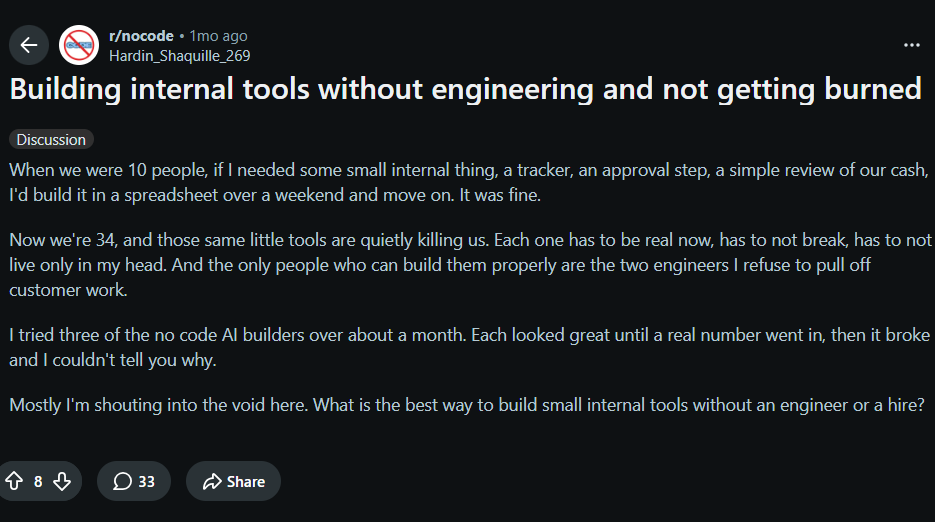
One reply in the comments pointed to the core issue: many AI-built systems start to fail in more complex business scenarios because they do not maintain a complete internal model of the application, including who is using the system, what permissions different roles have, how work moves through the process, and what users ultimately need to accomplish.
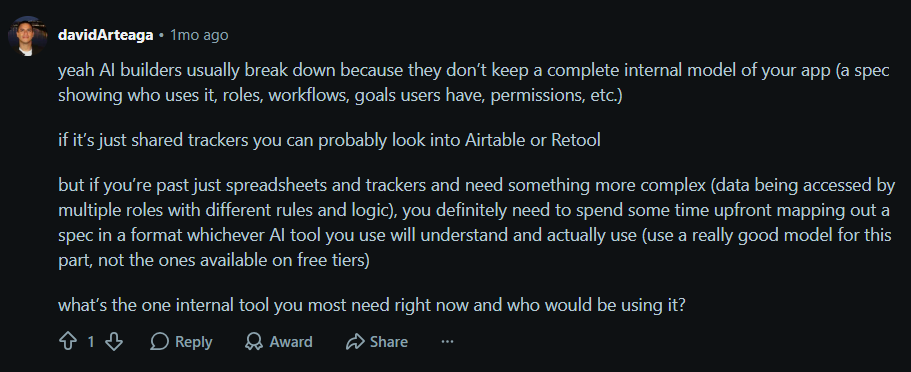
AI can generate pages and features quickly, but for an application to run reliably over the long term, the underlying platform still needs clear data models, relationships, permissions, and workflow capabilities. Otherwise, as business complexity grows, the features generated by AI become increasingly difficult to keep working correctly.
💬 Hey, you’re reading the NocoBase blog. NocoBase is the most extensible AI-powered no-code/low-code development platform for building enterprise applications, internal tools, and all kinds of systems. It’s fully self-hosted, plugin-based, and developer-friendly. → Explore NocoBase on GitHub
In this article, I will use a ticketing system as an example to show how AI and NocoBase can be used together to build a system with the foundations required for production use.
In this process, NocoBase provides the underlying capabilities for data relationships, permission control, and workflows. AI is responsible for understanding business requirements, converting natural language into data structures, pages, and features, and continuing to adjust the system as requirements evolve.
Step 1: Describe the Business Requirements and Let AI Design the System
Before building anything, start from the actual work. Clarify the problems the team is facing and what the system needs to solve, then describe those requirements to AI in natural language so it can build the required ticketing system on NocoBase.
If you are not sure how to describe the requirements, start from a few angles. For a ticketing system, for example:
- How customer issues enter the system: which channels they usually come from and how they are currently collected and handled;
- What happens after an issue comes in: who takes ownership, how follow-up works, and when the issue is considered resolved;
- Which situations require special attention: for example, urgent issues, tickets that remain unassigned for too long, or tickets that have been open for an extended period.
Once these points are clear, they can be turned directly into a natural-language requirement for AI. Below is the actual requirement we used in this build:
We are a small software company with four customer support agents. Customers mainly report issues through email and the support entry point on our website.
We currently handle these issues through a shared inbox. As the volume grows, issues are sometimes missed. People may assume someone else has already replied, only to find that no one handled the issue. Some tickets go through several rounds of communication, but it becomes unclear who currently owns them. Urgent issues can also remain unresolved for too long.
I want to build a customer support ticketing system. Each customer issue should be recorded separately and assigned to a specific support agent. Agents should be able to continuously update progress until the issue is resolved. For urgent issues, tickets that remain unassigned for too long, or tickets that are close to breaching their deadline, the system should remind the team to take action.
We also want an overview page that quickly shows how many issues are still open, which issues need priority attention, and how many issues have recently been resolved.
Please design and build this system based on these actual business requirements.
AI first breaks the requirements down into a data structure. In NocoBase, it creates tables for tickets, customers, support agents, communication records, SLA rules, and related data, then defines the relationships between them.
On top of the data model, AI continues building the pages.
In the end, AI creates a ticket list, ticket detail pages, and a support workspace, covering the basic scenarios of ticket recording, assignment, follow-up, and overview.
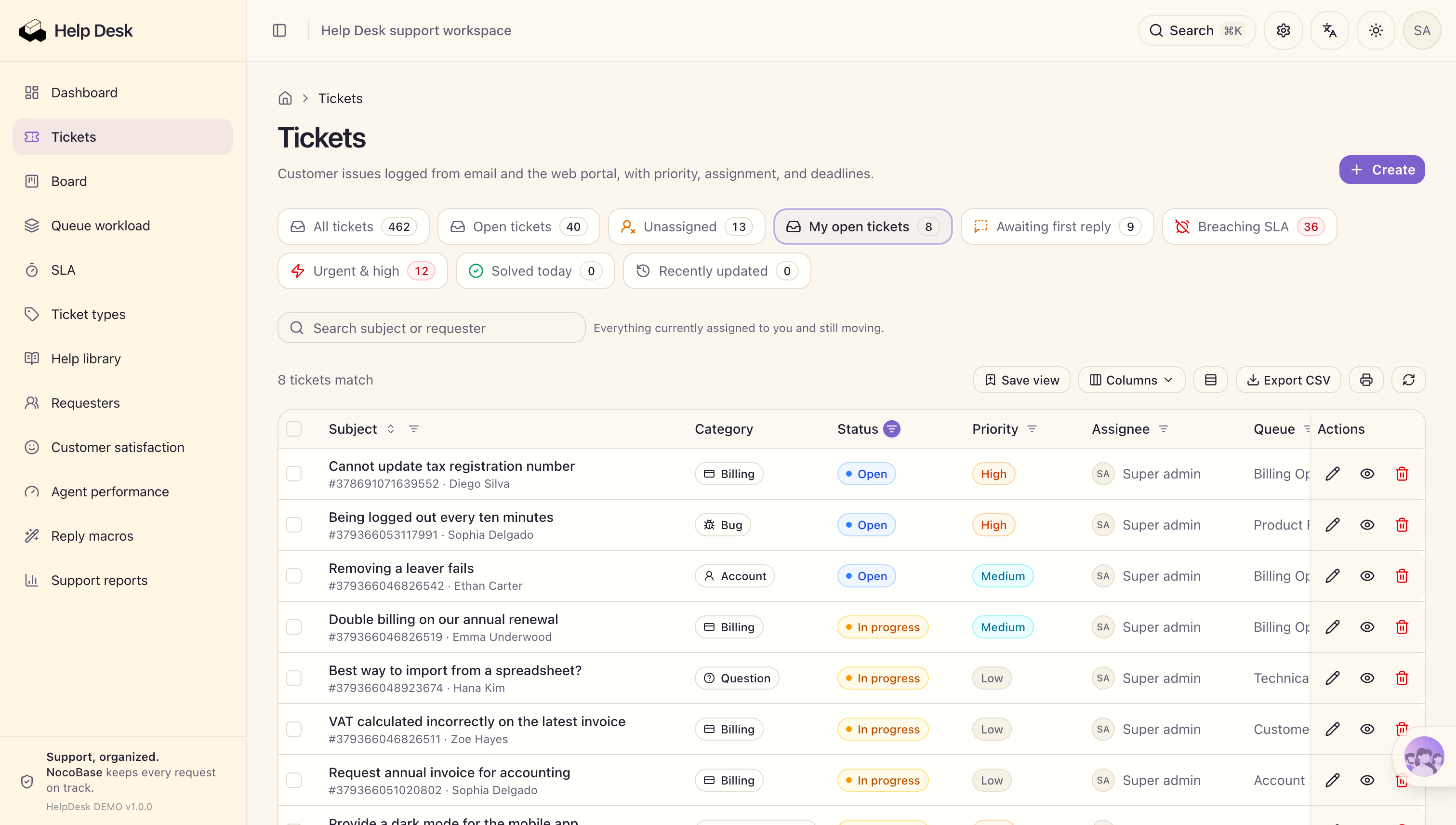
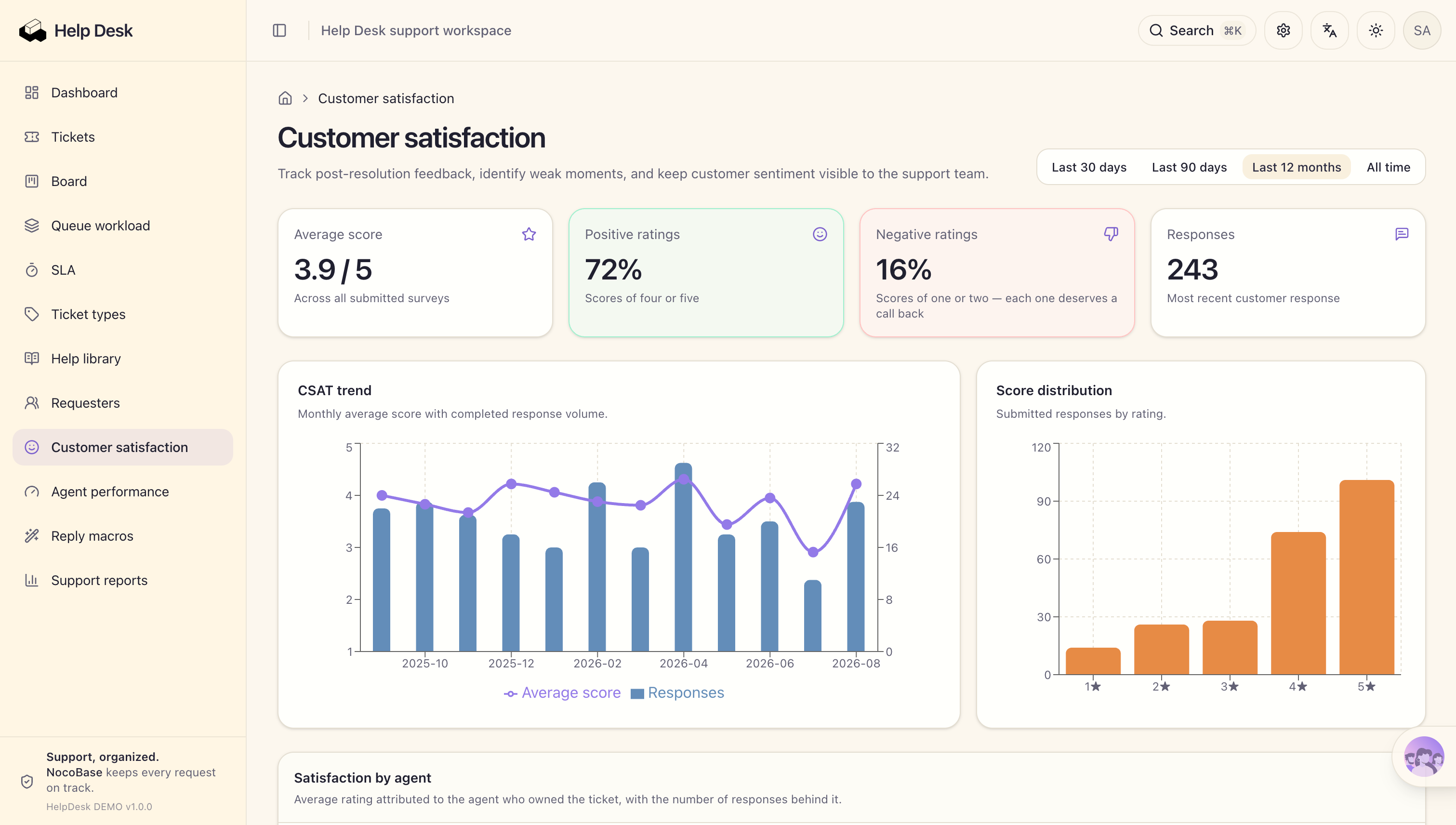
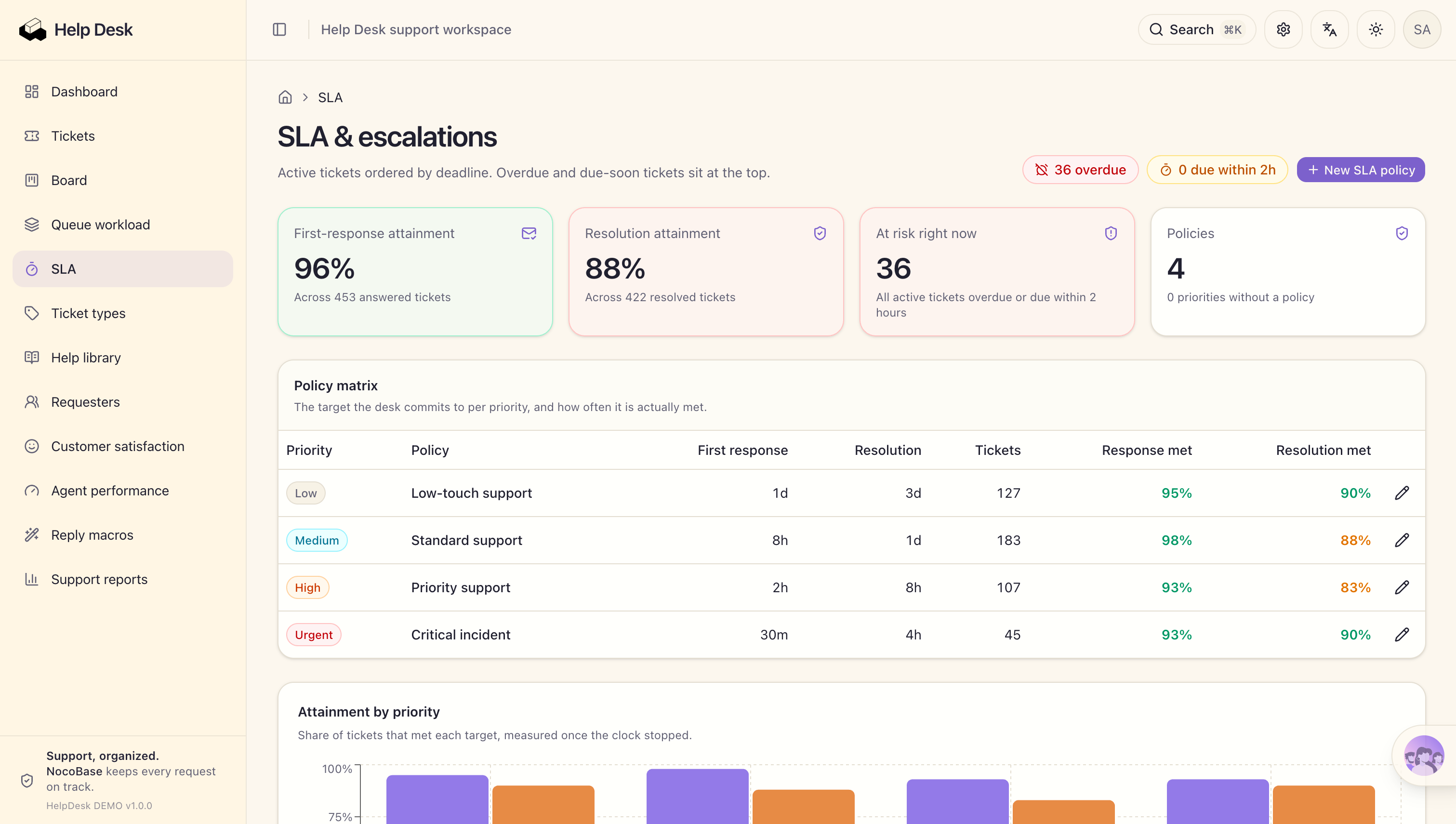
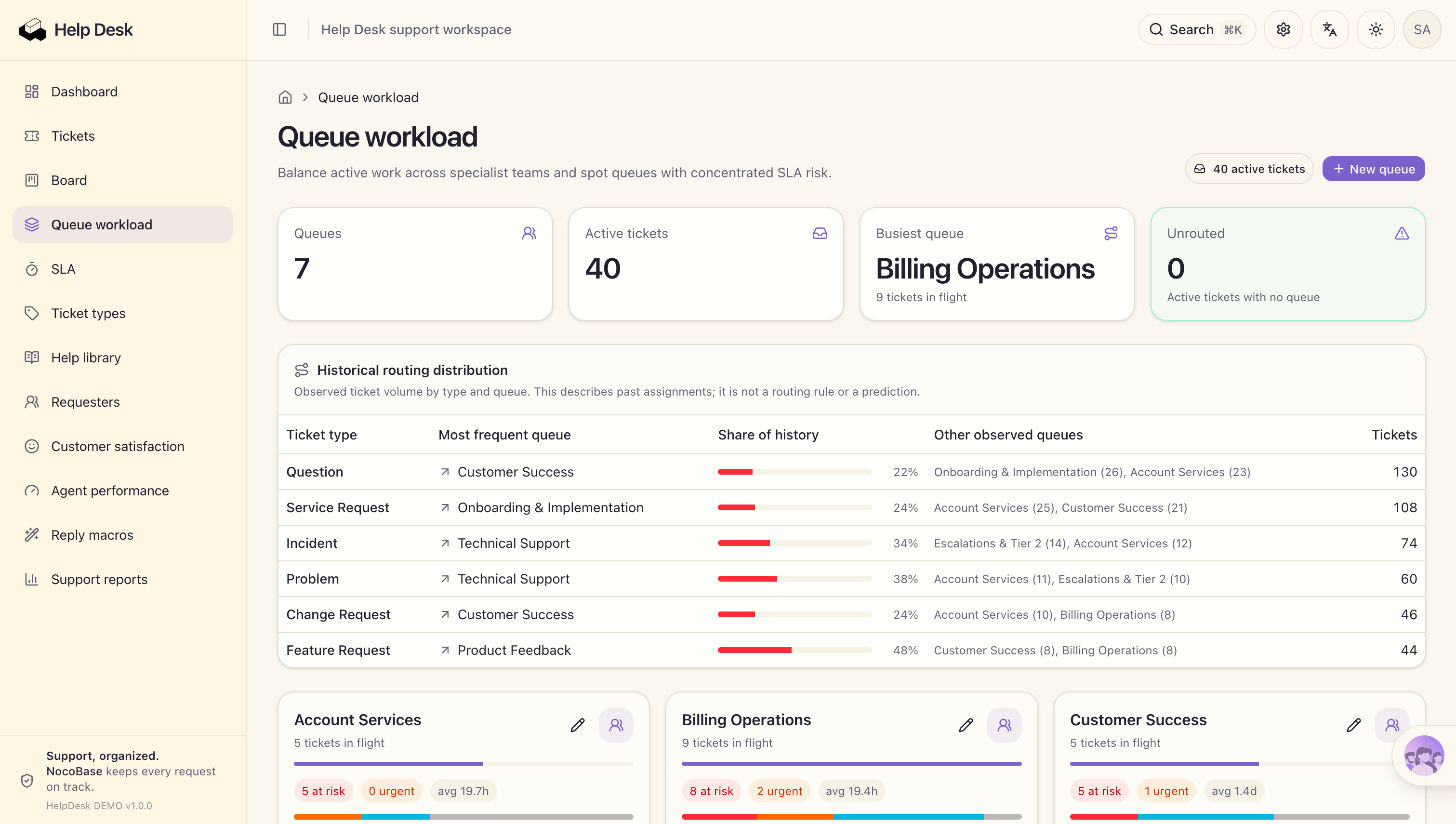
At this point, we have turned a business description into a working ticketing system. But “the features have been built” and “the system is ready for production” are not the same thing.
Once the whole team starts using the system, three questions still need to be verified: Are the data relationships accurate? Can different team members collaborate according to their permissions? Can assignment, reminders, SLA breaches, and escalation rules execute reliably?
Step 2: Solve Three Core Problems for Production Use
The Reddit comment mentioned earlier pointed out that many AI-built applications begin to fail once real data is added because they do not maintain a complete internal model of the application: who uses the system, what roles different members have, how the data is related, and which rules govern the flow of work.

The ticketing system now has data tables and pages, but when four support agents start working with real customer issues, we still need to validate three core areas.
1. Are the Data Relationships Accurate?
A ticket is not an isolated record.
Each ticket needs to be associated with the customer who submitted it, the current owner, historical communication records, and the applicable SLA rule. When the ticket status changes, statistics and pending items on the workspace also need to update accordingly.
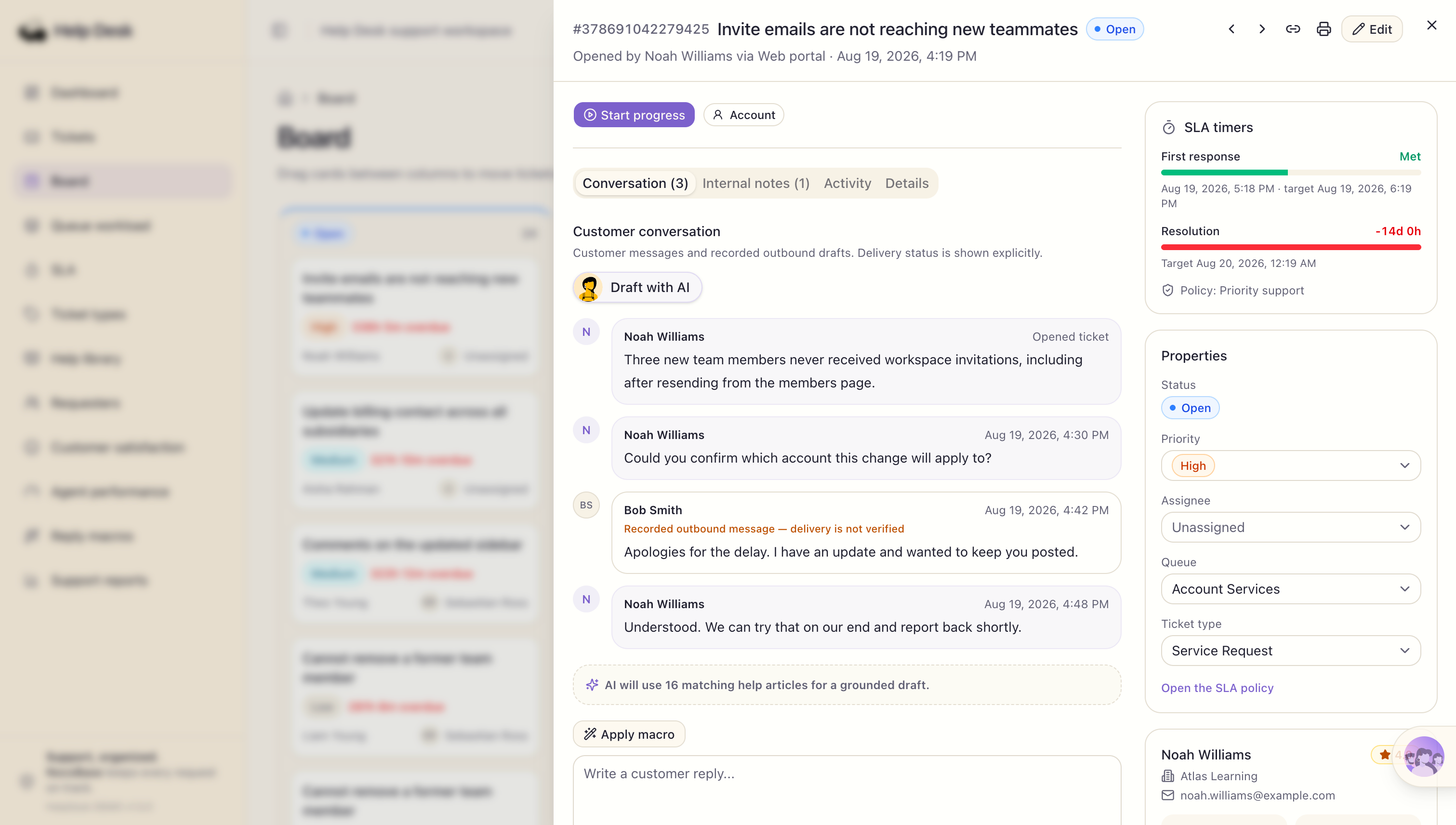
If these relationships are not defined clearly, the system may still look complete while failing in actual use. After changing the owner, previous handling records may become difficult to find. A ticket may be matched to the wrong response deadline, or numbers on the overview page may no longer match reality.
In NocoBase, these relationships are not temporary pieces of logic written by AI into a specific page. They are defined directly in the data model. Using the ticket table as an example, the SLA policy, queue, ticket type, and submitter are defined as many-to-one relationships. One ticket can be linked to multiple satisfaction records, attachments, followers, and other tickets. Parent-child ticket relationships are also explicitly defined in field configuration.
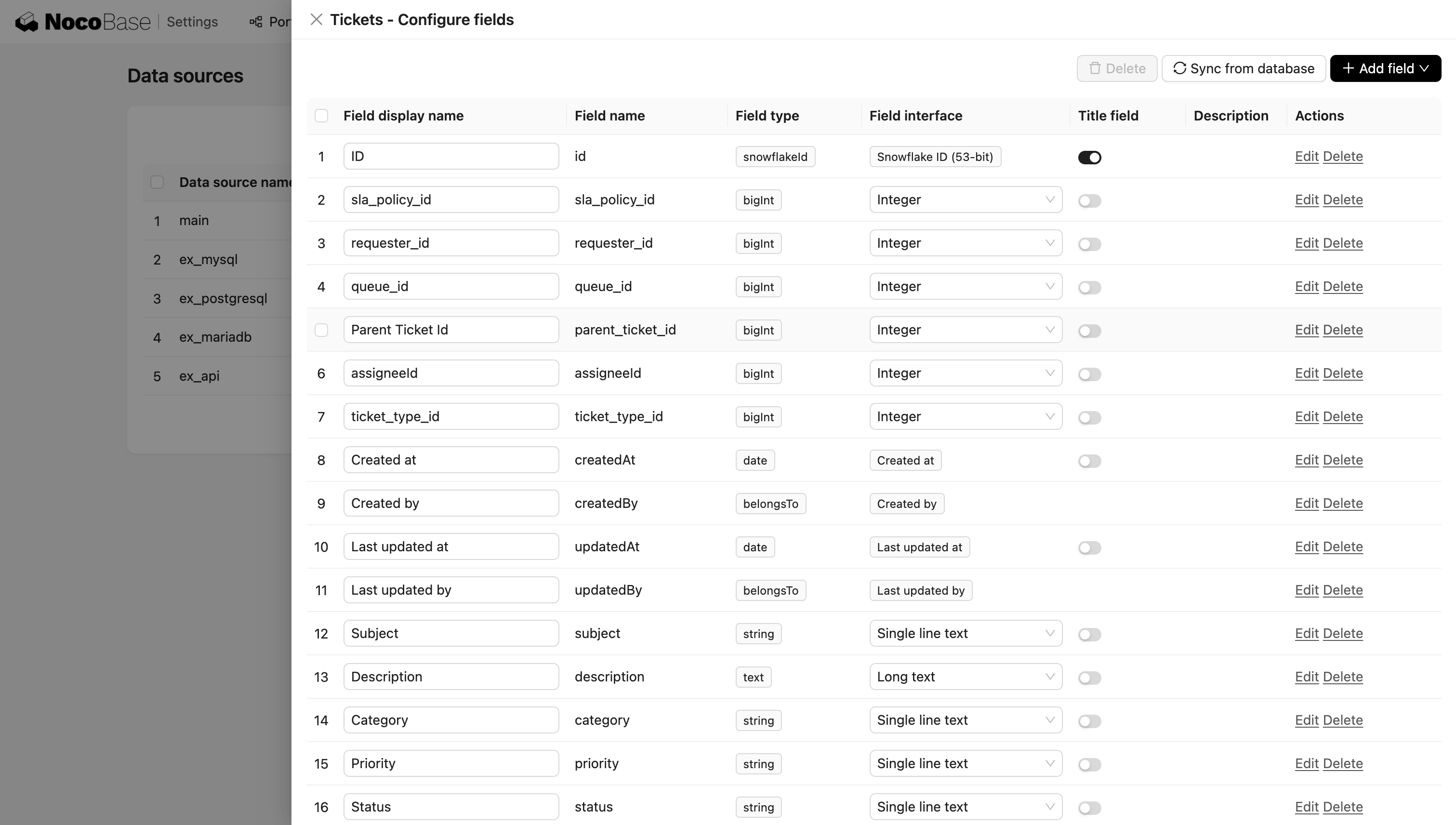
These relationships become part of the NocoBase data model and are shared by pages, permissions, workflows, and reporting features. Users can inspect each field type and relationship directly in the data source interface and continue adjusting them as business requirements change.
This is different from a Vibe Coding approach that starts from generated code. In a code-generated application, data relationships usually need to be implemented across the database structure, backend models, APIs, and page queries. If a relationship is incomplete or only one layer is updated later, data inconsistencies can occur. Manual inspection also requires developers to look into both code and database structures to verify the actual implementation.
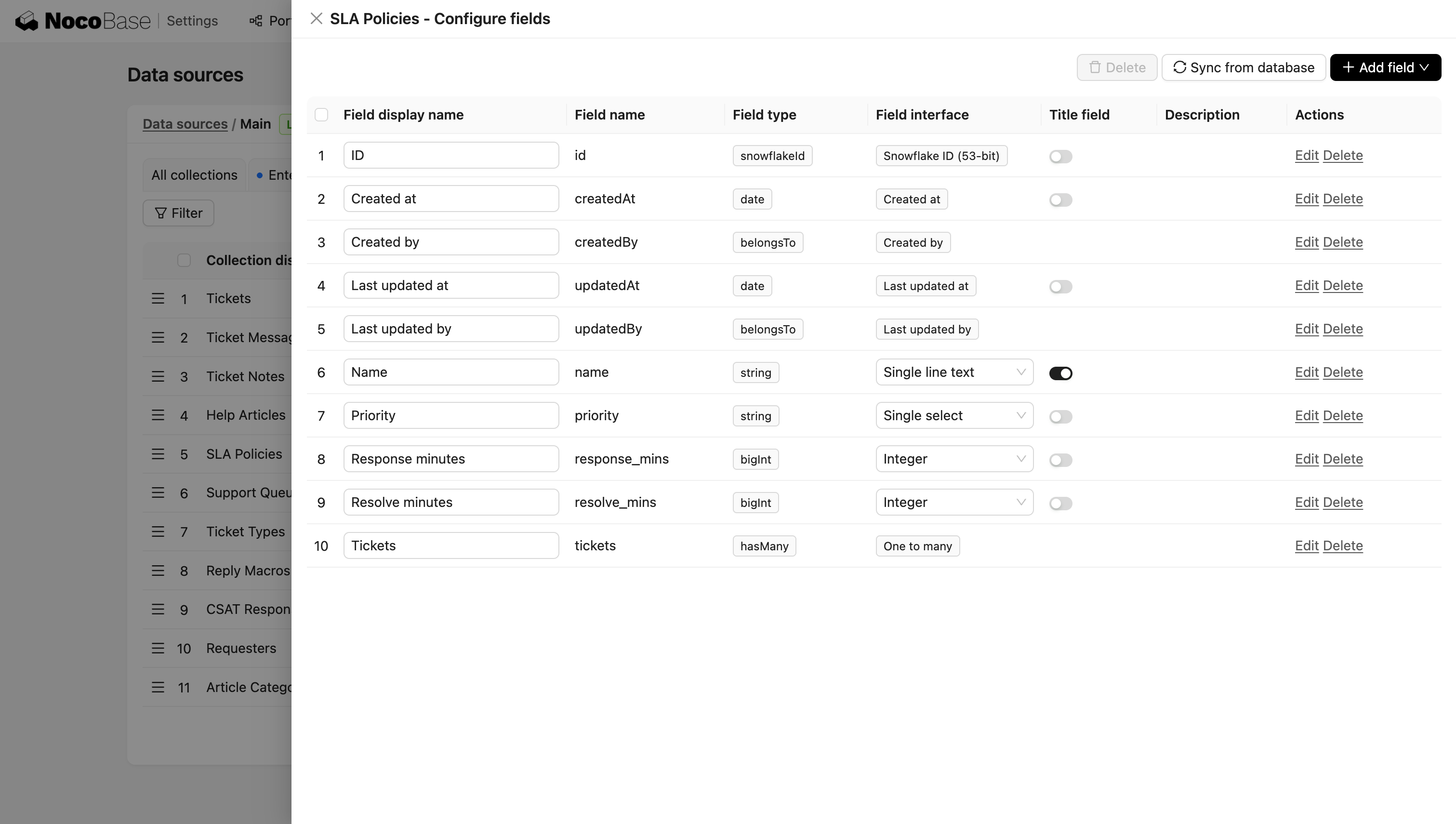
NocoBase already provides data modeling capabilities. AI only needs to translate business requirements into tables, fields, and relationships instead of building the entire data layer from scratch. After the system is generated, people can inspect and modify the model directly in the same interface.
2. Can Different Roles Collaborate According to the Rules?
When only one person uses a system, permissions are usually not a major issue. Once an entire team starts collaborating, it becomes necessary to define who can see what and who can change what.
In this ticketing system, AI can configure the corresponding roles and data permissions directly in NocoBase.
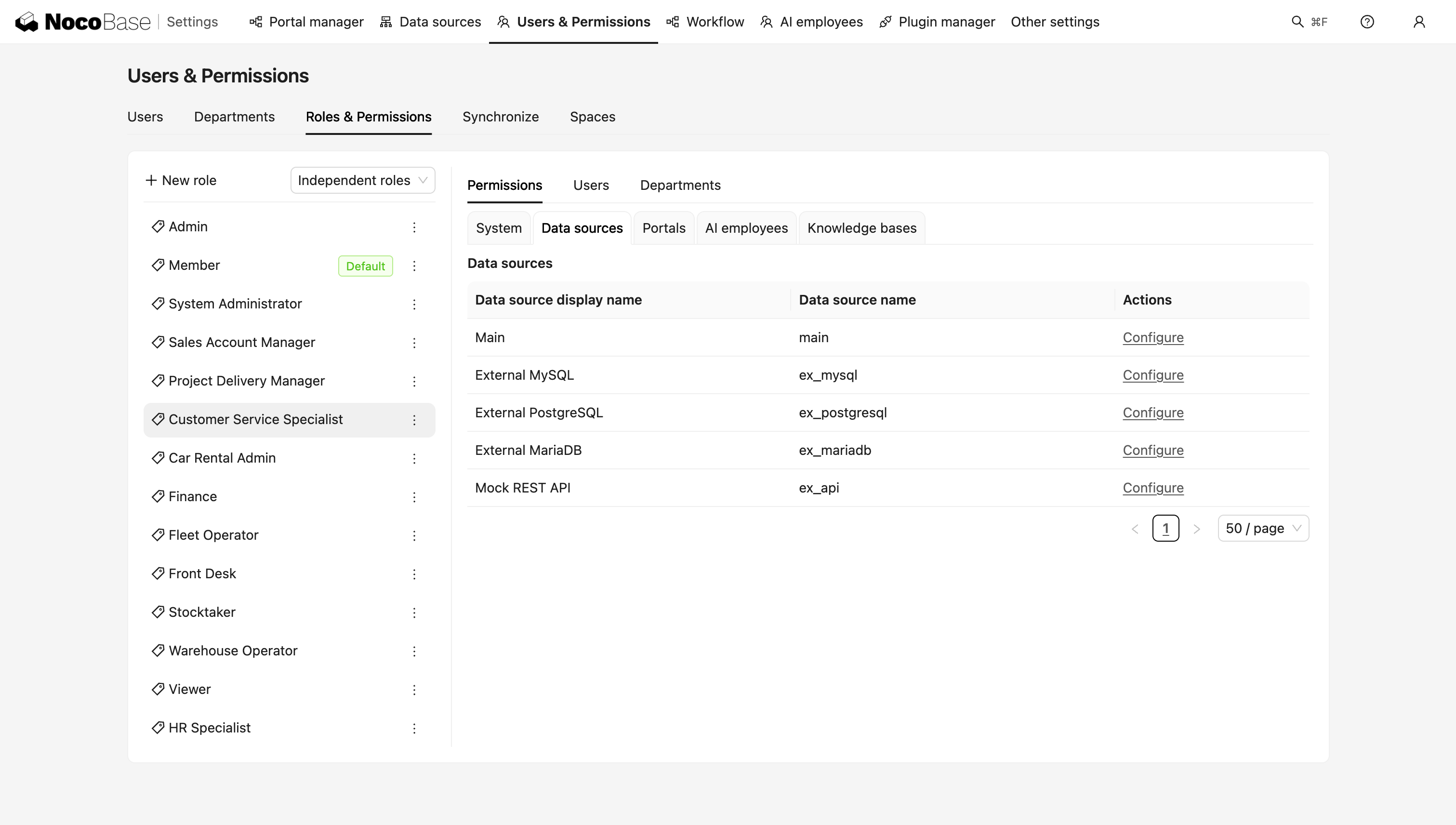
This is another important difference between building with NocoBase and using a Vibe Coding approach. In an AI-generated application, permission rules often need to be implemented separately across pages, APIs, and data queries. As the number of roles and rules increases, configuration becomes more complex. During manual review, teams often need to return to the code or test the application directly to confirm whether permissions are actually taking effect.
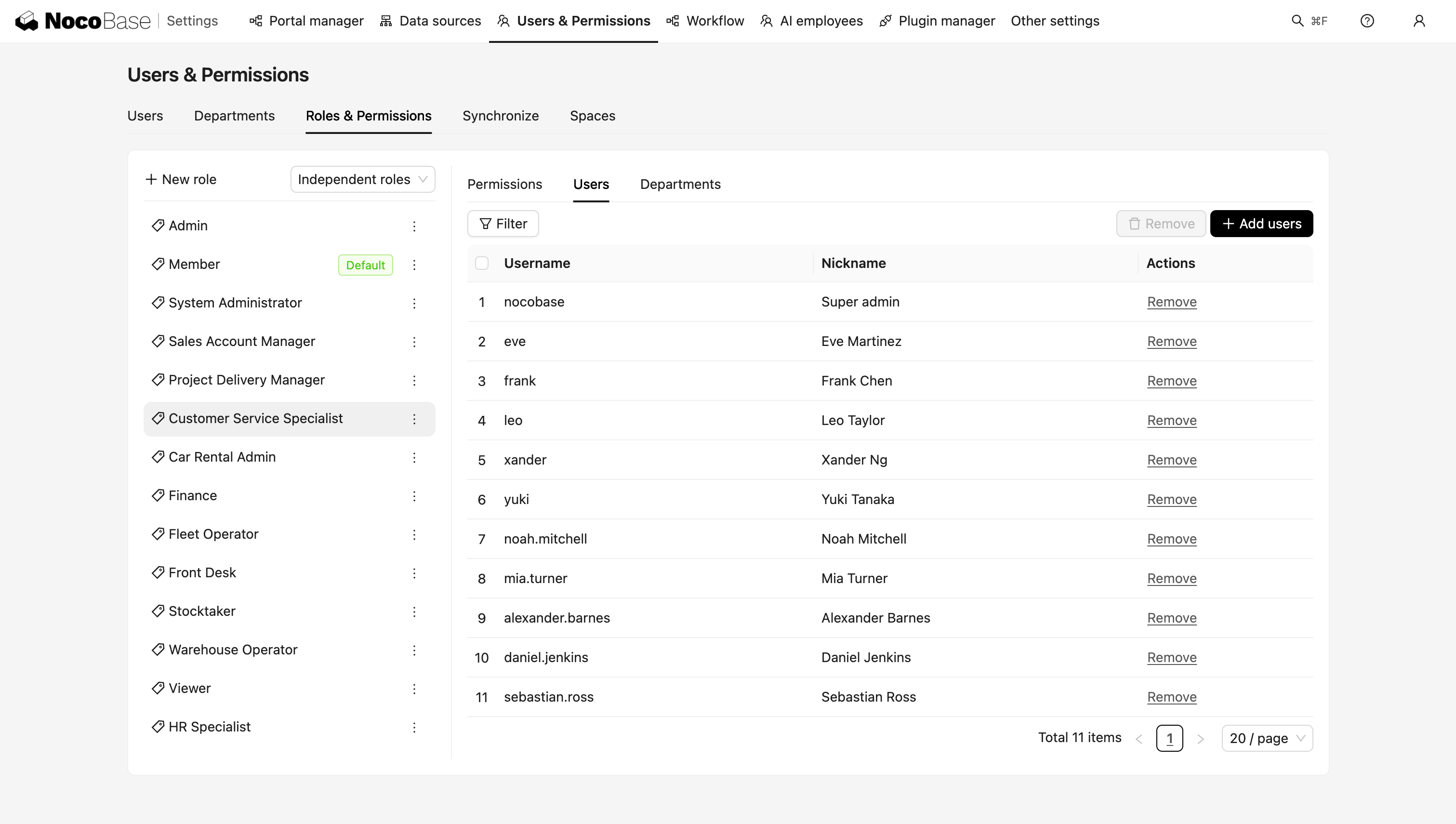
NocoBase already provides permission management capabilities. AI does not need to rebuild a permission system. It only needs to configure which data different roles can view and operate on according to the business requirements. The result is also clearly visible in the administration interface, where users can inspect the permission scope for each role and switch identities to validate the result.
3. Can Business Rules Execute Reliably?
Many rules in a ticketing system need to be monitored continuously and triggered automatically by the system.
In the workflow management interface, users can directly inspect how each rule is triggered, its execution mode, whether it is enabled, and how many times it has run. There is no need to enter the codebase to confirm which rules are active, what conditions trigger them, and whether they have actually executed.
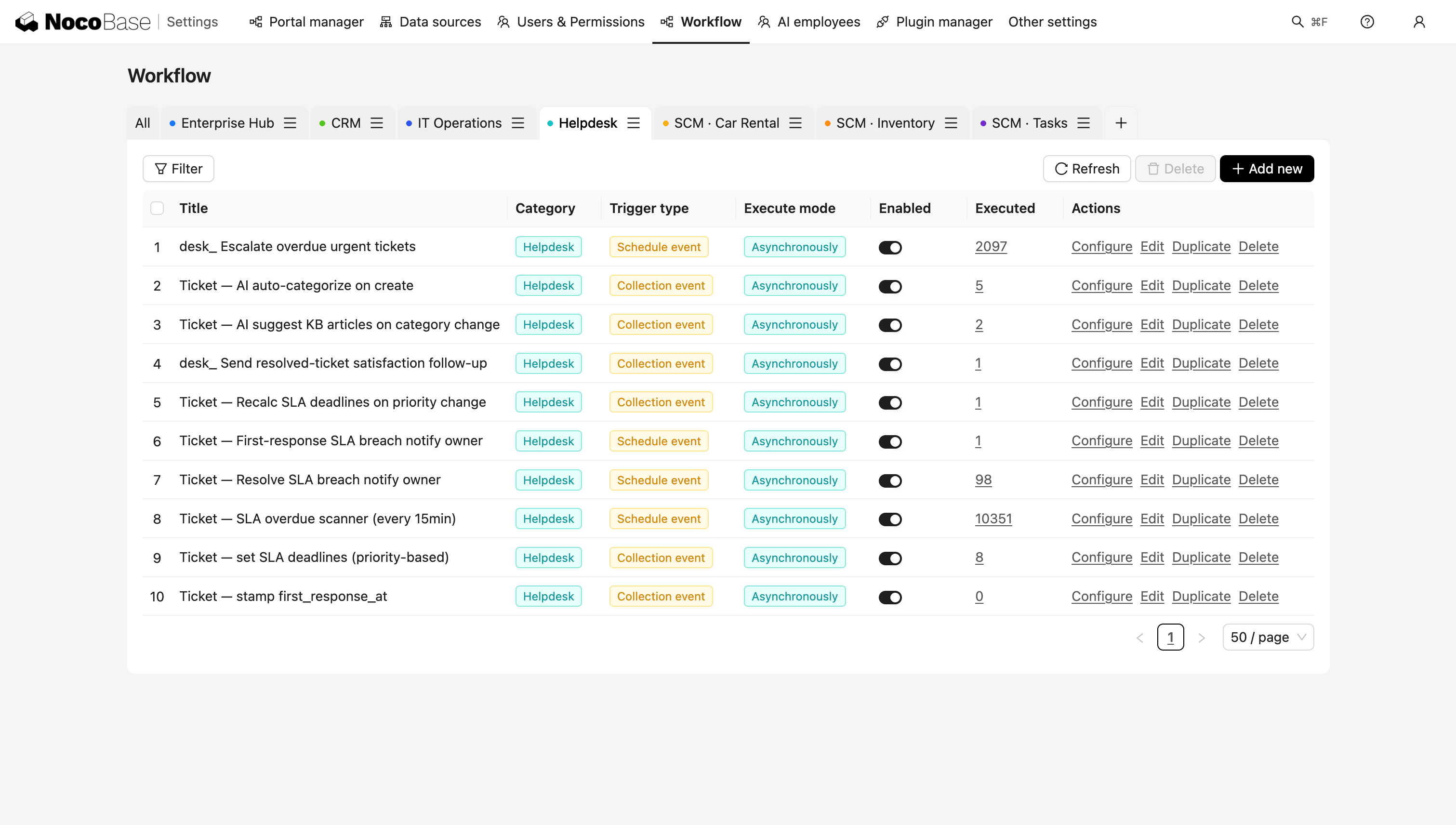
Execution results can also be inspected in detail. Take the “escalate overdue urgent tickets” workflow as an example. The system iterates through tickets that meet the condition, processes their deadlines, and runs the notification node. In the execution record shown in the screenshot, the escalation notification to the current owner has completed successfully, and the node status is shown as complete.
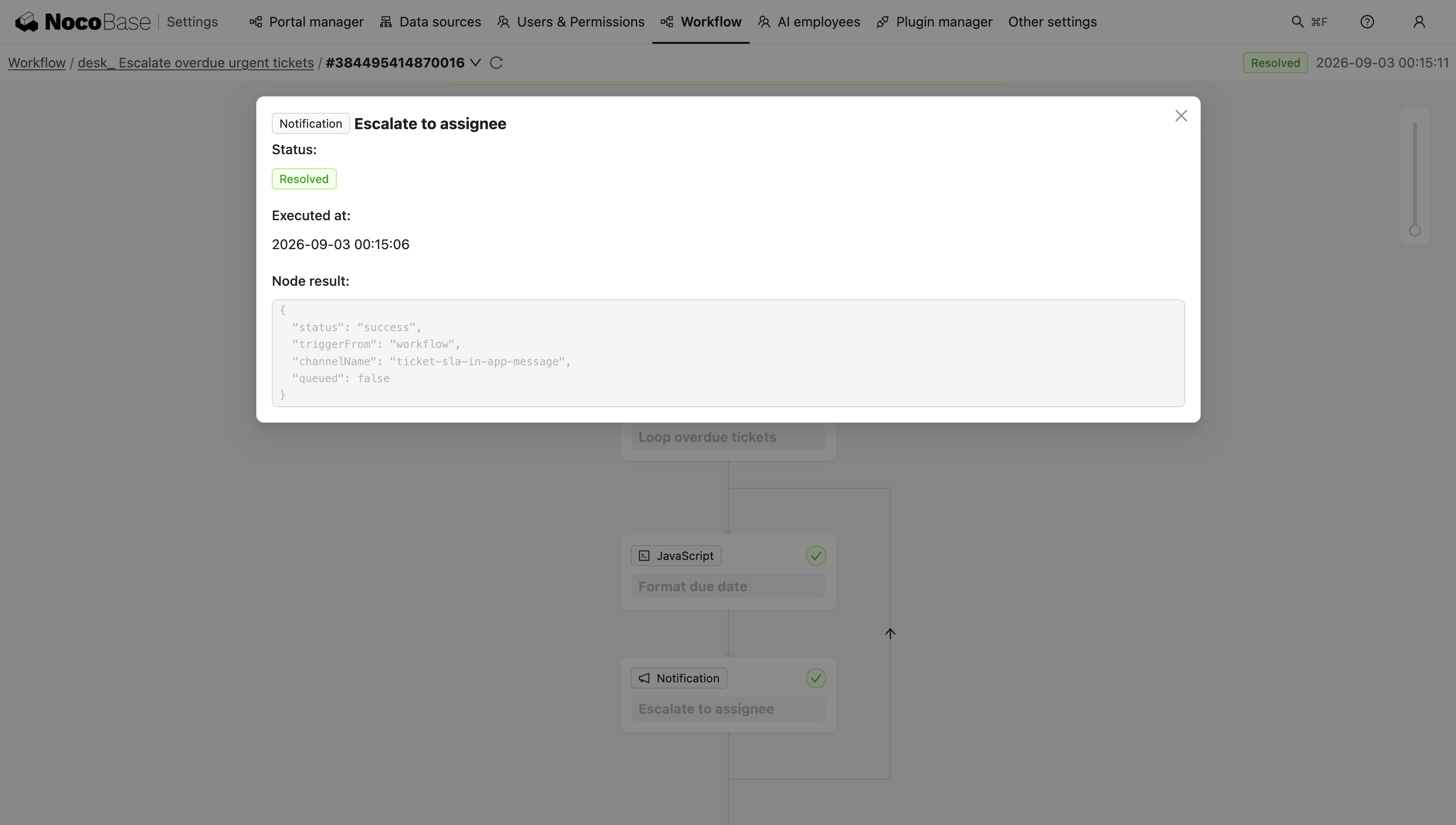
This means business rules are no longer hidden pieces of code. AI can configure them directly using NocoBase’s existing workflow capabilities, while people can inspect the workflow structure, runtime status, and individual execution records from the interface.
This is exactly what an internal application needs before being used in real operations: it is not enough to define a business process. Teams also need to know whether it was triggered, how far it progressed, and whether it ultimately completed successfully.
Step 3: Add AI Capabilities to the System
Another advantage of building on NocoBase is that AI does not only help during the application-building stage. Once the core system is ready, AI Employees and workflows can allow AI to participate directly in ticket handling.
In the current ticketing system, we use AI in two specific parts of the process.
The first is ticket creation.
Support agents do not need to fill in every ticket field manually from the start. They can simply describe the customer’s issue in natural language. AI Smart Form Fill first turns that description into a ticket title and issue description. Once the basic information is filled in, AI Smart Triage can review the ticket and suggest a category and priority.
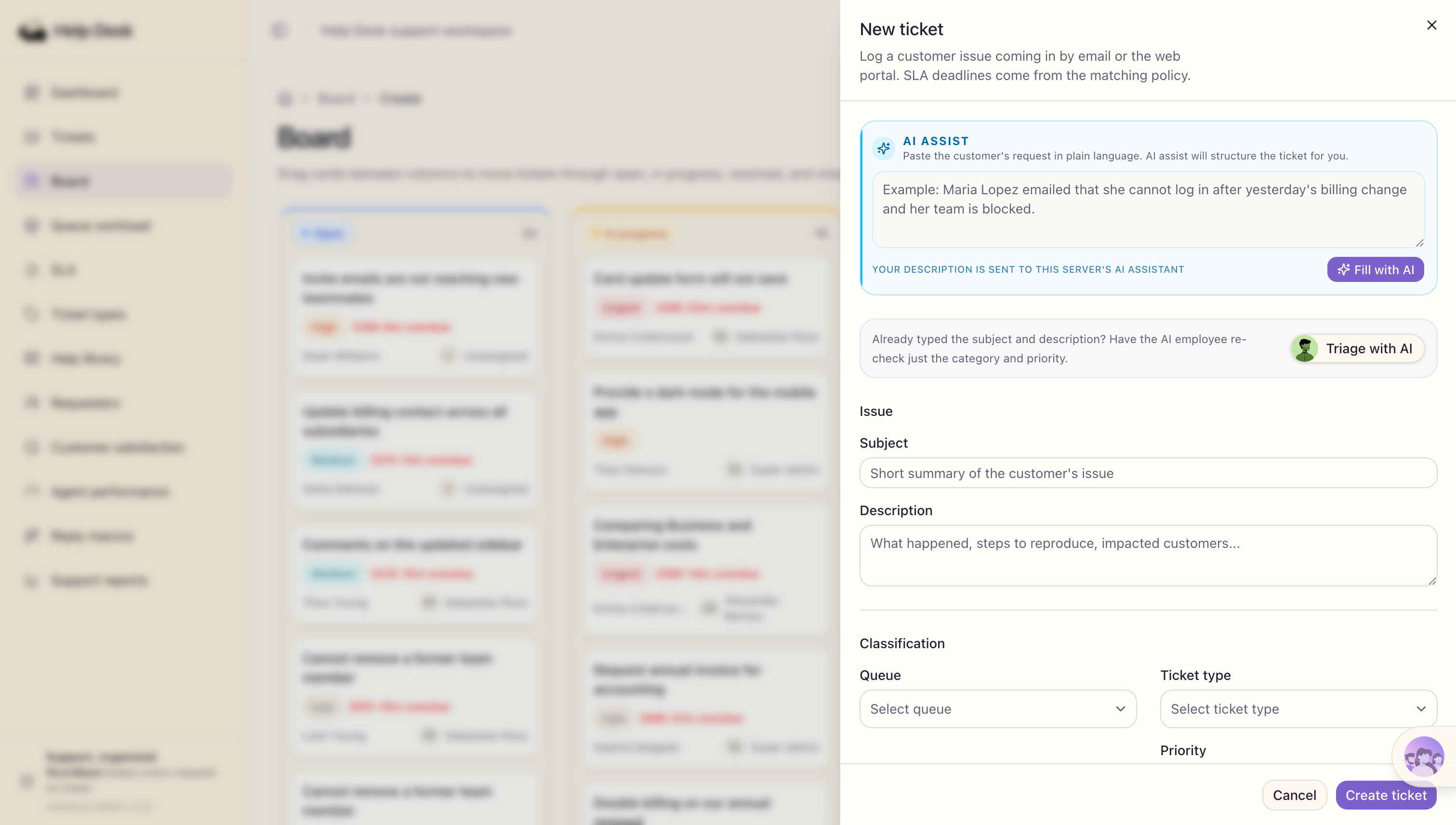
Here, AI is responsible for converting the customer’s natural-language description into structured information, but it does not bypass the form and submit the ticket automatically. The support agent can still review and edit the generated content before confirming and creating the ticket.
The second part is ticket handling.
On the ticket detail page, a support agent can ask AI to draft the next customer reply based on the current ticket. AI reads the customer’s issue, handling progress, and communication history, then refers to the help articles matched by the system. It summarizes the ticket situation and response strategy before generating a reply draft.
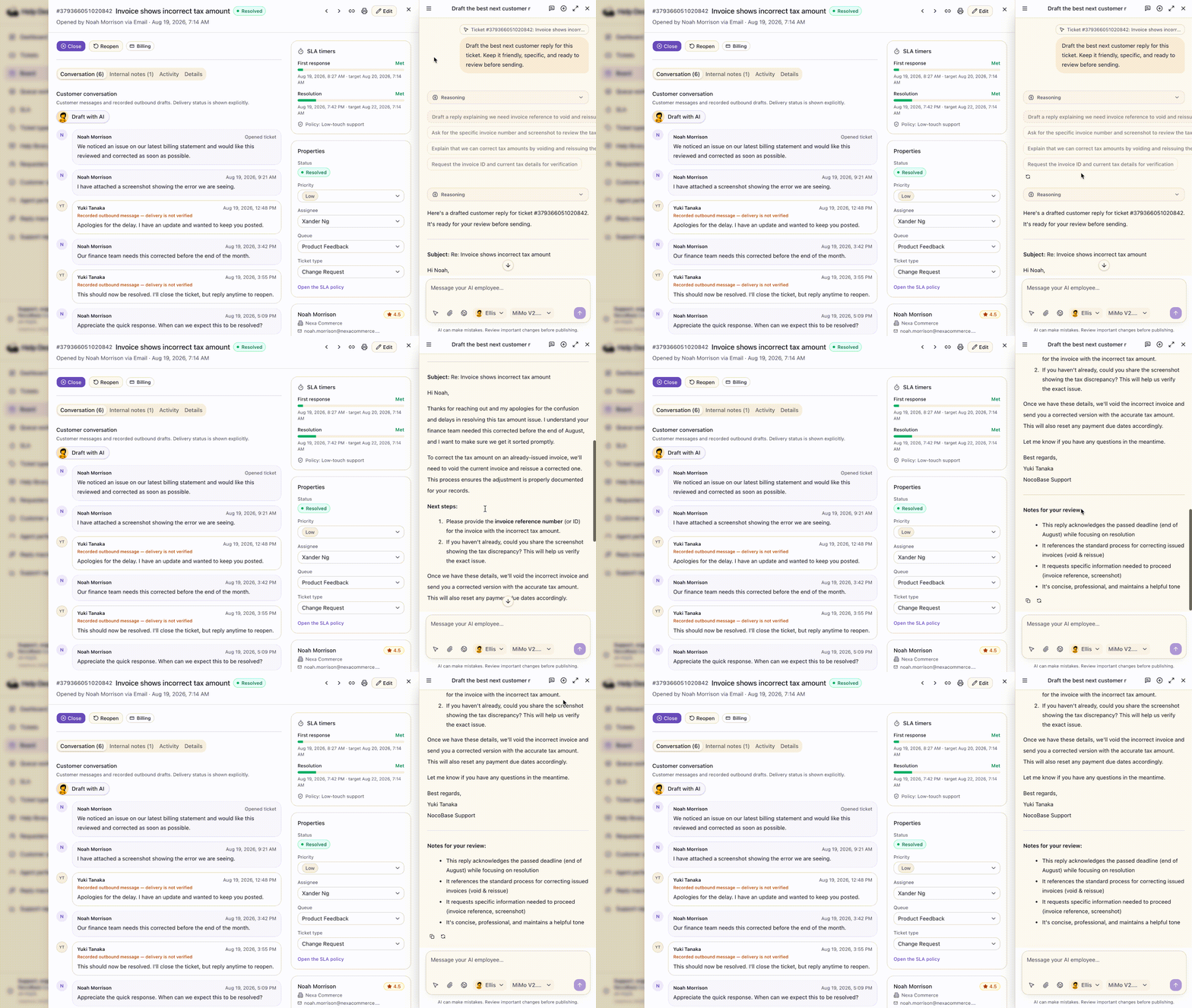
More importantly, AI does not operate outside the system’s permission model. NocoBase can control which users are allowed to use which AI Employees based on role. When an AI Employee calls the built-in data query tools, the system applies the current user’s data permissions and only returns data that the user is allowed to access.
Related documentation: AI Employee Roles and Permissions - NocoBase Documentation
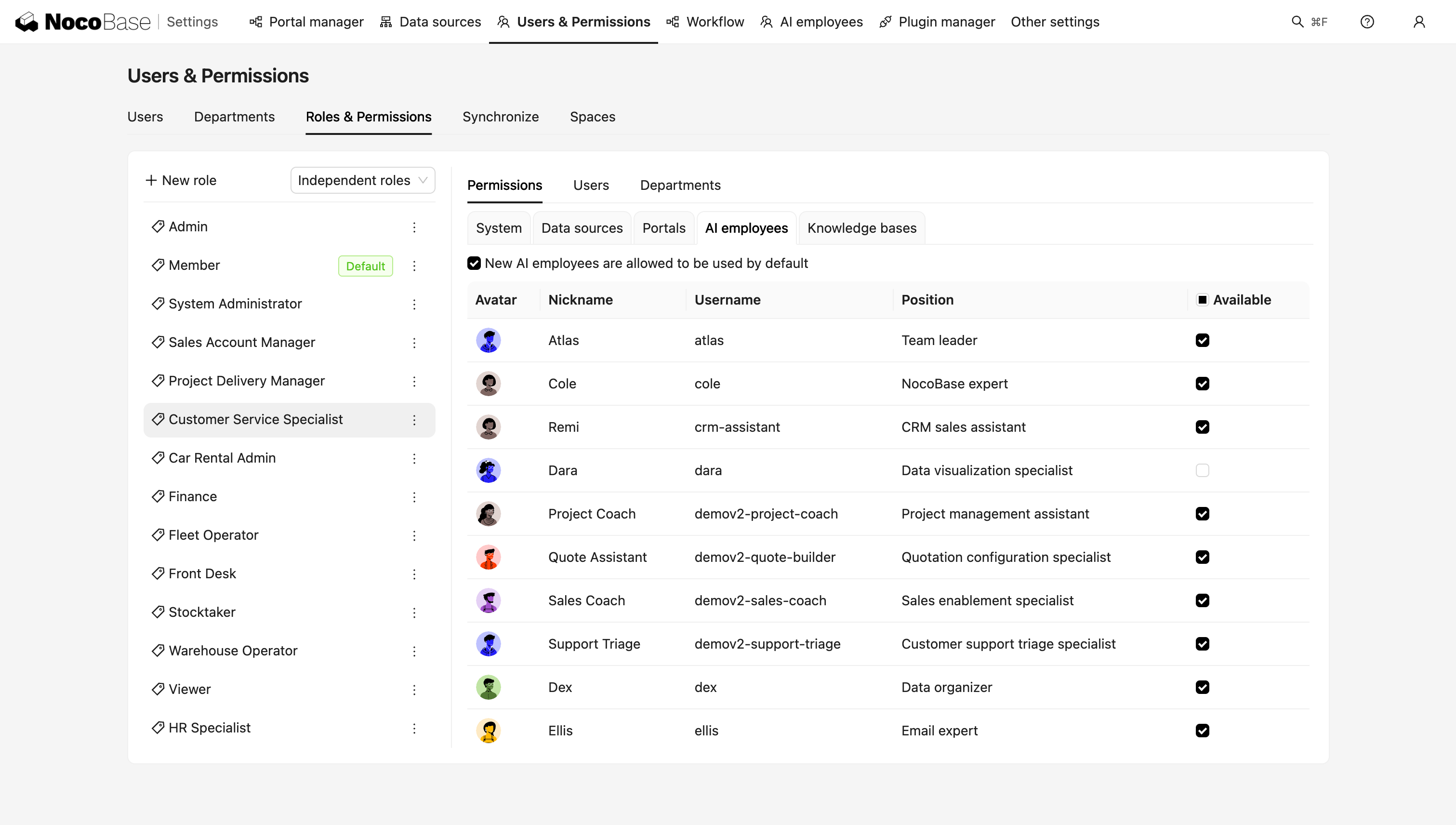
This means that when a regular support agent uses AI, AI does not automatically gain access to data that only a supervisor is allowed to see. What AI can access is still constrained by the original permission boundaries of the business system.
This is also what distinguishes NocoBase’s AI capabilities from temporarily calling a large language model outside the application. AI is not just an extra chat entry point. It operates inside the existing data, permission, and workflow system. It can participate in the business process without bypassing the application’s existing management rules.
Conclusion
Back to the question at the beginning: can an AI-built ticketing system really be used in production?
It depends on whether the system has a clear, inspectable business structure underneath it.
In this case, we first describe the business problems and requirements to AI. AI then uses NocoBase’s existing data model, permission, and workflow capabilities to turn those requirements into a working ticketing system.
That is the value of combining AI with NocoBase: AI understands the requirements and improves building efficiency, while NocoBase provides a manageable and inspectable system foundation. The final business rules and go-live results are still confirmed by people.
If you have an internal process that still depends on spreadsheets, a shared inbox, or manual reminders, start with four questions:
- Who will use the system?
- What business information does the system need to record?
- What can different roles view and operate on?
- Which rules need to be executed automatically by the system?
Once these questions are described clearly, AI has a much better starting point for building the business system.
If you want to try this approach, first connect your Coding Agent to NocoBase AI Builder, then describe your business requirements in natural language.
During initialization, you can give AI the following instruction:
Help me install the NocoBase CLI and complete initialization:
https://docs.nocobase.com/ai/ai-quick-start.md
(Please open and read the linked documentation directly.)
After initialization is complete, continue with the specific business requirements and ask AI to build on NocoBase’s existing data model, permissions, workflows, and related capabilities. You can then keep modifying the same application as the requirements evolve.
- Try the NocoBase + AI Demo: Request an online demo
- Build it yourself: View the AI Builder documentation
Related reading:
- Building an Inventory Management System: Vibe Coding vs NocoBase + AI
- How to Build a Production-Ready IT Operations System with AI and NocoBase
- NocoBase vs Baserow: Flexible Databases vs Enterprise Systems
- How to Build a Production-Ready CRM with AI and NocoBase
- How to Design an IT Asset Management System: Data Model, Lifecycle, and Workflows
- How to Choose a Smartsheet Alternative: 7 Tools Compared
- 5 Open-Source AI No-Code Tools for Complex Relational Data Models
- What Is AI No-Code? A Practical Guide to No-Code Platforms in the AI Era
- 9 Open-Source AI No-Code Tools on GitHub Worth Watching
- 14 Open Source AI Agent Tools with the Most GitHub Stars
- Top 8 Open Source AI Assistant Tools by GitHub Stars
- 6 Open Source Tools to Use with WorkBuddy
- Top 6 Open Source AI Tools by GitHub Stars for Stronger AI Agents