
Introduction
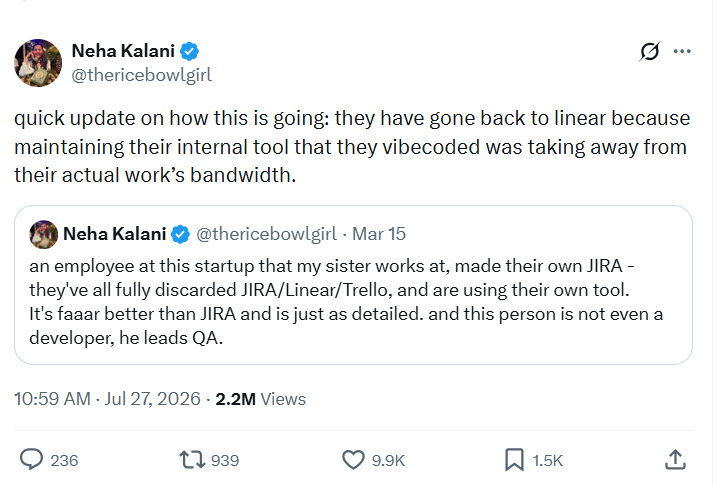
Recently, Sarvam AI Product Manager Neha Kalani shared the experience of a startup where her sister works. In March, the team used vibe coding to build an internal project management system similar to Jira. The person responsible for development was a QA lead, yet the first version not only fit the team’s working habits better but also appeared to offer more features than the SaaS tool they had used before.
By July, however, the team had abandoned the in-house system and migrated back to Linear because maintaining the internal tool was taking up too much time and energy.
As vibe coding and AI coding agents become more widely used, building a business system is getting easier. But as that system becomes more deeply embedded in day-to-day operations, the cost of modifying and maintaining it can continue to rise.
Is there a way to combine the flexibility of vibe coding with the stability of a mature business system?
💬 Hey, you're reading the NocoBase blog. NocoBase is the most extensible AI-powered no-code/low-code development platform for building enterprise applications, internal tools, and all kinds of systems. It’s fully self-hosted, plugin-based, and developer-friendly. → Explore NocoBase on GitHub
Using an IT asset management system as an example, this guide explains how to start from real requirements, define the data model, asset lifecycle, and core workflows, and then use AI to build a business system that balances customization flexibility with operational stability and can continue evolving after launch.
1. Define the Scope of the IT Asset Management System from Real Scenarios
To make the following data model, asset lifecycle, and workflow design more concrete, this article uses a technology company with around 300 employees as an example.
The company operates across multiple office locations and also has some remote employees. Its IT team needs to manage computers, monitors, mobile phones, peripherals, and network equipment centrally, but the relevant information is currently scattered across Excel files, shared spreadsheets, and employee chat messages.
Daily asset management mainly involves the following scenarios:
- Find and assign available equipment when a new employee joins;
- Verify and recover assets assigned to an employee when they leave;
- Transfer equipment between employees, departments, or office locations;
- Record the repair process and outcome when a device fails;
- Check a device’s current location, user, status, and warranty period;
- Trace previous assignment, return, transfer, and repair records.
These scenarios can be further organized into three core capabilities that the system needs to cover:
If procurement and cost management need to be included later, the system can be extended with suppliers, purchase contracts, repair costs, asset depreciation, and budgets. If the scope expands to software assets, it can also include software licenses, account assignments, and authorization periods.
2. Design the Core Structure of the IT Asset Management System
Once the business scope is clear, the next step is to determine which data the system should store, how different data objects should relate to one another, and how asset statuses and business processes should be designed. AI can assist with this stage as well. Based on the business scenarios above, it can identify the main data objects, break down their relationships, and draft the asset statuses and business processes before business users confirm and adjust them according to actual policies.
Using the employee equipment management scenario in this article, let’s look at how the core structure of an IT asset management system can be designed.
1. Build a Data Structure Centered on the Asset Register
A basic employee equipment management system mainly contains three types of data:
The asset register is the core of the entire system. Each record represents a specific asset that can be managed independently. Asset IDs and serial numbers should have uniqueness rules to prevent the same device from being entered more than once.
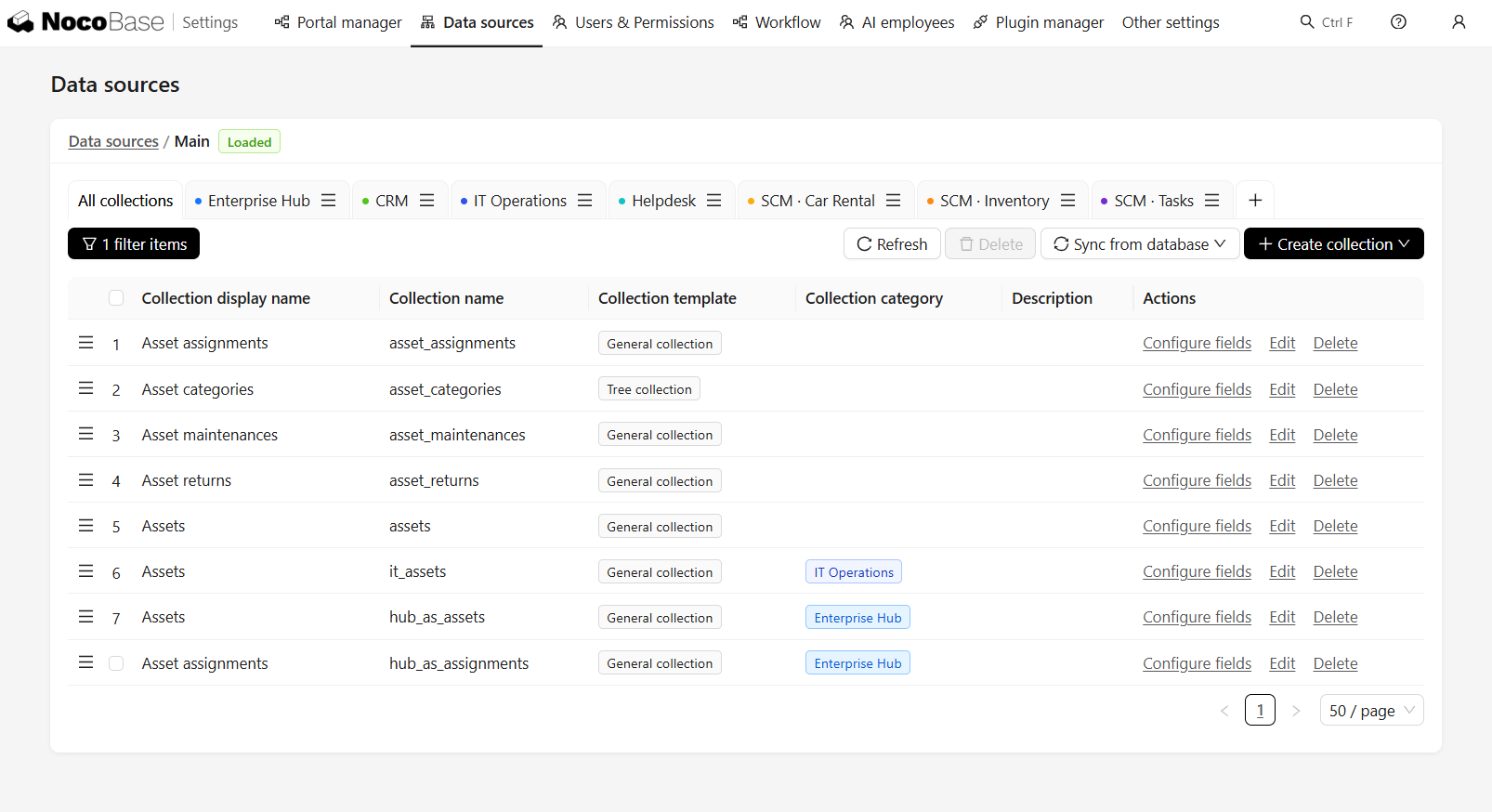
Information that needs to be reused by multiple assets and maintained centrally—such as asset categories, device models, employees, departments, and office locations—can be stored in separate collections and linked to the asset register. When the data volume is small and management requirements are simple, information such as brand, model, and supplier can first be stored directly as asset fields and restructured later if necessary.
The main relationships in the system are centered on individual assets and include several common one-to-many relationships. One asset category or device model can correspond to many assets, one employee can hold several assets, and one asset can be linked to multiple assignment, return, transfer, and repair records. Reference data such as employees, departments, and office locations can be reused through association fields. Suppliers can be associated with repair records when needed, reducing duplicate data entry and making later queries and reporting easier.
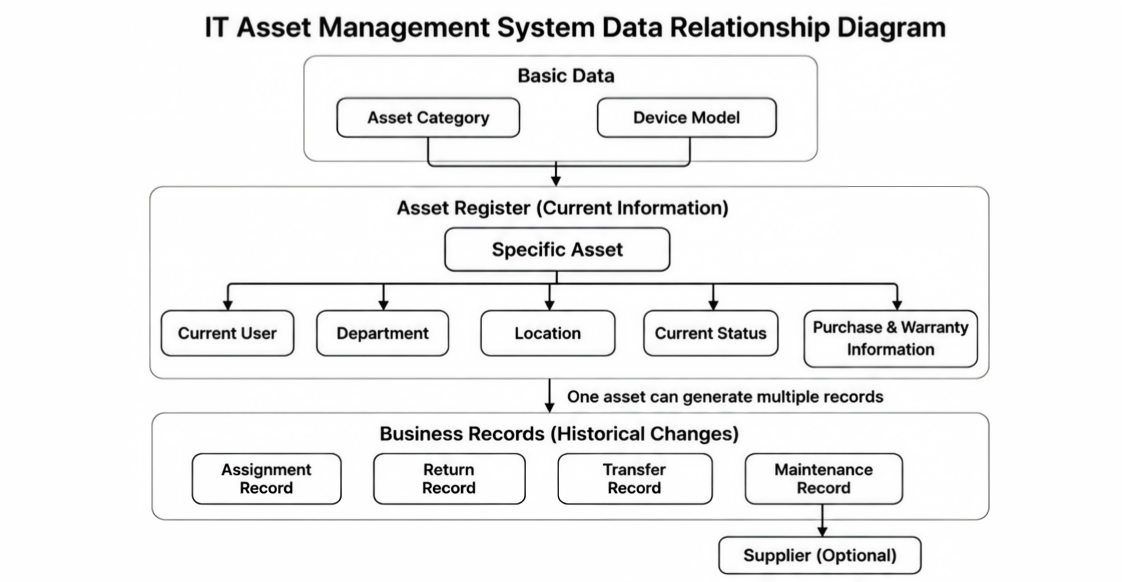
The asset register stores the device’s current user, department, office location, status, procurement information, and warranty information. Business records preserve previous assignments, returns, transfers, and repairs. Every business operation should create the corresponding history record while updating the asset register so that current information remains consistent with historical changes.
2. Define Asset Statuses and Transition Rules
The asset register needs a “current status” field to indicate whether a device is available and which management stage it is currently in. The full process from registration and use to final retirement can be represented by the current status together with historical business records.
When defining status rules, registration, assignment, return, repair, and retirement scenarios can also be given to AI first. It can draft possible statuses, transition paths, and the data that needs to be updated together.
A basic system can start with four asset statuses:
Status changes are triggered by specific business actions:
Asset registration completed → Available

Available
  └─ Assign → In use

In use
  ├─ Returned and passes inspection → Available
  ├─ Sent for repair or fault found after return → Under repair
  └─ Confirmed no longer usable → Retired

Under repair
  ├─ Repair completed → Available
  └─ Cannot be repaired → Retired
“Available,” “In use,” “Under repair,” and “Retired” are asset statuses. “Assign,” “Return,” “Transfer,” “Send for repair,” and “Complete repair” are business actions. A business action may change the asset status, or it may only change the current user, department, or office location.
For example, after a device is returned, the system needs to determine the next status based on the inspection result. A working device returns to Available, a faulty device moves to Under repair, and a device that can no longer be used moves to Retired. Business actions and status changes therefore do not have a fixed one-to-one relationship.
For scenarios that require inspection, approval, or waiting, intermediate statuses such as Reserved, Pending inspection, Pending transfer, and Pending disposal can also be added. A separate status is only necessary when the asset genuinely needs to remain in that stage for a period of time.
3. Configure High-Frequency Business Actions as Workflows
The current information in the asset register, the business records, and the status transition rules have now been defined. A workflow combines these rules into a complete operation so that administrators do not have to update asset status, current user, office location, and history records separately.
Whether the operation is an assignment, return, or repair, a complete business action usually includes the following steps:
Validate current data and permissions → Update the asset register → Create the corresponding business record → Send notifications or trigger follow-up actions
Common workflows can be designed in the following way:
Whether transfers need a separate workflow depends on how frequently they occur. If the company needs a clear record of which employee, department, or location an asset moved from and to, a separate transfer record is recommended. If office locations are only changed occasionally, the location can also be updated as part of another operation while preserving the change history.
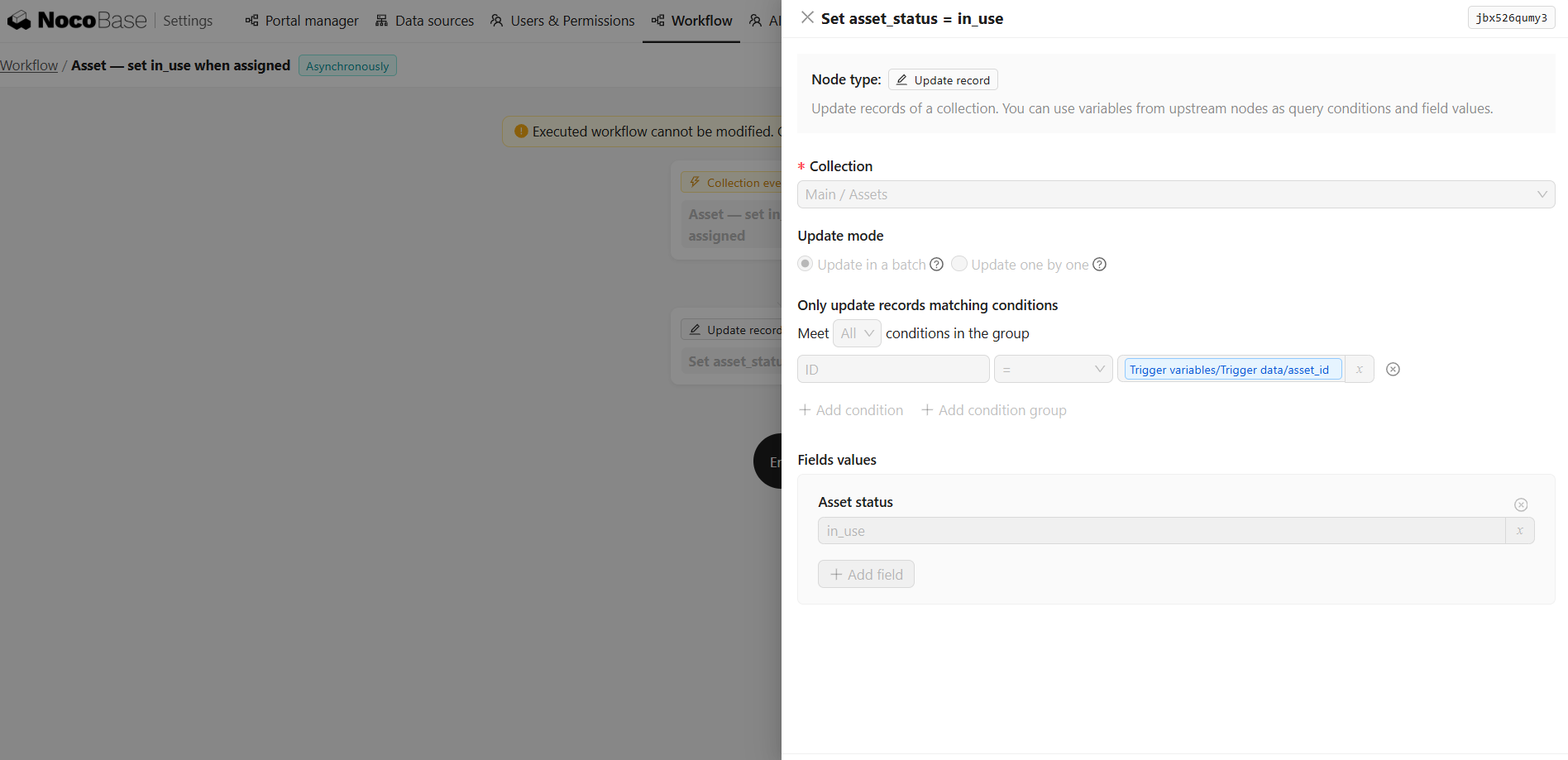
Workflows need to keep related data synchronized. For an asset assignment, the operation should only be considered complete when the current user, asset status, and assignment record have all been updated successfully. If any step fails, the system should roll back the change to avoid inconsistent data.
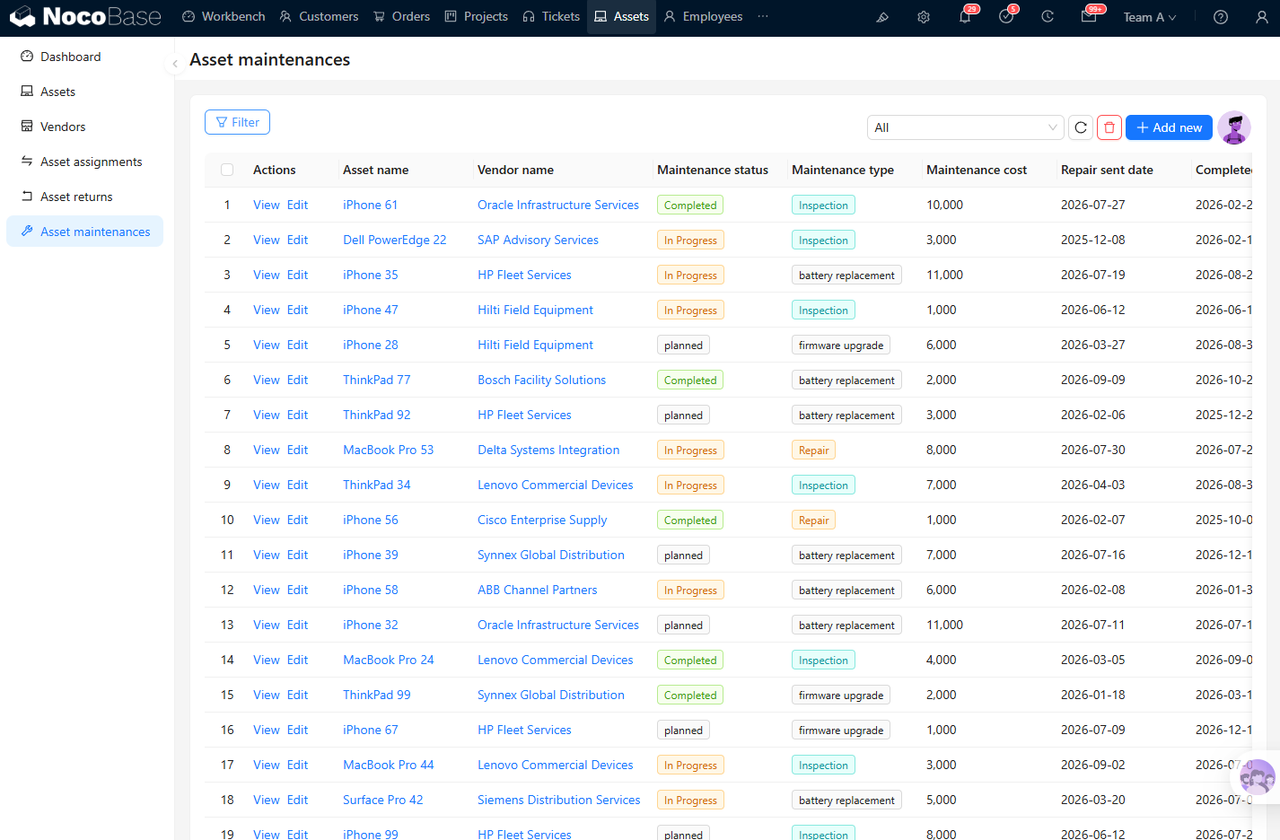
For a device repair, the workflow updates the asset status to Under repair and creates a repair record for tracking the repair supplier, repair type, processing status, cost, and completion time. Once the repair is complete, the asset is returned to Available or moved to Retired based on the outcome.
4. Summarize Asset Statuses with a Management Dashboard
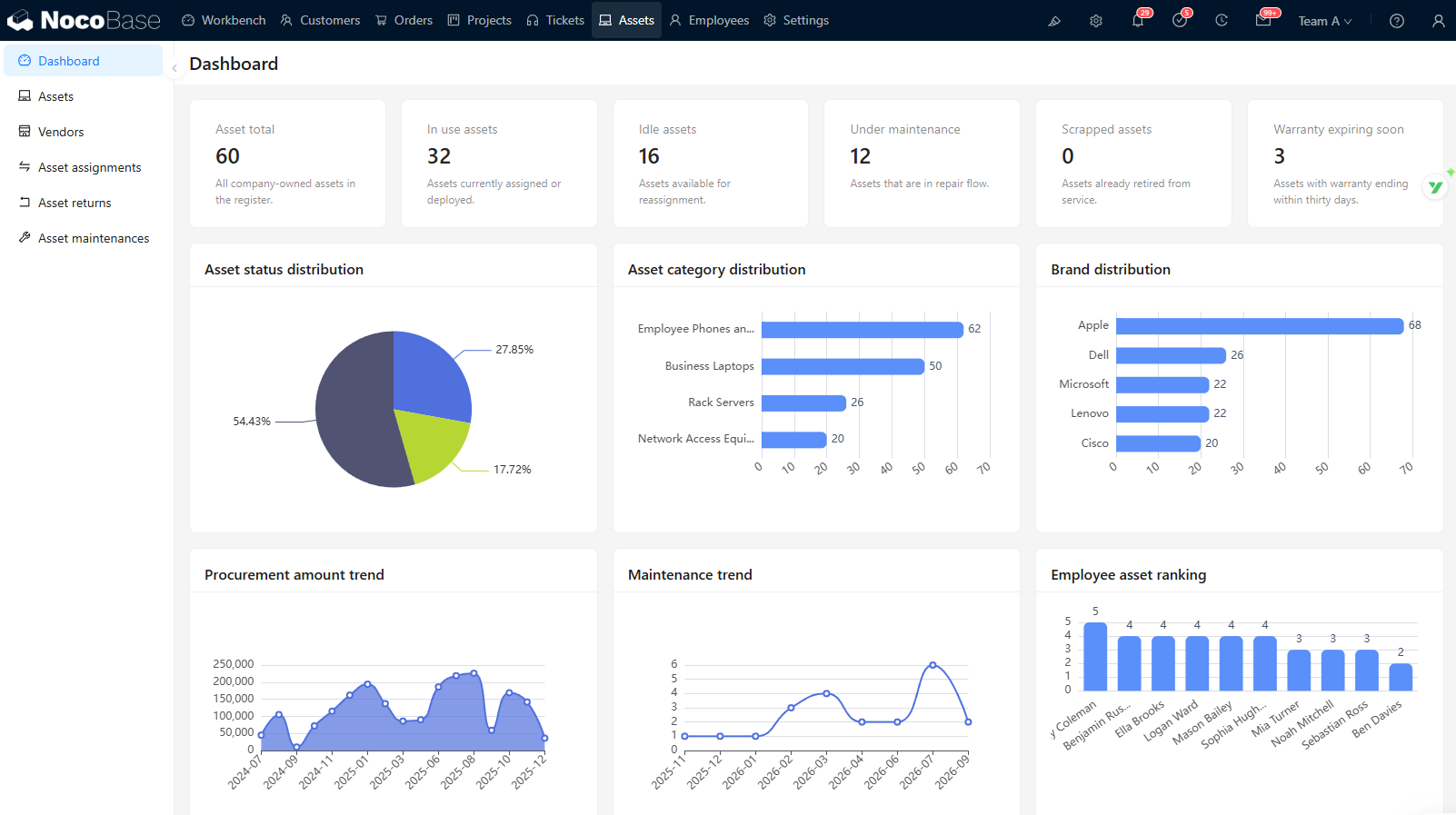
As asset register and business record data accumulate, the team can use a management dashboard to understand the overall asset situation and quickly identify devices that require attention.
Dashboard data can be aggregated directly from the asset register and different types of business records. For example, total asset counts and status distribution come from the asset register, repair trends come from repair records, and assets approaching the end of their warranty can be filtered by warranty date.
Asset status, category distribution, and trends are suitable for charts. Items that need follow-up are better shown as detailed lists, such as assets with warranties about to expire, assets under repair, assets past their expected return date, assets left unassigned for a long time, or devices with frequent repairs.
3. Build the System with an AI Agent and NocoBase
The data model, asset statuses and transition rules, business workflows, and management dashboard have now been designed. Next, an AI agent can connect to NocoBase and turn these designs into collections, associations, pages, business actions, and workflows.
1. Define the Roles of the AI Agent, NocoBase, and Business Users
Each of the three plays a different role during system implementation.
Business users explain the actual requirements and confirm asset statuses, operation conditions, role permissions, and exception-handling rules. For example, whether returned devices require inspection, which assets department managers can view, and whether devices under repair can be reassigned all depend on company policies.
The AI agent turns these business rules into executable system configurations. After connecting to NocoBase, it can create collections and associations, build list, form, and detail pages, configure workflows and permissions, and continue adjusting existing structures as requirements change. NocoBase officially provides a CLI and Skills, allowing AI agents such as Claude Code, Codex, Cursor, and OpenCode to participate in data modeling, page building, workflow orchestration, and permission configuration.
💡 How do you connect an AI agent to NocoBase? Read the official guide: https://nocode.docs.nocobase.com/ai-builder
NocoBase supports the system’s long-term operation. As an open-source AI no-code platform, it provides data models, pages, roles and data-scope permissions, workflows, scheduled tasks, and operation audits, together with self-hosting and plugin extensibility. The AI agent can call these existing capabilities directly instead of rebuilding accounts, permissions, page frameworks, and workflow execution mechanisms for every new system.
This approach increases implementation speed while preserving room for later maintenance and adjustment. After launch, administrators can still inspect and modify fields, pages, permissions, and workflows through the visual interface, reducing dependence on generated code and one-time AI output.
2. Let the AI Agent Complete the Initial Build in Stages
An asset management system contains multiple collections and business processes. Trying to configure everything in one step makes it easy to miss important details. It is better to ask the AI agent to produce the design first, confirm the data structure and status rules, and then create pages, workflows, permissions, and the management dashboard in stages.
You can proceed in the following order: define the data model, asset statuses, transition conditions, and workflows, and then let the AI agent execute each stage separately.
Confirm the data model
→ Create basic pages
→ Configure business actions
→ Add roles and permissions
→ Build the management dashboard and reminders
→ Test the complete business process
→ Import production data
The previous sections have already defined the data to manage, the relationships between data, asset statuses, and high-frequency business actions. Next, adjust the following prompt according to the company’s actual situation, add the confirmed fields, statuses, and processes, and then give it to an AI agent that is already connected to NocoBase.
Please design and build an IT asset management system in NocoBase.
It will mainly be used to manage computers, monitors, mobile phones,
peripherals, and network equipment.

First, read the collections, pages, workflows, and permission configurations
in the current application.
If identical or similar content already exists, prioritize reusing or adjusting it
to avoid duplicate creation or overwriting existing configurations.

Follow the confirmed business design below strictly.
For any rules that are still unclear, ask questions first and do not fill in the gaps yourself.

1. Data structure

The system needs to contain three types of data:

1. Reference data

- Asset categories
- Device models
- Employees
- Departments
- Office locations
- Suppliers (optional)

Based on whether the information needs to be reused and maintained centrally,
determine which items should be stored in separate collections
and which can be stored directly as asset fields. Explain the reasons.

2. Asset register

Each asset needs to store:

- Asset name
- Asset ID
- Serial number
- Asset category
- Brand and model
- Current status
- Current user
- Current department
- Current office location
- Device condition
- Purchase date
- Warranty date

Set uniqueness rules for the asset ID and serial number.

3. Business records

The system needs to store:

- Asset assignment records
- Asset return records
- Asset repair records

Based on the actual frequency of asset transfers,
determine whether a separate transfer record is needed.

If transfers are infrequent, changes to the user, department, or office location
can be included in existing business records. Explain the specific approach.

The data relationships need to support the following:

- One asset category or device model can correspond to multiple assets;
- One employee can hold multiple assets;
- One asset can be linked to multiple business records;
- Suppliers can be linked to asset sources or repair records when needed.

2. Asset statuses and transition rules

The basic statuses are:

- Available
- In use
- Under repair
- Retired

The following statuses are optional:

- Reserved
- Pending inspection
- Pending transfer
- Pending disposal

Explain the meaning, entry conditions, exit conditions,
and permitted business actions for each status.

Status transitions must follow these basic rules:

- An asset becomes Available after registration is completed;
- An Available asset becomes In use after assignment is completed;
- An In-use asset returns to Available after it is returned and passes inspection;
- An asset moves to Under repair when it is sent for repair or a fault is found during inspection;
- An asset returns to Available after repair is completed;
- An asset moves to Retired when it can no longer be used or repaired.

3. Business actions

The system needs to support:

- Assign device
- Return device
- Send device for repair
- Complete repair
- Retire device
- Optional asset transfer

Each business action needs to:

- Validate the asset’s current status and operation permissions;
- Update the current information in the asset register;
- Create the corresponding business record;
- Send notifications or trigger follow-up processing when needed.

Ensure that the asset register update and business record creation
are completed within the same operation.

If an exception occurs during execution,
roll back the changes to avoid inconsistencies between current information and history records.

4. Pages and management dashboard

Design the following pages:

- Asset management overview
- Asset list
- Asset detail page
- Create and edit asset forms
- Employee-held assets page
- Assignment records page
- Return records page
- Repair records page
- Optional transfer records page

The management dashboard needs to show:

- Total assets and status distribution
- Category and brand distribution
- Assets currently under repair
- Assets with warranties about to expire
- Number and cost of repairs
- Assets held by employees or departments

If a metric does not have the required fields,
first explain which fields need to be added. Do not generate an empty metric directly.

If device warranty periods need to be tracked,
configure a scheduled task to check warranty dates
and show assets with warranties about to expire on the management dashboard.

5. Roles and permissions

Design permissions for the following roles:

- IT administrator
- Regular employee
- Department manager
- System administrator

For each role, explain:

- Which pages they can access;
- Which data they can view;
- Which actions they can perform;
- Which fields they can modify.

Regular employees can only view assets assigned to themselves;
Department managers can only view data within their departments;
IT administrators are responsible for asset assignment, return, repair, and retirement;
System administrators manage the data structure, pages, workflows, and permissions.

6. Execution method

Execute the work in stages.

In the first stage, only output the following design and do not create any configuration:

- Collections and fields;
- Associations between collections;
- Asset statuses and transition rules;
- Page structure;
- Business workflows;
- Roles and permissions;
- Questions that still require confirmation from business users.

After I confirm the design, complete the following in order:

1. Create collections, fields, and associations;
2. Create basic pages;
3. Configure business actions and workflows;
4. Configure roles and data permissions;
5. Create the management dashboard and warranty reminders.

After each stage, explain:

- What has been completed;
- Which configurations were created or modified;
- Which items need to be checked;
- Which business rules remain undecided.

Wait for confirmation before moving to the next stage.
After the AI agent completes the configuration, use a small amount of test data to verify the complete business process.
For example, after a device is assigned, check whether the current user, department, office location, asset status, and assignment record are updated together. After a device is returned or a repair is completed, check whether the asset enters the correct status according to the transition rules defined earlier. Import production data only after confirming that the relationships, workflows, and permissions match actual requirements.
3. Connect Existing Data and Complete Pre-Launch Checks
Before connecting production data, standardize field names, associations, and status values according to the defined reference data, asset register, and business records, and remove duplicate or invalid data. After a small data set has been verified, import or connect the complete asset data.
If existing asset information is stored in Excel or shared spreadsheets, standardize the fields and formats before importing it in batches. If the data is already stored in an enterprise database or another business system, connect it through NocoBase data sources or APIs to reduce duplicate entry.
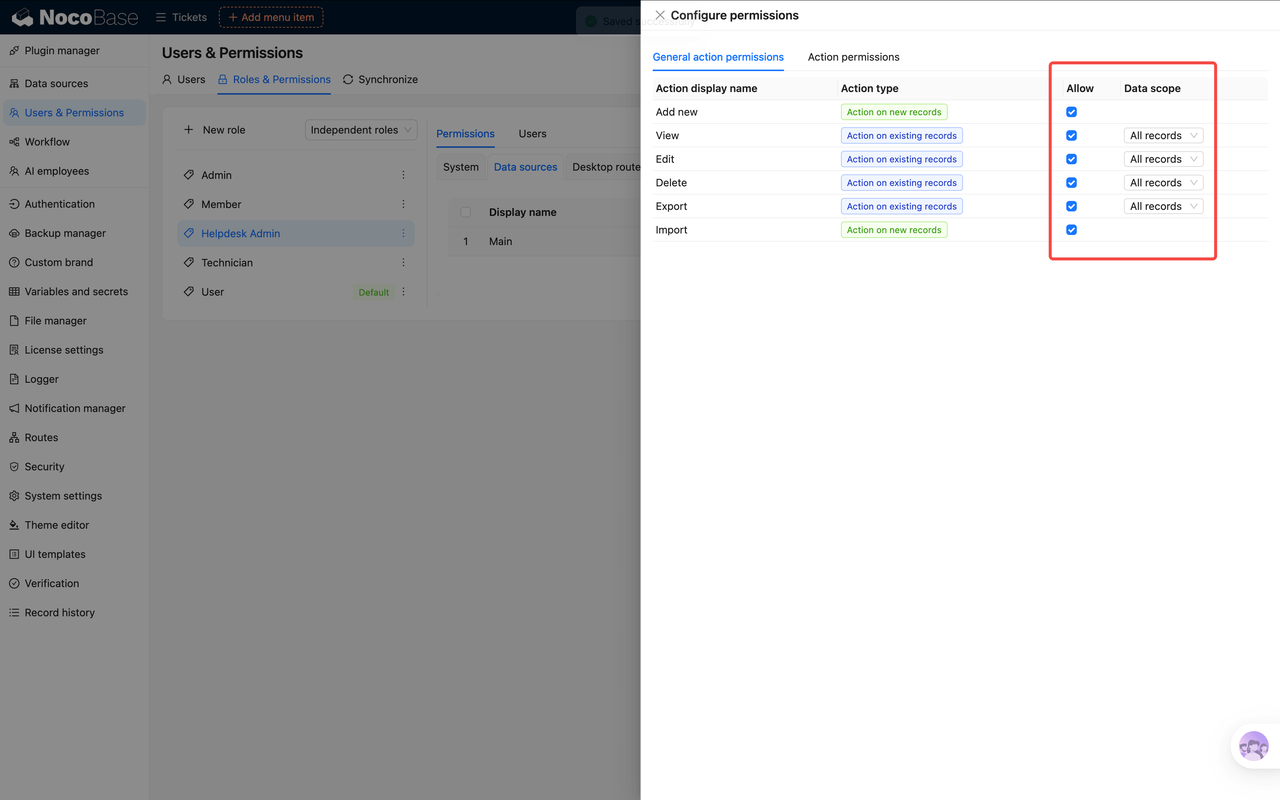
Permissions also need to be configured according to actual responsibilities. Define which pages each role can access, which actions they can perform, and which data they can view or modify. NocoBase can also apply field-level permissions. For example, regular employees can only view the assets assigned to them, department managers can view assets within their department, and IT administrators handle assignments, returns, repairs, and retirement. Critical fields such as asset status and current user can be restricted so that only designated roles can view or modify them.
4. Integrate AI into Daily Asset Management
After the system goes live, AI can continue to participate in daily asset management.
AI agents are mainly used to adjust fields, pages, and workflows. AI employees work with structured data in NocoBase and, within the authorized scope, handle data entry, queries, summaries, and report generation. Operations that modify official records—such as asset assignment, status changes, device retirement, and responsibility confirmation—should still be executed through system permissions and workflows.
Automatically Extract Asset Information
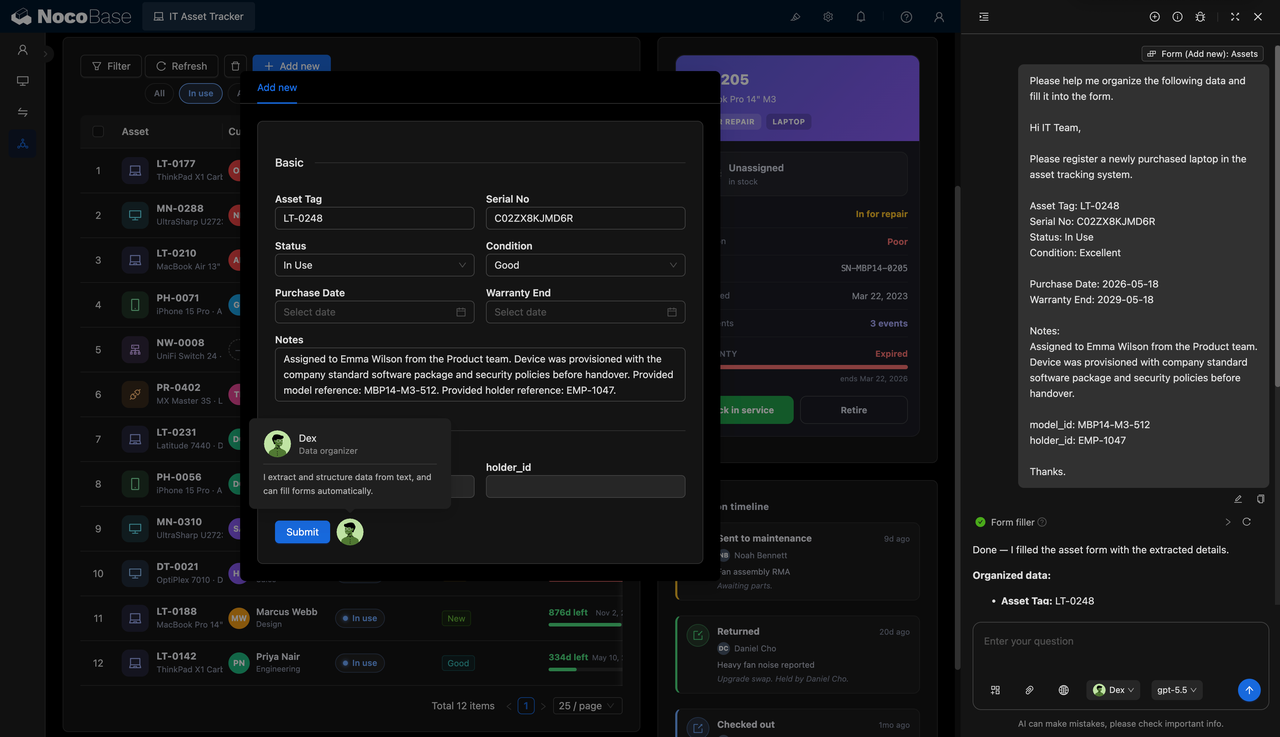
After receiving purchase lists, invoices, asset tag photos, or device handover notes, IT administrators can ask an AI employee to identify the device type, brand and model, asset ID, serial number, purchase date, and warranty period, and automatically fill the results into the asset form.
Critical fields such as asset IDs, serial numbers, and warranty dates should still be confirmed by an administrator and checked against uniqueness rules for duplicates or recognition errors.
Query Assets and Generate Reports
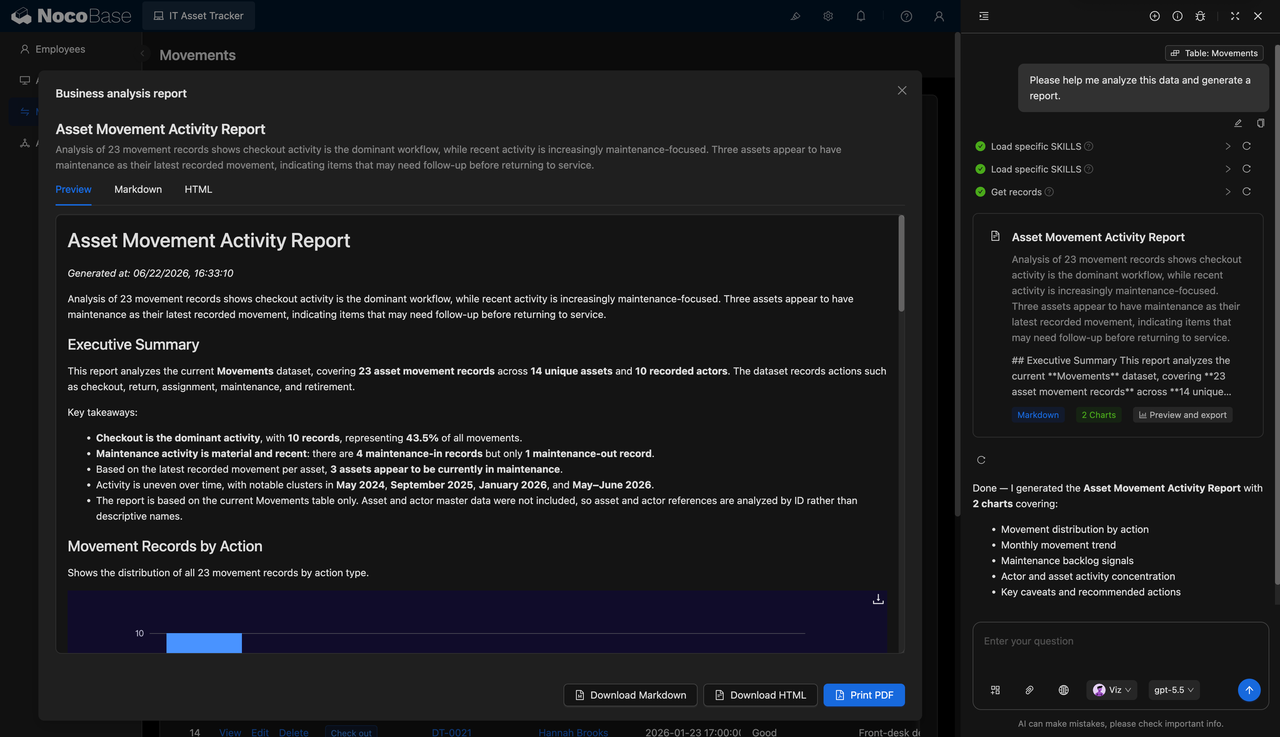
Within the authorized data scope, an AI employee can read the asset register and business records to find idle equipment, assets with warranties about to expire, repair frequency, assets held by departments, and repair costs. It can also summarize asset changes over a period and generate a monthly asset activity report.
Get Started Faster
If the number of device types is small and the permission and approval processes are simple, you do not need to design every structure from scratch. Start by defining the asset scope, fields, statuses, business actions, and role permissions, and let an AI agent connected to NocoBase generate the initial version. You can also use the NocoBase lightweight IT asset management solution as a starting point and adjust its fields, statuses, and permissions.
As the number of assets and management requirements grow, gradually add support for multiple office locations, more complex permissions, complete historical tracking, procurement, and cost management.
Conclusion
When building ITAM, ITSM, and other enterprise business systems that need to operate over the long term, we still recommend choosing a platform such as NocoBase that combines a stable business foundation with AI capabilities. It provides reliable data models, permissions, and workflows, while AI agents accelerate system implementation and AI employees participate in ongoing operations. This makes it possible to move beyond a quick prototype and build a system that can operate in real business environments, remain maintainable over time, and expand as management requirements evolve.
If you found this article useful, share it with others who are also interested in AI and enterprise system development.
Related reading:
- How to Choose a Smartsheet Alternative: 7 Tools Compared
- 5 Open-Source AI No-Code Tools for Complex Relational Data Models
- What Is AI No-Code? A Practical Guide to No-Code Platforms in the AI Era
- 9 Open-Source AI No-Code Tools on GitHub Worth Watching
- 14 Open Source AI Agent Tools with the Most GitHub Stars
- Top 8 Open Source AI Assistant Tools by GitHub Stars
- 6 Open Source Tools to Use with WorkBuddy
- Top 6 Open Source AI Tools by GitHub Stars for Stronger AI Agents
- 5 Open-Source Internal Tools to Use with Hermes Agent
- OpenClaw and 5 Open-Source Tools for Monitoring Business Workflows
- What Open-Source Tools Work Well with OpenCode? 5 Projects to Try
- Building Internal Tools with Codex: 6 Open-Source Projects for Developers
- After Claude Code: 6 Open-Source Tools You Should Know
(1)-cehdfe.png)