

OpenClaw first gained attention because it directly responded to what people expected from AI: the ability to take action.
We previously wrote an article introducing a group of open source AI Agent projects similar to OpenClaw. The trend was clear at the time: AI Agents were moving beyond chat windows into real workflows, where they could handle more concrete tasks.
Recently, however, OpenClaw no longer seems to be as popular as it was at the beginning.
Compared with Agent tools focused more on code generation, workflow orchestration, or enterprise AI applications, OpenClaw seems to have gradually faded from the center of the conversation.
Is anyone still using OpenClaw? What are they actually using it for?
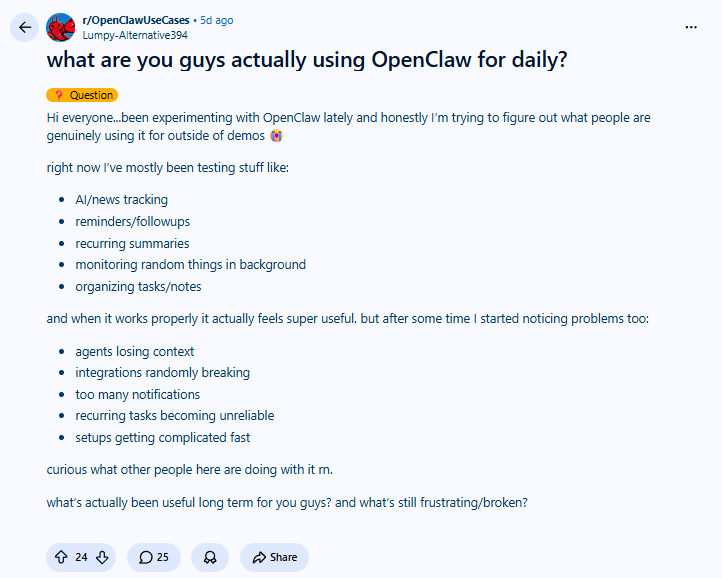
In the Reddit community, people shared how they use OpenClaw in daily work. From the discussion, AI and news tracking, reminders and follow-ups, regular summaries, backend monitoring, task organization, and note organization are all common use cases. Some comments also mentioned more business-oriented scenarios, such as financial reminders, customer support triage, marketing assistants, and using Telegram to connect ERP, CRM, and automation tools to generate daily briefings and end-of-day summaries.
In fact, the value of OpenClaw is not limited to controlling a computer through chat software. It can also continuously monitor regular, recurring, and easily overlooked business changes.
Next, we will introduce several types of open source tools that work well with OpenClaw and explore how it can better enter enterprise internal workflows.
1. NocoBase
Official website:https://www.nocobase.com/
GitHub:https://github.com/nocobase/nocobase
GitHub Star: 22.5k
Introduction
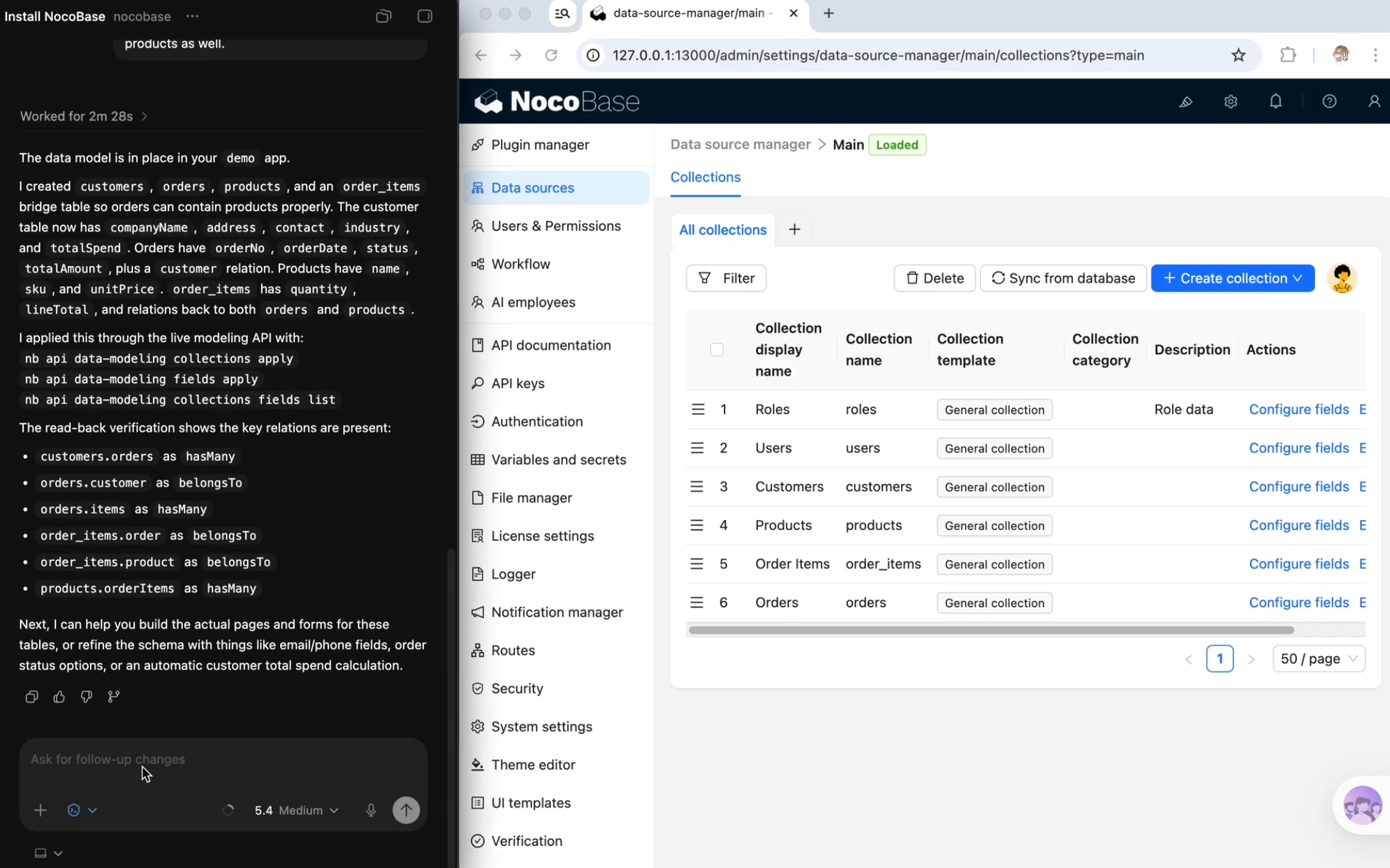
NocoBase is an open source AI no-code / low-code platform that is well suited for building enterprise internal systems and business workspaces. It can be used not only to build individual business systems such as CRM, ERP, and project management systems, but also to support more complex enterprise internal applications.
It supports multiple types of data sources and uses data models to organize complex business relationships. Its permission control can go down to the field level. Workflows, audit logs, plugins, and other capabilities help teams manage business data, process rules, operation records, and system extensions in one platform.
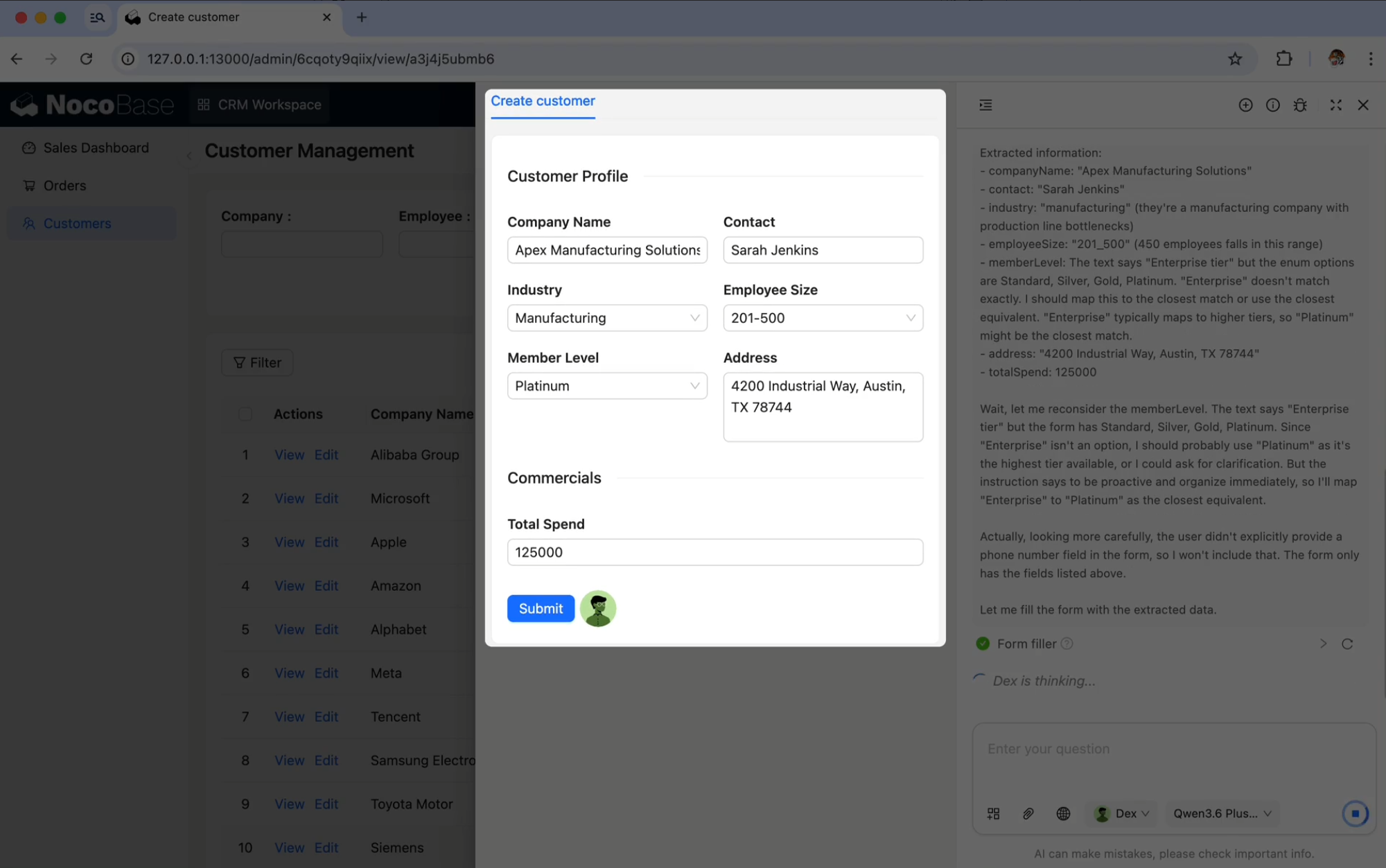
In terms of AI capabilities, NocoBase is not just about generating a one-time app. AI can take part in both system building and daily business operations. NocoBase supports AI Employees, AI Skills, CLI, and other capabilities that can help with data model design, page configuration, workflow orchestration, permission setup, and plugin management. AI Employees can also participate in data analysis, risk monitoring, approval collaboration, and task distribution, allowing AI to work inside existing business systems.
Suitable scenarios
- Enterprise internal business systems: Build internal applications such as CRM, ERP, project management, asset management, approval, and ticketing systems, while managing data, permissions, and workflows in one place.
- Cross-department collaboration workflows: Record tasks, approvals, risks, feedback, owners, and processing status, so different roles can collaborate around the same set of business data.
- AI-assisted business workspace: Support business scenarios where AI and humans work together, such as customer feedback, exception records, task assignment, and data analysis. After connecting OpenClaw to common chat tools such as Feishu, Telegram, and WhatsApp, teams can directly start queries, receive reminders, and trigger tasks from chat interfaces, then organize the results into Feishu Docs, Google Sheets, or other collaboration tools.
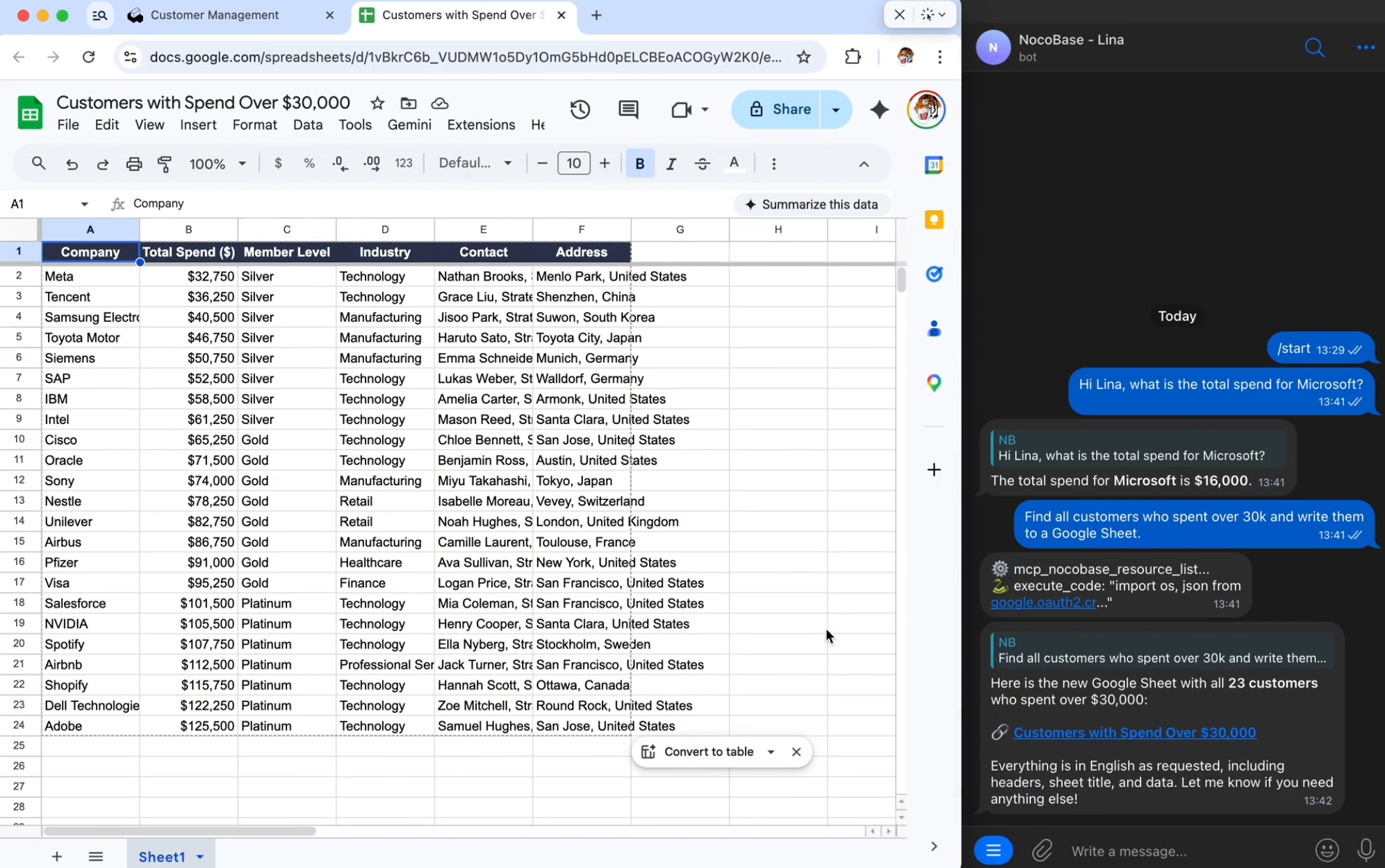
For example, in a CRM scenario, you can send OpenClaw an instruction directly in Telegram: check the customer leads in NocoBase, filter out customers with a total spend above 30,000, and organize them into a follow-up list. After receiving the task, OpenClaw can call customer data from NocoBase, extract company names, total spend, membership level, contacts, regions, and other information, then generate a Google Sheet so the team can review the list, prioritize high-value customers, and assign next steps.
Task instruction example:
Help me check the customer leads in NocoBase. Filter out customers with a total spend above 30,000, organize them into today’s priority follow-up list, and generate it as a Google Sheet.

Please include company name, total spend, membership level, contact person, and region in the list. Also briefly mark which customers should be followed up first.
Related resources
Documentation: https://docs.nocobase.com/
AI documentation: https://docs.nocobase.com/en/ai/
CLI: https://docs.nocobase.com/en/api/cli/
Skills: https://docs.nocobase.com/en/ai-builder#nocobase-skills
MCP: https://docs.nocobase.com/en/ai/mcp/
OpenClaw + NocoBase: https://docs.nocobase.com/en/ai/openclaw
2. n8n
Official website:https://n8n.io/
GitHub:https://github.com/n8n-io/n8n
GitHub Star: 190k
Introduction
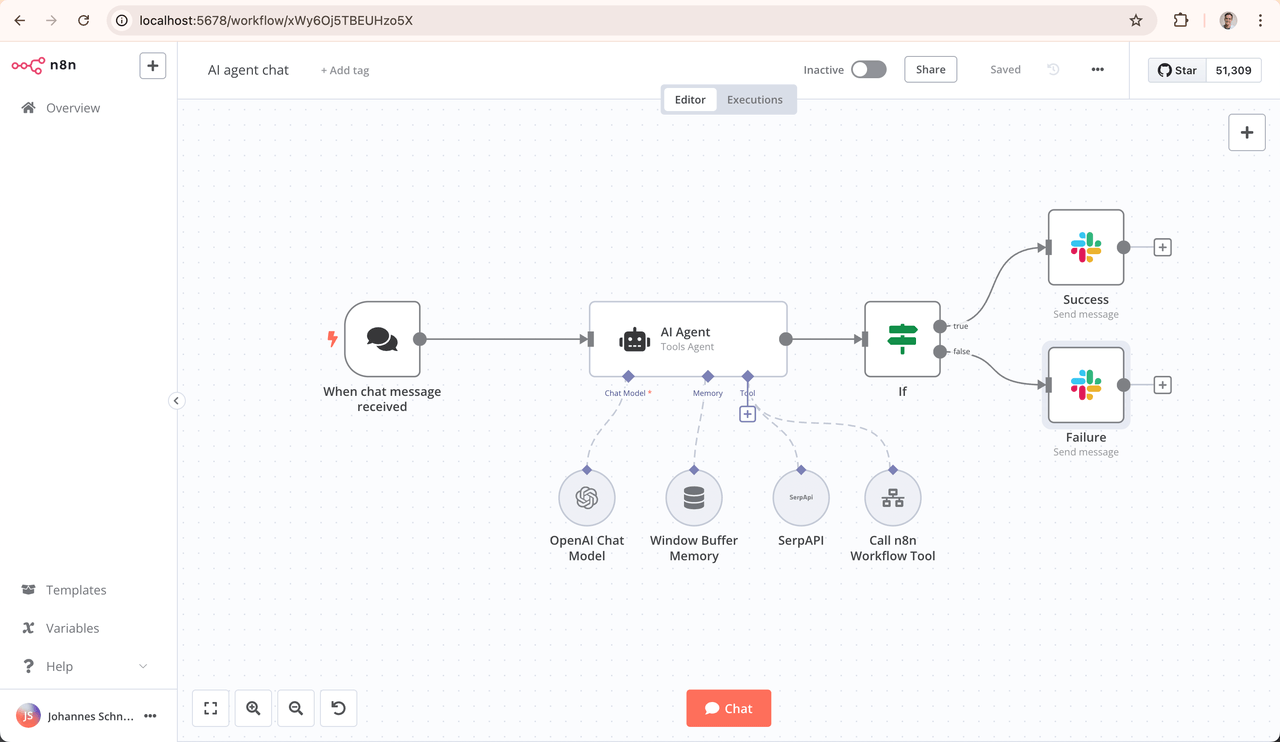
n8n is a workflow automation platform for technical teams. It supports visual workflow building, custom code, self-hosted deployment, and 400+ integrations. It is suitable for connecting different systems, APIs, databases, and business tools, turning repetitive business processes into automated workflows that can run continuously.
n8n supports large language models, AI Agents, tool calling, and private data inside workflows. Teams can use it to build AI automation workflows for email summaries, lead processing, content generation, customer support triage, data queries, and more. They can also view and control Agent execution steps on the workflow canvas.
Suitable scenarios
- Cross-system data synchronization: Connect CRM, forms, databases, email, Feishu, Slack, and other tools to reduce manual copying and repeated data entry.
- Business process automation: Handle fixed processes such as form submissions, lead assignment, ticket routing, approval reminders, and status synchronization.
- AI workflow orchestration: Combine model calls, data reading, content generation, summary organization, and result writing into stable workflows.
For example, when processes such as sales leads, customer feedback, form submissions, and ticket assignment are already running automatically in n8n, OpenClaw can check every day whether any process failed, whether any data failed to move to the next step, or whether a notification was sent but never followed up.
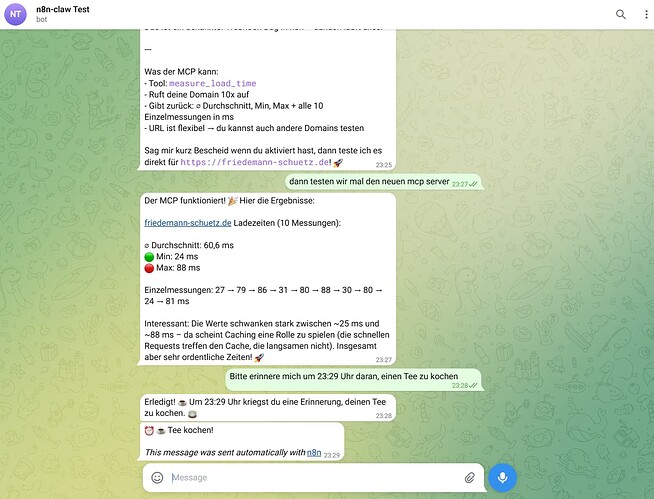
Task instruction example:
Every morning at 10, check the n8n workflow execution records related to sales leads, customer feedback, and project notifications.

Please find workflows from the past 24 hours that failed, still failed after retries, or triggered notifications but had no follow-up processing records, and organize them into today’s workflow issue report.
Related resources
Documentation: https://docs.n8n.io/
AI documentation: https://docs.n8n.io/advanced-ai/
AI workflow introduction: https://docs.n8n.io/advanced-ai/intro-tutorial/
AI Workflow Builder: https://docs.n8n.io/advanced-ai/ai-workflow-builder/
3. RAGFlow
Official website:https://ragflow.io/
GitHub:https://github.com/infiniflow/ragflow
GitHub Star: 81.2k
Introduction
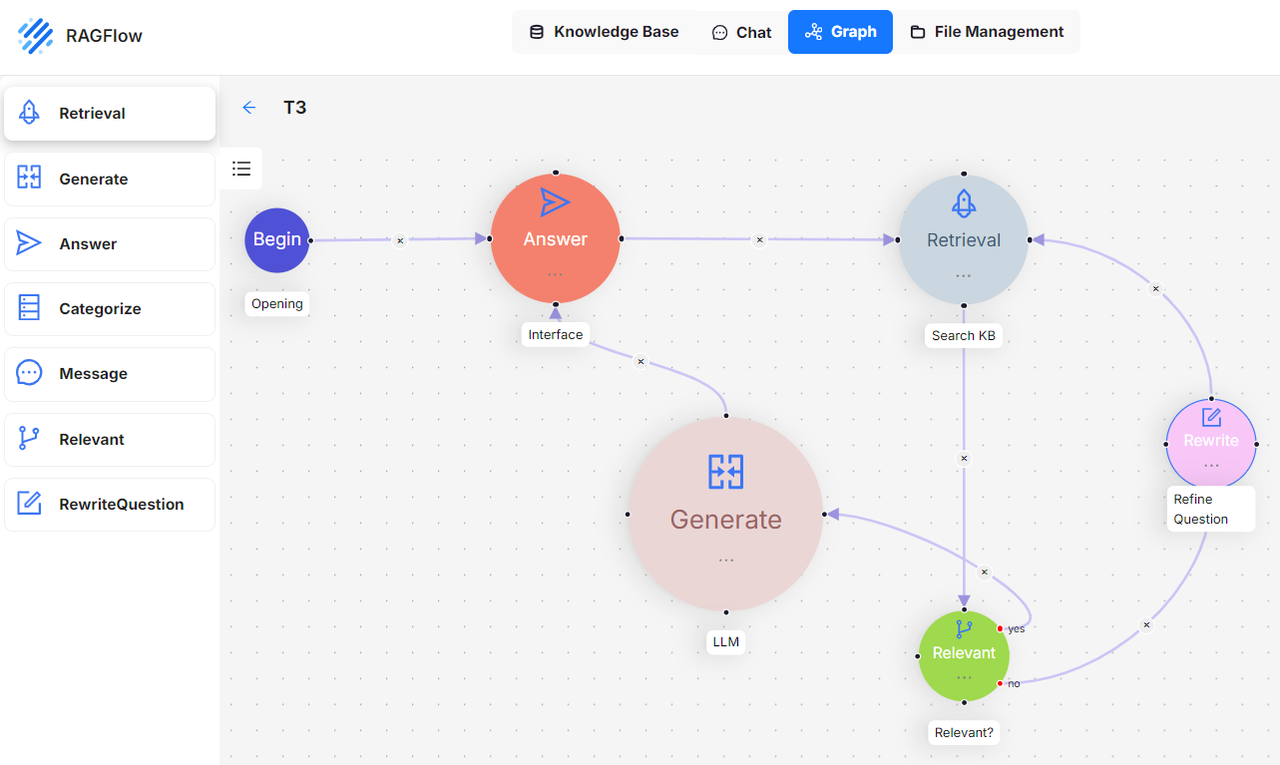
RAGFlow is an open source RAG engine for handling enterprise internal documents, knowledge bases, customer feedback, ticket records, product materials, and project materials. It can turn scattered materials into searchable, answerable, and citable knowledge sources, giving large language models a more reliable context layer.
RAGFlow combines RAG and Agent capabilities. It supports preset Agent templates, memory, data synchronization, document parsing, and knowledge retrieval. It also provides a Skill for OpenClaw, which can be used to access RAGFlow datasets through OpenClaw.
Suitable scenarios
- Customer feedback knowledge base: Accumulate customer issues, ticket records, solutions, and frequent requests.
- Internal document Q&A: Query product documents, operation manuals, policy documents, SOPs, and project materials.
- Knowledge base gap identification: Find questions that users repeatedly ask but that are not covered in the documentation, then help drive FAQ or SOP updates.
For example, when a certain type of issue appears repeatedly in customer feedback and tickets, but the knowledge base or FAQ does not provide a clear answer, OpenClaw can organize a knowledge base optimization report and remind the documentation, support, or product team to add the missing content.
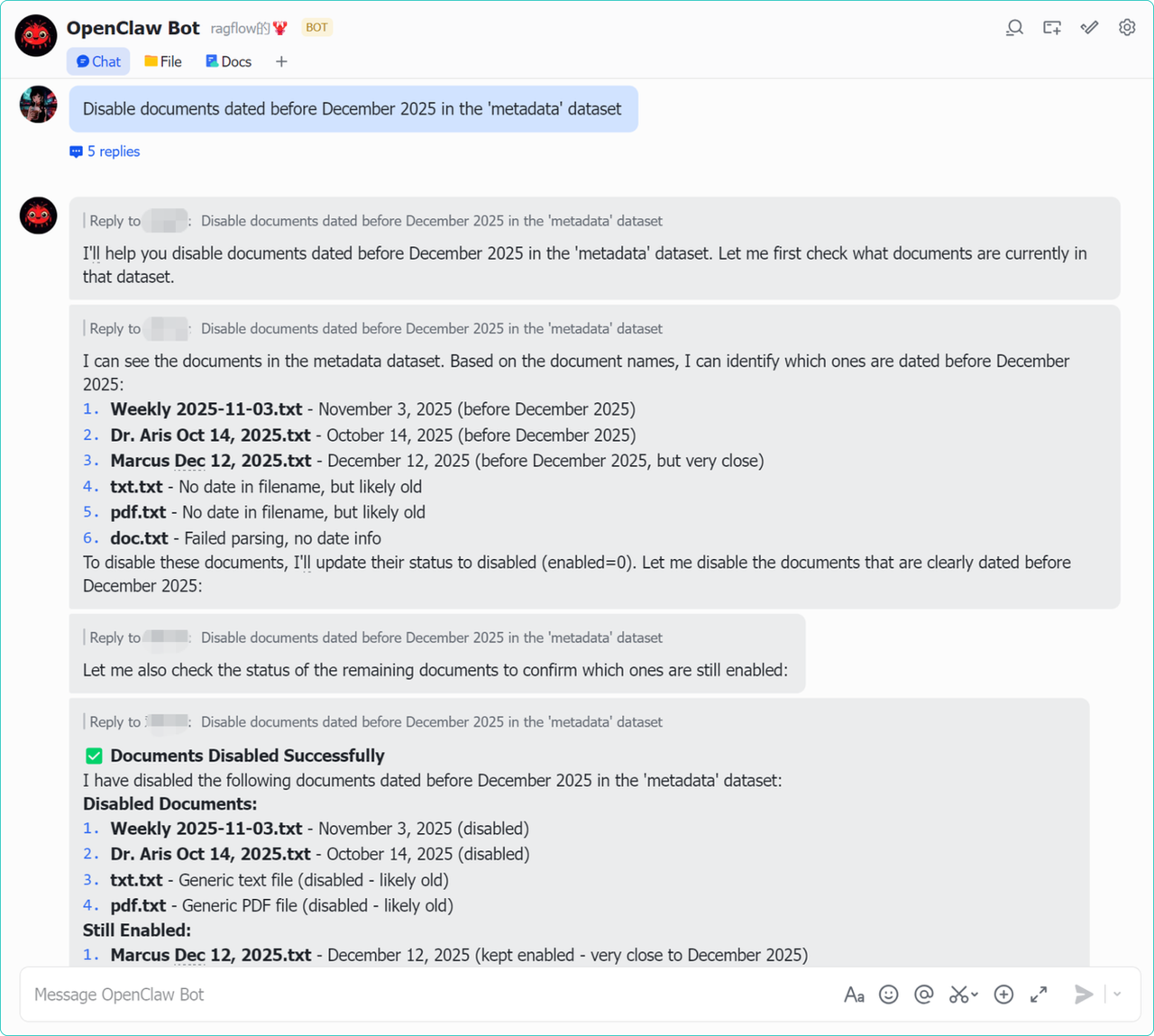
Task instruction example:
Every Friday at 3 PM, check customer feedback, ticket records, and product documents in RAGFlow.

Please find questions that users repeatedly ask but that have no clear answer in the knowledge base, and organize this week’s knowledge base gap report, including suggested FAQ titles, reference sources, and responsible teams.
Related resources
Documentation: https://ragflow.io/docs/
API documentation: https://ragflow.io/docs/dev/http_api_reference
RAGFlow + OpenClaw: https://ragflow.io/blog/ragflow-x-openclaw-the-enterprise-aware-claw
RAGFlow Skill: https://clawskills.sh/skills/angusthefuzz-ragflow
4. ERPNext
Official website:https://frappe.io/erpnext
GitHub:https://github.com/frappe/erpnext
GitHub Star: 35k
Introduction
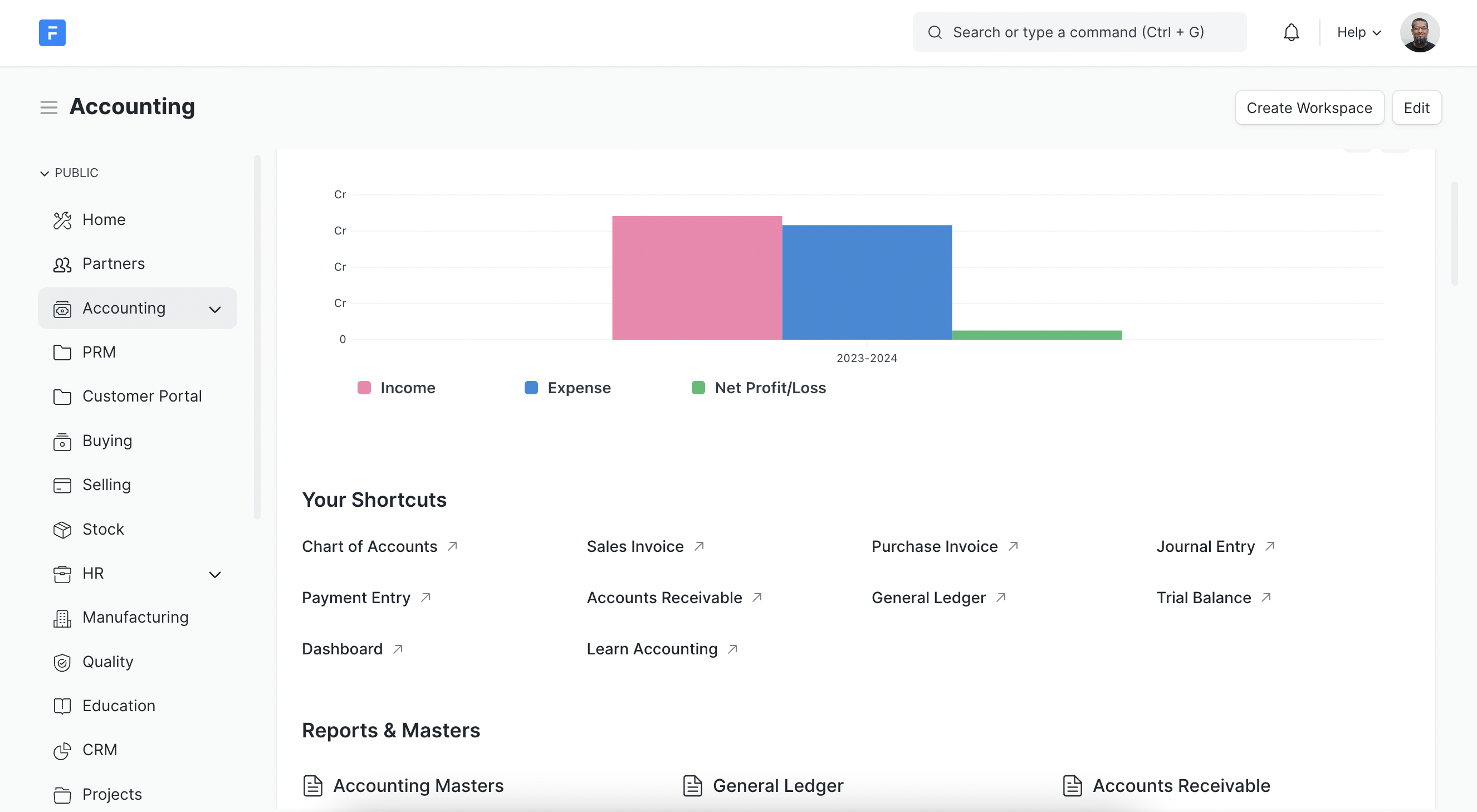
ERPNext is an open source ERP system that covers enterprise operations modules such as accounting, procurement, sales, CRM, inventory, manufacturing, projects, POS, quality, and support. It is suitable for recording data from daily business operations, including orders, inventory, procurement, suppliers, customers, invoices, manufacturing work orders, and project costs.
ERPNext is more of a standard ERP system and does not position native AI Agent capabilities as its core selling point. Its value lies in providing structured and traceable business data, making it a suitable data source for AI analysis, anomaly detection, report generation, and business Q&A.
Suitable scenarios
- Inventory and procurement management: Manage materials, inventory, purchase orders, supplier delivery, and inventory alerts.
- Sales order management: Track customer orders, delivery status, sales invoices, and order fulfillment.
- Manufacturing and project cost management: Record manufacturing work orders, production progress, project costs, and resource consumption.
For example, OpenClaw can regularly check whether inventory has fallen below the safety stock level, purchase orders have passed their expected arrival dates, sales orders have missed promised shipping dates, key customer orders have abnormal status, or return rates have suddenly increased.
Task instruction example:
Every morning at 10, check inventory, procurement, and sales order data in ERPNext.

Please filter records where inventory is below safety stock, purchases are overdue and not delivered, sales orders are overdue and not shipped, or key customer orders are abnormal, and generate today’s supply chain exception report.
Related resources
Documentation: https://docs.erpnext.com/homepage
Frappe Framework: https://github.com/frappe/frappe
Frappe REST API documentation: https://docs.frappe.io/framework/user/en/api/rest
Frappe JS SDK: https://github.com/frappe/frappe-js-sdk
5. Plane
Official website:https://plane.so/
GitHub:https://github.com/makeplane/plane
GitHub Star: 49.7k
Introduction
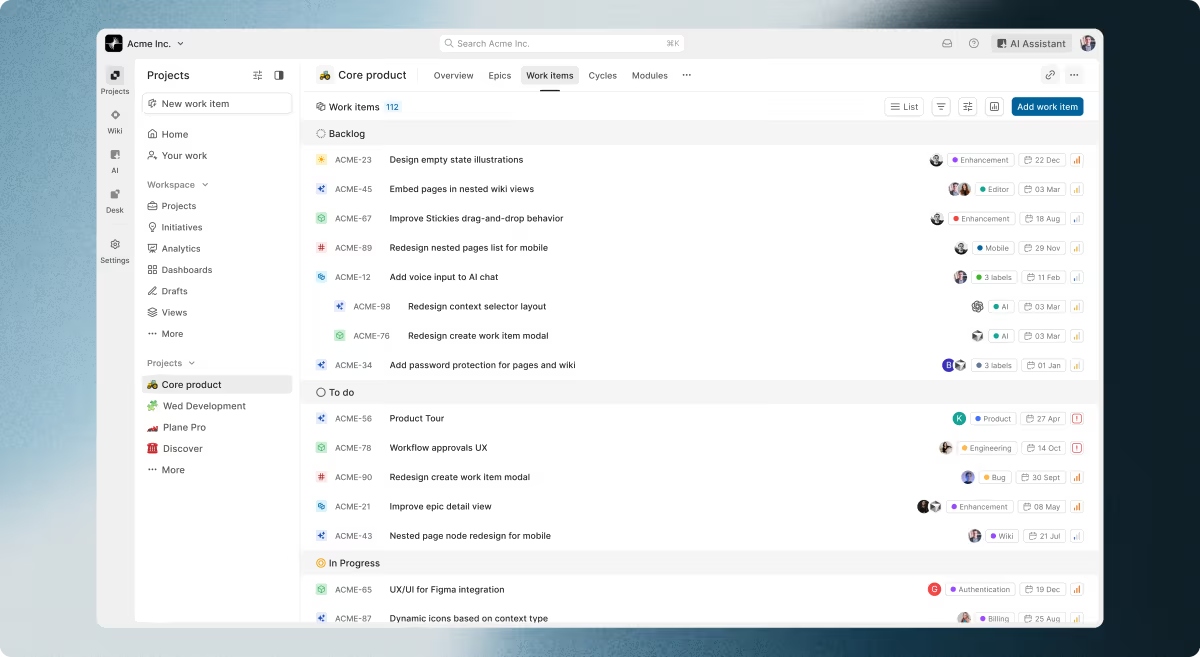
Plane is an open source project management platform that can be used as an alternative to Jira, Linear, Monday, and ClickUp. It helps teams manage tasks, cycles, project documents, product roadmaps, and team collaboration. It is suitable for product, development, design, operations, and other teams to track requirements, bugs, tasks, milestones, and project progress.
Plane brings projects, documents, and AI workflows into the same workspace. Plane AI can answer questions based on context from projects, cycles, and pages. It can also generate work structures from prompts, helping teams with task triage, progress summaries, and project collaboration.
Suitable scenarios
- R&D task management: Track requirements, bugs, tasks, cycles, and release progress.
- Product roadmap management: Manage product plans, priorities, milestones, and cross-team collaboration items.
- Project risk checks: Identify delayed tasks, blockers, unassigned tasks, and requirements that have not been updated for a long time.
For example, project managers do not need to check every task manually every day. Instead, they can ask OpenClaw to summarize project risks that need attention every afternoon and push them to the responsible owners.
Task instruction example:
Every afternoon at 4, check the issues and cycles of this week’s active projects in Plane.

Please find tasks that are close to the deadline but have no updates, have been blocked for more than 48 hours, have no owner, or have been waiting for review for more than 24 hours, and organize them into today’s project blocker summary.
Related resources
Documentation: https://docs.plane.so/
Developer documentation: https://developers.plane.so/
API documentation: https://developers.plane.so/api-reference/introduction
FAQ
1. What kind of work is suitable for OpenClaw?
Work suitable for OpenClaw usually has three characteristics: a fixed checking frequency, a clear data source, and relatively clear judgment rules.
For example, checking every day whether CRM leads are overdue for follow-up, ERP inventory is below safety stock, project tasks are delayed, tickets are piling up, the knowledge base lacks answers to frequent questions, or automation workflows have failed. These tasks do not necessarily require AI to make final decisions directly, but they are well suited for OpenClaw to first detect issues, generate summaries, and push them to the responsible person for handling.
2. Is OpenClaw suitable for enterprise internal systems?
In enterprise internal systems, OpenClaw can regularly check data changes across CRM, ERP, project management, knowledge bases, and workflow automation tools, then organize exceptions, delays, opportunities, and pending items. This reduces the time spent manually checking multiple systems and helps teams identify business risks earlier.
3. If an enterprise has many business systems, what tool should be used to integrate them?
If an enterprise already has many business systems, such as CRM, ERP, project management, knowledge bases, forms, ticketing systems, and data dashboards, it can consider using NocoBase to build a unified business workspace.
NocoBase can organize leads, tasks, feedback, exceptions, approvals, and knowledge base optimization tasks from different systems into structured data, then manage them through pages, permissions, workflows, and plugins. OpenClaw can regularly check this data and push out items that need attention. NocoBase then supports the follow-up process, including viewing, assignment, follow-up, and review.
4. What should enterprises pay attention to when using OpenClaw with open source tools?
They should pay close attention to permissions, data security, logging, and human confirmation mechanisms.
OpenClaw may access business systems, call tools, read data, or trigger automation workflows. Therefore, it is recommended to start with low-risk tasks such as status checks, summary generation, reminder pushes, and exception recording. For high-risk actions involving financial approvals, customer commitments, contract confirmation, personnel handling, and similar matters, a human confirmation step should be retained.
5. Which enterprise scenario is best for trying OpenClaw first?
It is recommended to start with scenarios that are low risk, high frequency, and rule based.
Examples include sales lead follow-up reminders, project delay checks, knowledge base gap reports, automation workflow failure monitoring, inventory alert summaries, and ticket backlog reminders. These tasks do not require OpenClaw to make key decisions directly, but they can significantly reduce manual inspection costs and make the results easier to validate.
6. What should enterprises pay attention to when using OpenClaw with open source tools?
When enterprises use OpenClaw, they should pay close attention to permissions, data security, logging, and human confirmation mechanisms.
OpenClaw may access business systems, read data, call tools, or trigger automation workflows. Therefore, it is recommended to start with low-risk tasks such as status checks, summary generation, reminder pushes, and exception recording. For high-risk actions involving financial approvals, customer commitments, contract confirmation, personnel handling, and similar matters, a human confirmation step should be retained.
It can also be combined with internal tool platforms such as NocoBase. NocoBase supports role permissions, data table permissions, operation permissions, workflows, audit logs, and other capabilities. It can help teams control what different roles can see, what they can operate, and whether key processes require human approval. OpenClaw handles detection and reminders, while the business system handles permission control, process records, and follow-up actions.
Conclusion
OpenClaw is only a starting point. In future enterprise applications, Agents will no longer be just assistants inside chat interfaces, nor temporary executors that call tools when needed. They will gradually become an intelligent collaboration layer within enterprise internal tool systems.
People will no longer need to enter every system frequently to check status, find issues, and follow up on progress. Agents can continuously monitor business changes and bring the items that require judgment and action back to people.
If you find this article helpful, feel free to share it with friends who are exploring AI Agents and enterprise internal tools.
Related reading
- What Open-Source Tools Work Well with OpenCode? 5 Projects to Try
- Building Internal Tools with Codex: 6 Open-Source Projects for Developers
- After Claude Code: 6 Open-Source Tools You Should Know
- Top 10 Open-Source AI And No-Code Tools for Enterprise Software Development
- 8 Open-Source AI Agent Platforms for Building Internal Tools
- The Best Enterprise-Grade Self-Hosted CRMs with RBAC, AI, and Open API Support
- 6 Best Open-Source Tools to Replace Custom Integration Middleware
- Replace Excel with NocoBase or Airtable? A Cost-by-Cost Comparison
- 4 Ways to Quickly Build Web Apps from Excel Data
- Not Just PostgreSQL: Comparing 5 No-Code/Low-Code Platforms with External Database Support
- Open Source Project Management Tool Selection Guide, 2026 Edition