

We previously published an Excel replacement guide that breaks down how companies can choose the right tool to replace Excel based on business complexity and actual usage needs.
For many teams, Airtable is a common next step. It is attractive for spreadsheet collaboration and lightweight management. But as business needs become more complex, teams often start paying more attention to system capabilities, modular expansion, and how much control they really have over the tools they use.
With that in mind, we have also explained how common Airtable workflows can be handled in NocoBase, giving teams that are exploring a more modular, system based, and self controlled approach another option to consider.
💬 Hey, you’re reading the NocoBase blog. NocoBase is the most extensible AI-powered no-code/low-code development platform for building enterprise applications, internal tools, and all kinds of systems. It’s fully self-hosted, plugin-based, and developer-friendly. → Explore NocoBase on GitHub
If you are still deciding whether to move from Excel to a new tool, the difference between Airtable and NocoBase is not just about features. It is also about the real cost of migration. Different goals lead to different workloads during migration, and they also result in very different long term cost structures.
In the rest of this article, we break that down from a migration cost perspective and look at what teams actually need to invest when moving from Excel to Airtable or NocoBase. Hopefully, this will give you a clearer reference point as you make your choice.
Want a quick summary first? Start with the table below to see which product is closer to your current needs.
| If your situation is… | Better fit for Airtable | Better fit for NocoBase |
|---|---|---|
| You just want to move Excel online quickly | ✓ | |
| Your main focus is spreadsheet collaboration and information organization | ✓ | |
| You need complex workflows, approvals, and cross functional business coordination | ✓ | |
| You need row level, field level, or data scope permissions | ✓ | |
| Your team is likely to keep growing | ✓ | |
| You care more about long term total cost | ✓ | |
| You may later expand into a full internal system | ✓ | |
| You want to keep early launch and deployment pressure low | ✓ |
Airtable and NocoBase: A Migration Cost Comparison
NocoBase is an open source, self hosted, AI driven no code and low code platform. It is a good fit for teams that want to move beyond Excel and build internal systems such as CRM, approvals, ticketing, and project management.
Airtable is a low code platform built for collaborative applications. It is well suited to quickly turning spreadsheet based management, information organization, and lightweight workflows into an online system.
Related links
NocoBase website: www.nocobase.com
NocoBase documentation: https://docs.nocobase.com
Airtable website: www.airtable.com
Airtable documentation: https://support.airtable.com/
2.1 Data Cleanup and Structure Redesign Cost
NocoBase
NocoBase is built around a data model driven architecture, with pages separated from the underlying data structure. That makes it possible to move data cleanup, structure design, and interface building forward in parallel. The main data source can either create tables directly or sync existing database schemas. Later, whether you connect external data sources or add new business objects, you do not need to rebuild the foundation from scratch.
Its modeling and setup path is also relatively clear, and the official site and documentation provide enough guidance to support that process. With the help of Agent tools, users can quickly generate an initial system prototype through natural language, then review and refine it inside the product. This allows early cleanup, modeling, and initial setup to move forward continuously, with lower time cost overall.
Airtable
Airtable is better suited to an import first, organize later approach. Excel and CSV files can be imported directly into new or existing tables. During import, you can adjust fields, headers, and field types. If you want to add more data to an existing table, you can also merge it through Airtable’s CSV import tools.
Its structure is more standardized. The main building blocks are bases, tables, fields, records, and views. Linked records can create relationships between tables, while views are useful for grouping and organizing information within a single table. This makes early stage organization efficient, but as business relationships become more complex, modeling still has to happen within the same framework, and adaptation costs tend to rise.
2.2 Workflow Setup Cost
NocoBase
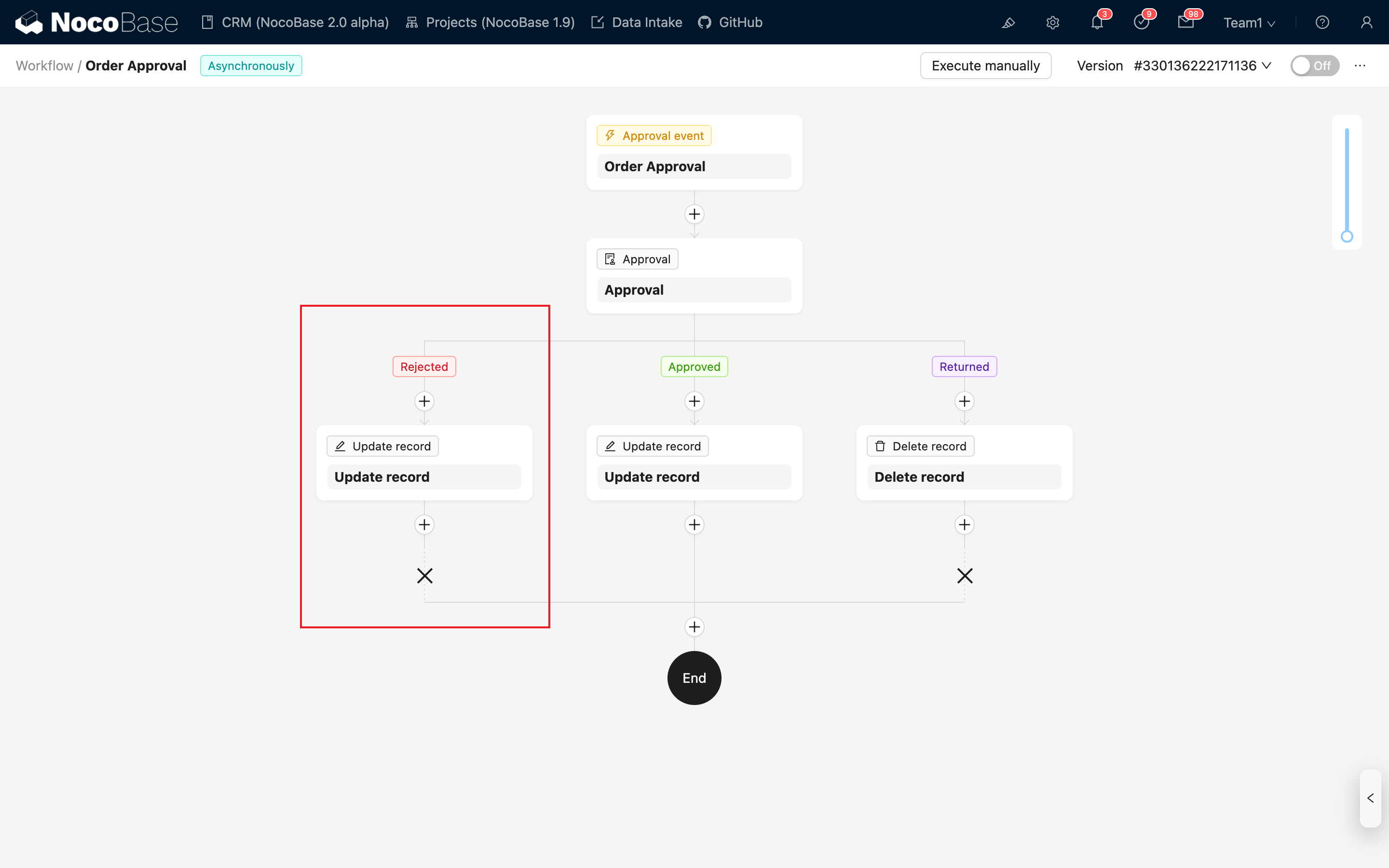
When it comes to workflow setup, the core strength is NocoBase’s workflow engine. It supports pre actions, post actions, custom actions, approvals, Webhooks, scheduled tasks, conditional branches, parallel branches, sub workflows, manual steps, and large language model nodes. Initial setup is heavier, but complex workflows can be handled directly inside the system, which lowers adaptation costs later on.
Its workflows are tied directly to business actions. Create, edit, submit, and approve actions can all be handled within the same workflow. This makes it a strong fit for more system oriented scenarios such as approvals, validation, blocking logic, and manual processing.
Airtable
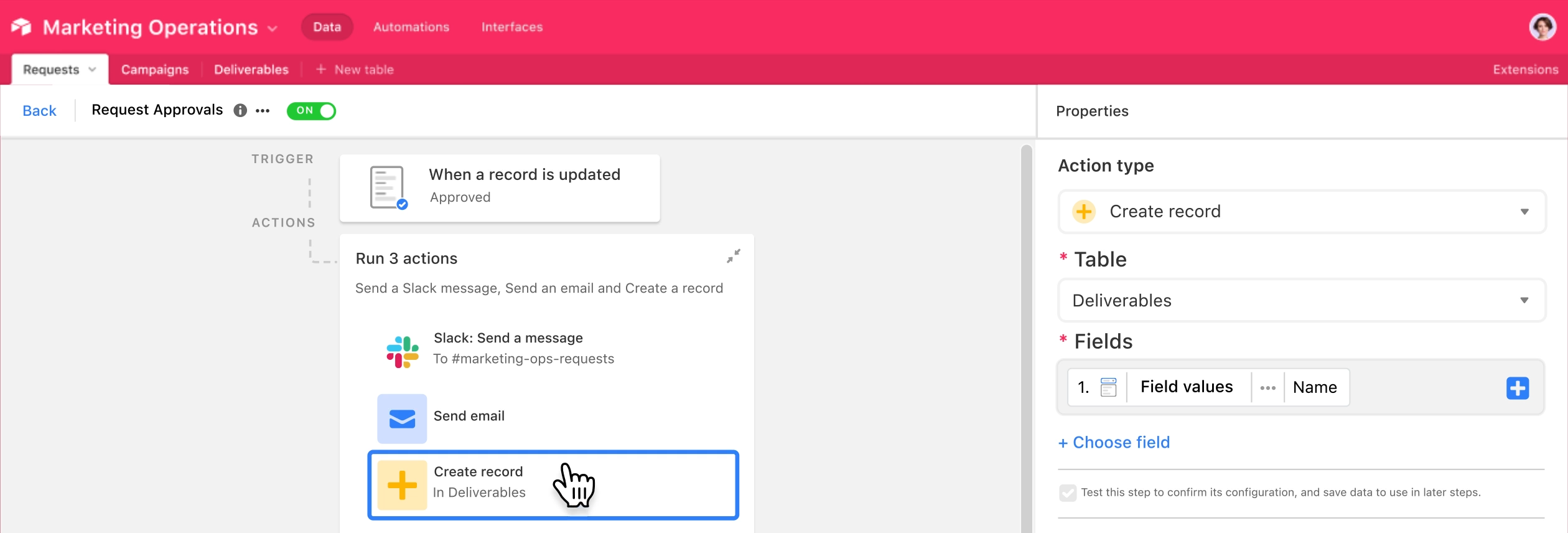
Airtable’s workflow setup is built around triggers + actions. It works well for notifications, syncing, writebacks, integrations, and script execution after events like record creation, field updates, or form submissions. The upfront setup cost is lower, and basic automation can be rolled out more quickly.
That said, its workflow logic still depends on the existing table structure and automation framework. Standard workflows are easy to implement, but once you need more detailed business rules, approval chains, or manual intervention, flexibility starts to narrow. Airtable’s AI assistant Omni can help users create automation workflows directly, which lowers the setup barrier even further, but it does not change that overall limitation.
2.3 Permissions and Collaboration Cost
NocoBase
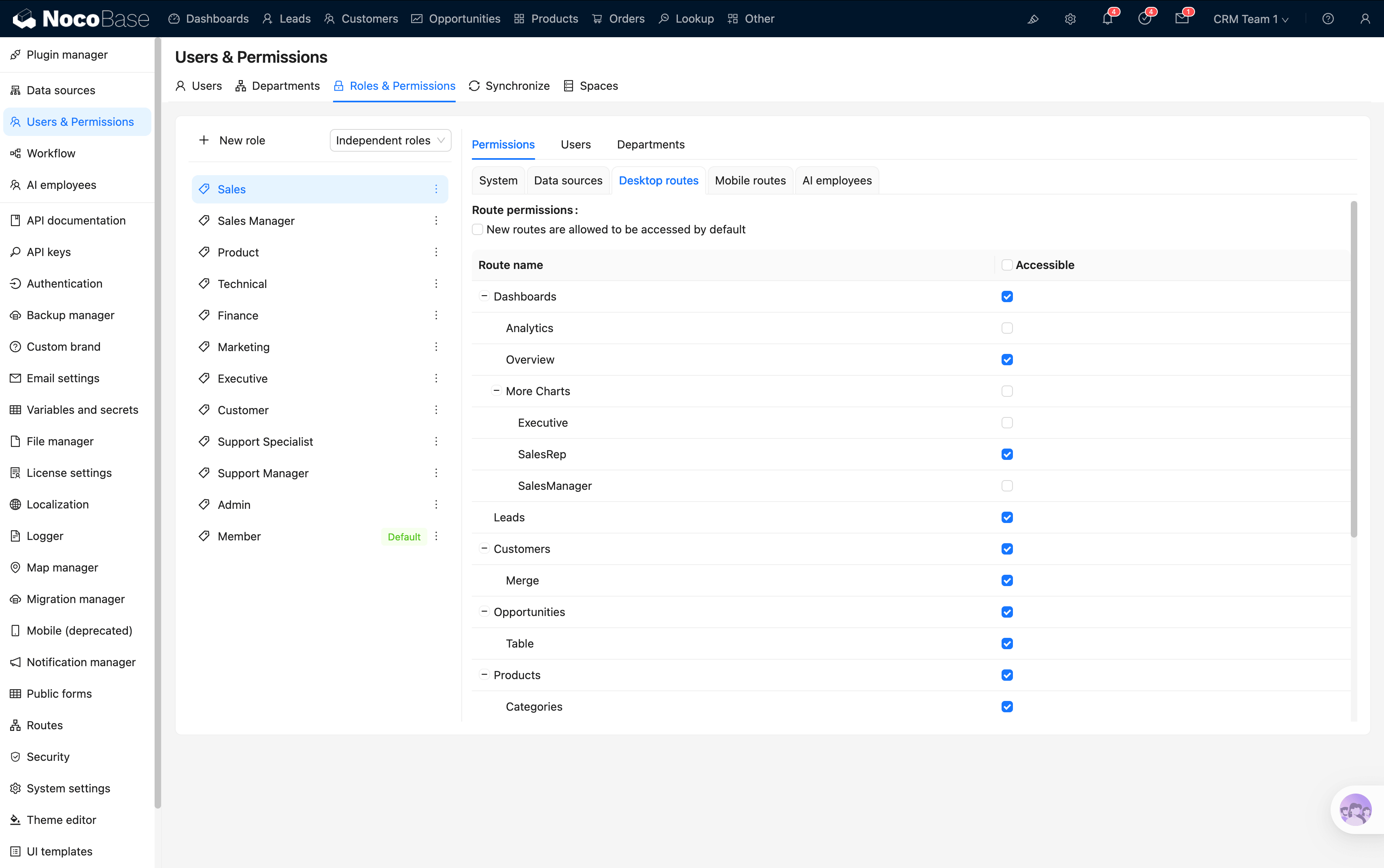
NocoBase’s permission model is more aligned with business systems. Roles, data scope, and field permissions can all be handled within one framework, and the level of control can go all the way down to rows and fields.
This takes more time to configure up front, but once the boundaries are clearly defined, later additions such as new roles, pages, and workflows can all follow the same permission model. In complex collaboration scenarios, the initial setup cost is higher, but the long term adaptation cost is lower.
Airtable
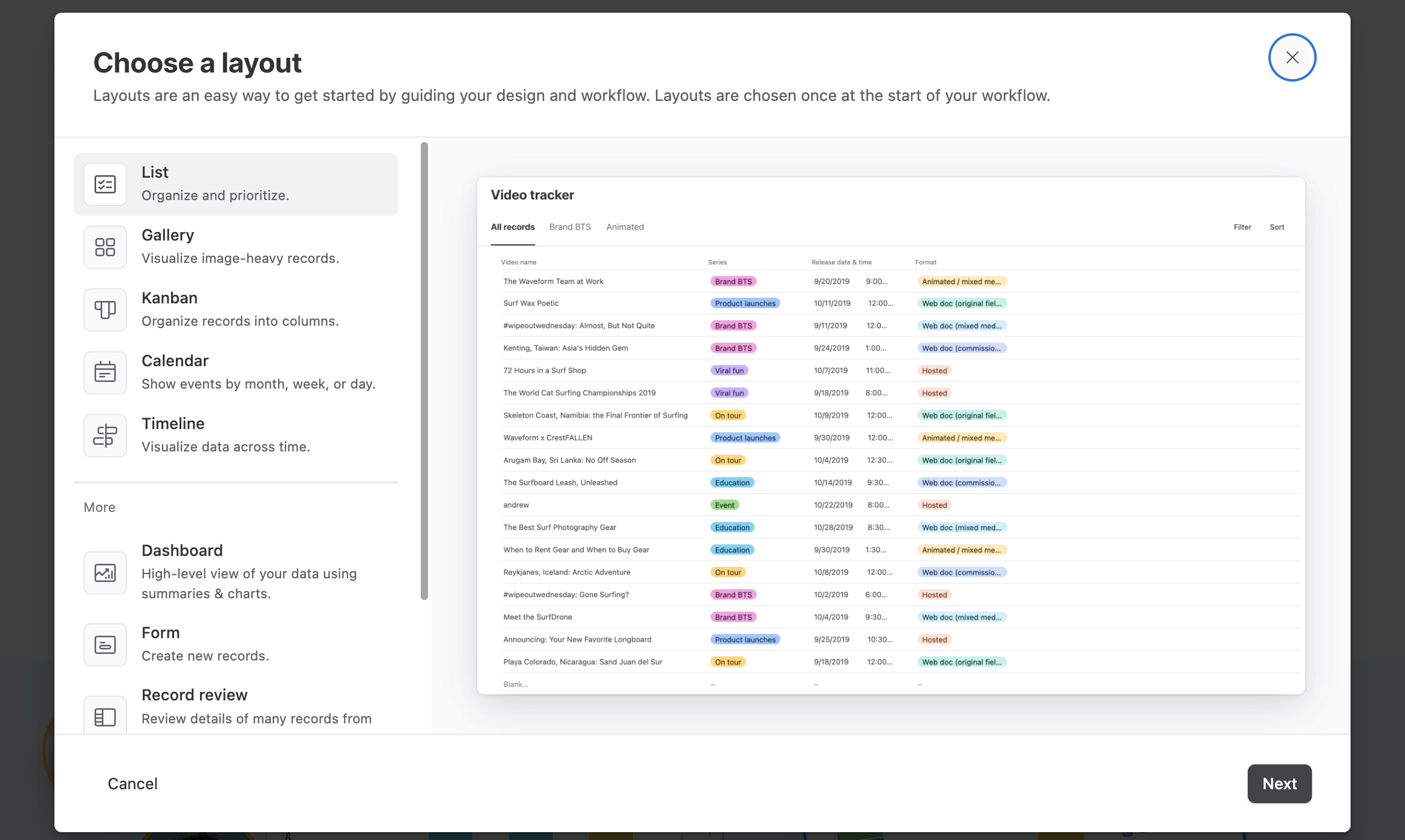
Airtable’s permission structure is more collaboration oriented. Viewing and editing boundaries across workspaces, bases, and interfaces are relatively clear, which makes it easier to quickly define who can see what, who can edit what, and who can access which interface.
That keeps the initial setup cost lower and helps teams start collaborating faster. But its permission model is still shaped by the platform’s own hierarchy. As business needs become more detailed, later adjustments can only happen within that structure, so flexibility becomes more limited.
2.4 Deployment, Maintenance, and Pricing Cost
NocoBase
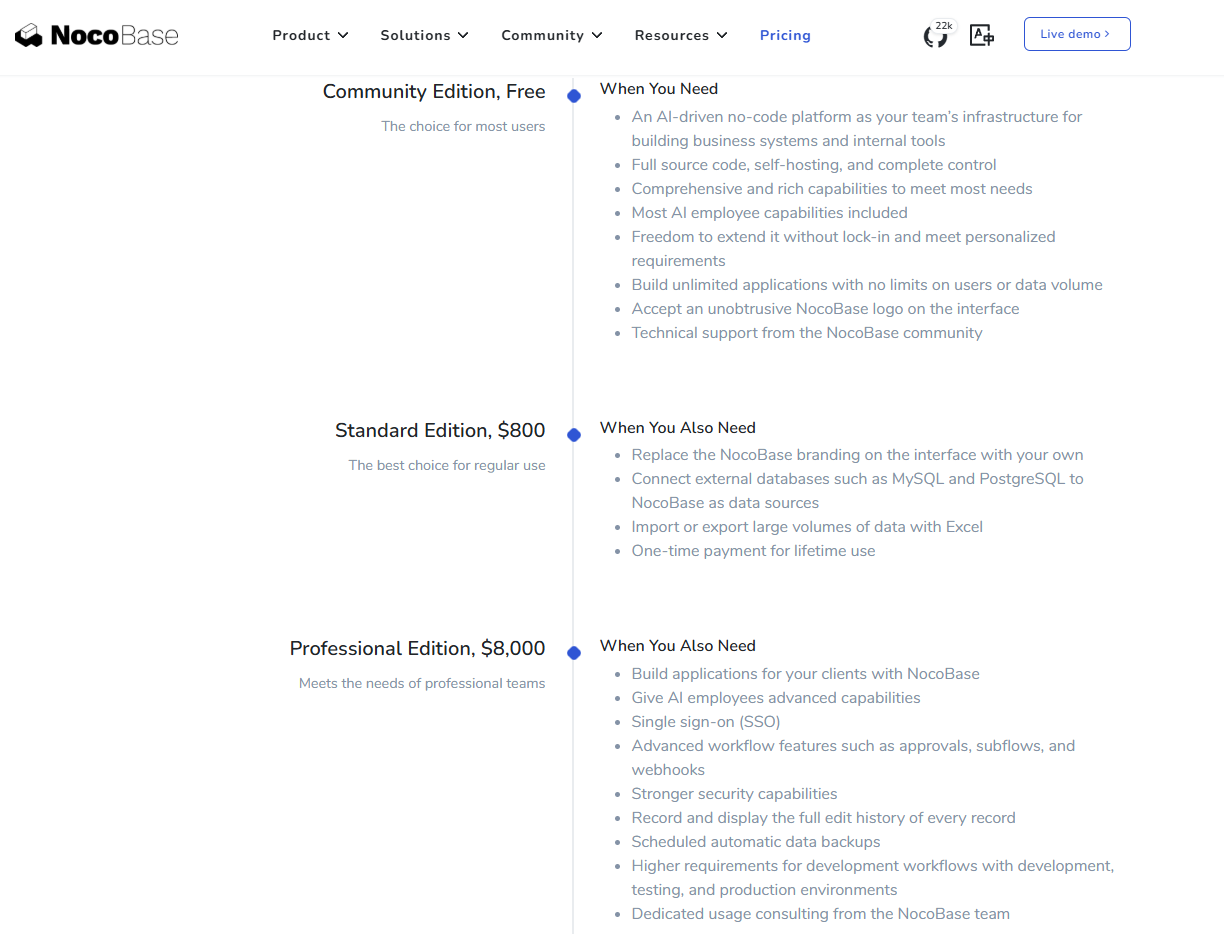
NocoBase’s cost structure mainly has two parts: software licensing and self managed maintenance. The software itself is open source and available to use. Commercial licensing follows a one time payment model rather than charging by user count, app count, or data volume. The Standard edition is USD 800, and the Professional edition is USD 8,000, both as perpetual licenses. On the deployment side, teams manage setup themselves, usually through Docker container deployment. That creates some upfront cost around environment setup, version upgrades, and ongoing maintenance, but as the number of users grows, software licensing cost does not rise with each additional seat.
Airtable
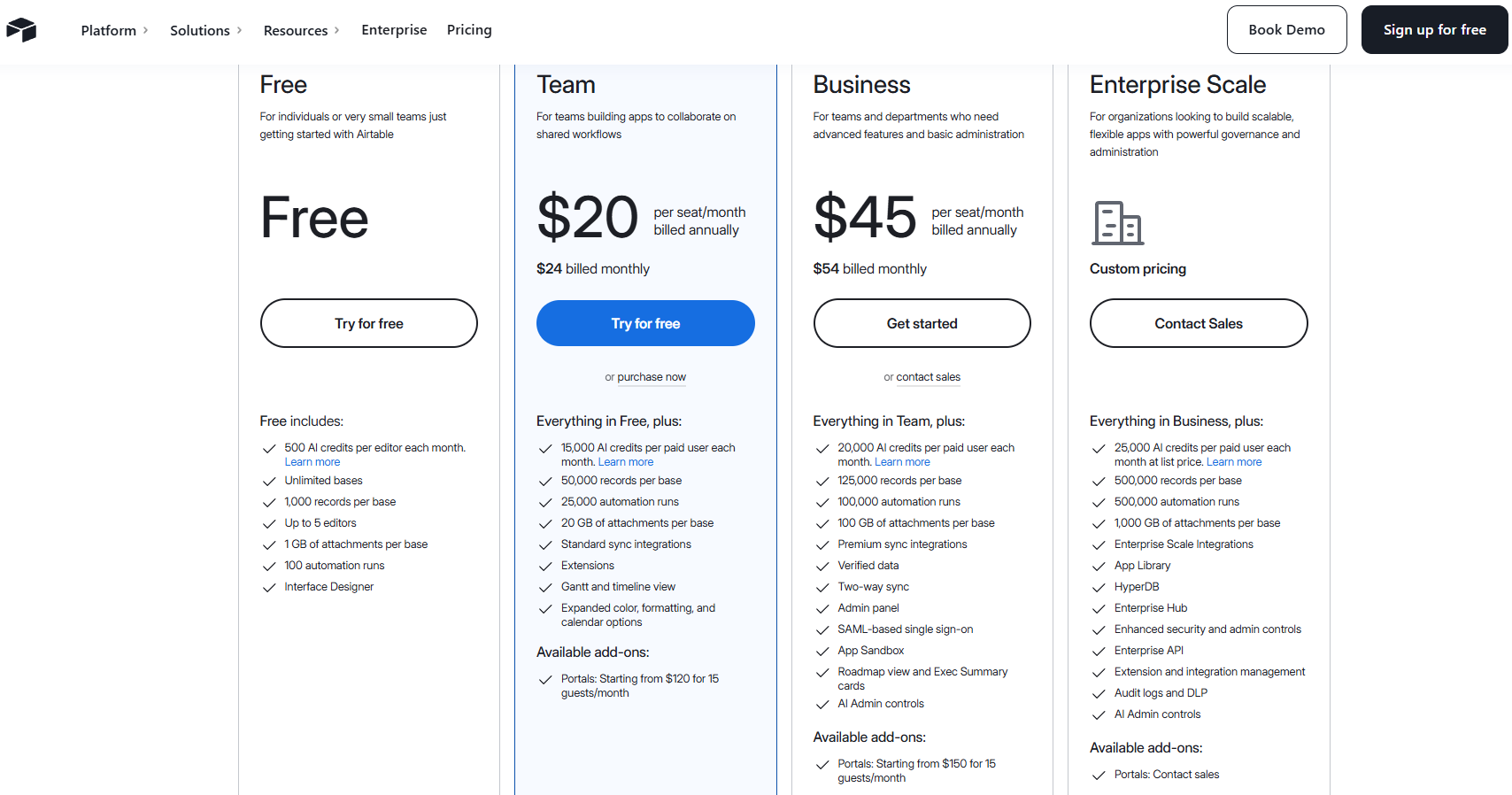
Airtable has a simpler cost structure, centered on recurring subscriptions. Its self serve plans are priced by workspace, with the Team plan at USD 20 per user per month when billed annually and the Business plan at USD 45 per user per month when billed annually. Billing applies to collaborators with comment access or above. Teams do not need to manage deployment or infrastructure themselves, which reduces early launch and maintenance pressure. But as the team grows, software cost continues to rise with the number of seats.
2.5 Long Term Adjustment and Expansion Cost
NocoBase
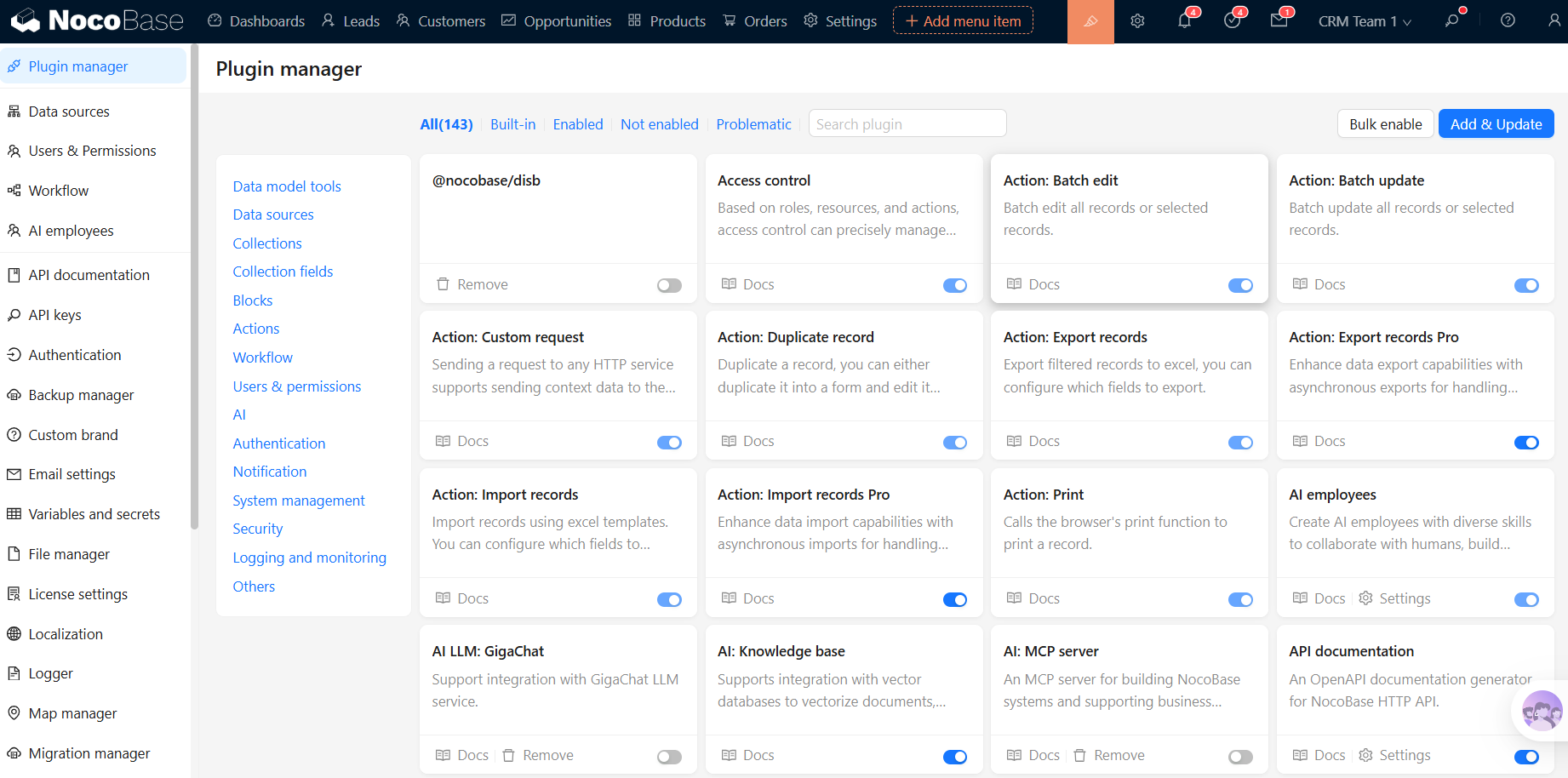
NocoBase’s long term scalability comes mainly from its plugin architecture. Pages, blocks, actions, interfaces, and data sources can all be extended through plugins. That means when you later add new business objects, new pages, or new capabilities, you do not have to keep rebuilding the original structure. For internal systems that will continue to evolve, this foundation is better suited to long term growth.
The cost of long term adjustment shows up more in repetitive daily work. NocoBase’s AI Employees are already built into the system and can work with page structure, data rows, and table structure to support tasks such as querying, analysis, form completion, and business collaboration. Over time, this mainly helps reduce the effort spent on repeated organization, repeated data entry, and repeated configuration.
Airtable
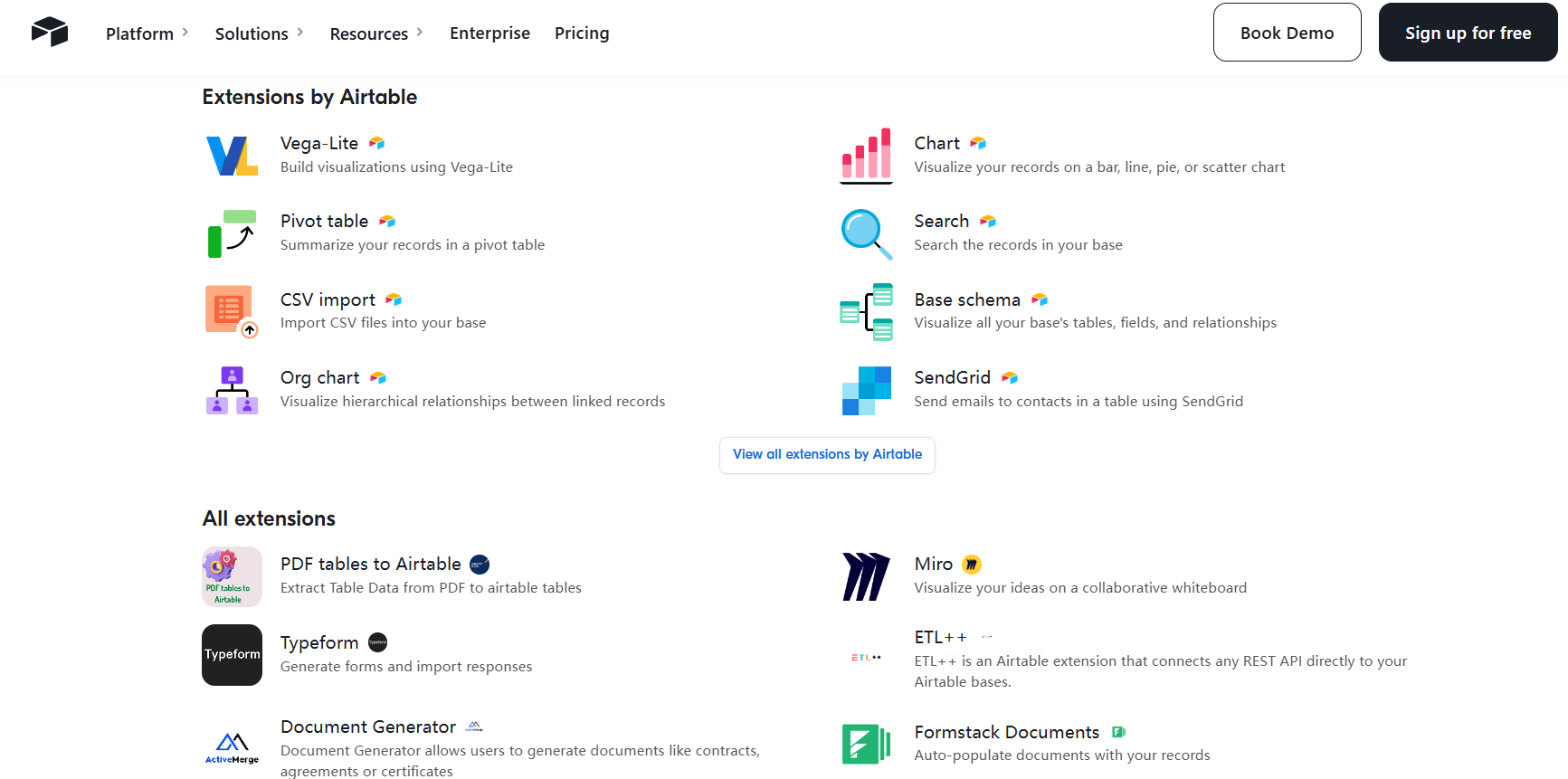
Airtable’s long term changes mainly happen within its existing bases and table structures. Fields, linked records, views, interfaces, and automation workflows can support most day to day updates, but the path for change still stays within the same original framework.
Its expansion model is built on that same structure as well. As business complexity rises, the setup effort saved in the beginning gradually turns into later costs in structural adaptation and rule changes. This becomes especially obvious once relationships multiply and workflows become deeper, because teams have to keep adjusting inside the same framework.
AI Can Reduce Part of the Setup Cost
Both tools can use AI to improve implementation efficiency, because both provide solid documentation and support resources. Many setup questions can be handled first by asking AI to find the right information and organize the steps. For teams that already like working with Agents, general purpose AI tools such as Claude Code can also be used to help build systems in NocoBase.
NocoBase is no longer limited to manual setup or only the built in AI features inside the product. Developers can use AI Agents to generate data models, page layouts, and an initial system prototype through natural language, then simply review and fine tune the results inside the system. This skips a lot of tedious early setup work and significantly reduces upfront operational cost.
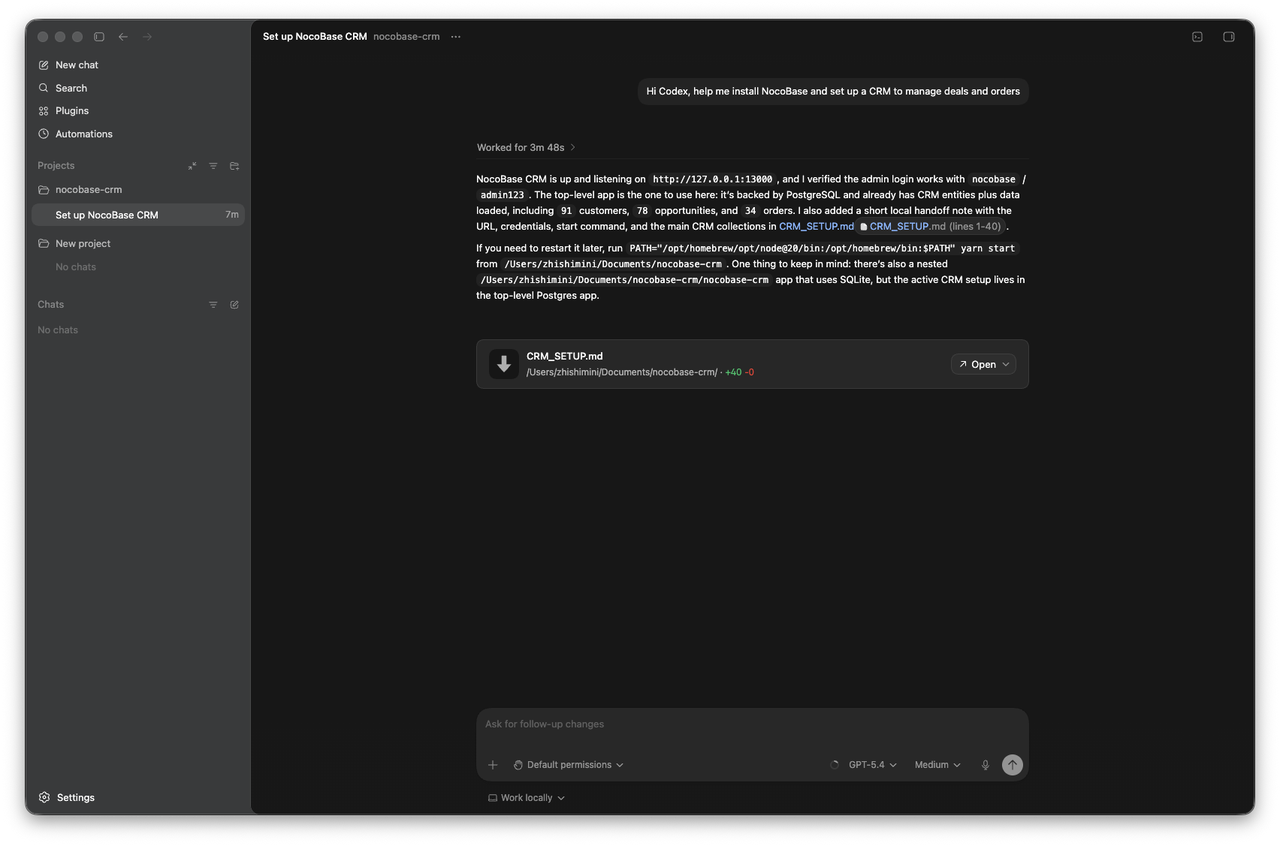
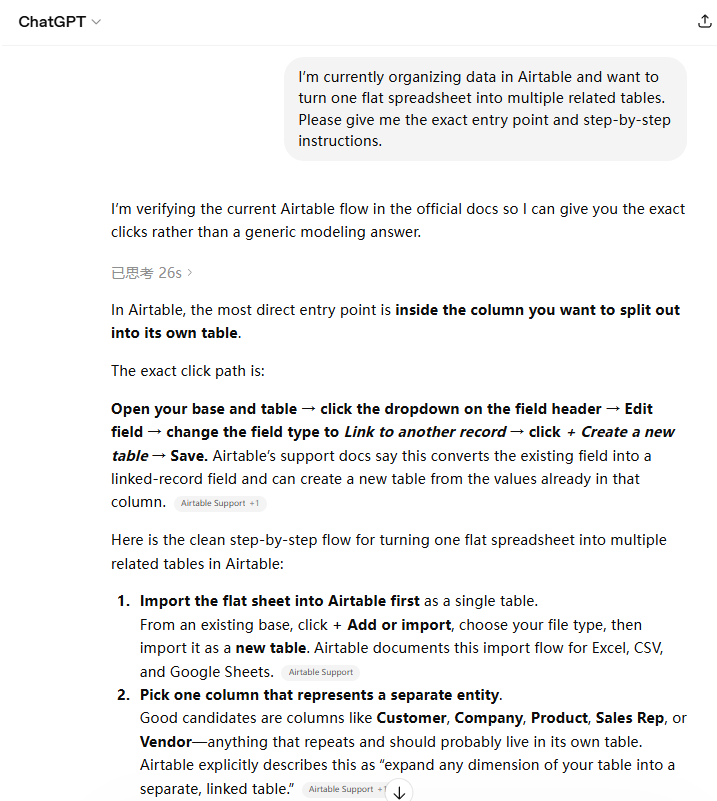
In similar scenarios, Airtable’s AI is used more to help users understand and carry out manual tasks such as turning a field into a linked relationship and then creating a new table.
FAQ
1. I only have one messy Excel file right now, and my goal is to get collaboration running first. Should I choose Airtable first or go straight to NocoBase?
If your current goal is to get online quickly, start collaborating, and organize the spreadsheet first, Airtable is the more direct option. But if you already know you will later need permissions, workflows, external data sources, and internal systems, NocoBase is the better choice if you want to start with a system mindset and avoid another round of structural rebuilding later.
2. We have 20 to 50 collaborators, but not everyone needs edit access. Will Airtable get more expensive over time?
Yes. Airtable mainly charges by editable collaborator seat. As long as someone has edit access to a base, that person counts toward the cost. If your team is likely to keep growing, NocoBase is the better fit: it does not charge by seat, commercial licensing is a one time payment, and long term total cost is easier to control.
3. We want sales to only see their own customers, finance to see amounts, and operations not to see amounts. Which one is a better fit?
NocoBase is the better fit. Its permission model supports row level, field level, and data scope control, which is much closer to real business needs.
4. Can I start with Airtable and move to NocoBase later when workflows become more complex?
Yes, but you need to be ready for the cost of a second migration. If you can already tell from the beginning that your needs will grow into more complex workflows and systems, it is usually better to start directly with NocoBase. Many of the capabilities Airtable offers can also be handled there.
5. I am still not familiar with the platform. Can I first use AI to understand the steps clearly, and then start building?
Yes.
Airtable’s AI assistant Omni can help you build, edit, and search bases, and can also assist with automation setup. NocoBase’s AI Employees are already involved in system building, data analysis, and business operations. For beginners, using AI first to understand the path can genuinely reduce the learning curve.
6. We do not want to keep paying by headcount and care more about long term total cost. Which one should we choose?
NocoBase is the better fit.
Airtable’s cost keeps rising as the number of editable collaborators increases. NocoBase uses a one time licensing model. Self hosting does bring maintenance costs, but the software licensing itself is more stable and better suited to long term use.
Thank you for your interest in products like Airtable and NocoBase. If this was helpful, feel free to share it with others who are also comparing tools or planning a system migration.
Related reading:
- 4 Ways to Quickly Build Web Apps from Excel Data
- Not Just PostgreSQL: Comparing 5 No-Code/Low-Code Platforms with External Database Support
- Open Source Project Management Tool Selection Guide, 2026 Edition
- How to Build a Custom CRM with PostgreSQL
- Top 20 AI Projects on GitHub to Watch in 2026: Not Just OpenClaw
- Best Open Source AI CRM: NocoBase vs Twenty vs Krayin
- Top 3 Open Source ERP with AI on GitHub: NocoBase vs Odoo vs ERPNext
- 5 Most Popular Open-Source AI Project Management Tools on GitHub