

📝 Note: This article was last updated on Jan. 21, 2026. We regularly update the information to ensure you have the latest insights! 😊
Introduction
In internal business operations, Excel remains one of the most widely used management tools.
Sales quotes, shift schedules, operational reports… a large amount of critical business information is stored in Excel spreadsheets, which have gradually become the most familiar and most relied upon data carrier for many teams.
However, once these spreadsheets are edited simultaneously by multiple roles and teams, issues such as version conflicts, poor access control, and inconsistent data definitions become almost unavoidable.
Recently, while browsing Reddit, I noticed ongoing discussions among professionals from different industries and companies of various sizes around the same question.
Is there a more suitable tool to replace Excel?
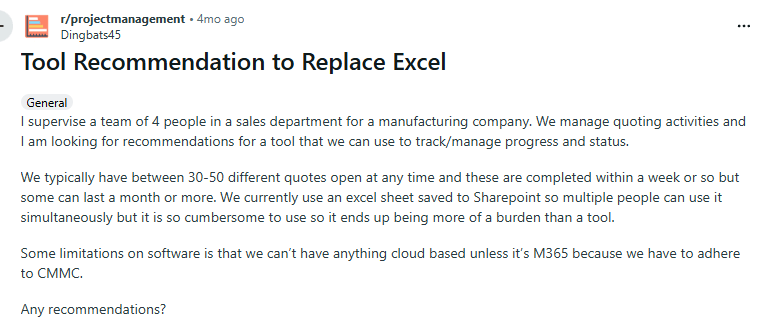
These discussions consistently point to similar problems:
in collaborative, multi user environments, spreadsheets are difficult to keep in sync, changes lack clear audit trails, and permission and workflow capabilities are limited, making Excel increasingly unable to support more complex business management needs.

Many suggestions appear in the community, but the tools mentioned most often are familiar, established products such as Google Sheets and Smartsheet.
💡 Read more: The 8 Best Google Sheets Alternatives (Specs & Pricing)
But are these tools truly suitable for every company, or for every stage of a company’s growth?
With this question in mind, this article goes beyond repeating these “well known” options. Instead, based on real world internal operations and different management needs and usage patterns, it introduces six internal management software options that can replace Excel in different scenarios.
💬 Hey, you’re reading the NocoBase blog. NocoBase is the most extensible AI-powered no-code/low-code development platform for building enterprise applications, internal tools, and all kinds of systems. It’s fully self-hosted, plugin-based, and developer-friendly. → Explore NocoBase on GitHub
These products include both SaaS solutions and open source alternatives that can be used in similar contexts. Based on how companies actually use Excel, they are grouped into several categories.
- Business operations tools: NocoBase (open source), monday work management (SaaS)
- Collaboration and spreadsheet tools: NocoDB (open source), Airtable (SaaS)
- Internal tools platforms: Appsmith (open source), Retool (SaaS)
1.Business Operations Tools
This category of products is typically used to support core business data and process logic.
Business records, status rules, and collaboration workflows that were previously maintained in Excel can be restructured into clear data models, access controls, and process configurations, transforming fragmented spreadsheet usage into configurable business systems.
NocoBase
- Product type: Business system building platform (no code / low code)
- Open source / closed source: Open source (Apache-2.0)
- Deployment model: Self hosted
- Target users: IT teams, business and functional departments, cross department collaboration scenarios
- Official website: https://www.nocobase.com
- GitHub: https://github.com/nocobase/nocobase
- GitHub Stars: 21.1k
- Documentation: https://v2.docs.nocobase.com/
Overview
NocoBase is an open source, AI enabled no code / low code platform for building internal applications, operational systems, and management tools.
It is designed for organizations that require internal operations management or cross team collaboration and is deployed on the company’s own servers or private cloud, making it well suited for teams with strong requirements around data ownership and system control.
From a positioning standpoint, NocoBase is centered on data models and focuses on building internal business systems rather than replicating spreadsheet based collaboration, which makes it better suited to managing complex business structures.
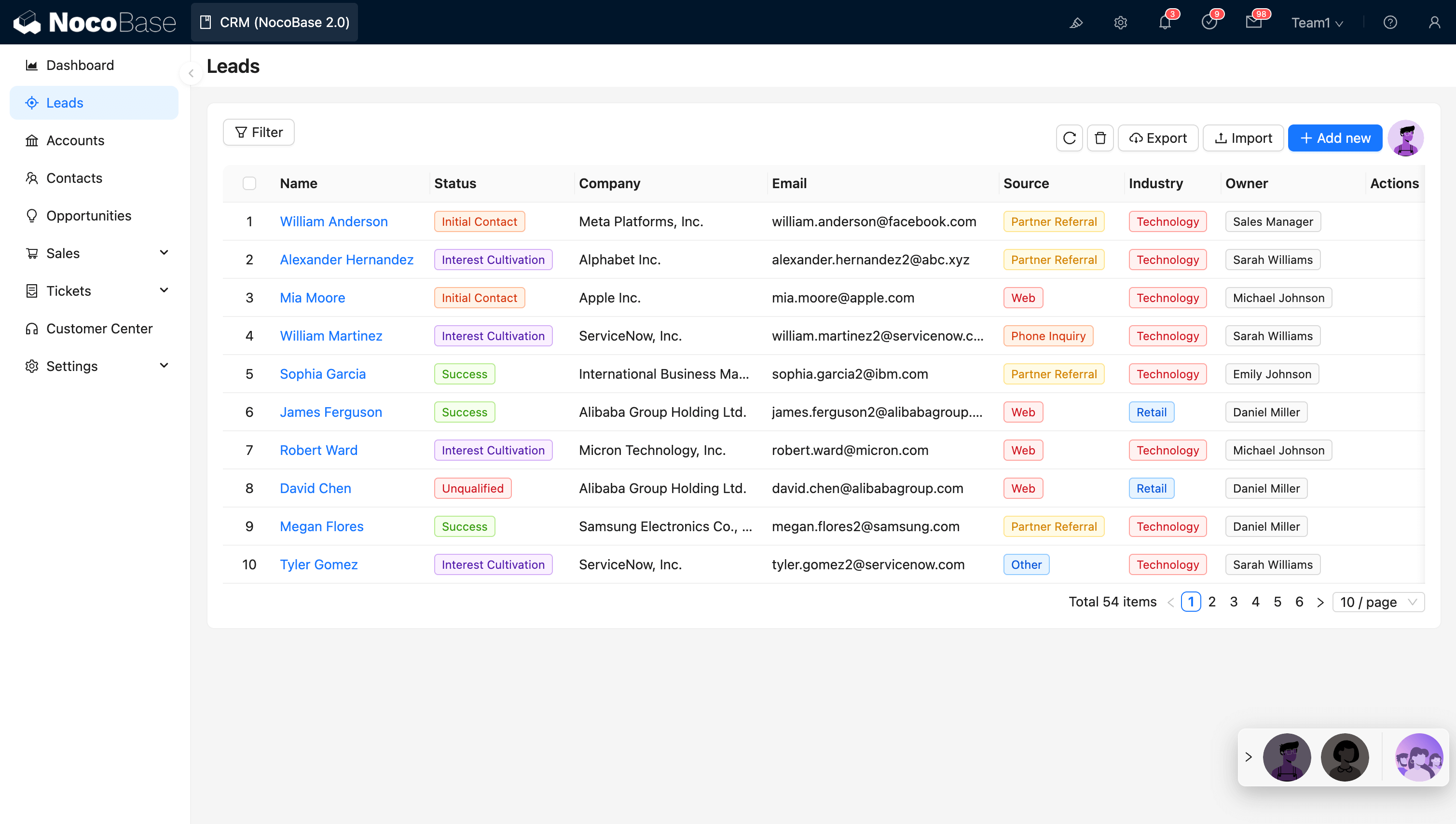
In practice, NocoBase enables organizations to consolidate business data, status rules, and collaboration relationships that were once scattered across Excel files into structured data models, access controls, and process logic. The result is a system that is clearer, easier to govern, and more scalable, while reducing reliance on manual spreadsheet maintenance.
Core capabilities
Data model driven management
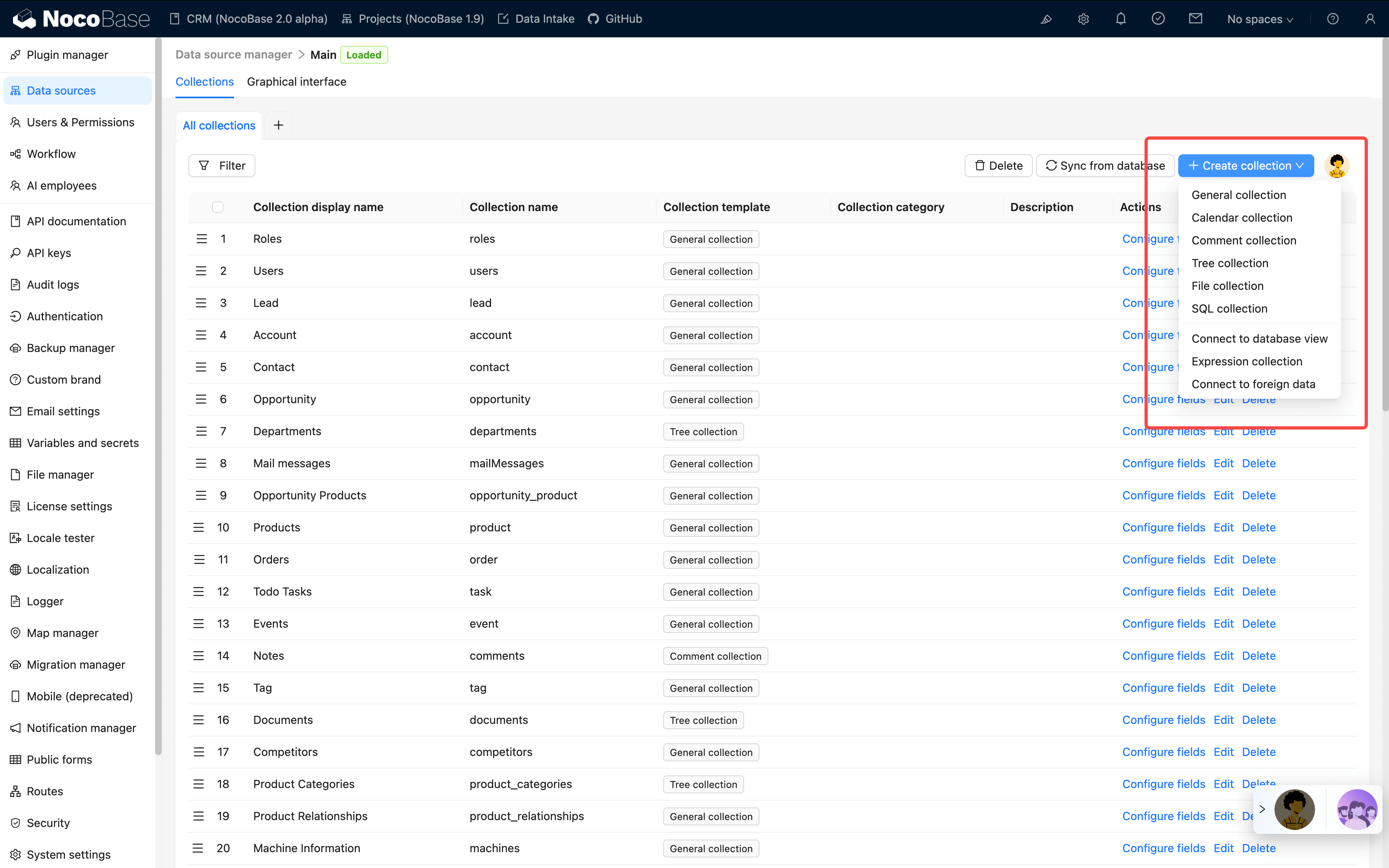
NocoBase follows a data first design approach, defining business data structures before building interfaces and interaction logic. Because data and presentation are decoupled, the same dataset can be displayed as tables, forms, kanban boards, or charts. This makes it more effective for representing complex, real world business relationships than forcing all information into a single spreadsheet.
Multi role collaboration with fine grained access control
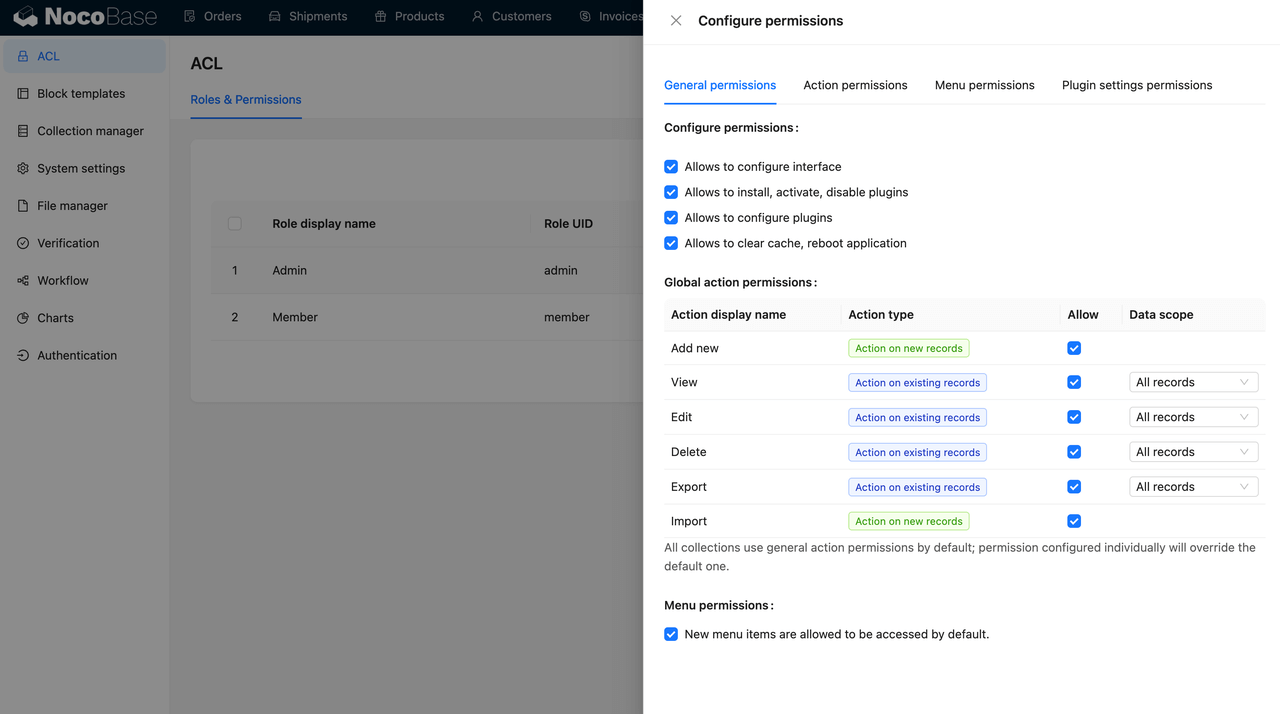
The platform provides a comprehensive permission system covering roles, fields, data rows, and actions. Through configuration, organizations can clearly define what each role can view and operate, addressing Excel’s limitations in collaborative environments where permissions are coarse and accountability is unclear.
AI employees
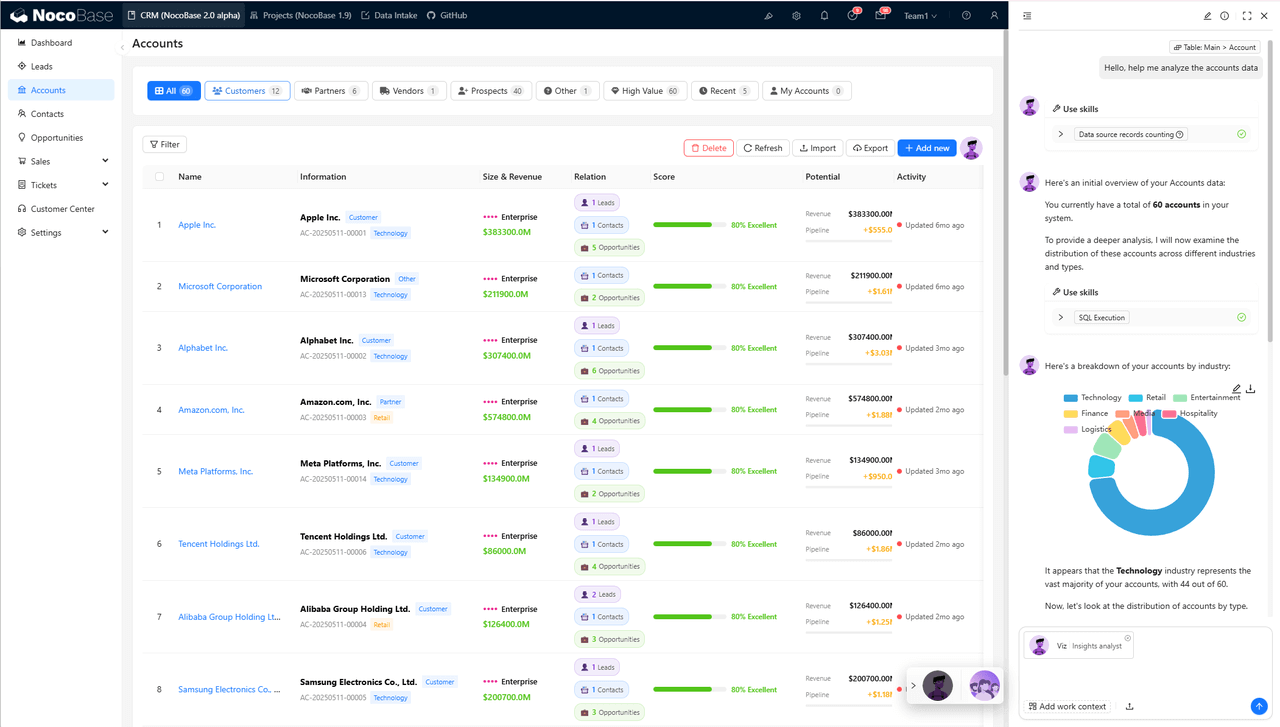
NocoBase embeds AI capabilities into business systems in the form of “employees”. These AI employees can understand the current context, including pages, data rows, and table structures, and perform practical actions such as querying data, running analyses, and filling out forms. They support data analysis, content assistance, and process automation, rather than functioning as simple conversational tools.
Typical use cases
CRM and lead management, project and task management, internal approval workflows and form systems, operational reporting and management ledgers, ERP modules such as order, inventory, and supplier management, and customized internal business systems
monday work management
- Product type: Business operations management platform
- Open source / closed source: Closed source (SaaS)
- Deployment model: SaaS
- Target users: Business teams, functional departments, cross team collaboration scenarios
- Official website: https://monday.com/work-management
- Documentation: https://support.monday.com/hc/en-us
Overview
monday work management is a SaaS work management platform focused on collaboration and process visualization. It is primarily used to organize team work, track progress, and coordinate cross department efforts, and is delivered entirely through the cloud without the need for self managed infrastructure.
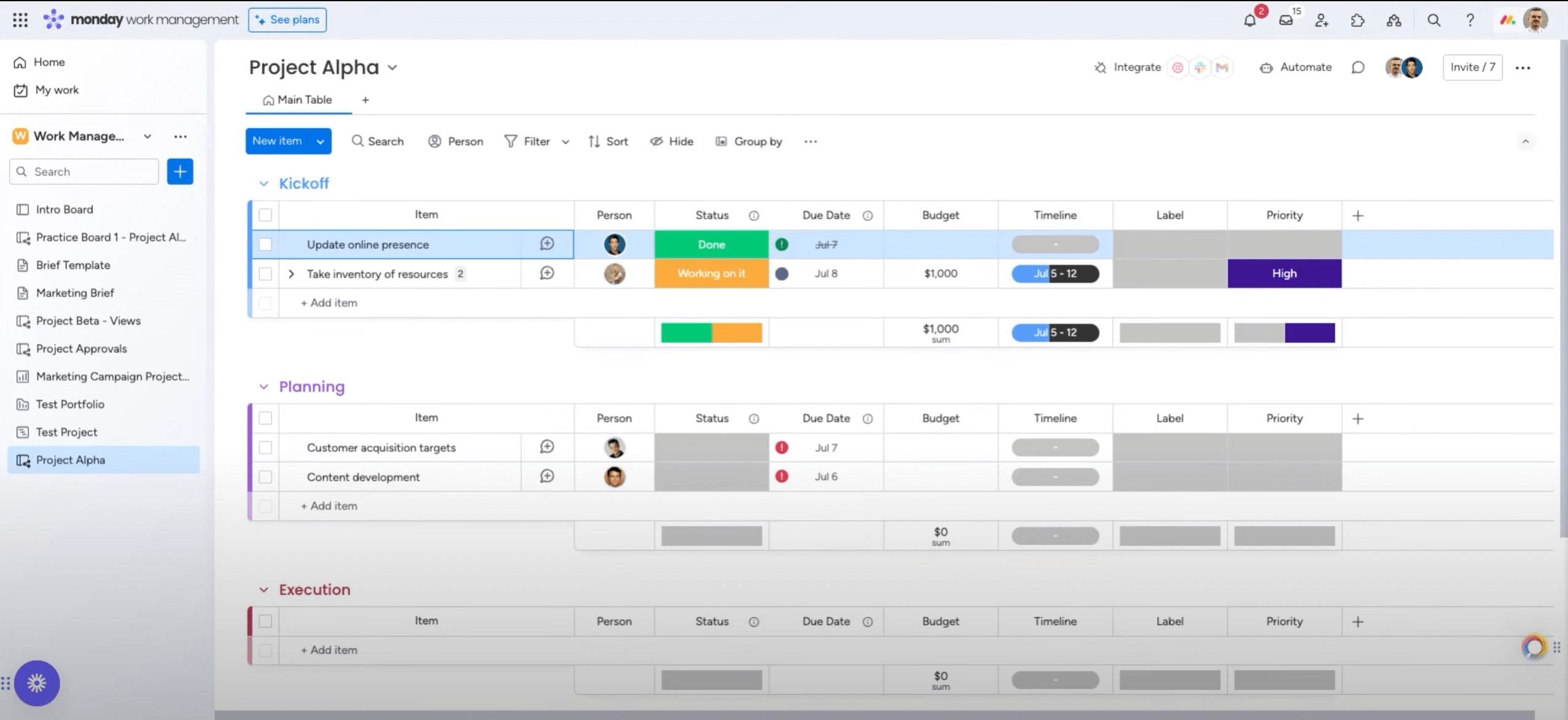
In internal operations, monday work management is often used to replace Excel for task tracking, progress management, and collaborative records. Status updates, owners, and deadlines that require manual maintenance in Excel are handled through real time synchronized boards, reducing communication overhead and duplicated effort.
Core capabilities
Structured boards and multiple views
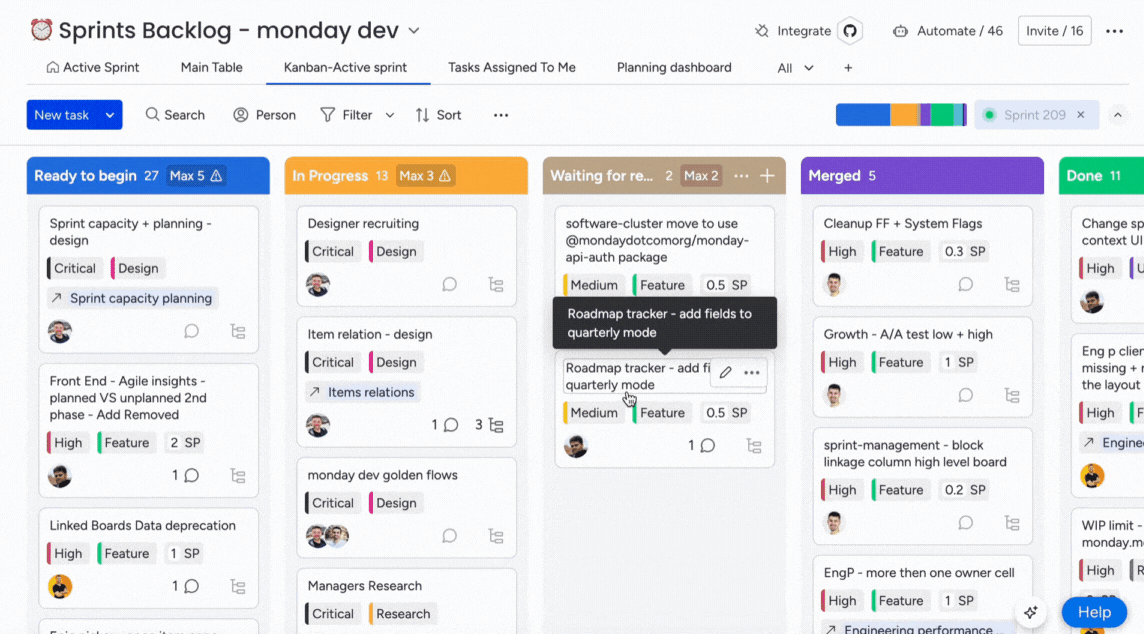
Boards serve as the core data structure in monday work management. The same data can be viewed as tables, boards, timelines, or calendars, making it easier to manage task statuses, project progress, and workflow milestones in a more visual and intuitive way than traditional spreadsheets.
Real time collaboration and synchronization
The platform supports multiple users working simultaneously, with all changes synchronized in real time and fully logged. Compared with repeatedly sharing and merging Excel files, monday is better suited for continuous collaboration and day to day operations.
Intelligent assistance and content generation
Through its AI capabilities, monday work management provides contextual assistance such as suggesting resource allocation, generating summaries, organizing meeting notes, and creating automation templates. These features reduce manual information handling and allow teams to focus more on execution and strategic work.
Typical use cases
Project and task management, cross department collaboration, operational progress tracking, work record management, and lightweight business process management
2. Collaborative Spreadsheet Tools
This category of tools primarily addresses a single issue: Excel performs poorly as a shared spreadsheet and data container in collaborative environments.
Their focus is on online collaboration, structured tables, and flexible views, rather than complex workflows or business logic.
NocoDB
- Product type: Collaborative spreadsheet data management tool
- Open source / closed source: Open source (AGPL-3.0)
- Deployment model: Self hosted
- Target users: Business teams, data teams, and small to medium sized teams that need collaborative data management
- Official website: https://nocodb.com
- GitHub: https://github.com/nocodb/nocodb
- GitHub Stars: 61.1k
- Documentation: https://nocodb.com/docs/product-docs
Overview
NocoDB is an open source collaborative spreadsheet tool, often positioned as an open source alternative to Airtable. It turns existing relational databases such as MySQL and PostgreSQL directly into collaborative online spreadsheets, enabling non technical users to view and maintain data in a familiar, Excel like interface.
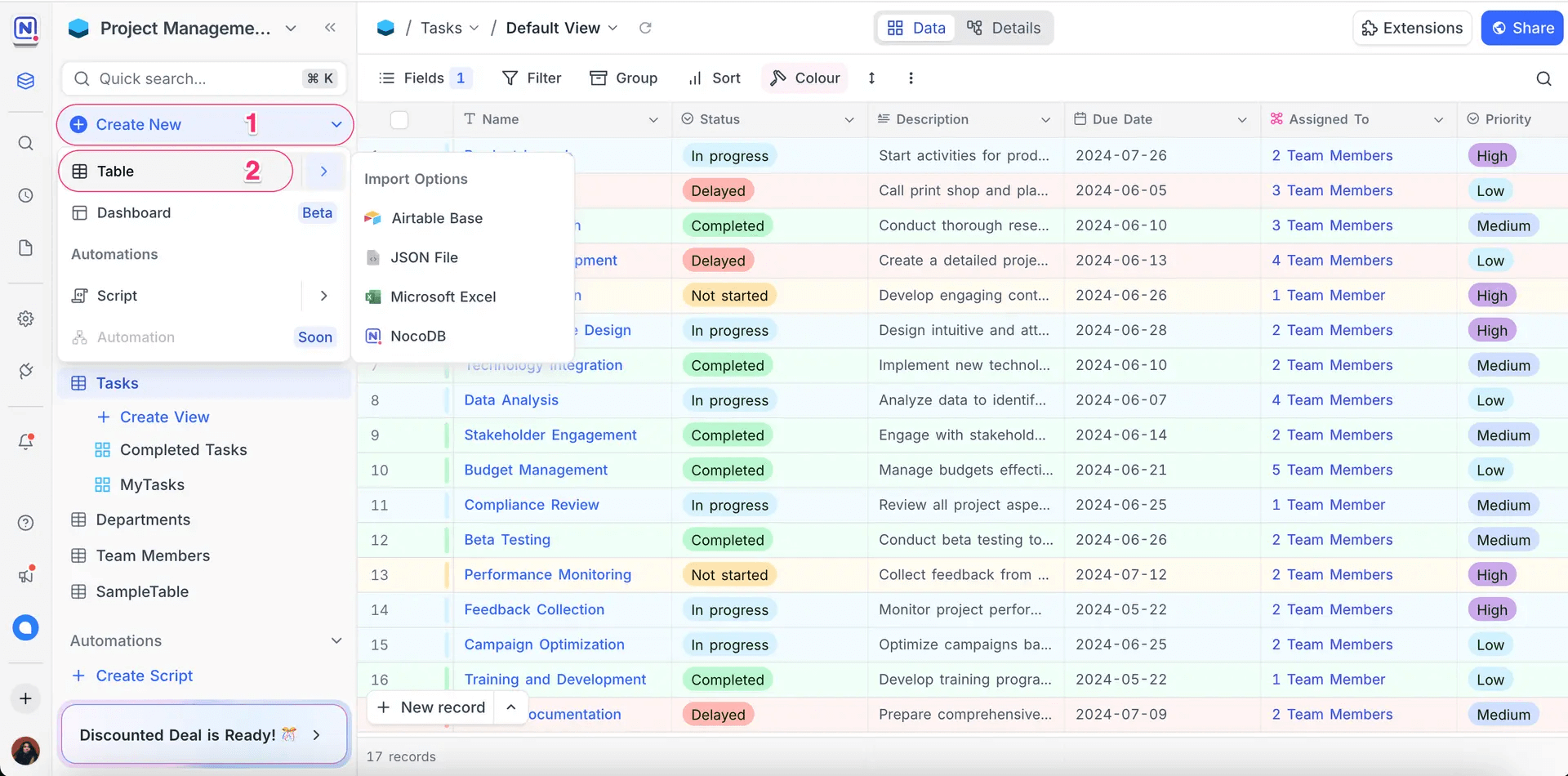
NocoDB is typically used to replace Excel in scenarios such as data records, list management, and shared spreadsheets. Data that was previously scattered across multiple Excel files can be centralized in a database and collaboratively maintained through a unified spreadsheet interface.
Core capabilities
Database backed spreadsheet collaboration
NocoDB works directly on top of existing databases, mapping database tables to editable online spreadsheets. Users can view and update data without needing to understand SQL, significantly lowering the barrier to collaborative data management.
Multi user collaboration with basic access control
The platform supports multiple users editing the same data simultaneously and provides basic permission controls. Compared with repeatedly sharing Excel files, NocoDB avoids version conflicts, but its access control remains relatively coarse, making it better suited for lightweight collaboration scenarios.
AI assisted field and view recommendations
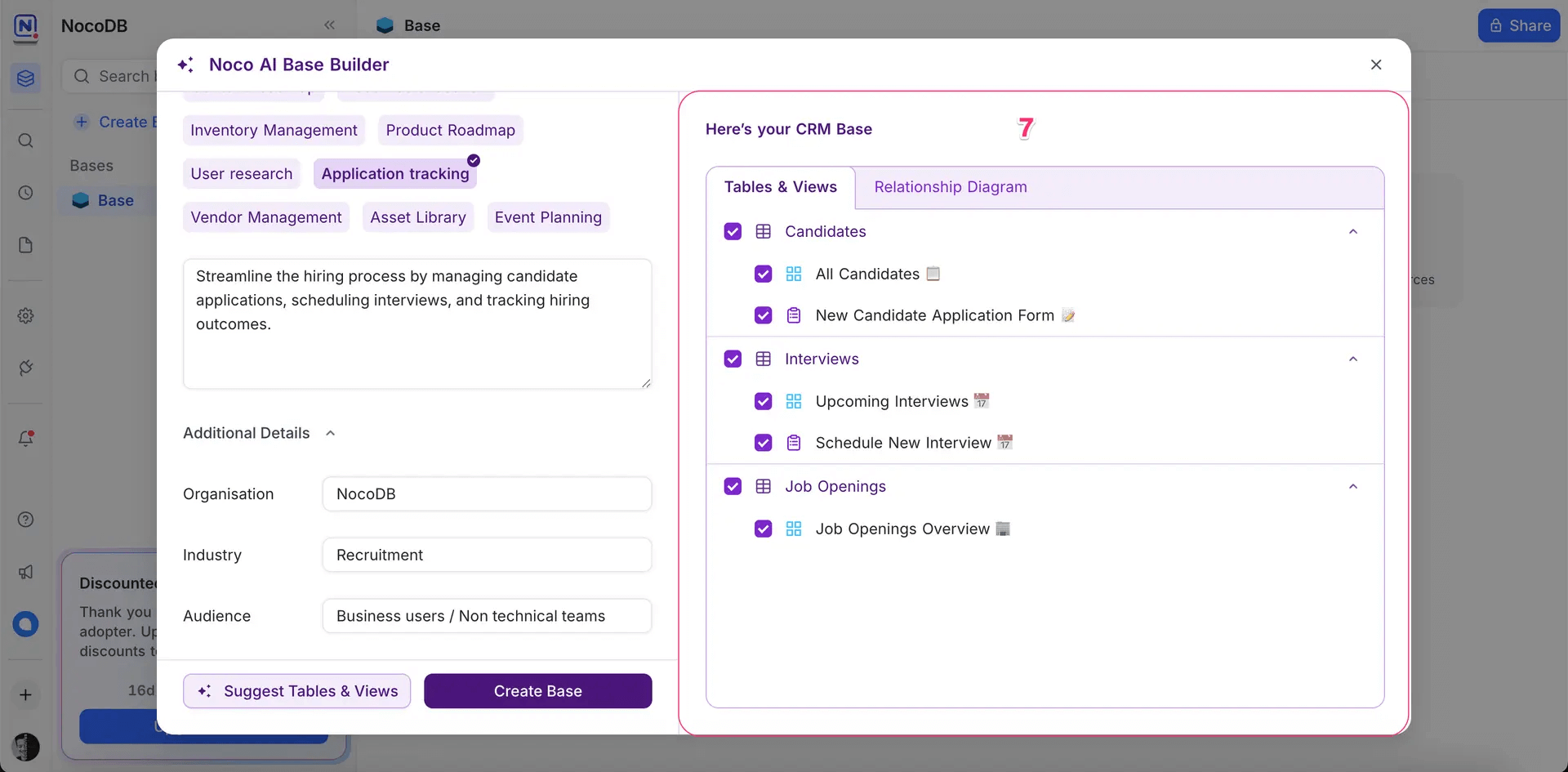
When designing data structures, NocoAI offers recommendations for fields, relationships, and views based on the current context. This reduces the cognitive load associated with database design and improves setup efficiency. Even users without database experience can quickly configure basic tables and views.
Typical use cases
Collaborative data tables, operational data records, content or resource list management, lightweight internal data maintenance, Airtable alternatives
Airtable
- Product type: Collaborative spreadsheet data management platform
- Open source / closed source: Closed source (SaaS)
- Deployment model: SaaS
- Target users: Business teams, operations teams, product and project teams
- Official website: https://www.airtable.com
- Documentation: https://www.airtable.com/guides
Overview
Airtable is a SaaS data management platform built around collaborative spreadsheets. By combining tables, multiple views, and lightweight automation, it helps teams manage structured data more efficiently. Its core focus is enabling data to be collaboratively edited and visualized in spreadsheet form.
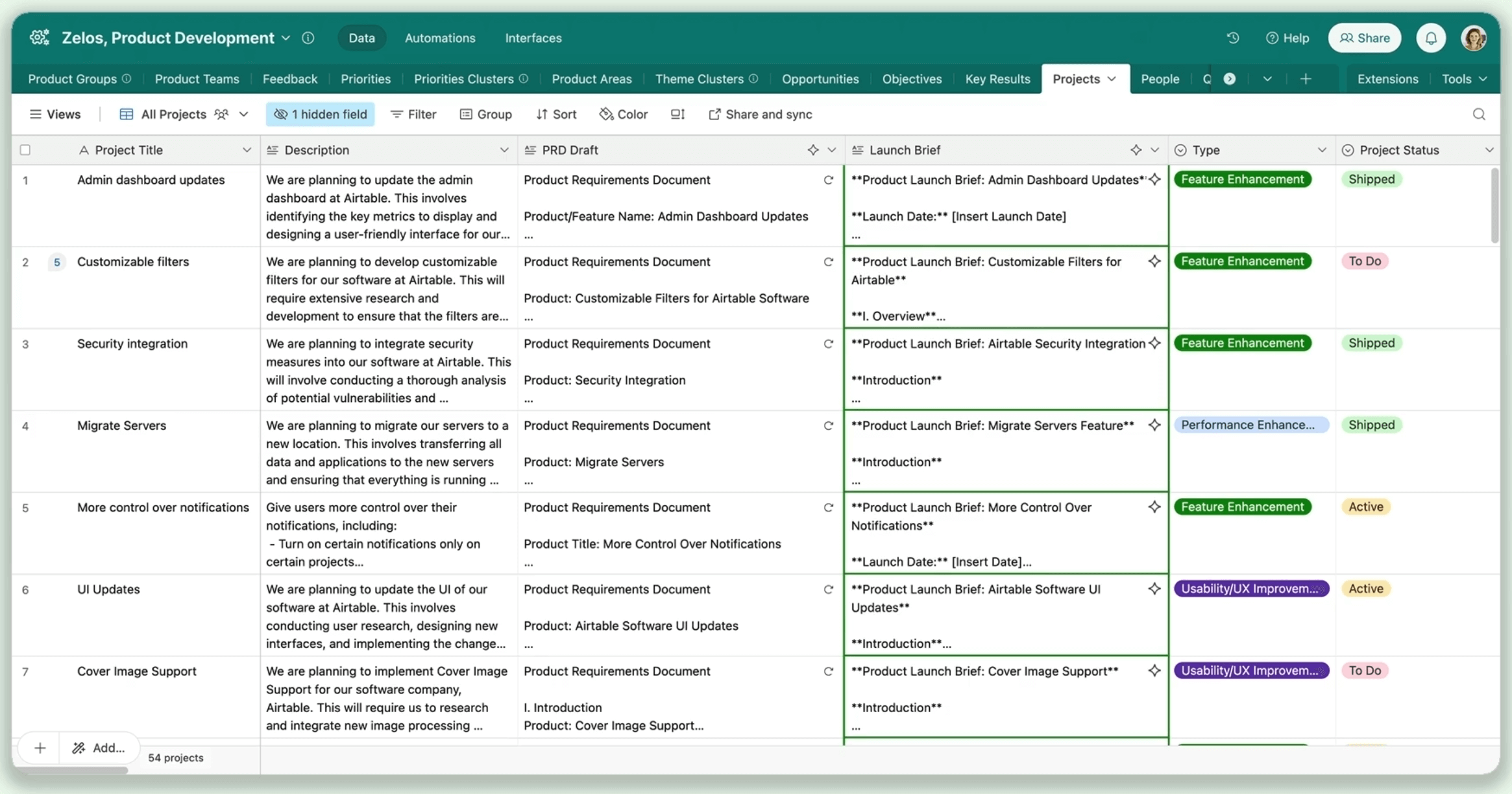
Airtable is commonly used to replace Excel in scenarios such as shared data tables, operational records, and cross team information synchronization. Data that once depended on shared Excel files and manual updates can be managed through online tables with real time collaboration.
Core capabilities
Multi view collaborative tables
In addition to standard spreadsheets, Airtable provides views such as kanban boards, calendars, and timelines. The same dataset can be managed from different perspectives, making it well suited for tasks, resources, and status driven information.
Flexible field types and lightweight rules
The platform offers a rich set of field types along with basic formula and validation capabilities. Users can perform simple calculations, checks, and relationships without writing code, reducing the ongoing maintenance cost of spreadsheets.
Workflow focused AI assistance
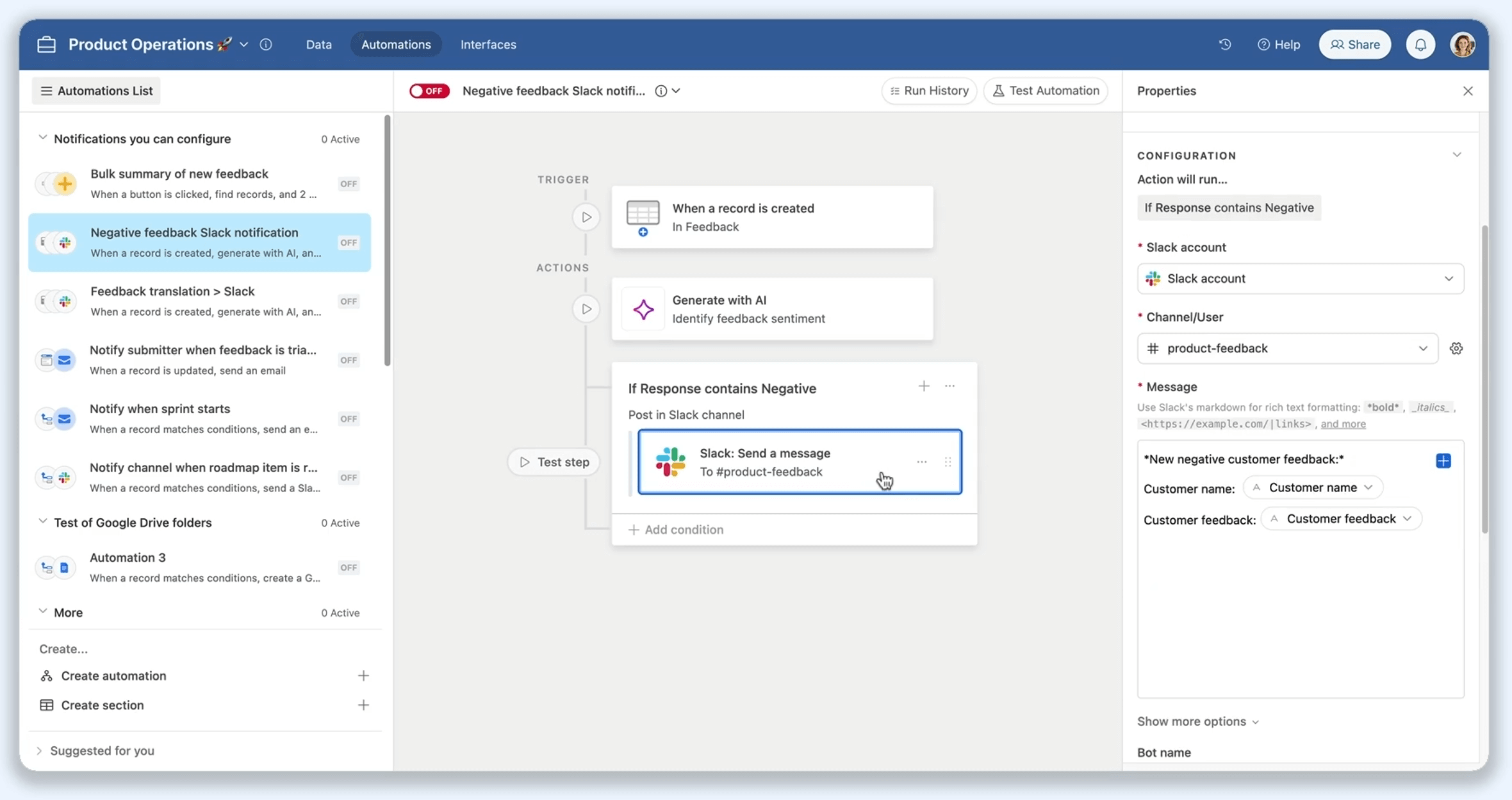
Rather than acting purely as a content generator, Airtable’s AI is designed to support existing workflows. It can be embedded into automations to trigger summaries, content completion, or data routing, allowing teams to introduce a degree of intelligence while maintaining familiar spreadsheet based collaboration.
Typical use cases
Collaborative spreadsheets, operational data management, project and resource records, content and asset management, cross team information synchronization
💡 Read more: Is Airtable Too Expensive? 5 Self-Hosted Alternatives Compared by Cost & Features
3. Internal Tools
In these scenarios, Excel is used primarily as an operational interface.
Typical use cases include data entry, status updates, approval actions, and simple management views. Tools in this category provide configurable management interfaces that replace direct interaction with spreadsheets.
Appsmith
- Product type: Low code platform
- Open source / closed source: Open source (Apache-2.0)
- Deployment model: Self hosted / SaaS (commercial edition)
- Target users: IT teams, engineering teams, and business teams building internal management interfaces
- Official website: https://www.appsmith.com
- GitHub: https://github.com/appsmithorg/appsmith
- GitHub Stars: 38.8k
- Documentation: https://docs.appsmith.com/
Overview
Appsmith is an open source low code platform for building internal tools, designed to rapidly create management interfaces and operational back offices for internal use. By combining visual components with data source integrations, teams can quickly build web interfaces for data entry, status updates, and administrative actions.

In internal operations, Appsmith often replaces Excel as the interface for interacting with data. Tasks such as data entry, status updates, and simple approval steps that were previously handled in spreadsheets can be moved into clearer, more structured management interfaces with well defined access controls.
Core capabilities
Visual interface construction
Appsmith offers a wide range of ready made UI components, including tables, forms, buttons, and charts.
Through drag and drop and configuration, users can quickly assemble internal management pages without developing front end interfaces from scratch.
Multiple data source integration
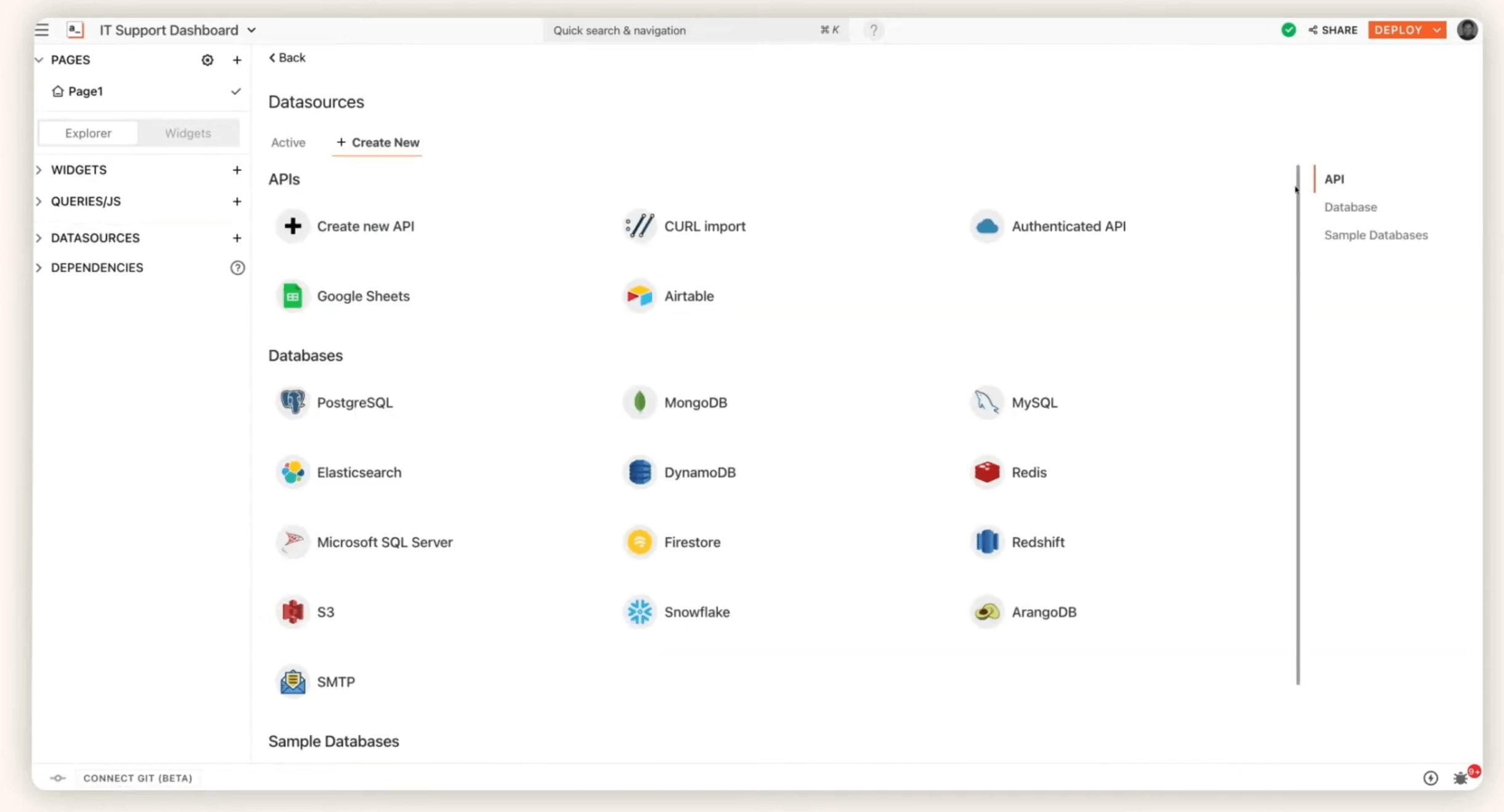
The platform supports direct connections to relational databases, REST APIs, and third party services. Actions taken in the interface can trigger data queries and updates, positioning Appsmith as a practical intermediary between spreadsheets and backend systems.
AI enabled capabilities
Appsmith integrates large language models through its Appsmith AI features, allowing developers to add AI powered actions such as text generation, analysis, and classification. This enables internal tools not only to display data, but also to generate content, extract insights, and assist analysis based on business context, reducing repetitive work and improving overall efficiency.
Typical use cases
Internal management back offices, data entry and maintenance interfaces, operations or support tools, simple approval and action interfaces, internal system access points
💡 Read more: 5 Management Tools Perfect for Small Businesses (Based on Real Experience)
Retool
- Product type: Low code internal tool platform
- Open source / closed source: Closed source (SaaS, with enterprise private deployment options)
- Deployment model: SaaS / private deployment (enterprise edition)
- Target users: Engineering teams, IT teams, and business teams that need to deliver internal tools quickly
- Official website: https://retool.com
- Documentation: https://docs.retool.com/
Overview
Retool is a low code internal tool platform built around developer productivity, enabling teams to quickly create internal management interfaces and operational back offices.
Delivered primarily as a cloud based SaaS product, Retool emphasizes deep integration with existing databases and APIs, making it well suited for internal use cases that involve frequent data operations.
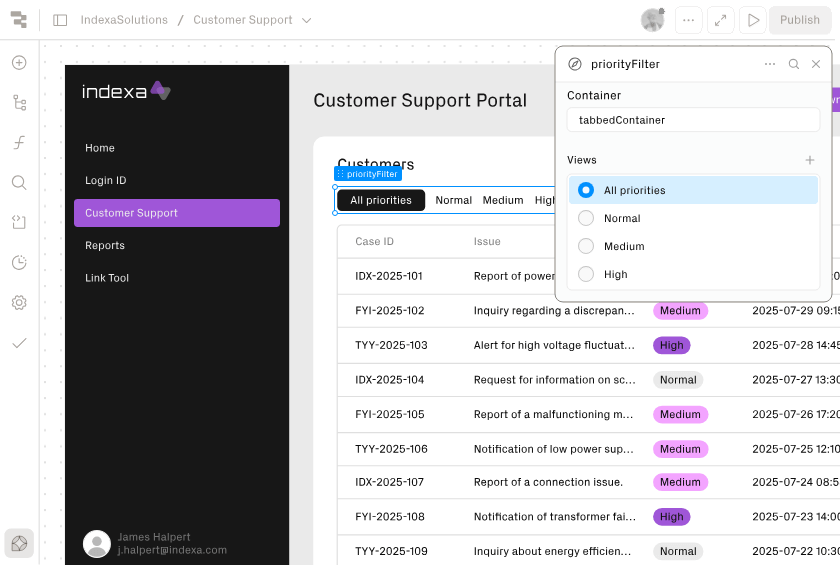
Use cases where Excel is applied for data manipulation, status tracking, and internal management interfaces can all be replaced by Retool. Manual update and operation workflows previously handled in spreadsheets can be migrated to more secure and controllable web based management interfaces.
Core capabilities
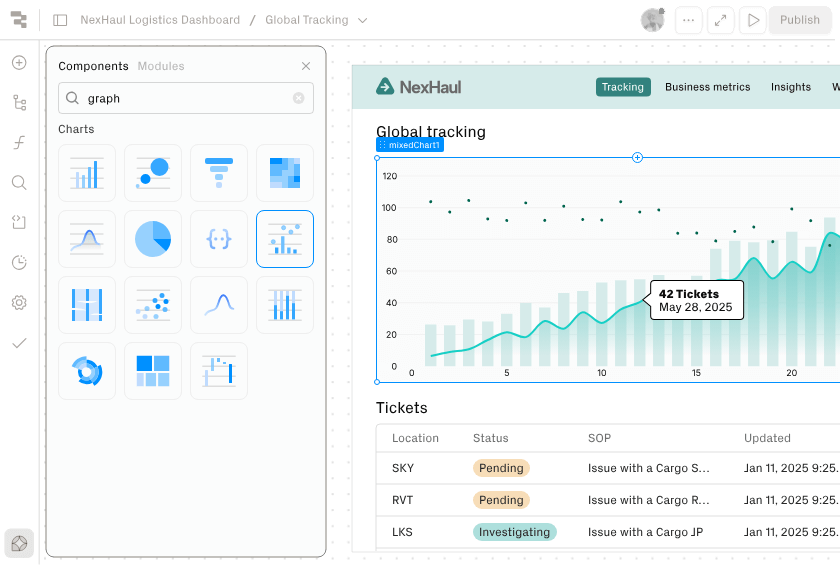
Component based interface building
Retool provides a rich library of prebuilt components, including tables, forms, charts, and control elements. These components can be rapidly combined to create internal tools, significantly reducing front end development effort.
Robust data source connectivity
The platform connects directly to databases such as PostgreSQL and MySQL, as well as REST APIs and third party services. Interface interactions can trigger real time data queries and updates, making Retool an efficient operational gateway between systems and data.
AI driven development and workflow automation
Retool’s AI capabilities allow users to leverage large language models during tool development to generate logic, queries, and interface code. Natural language descriptions can be transformed into functional components and business logic, reducing boilerplate coding and accelerating development.
Typical use cases
Internal management back offices, data operation and maintenance tools, operations and support systems, approval and status management interfaces, internal tools for engineering teams
How to choose the right Excel alternative
Organizational complexity and process maturity
For basic needs such as maintaining lists or records within a single team, collaborative spreadsheet tools are often sufficient. When multiple departments, defined roles, or cross system data flows are involved, solutions that can support structured processes and rules become necessary.
Governance and compliance requirements
Data governance expectations vary widely. Requirements for fine grained access control, complete change histories, or self hosted data will significantly narrow the range of viable tools.
Alignment with existing IT architecture
Some teams need a standalone solution, while others require integration with CRM, ERP, collaboration tools, or data platforms. Tool selection should account for how well a solution fits into the existing system landscape.
Change management and scalability
When processes or rules evolve, whether a system can adapt through configuration or requires replacement will directly affect long term maintenance costs and operational stability.
💡 Read more: How to Quickly Build a Real System to Replace Excel: A Complete Guide
Conclusion
Excel remains a critical tool in internal environments and continues to be efficient and reliable for records, reporting, and daily tracking.
By introducing enterprise management software in the right scenarios and establishing a clearer division of responsibilities alongside Excel, organizations can often achieve smoother collaboration and more effective management.
If you found this content useful, feel free to share it with others who may be interested.
Related reading:
- 10 Open Source Tools Developers Use to Reduce Repetitive CRUD
- Top 12 Open-source AI Workflows Projects with the Most GitHub Stars
- 6 Open-Source No-Code & Low-Code Tools for Software Agencies
- Top 10 Open-source AI CRM Projects with the Most GitHub Stars
- How to Quickly Build a Real System to Replace Excel: A Complete Guide
- Top 5 Open-Source AI Internal Tools on GitHub
- The 8 Best Google Sheets Alternatives (Specs & Pricing)
- 6 Open-Source No/Low-Code Tools for Building PoCs
- A Developer’s Technical Decision Guide to No-Code and Low-Code (2026)
- 6 In-Depth Comparison of RBAC in Enterprise-Grade No-Code/Low-Code Platforms