Construa com o seu agente de IA
Build a NocoBase app — Delivery Tracking Management System: a delivery status board, waybill details, delivery activity logs, and AI waybill recognition for form filling. Match the layout and signature visuals of this reference prototype: https://static-docs.nocobase.com/solution/templates/24-delivery-tracking.html
O link do protótipo (HTML) no prompt é um design que preparamos previamente, apenas para demonstrar a capacidade; o NocoBase não recomenda gerar um sistema inteiro a partir de um único prompt. Ao construir com ele, combine-o com a skill “prototype reproduction” (nocobase-prototype-repro) das NocoBase Skills para obter um bom resultado.
Antes de começar, siga o início rápido do agente de IA para instalar o NocoBase e conectar o seu agente. Os resultados de IA podem variar; dependendo do modelo e da complexidade do sistema, alguns ajustes ou rodadas adicionais podem ser necessários.
Introduction
A delivery tracking management system helps teams manage the full shipment process, from pickup and transportation to final delivery and confirmation. In one workspace, teams can view tracking progress, delivery exceptions, logistics milestones, and on-time performance without switching between spreadsheets, label images, and carrier portals.
These records can also be managed as a NocoBase-based internal business system, with delivery orders, shipment status, carriers, milestones, tracking numbers, exceptions, and delivery timelines organized through configurable data models, role permissions, views, workflows where needed, and operation history.
The page is centered around a delivery kanban board. Shipments are organized by status, including pending pickup, picked up, in transit, out for delivery, delivered, and exceptions. Each shipment record can store the tracking number, weight, destination city, recipient, address, service level, carrier, driver, estimated delivery time, and number of delivery attempts.
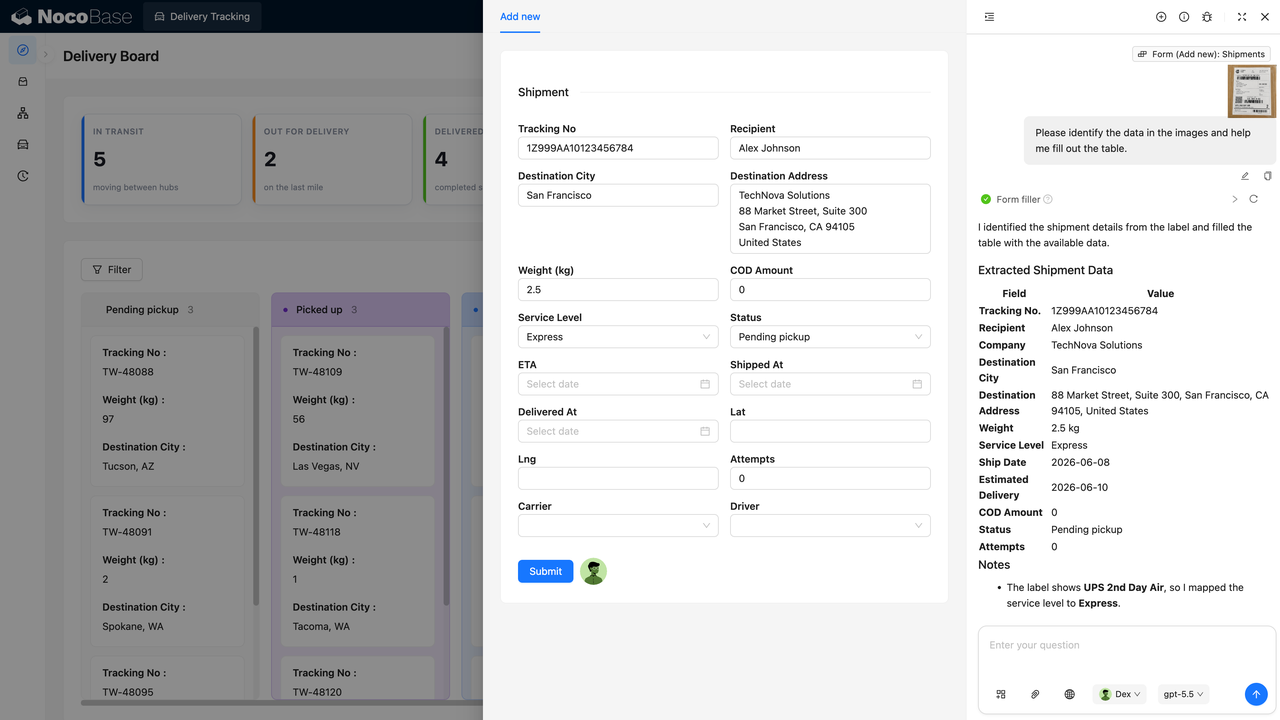
With the help of AI Agent, teams can extract key information directly from delivery label images, such as tracking number, recipient, destination address, weight, service level, shipping date, and estimated delivery date, then automatically fill the data into NocoBase forms. If fields, statuses, page layouts, or filters need to be adjusted later, teams can continue configuring them in NocoBase without rebuilding the system.
This system is suitable for logistics operations, warehouse fulfillment, e-commerce shipping, after-sales tracking, and internal delivery teams, especially in scenarios that require continuous tracking of shipment status, delivery exceptions, and label-based data entry.
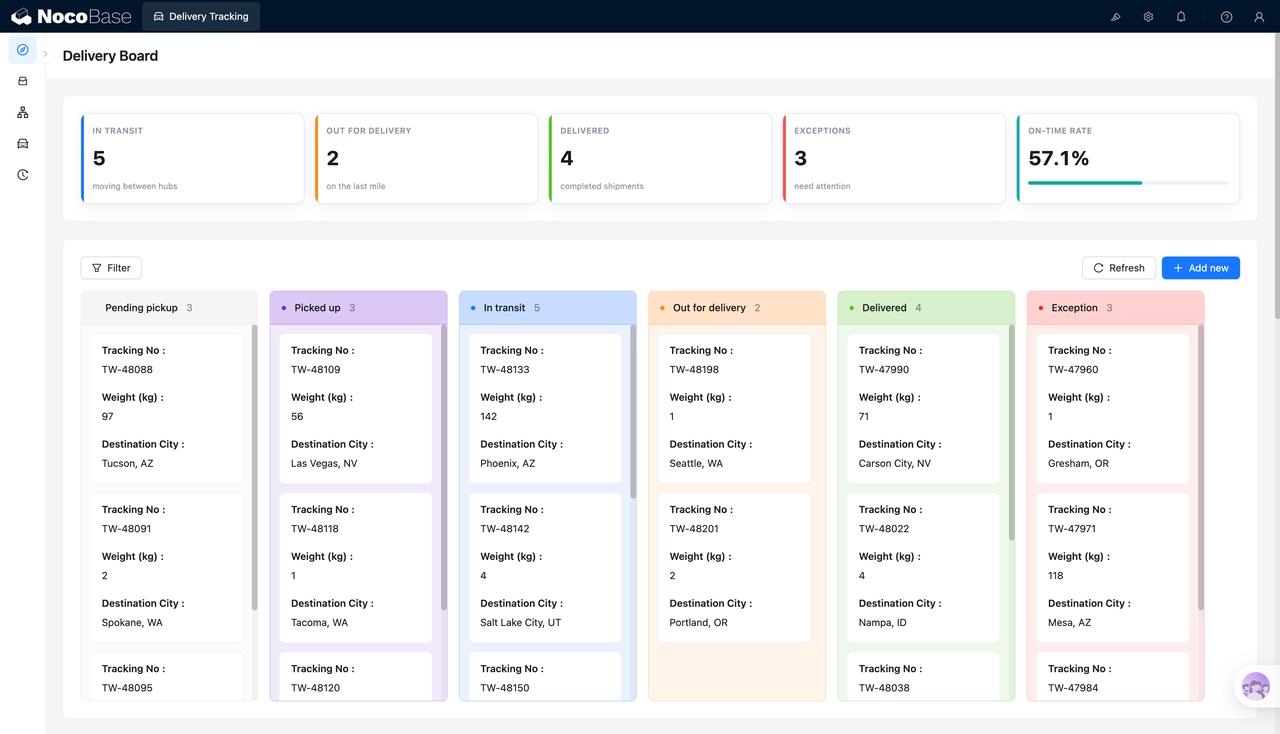
The delivery kanban manages shipments by status and shows on-time performance:
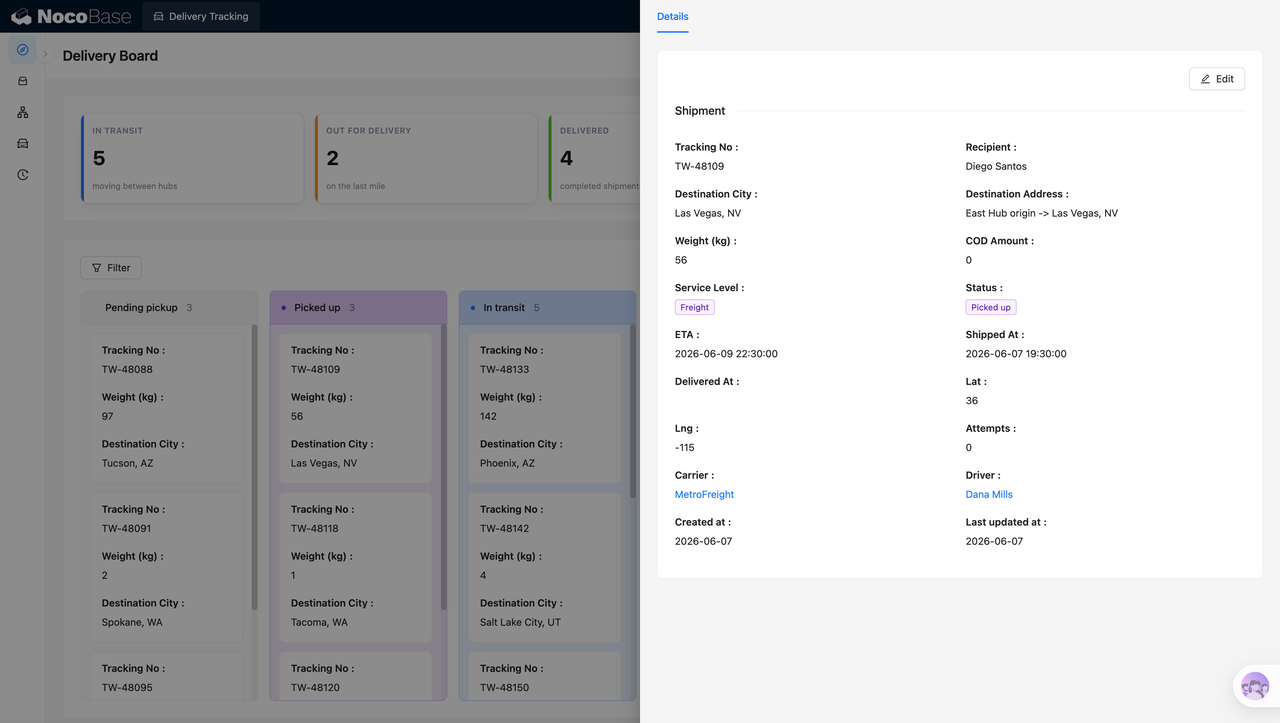
Shipment details show address, timing, carrier, and driver information in one place:
AI extracts tracking numbers and address information from delivery labels:
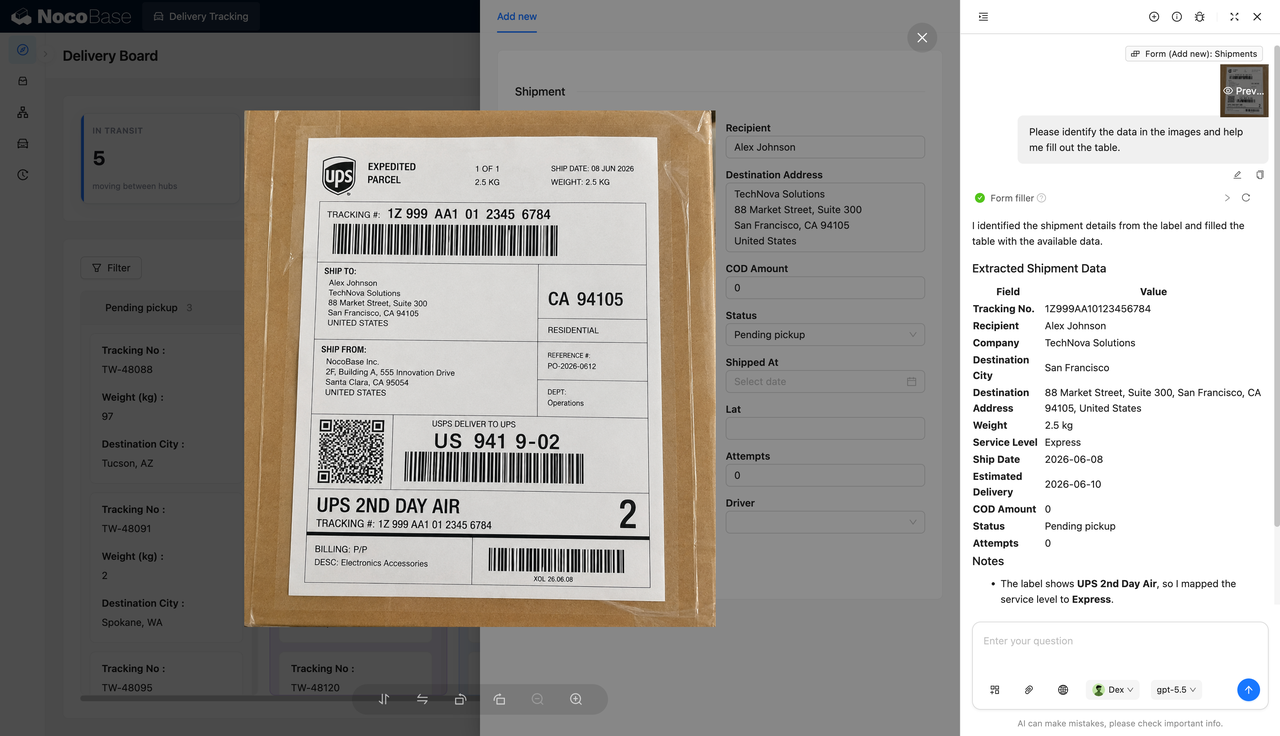
AI fills extracted label information into the new shipment form:
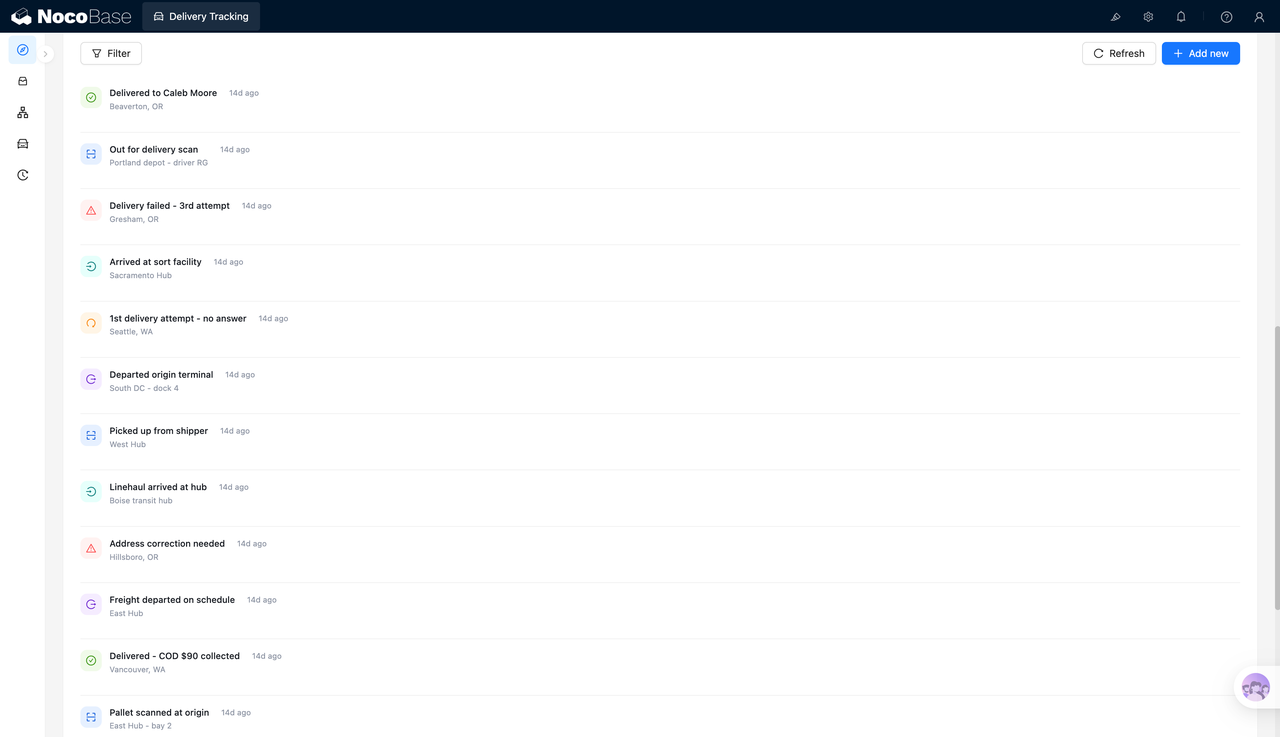
The delivery timeline records every key status change:
What Problems Can a Delivery Tracking Management System Solve?
The hardest part of delivery tracking is not just saving a tracking number. Teams also need to know where each shipment is, whether it is on time, whether an exception has occurred, and who should handle the next step.
As shipment volume grows, manual spreadsheets can easily lead to delayed status updates, missed exceptions, and unclear ownership. For example, a shipment may have failed delivery while the record still shows “in transit,” or an address may need correction but is not marked in time.
The delivery kanban separates shipments by status. Operations staff can directly view pending pickup, picked up, in transit, out for delivery, delivered, and exception shipments, making it easier to see where delivery pressure is concentrated.
The shipment detail page provides additional context beyond the kanban view. Recipient, destination address, weight, service level, carrier, driver, estimated delivery time, shipping time, and delivery attempts are shown on one page, helping teams decide whether to wait, follow up with the carrier, or move the shipment into exception handling.
When creating a new shipment record, AI label recognition can reduce repetitive data entry. After an operator uploads or references a label image, AI can extract key fields and fill them into the form. The operator can then review and complete the record, reducing copy-paste errors, wrong field entries, and missing information.
Key Features
Delivery Status Overview Dashboard
- In-transit count: Shows how many shipments are currently in transit, helping teams understand the volume moving through transportation nodes.
- Out-for-delivery count: Shows how many shipments have entered last-mile delivery.
- Delivered count: Shows how many shipments have been signed for or completed.
- Exception count: Shows shipments that need attention, helping teams prioritize problem cases.
- On-time rate: Shows current delivery punctuality, helping teams assess overall fulfillment performance.
Shipment Card Management
- Tracking number: Each card displays the tracking number so teams can quickly locate a shipment.
- Weight information: Shows shipment weight, such as 1 kg, 56 kg, or 142 kg.
- Status grouping: Shipments are displayed in different status columns, making progress easier to follow.
Shipment Detail Management
- Recipient information: Shows the recipient, destination city, and destination address.
- Delivery information: Shows service level, delivery status, estimated delivery time, shipping time, and actual delivery time.
- Amount and attempts: Supports COD amount and delivery attempt tracking.
- Carrier and driver: Records carrier and driver information, such as MetroFreight and the assigned driver.
- System records: Shows creation and update times for later tracking and verification.
Delivery Timeline Records
- Delivery milestones: Records events such as delivered, delivery scan, arrived at sorting center, departed from shipping site, and shipment dispatched.
- Exception milestones: Records delivery failure, no recipient available, address correction required, and similar exception events.
- Time markers: Each activity includes time information, such as 14 days ago.
- Location information: Timeline entries can show places such as Beaverton, Portland, Gresham, Seattle, and East Hub.
- Process tracing: Teams can reconstruct the delivery process from timeline records instead of only viewing the final status.
AI Label Recognition and Automatic Form Filling
- Label image recognition: AI can read shipment information from delivery label images.
- Key field extraction: Supports extraction of tracking number, recipient, company, destination city, destination address, weight, and service level.
- Delivery time recognition: Supports recognition of shipping date and estimated delivery date.
- Automatic field mapping: AI can fill extracted results into the corresponding fields in a NocoBase form.
- Manual review support: Operators can check the fields before submission and complete or correct them when needed.
Why Build a Delivery Tracking Management System with AI and NocoBase?
Delivery tracking management needs shipment status, delivery milestones, exception records, and label-based data entry to keep running continuously. New shipment records are added every day, while existing records move from pending pickup and picked up to in transit, out for delivery, delivered, or exception status.
Basic Vibe Coding can quickly generate a delivery kanban or a new shipment form, but logistics workflows often change over time. A team may need to add statuses such as “address correction,” “third delivery attempt failed,” or “COD collected,” and may also need new fields for carriers, drivers, delivery attempts, and service levels. When each change requires code-level modification, the system becomes harder to maintain.
AI is well suited for repetitive setup and data entry work. It can generate the initial pages based on the delivery tracking scenario, recognize delivery label images, extract tracking number, recipient, address, weight, service level, and delivery dates, then fill the data into a new shipment form.
NocoBase is better suited for long-term management. Shipment fields, status groups, kanban views, detail pages, timeline records, and permissions can all be adjusted through configuration. Logistics teams do not need to rebuild the whole system just to change one field, one status, or one filter.
A delivery tracking management system built this way can help logistics operations, warehouse fulfillment, e-commerce shipping, and after-sales teams manage shipment status, delivery exceptions, and label-based data entry over the long term, making the delivery process clearer and easier to trace.
FAQ
1.Can a delivery tracking management system show the overall delivery situation?
Yes. The system can centrally display in-transit shipments, out-for-delivery shipments, delivered shipments, exceptions, and the on-time rate, helping teams quickly assess overall fulfillment performance.
2.Does the system support shipment management by delivery status?
Yes. The screenshots show status groups such as pending pickup, picked up, in transit, out for delivery, delivered, and exceptions.
3.Can each shipment record have a detail page?
Yes. The detail page can show tracking number, recipient, destination city, destination address, weight, service level, status, estimated delivery time, carrier, and driver.
4.Does the system support delivery timeline records?
Yes. The system can record milestones such as delivered, delivery scan, delivery failure, arrival at sorting center, address correction, and shipment dispatch.
5.Can teams create new delivery records in the system?
Yes. The new record form supports tracking number, recipient, destination address, weight, service level, status, time, carrier, driver, and other shipment information.
6.Can AI recognize delivery labels?
Yes. In the screenshots, AI reads a delivery label image and extracts tracking number, recipient, destination address, weight, service level, shipping date, and estimated delivery time.
7.Can AI automatically fill in forms?
Yes. After recognizing the label, AI can fill the extracted data into the new shipment form, reducing manual copy-paste and data entry work.
8.Can the system record delivery exceptions?
Yes. The kanban includes an exception column and an exception count, while the timeline can also store events such as delivery failure and address correction.
9.Does the system support on-time delivery rate tracking?
Yes. The top dashboard shows an on-time rate, such as 57.1% in the screenshot, helping teams understand overall delivery punctuality.
10.Can AI reports be exported?
The current screenshots show AI label recognition and automatic form filling, but not AI report export. Later, the system can be extended with exception analysis, on-time performance analysis, or fulfillment summaries, and export capabilities can be added as needed.
11.Can Claude Code, Codex, Cursor, or OpenCode help build this system?
Yes. These AI Agents can connect to NocoBase and help generate the delivery kanban, detail pages, forms, field structure, and timeline records, which can then be adjusted further in NocoBase.
12.How is this different from building with pure Vibe Coding?
Pure Vibe Coding is better for quickly generating pages. NocoBase is better for managing delivery data, status transitions, field changes, permissions, and later iterations.
13.Does the system support access control?
Yes. Access control can be configured in NocoBase. For example, operations staff can create and edit shipments, managers can view dashboards, and some users can be limited to specific data.
14.Can delivery statuses or fields be adjusted later?
Yes. Delivery statuses, fields, form layouts, kanban groups, timeline records, and filters can all be adjusted without rebuilding the entire system.
15.Is this system suitable for formal enterprise use?
Yes. NocoBase can support data models, pages, permissions, and process configuration, while AI reduces setup and data entry work. This makes the system suitable for long-term maintenance and continuous adjustment.