Construa com o seu agente de IA
Build an application with NocoBase — Lightweight Project Management System: task boards, assignees, priorities, risk tasks, AI-assisted task extraction, and project status reports. Use this prototype as the layout and signature visual reference: https://static-docs.nocobase.com/solution/templates/53-project-management-system.html
O link do protótipo (HTML) no prompt é um design que preparamos previamente, apenas para demonstrar a capacidade; o NocoBase não recomenda gerar um sistema inteiro a partir de um único prompt. Ao construir com ele, combine-o com a skill “prototype reproduction” (nocobase-prototype-repro) das NocoBase Skills para obter um bom resultado.
Antes de começar, siga o início rápido do agente de IA para instalar o NocoBase e conectar o seu agente. Os resultados de IA podem variar; dependendo do modelo e da complexidade do sistema, alguns ajustes ou rodadas adicionais podem ser necessários.
What is a lightweight project management system?
A lightweight project management system is an AI-powered business system for product, engineering, operations, and project teams. It helps manage task lists, board progress, assignees, priorities, risks, deadlines, and project status reports. Teams can use familiar AI Agents to generate task fields, board workflows, and page structures first, then continue adjusting tables, boards, detail pages, forms, and reports in NocoBase. This turns project management from a one-off generated page into a business process that can be maintained over time.
The demo system can track 15+ tasks, 4 task stages, 3 risk tasks, and 183 effort points, helping teams turn scattered tasks into a project management process that can be viewed, updated, and reviewed.
Key values
- ⏱️ Manage task progress across 4 stages: Backlog, In progress, In review, and Done
- 📊 Track 15+ tasks, 183 effort points, and average completion progress in one place
- ⚠️ Identify 3 high-risk tasks and pay earlier attention to key issues such as authentication, payments, and stability
- 🤖 Use NocoBase AI employees to extract tasks from meeting notes and organize descriptions and AI summaries automatically
System preview
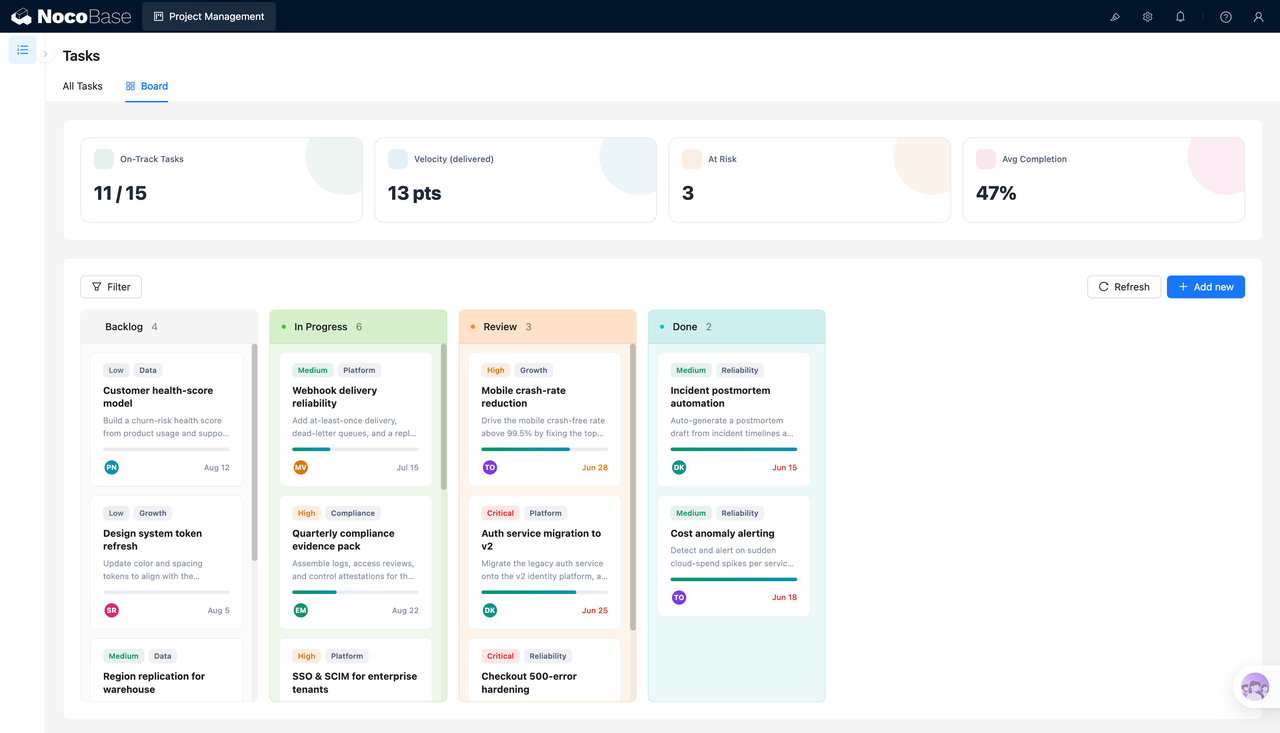
1.Task board and project overview
The project board brings active tasks, delivered effort, risk tasks, and average completion progress into one view. Tasks are grouped by Backlog, In progress, In review, and Done, so teams can quickly see what is waiting, what is moving forward, what needs review, and whether the project has delivery risks.
2.Task details and AI summaries
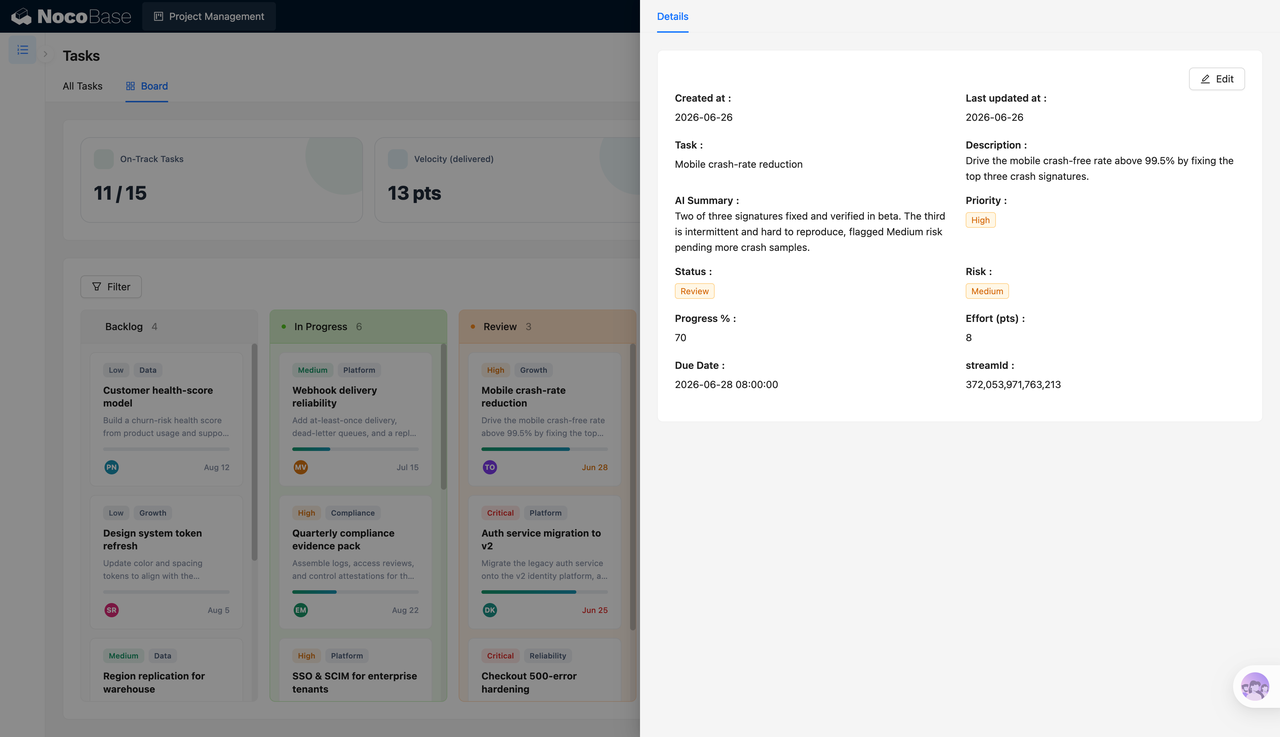
The task detail page shows the task name, description, priority, status, risk level, progress, effort points, deadline, and related workflow. The AI summary condenses the task background, current progress, and risk points into a readable note, helping owners understand the task status without reading through the full record.
3.Create tasks automatically with AI
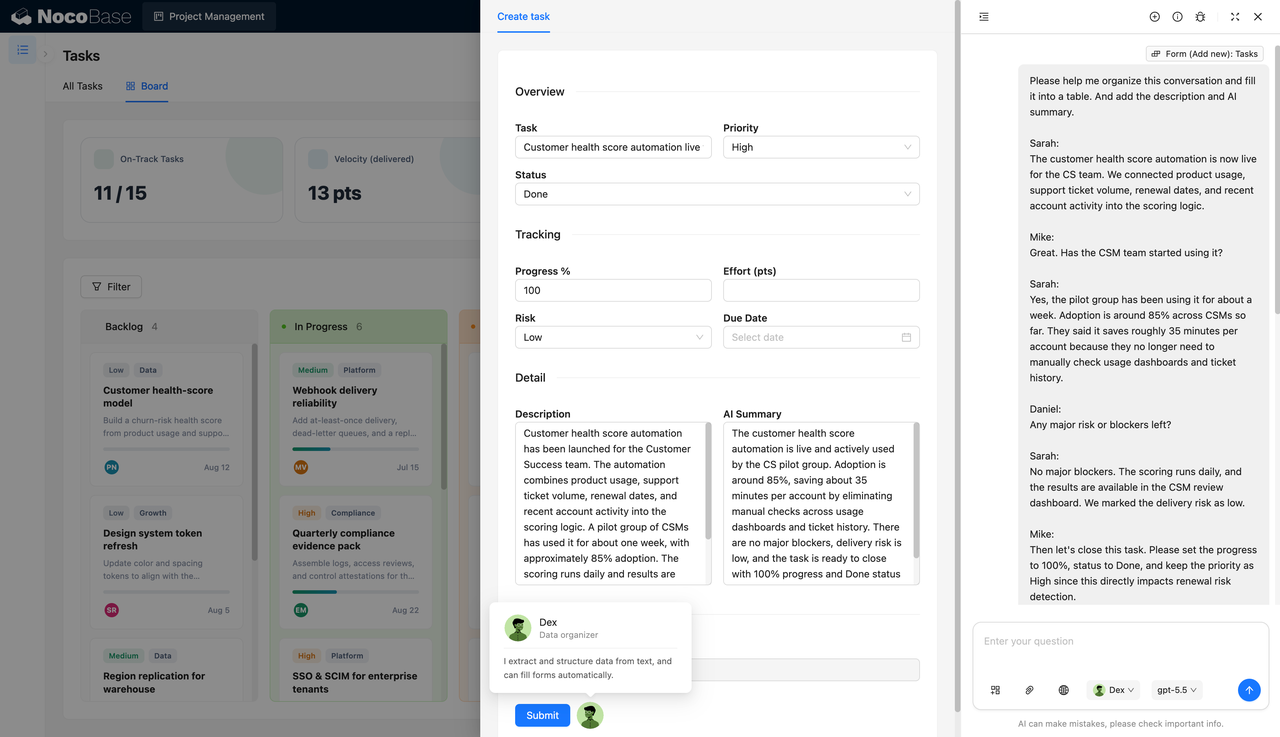
NocoBase AI employees can turn meeting conversations or project discussions into structured task records, including task name, priority, status, progress, risk, description, and summary. For example, after a customer health score automation goes live, AI can extract key details such as “launched,” “around 85% adoption,” “about 35 minutes saved per customer,” and “low risk,” then let a human confirm the record before saving it.
4.Full task list
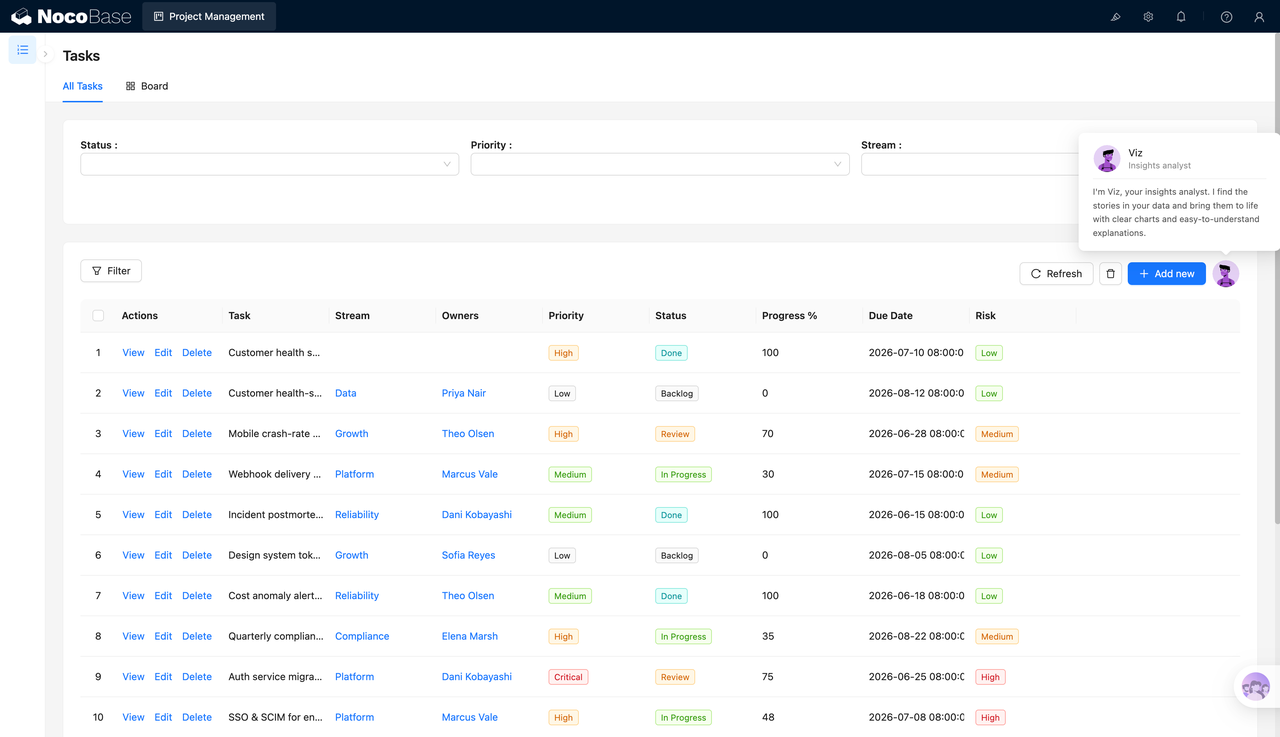
The full task list is useful for managing all project work in one place. Teams can filter tasks by status, priority, and workflow, and view assignees, progress, deadlines, and risk levels together. Compared with a single board view, the list is better for schedule checks, delay reviews, and cross-team progress syncs.
5.Project status report
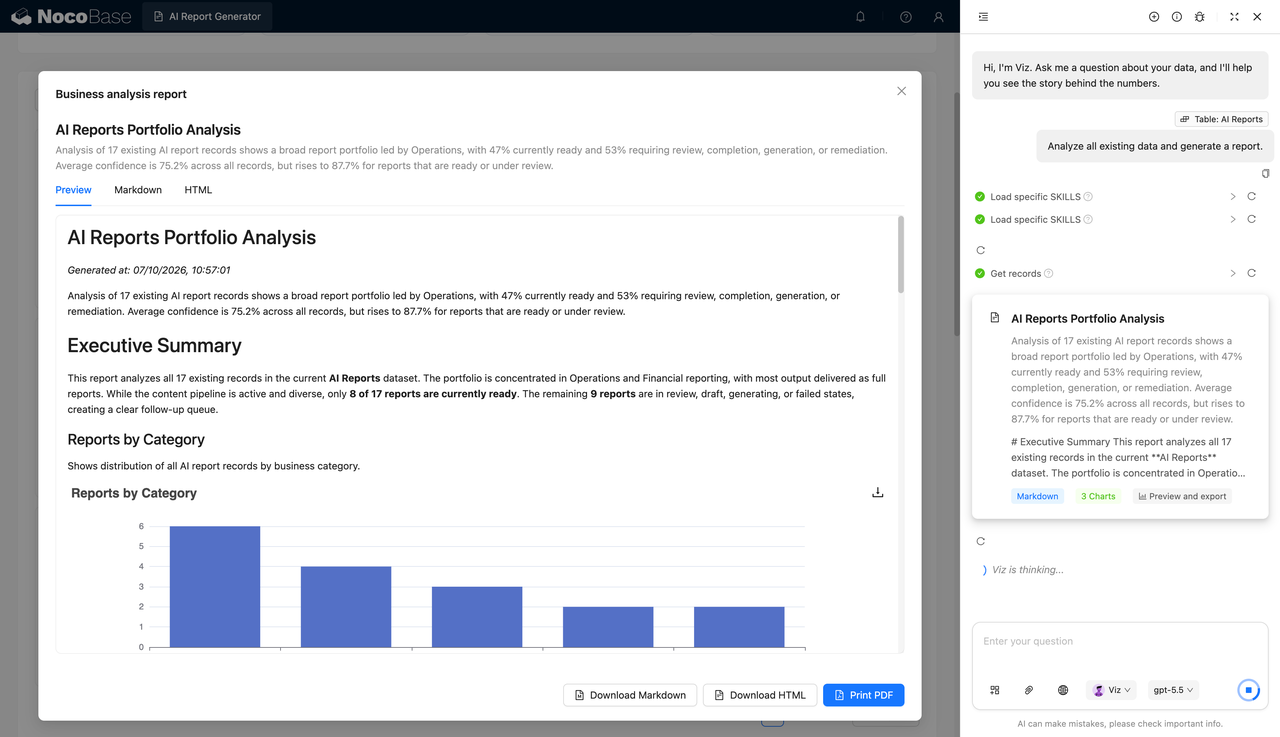
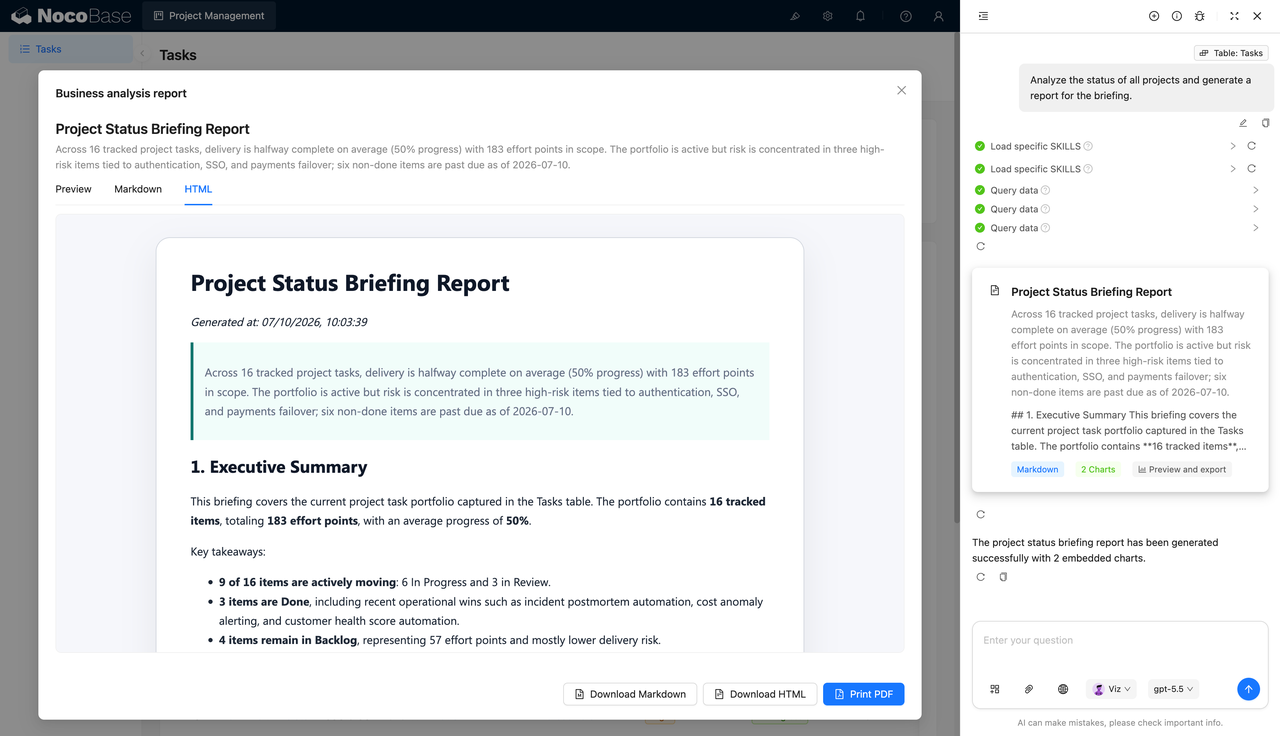
NocoBase AI employees can generate project status reports from the task table, summarizing total tasks, effort points, average progress, in-progress tasks, completed tasks, pending tasks, and key risk areas. The report can be used for weekly meetings, project reviews, and management briefings, reducing the time spent manually compiling data and writing updates.
Use cases
- Lightweight project management: Manage product iterations, operations projects, internal redesigns, and cross-team collaboration tasks.
- Engineering task boards: Track engineering work across stages such as backlog, development, review, and completion.
- Project progress reporting: Automatically summarize task progress, delay risks, effort points, and milestone results.
- Meeting notes to tasks: Extract tasks, owners, risks, progress, and next steps from project discussions.
Why choose a lightweight project management system?
| Comparison item | Excel / docs / chat records | Lightweight project management system |
|---|---|---|
| Task records | ❌ Tasks are scattered across meeting notes, spreadsheets, and chat records | ✅ Manage tasks, assignees, status, and deadlines in one place |
| Project board | ❌ Task stages need to be organized manually | ✅ Move tasks through Backlog, In progress, In review, and Done |
| Progress tracking | ❌ It is hard to judge overall completion quickly | ✅ View progress, effort points, and risk counts together |
| Risk identification | ❌ Risks mainly depend on manual reminders from the project manager | ✅ Mark low-, medium-, and high-risk tasks by risk level |
| Meeting-to-task workflow | ❌ Tasks must be organized manually after meetings and can be missed | ✅ NocoBase AI employees can extract tasks and fill forms |
| Project reports | ❌ Weekly reports and reviews require repeated manual summaries | ✅ AI can generate project status reports from task data |
| Future extension | ❌ Spreadsheet maintenance becomes costly when the process changes | ✅ Extend boards, calendars, permissions, reports, and automation workflows |
Core features
1.Task list management
Manage task names, assignees, priorities, status, progress, deadlines, risk levels, and related workflows in one place, helping project managers track execution consistently.
2.Stage board management
Use boards to manage tasks across different stages, so teams can understand task distribution, identify backlogs, spot review bottlenecks, and follow up on unfinished work.
3.AI task extraction and form filling
NocoBase AI employees can extract task information from meeting notes, project discussions, or requirement documents, and automatically organize descriptions, progress, risks, and summaries to reduce manual entry.
4.Project status reports
The system can generate project reports based on task data, covering task counts, average progress, effort points, delay risks, and key conclusions. It is suitable for weekly meetings and project reviews.
FAQ
1.Which teams is a lightweight project management system suitable for?
It is suitable for product teams, engineering teams, operations teams, project managers, and cross-functional teams, especially when the number of tasks is not too large but progress, risks, and delivery results still need to be tracked clearly.
2.What task information can the system manage?
It can manage task names, descriptions, assignees, priorities, status, progress, effort points, risk levels, deadlines, related workflows, and AI summaries.
3.Does it support a board view?
Yes. Tasks can be displayed by stages such as Backlog, In progress, In review, and Done, making it suitable for daily stand-ups, iteration tracking, and project progress checks.
4.Can it generate tasks from meeting content?
Yes. NocoBase AI employees can read meeting notes or project discussions, extract task names, status, progress, risks, descriptions, and summaries, and then write them into task forms.
5.Why build a lightweight project management system with AI + NocoBase?
AI Agents can call NocoBase components through natural language to build task tables, boards, detail pages, forms, and project report pages. NocoBase provides the data structure, permissions, views, and extension capabilities needed for long-term use. Combined with NocoBase AI employees for task extraction, summary writing, and project reporting, it is more suitable for ongoing project management than relying only on Excel, documents, and chat tools.