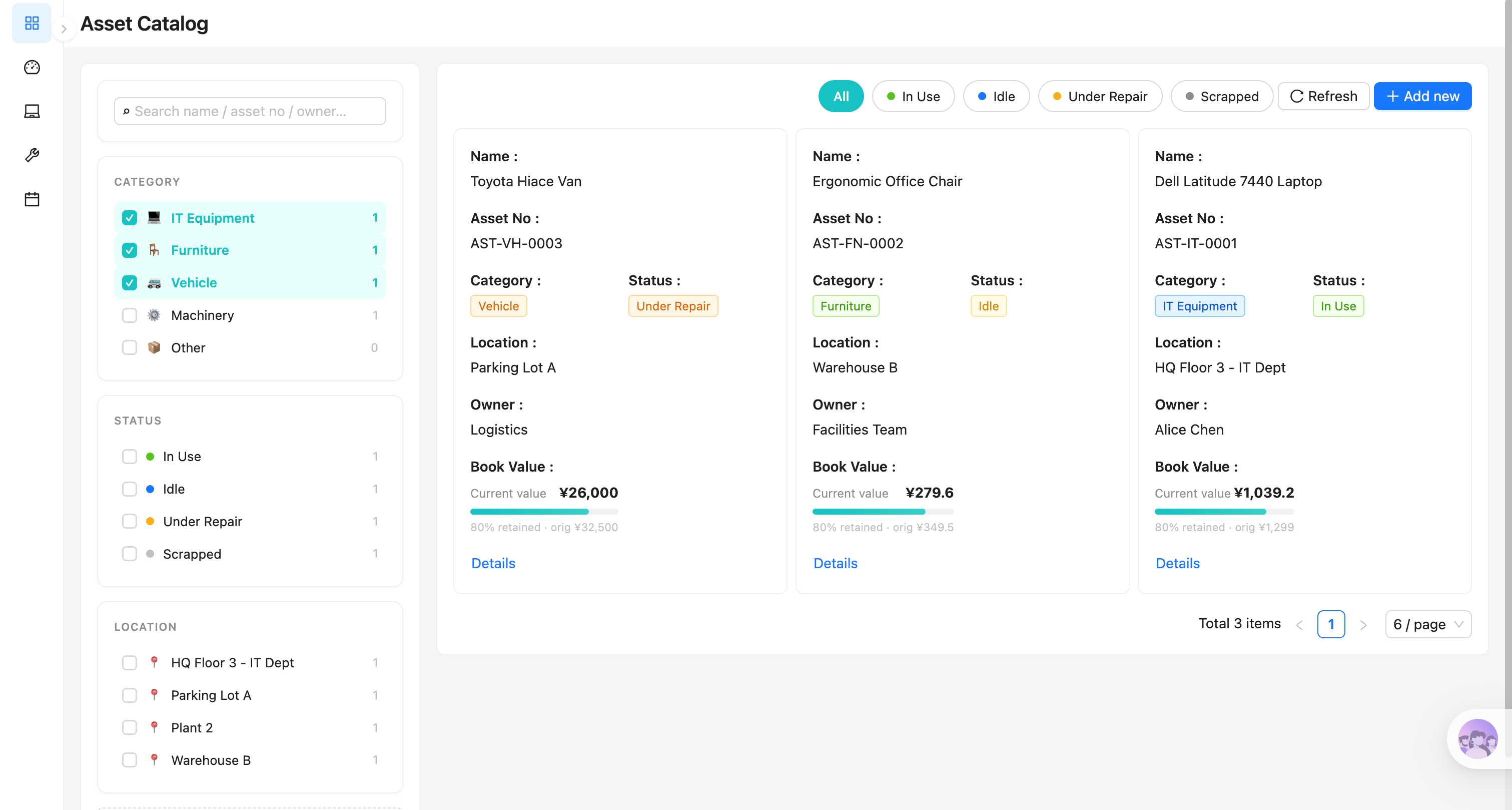
Construa com o seu agente de IA
Build a NocoBase app — Asset Inventory Tracking System: an asset ledger, depreciation curves, maintenance history, and an asset-status analysis report. Match the layout and signature visuals of this reference prototype: https://static-docs.nocobase.com/solution/templates/22-asset-inventory.html
O link do protótipo (HTML) no prompt é um design que preparamos previamente, apenas para demonstrar a capacidade; o NocoBase não recomenda gerar um sistema inteiro a partir de um único prompt. Ao construir com ele, combine-o com a skill “prototype reproduction” (nocobase-prototype-repro) das NocoBase Skills para obter um bom resultado.
Antes de começar, siga o início rápido do agente de IA para instalar o NocoBase e conectar o seu agente. Os resultados de IA podem variar; dependendo do modelo e da complexidade do sistema, alguns ajustes ou rodadas adicionais podem ser necessários.
Introduction
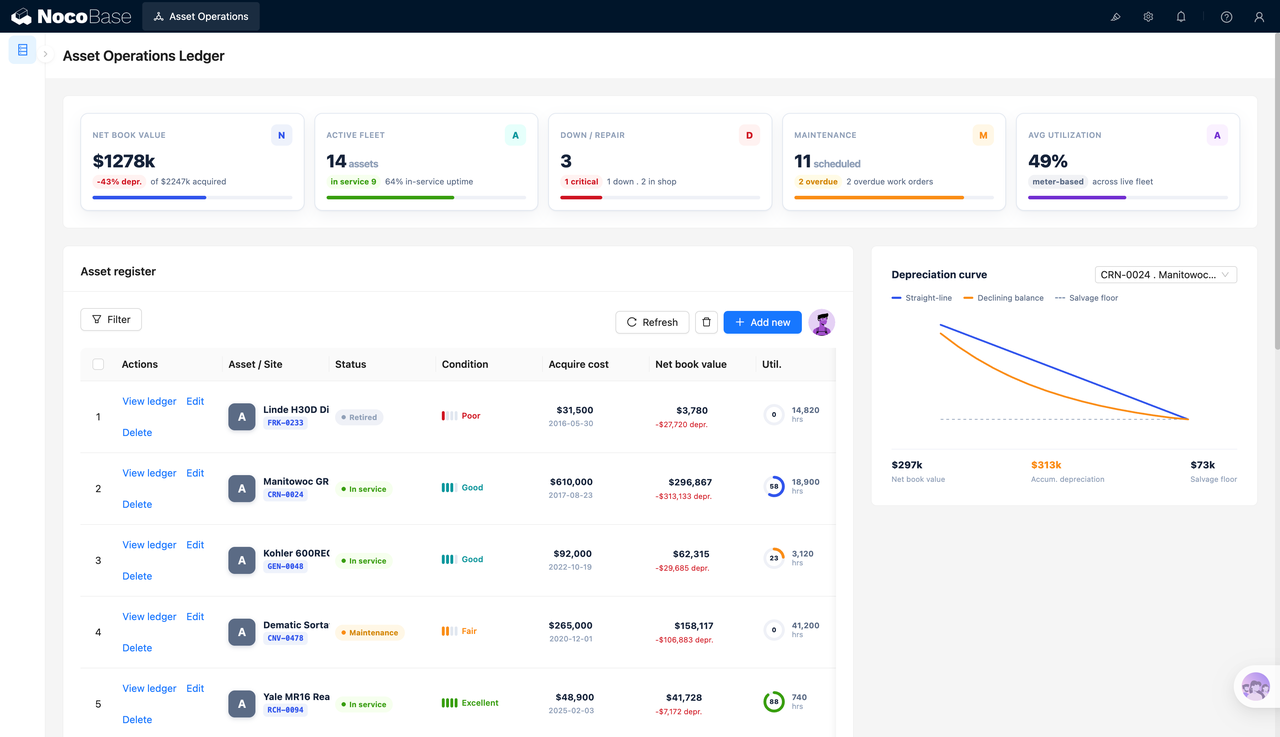
An asset inventory tracking system is suitable for managing internal equipment, vehicles, machinery, warehouse assets, and operational assets. Teams can view total asset value, active assets, maintenance status, maintenance plans, and average utilization on one page, making it easier to understand whether the current asset portfolio is healthy.
These records can also be managed as a NocoBase-based internal business system, with asset inventory, stock counts, locations, assignments, check-in records, asset categories, and inventory audits organized through configurable data models, role permissions, views, workflows where needed, and operation history.
The page is built around an asset ledger. Each asset can record its name, asset tag, status, condition, purchase cost, book value, accumulated depreciation, and operating hours. The depreciation chart on the right tracks the financial value of a single asset, helping teams understand value changes, salvage value, and accumulated depreciation.
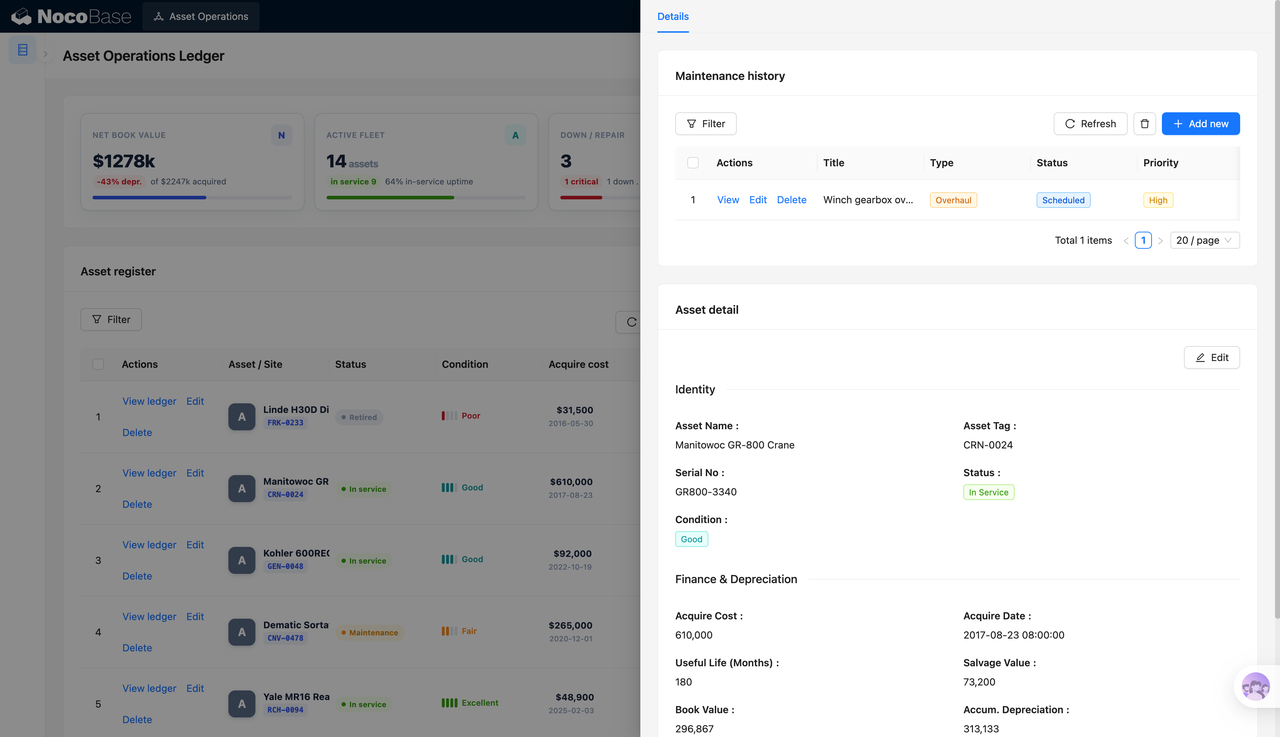
On the asset detail page, the system can further show identity information, financial depreciation data, operational data, and maintenance history. For equipment that needs long-term management, teams can track both the asset itself and related maintenance records, such as maintenance type, planned status, and priority.
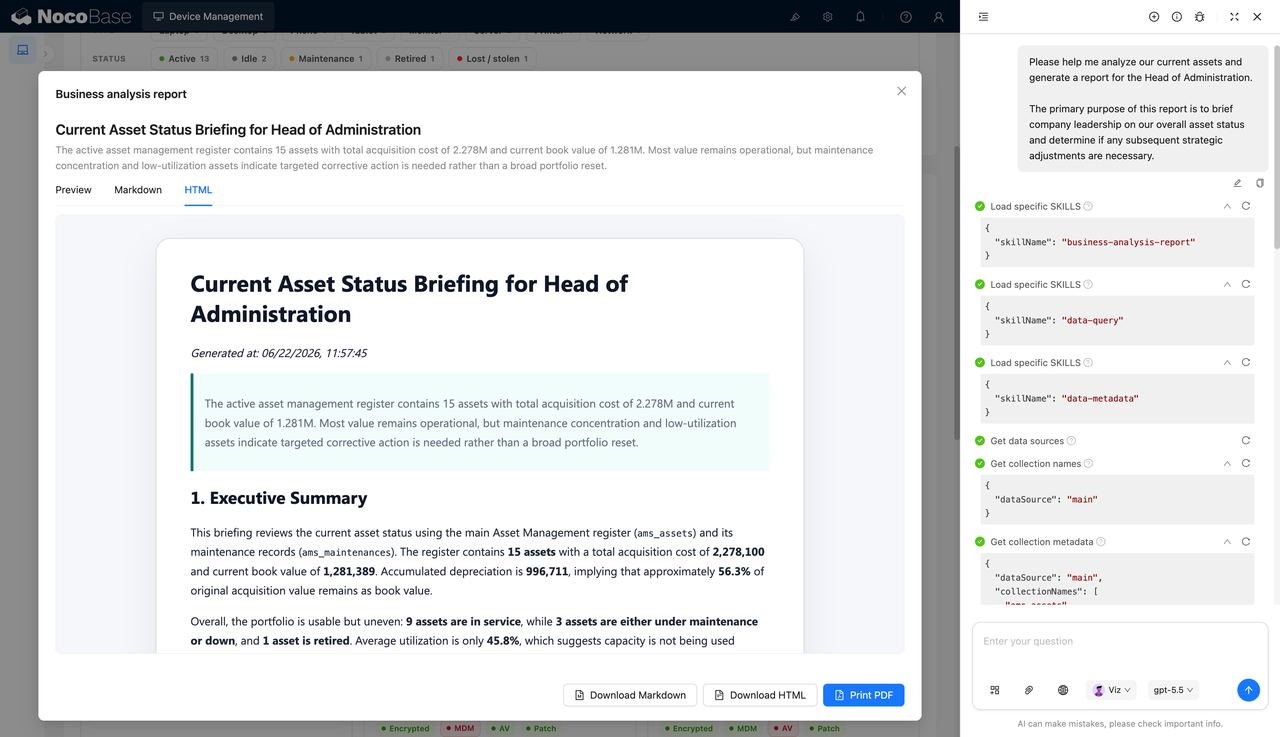
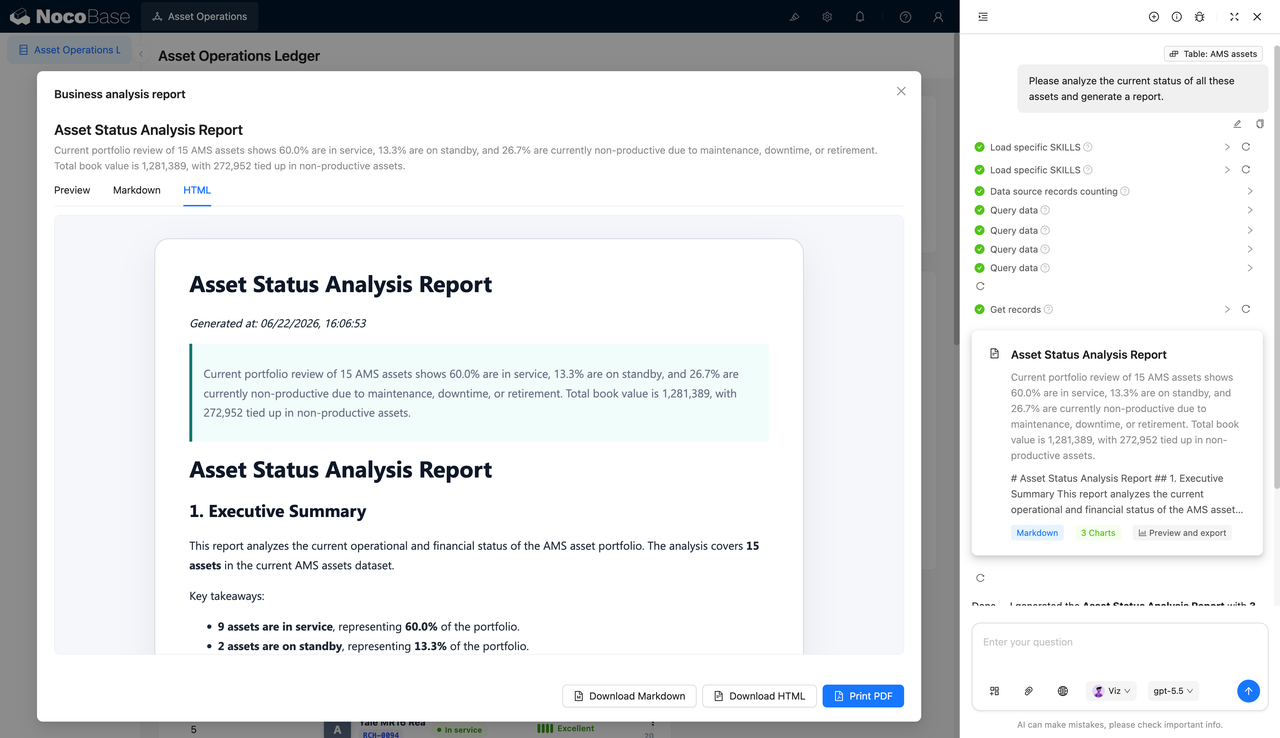
AI Agent can generate asset status analysis reports based on asset data. These reports can summarize the proportion of active, standby, maintenance, downtime, and retired assets, and analyze the book value held by non-production assets.
Asset overview showing book value, active assets, maintenance status, and utilization:
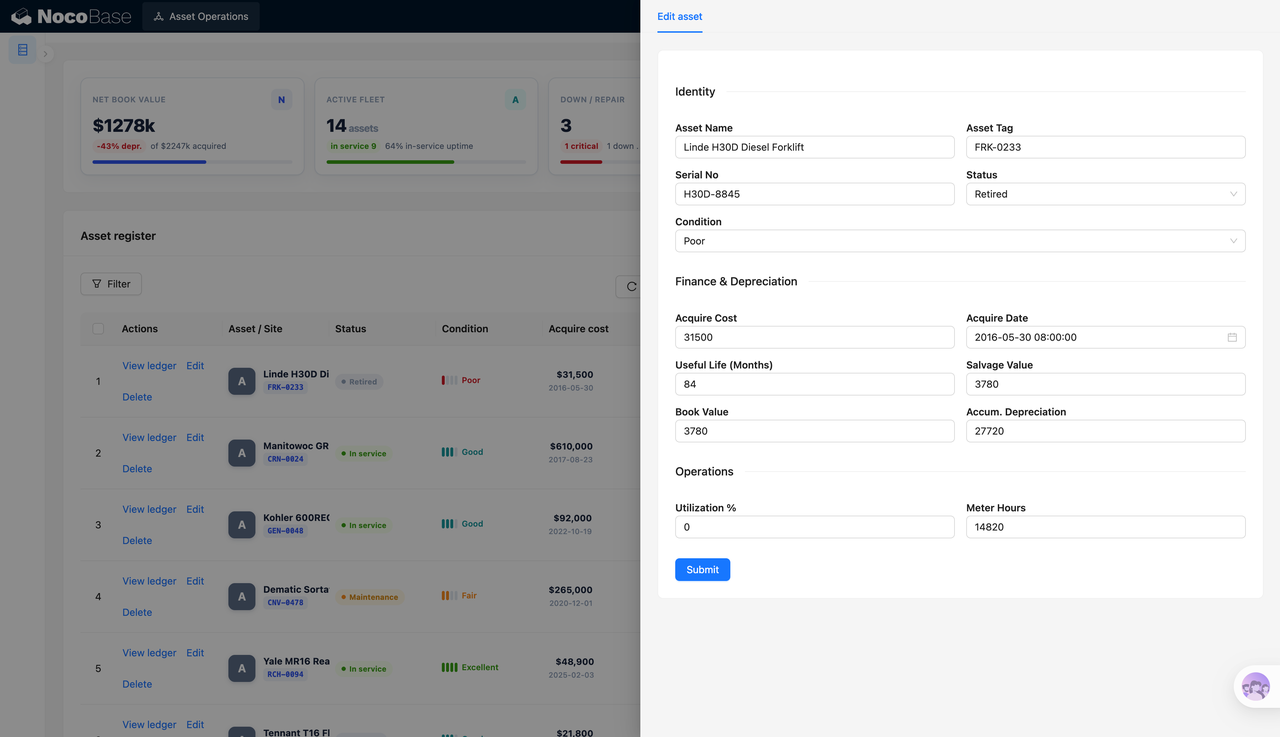
Asset edit form for identity, depreciation, and operational fields:
Detail page showing maintenance history and complete financial information:
AI-generated asset status report that can be exported:
What Problems Can an Asset Inventory Tracking System Solve?
Asset management often faces two issues: equipment, vehicles, and machinery are scattered across different spreadsheets, while financial value, depreciation, maintenance status, and usage data are hard to evaluate together. As the number of assets grows, it becomes difficult to know which assets are still in use, which are under maintenance, which have been retired, and which assets hold high book value without producing operational value.
The asset ledger keeps basic and operational information in one place. Teams can review assets by status, condition, purchase cost, book value, accumulated depreciation, and operating hours. This helps them move beyond knowing how many assets exist and understand whether those assets are actually usable. For high-value assets such as large equipment, vehicles, forklifts, and cranes, the system can also show book value, accumulated depreciation, and salvage value, helping finance, operations, and management teams decide whether an asset should continue to be used, repaired, transferred, or retired.
Maintenance history connects asset operations with maintenance planning. Teams can see whether an asset has scheduled maintenance tasks, the type of maintenance, current status, and priority. This reduces missed repairs and helps teams trace asset downtime, maintenance, and recovery.
AI-generated asset status reports help management quickly understand the current asset portfolio. For example, the report can show how many assets are active, standby, under maintenance, down, or retired, and how much book value is held by non-production assets. This supports asset audits, operational optimization, and budget decisions.
Key Features
Asset Ledger Management
- Asset name and tag: Each asset has a name and asset tag for quick identification and search.
- Status management: Supports statuses such as active, maintenance, and retired, helping teams distinguish the current asset stage.
- Condition records: Uses condition labels such as excellent, good, fair, and poor to quickly assess asset health.
- Purchase and book value: Records purchase cost, purchase date, book value, and accumulated depreciation.
- Operating hours: Displays meter hours and utilization, so teams can evaluate asset status together with operating intensity.
Depreciation Curve Tracking
- Single-asset selection: Select a specific asset to view its depreciation curve.
- Straight-line depreciation: Shows value changes under the straight-line depreciation method.
- Declining balance: Shows value trends under another depreciation basis.
- Salvage value floor: Marks the salvage value floor so depreciation analysis does not fall below the minimum residual value.
- Financial summary: Summarizes book value, accumulated depreciation, and salvage value for financial review.
Asset Details and Maintenance History
- Maintenance record list: Shows maintenance tasks linked to a specific asset.
- Maintenance type: Supports records such as inspection and service.
- Maintenance status: Marks whether a task is planned, in progress, or in another status.
- Priority labels: Highlights high-priority maintenance tasks.
- Linked details: Shows asset details and maintenance history in the same side panel, reducing page switching.
AI Asset Status Analysis Report
- Data reading: AI Agent can read records from the asset table and generate analysis reports.
- Asset status summary: The report can calculate the proportion of active, standby, and non-production assets.
- Book value analysis: It can analyze the book value held by non-production assets.
- Multi-format preview: Supports Preview, Markdown, and HTML views.
- Report export: Supports downloading Markdown, downloading HTML, and printing to PDF for internal reporting.
Why Build an Asset Inventory Tracking System with AI and NocoBase?
An asset inventory tracking system needs to manage the asset ledger, usage status, condition assessment, purchase cost, book value, accumulated depreciation, useful life, salvage value, operating hours, maintenance records, and asset analysis reports. It focuses on the continuous management of assets from purchase and usage to maintenance and depreciation evaluation, rather than simply recording a few pieces of equipment information.
It is not difficult for AI to generate an asset list, form, and detail page at the beginning. But once the system is in use, new requirements keep appearing: adding asset categories, changing depreciation methods, recording maintenance history, separating permissions by role, and generating reports for management. The larger the asset base becomes, the more the team needs a system that can be adjusted continuously instead of changing pages manually each time.
NocoBase works more like infrastructure and scaffolding for enterprise applications. It already provides data models, permissions, workflows, operation history, audit logs, notifications, single sign-on, page building, and plugin extensions. AI can speed up the initial build, while NocoBase keeps the system stable, maintainable, and extensible.
Teams can first use AI to generate the asset ledger, edit form, detail page, depreciation chart, and asset status report. Then they can continue adjusting asset fields, status rules, maintenance records, financial methods, and permission scopes in NocoBase. When asset management policies change later, the system can evolve on top of the existing structure.
FAQ
1.What assets can this asset inventory tracking system manage?
It is suitable for managing internal equipment, vehicles, machinery, forklifts, cranes, generators, warehouse equipment, and other fixed assets. Any asset that needs long-term tracking of status, depreciation, operating hours, and maintenance records can be managed in a similar way.
2.Can the system show the overall asset situation?
Yes. The screenshots show summary cards for net book value, active assets, downtime / maintenance assets, maintenance plans, and average utilization. These are useful for asset audits and operational overview.
3.Does it support asset status management?
Yes. The asset ledger already shows statuses such as active, maintenance, and retired. Teams can extend the status categories based on their actual management process.
4.Can it record asset condition?
Yes. The screenshots show condition labels such as excellent, good, fair, and poor, helping teams quickly assess asset health.
5.Can it show depreciation for a single asset?
Yes. The right side of the page shows a depreciation curve for a selected asset, including straight-line depreciation, declining balance, and salvage value floor, with a summary of book value, accumulated depreciation, and salvage value.
6.Can users edit asset information?
Yes. The asset edit form includes asset name, asset tag, serial number, status, condition, purchase cost, purchase date, useful life, salvage value, book value, accumulated depreciation, utilization, and meter hours.
7.Does it support maintenance history?
Yes. The screenshots show a maintenance history list where teams can record maintenance title, type, status, and priority. It is suitable for tracking inspections, service work, and planned maintenance tasks.
8.Can users add new assets?
Yes. The asset ledger page includes an add button, and the side edit panel shows the asset form structure for creating or maintaining asset records.
9.What can AI Agent do?
AI Agent can read asset data and generate asset status analysis reports. The report shown in the screenshots summarizes the proportion of active assets, standby assets, non-production assets, and the book value held by non-production assets.
10.Can AI reports be exported?
Yes. The screenshots show Markdown, HTML, and PDF-related actions. Reports can be downloaded as Markdown or HTML, and printed as PDF.
11.Can Claude Code, Codex, Cursor, or OpenCode help build it?
Yes. These AI Agents can help generate initial pages, field structures, form configuration, report prompts, and page descriptions. The final system is still recommended to be maintained in NocoBase, so teams can continue adjusting data models, permissions, and business rules.
12.How is this different from pure Vibe Coding?
Pure Vibe Coding is better for quickly building a prototype. Asset inventory tracking involves asset ledgers, depreciation, maintenance records, status changes, permissions, and future adjustments. NocoBase already provides common infrastructure for enterprise applications. AI improves build speed, while NocoBase supports long-term maintenance and extension.
13.Does the system support permission control?
The screenshots do not show the permission page directly, but NocoBase supports permission configuration. Enterprises can set different data viewing and editing scopes for finance, operations, maintenance, and management roles.
14.Can fields be adjusted later?
Yes. Asset management often adds fields such as asset location, owner, department, supplier, warranty date, or inventory status. After building with NocoBase, teams can continue adjusting data tables, fields, and pages without rebuilding the whole system.
15.Is this system suitable for formal enterprise use?
Yes. Asset inventory tracking involves long-term data maintenance, financial value tracking, maintenance records, and management reports, so it is better suited as a sustainable enterprise business system than as a one-time spreadsheet or temporary page.