

TLDR
If you are looking for an open source AI CRM, NocoBase offers the deepest AI integration. Its AI employees can understand business context and actively participate in data handling, form entry, and workflow collaboration, rather than functioning as standalone chat tools. Twenty is a better fit for sales teams that want to get started quickly, while Krayin is better for teams that want to add AI automation to a more traditional CRM setup.
SaaS vs Open Source
“$300 billion has evaporated! The SaaS apocalypse has begun!”
Recently, the idea of a “SaaS apocalypse” has become a hot topic.
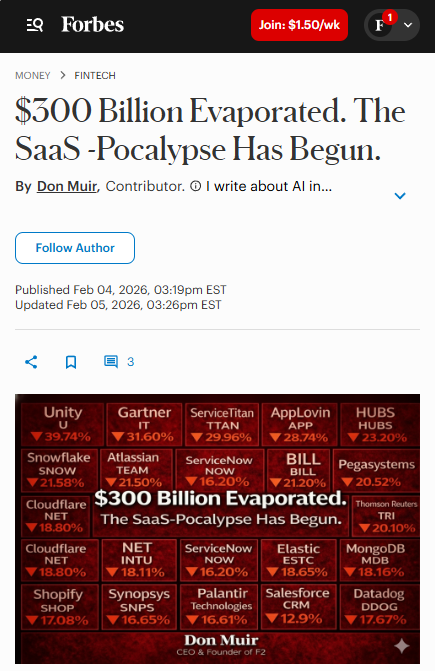
For the past two decades, software has shaped how businesses operate. Whether in sales, finance, collaboration, or project management, companies have long treated deploying a system as the starting point for improving efficiency. Software itself has been seen as a core productivity tool.
But now AI is starting to handle analysis, content generation, coordination, and decision support directly. As a result, many workflows that once had to live inside a specific application are being restructured. In CRM SaaS, this shift is especially clear.
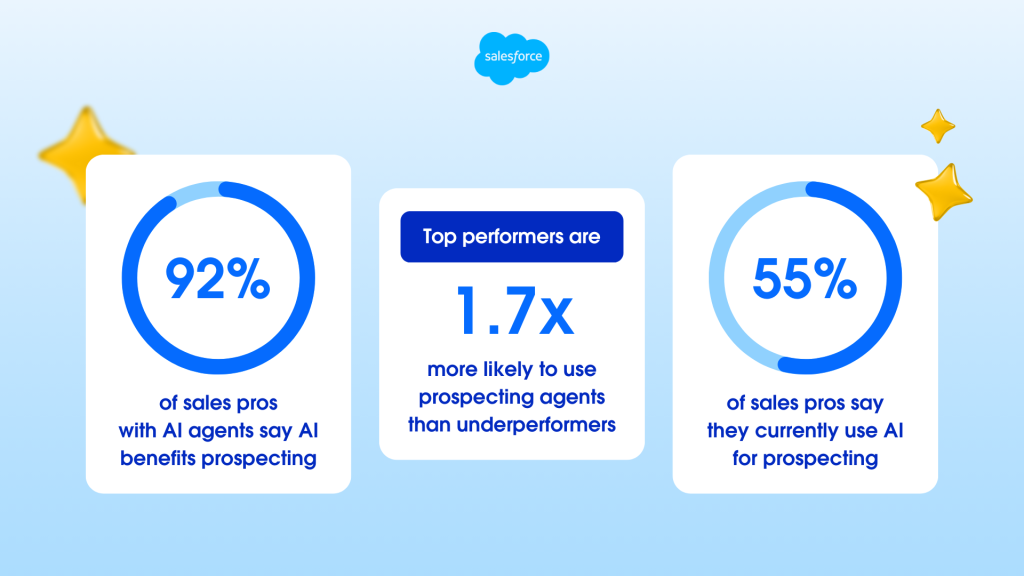
According to Salesforce’s 2026 State of Sales, 54% of salespeople have already used AI agents, and nearly 90% plan to do so by 2027. AI is expected to cut customer research time by 34% and email drafting time by 36%. In other words, AI is no longer just an add-on to CRM. It is reshaping the core product itself.
At the same time, most commercial SaaS products still keep AI inside closed systems. Users can only use prebuilt features and have limited control over how those AI capabilities evolve. Open source offers a different path. It provides not only ready-made functionality, but also an editable, extensible, and customizable environment where AI can be woven into real business processes and become a long-term productivity asset owned by the business.
That is why we selected three popular open source CRM projects on GitHub, NocoBase, Twenty, and Krayin CRM. We compare them across product structure, depth of AI integration, and real-world use cases to help you better evaluate your options when choosing an open source AI CRM.
💬 Hey, you’re reading the NocoBase blog. NocoBase is the most extensible AI-powered no-code/low-code development platform for building enterprise applications, internal tools, and all kinds of systems. It’s fully self-hosted, plugin-based, and developer-friendly. → Explore NocoBase on GitHub
Overall Comparison of Three Open Source CRMs
| Evaluation Dimension | NocoBase | Twenty | Krayin CRM |
|---|---|---|---|
| AI Integration Depth | ⭐⭐⭐⭐⭐ AI employees deeply embedded in the business system | ⭐⭐⭐ AI-enhanced workflows | ⭐⭐ Separate AI enhancement layer |
| Product Form | Flexible platform for building your own CRM | Ready-to-use CRM | Ready-to-use CRM with standardized processes |
| Extension Flexibility | ⭐⭐⭐⭐⭐ Plugin microkernel architecture | ⭐⭐⭐⭐ Custom objects + API | ⭐⭐⭐ Framework-based extension |
| Private Deployment | ✅ Supported, cost-effective | ✅ Supported | ✅ Supported |
| Learning Curve | Medium (requires setup, templates available) | Low (ready to use) | Low (ready to use) |
| Best-Fit Scenario | Deep customization + advanced AI integration | Fast rollout + team collaboration | Standard CRM + AI automation |
| GitHub Stars | 21.7k | 40.2k | 21.7k |
| Tech Stack | React + Node.js | React + TypeScript | Laravel + Vue.js |
💡Read more: Top 10 open source AI CRM projects by GitHub stars
NocoBase
Official website: https://www.nocobase.com/
GitHub: https://github.com/nocobase/nocobase
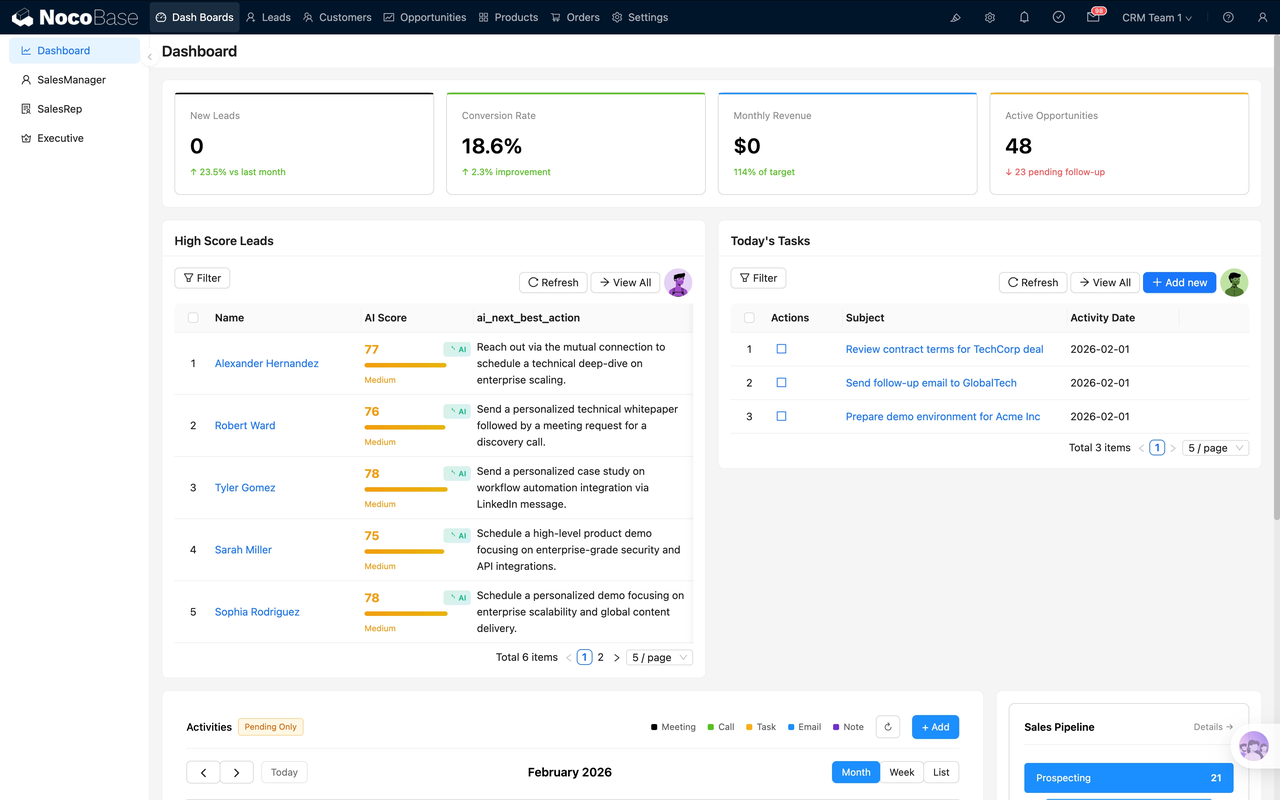
Project Overview
Positioning: NocoBase is an AI-driven open source no-code/low-code platform for building enterprise apps, internal tools, and business systems. In CRM scenarios, it serves as the foundation for building a CRM while allowing you to expand around core objects such as customers, leads, and opportunities. As an open source alternative to SaaS CRMs like Salesforce, HubSpot, and Pipedrive, NocoBase provides standard CRM functionality while also supporting deep customization through its platform architecture.
Open source model: Fully open source, supports private deployment, and is licensed under Apache-2.0.
GitHub Stars: 21.7k
GitHub Forks: 2.5k
GitHub Contributors: 106
Maturity: NocoBase is a platform product built around data models, plugins, workflows, and AI. It is designed to keep evolving as your business grows. It has also introduced a CRM 2.0 solution built on NocoBase 2.x, combining workflow automation and AI directly into sales processes for use cases such as lead scoring, win-rate forecasting, and customer health monitoring. It also includes a Restore Guide so the solution can be imported into an existing NocoBase environment with one click.
👉Try the NocoBase CRM 2.0 sales management solution now
Technical Architecture
Openness:
NocoBase uses a data-model-driven architecture with a plugin microkernel. The system keeps its core lightweight, while additional functionality is added through plugins. The UI is separated from the underlying data structure, which makes the platform more flexible.
Data and workflow flexibility:
NocoBase supports multiple data sources, including MySQL, PostgreSQL, SQLite, MariaDB, MongoDB, REST APIs, GraphQL, JSON files, and Excel files. It supports unified management across data sources, cross-source relationship queries, and permission control, making it suitable for managing customers, leads, opportunities, and related workflows.
Customization and implementation:
NocoBase uses a plugin-based extension model. Plugins are versioned independently, so platform upgrades do not affect them. This makes it well suited for expanding fields, workflows, plugins, and system capabilities on top of an existing business setup.
AI Capabilities
AI’s role in the product:
NocoBase’s AI Employees are deeply integrated AI agents built directly into business systems. They can be freely defined based on a company’s own workflows and business needs. Rather than acting as simple chatbots, they function more like digital coworkers that understand context inside the business interface and can take action. They support multiple models, including OpenAI, Claude, and local LLMs, and also support enterprise knowledge bases, RAG, and conversation memory, which helps AI fit real business processes more naturally.
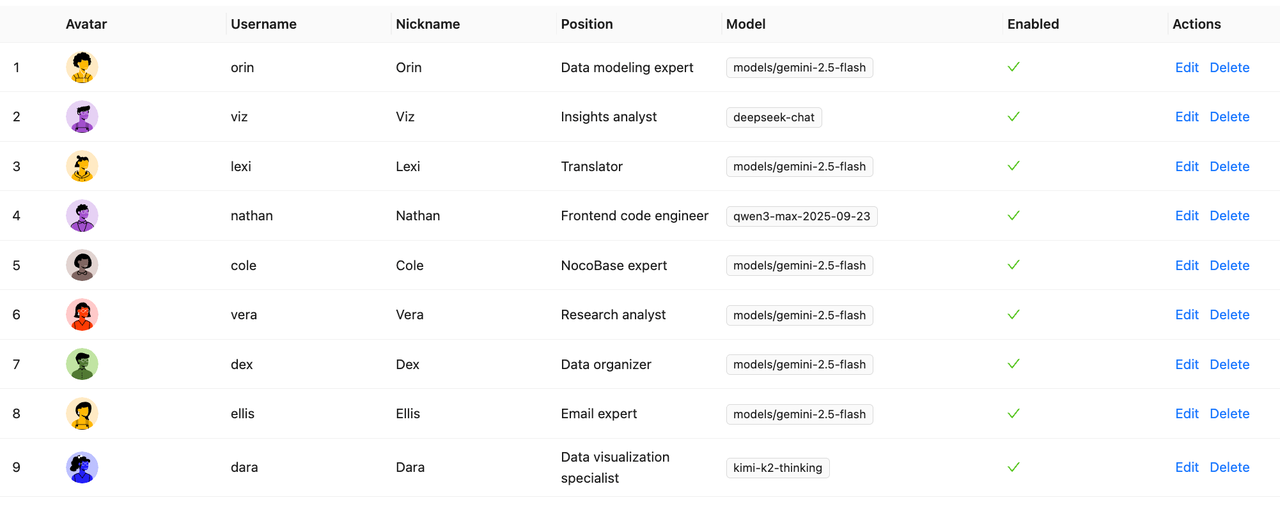
The main CRM tasks AI helps with include data organization, content generation, knowledge lookup, operational execution, and workflow collaboration.
Typical Use Cases
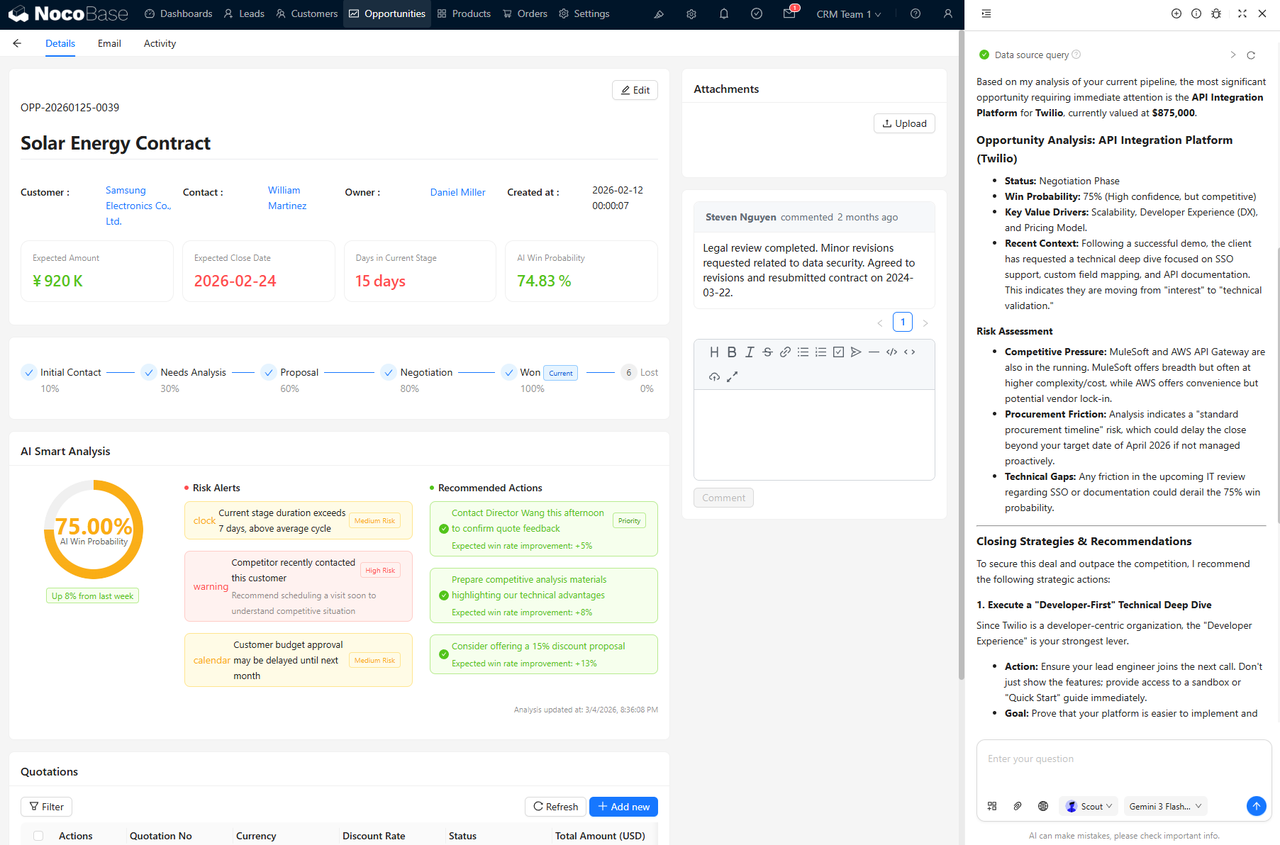
Scout is a sales intelligence assistant used for opportunity analysis, win-rate forecasting, competitive analysis, and deal strategy recommendations. It helps sales teams make better decisions and move deals forward more efficiently.
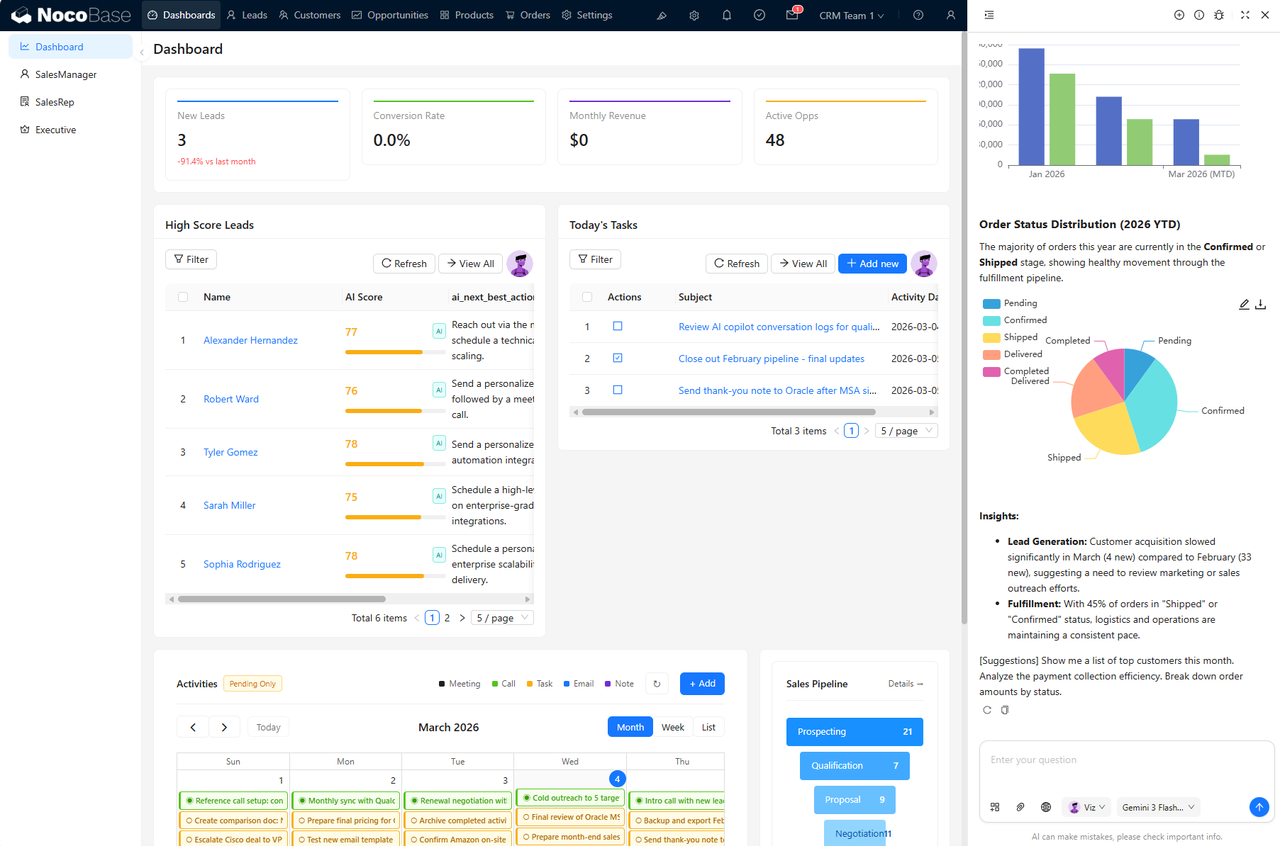
Viz is an AI insights analyst focused on lead scoring, customer health, sales analytics, and pipeline forecasting. It can generate charts and conclusions automatically based on the current page, and it can also handle scheduled recurring analysis tasks.
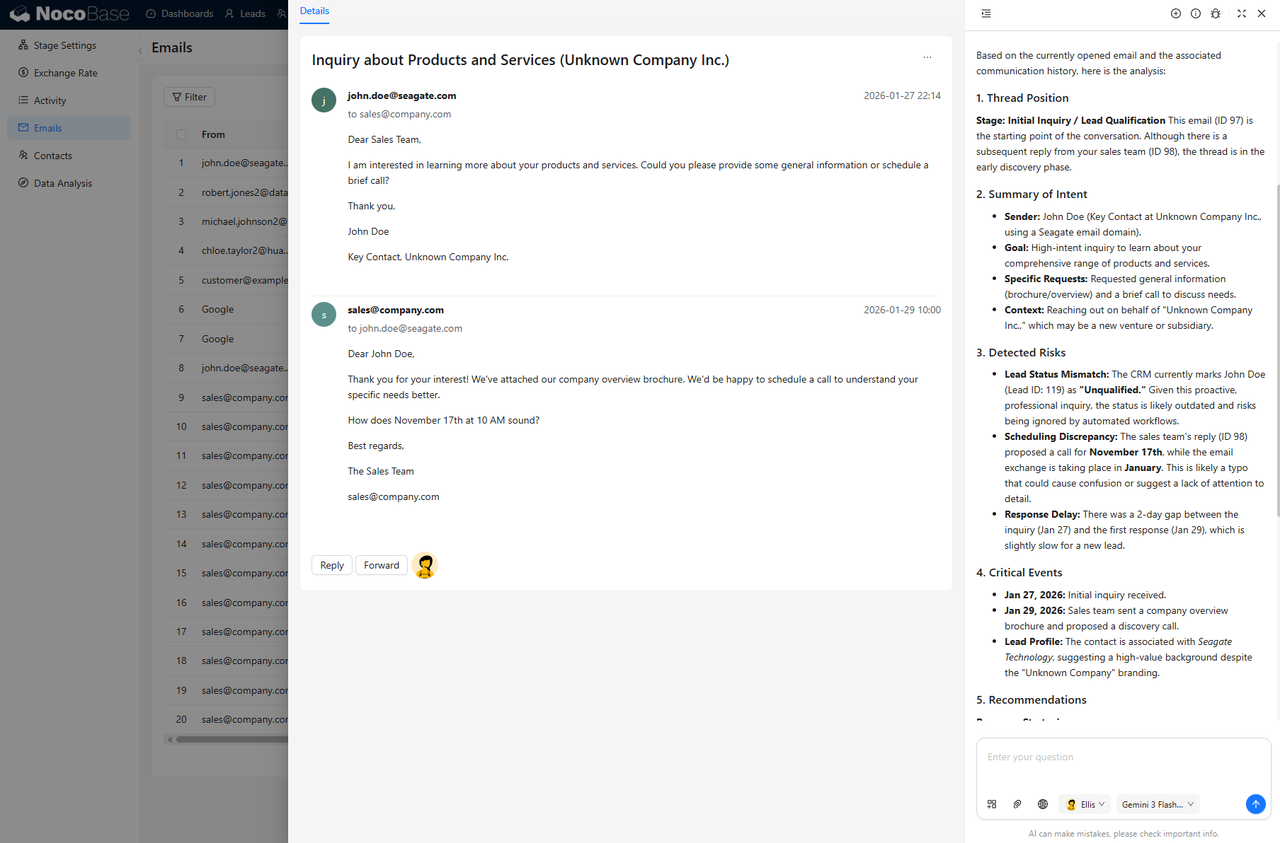
Ellis is an AI email assistant for sentiment and intent analysis, reply drafting, and communication summaries. It combines message history, customer context, and the current email to help teams respond more effectively.
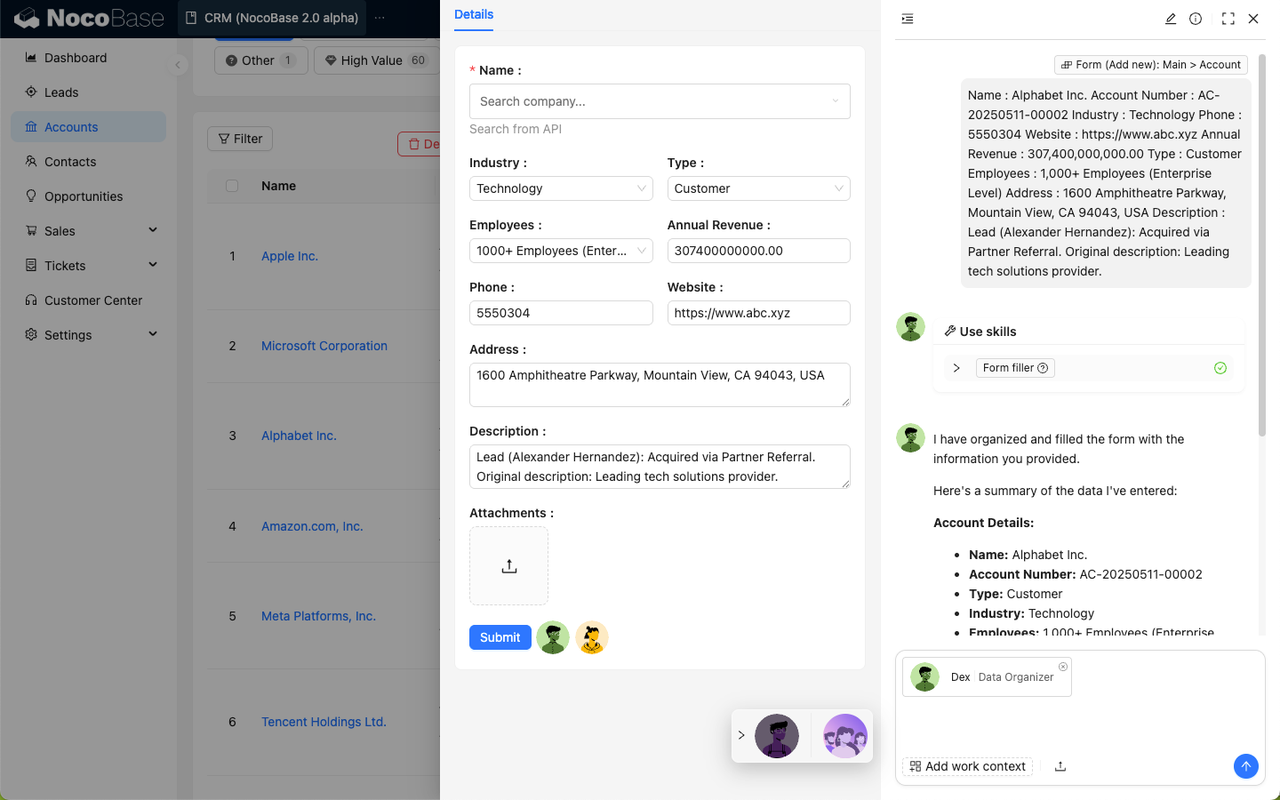
Dex is an AI data specialist that extracts key information from unstructured files or data and turns it into structured content. It can also use tools to enter that information directly into forms, making it useful for repetitive processing tasks.
Lexi is a multilingual communication assistant for cross-language customer communication, translation, and international email handling.
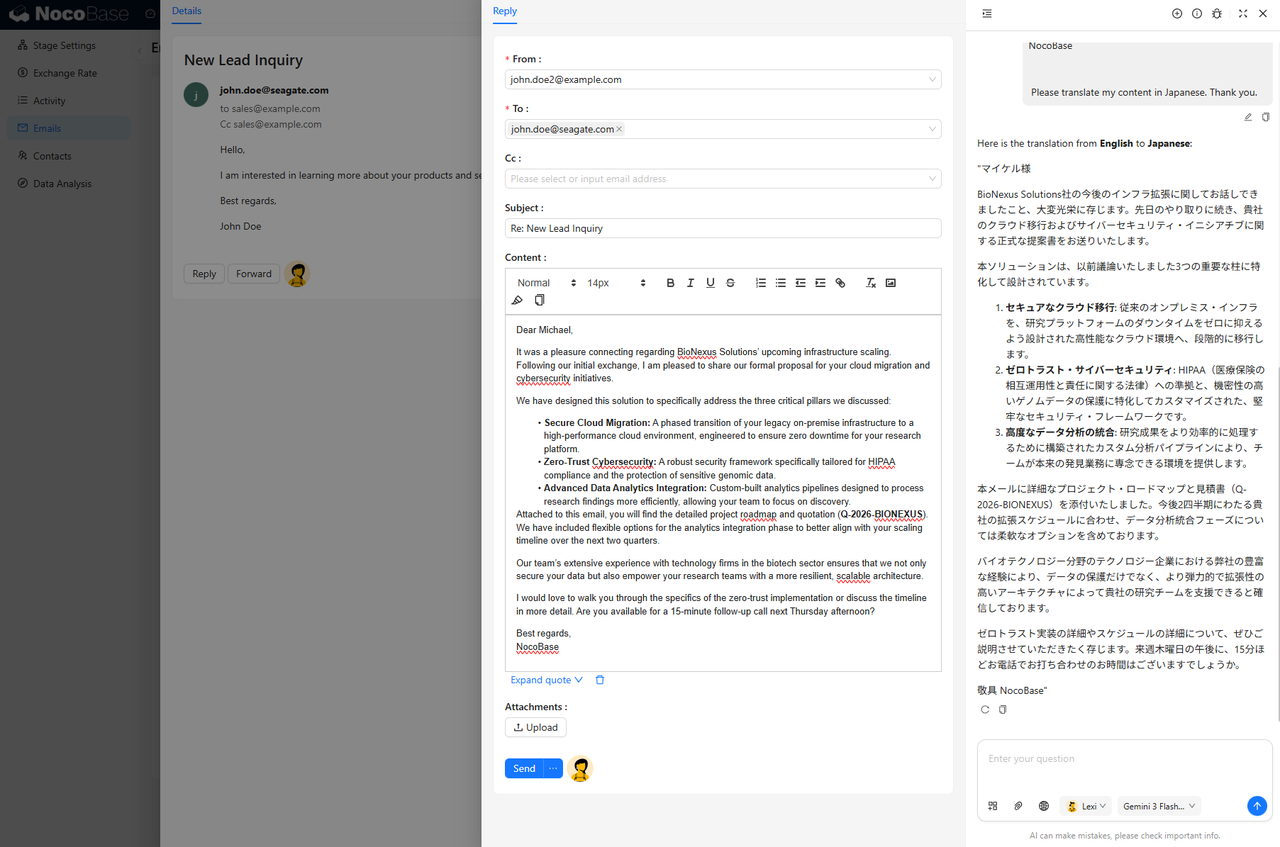
In NocoBase, AI employees can be extended and configured freely based on business needs. With the CRM 2.0 solution, they can directly support lead scoring, opportunity analysis, sales forecasting, email processing, and other parts of the sales cycle as active participants in the workflow.
Twenty
Official website: https://twenty.com/
GitHub: https://github.com/twentyhq/twenty
Project Overview
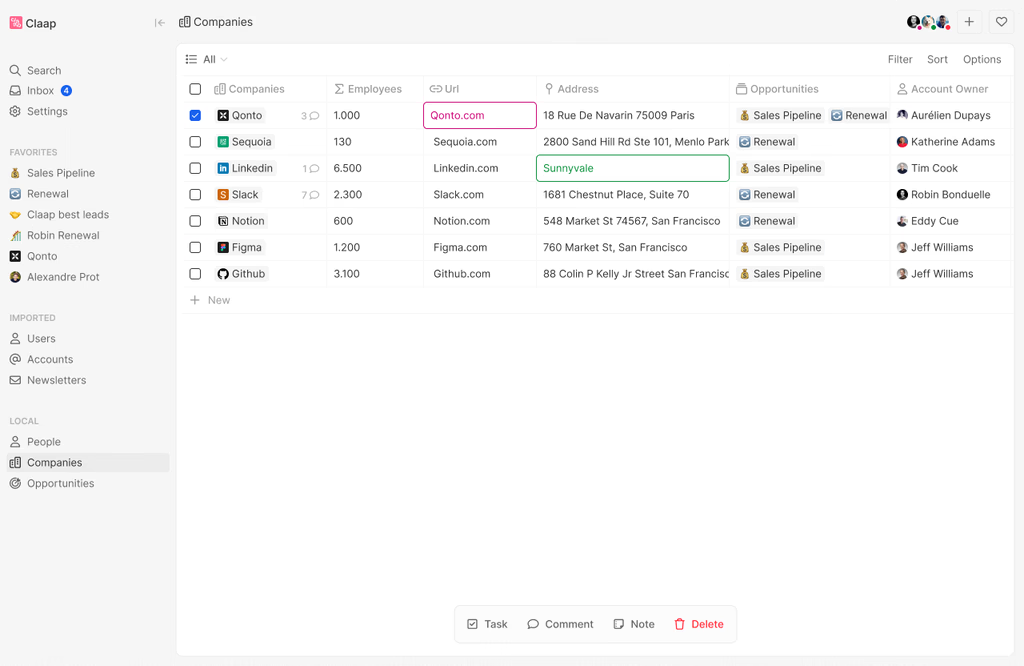
Positioning: Twenty is a modern open source CRM positioned as an open source alternative to Salesforce. In the open source community, it is often compared with products like HubSpot, Pipedrive, and Zoho CRM. It provides core CRM features such as contact management, opportunity tracking, email sync, and automation, all on a fully open source architecture.
Open source model: Supports self-hosting and lets teams manage deployment and data on their own infrastructure. According to its website, Twenty uses the GPL license, and its documentation provides a complete self-hosting setup path.
GitHub Stars: 40.2k
GitHub Forks: 5.3k
GitHub Contributors: 592
Maturity: Twenty is much closer to a ready-to-use CRM product. It already includes core CRM features such as custom objects and fields, permissions, workflow automation, email and calendar sync, APIs, and webhooks, while still leaving room for further development and customization.
Technical Architecture
Openness:
Twenty supports custom objects, fields, and relationships, along with APIs, webhooks, and code-based extensions. It is not limited to a fixed CRM data structure and can be adapted to different business models.
Data and workflow flexibility:
It supports custom data models, filters, sorting, grouping, kanban views, and table views. It also includes trigger-based and action-based workflow automation. Teams can use it with standard CRM objects such as contacts, companies, and opportunities, while also adding new objects and workflows as needed.
Customization and implementation:
Twenty offers three paths for developers: Extend, Self-Host, and Contribute. It supports API integrations, self-hosted deployment, and code-level extension. Its documentation also covers Docker Compose, cloud deployment, and multi-workspace setup, making it a good fit for teams that want to build on top of a solid CRM foundation.
AI Capabilities
AI’s role in the product:
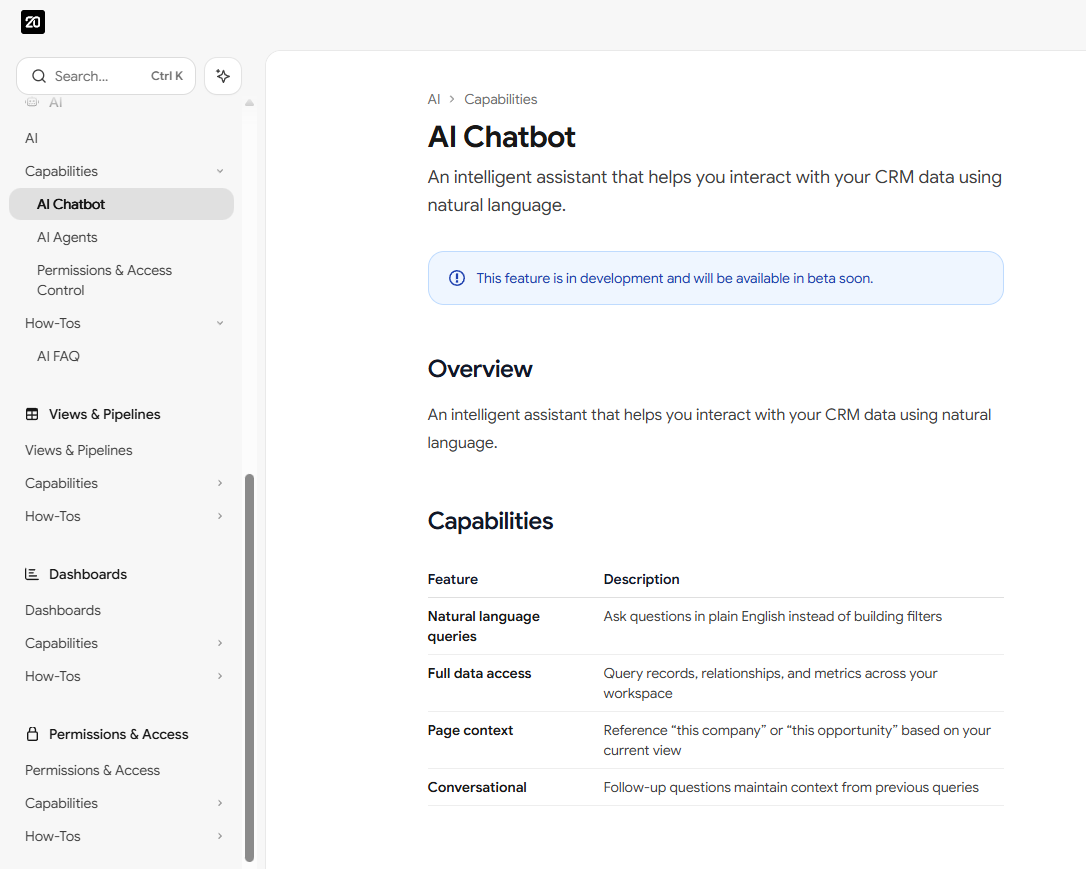
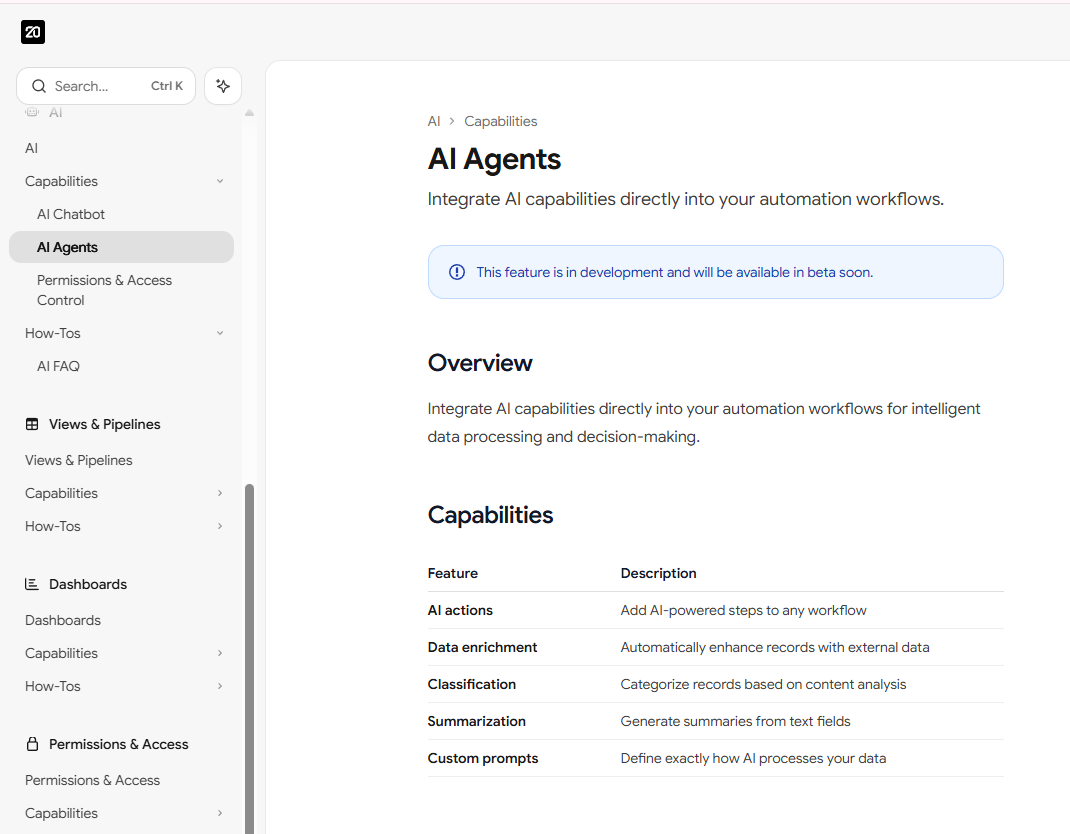
Twenty treats AI as a dedicated product module, currently centered on two directions: AI Chatbot and AI Agents in Workflows. The chatbot is designed for natural-language interaction with CRM data, while AI agents are meant to handle AI-powered actions and multi-step tasks inside workflows. Both features are currently in the pre-release stage.
The main CRM tasks AI helps with:
Twenty’s AI is designed for natural-language CRM queries, sales insights, data enrichment, record classification, summarization, custom prompt handling, and workflow tasks such as lead scoring, data cleanup, email draft generation, and record assignment.
Typical Use Cases
The AI Chatbot allows users to query records, relationships, and metrics in natural language. For example, users can look up high-value opportunities, find contacts that have not been followed up with recently, summarize pipeline value, or ask context-aware follow-up questions such as “Which opportunities are linked to this company?” or “What recent interactions have I had with this contact?”
Inside workflows, AI Agents can automatically classify leads, enrich company information, generate post-meeting follow-up emails, and route records to the right team members based on content.
Krayin CRM
Official website: https://krayincrm.com/
GitHub: https://github.com/krayin/laravel-crm
Project Overview
Positioning: Krayin is an open source CRM built with Laravel and Vue.js for SMBs and enterprise teams. It is designed to support the full customer lifecycle, including leads, customers, sales processes, and related collaboration.
Open source model: Fully open source, supports self-hosting, and has long been available for free under the MIT License.
GitHub Stars: 21.7k
GitHub Forks: 1.4k
GitHub Contributors: 41
Maturity: Krayin is closer to a traditional ready-to-use CRM product. It already includes complete customer management and sales process functionality, while still leaving room for further extension, including multi-tenant SaaS, WhatsApp, and VoIP-related expansions.
Technical Architecture
Openness:
Krayin is built on Laravel and Vue.js. Its GitHub repository describes it as a CRM framework, meaning it offers both a ready-to-use CRM core and the flexibility to extend it further.
Data and workflow flexibility:
Its standard capabilities focus on core CRM objects such as leads, customers, and sales. It also supports industry-specific use cases, along with typical lead management and sales automation scenarios.
Customization and implementation:
Krayin provides developer documentation, Docker-based installation paths, and API guidance. It is well suited for teams that want to extend modules, self-host, and tailor the system to industry-specific needs.
AI Capabilities
AI’s role in the product:
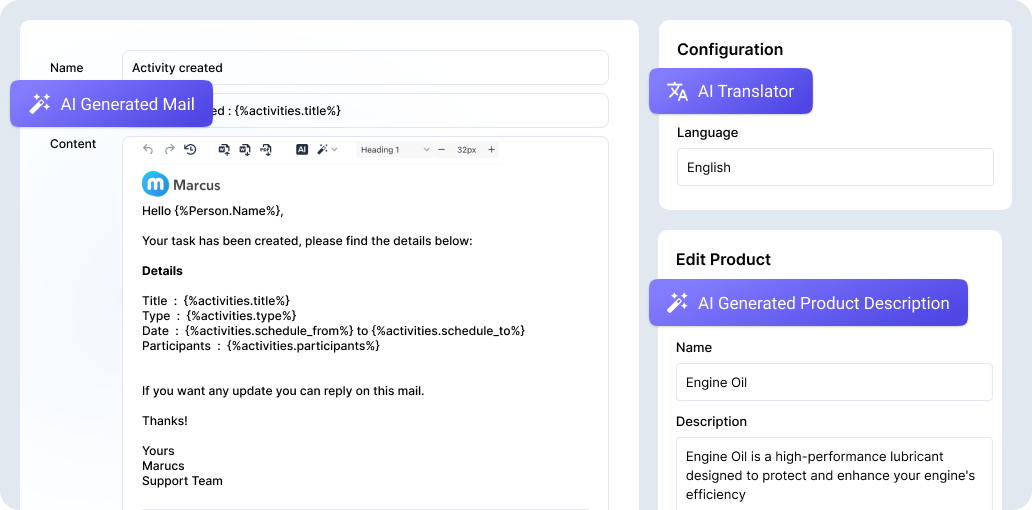
Krayin positions AI as a separate enhancement layer. It provides a dedicated AI CRM page and a Magic AI configuration option. At this stage, AI is mainly an added intelligence layer built on top of the existing CRM system.
The main CRM tasks AI helps with:
Krayin’s AI focuses on task automation, data analysis, customer intent recognition, and decision support. Magic AI supports connecting external models through API keys and lets users manually choose the model. Its AI CRM messaging focuses on efficiency, data-driven decisions, and automated customer management.
Typical Use Cases
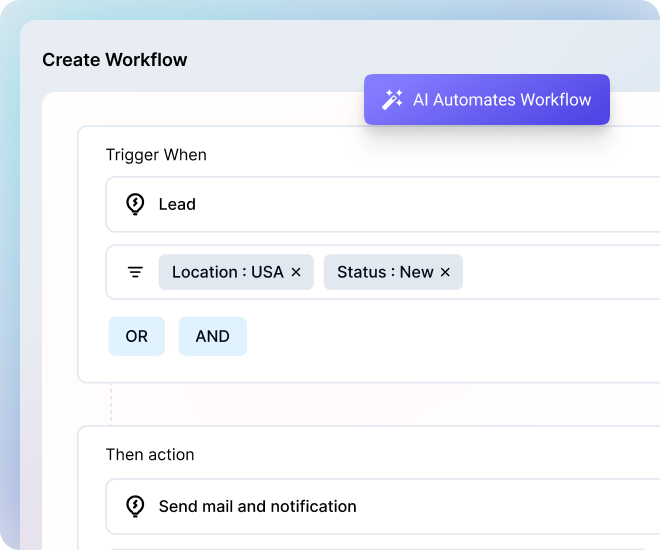
Krayin’s AI can automate routine work such as data entry, follow-up reminders, and scheduling. It handles repetitive tasks and can also suggest process improvements based on historical data.
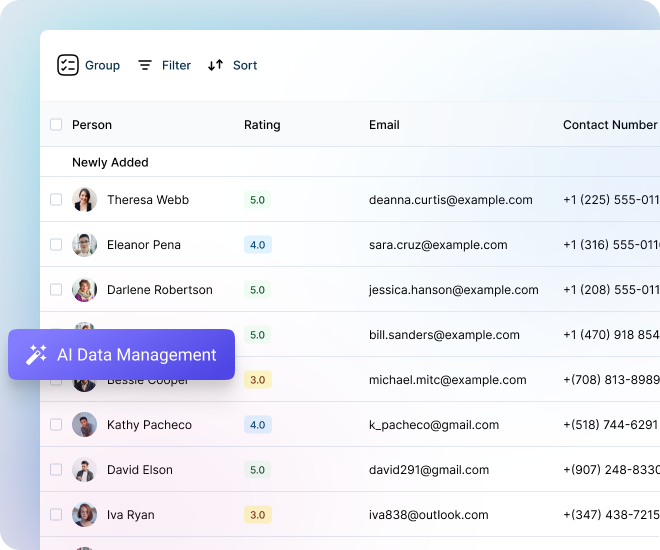
It can also organize, clean, merge, and analyze customer data from multiple sources, helping reduce manual errors and improve data quality.
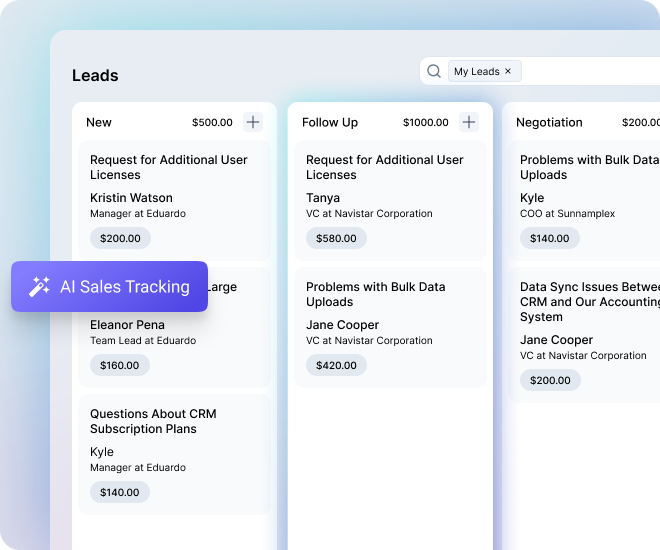
Across the sales pipeline, it can monitor each stage, detect bottlenecks, forecast outcomes, and support prioritization through lead scoring and trend analysis.
Product Differences at a Glance
AI Integration Depth
- NocoBase: AI is deeply embedded into the business system itself. Through AI employees, it can directly interact with data, pages, and workflows, making it the closest to true platform-level AI integration.
- Twenty: AI is built as a native product capability, focused on natural-language interaction and AI-powered workflow actions, making it closer to embedded CRM AI enhancement.
- Krayin CRM: AI sits on top of the existing CRM as an added enhancement layer, mainly for automation, analysis, and decision support, making it closer to a traditional CRM with AI add-ons.
Architecture and Extension Capability
- NocoBase: Built around a data-model-driven plugin microkernel, it offers the strongest flexibility and is the best fit for deep, ongoing customization.
- Twenty: Balances usability and extensibility by combining a ready-to-use CRM with support for custom objects, fields, APIs, and workflows.
- Krayin CRM: Extends a standard CRM core through a framework-based approach, making it a practical choice for modular additions and industry-specific adaptation.
Frequently Asked Questions
Q1: Which open source CRM has the strongest AI capabilities?
A: NocoBase.
Its AI employees are not standalone chat tools. They can understand the current page, CRM data, and business context, then directly assist with querying, form filling, data updates, and workflow collaboration. That makes them much closer to a deeply embedded AI layer inside the business system. Companies can also build their own specialized AI employees for specific tasks and workflows.
✨Integrate the CRM 2.0 solution into your existing NocoBase system
Q2: Which CRM is best for sales teams that want to get up and running quickly?
A: Twenty.
It is much closer to a complete, ready-to-use open source CRM. It already includes core sales entities such as contacts, companies, opportunities, tasks, email, and calendar support, while still offering APIs, webhooks, custom objects, and workflow automation for future expansion.
Q3: Which option is best for migrating away from a traditional SaaS CRM?
A: If your priority is greater control, all three offer more flexibility than closed SaaS platforms, but they suit different paths:
- NocoBase is best for teams that want to deeply redesign both business workflows and AI together
- Twenty is best for teams that want a modern CRM experience with AI and a faster rollout
- Krayin is best for teams that want to gradually add AI automation to an established CRM model
Q4: What should you look at when choosing an open source AI CRM?
- How much customization your business process requires
- Whether the AI can connect directly to CRM data
- Whether the product structure matches your needs
- Whether your team has the technical capacity to support it
- Whether long-term maintenance is realistic
Q5: How does the cost of open source CRM compare with Salesforce?
A: Using a 50-person team over three years as an example:
- Salesforce: about $150 to $300 per user per month × 50 users × 36 months = $270,000 to $540,000
- NocoBase: free and open source, with manageable self-hosting costs; commercial version available as a one-time purchase from $800 to $8,000
- Twenty: self-hosting costs are about $5,000 per year for servers and maintenance
- Krayin CRM: free and open source, with manageable self-hosting costs
Q6: Which AI models do these open source CRMs support?
A: NocoBase supports OpenAI models such as GPT-4 and GPT-3.5, Claude, and local models such as Ollama. Twenty and Krayin are still developing their AI capabilities and are expected to support mainstream commercial models.
Q7: Can non-technical teams use them?
A: Twenty and Krayin are easier for non-technical teams because they are ready to use. NocoBase requires some technical understanding, but it offers a full CRM 2.0 solution template that can be restored and used quickly.
Q8: How hard is data migration?
A: All three support CSV imports. Migrating from Salesforce typically requires APIs or third-party tools. NocoBase can also connect to existing databases through its multi-data-source capabilities, which can reduce migration effort.
Q9: Do they offer paid support?
A: NocoBase offers enterprise support and customization services. Twenty provides a commercial cloud version. Krayin offers paid technical support and hosting services.
Q10: Which project has the most active community?
A: Based on GitHub numbers, the ranking is: Twenty (40.2k stars, 592 contributors) > NocoBase (21.7k stars, 106 contributors) > Krayin (21.7k stars, 41 contributors). That said, NocoBase’s community and plugin ecosystem are growing quickly.
If this article was helpful, feel free to share it with others who are also exploring open source AI CRM.💕
Related reading:
- Top 3 Open Source ERP with AI on GitHub: NocoBase vs Odoo vs ERPNext
- 5 Most Popular Open-Source AI Project Management Tools on GitHub
- 6 Best Open-Source AI Ticketing Systems
- 4 Open Source Data Management Tools for Business Systems
- 4 Lightweight Enterprise Software for Business Processes (With Real-World Cases)
- 6 Enterprise Softwares to Replace Excel for Internal Operations
- 10 Open Source Tools Developers Use to Reduce Repetitive CRUD
- Top 12 Open-source AI Workflows Projects with the Most GitHub Stars