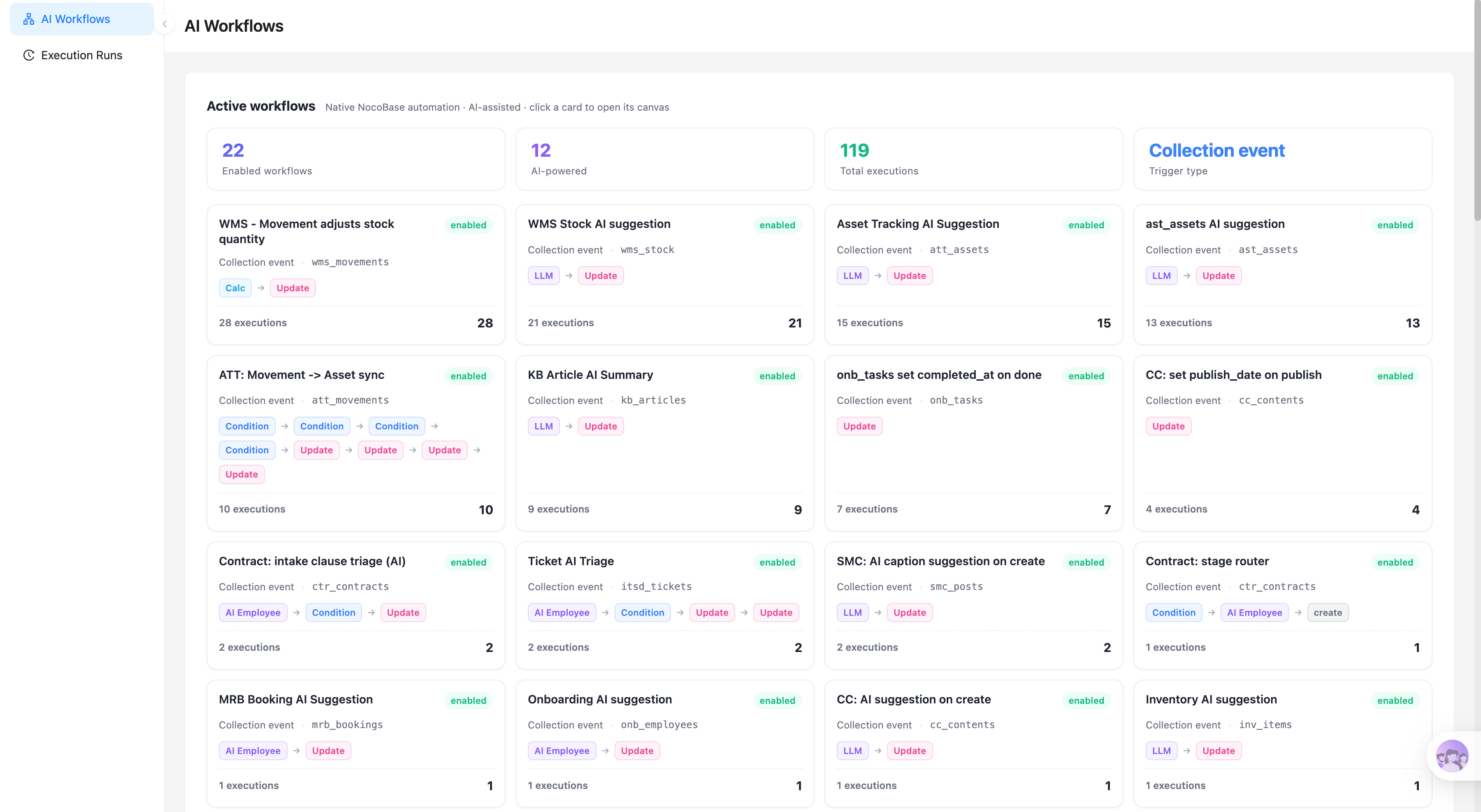
Construire avec votre agent IA
Build a NocoBase app — Customer Support Ticket System: a three-pane inbox — queue, conversation, and customer panel. Match the layout and signature visuals of this reference prototype: https://static-docs.nocobase.com/solution/templates/12-support-ticket-software.html
Le lien du prototype (HTML) dans le prompt est une maquette que nous avons préparée, uniquement pour démontrer la capacité ; NocoBase ne recommande pas de générer un système entier à partir d’un seul prompt. Lorsque vous l’utilisez pour construire, associez-le au skill « prototype reproduction » (nocobase-prototype-repro) des NocoBase Skills pour obtenir un bon résultat.
Avant de commencer, suivez le démarrage rapide de l'agent IA pour installer NocoBase et connecter votre agent. Les résultats de l'IA peuvent varier ; selon le modèle et la complexité du système, quelques ajustements ou échanges supplémentaires peuvent être nécessaires.
Introduction
Utilisez votre AI agent préféré et NocoBase pour créer rapidement un système de ticketing de support client personnalisable, fiable et continuellement évolutif — pour gérer les problèmes clients, les statuts de tickets, les priorités, l’historique des conversations, les notes internes, les assignataires, les SLA et les informations clients.
Copiez l’invite ci-dessous et laissez votre AI agent générer la structure de base d’un système de ticketing dans NocoBase, puis ajustez les champs, les pages et les flux de traitement via l’interface no-code.
Ce système convient aux équipes de service client, aux équipes de support après-vente, aux équipes de support technique, aux entreprises SaaS, aux éditeurs de logiciels et aux équipes e-commerce qui ont besoin de traiter en un seul endroit les problèmes clients issus des canaux e-mail, chat en direct, web et téléphone.
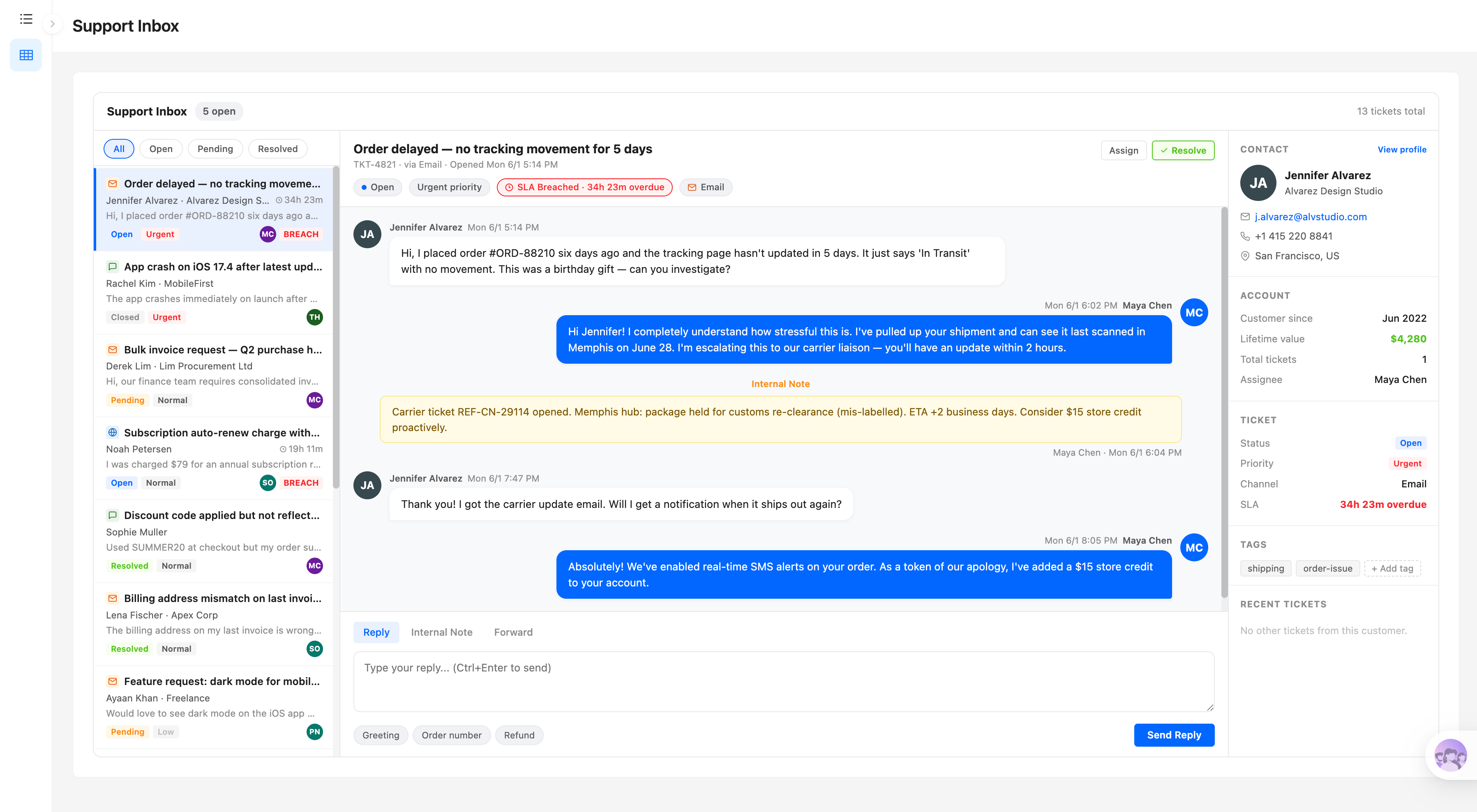
Boîte de réception du support client :
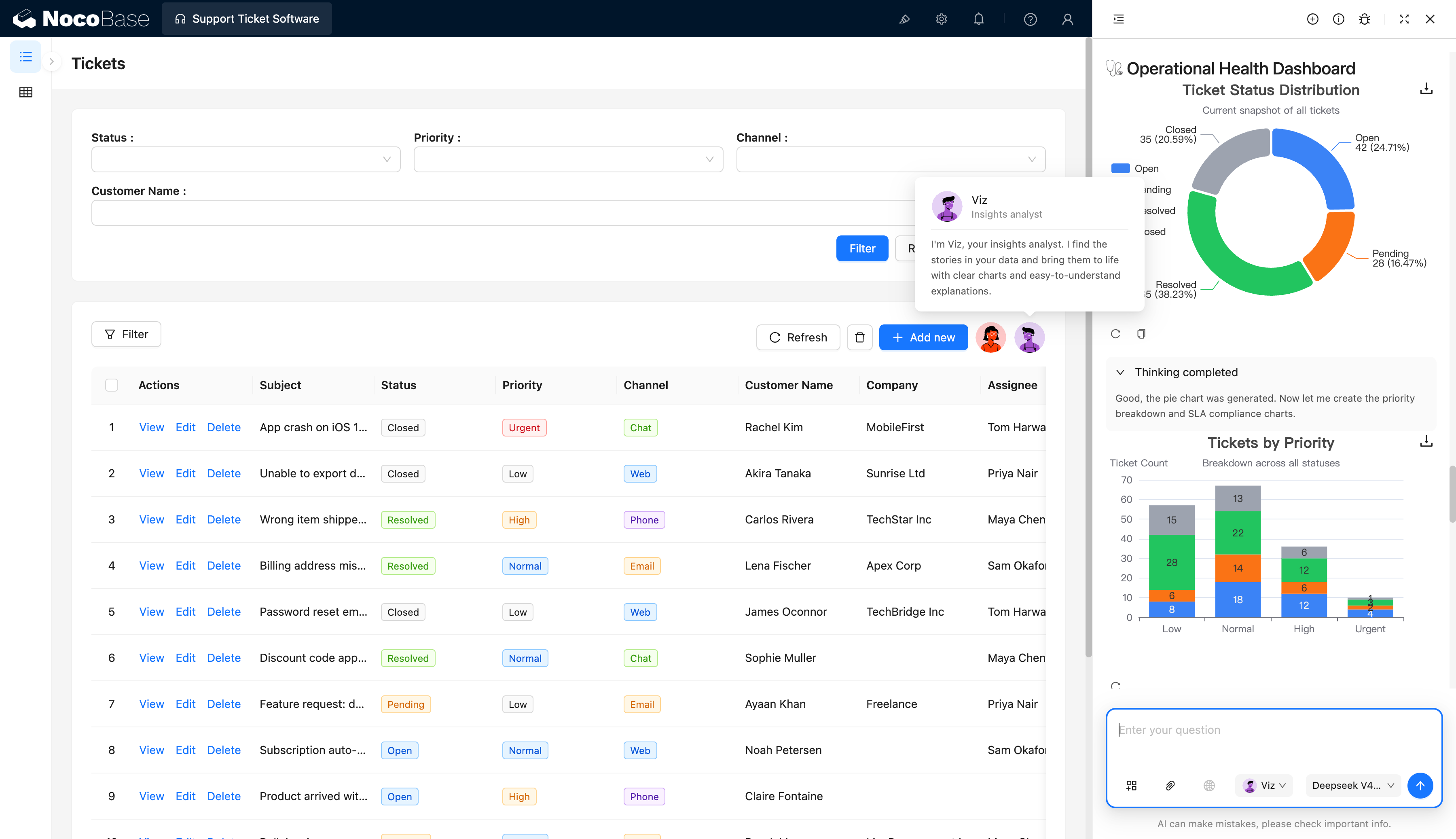
AI employee analysant les données de tickets :
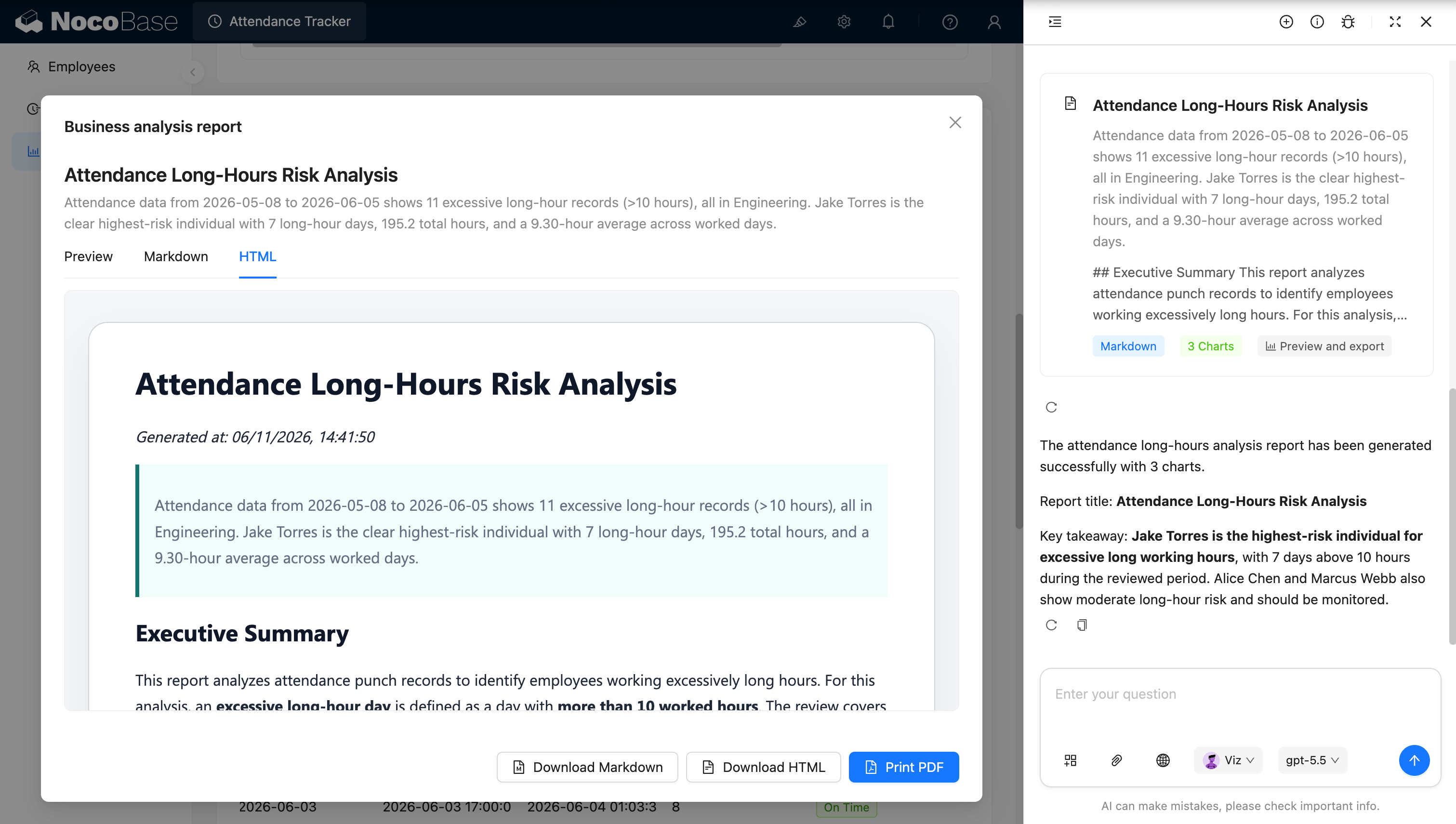
Détail du ticket et historique des messages :
Quels problèmes un système de ticketing résout-il ?
La difficulté du support client ne réside pas dans la réception des questions — elle réside dans le suivi continu du statut de chaque problème à travers plusieurs canaux, clients et agents.
Lorsque les problèmes clients sont dispersés entre boîtes mail, outils de chat et tableurs, les équipes se retrouvent facilement confrontées à des tickets manqués, des réponses en double, des responsabilités floues, des urgences traitées trop tard et un contexte client difficile à retrouver.
Avec ce système, les agents peuvent consulter les tickets en attente dans une boîte de réception unifiée et les filtrer par statut : ouvert, en attente, résolu. Chaque ticket enregistre son objet, le client, l’entreprise, le canal, la priorité, l’assignataire et le statut SLA.
À l’ouverture d’un ticket, les agents voient l’intégralité de la conversation client et peuvent, sur le même écran, répondre au client, ajouter des notes internes uniquement visibles en interne, ou transférer la conversation à une autre personne. Le système peut également afficher les coordonnées du client, sa région, la date de début de relation, la valeur client, l’historique des tickets et le responsable actuel — permettant aux agents de comprendre le contexte client dans sa globalité.
Pour les tickets urgents ou sur le point de dépasser leur SLA, le système affiche clairement le retard accumulé, aidant l’équipe à prioriser les problèmes à risque élevé.
Fonctionnalités principales
Boîte de réception unifiée
- Traitement centralisé des tickets : Consultez les problèmes clients soumis via différents canaux dans une seule boîte de réception et passez d’un ticket à l’autre rapidement.
- Statut et priorité en un coup d’œil : Filtrez les tickets par statut (ouvert, en attente, résolu) tout en visualisant la priorité et le risque SLA.
- Aperçu des informations clés : Consultez directement l’objet du ticket, le client, l’entreprise, le résumé du contenu et la date de création pour décider rapidement de l’ordre de traitement.
Communication client et historique des messages
- Historique complet de la conversation : Affichez les messages clients, les réponses des agents, les expéditeurs et les horodatages précis en un seul endroit, en préservant l’intégralité du contexte.
- Plusieurs actions de communication : Répondez directement aux clients, utilisez des réponses rapides ou transférez un ticket à une autre personne pour traitement.
- Séparation des types de messages : Distinguez clairement les messages clients, les réponses des agents et les notes internes pour éviter que du contenu de collaboration interne ne soit envoyé par erreur aux clients.
Collaboration d’équipe et routage des tickets
- Gestion des assignataires : Attribuez les tickets à des agents spécifiques et réassignez-les en fonction de la charge de travail ou de l’expertise.
- Collaboration via notes internes : Consignez les étapes de résolution, les informations de passation et les suggestions de traitement pour la communication interne de l’équipe.
- Mises à jour de statut : Mettez continuellement à jour les statuts des tickets et marquez les problèmes comme résolus une fois traités.
Gestion des informations tickets et clients
- Informations essentielles du ticket : Gérez en un seul endroit l’objet, le statut, la priorité, le canal source, l’assignataire, l’échéance SLA et la date de création.
- Profils clients liés : Consultez les coordonnées du client, sa région, son entreprise et le responsable de compte actuel lors du traitement d’un ticket.
- Historique des services : Accédez aux tickets passés du client, à la date de début de relation et à la valeur vie client, aidant les agents à comprendre le contexte complet.
Filtrage et recherche multi-critères
- Filtrage flexible des tickets : Filtrez les tickets par statut, priorité, canal source et assignataire.
- Recherche rapide de clients : Localisez les tickets associés et l’historique du service par nom de client ou entreprise.
- Détection des risques SLA : Identifiez rapidement les tickets à risque élevé approchant leur échéance ou déjà en dépassement.
Analyse assistée par l’IA
- Analyse de la distribution des tickets par l’IA : Comptez les tickets par statut et priorité pour comprendre la structure de la file d’attente de support.
- Détection des problèmes à risque élevé par l’IA : Identifiez les tickets urgents, non résolus depuis longtemps ou sur le point de dépasser leur SLA.
- Tableaux de bord opérationnels par l’IA : Résumez les tickets non résolus, la distribution des priorités et les performances SLA pour aider les responsables à évaluer la charge de l’équipe.
- Synthèses des données de support par l’IA : Extrayez automatiquement les problèmes fréquents, les risques majeurs et les éléments nécessitant un traitement prioritaire.
Pourquoi créer un système de ticketing avec l’IA et NocoBase ?
Dès qu’un système de support est réellement utilisé, il doit gérer bien plus qu’une liste de tickets. Les équipes doivent également gérer les messages clients, les notes internes, les assignataires, les priorités, les SLA, les profils clients et l’historique — et maintenir la cohérence des informations entre différents agents.
Si vous utilisez simplement du vibe coding générique pour générer une page de support de zéro, la liste de tickets et la zone de réponse sont faciles à réaliser, mais le contrôle des accès, la liaison des messages, les profils clients, le suivi SLA, l’historique des actions et l’analyse des données doivent encore être complétés pièce par pièce.
NocoBase connecte les tickets, les messages, les clients, les entreprises et les assignataires comme des données liées. Les agents traitent les problèmes clients dans une interface unifiée, tandis que les managers utilisent des filtres, des statistiques et des tableaux de bord pour comprendre les opérations globales.
L’IA peut non seulement aider à construire le système, mais aussi participer à l’analyse des données de support. L’AI employee visible dans les captures d’écran peut lire les données de tickets et générer des graphiques de distribution des statuts et d’analyse des priorités, aidant les managers à comprendre rapidement les tickets non résolus, les urgences et la charge de travail de l’équipe.
Le résultat n’est pas seulement une boîte de réception de support, mais une plateforme de service client qui évolue continuellement avec votre base de clients, vos canaux de support, vos règles SLA et votre organisation d’équipe.
FAQ
- En quoi un système de ticketing diffère-t-il d’une simple boîte mail partagée ?
Une boîte mail partagée ne peut que collecter des e-mails ; elle peine à gérer continuellement le statut des tickets, les priorités, les assignataires, les SLA, les notes internes et l’historique client.
Un système de ticketing transforme chaque problème client en un ticket traçable et relie les messages clients, les réponses des agents, le statut de traitement et les assignataires. Même lorsqu’un ticket passe d’un agent à un autre, l’équipe voit le contexte complet, réduisant les questions répétées et les problèmes manqués.
- Puis-je gérer en un seul endroit les problèmes clients issus de différents canaux ?
Oui. Le système peut enregistrer des tickets provenant de l’e-mail, du chat en direct, des formulaires web, du téléphone et d’autres canaux, et les gérer dans une boîte de réception et une liste de tickets unifiées.
Chaque ticket conserve son canal source, de sorte que l’équipe peut filtrer ou analyser le volume de problèmes et les performances de traitement par canal.
- Puis-je gérer l’intégralité de la conversation client sur une seule page ?
Oui. Les agents peuvent consulter les messages clients, les réponses passées et les notes internes sur la page du ticket et répondre directement aux clients, sans avoir à jongler entre la messagerie, les outils de chat et les fiches clients.
La page peut également afficher les coordonnées du client, son entreprise, sa région, sa valeur client et son historique de tickets, afin que les agents aient une vue complète avant de répondre.
- Puis-je prioriser les tickets par priorité et SLA ?
Oui. Chaque ticket peut se voir attribuer une priorité telle que faible, normale, haute ou urgente, et enregistrer une échéance SLA.
Les équipes peuvent prioriser les tickets haute priorité et ceux proches ou dépassant leur échéance. Les responsables du support peuvent également utiliser des filtres et des tableaux de bord opérationnels pour voir les problèmes à risque élevé actuels.
- Puis-je attribuer des tickets à différents agents ou équipes ?
Oui. Chaque ticket peut avoir un assignataire désigné, et les responsables du support peuvent réassigner les tickets en fonction des compétences, des files d’attente ou de la charge de travail actuelle.
Avec la configuration des permissions, les agents ne voient que les tickets qui leur sont assignés tandis que les responsables voient ceux de toute l’équipe, évitant que chaque agent ait par défaut accès à toutes les données clients.
- Le système conserve-t-il un historique complet des messages et du traitement ?
Oui. Les messages clients, les réponses des agents et les notes internes enregistrent tous l’expéditeur, le contenu, le type et l’heure.
Les changements de statut des tickets, les changements d’assignataires et d’autres actions clés peuvent également être conservés comme historique d’actions, facilitant la revue du processus de traitement, les passations de travail ou la résolution des litiges clients.
- Que peut faire l’IA dans le support client ?
L’IA peut analyser les objets et le contenu des tickets pour aider à la classification des problèmes, à l’évaluation des priorités, à la génération de résumés et aux suggestions de réponse, et peut générer des analyses opérationnelles basées sur les données de statut, de priorité et de SLA des tickets.
Par exemple, l’IA peut identifier les tickets urgents non résolus, résumer les problèmes fréquents, ou aider les responsables à identifier les principaux risques dans la file d’attente de support actuelle.
- Claude Code, Codex, Cursor ou OpenCode peuvent-ils créer ce système de ticketing ?
Oui. Des AI agents de codage tels que Claude Code, Codex, Cursor et OpenCode peuvent se connecter à NocoBase et générer des structures de données comme les clients, les tickets et les messages, ainsi que la boîte de réception, la liste de tickets et les pages de détail à partir d’invites en langage naturel.
Une fois la base générée, l’équipe peut continuer à ajuster les champs, les statuts, les pages, les permissions et les workflows via l’interface no-code de NocoBase, sans avoir à demander à l’IA de reconstruire entièrement l’application à chaque fois.
- Puis-je contrôler quels clients et tickets chaque agent peut voir ?
Oui. NocoBase prend en charge le contrôle d’accès par rôle, assignataire, équipe ou autres conditions de données.
Par exemple, les agents traitent uniquement les tickets qui leur sont assignés, les responsables d’équipe consultent les tickets de leur groupe, le responsable du support voit toutes les données de service, et les administrateurs gèrent la configuration du système. Les entreprises peuvent également ajouter le SSO selon les besoins afin que les employés continuent à utiliser leurs comptes d’entreprise existants.
- Le système peut-il suivre l’évolution de notre processus de support ?
Oui. Les équipes peuvent continuer à ajouter des champs de tickets, des statuts, des canaux, des priorités et des règles SLA, et à ajuster la mise en page de la boîte de réception, les profils clients, les méthodes d’assignation et les flux de notifications.
À mesure que l’équipe de support grandit ou que les canaux augmentent, il n’est pas nécessaire de reconstruire le système — vous pouvez continuer à itérer sur les données et les processus existants.
- Ce système est-il prêt pour une vraie équipe de service client ?
Oui. Le support client a particulièrement besoin d’isolation des permissions, d’historique des messages, de suivi des actions, de SLA et de maintenance à long terme — pas seulement d’une interface capable d’envoyer des réponses.
NocoBase peut combiner selon les besoins des workflows, des notifications, de l’historique d’actions, des journaux d’audit, une connexion d’entreprise, des API et des extensions de plugins. Par rapport à une page de support générée ponctuellement par du vibe coding générique, c’est bien mieux adapté à la gestion d’une opération de support client continue.