Build it with your AI agent
Build a NocoBase app — Employee Attendance Management System: attendance KPIs, a monthly heatmap, and dual donut charts for status distribution. Match the layout and signature visuals of this reference prototype: https://static-docs.nocobase.com/solution/templates/13-attendance-tracker.html
The prototype link (HTML) in the prompt is a design we pre-made, only to demonstrate the capability; NocoBase doesn't recommend generating a whole system from a single prompt. When you build with it, pair it with the “prototype reproduction” skill (nocobase-prototype-repro) in NocoBase Skills to get a good result.
Before you start, follow the AI agent quick start to install NocoBase and connect your agent. AI results can vary; depending on the model and system complexity, some fine-tuning or extra rounds may be needed.
Introduction
Use your favorite AI Agent and NocoBase to quickly build a customizable, reliable, long-lived employee attendance system — recording clock-in/clock-out times, working hours, attendance status, monthly attendance and per-department performance.
Copy the prompt below and let your AI Agent generate the basic data model and structure of the attendance system in NocoBase, then fine-tune fields, pages, attendance statuses and statistics rules through the no-code interface.
It fits office teams, remote teams, chain stores, service teams and SMBs that need to manage daily clock-ins, lateness, absence, leave, overtime and monthly attendance records.
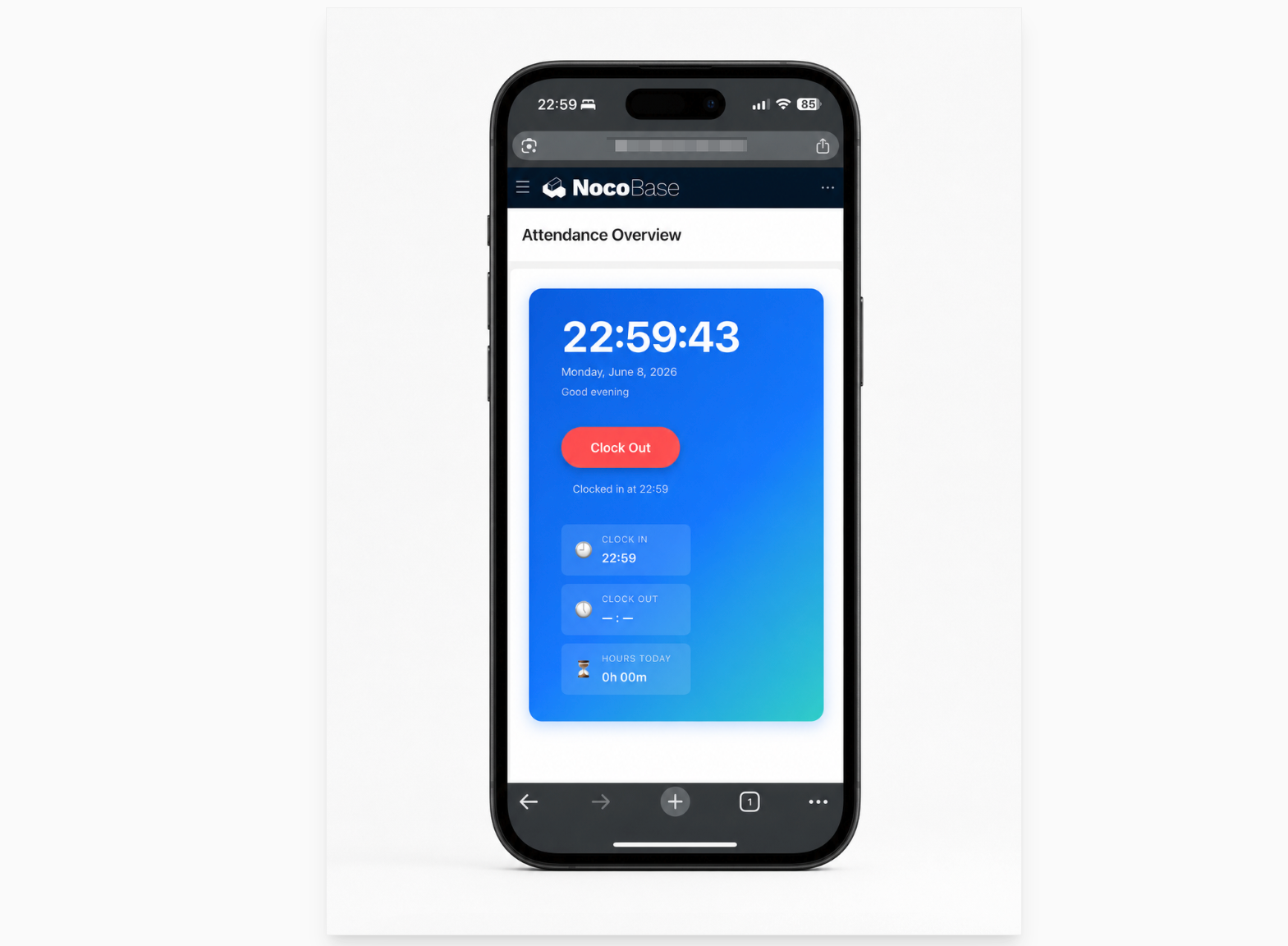
Mobile clock-in and clock-out:
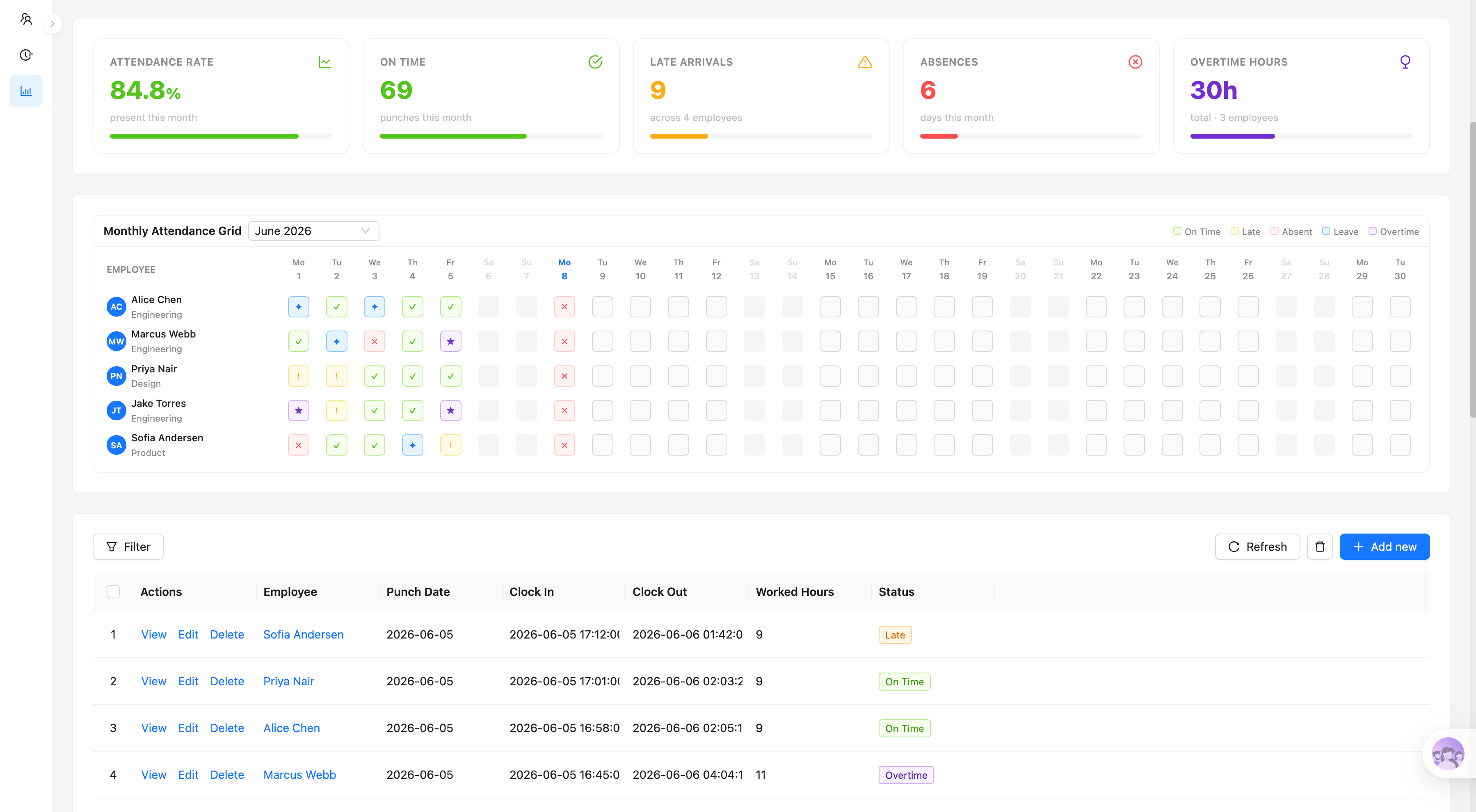
Monthly attendance overview and detail records:
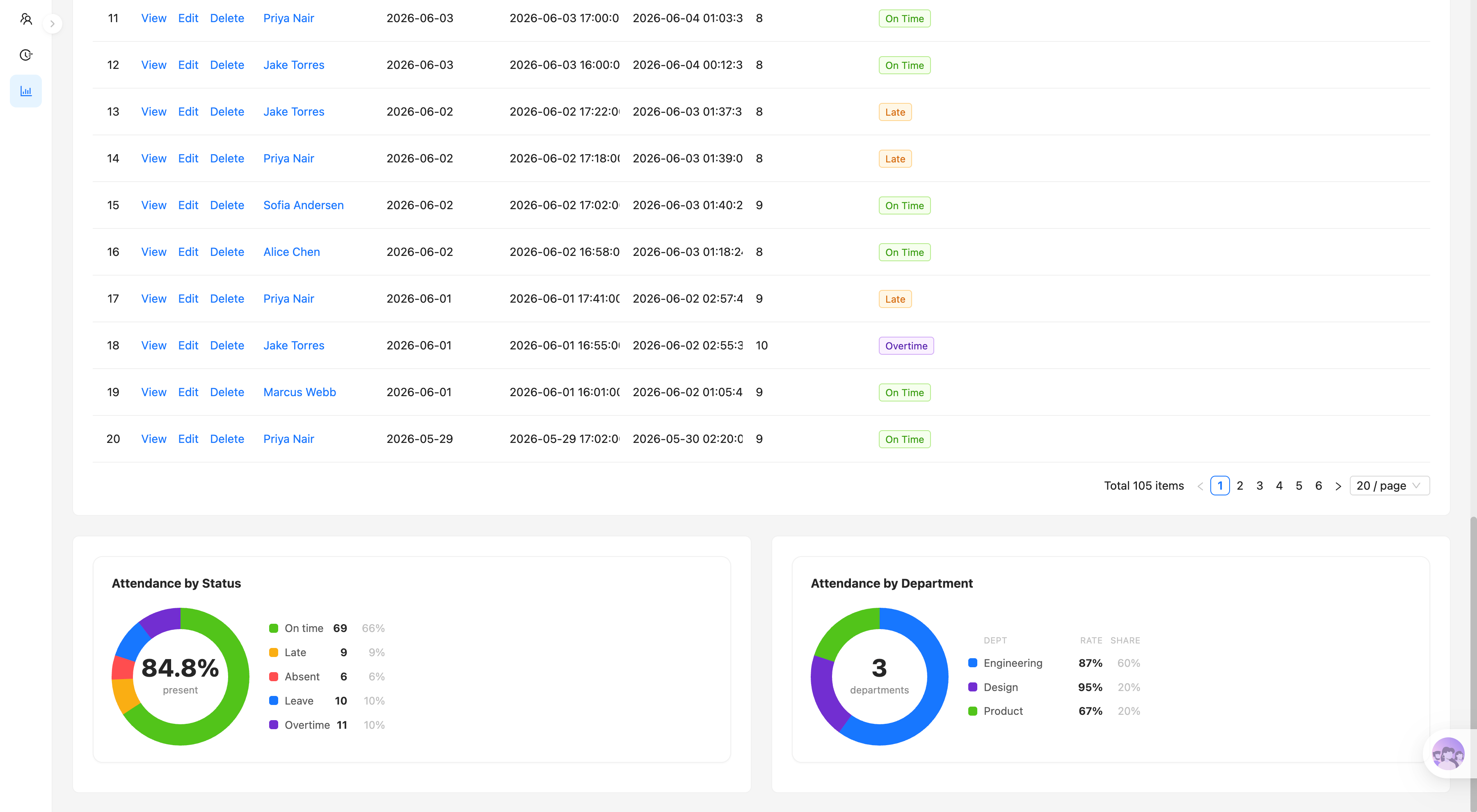
Attendance statuses and department statistics:
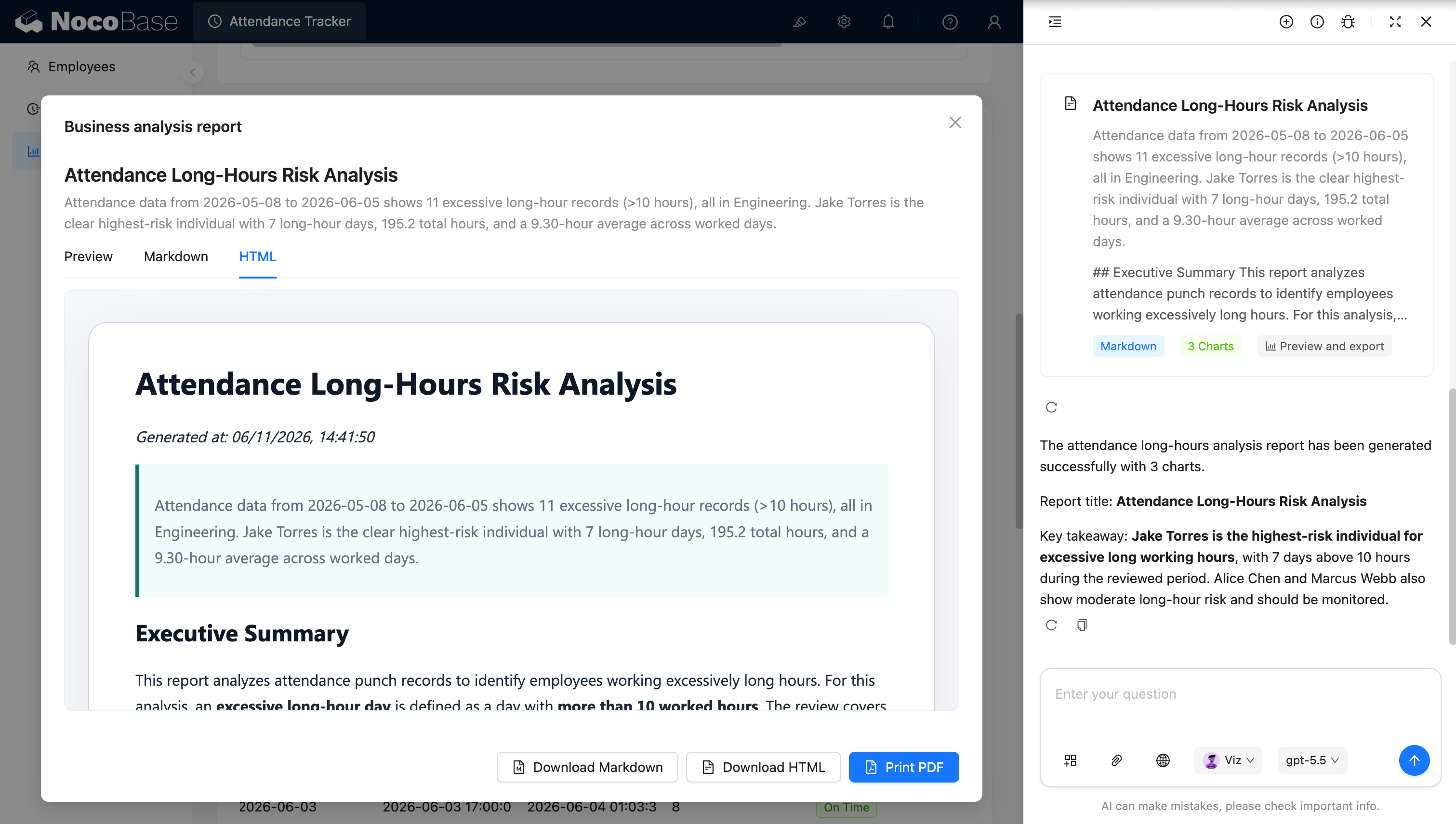
AI analyzes attendance and generates reports:
What problems does an attendance system solve?
The core of attendance management is not just recording whether someone showed up — it is accurately tracking when each person clocked in and out, how long they actually worked, and whether there was lateness, absence, leave or overtime.
If your team still relies on paper sign-ins, chat check-ins or scattered spreadsheets, HR easily runs into missing records, miscalculated hours, painful month-end summaries and inconsistent standards across employees.
With this system, employees check the current time and clock in or out directly on their phones. The system records start time, end time and accumulated working hours for the day, and produces the corresponding attendance record.
Managers can review each employee’s daily status in a monthly attendance matrix, with distinct markers for normal, late, absent, on leave and overtime. The system also shows the month’s attendance rate, on-time count, lateness count, absence days and overtime hours.
The attendance detail list records employee, date, start time, end time, working hours and status, making it easy for HR to review and verify records. Managers can also check attendance rates and headcount distribution by department to understand each team’s overall performance.
Core features
Mobile clock-in & clock-out
- Real-time mobile check-in: employees see the current time on their phone and clock in or out.
- Today at a glance: shows today’s clock-in time, clock-out time and accumulated working hours in real time.
- State-aware action: the page automatically offers clock-in or clock-out based on today’s record.
Attendance records & statuses
- Complete detail records: employee, date, start time, end time and actual working hours.
- Multiple statuses: normal, late, absent, on leave and overtime, each with its own marker.
- Maintenance & lookup: filter records by employee or date; authorized staff can fix missing or wrong data.
Monthly attendance matrix
- Whole-month view per employee: employees as rows, dates as columns, every day’s status in one place.
- Quick month switching: review current or historical months for periodic HR checks.
- Anomaly spotting: status markers make lateness, absence, leave and overtime easy to spot.
Attendance dashboard
- Key metrics: monthly attendance rate, on-time count, lateness count and absence days.
- Overtime stats: total overtime hours and the number of employees involved.
- Overall picture: the current month’s attendance at a glance for fast judgement.
Department & status analytics
- Status distribution: counts and ratios of normal, late, absent, leave and overtime records.
- Department comparison: attendance rates and headcount by department to identify problem teams.
- Trend & risk signals: combine statuses and hours to surface frequent lateness, long-term absence or excessive overtime.
AI assistance
- AI anomaly detection: automatically analyzes lateness, absence, frequent leave and abnormal hours, helping HR spot employees or teams that need attention.
- AI overtime-risk analysis: aggregates long hours, consecutive overtime and per-department overtime distribution to identify overwork risks.
- AI attendance reports: summarizes attendance rate, lateness, absence, leave and overtime into a monthly digest with management suggestions.
Why build it with AI and NocoBase?
Once an attendance system is really in use, it is never just a clock-in button. Teams also need to calculate working hours, detect lateness and overtime, aggregate monthly data, and let HR review and correct records.
A page generated from scratch by plain Vibe Coding usually stops at submitting a timestamp. Linking clock-in/clock-out records, computing statuses, the monthly matrix, department statistics, permissions and history all still need continuous patching and debugging.
NocoBase connects employees, departments and attendance records, and lets you configure the mobile check-in page, monthly matrix, detail list and dashboards in one system. Teams can adapt fields, statuses and views to their own schedules and rules.
AI lowers the building cost further. Start with a prompt that lets your AI Agent generate the employee table, attendance records, mobile check-in page and dashboards, then keep refining pages and rules in NocoBase’s no-code interface.
What you get is not a one-off clock-in demo, but an internal system that keeps evolving with team size, org structure and attendance policies.
FAQ
- Can employees clock in and out on their phones?
Yes. The system provides a mobile attendance page where employees see the current time and complete clock-in and clock-out.
The page also shows today’s clock-in time, clock-out time and accumulated hours — no separate attendance app required.
- Does the system calculate daily working hours automatically?
Yes. After clock-in and clock-out, the system computes the day’s working hours from the two timestamps and saves them to the record.
The data feeds status judgement (normal / late / overtime) and rolls up into the monthly dashboard.
- Can lateness, absence and overtime follow our own policy?
Yes. Teams set their standard start time, standard hours and status rules.
For example: clocking in after the cutoff marks Late; exceeding standard hours marks Overtime; no valid record marks Absent. Leave is a separate status so it is never miscounted as absence.
- Can I view a whole month of attendance per employee?
Yes. The monthly matrix shows each employee’s daily status with distinct markers for normal, late, absent, on leave and overtime.
Compared with reading raw records, HR and team leads spot consecutive lateness, frequent absence or heavy overtime much faster.
- Can AI analyze long hours and overwork risk?
Yes. AI reads attendance records in a chosen period, flags days above your hour threshold, and analyzes which employees or departments carry the highest long-hour risk.
The sample report counts 10-hour-plus days, related employees’ accumulated and average hours, and generates a risk summary with charts.
- What does the AI attendance report include?
Long-hour record counts, high-risk employees, department distribution, accumulated hours, average daily hours and key findings.
Results can be viewed as Preview, Markdown or HTML, downloaded, or printed to PDF — handy for HR reporting and management reviews.
- Can missing or wrong records be corrected?
Yes. HR or authorized managers can edit wrong timestamps, add missing records or fix statuses.
Changes keep an operation history of who adjusted what and when, so attendance data cannot be silently altered.
- Can regular employees see other people’s records?
Usually not. NocoBase controls access by role, department and data scope.
For example, employees see only their own records; team leads see their department; HR maintains everything; management sees aggregates without necessarily accessing individual rows. This matters for data that includes working hours and overtime.
- Do we need to redevelop the system when attendance rules change?
No. After going live you can keep adjusting standard times, lateness rules, standard hours, status types, the monthly matrix and metrics.
Different regions, shifts or departments can use different rules — NocoBase’s collections, pages and workflows stay configurable.
- Can Claude Code, Codex, Cursor or OpenCode help build it?
Yes. These AI Coding Agents connect to NocoBase and generate the employee table, attendance records, mobile check-in page, monthly matrix and dashboards from natural-language prompts.
Afterwards HR or admins keep tweaking fields, rules, pages and permissions in the no-code interface — no need to regenerate from scratch for every change.
- How is this different from a Vibe-coded clock-in page?
Plain Vibe Coding quickly produces a clock-in button or a timestamp page, but real enterprise use also needs permissions, attendance rules, corrections, operation history, department statistics and long-term maintenance.
NocoBase keeps check-ins, hour calculation, status judgement, access control and analysis reports in one business system, with SSO, audit logs, notifications, APIs and plugins available on demand — built for continuously running attendance management, not a one-off demo.