Build it with your AI agent
Build an application with NocoBase — Field Service Management System: work order dispatching, technician scheduling, service deadline tracking, spare parts suggestions, and AI work order operations analysis. Use this prototype as the layout and signature visual reference: https://static-docs.nocobase.com/solution/templates/60-field-service-management-system.html
The prototype link (HTML) in the prompt is a design we pre-made, only to demonstrate the capability; NocoBase doesn't recommend generating a whole system from a single prompt. When you build with it, pair it with the “prototype reproduction” skill (nocobase-prototype-repro) in NocoBase Skills to get a good result.
Before you start, follow the AI agent quick start to install NocoBase and connect your agent. AI results can vary; depending on the model and system complexity, some fine-tuning or extra rounds may be needed.
What is a Field Service Management System?
A field service management system is an AI business system for centrally managing customer repair requests, work order dispatching, service personnel, response deadlines, spare parts, and on-site handling records. It is suitable for after-sales, operations and maintenance, equipment service, and regional service teams. Teams can use natural language to tell an AI Agent what work order fields, dispatch pages, and handling workflows they need, and then turn them into long-term maintainable tables, detail pages, lists, permissions, and analysis views in NocoBase. The example system can track 15 field service work orders, 10 service categories, and 6 service personnel at the same time, while identifying 4 work orders at risk of missing deadlines and 1 overdue work order. After the system is built, NocoBase AI employees can also summarize work orders, recommend possible spare parts, and generate service operations analysis reports.
Core Value
- 🛠️ Centrally manage 15 work orders across 10 service categories, including security, HVAC, fire protection, mechanical, and electrical services
- ⏱️ Track service deadlines in real time, with 73% of current work orders on schedule
- ⚠️ Automatically identify 4 work orders at risk of delay and 1 overdue work order
- 👷 Assign work based on the specialties, availability, and workload of 6 service personnel
System Preview
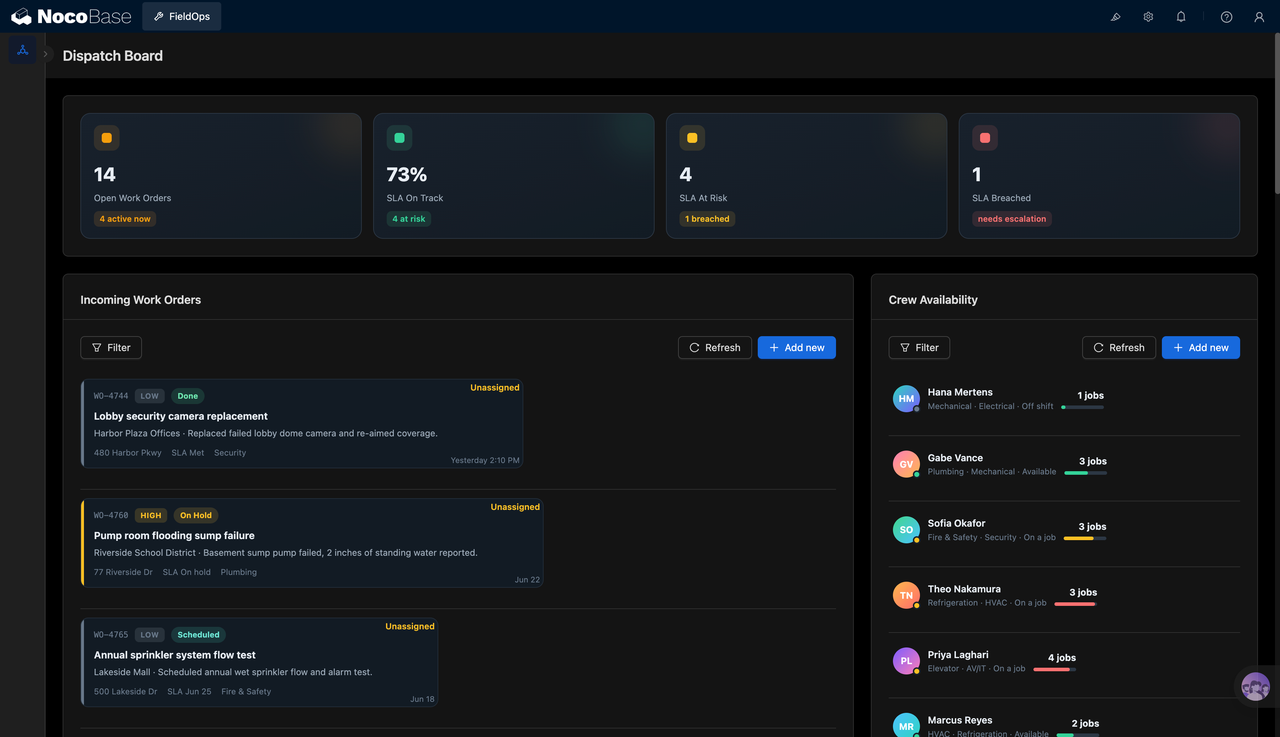
1.Dispatch overview and personnel scheduling
The dispatch overview centrally displays open work orders, service deadline compliance, at-risk work orders, and overdue work orders. New tasks can be sorted by priority, status, address, and service type. Dispatchers can also view each service person’s specialty, current status, and assigned workload before deciding who should take the job.
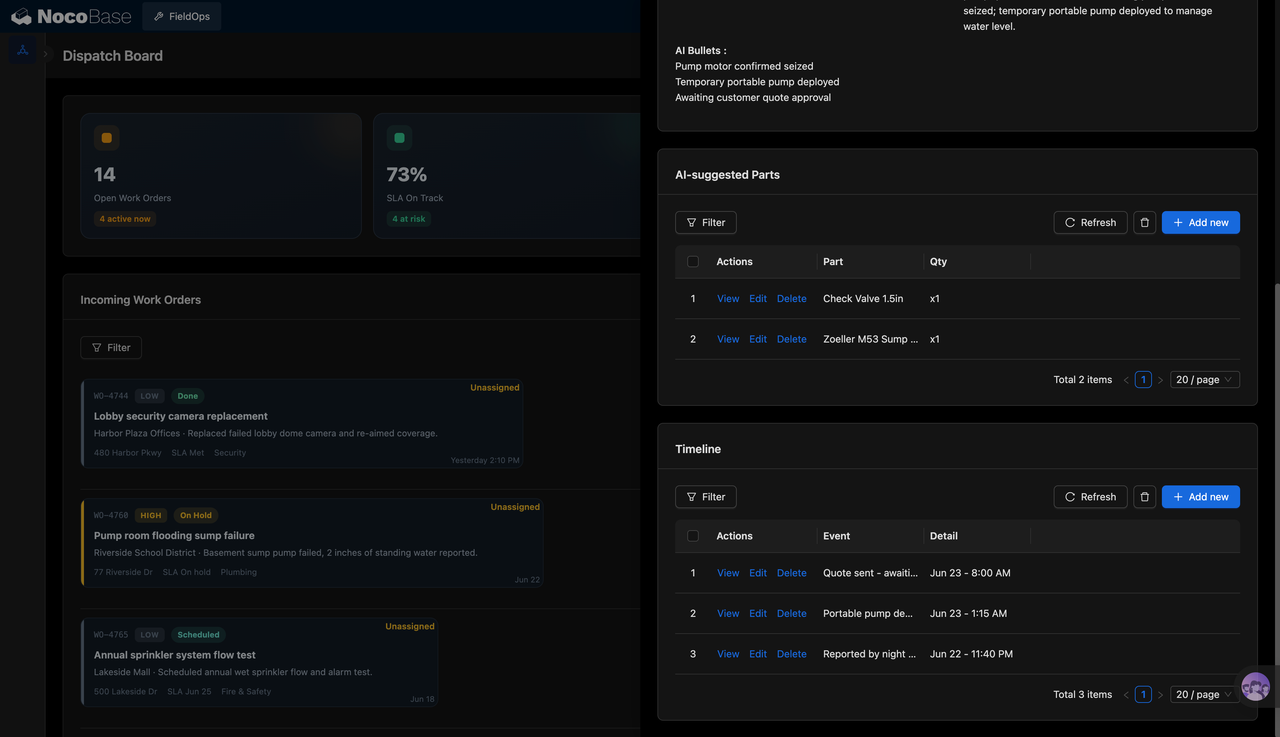
2.AI handling suggestions and work order timeline
Key information generated during work order handling can be organized into brief points, such as faulty parts, temporary handling measures, and items waiting for customer confirmation. The system can also list AI-suggested spare parts and quantities, and use a timeline to record key actions such as repair requests, temporary handling, and quotation sending, so the next person taking over can quickly understand the on-site situation.
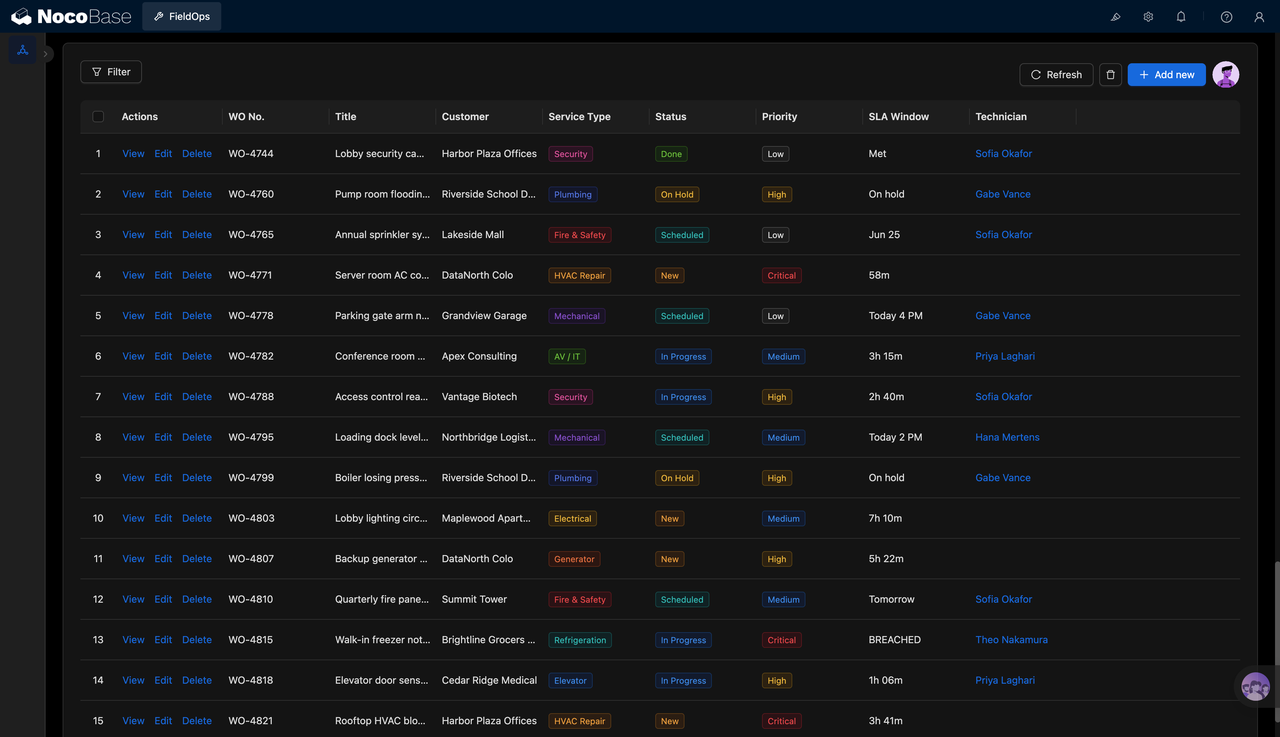
3.All work order management
The work order list centrally records the work order number, customer, service type, status, priority, service deadline, and responsible person. Teams can quickly filter tasks that are new, scheduled, in progress, paused, or completed, and can also identify work orders that have not been dispatched, have high priority, or are already overdue.
4.Work order details and on-site execution information
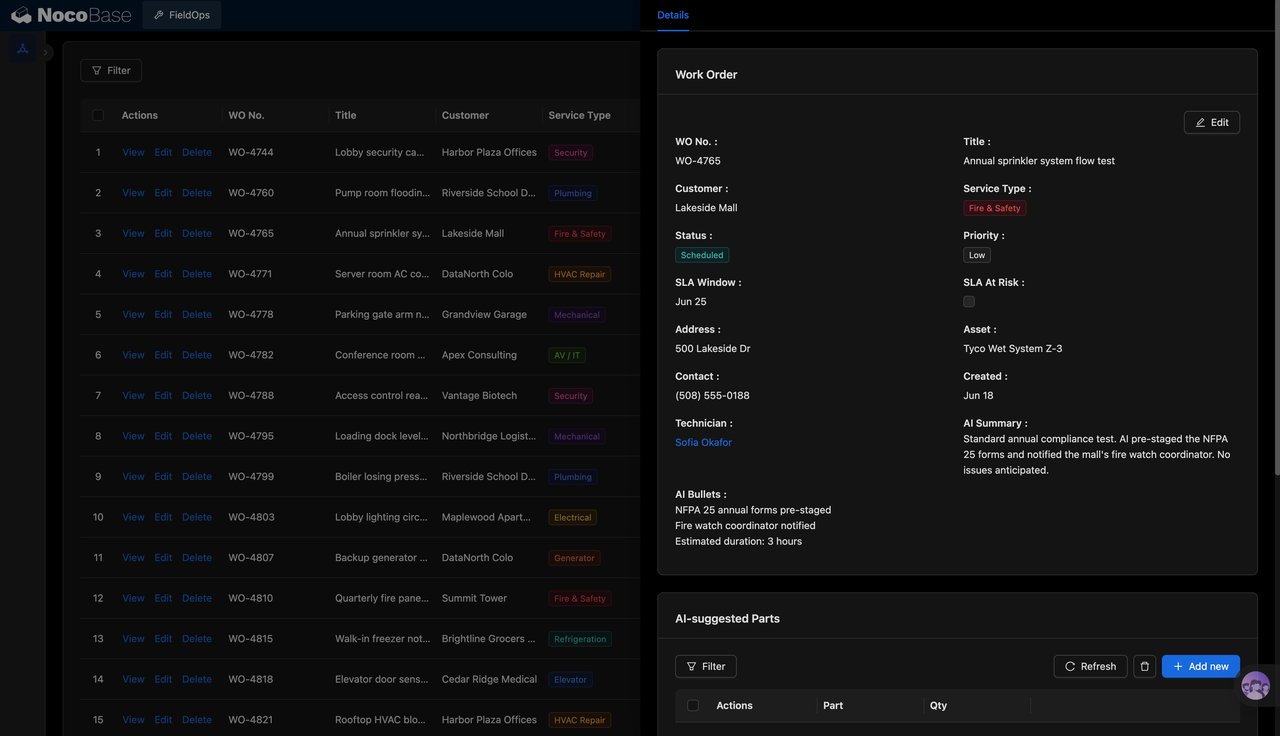
The work order detail page shows the customer, address, contact person, service type, priority, service personnel, creation time, and service deadline. NocoBase AI employees can also generate work order summaries and handling points, such as preparing compliance forms in advance, notifying the on-site person in charge, estimating work duration, and linking possible spare parts.
5.AI work order operations analysis
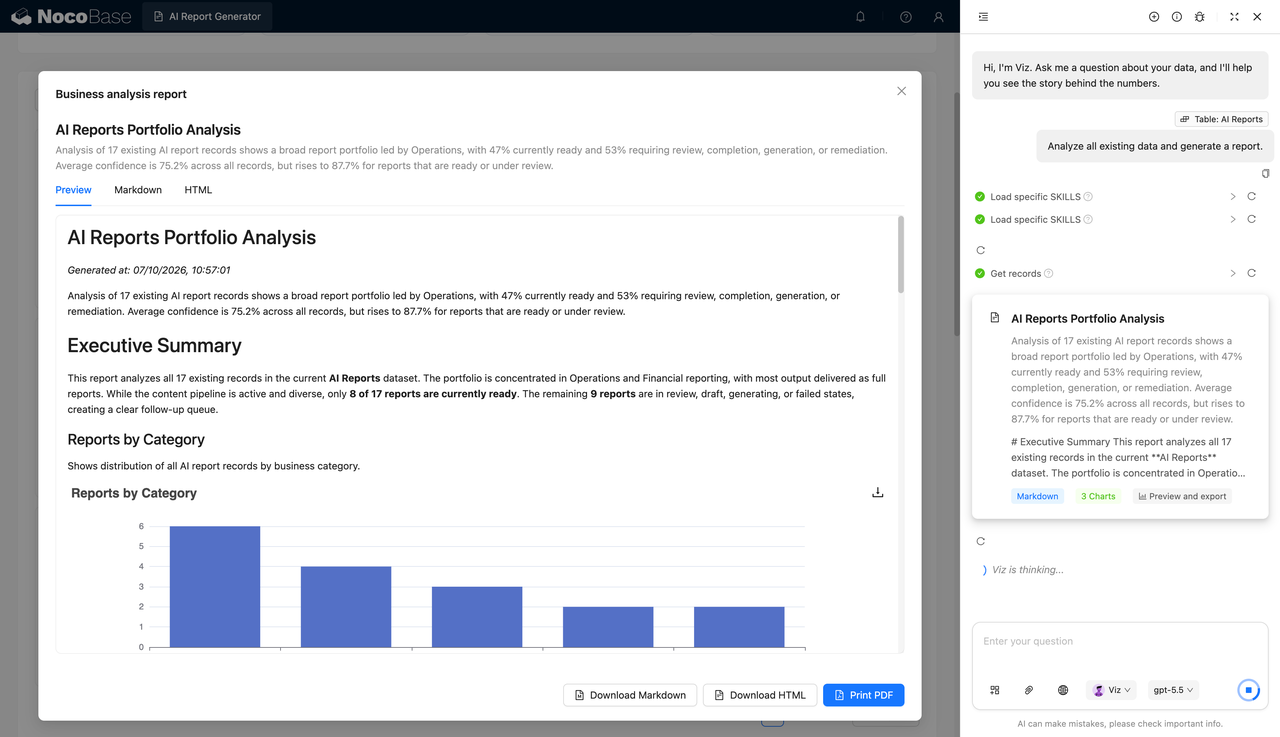
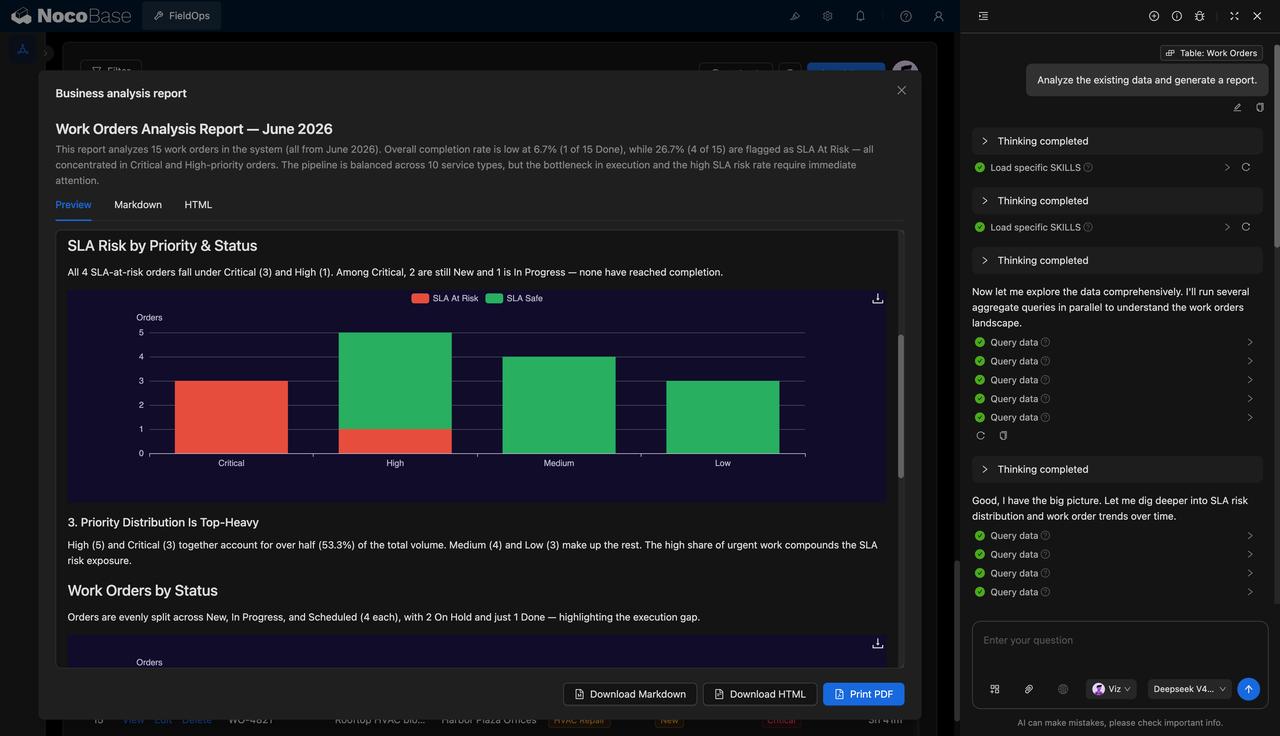
NocoBase AI employees can read existing work order data and analyze completion rates, priority distribution, service deadline risks, and task backlogs under different statuses. The system can automatically generate operations reports with charts and export them as Markdown, HTML, or PDF for service weekly reports, dispatch reviews, and management reporting.
Applicable Scenarios
- Facility maintenance work order management: Manage equipment repair and maintenance tasks in office buildings, parks, shopping malls, and property projects
- Field service dispatch management: Assign field service personnel based on skills, region, workload, and urgency
- Equipment maintenance and inspection: Manage inspection and repair work for HVAC, fire protection, security, electrical, refrigeration, and mechanical equipment
- Service deadlines and customer response management: Track response time, arrival time, handling progress, and overdue risks
Why choose a Field Service Management System?
| Comparison item | Phone calls, group chats, and Excel | Field Service Management System |
|---|---|---|
| Repair records | ❌ Information is scattered across phone calls, chats, and spreadsheets | ✅ Work order numbers, customers, addresses, and issues are recorded in one place |
| Dispatch arrangements | ❌ Mainly depends on dispatcher experience | ✅ Assign personnel based on skills, status, and workload |
| Handling progress | ❌ Requires asking field personnel one by one | ✅ New, scheduled, in progress, paused, and completed statuses are clearly visible |
| Service deadlines | ❌ Tasks that are about to become overdue are easy to miss | ✅ Normal, at-risk, and overdue work orders are displayed centrally |
| Spare parts preparation | ❌ Missing materials are often discovered only after arrival on site | ✅ AI can suggest possible spare parts based on work order information |
| Process records | ❌ Quotation, handling, and communication records are easy to lose | ✅ A timeline keeps the full handling process |
| Data review | ❌ Completion rates and overdue status need to be calculated manually | ✅ AI generates work order analysis reports and charts |
Core Features
1.Work order and customer information management
Centrally maintain work order numbers, customers, addresses, contact persons, service types, statuses, priorities, and creation times to ensure that every field service record is complete.
2.Personnel scheduling and service deadline management
Assign work based on each service person’s specialty, current status, and number of tasks, while tracking response deadlines, risk status, and overdue situations.
3.AI work order summaries and spare parts suggestions
NocoBase AI employees can organize fault descriptions, actions already taken, follow-up items, and estimated working hours, and recommend possible spare parts based on the task content.
4.Work order analysis and service review
The system can calculate work order volume, completion rate, status distribution, priority structure, and service deadline risks, and generate analysis reports suitable for weekly reports or reviews.
FAQ
1.What teams is a Field Service Management System suitable for?
It is suitable for property facilities, equipment maintenance, after-sales service, engineering operations and maintenance, fire protection and security, HVAC and refrigeration, and field technical support teams, especially organizations that need to manage multiple personnel and multiple work orders at the same time.
2.What service types can the system manage?
It can manage field services such as security, plumbing, fire protection, HVAC, mechanical, electrical, audio and video, refrigeration, elevators, and generators. New service categories can also be added based on the company’s business needs.
3.Does it support service personnel scheduling?
Yes. The system can record each service person’s specialty, work status, and current workload. Dispatchers can assign tasks based on the work order type, priority, and service deadline.
4.What work order tasks can NocoBase AI employees handle?
NocoBase AI employees can organize work order summaries, extract handling points, suggest possible spare parts, and analyze overdue risks, task status, and overall service performance.
5.Why use AI + NocoBase to build a Field Service Management System?
Teams can use natural language to describe work order fields, dispatch rules, and management pages to an AI Agent, which then calls NocoBase components to build the system. NocoBase is responsible for storing the data relationships among customers, work orders, personnel, and spare parts, and provides permissions, views, and workflow extensions. NocoBase AI employees then continue to handle work order organization, data analysis, and report generation.