Build it with your AI agent
Build a NocoBase app — Employee Document Management System: a document library, file categorization, expiry reminders, and an employee-document analysis report. Match the layout and signature visuals of this reference prototype: https://static-docs.nocobase.com/solution/templates/37-employee-documents.html
The prototype link (HTML) in the prompt is a design we pre-made, only to demonstrate the capability; NocoBase doesn't recommend generating a whole system from a single prompt. When you build with it, pair it with the “prototype reproduction” skill (nocobase-prototype-repro) in NocoBase Skills to get a good result.
Before you start, follow the AI agent quick start to install NocoBase and connect your agent. AI results can vary; depending on the model and system complexity, some fine-tuning or extra rounds may be needed.
Introduction
An employee document management system helps HR and administrative teams manage employee contracts, identity documents, visa permits, tax files, training certificates, policy acknowledgements, and benefits materials in one place. Teams can view document counts, validity status, upcoming expirations, and missing files without maintaining records across scattered folders and spreadsheets.
These records can also be managed as a NocoBase-based internal business system, with employee documents, file categories, document owners, expiry dates, review status, HR files, and access permissions organized through configurable data models, role permissions, views, workflows where needed, and operation history.
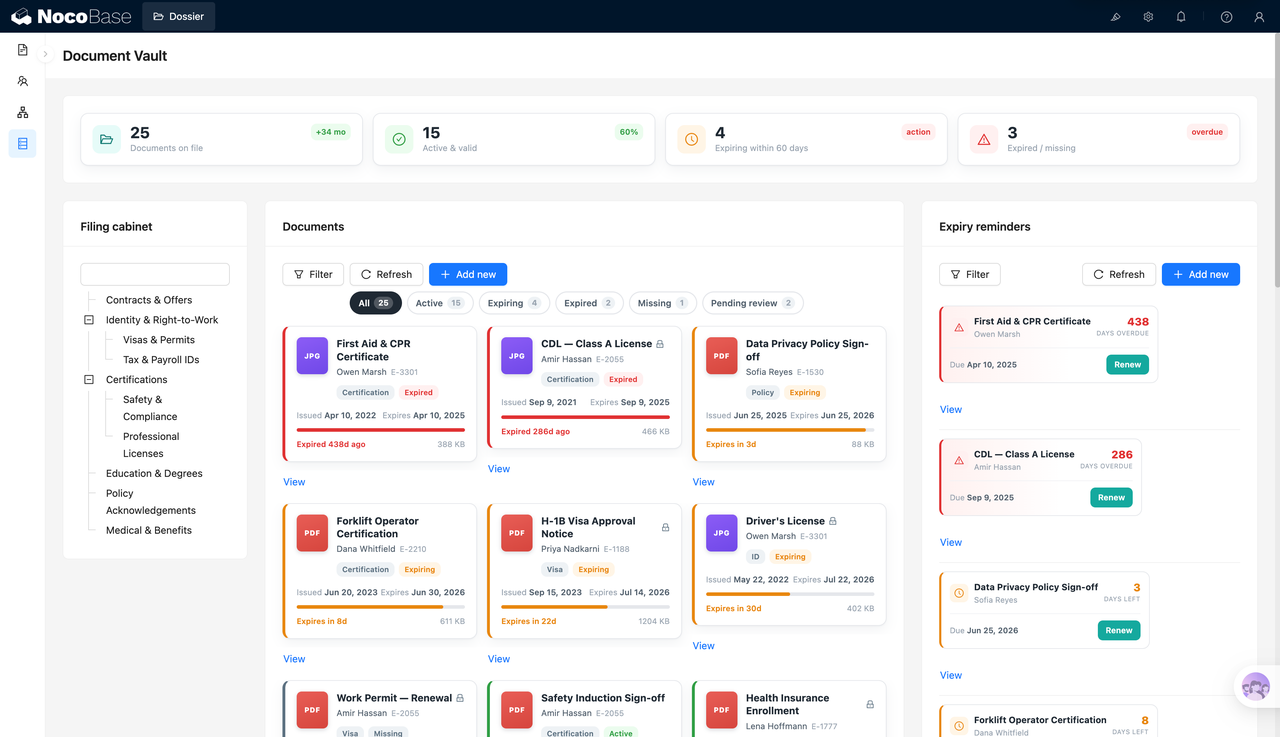
The page is centered on a document library and expiration reminders. The left side supports browsing by document cabinet or category. The middle area displays document cards with the document name, employee, category, status, issue date, expiration date, file size, and file type. The right side highlights expired and soon-to-expire documents.
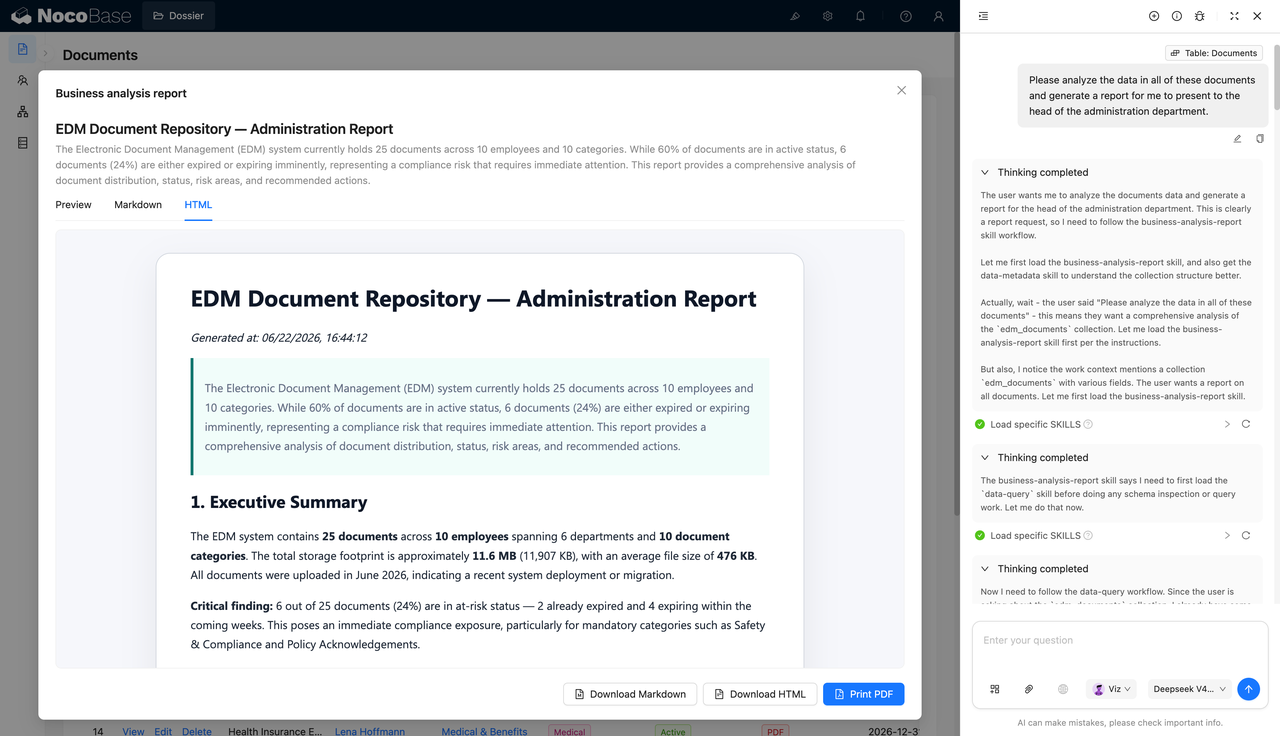
With the help of AI Agent, teams can generate management reports based on employee document data, summarizing document volume, employee coverage, file type distribution, confidential file ratio, expiration risks, and priority follow-up items.
Document library for document status and expiration reminders:
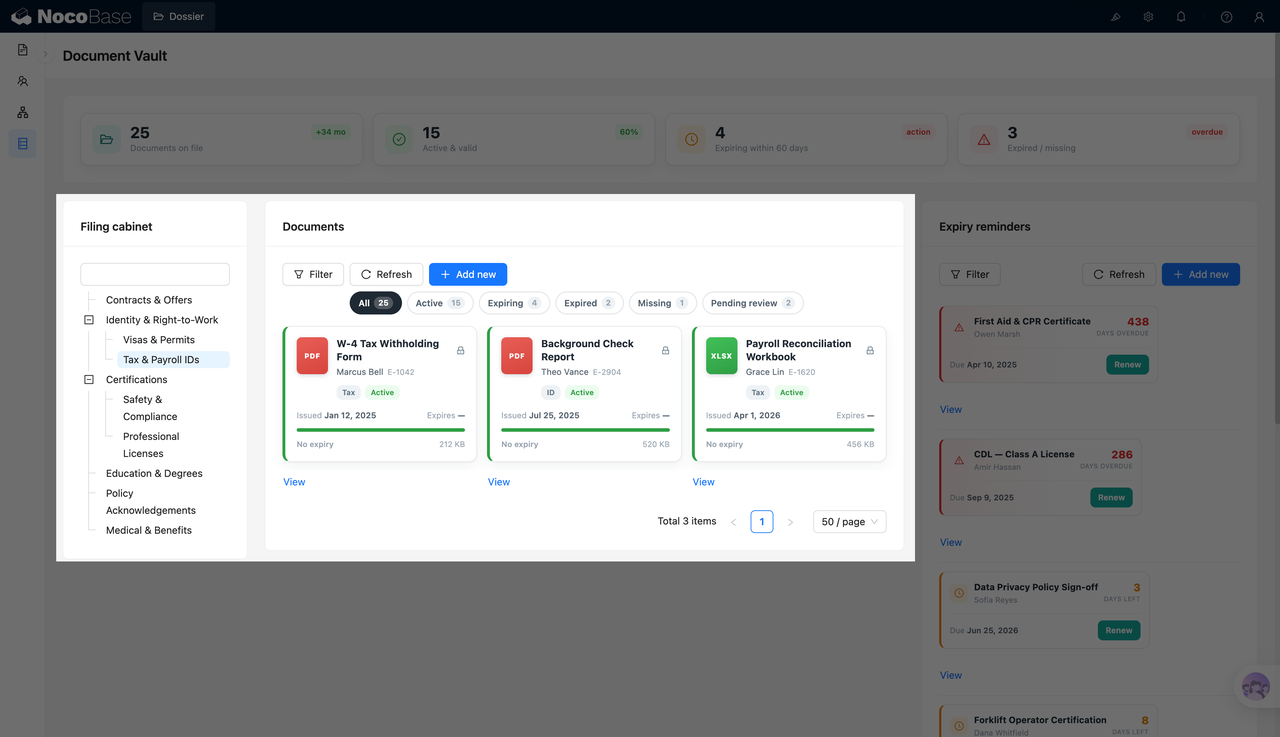
Filter employee files by archive category:
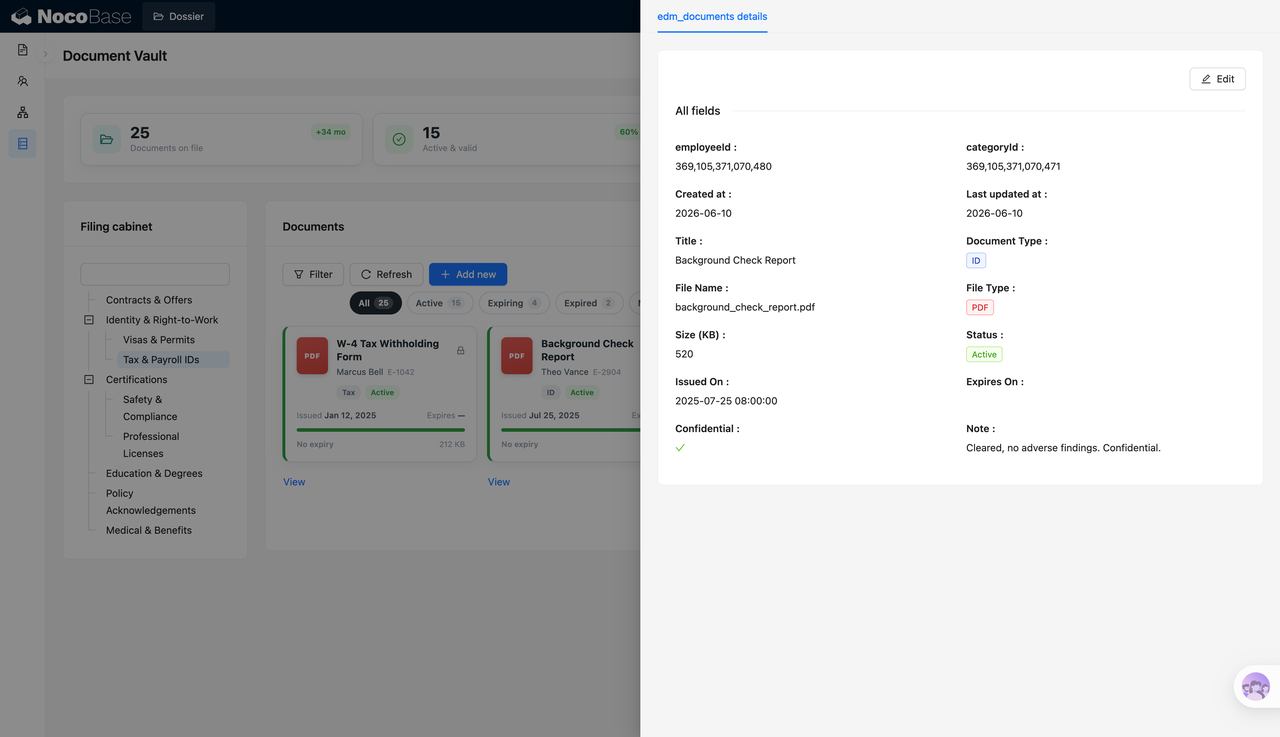
Document details record type, status, and confidentiality information:
AI-generated employee document management report:
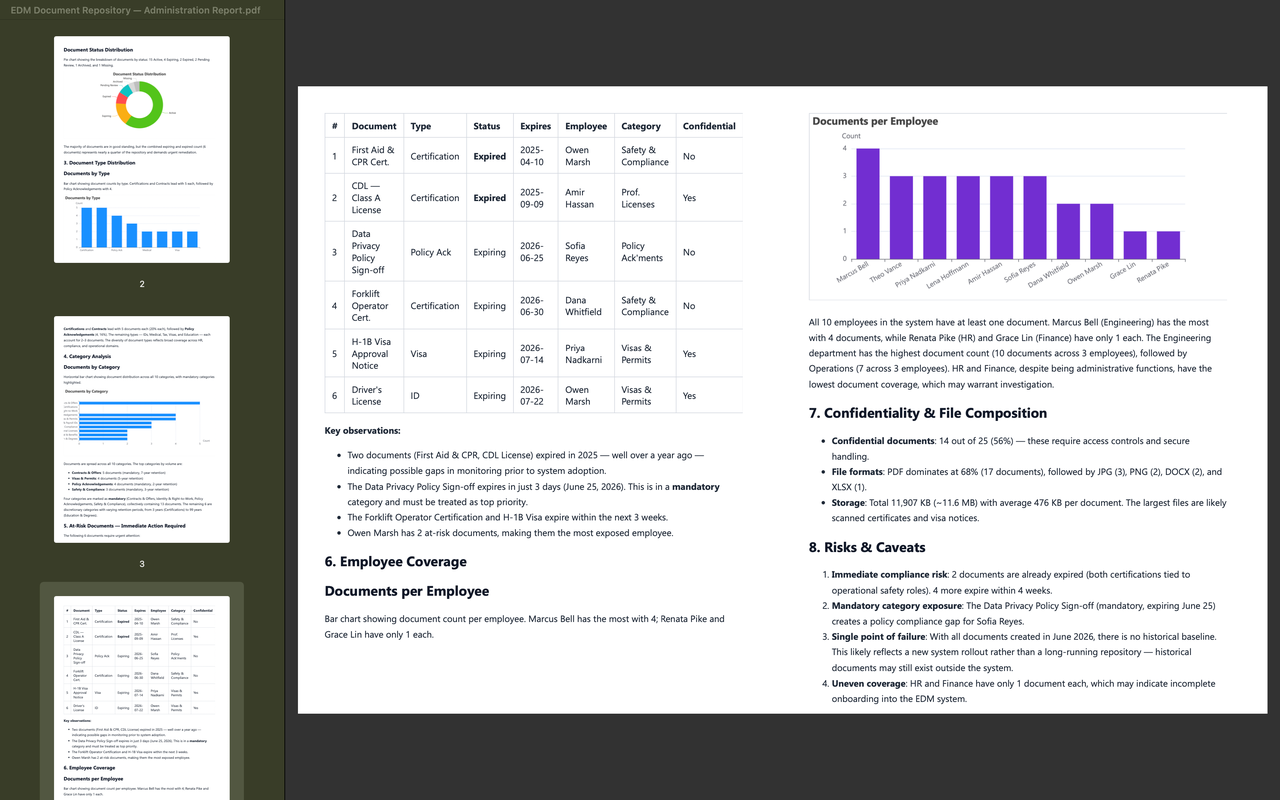
PDF report showing risks and employee coverage:
What Problems Can an Employee Document Management System Solve?
Employee document management is difficult because file types vary, expiration periods differ, confidentiality requirements are not the same, and many documents need periodic renewal or resubmission. When documents are maintained only in local folders or spreadsheets, it is easy to miss expired certificates, visa permits, policy acknowledgements, or missing files.
Documents such as contracts and offers, identity and work permits, visas and permits, tax and payroll IDs, safety and compliance files, professional licenses, education records, policy acknowledgements, and medical benefits materials should be organized under a consistent structure so HR can locate them quickly.
Document validity also needs ongoing follow-up. For example, first aid and CPR certificates or CDL Class A licenses may already be expired, while data privacy policy acknowledgements, forklift operation certificates, H-1B approval notices, and driver’s licenses may be close to expiration. The system can centralize these risks so the team can renew or request missing materials in time.
The document details page keeps a more complete record. Employee ID, category ID, title, document type, file name, file format, file size, status, issue date, expiration date, confidentiality status, and notes are all available in one page for review and audit.
Key Features
Employee Document Overview Dashboard
- Total documents: Shows the current number of employee documents in the system, such as 25 files.
- Valid document count: Shows how many documents are currently valid and usable, such as 15 valid files.
- Upcoming expiration reminders: Shows the number of documents expiring within 60 days, such as 4 files.
- Expired and missing document count: Shows expired or missing files that require follow-up, such as 3 items.
Expiration Reminder Management
- Expired document reminders: Shows how many days a document is overdue, such as 438 days or 286 days.
- Upcoming expiration reminders: Shows remaining days before expiration, such as 3 days, 8 days, or 22 days.
- Renewal action: Reminder cards provide a renewal entry point so HR can act quickly.
- Employee linkage: Each reminder is linked to the relevant employee for easier follow-up.
- Priority handling: Expired and upcoming documents are displayed separately, helping teams handle high-risk items first.
Archive Categories and Document Details
- Archive categories: Supports categories such as contracts and offers, identity and work permits, visa permits, tax and payroll IDs, certifications, education, policy acknowledgements, and medical benefits.
- Document status: Records statuses such as valid, expiring soon, expired, and missing.
- File information: Stores file name, file type, file size, issue date, and expiration date.
- Employee linkage: Each document can be linked to a specific employee, making it easier to search by person or category.
- Notes: The details page can keep notes for audit, renewal, or additional explanation.
Compliance and Confidentiality Management
- Confidential file tags: Sensitive materials such as background checks, visas, and identity documents can be marked as confidential.
- Compliance risk alerts: Safety certifications, policy acknowledgements, and permit documents can be monitored for risk.
- Expired document handling: Renewal or update workflows can be built around expired documents.
- Audit preparation: Document status, dates, and notes are retained for internal checks or external audits.
- Permission extension: NocoBase permissions can be used to restrict data viewing and editing by role.
AI Employee Document Analysis Report
- Overall document summary: AI can summarize document count, employee count, category count, and valid document ratio.
- Risk identification: The report can highlight compliance risks from expired, soon-to-expire, and missing documents.
- Coverage analysis: It can analyze employee document coverage and help HR find incomplete records.
- Confidential file analysis: It can summarize the confidential file ratio and related management risks.
- Report export: Markdown, HTML, and PDF outputs are supported for HR leads, management review, or internal archiving.
Why Build an Employee Document Management System with AI and NocoBase?
An employee document management system needs to cover archive categories, employee relationships, document status, validity periods, missing files, confidentiality tags, renewal reminders, and management reports. It does more than store files. It helps HR and administrative teams maintain document completeness and compliance over time.
Using AI to quickly generate a file list or upload page is not difficult. The long-term work is maintaining the rules behind the archive. Onboarding materials, contracts, licenses, permits, and confidentiality agreements need to be placed in different categories. Some documents require validity tracking and renewal reminders. Missing materials need continuous follow-up. Sensitive files related to compensation, identity, or contracts also need role-based access control. As the number of employees and document types increases, a single page prototype can no longer support these changing management requirements.
NocoBase works more like an enterprise application foundation and scaffolding layer. It already provides data models, permissions, workflows, operation history, audit logs, notifications, single sign-on, page building, and plugin extensions. AI helps speed up system setup, while NocoBase keeps the system maintainable, extensible, and suitable for long-term use.
Teams can first use AI to generate the document library, archive categories, details pages, expiration reminders, and employee document analysis reports. Then they can continue adjusting document types, status rules, reminder periods, confidentiality fields, permission scopes, and report content in NocoBase. When employee document policies change later, the system can continue evolving on top of the existing structure.
FAQ
1.Can the employee document management system show overall document status?
Yes. The system can show total documents, valid documents, soon-to-expire documents, and expired or missing documents.
2.Does the system support archive category management?
Yes. The screenshots include categories such as contracts and offers, identity and work permits, visa permits, tax and payroll IDs, certifications, education records, policy acknowledgements, and medical benefits.
3.Can the system manage document expiration dates?
Yes. Each document can record an issue date and expiration date, with reminders before or after expiration.
4.Does the system support expiration reminders?
Yes. The reminder area on the right can show expired and soon-to-expire documents with overdue days or remaining days.
5.Can the system handle missing documents?
Yes. Documents can be marked as missing so HR can follow up with employees.
6.Can each document have a details page?
Yes. The details page can show employee ID, category ID, title, document type, file name, file type, size, status, issue date, expiration date, confidentiality status, and notes.
7.Does the system support confidential document management?
Yes. Document details can mark whether a file is confidential. NocoBase permissions can also restrict who can view specific files.
8.Does the system support different file types?
Yes. The screenshots show file types such as PDF, JPG, and XLSX, which are suitable for different employee records.
9.Can AI generate employee document analysis reports?
Yes. AI can generate management reports based on document data, covering document volume, employee coverage, category distribution, expiration risks, and confidential files.
10.Can AI reports be exported?
Yes. The screenshots show Markdown, HTML, and PDF outputs, which can be used for HR leads, management review, or internal archiving.
11.What risks can the report analyze?
The report can analyze expired documents, upcoming expirations, policy acknowledgement risks, uneven employee coverage, and confidential file management issues.
12.Can Claude Code, Codex, Cursor, or OpenCode help build this system?
Yes. These AI Agents can connect to NocoBase and help generate the document library, archive categories, details pages, expiration reminders, and analysis reports. The team can then continue adjusting the system in NocoBase.
13.How is this different from building with pure Vibe Coding?
Pure Vibe Coding is better for quickly generating page prototypes. NocoBase is more suitable for managing employee document data, permissions, statuses, expiration reminders, report output, and ongoing iteration.
14.Does the system support access control?
Yes. Permissions can be configured in NocoBase. For example, HR can view and maintain all records, department leads can view related employees, and confidential files can be restricted to specific roles.
15.Can archive categories and fields be changed later?
Yes. File categories, document types, statuses, expiration reminder rules, confidentiality fields, list views, and report content can all be adjusted later.
16.Is this system suitable for formal enterprise use?
Yes. NocoBase can support employee document data, pages, permissions, and process configuration. AI can reduce setup and report preparation work, making the system suitable for long-term maintenance and continuous iteration.