Bangun dengan AI agent Anda
Build a NocoBase app — Issue Tracking System: a tree table with multi-select facets and checkbox columns. Match the layout and signature visuals of this reference prototype: https://static-docs.nocobase.com/solution/templates/15-issue-tracking.html
Tautan prototipe (HTML) di prompt adalah desain yang sudah kami siapkan, hanya untuk mendemonstrasikan kemampuannya; NocoBase tidak menyarankan membuat satu sistem utuh hanya dari satu prompt. Saat membangun dengannya, padukan dengan skill “prototype reproduction” (nocobase-prototype-repro) di NocoBase Skills agar mendapat hasil yang baik.
Sebelum memulai, ikuti panduan cepat AI agent untuk menginstal NocoBase dan menghubungkan agent Anda. Hasil AI dapat bervariasi; bergantung pada model dan kompleksitas sistem, mungkin diperlukan penyesuaian atau beberapa putaran tambahan.
Pendahuluan
Gunakan AI agent favorit Anda dan NocoBase untuk membangun sistem pelacakan isu yang dapat dikustomisasi, andal, dan terus berkembang — mengelola proyek, epic, isu, sub-tugas, status, prioritas, penanggungjawab, dan ID isu.
Anda dapat menyalin prompt di bawah ini dan membiarkan AI agent menghasilkan struktur dasar sistem pelacakan isu di NocoBase, lalu menyempurnakan kolom, halaman, hierarki tugas, dan alur kerja melalui antarmuka no-code.
Sistem ini sangat cocok untuk tim pengembangan perangkat lunak, R&D produk, infrastruktur, API, frontend, dan dukungan teknis yang membutuhkan cara terpadu untuk mengelola bug, tugas teknis, permintaan perbaikan, dan isu lintas proyek.
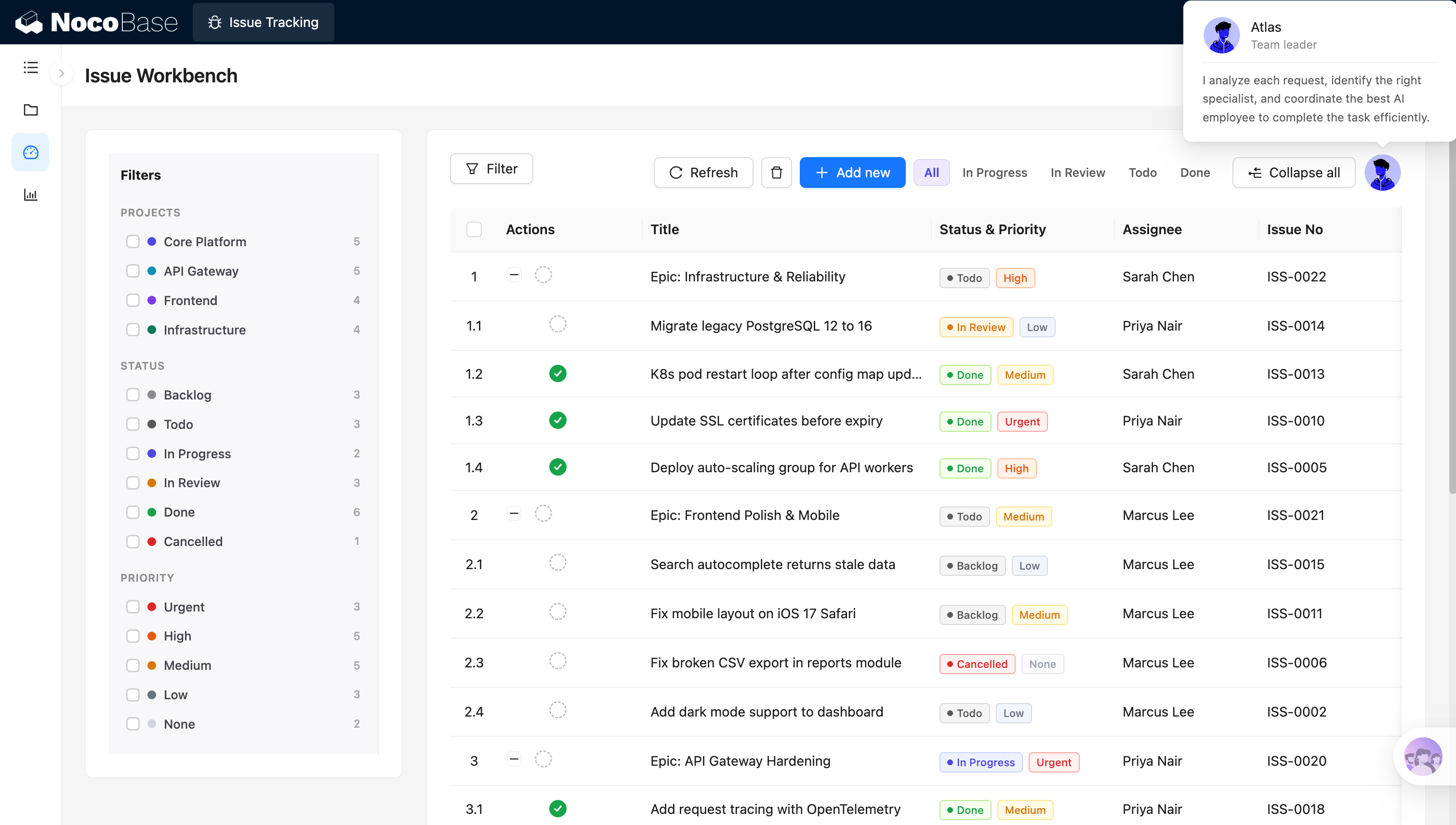
Ruang kerja isu dengan pemfilteran multi-dimensi:
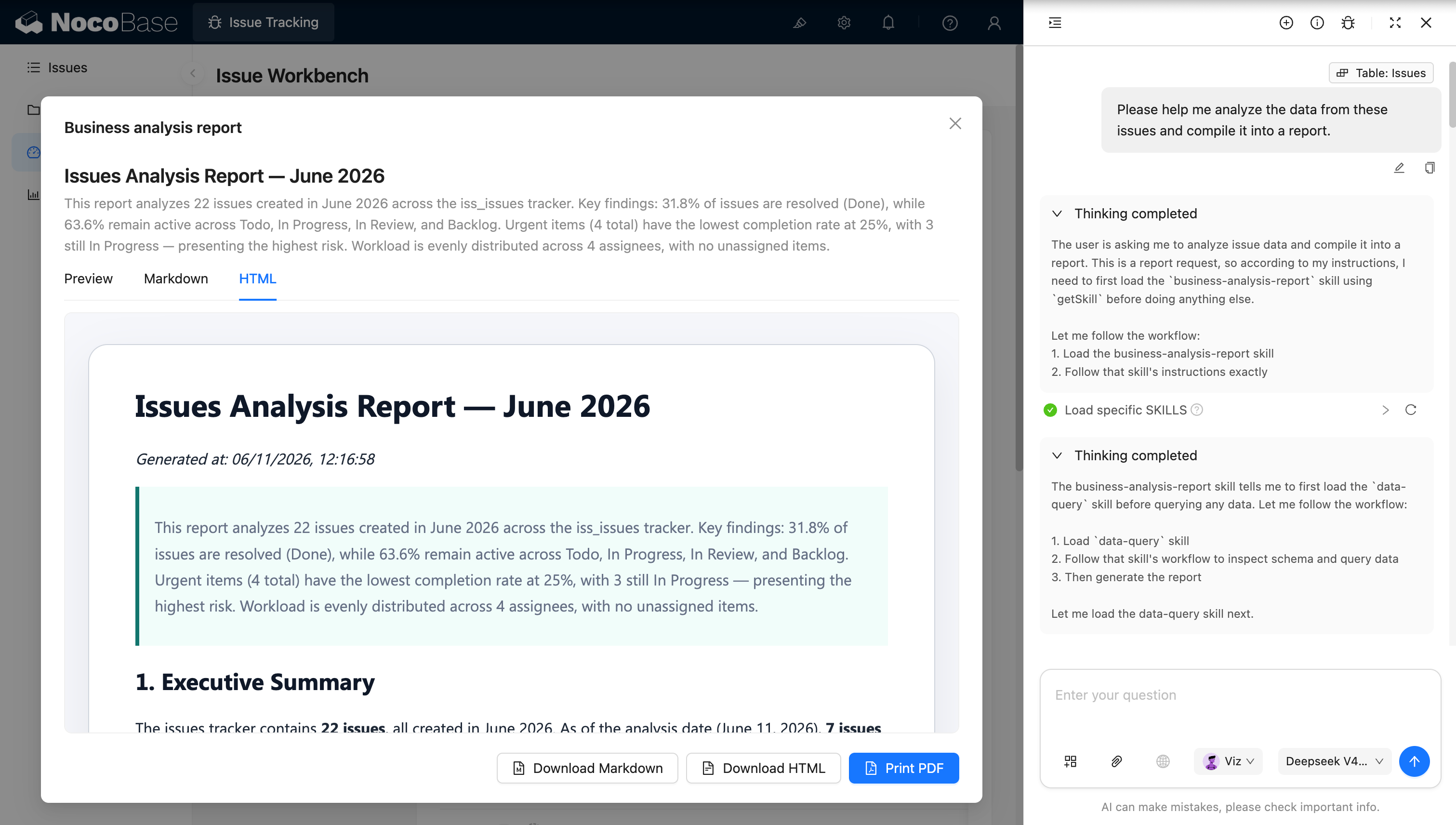
AI employee menghasilkan laporan analisis isu:
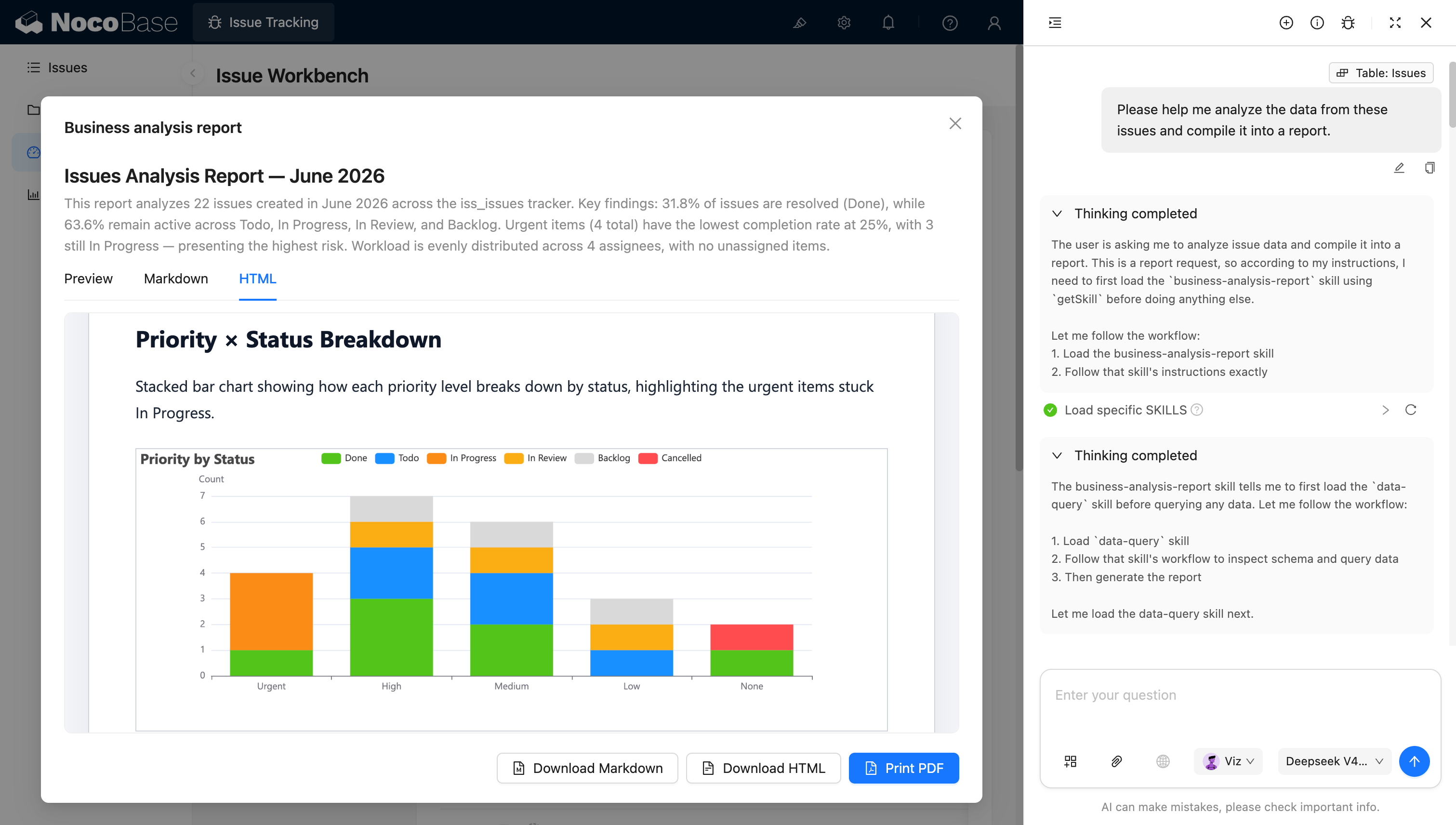
Menganalisis isu berdasarkan prioritas dan status:
Masalah apa yang dapat diselesaikan oleh sistem pelacakan isu?
Pelacakan isu memberikan gambaran jelas kepada tim tentang proyek mana suatu isu berada, bagaimana perkembangannya, seberapa mendesak, siapa yang memilikinya, dan bagaimana hubungannya dengan tugas lain dalam hierarki.
Ketika isu tersebar di utas obrolan, dokumen, dan berbagai alat proyek, tim mudah menghadapi pengajuan ganda, kepemilikan yang tidak jelas, isu mendesak yang terhenti terlalu lama, dan epic yang terputus dari tugas eksekusi aktual.
Sistem mendukung status seperti Todo, In Progress, In Review, Done, Backlog, dan Cancelled, serta prioritas seperti Urgent, High, Medium, Low, dan None. Tim dapat dengan cepat menemukan isu yang perlu diperhatikan melalui filter di sisi kiri atau tab status di bagian atas.
Setiap catatan isu juga dapat menampilkan penanggungjawab dan ID isu yang unik, memudahkan tim merujuk isu secara tepat dalam diskusi, komit kode, atau retrospektif.
AI team lead dapat menganalisis konten setiap isu, mengidentifikasi keterampilan yang diperlukan, dan merekomendasikan karyawan yang tepat untuk menanganinya. AI data analyst juga dapat membaca semua data isu dan menghasilkan laporan tentang tingkat penyelesaian, isu aktif, risiko isu mendesak, dan beban kerja penanggungjawab.
Fitur utama
Manajemen proyek dan isu
- Manajemen multi-proyek terpadu: Kelola isu secara terpusat di berbagai proyek seperti Core Platform, API Gateway, Frontend, dan Infrastructure.
- Informasi isu esensial: Catat judul isu, ID, proyek, status, prioritas, penanggungjawab, dan epic induk.
- Pemfilteran proyek cepat: Lihat daftar isu dan jumlahnya per proyek untuk dengan cepat menemukan item yang tertunda untuk berbagai tim.
Hierarki epic dan sub-tugas
- Manajemen tugas hierarkis: Gunakan epic untuk mengorganisasi persyaratan besar dan hubungkan bug, tugas, dan sub-isu di bawahnya.
- Tampilan perluas dan lipat: Perluas atau lipat sub-tugas sesuai permintaan untuk beralih dengan cepat antara tujuan keseluruhan dan item eksekusi konkret.
- Pelacakan kemajuan eksekusi: Gabungkan status isu induk dan anak untuk melihat bagaimana pekerjaan di bawah setiap epic berkembang.
Manajemen status dan prioritas
- Status isu lengkap: Dukung tahapan seperti Backlog, Todo, In Progress, In Review, Done, dan Cancelled.
- Prioritas multi-level: Gunakan Urgent, High, Medium, Low, dan None untuk membedakan seberapa mendesak setiap isu.
- Identifikasi risiko cepat: Gunakan tag status dan prioritas untuk menemukan isu mendesak yang belum selesai atau telah terhenti lama.
Ruang kerja isu dan pemfilteran
- Pemfilteran multi-kondisi: Filter isu berdasarkan proyek, status, prioritas, dan penanggungjawab.
- Tindakan isu cepat: Buat, hapus, dan segarkan isu, serta perluas atau lipat seluruh hierarki tugas.
- Daftar isu terpadu: Lihat judul isu, status, prioritas, penanggungjawab, dan ID isu dalam satu ruang kerja.
Penugasan berbasis AI
- AI menganalisis kebutuhan tugas: Tentukan keterampilan yang diperlukan untuk menyelesaikan tugas berdasarkan judul dan konten isu.
- AI merekomendasikan penanggungjawab: Rekomendasikan orang yang tepat dengan menggabungkan kemampuan karyawan dengan beban kerja saat ini.
- Koordinasi tugas berbantuan AI: Temukan isu yang tidak ditugaskan atau ditugaskan dengan buruk dan sarankan penyesuaian.
Analisis isu dan risiko AI
- Analisis kemajuan isu: Lacak jumlah total isu, tingkat penyelesaian, dan jumlah isu yang sedang aktif.
- Identifikasi isu mendesak: Analisis bagaimana isu Urgent berkembang dan temukan tugas berisiko tinggi yang masih dalam proses.
- Analisis beban kerja dan penugasan: Bandingkan jumlah isu yang dimiliki setiap penanggungjawab dan identifikasi isu yang tidak ditugaskan.
- Pembuatan ringkasan risiko: Secara otomatis rangkum risiko utama proyek saat ini, hambatan, dan prioritas utama.
Mengapa membangun sistem pelacakan isu dengan AI dan NocoBase?
Setelah sistem pelacakan isu benar-benar digunakan oleh tim teknik, sistem harus menangani lebih dari sekadar judul dan status — sistem juga mencakup proyek, epic, sub-tugas, prioritas, penanggungjawab, dan analisis data.
Jika Anda menghasilkan daftar tugas dari nol dengan vibe coding biasa, Anda biasanya dapat menyelesaikan CRUD dengan cepat, namun tugas hierarkis, pemfilteran majemuk, manajemen penanggungjawab, izin data, dan laporan analisis masih memerlukan pengembangan berkelanjutan.
NocoBase dapat menghubungkan proyek, isu, epic, sub-tugas, dan data orang, serta menyajikannya secara terpadu melalui tabel pohon, filter, tag status, dan tag prioritas. Tim juga dapat menambahkan proyek, status, atau aturan prioritas baru untuk menyesuaikan proses pengembangan aktual mereka.
AI dapat lebih jauh berpartisipasi dalam penugasan tugas dan analisis data. AI team lead dapat memahami konten isu dan merekomendasikan orang yang tepat berdasarkan keterampilan karyawan; AI data analyst dapat membaca data isu dan secara otomatis merangkum tingkat penyelesaian, risiko, distribusi prioritas, dan beban kerja tim.
Sistem pelacakan isu yang dibangun dengan cara ini bukan hanya tabel tugas statis — melainkan sistem internal yang mendukung kolaborasi teknik yang kompleks, analisis berkelanjutan, dan iterasi jangka panjang.
FAQ
- Bisakah saya memfilter isu dengan cepat berdasarkan proyek, status, dan prioritas?
Ya. Sistem mendukung pemfilteran isu berdasarkan proyek seperti Core Platform, API Gateway, Frontend, dan Infrastructure, serta menggabungkan filter di berbagai status seperti Backlog, Todo, In Progress, In Review, Done, dan Cancelled, serta prioritas seperti Urgent, High, Medium, Low, dan None.
Setiap opsi filter juga dapat menampilkan jumlah isu yang sesuai, membantu tim dengan cepat melihat proyek atau tahap mana yang paling banyak mengandung isu.
- Bisakah saya mengelola hierarki antara epic dan sub-tugas?
Ya. Persyaratan kompleks dapat dibuat terlebih dahulu sebagai epic, dengan bug, tugas teknis, atau perbaikan dihubungkan di bawahnya sebagai sub-tugas.
Ruang kerja mendukung perluasan dan pelipatan hierarki, sehingga tim dapat melihat tujuan keseluruhan sekaligus melacak status, prioritas, dan penanggungjawab setiap item eksekusi.
- Bisakah saya menyesuaikan status isu agar sesuai dengan proses tim saya?
Ya. Sistem dapat menggunakan status seperti Backlog, Todo, In Progress, In Review, Done, dan Cancelled, dan Anda dapat menambahkan tahapan seperti In Testing, Ready to Release, atau Blocked berdasarkan proses aktual tim Anda.
Ketika proses pengembangan berubah, Anda dapat terus menyesuaikan status, filter halaman, dan alur kerja tanpa membangun ulang seluruh sistem.
- Bisakah saya menetapkan prioritas untuk isu dan mengidentifikasi tugas berisiko tinggi?
Ya. Setiap isu dapat diatur ke Urgent, High, Medium, Low, atau None, yang ditampilkan dengan jelas menggunakan tag yang berbeda.
Tim dapat menggabungkan status dan prioritas untuk mengidentifikasi tugas berisiko tinggi, seperti isu mendesak yang masih berada di In Progress, atau isu berprioritas tinggi yang belum masuk pemrosesan dalam waktu lama.
- Bisakah AI merekomendasikan penanggungjawab yang tepat berdasarkan konten isu?
Ya. AI team lead dapat menganalisis judul isu, deskripsi, dan proyek untuk menentukan keterampilan teknis yang diperlukan tugas, lalu merekomendasikan orang yang tepat berdasarkan keterampilan karyawan dan beban kerja saat ini.
Ini mengurangi waktu penugasan manual dan membantu tim melihat apakah tugas terkonsentrasi pada beberapa anggota.
- Bisakah saya melihat berapa banyak isu yang ditanggungjawabi oleh setiap anggota?
Ya. Sistem dapat menghitung isu berdasarkan penanggungjawab dan lebih lanjut memecahnya menjadi tugas yang selesai, sedang berlangsung, dan tertunda.
AI juga dapat mengidentifikasi distribusi beban kerja yang tidak merata, isu tanpa pemilik, dan anggota mana yang menangani lebih banyak tugas mendesak atau berprioritas tinggi.
- Bisakah AI menganalisis tingkat penyelesaian isu dan risiko teknis?
Ya. AI dapat membaca status isu, prioritas, proyek, dan data penanggungjawab untuk menghitung total isu, tingkat penyelesaian, dan proporsi isu aktif, serta mengidentifikasi tugas yang perlu diperhatikan.
Misalnya, laporan analisis dalam tangkapan layar dapat mengungkap tingkat penyelesaian yang rendah untuk isu Urgent, beberapa tugas mendesak yang masih In Progress, dan apakah saat ini ada isu yang tidak ditugaskan.
- Bisakah laporan analisis isu dipratinjau dan diekspor?
Ya. Setelah AI menghasilkan laporan, laporan dapat dilihat sebagai Preview, Markdown, atau HTML.
Laporan juga dapat diunduh sebagai Markdown atau HTML, atau dicetak sebagai PDF — berguna untuk rapat mingguan teknik, retrospektif proyek, dan pelaporan manajemen.
- Bisakah saya mengontrol isu mana yang dapat dilihat dan diedit oleh anggota yang berbeda?
Ya. NocoBase mendukung izin berdasarkan peran, proyek, penanggungjawab, dan jenis tindakan.
Misalnya, anggota biasa hanya dapat memperbarui isu yang ditugaskan kepada mereka; pimpinan proyek dapat mengelola isu dan penanggungjawab dalam proyek mereka; pimpinan tim dapat melihat beban kerja lintas proyek; dan administrator dapat mengonfigurasi kolom, status, prioritas, dan izin.
Ini jauh lebih cocok untuk kolaborasi teknik nyata daripada membiarkan semua orang mengedit setiap isu.
- Bisakah saya melacak siapa yang mengubah suatu isu?
Ya. Anda dapat mengaktifkan riwayat tindakan dan log audit sesuai kebutuhan untuk mencatat perubahan pada status isu, prioritas, penanggungjawab, dan kolom lainnya.
Ketika tugas mendesak ditunda, dibatalkan, atau ditugaskan kembali, tim dapat melacak siapa yang melakukan perubahan dan kapan, membuat retrospektif dan akuntabilitas jauh lebih mudah.
- Bisakah Claude Code, Codex, Cursor, atau OpenCode membantu membangun sistem pelacakan isu?
Ya. AI coding agent seperti Claude Code, Codex, Cursor, dan OpenCode dapat terhubung ke NocoBase dan menghasilkan tabel proyek, tabel isu, relasi epic dan sub-tugas, halaman pemfilteran, dan fitur analisis dari prompt.
Setelah sistem dasar dihasilkan, tim dapat terus menyesuaikan struktur data, halaman, status, dan izin melalui antarmuka no-code NocoBase, tanpa meminta AI untuk menulis ulang aplikasi dari awal setiap kali ada perubahan.
- Apa bedanya dengan daftar tugas yang dihasilkan oleh vibe coding biasa?
Vibe coding biasa dapat dengan cepat menghasilkan daftar isu atau papan kanban, tetapi ketika menghadapi hierarki epic, pemfilteran majemuk, izin yang terperinci, riwayat tindakan, analisis beban kerja, dan pemeliharaan jangka panjang, biasanya memerlukan penulisan kode yang semakin banyak.
NocoBase sudah menyediakan relasi data, izin, alur kerja, audit, dan ekstensibilitas yang dibutuhkan sistem bisnis. AI mempercepat pembangunan dan analisis, sementara NocoBase membawa proses teknik yang berjalan berkelanjutan.
- Apakah sistem pelacakan isu ini cocok untuk penggunaan jangka panjang oleh tim teknik?
Ya. Setelah diluncurkan, Anda dapat terus menambahkan proyek, jenis isu, status, prioritas, metrik analisis, dan alur kerja otomatis, serta menyesuaikan izin seiring tim berkembang.
Perusahaan juga dapat mengaktifkan single sign-on, notifikasi, API, riwayat tindakan, dan ekstensi plugin sesuai kebutuhan. Dibandingkan dengan demo manajemen tugas sekali pakai, sistem ini jauh lebih cocok untuk membangun sistem pelacakan isu yang dapat dipelihara, dapat dilacak, dan terus berkembang.