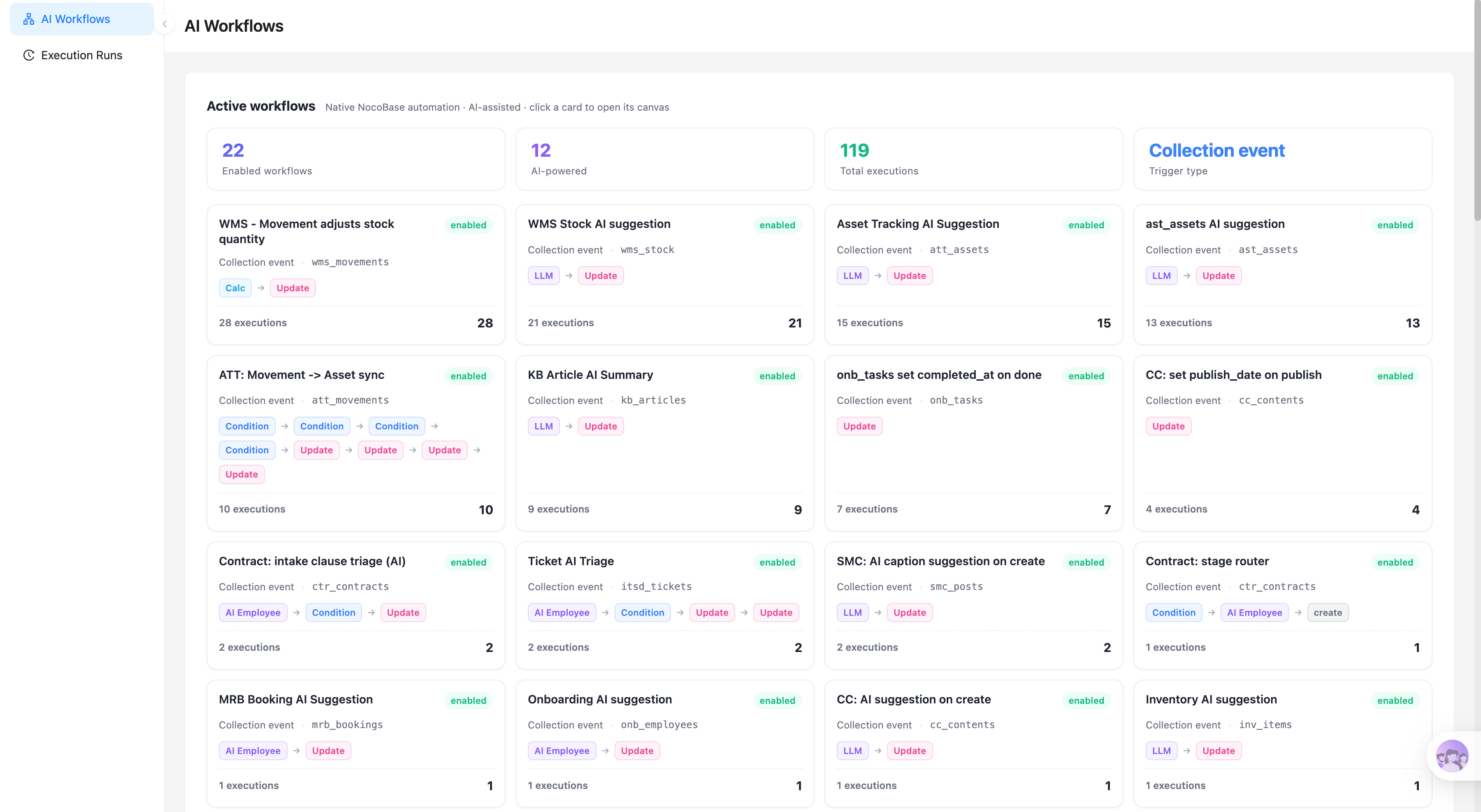
Bangun dengan AI agent Anda
Build a NocoBase app — Service Request System: a step-by-step service request form, category selection, service-level hints, approval requirements, a request list, and an AI service-request analysis report. Match the layout and signature visuals of this reference prototype: https://static-docs.nocobase.com/solution/templates/30-service-request.html
Tautan prototipe (HTML) di prompt adalah desain yang sudah kami siapkan, hanya untuk mendemonstrasikan kemampuannya; NocoBase tidak menyarankan membuat satu sistem utuh hanya dari satu prompt. Saat membangun dengannya, padukan dengan skill “prototype reproduction” (nocobase-prototype-repro) di NocoBase Skills agar mendapat hasil yang baik.
Sebelum memulai, ikuti panduan cepat AI agent untuk menginstal NocoBase dan menghubungkan agent Anda. Hasil AI dapat bervariasi; bergantung pada model dan kompleksitas sistem, mungkin diperlukan penyesuaian atau beberapa putaran tambahan.
Introduction
Use AI and NocoBase to quickly build a service request system that centrally collects internal requests for hardware, access permissions, software, facilities, HR, and finance.
These records can also be managed as a NocoBase-based internal business system, with service requests, request categories, requester information, approval progress, assignees, and service status organized through configurable data models, role permissions, views, workflows where needed, and operation history.
The system supports a step-by-step request submission flow. Employees first select a service category, then fill in the title, description, priority, and submission channel. Based on the selected category, the system automatically matches the service level, approval requirements, and target completion time.
You can copy the prompt directly and let AI Agents such as Claude Code, Codex, Cursor, and OpenCode generate the request form, request list, detail page, and other pages in NocoBase. After that, you can continue adjusting categories, fields, permissions, and workflows through no-code configuration.
This system is suitable for IT, administration, HR, finance, and internal support teams. It helps standardize employee service requests, reduce back-and-forth communication, and improve cross-department handling efficiency.
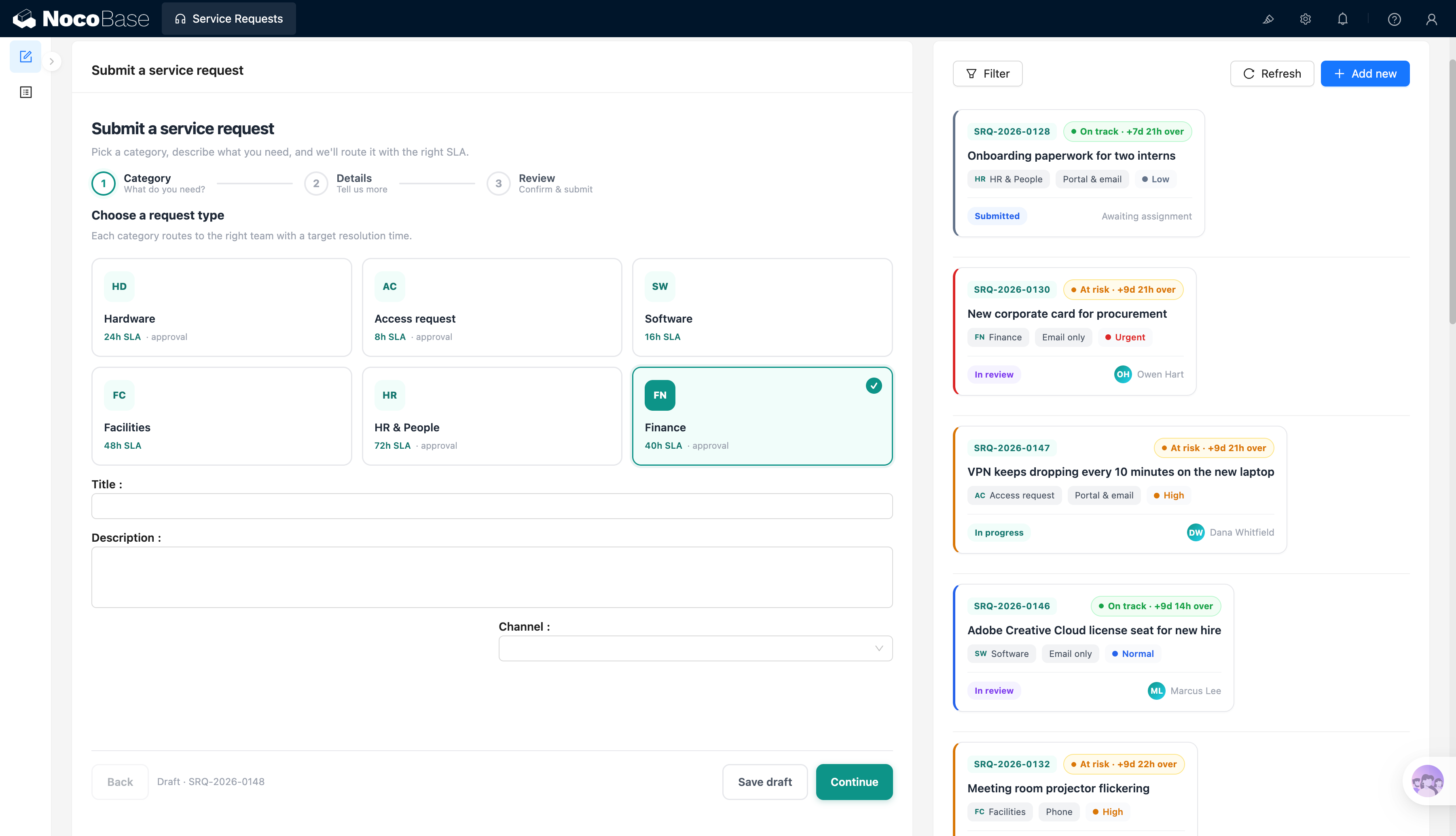
Service request entry, category selection, and request list:
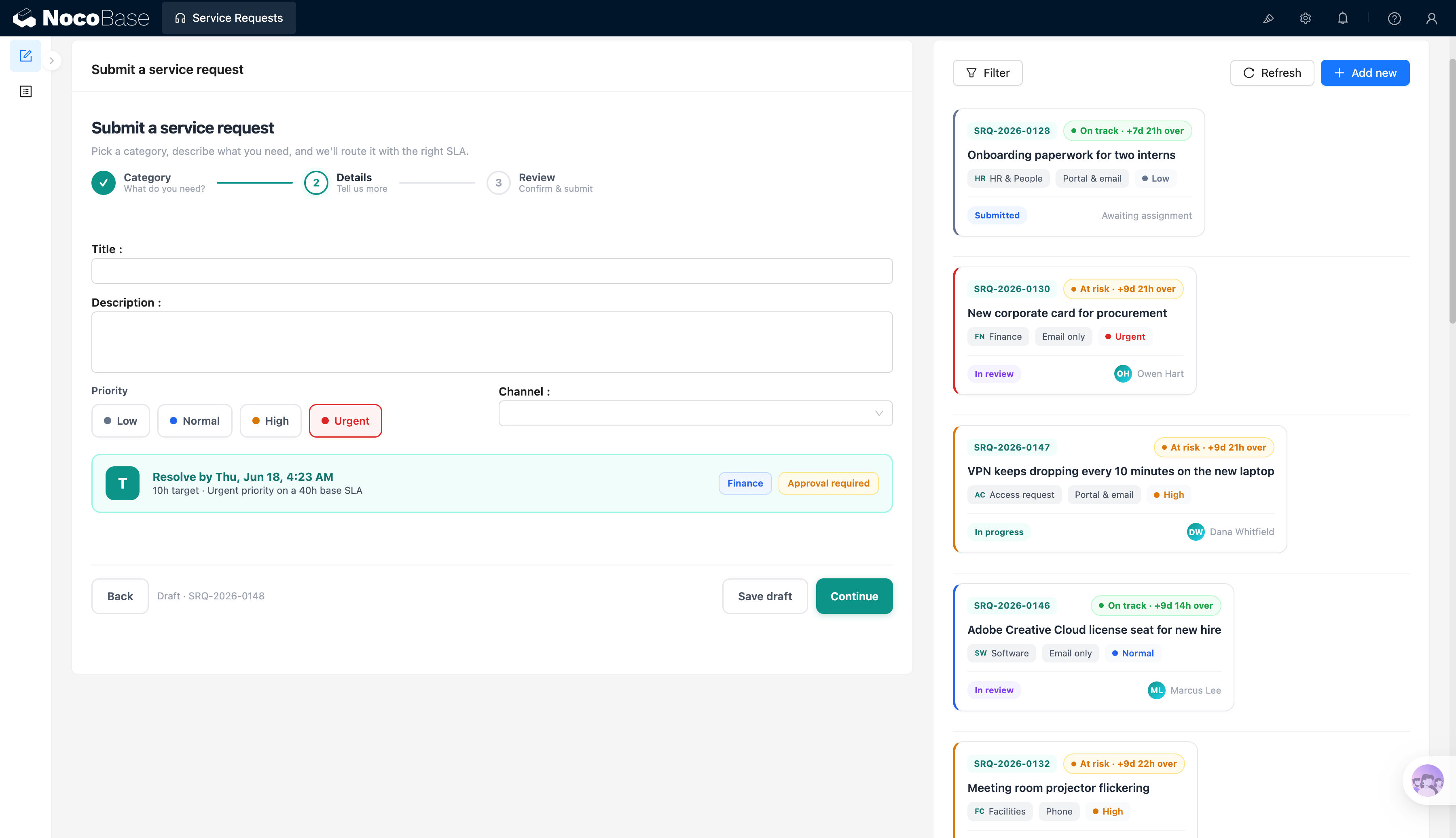
Priority, service level, and approval reminders:
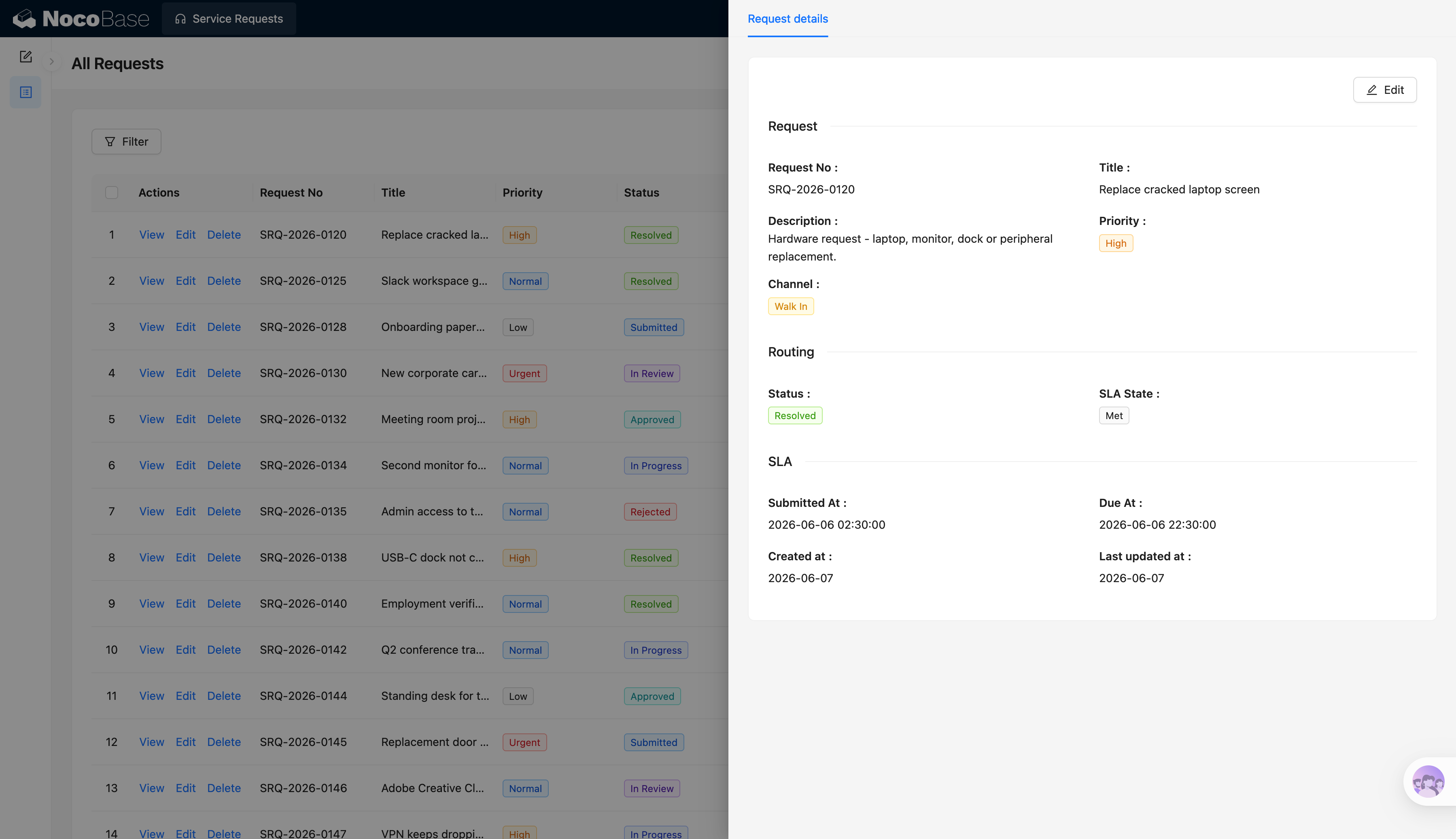
Request details, service level, and processing status:
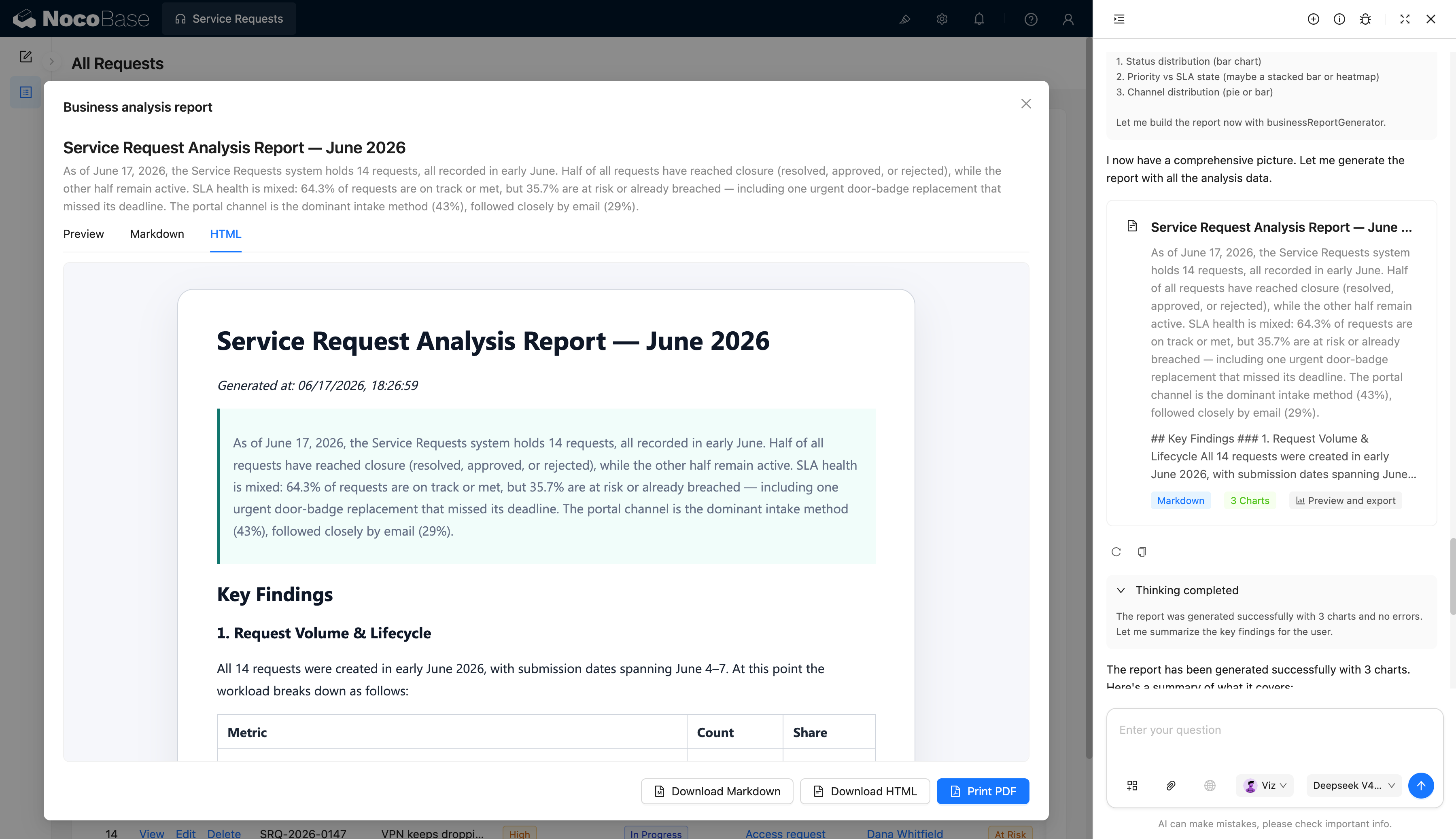
AI-generated service request analysis report:
What problems can a service request system solve?
With this system, employees can submit requests by category, such as hardware, access permissions, software, facilities, HR, and finance. Each category can have its own service level. For example, hardware requests can be set to 24 hours, access requests to 8 hours, software requests to 16 hours, facility requests to 48 hours, HR requests to 72 hours, and finance requests to 40 hours.
The system can automatically display the target completion time based on the priority. For example, after selecting an urgent finance request in the screenshot, the system shows that it should be completed before June 18 and marks it as requiring approval.
The request list on the right can show the progress of different requests in real time, such as “on track” or “at risk”, along with the assignee, category, channel, priority, and current status.
AI can also generate a service request analysis report, summarizing the number of requests, closed requests, service level achievement rate, at-risk requests, main submission channels, and follow-up optimization suggestions.
Core features
Step-by-step service request form
- Category selection: Supports service types such as hardware, access permissions, software, facilities, HR, and finance.
- Service level reminder: Displays the target processing time for each category, such as 8 hours, 16 hours, 24 hours, or 40 hours.
- Request information: Supports title, description, priority, and submission channel.
- Draft saving: Allows users to save drafts so unfinished requests are not lost.
- Submission confirmation: Uses a three-step flow of category, details, and confirmation to reduce invalid requests.
Request list management
- Request ID management: Generates a unique ID for each request, such as SRQ-2026-0128 and SRQ-2026-0130.
- Priority labels: Supports priorities such as low, normal, high, and urgent.
- Status tracking: Supports statuses such as submitted, under review, in progress, approved, resolved, and rejected.
- Channel records: Records request sources such as portal, email, phone, and on-site submission.
- Assignee display: Shows the current assignee in the list so employees and managers can follow up easily.
Service levels and risk reminders
- Target completion time: Automatically calculates the expected completion time based on category and priority.
- Service level status: Displays statuses such as “on track”, “at risk”, and “overdue”.
- Overdue reminders: Highlights requests that are close to overdue or already overdue.
- Approval requirement reminders: Automatically marks requests that require approval, such as finance and access requests.
- Risk-based sorting: Helps support teams prioritize urgent and high-risk requests.
Request detail management
- Request information display: Shows the ID, title, description, priority, and submission channel.
- Processing status display: Shows the current status and service level result, such as resolved and achieved.
- Time records: Records the submission time, due time, creation time, and last updated time.
- Detail editing: Supports editing request content, priority, status, and assignee.
- End-to-end tracking: Allows both employees and support teams to clearly understand request progress.
AI service request analysis report
- AI request summary: Automatically counts the total number of requests, closed requests, requests still in progress, and service level achievement.
- AI risk detection: Identifies service requests that are at risk, overdue, or marked as urgent.
- AI channel analysis: Calculates the share of requests from channels such as portal, email, and phone, and identifies the main entry points.
- AI optimization suggestions: Provides process improvement suggestions based on request type, priority, and processing status.
- Report export: Supports preview, Markdown, and HTML viewing, and can be downloaded or printed as a PDF.
Why use AI and NocoBase to build a service request system?
A service request system is not just a simple form. It is an internal enterprise workflow system that covers categories, service levels, approvals, statuses, permissions, notifications, and statistical analysis.
If you use pure Vibe Coding to generate it from scratch, you may quickly create a submission page at the beginning, but many complex needs will appear later. Different categories require different service levels, different roles need access to different data, urgent requests need reminders, finance and access requests need approvals, and historical records need to be traceable.
NocoBase works more like infrastructure and scaffolding for enterprise applications. It already provides core capabilities such as data modeling, permissions, workflows, operation history, audit logs, notifications, single sign-on, page building, and plugin extensions. AI helps speed up the initial build, while NocoBase keeps the system maintainable, extensible, and ready for long-term use.
Teams can first use AI to generate the request form, list, detail page, and reports, and then continue adjusting categories, fields, service levels, approval workflows, and permission rules in NocoBase. When internal policies change later, the system does not need to be rebuilt from scratch.
The result is not just a request form, but an internal service management system suitable for long-term enterprise use.
FAQ
1.Can employees submit service requests by type?
Yes. The system supports categories such as hardware, access permissions, software, facilities, HR, and finance.
Each category can have different service levels and approval requirements. For example, access requests can be processed within 8 hours, while finance requests can be processed within 40 hours and require approval.
2.Can the system automatically calculate processing time based on priority?
Yes. The system can combine the service type and priority to automatically display the target completion time.
For example, in the screenshot, an urgent finance request shows a clear due time and indicates that the result is calculated based on a 40-hour service level.
3.Can teams see whether each request has an overdue risk?
Yes. The request list can display statuses such as “on track” and “at risk”.
Support teams can prioritize requests that are about to become overdue, already overdue, or marked as urgent, reducing the risk of service level breaches.
4.Can the system manage request processing status?
Yes. The system supports statuses such as submitted, under review, in progress, approved, resolved, and rejected.
Employees can check the progress of their own requests, while support teams can focus on requests that are unassigned, in progress, or at risk.
5.Can request details and processing time be recorded?
Yes. The detail page can display the request ID, title, description, priority, channel, status, service level status, submission time, due time, creation time, and last updated time.
This helps track the full process from request submission to resolution.
6.Can AI generate service request analysis reports?
Yes. AI can read request data and generate a service request analysis report.
The report can summarize total requests, closed requests, service level achievement rate, at-risk requests, main channels, and next-step optimization suggestions.
7.How is this system different from a form generated by pure Vibe Coding?
Pure Vibe Coding can quickly generate a request form, but enterprise service requests also require permissions, approvals, service levels, status transitions, notifications, audits, and ongoing iteration.
NocoBase provides the core capabilities required by enterprise applications. AI speeds up the build, while NocoBase keeps the system maintainable, traceable, and extensible.
8.Can different departments handle only their own requests?
Yes. Enterprises can set permissions by department, role, category, or assignee.
For example, the IT team can handle only hardware, access, and software requests, the HR team can handle only HR requests, and the finance team can handle only finance requests.
9.Can approval workflows be added for certain requests?
Yes. The system can add approval steps for categories such as finance, access permissions, and HR.
For example, normal hardware requests can move directly into processing, while finance purchases or access provisioning can require approval first.
10.Can categories, fields, and workflows be adjusted later?
Yes. Teams can adjust service categories, priorities, service levels, approval rules, statuses, and page layouts at any time.
This is also the advantage of building with NocoBase. The system can continue to evolve with enterprise processes instead of being rebuilt every time.
11.Can the system connect to enterprise login and permission systems?
Yes. NocoBase supports enterprise-level permissions, role management, and single sign-on.
Enterprises can give employees, department managers, support staff, and administrators different access permissions to prevent unrelated users from viewing sensitive requests.
12.Is this system suitable for formal internal enterprise use?
Yes. Service requests involve cross-department collaboration, processing timelines, approval responsibilities, and employee experience, so they require a more stable system foundation than a one-time form.
NocoBase can enable permissions, workflows, operation history, audit logs, notifications, APIs, and plugin extensions as needed, making it suitable for building a long-running enterprise service request system.