Construire avec votre agent IA
Build an application with NocoBase — Procurement Management System: purchase requests, supplier spend, approval status, AI risk detection, and procurement analysis reports. Use this prototype as the layout and signature visual reference: https://static-docs.nocobase.com/solution/templates/55-procurement-management-system.html
Le lien du prototype (HTML) dans le prompt est une maquette que nous avons préparée, uniquement pour démontrer la capacité ; NocoBase ne recommande pas de générer un système entier à partir d’un seul prompt. Lorsque vous l’utilisez pour construire, associez-le au skill « prototype reproduction » (nocobase-prototype-repro) des NocoBase Skills pour obtenir un bon résultat.
Avant de commencer, suivez le démarrage rapide de l'agent IA pour installer NocoBase et connecter votre agent. Les résultats de l'IA peuvent varier ; selon le modèle et la complexité du système, quelques ajustements ou échanges supplémentaires peuvent être nécessaires.
What is a procurement management system?
A single purchase request often passes through multiple roles before it is approved, including the requester, department owner, procurement team, finance team, and suppliers. A procurement management system brings these scattered requests, supplier details, approval statuses, budget risks, and procurement analysis into one business system, so teams can continuously track the progress of every purchase.
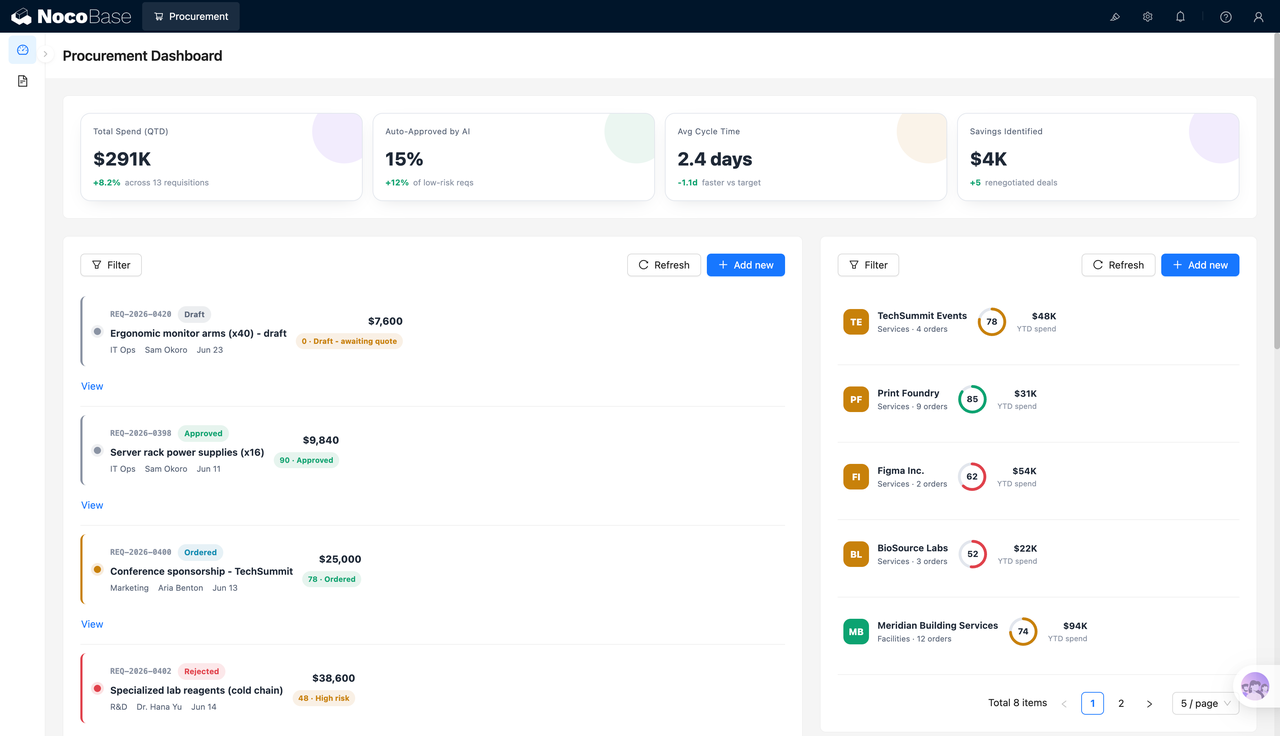
In this procurement management demo, teams can view 13 purchase requests, $291K in quarterly procurement spend, a 2.4-day average processing cycle, and $4K in potential savings. Procurement and finance teams can first review overall budget usage and approval efficiency, then open each request to check supplier details, amount, status, and risk tags. After Claude Code, Codex, Cursor, OpenCode, or another AI Agent generates the initial structure, teams can continue adjusting forms, fields, approval workflows, and permissions in NocoBase. NocoBase AI employees can also help identify procurement risks, analyze savings opportunities, and generate procurement reports.
Core value
- ⏱️ Keep the average procurement cycle at 2.4 days and reduce cross-department waiting
- 💰 View $291K in quarterly procurement spend and 13 purchase requests in one place
- 🤖 Use AI to identify low-risk purchases; in this demo, 15% of requests can be auto-approved by AI
- 📊 Let NocoBase AI employees generate procurement analysis reports across status, department, and category dimensions
System preview
1.Procurement management overview
The procurement overview shows quarterly procurement spend, the AI auto-approval rate, average processing time, and identified savings. Teams can review the purchase request list and supplier spending in the same workspace, making it easier to see which requests are waiting for quotes, approved, ordered, or marked as high risk.
2.Purchase request details
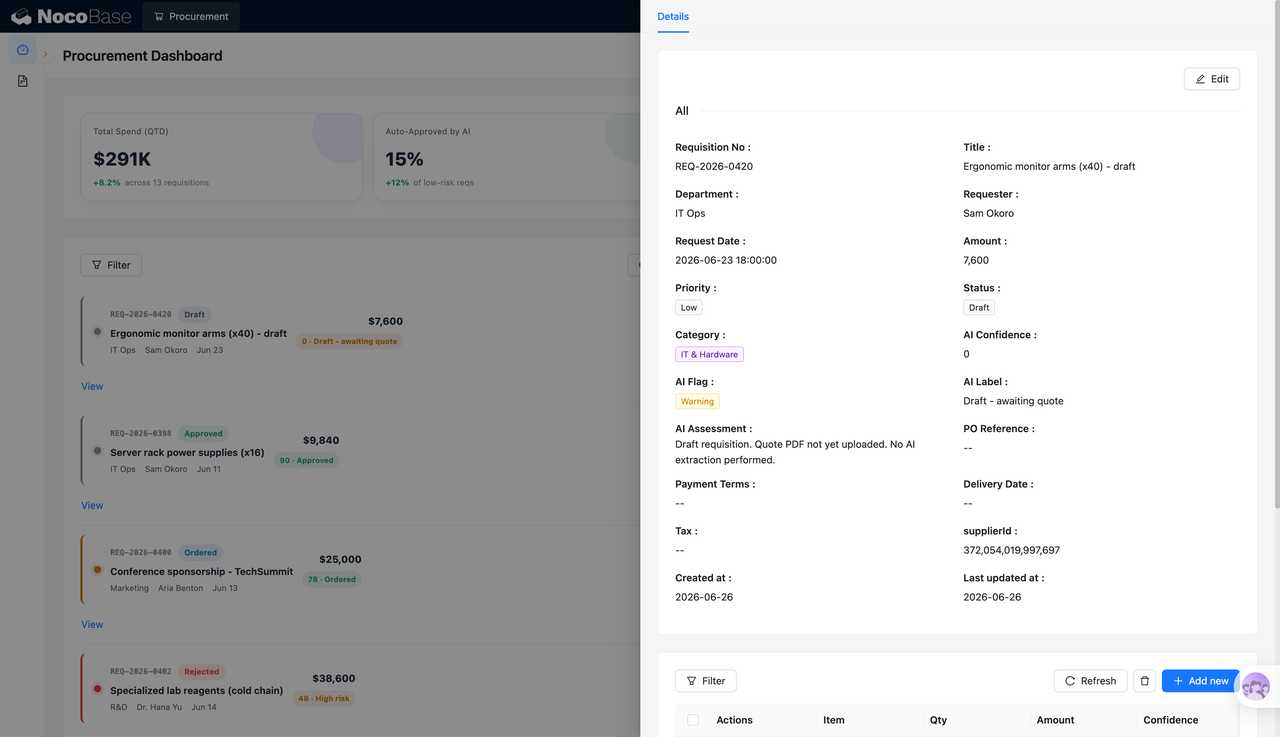
The purchase request detail page displays the request ID, title, department, requester, request date, amount, priority, status, category, AI confidence score, AI tags, and supplier information. Procurement teams can confirm the request context, risk assessment, and next processing status on one page instead of switching between multiple sheets.
3.Line items and procurement details
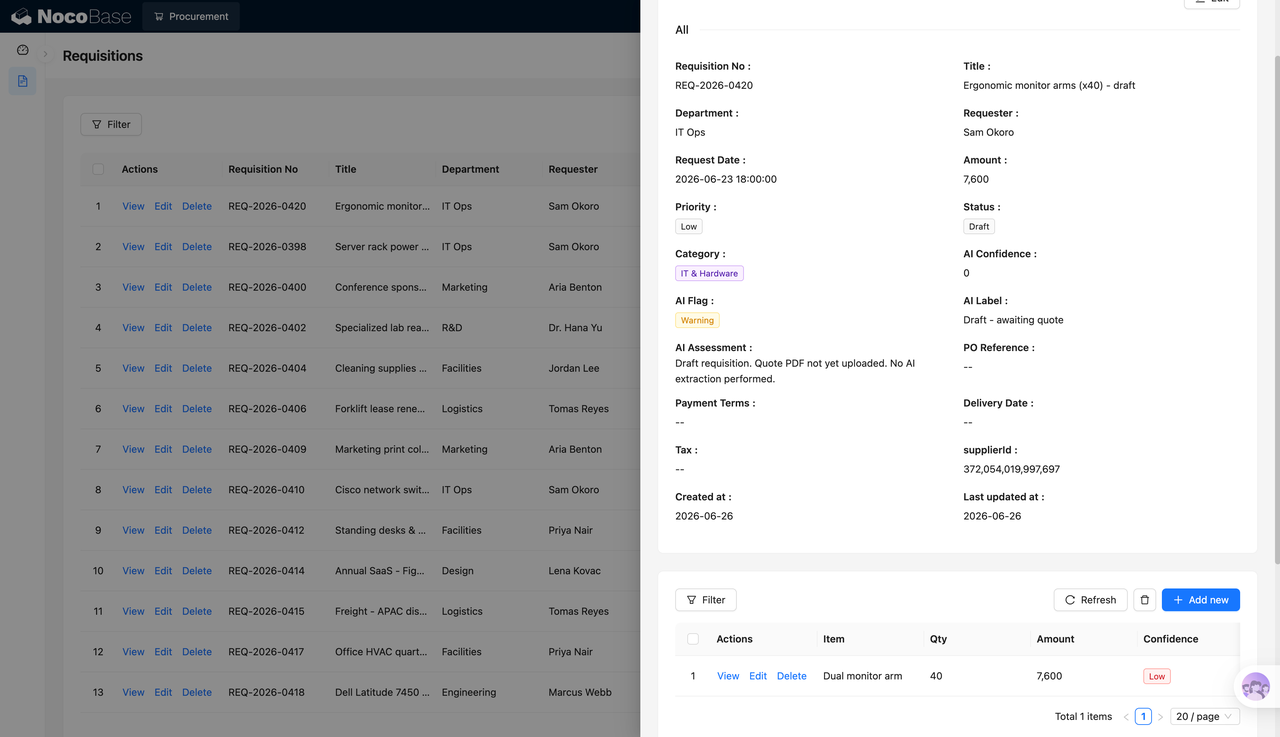
The system can manage not only the purchase request itself, but also specific line items, quantities, amounts, and recognition confidence. For different types of purchases such as monitor stands, server power supplies, event sponsorship, and lab consumables, teams can connect the request with its detailed line items for pricing review, approval, and archiving.
4.AI procurement data analysis
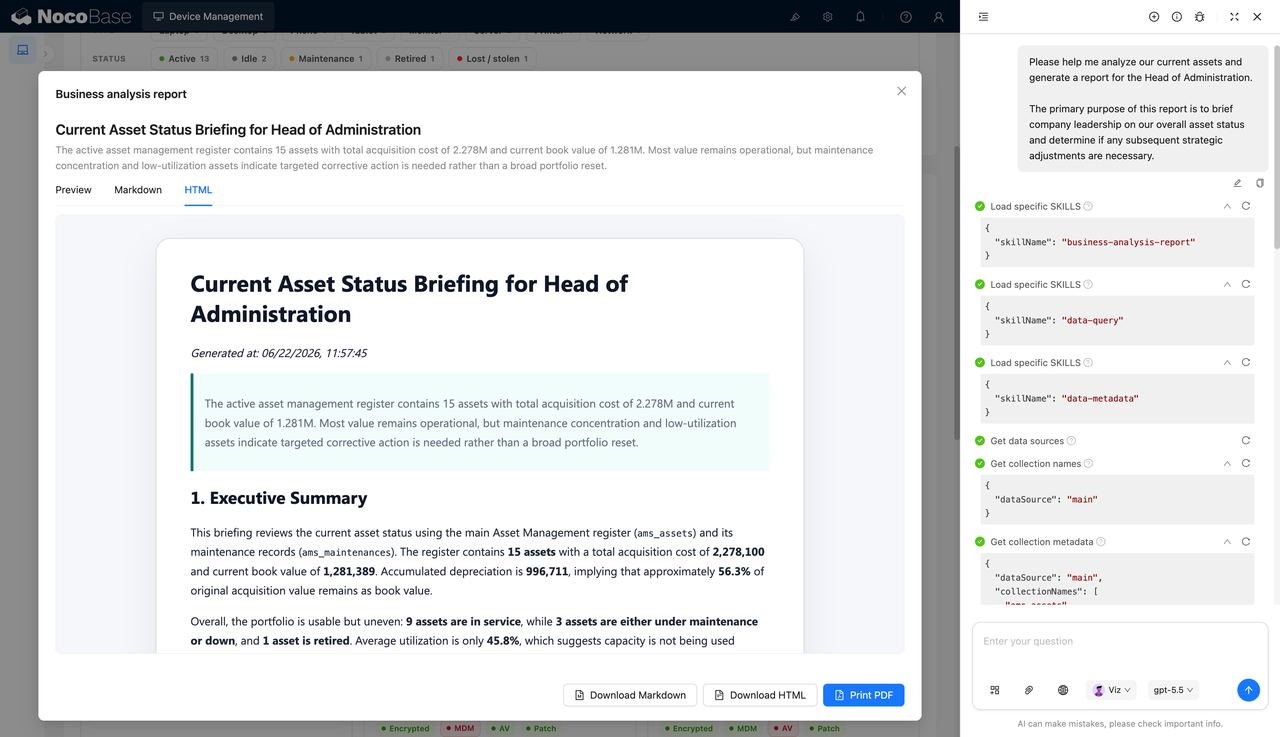
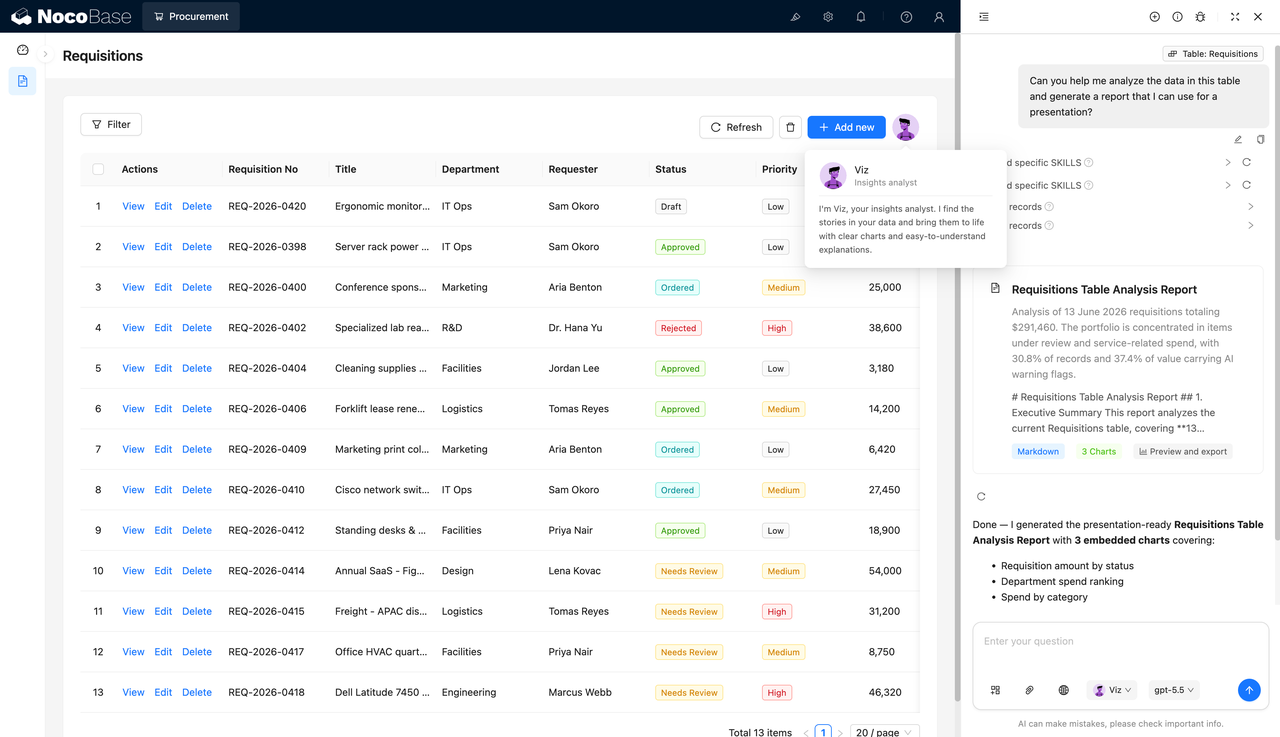
NocoBase AI employees can generate analysis reports from the purchase request table, automatically summarizing procurement amounts, status distribution, department spending, and category structure. Procurement owners can use these results directly in reports, reducing the time spent filtering data, building pivot tables, and creating charts manually.
5.Procurement analysis report
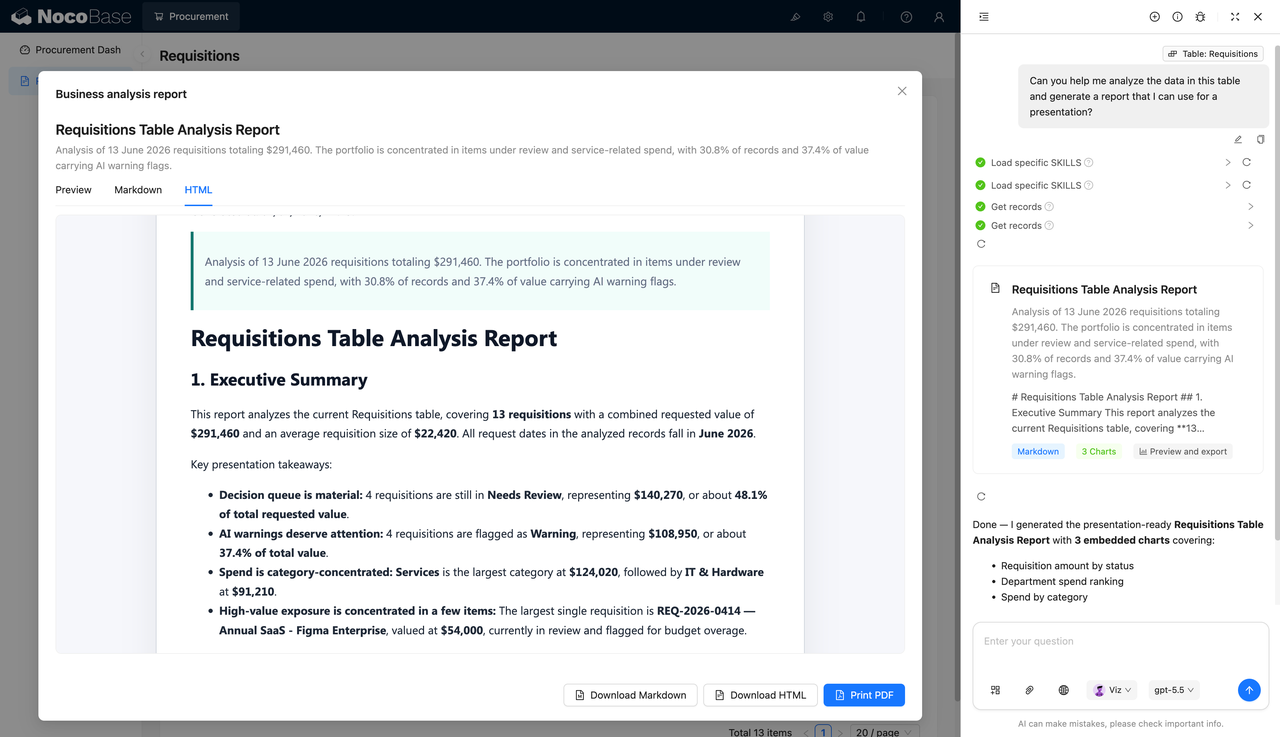
The AI-generated procurement analysis report can include an executive summary, key findings, and charts, with export options such as Markdown, HTML, or PDF. The report can identify requests that need review, high-risk spend, concentration in service-related categories, and large purchase items, helping teams spot budget and approval risks more quickly.
Use cases
- Enterprise purchase request management: Manage purchase requests, requesters, departments, amounts, priorities, and approval status in one place.
- Supplier procurement management: Track supplier spend, order volume, ratings, and annual procurement amounts.
- Procurement approval workflow management: Move requests through draft, pending review, approved, ordered, rejected, and other workflow statuses.
- Procurement data analysis reports: Analyze department spend, category spend, procurement risks, and budget usage.
Why choose a procurement management system?
| Comparison | Excel / email approvals | Procurement management system |
|---|---|---|
| Purchase requests | ❌ Scattered across emails, spreadsheets, and chat messages | ✅ Manage request IDs, amounts, departments, and statuses in one place |
| Procurement details | ❌ Items, quantities, and quotes are easy to miss | ✅ Connect requests with detailed line items |
| Approval status | ❌ Teams need to manually check current progress | ✅ Draft, approval, ordering, rejection, and other statuses are clearly visible |
| Supplier management | ❌ Supplier spend and ratings are hard to summarize | ✅ View supplier spend, orders, and ratings together |
| Risk detection | ❌ High-risk purchases mainly rely on manual judgment | ✅ AI tags highlight budget, quote, and review risks |
| Report generation | ❌ Data and charts need to be prepared manually | ✅ NocoBase AI employees generate procurement analysis reports |
| System extension | ❌ Spreadsheet maintenance becomes costly when processes change | ✅ Extend approvals, permissions, reports, and supplier evaluation over time |
Key features
1.Purchase request management
Maintain purchase request IDs, titles, departments, requesters, amounts, priorities, statuses, and categories in one place, helping procurement teams track every purchasing need consistently.
2.Supplier and spend management
Review annual spend, order volume, and ratings by supplier, so procurement teams can identify key suppliers, high-spend vendors, and partners that may need renegotiation.
3.AI risk detection
The system can record AI confidence scores, AI tags, and AI assessment results, highlighting requests that require quotes, exceed budget limits, or need manual review to reduce missed risks.
4.AI procurement analysis reports
NocoBase AI employees can generate analysis reports based on procurement data, covering purchase amounts, approval statuses, department spending, and category structure. These reports are useful for procurement reviews and management updates.
FAQ
1.What teams is a procurement management system suitable for?
It is suitable for enterprise procurement teams, finance teams, admin teams, IT operations teams, and business departments, especially organizations that need to manage purchase requests, suppliers, approval status, and budget risks in one system.
2.What procurement information can the system manage?
It can manage purchase request IDs, titles, departments, requesters, amounts, priorities, statuses, categories, suppliers, payment terms, delivery dates, line items, and AI assessment results.
3.Does it support supplier management?
Yes. The system can record supplier names, service types, order volume, annual spend, and ratings, helping teams review supplier performance and procurement spend distribution.
4.Does it support AI procurement analysis?
Yes. NocoBase AI employees can analyze the purchase request table and generate reports on procurement amounts, status distribution, department spending, category spending, and risk alerts.
5.Why build a procurement management system with AI and NocoBase?
AI Agents can call NocoBase components through natural language to create purchase request tables, detail pages, supplier views, and analysis pages. NocoBase provides the data relationships, permissions, views, and workflow extensions needed for long-term use. With NocoBase AI employees for procurement analysis and report generation, this approach is easier to maintain than managing procurement only with Excel, email, and chat tools.