Xây dựng hệ thống bằng AI agent của bạn
Build an App with NocoBase — Renewal Management System: Renewal opportunities, customer health scores, ARR risk dashboard, stage board, follow-up calendar, AI renewal analysis, and AI-assisted renewal form autofill. The layout and signature visual style can reference this prototype: https://static-docs.nocobase.com/solution/templates/40-renewal-management.html
Liên kết nguyên mẫu (HTML) trong prompt là thiết kế chúng tôi chuẩn bị sẵn, chỉ nhằm minh họa khả năng; NocoBase không khuyến nghị tạo cả một hệ thống chỉ từ một câu prompt. Khi xây dựng với nó, hãy kết hợp với skill “prototype reproduction” (nocobase-prototype-repro) trong NocoBase Skills để có kết quả tốt.
Trước khi bắt đầu, hãy làm theo hướng dẫn nhanh AI agent để cài đặt NocoBase và kết nối agent của bạn. Kết quả AI có thể khác nhau; tùy vào mô hình và độ phức tạp của hệ thống, có thể cần tinh chỉnh thêm hoặc tương tác nhiều vòng.
What is a renewal management system?
A renewal management system helps teams manage customer contract expirations, renewal progress, customer health, and renewal risk. With an AI Agent connected to NocoBase, teams can quickly generate core pages such as renewal opportunities, customer records, and renewal dashboards. Users only need to confirm the field structure, page logic, and business rules, so a basic system can be built in as little as about one hour, without relying on scattered Excel sheets, calendar reminders, and sales notes.
It is useful for sales, customer success, and customer operations teams that manage SaaS subscriptions, B2B contract renewals, ARR risk, and customer health. Instead of keeping renewal work in fragmented records, the system turns it into a clear, continuous, and collaborative management process.
Core value
- ⏱️ Bring renewal information into one system to reduce cross-sheet lookup and duplicate maintenance
- 💰 Track US$2.33M in open renewal ARR and US$1.05M in at-risk ARR in real time
- 📊 Move renewals through stages such as upcoming, outreach, negotiation, and risk warning
- 🤖 Use AI to quickly calculate upcoming expirations, such as 3 out of 15 customers, or about 20%
System preview
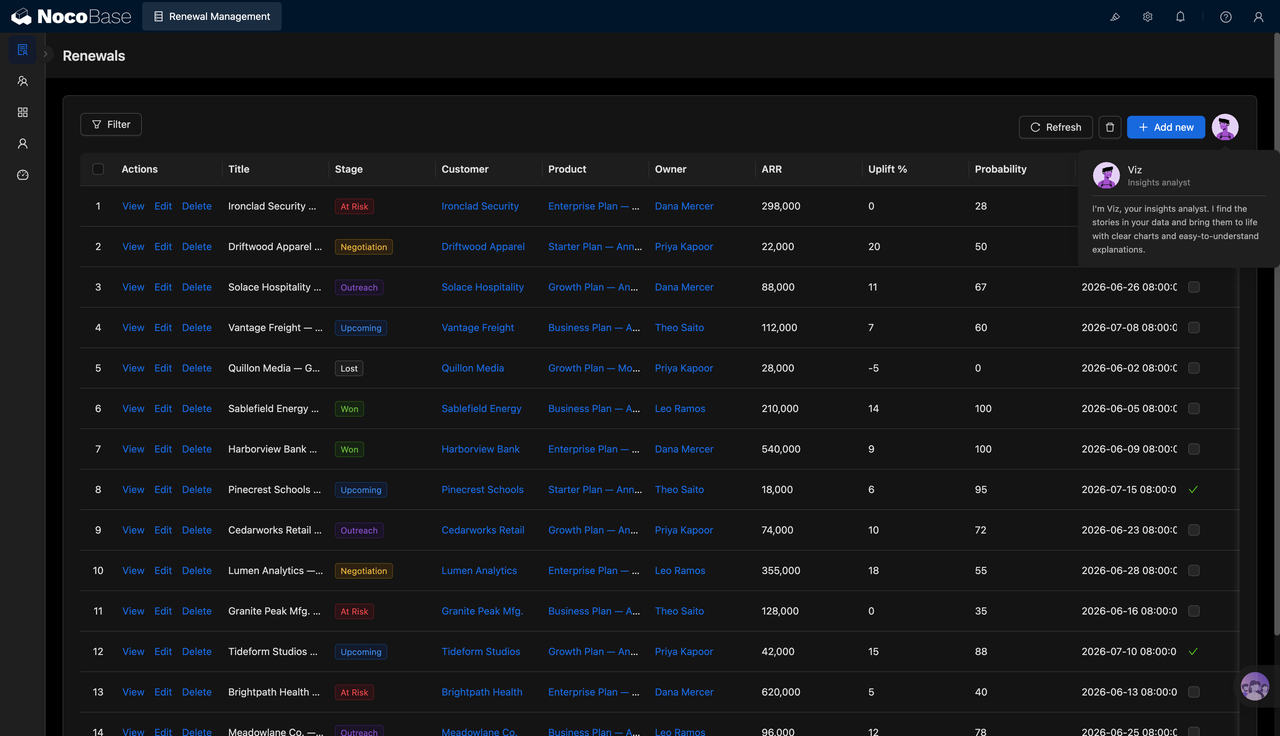
1.Renewal opportunity management
The system centralizes every renewal opportunity, including the customer, product, owner, renewal ARR, uplift percentage, win probability, expiration date, and current stage. Teams can quickly see which renewals are moving forward, which ones are already at risk, and how much revenue is tied to each opportunity.
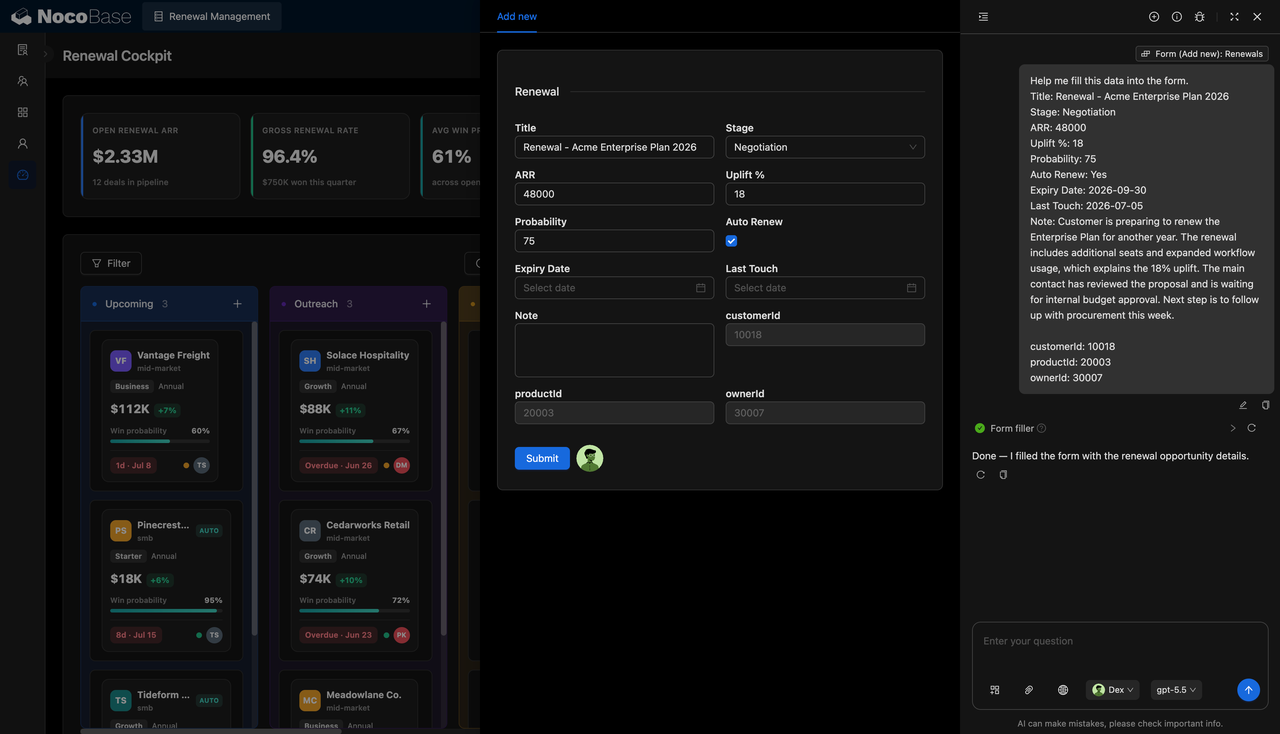
2.AI-filled renewal forms
NocoBase AI Employee can fill in renewal forms based on the renewal information provided by the user, including the title, stage, ARR, uplift percentage, win probability, auto-renewal status, expiration date, latest touchpoint, and notes. The user only needs to review the generated content before saving it, reducing manual entry and missing fields.
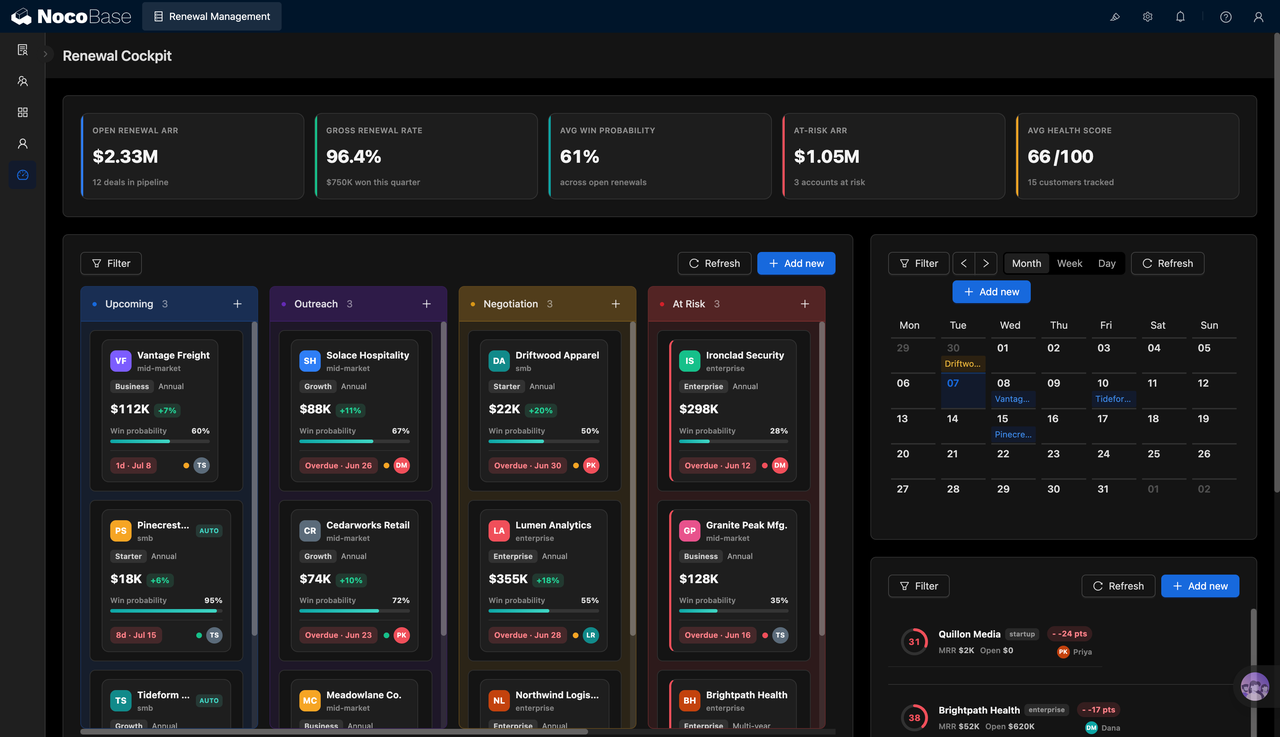
3.Renewal overview
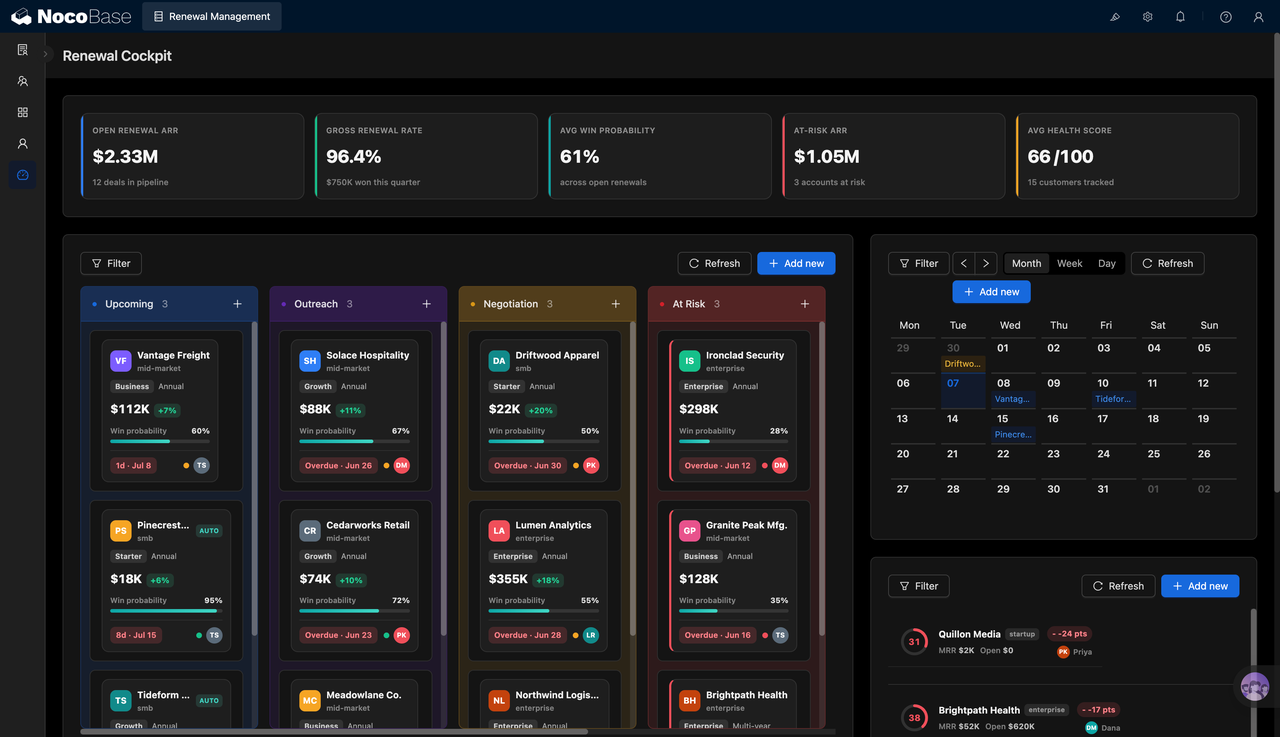
The renewal overview shows open renewal ARR, renewal rate, average win probability, at-risk ARR, and customer health score in one place. It also uses a stage board, calendar, and at-risk customer list to present renewal progress. Sales, customer success, and management teams can quickly understand the overall renewal status and identify which customers need priority follow-up.
4.AI renewal analysis report
NocoBase AI Employee can generate business analysis reports based on renewal data, summarizing the renewal portfolio, at-risk revenue, expected ARR, and key findings. It can also generate charts automatically, so teams can use the results directly in weekly meetings, renewal reviews, and management reporting instead of manually organizing data and building reports.
5.Customer details and health management
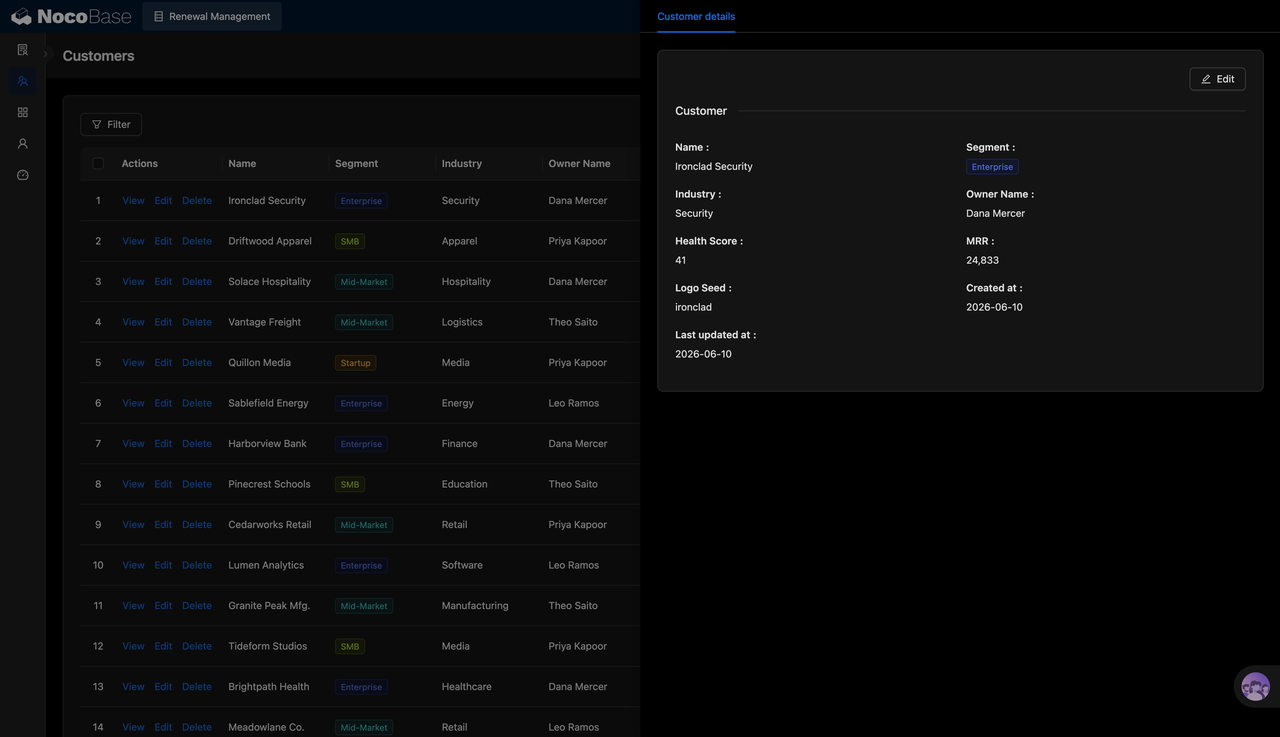
The customer detail page brings together customer name, segment, industry, owner, health score, MRR, creation time, and update time. Teams can combine customer health data with renewal records to assess renewal risk, follow-up priority, and the next renewal strategy.
Use cases
- SaaS subscription renewal management: Manage annual subscriptions, plan renewals, upgrade renewals, and churn risk.
- Customer success renewal management: Track customer health, renewal probability, owner, and next actions.
- B2B contract renewal tracking: Manage enterprise contract expirations, renewal stages, ARR, and negotiation progress.
- ARR / MRR risk management: Identify high-risk customers, at-risk revenue, and changes in renewal forecasts earlier.
Why choose a renewal management system?
| Comparison item | Excel spreadsheets | Renewal management system |
|---|---|---|
| Renewal visibility | ❌ Data is scattered, and teams often switch between multiple sheets | ✅ View customers, products, stages, ARR, and probability on one page |
| Expiration reminders | ❌ Relies on manual reminders and can easily miss follow-ups | ✅ Use a calendar to manage renewal milestones more clearly |
| Stage progress | ❌ Status updates depend on manual notes and are hard to standardize | ✅ Move opportunities through renewal stages on a board |
| Customer health | ❌ Hard to connect health signals with renewal opportunities | ✅ Use Health Score to assess renewal risk |
| Risk identification | ❌ High-risk customers are mostly identified manually | ✅ Centralize at-risk customers and at-risk ARR |
| AI analysis | ❌ Requires manual filtering, summarizing, and calculation | ✅ Ask questions directly and generate renewal statistics |
| Team collaboration | ❌ Sales, CS, and management teams may work from different information | ✅ Collaborate in one system with more transparent information |
Core features
1.Renewal opportunity management
Maintain customers, products, owners, ARR, uplift percentage, renewal probability, and renewal stages in one place. This helps sales and customer success teams manage the renewal process with a shared workflow.
2.Customer segmentation and health management
Manage customers by segment, industry, owner, and health score, helping teams identify key accounts, healthy customers, and potential renewal risks.
3.Stage board and calendar management
Use a renewal board to move opportunities through different stages, and use a calendar to manage renewal milestones. This reduces missed follow-ups and avoids handling renewals only when the contract is already close to expiration.
4.AI renewal Q&A
AI can quickly calculate upcoming expirations, at-risk customers, renewal percentages, and revenue distribution based on system data, reducing the time spent on manual summaries.
FAQ
1.What teams is a renewal management system suitable for?
It is suitable for SaaS sales teams, customer success teams, customer operations teams, and account management teams, especially in scenarios that involve subscription renewals, annual contract renewals, and ARR risk management.
2.Can the system track renewal revenue and renewal probability?
Yes. The system can record renewal revenue, uplift percentage, win probability, and current stage, helping teams evaluate the revenue value, progress, and likelihood of each renewal opportunity.
3.Does it support upcoming expiration reminders?
Yes. Teams can use the renewal list, stage board, and calendar view to identify customers with upcoming expirations and arrange outreach and follow-up in advance.
4.Does it support AI queries and renewal analysis?
Yes. Teams can use NocoBase AI Employee to query system data directly, such as the number and percentage of upcoming expirations, the distribution of at-risk customers, and renewal progress. Instead of manually filtering spreadsheets, teams can quickly obtain renewal analysis for daily management, weekly reporting, and renewal reviews.
5.Why build a renewal management system with AI + NocoBase?
AI can help quickly generate the field structure, page descriptions, analysis questions, and renewal statistics logic. NocoBase provides the data relationships, permissions, views, workflows, and extension capabilities needed for long-term use, making it more suitable for internal business systems than relying only on Excel or temporary AI tools.