Xây dựng hệ thống bằng AI agent của bạn
Build an application with NocoBase — AI Report Generator: report task management, business categories, key finding extraction, confidence review, multi-format report export, and AI-generated analysis charts. Use this prototype as the layout and signature visual reference: https://static-docs.nocobase.com/solution/templates/57-ai-report-generator.html
Liên kết nguyên mẫu (HTML) trong prompt là thiết kế chúng tôi chuẩn bị sẵn, chỉ nhằm minh họa khả năng; NocoBase không khuyến nghị tạo cả một hệ thống chỉ từ một câu prompt. Khi xây dựng với nó, hãy kết hợp với skill “prototype reproduction” (nocobase-prototype-repro) trong NocoBase Skills để có kết quả tốt.
Trước khi bắt đầu, hãy làm theo hướng dẫn nhanh AI agent để cài đặt NocoBase và kết nối agent của bạn. Kết quả AI có thể khác nhau; tùy vào mô hình và độ phức tạp của hệ thống, có thể cần tinh chỉnh thêm hoặc tương tác nhiều vòng.
What is an AI report generator?
An AI report generator is an AI business system for consolidating business data, extracting key findings, and generating readable, shareable data analysis reports. Teams can describe the required fields, pages, and report workflow in natural language, then let an AI Agent create the report list, detail pages, data tables, and output pages. NocoBase AI employees can then read the data, generate summaries, identify risks, and organize charts. In this example, the system manages 17 reports, 5 business topics, and 4 report formats, with an average report confidence score of 87.7%. It turns manual report preparation into a reusable internal analytics workflow.
Core value
- ⏱️ Save an estimated 228 hours on data preparation and report writing
- 📊 Manage 17 reports across 5 topics: operations, finance, marketing, product, and security
- ✅ Reach an average report confidence score of 87.7%, with 5 reports clearly marked for human review
- 📄 Support 4 report formats: full report, executive summary, email brief, and presentation
System preview
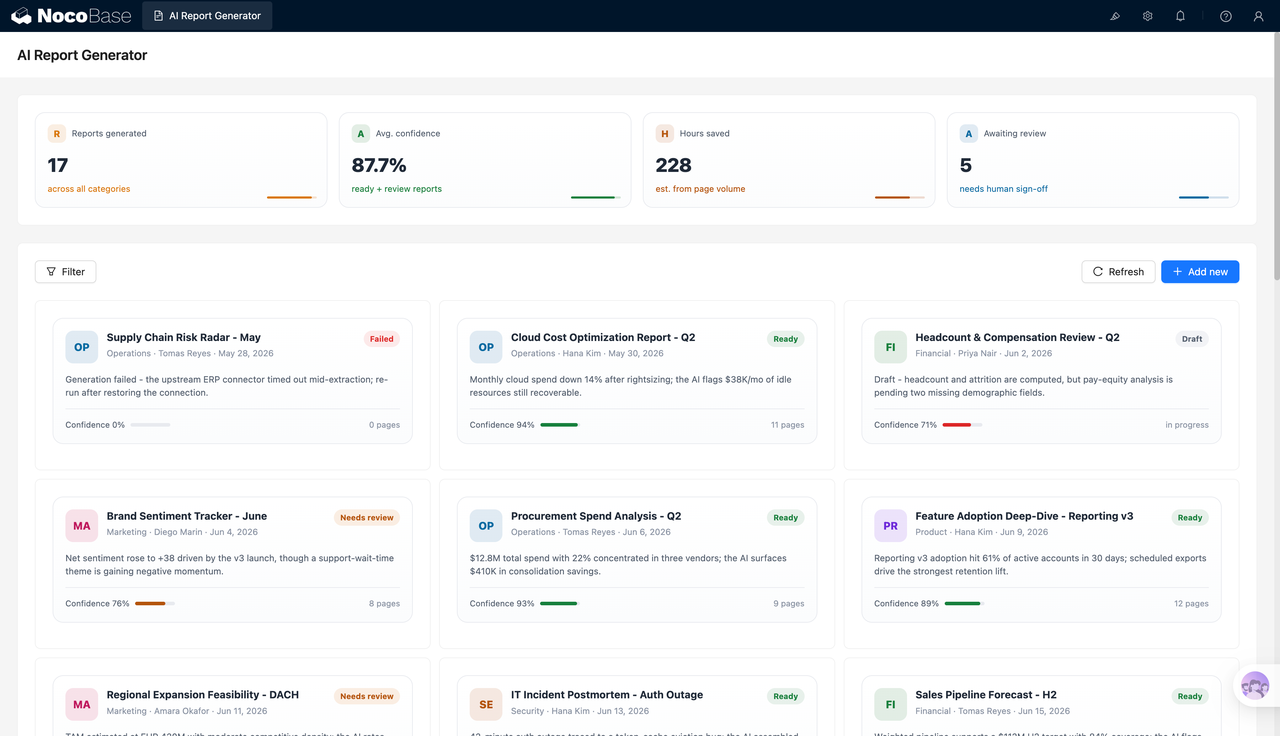
1.Report generation overview
The overview brings together the number of generated reports, average confidence score, estimated hours saved, and reports pending review. Reports are displayed as cards, so teams can quickly check each report’s topic, business area, owner, status, summary, page count, and confidence score, and distinguish ready, pending review, draft, and failed tasks.
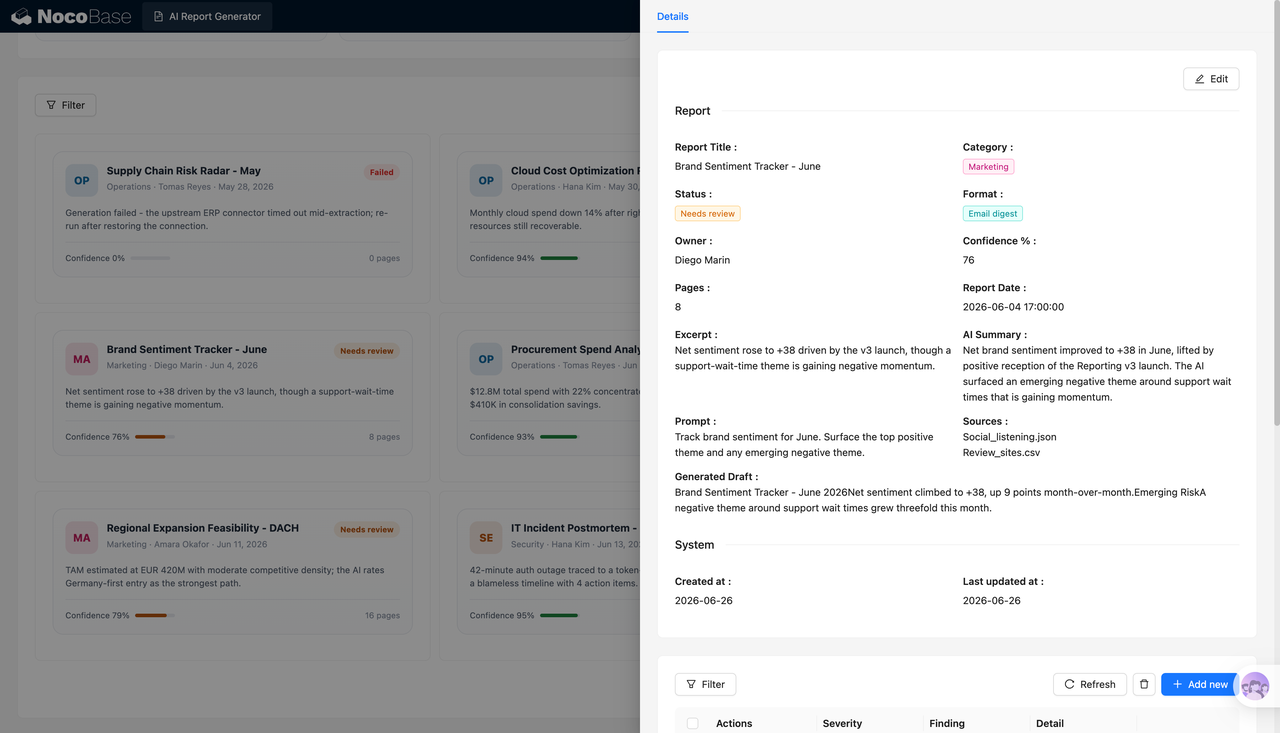
2.Report details and generation context
Each report can store its title, business category, status, delivery format, owner, page count, generation date, and confidence score. It can also keep the original prompt, data sources, content summary, and draft output. Reviewers can see which data was used, what conclusions the AI produced, and which parts still need confirmation.
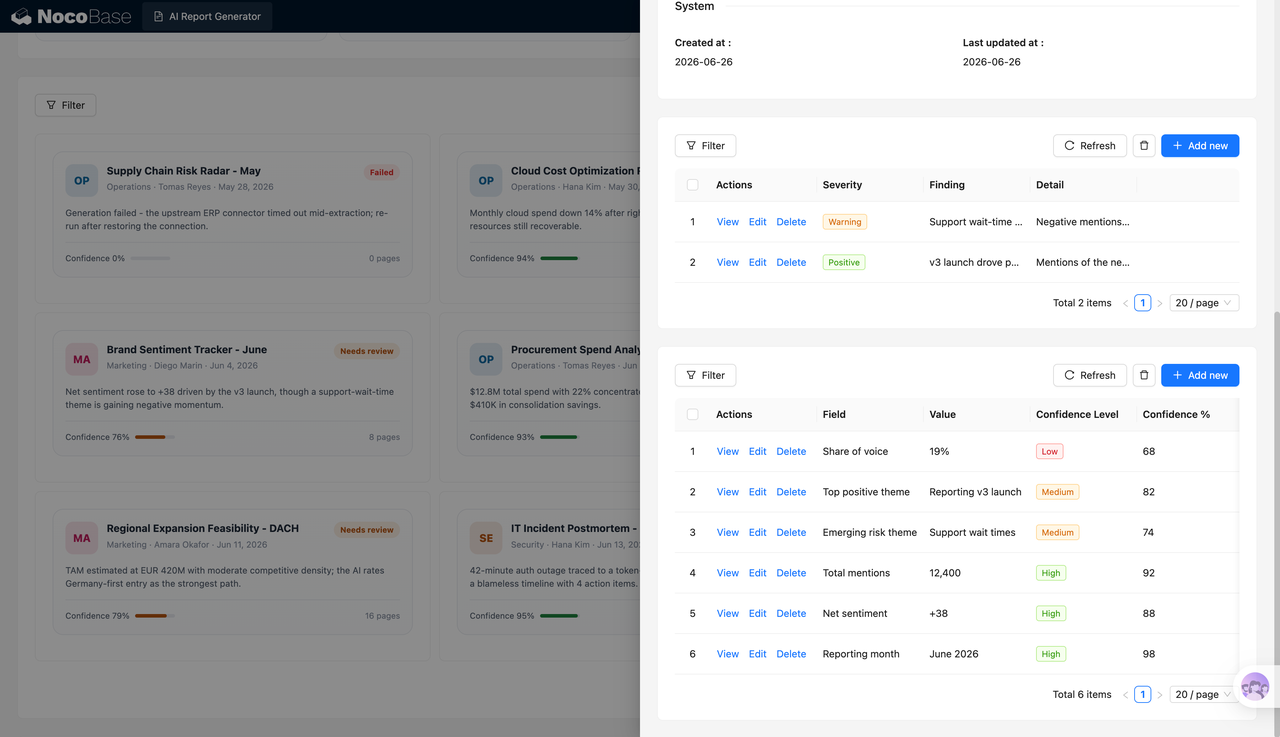
3.Key findings and metrics
Report conclusions can be broken down into structured findings and metrics. Teams can record the finding level, specific insight, supporting notes, metric name, metric value, and confidence score. Examples include brand visibility, positive themes, potential risks, total mentions, and net sentiment, making it easier to filter, review, and track findings over time.
4.Centralized report task management
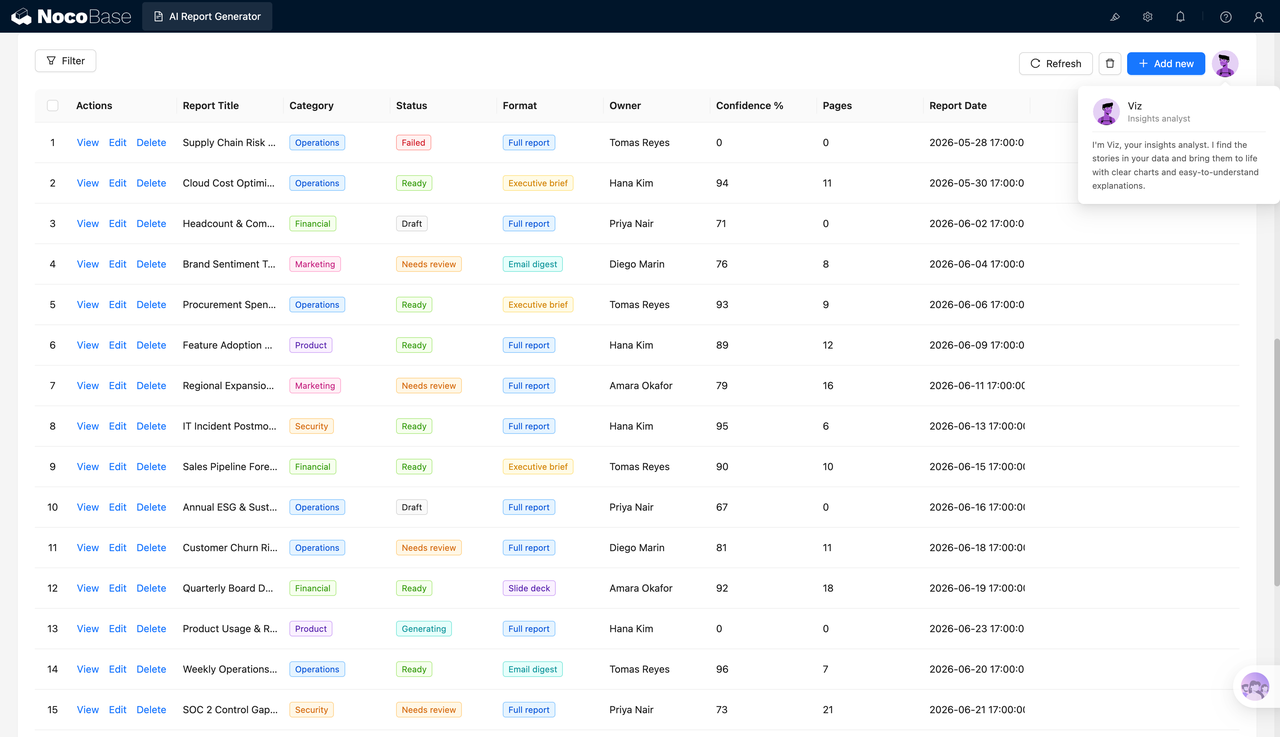
The report list manages title, business category, generation status, report format, owner, confidence score, page count, and date in one place. Operations, finance, marketing, product, and security teams can maintain their own report tasks in the same system instead of scattering reports across folders, emails, and chat threads.
5.AI report analysis and export
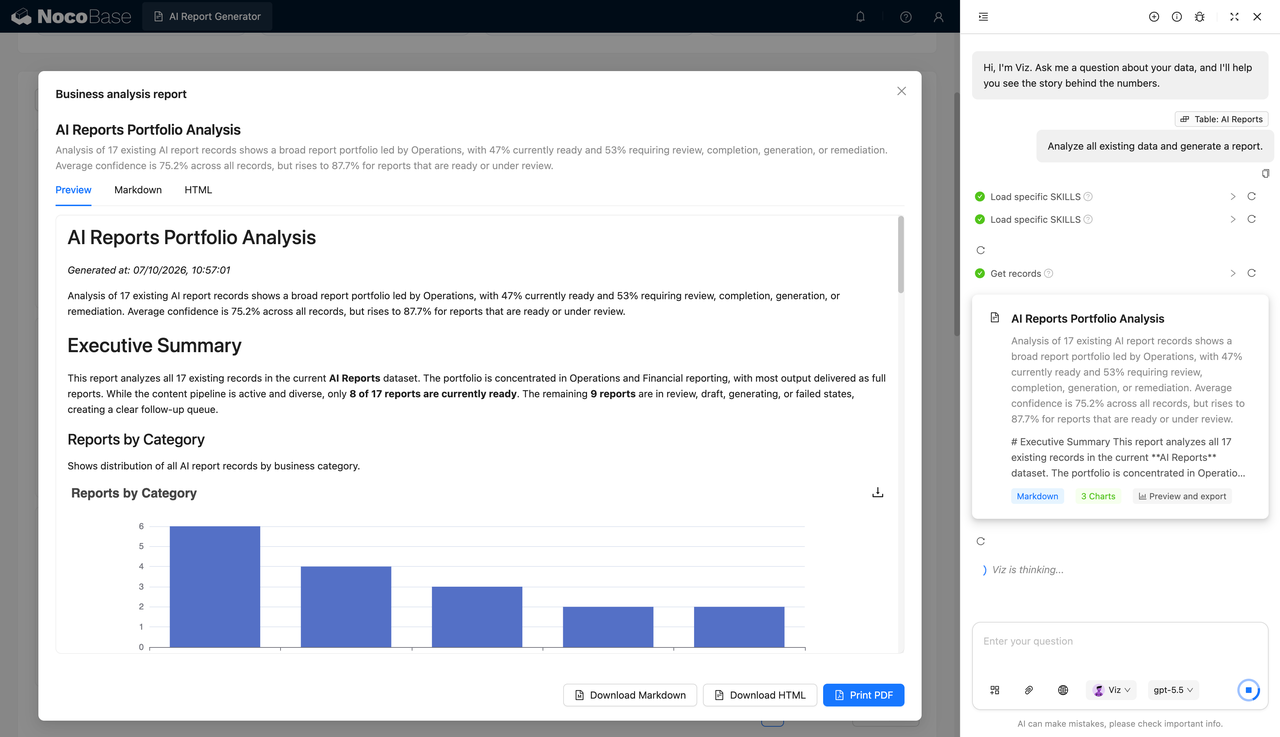
NocoBase AI employees can analyze existing reports and automatically generate an executive summary, category breakdown, status distribution, confidence charts, and other visuals. The final report can be previewed online and exported as Markdown, HTML, or PDF for weekly meetings, monthly reviews, and management updates.
Use cases
- Business performance analysis: Summarize operational data, key metrics, anomalies, and stage-by-stage conclusions
- Finance and procurement analysis: Generate reports on cost analysis, procurement spend, budget execution, and supplier performance
- Marketing and product data reporting: Analyze brand visibility, user feedback, product usage, and feature adoption
- IT and security incident reporting: Organize system incidents, security events, risk findings, and incident reviews
Why choose an AI report generator?
| Comparison | Manual report preparation | AI report generator |
|---|---|---|
| Data preparation | ❌ Copy data across spreadsheets and files | ✅ Read and organize business data in one place |
| Report writing | ❌ Write summaries, conclusions, and body text from scratch | ✅ Generate drafts, summaries, and key findings with AI |
| Chart creation | ❌ Select data and create charts manually | ✅ Generate analysis charts based on report data |
| Review process | ❌ Hard to identify which parts need checking | ✅ Show confidence scores and mark reports for review |
| Report management | ❌ File names and versions easily become messy | ✅ Manage status, owner, date, and page count in one system |
| Output formats | ❌ Reformat content repeatedly for different formats | ✅ Support multiple report types and file exports |
| Long-term expansion | ❌ New reports require new templates | ✅ Add fields, categories, workflows, and data sources over time |
Key features
1.Report task management
Maintain report title, business category, owner, status, delivery format, page count, generation date, and confidence score in one place, so teams can track each report from production to review.
2.AI summaries and key finding extraction
NocoBase AI employees can generate report summaries from business data, extract positive signals, risk indicators, abnormal changes, and key metrics, then save those conclusions as structured records.
3.Confidence and review management
The system records confidence scores for reports and key metrics, separating high-, medium-, and low-confidence results. Content with low confidence or incomplete data can be moved into a review status for business users to confirm before distribution.
4.Chart generation and multi-format output
AI can generate charts for categories, status, trends, and metrics based on report data. Completed reports can be previewed online and exported as Markdown, HTML, or PDF. They can also be managed as full reports, executive summaries, email briefs, or presentations.
FAQ
1.What teams is an AI report generator suitable for?
It is suitable for operations, finance, procurement, marketing, product, security, and management teams, especially companies that need to generate weekly reports, monthly reports, business analysis, and management briefs on a regular basis.
2.What types of reports can the system generate?
It can be used for business analysis, procurement spend, cloud cost optimization, brand sentiment, product adoption, sales forecasting, security incident reviews, and customer churn risk reports.
3.Do AI-generated reports need human review?
A review step is recommended. The system shows each report’s confidence score and status. High-confidence reports can be confirmed quickly, while reports with incomplete data or uncertain conclusions can stay in a pending review status.
4.Can it analyze existing report data?
Yes. NocoBase AI employees can read report records in the system, analyze report categories, generation status, average confidence score, and pending tasks, then generate an overall analysis report with summaries and charts.
5.Why build a report generator with AI + NocoBase?
Teams can describe report fields, management pages, and generation workflows to an AI Agent in natural language, and the Agent can call NocoBase components to build the system. NocoBase stores the data, manages permissions, configures views, and supports long-term expansion, while NocoBase AI employees handle data analysis, content extraction, and report generation. This makes it suitable for enterprise reporting workflows that need to run continuously.