Construa com o seu agente de IA
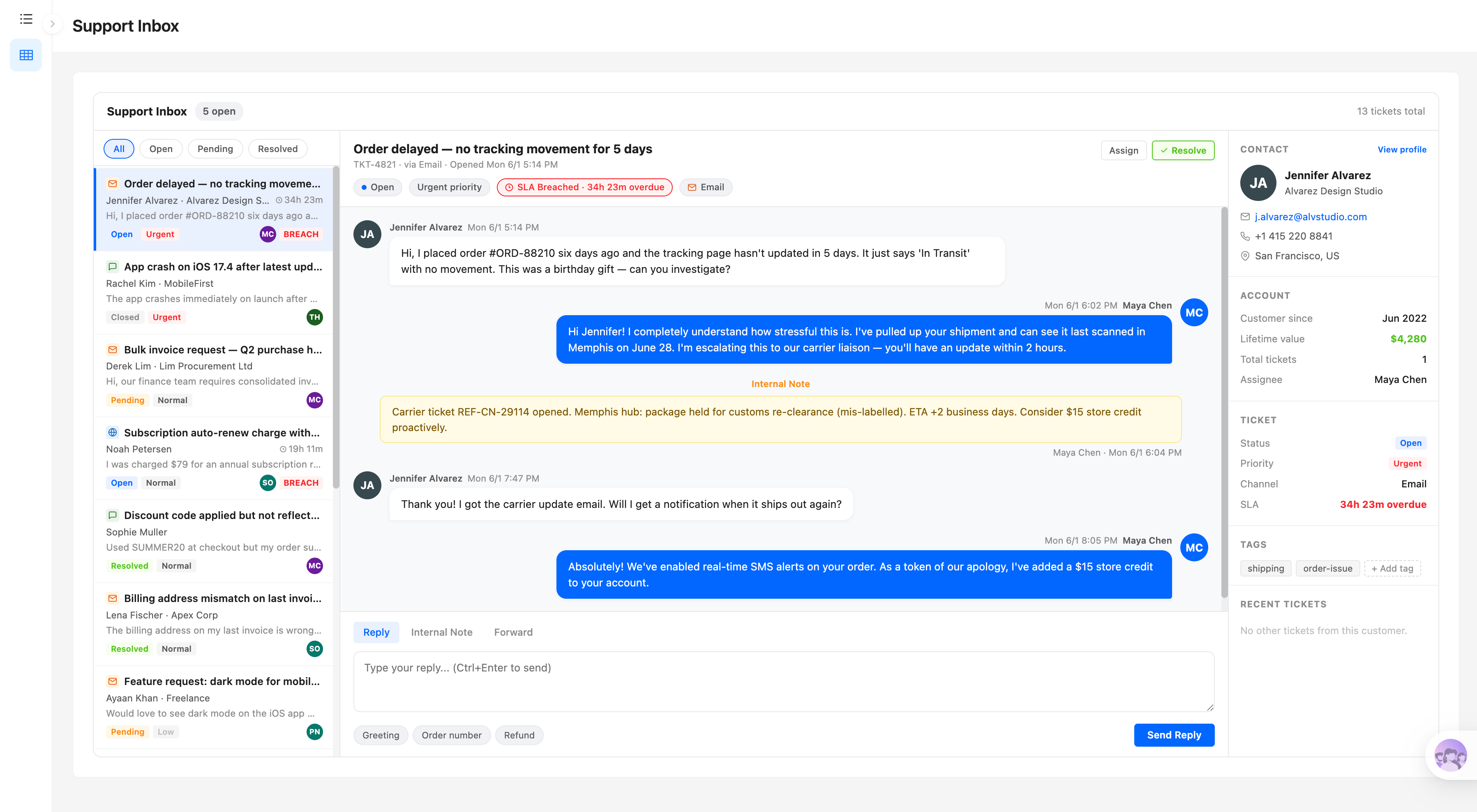
Build a NocoBase app —SLA Management System: a KPI bar, a three-column war-room board, and countdown rings. Match the layout and signature visuals of this reference prototype: https://static-docs.nocobase.com/solution/templates/17-sla-management.html
O link do protótipo (HTML) no prompt é um design que preparamos previamente, apenas para demonstrar a capacidade; o NocoBase não recomenda gerar um sistema inteiro a partir de um único prompt. Ao construir com ele, combine-o com a skill “prototype reproduction” (nocobase-prototype-repro) das NocoBase Skills para obter um bom resultado.
Antes de começar, siga o início rápido do agente de IA para instalar o NocoBase e conectar o seu agente. Os resultados de IA podem variar; dependendo do modelo e da complexidade do sistema, alguns ajustes ou rodadas adicionais podem ser necessários.
Introdução
Use seu AI agent favorito junto com o NocoBase para criar rapidamente um sistema de gerenciamento de SLA — personalizável, confiável e com evolução contínua — para monitorar tempos de resposta de tickets, tempos de resolução, status de violação, tickets em risco, taxas de cumprimento de SLA e desempenho de serviço por nível de prioridade.
Copie o prompt abaixo e deixe seu AI agent gerar a estrutura base do sistema de gerenciamento de SLA no NocoBase; depois ajuste campos, páginas, regras de prazo e padrões de prioridade pela interface no-code.
Este sistema é ideal para equipes de suporte ao cliente, suporte técnico, service desks de TI, equipes de operações, equipes de infraestrutura e equipes de serviços internos que precisam acompanhar se os tickets recebem resposta e resolução dentro dos prazos acordados.
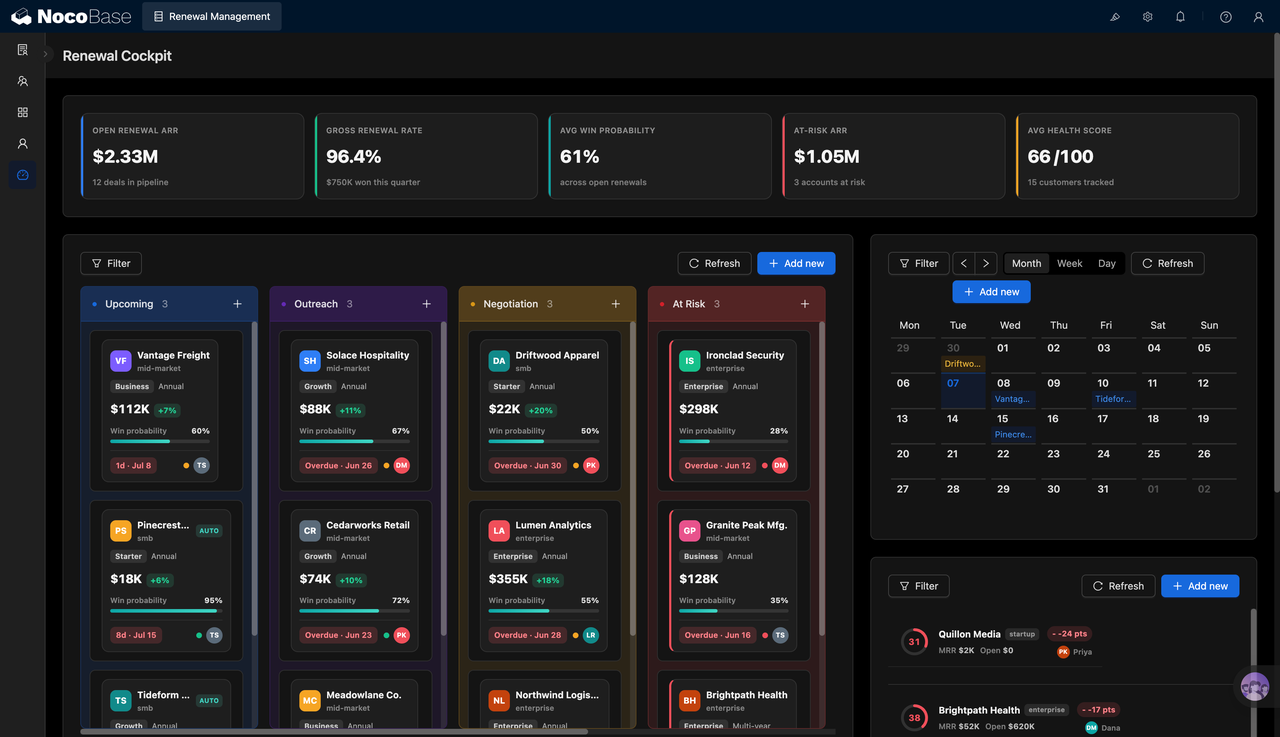
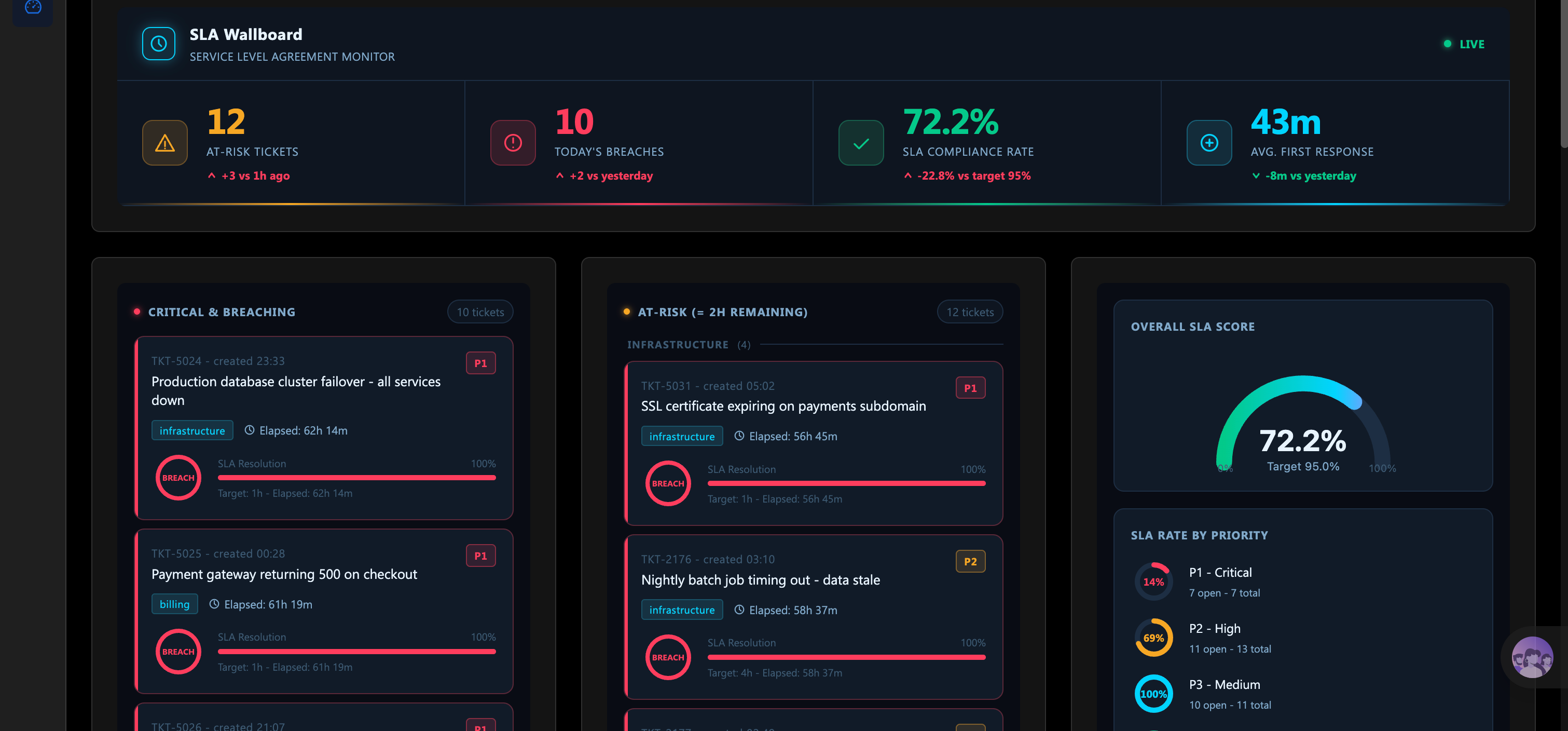
Dashboard de monitoramento de SLA em tempo real:
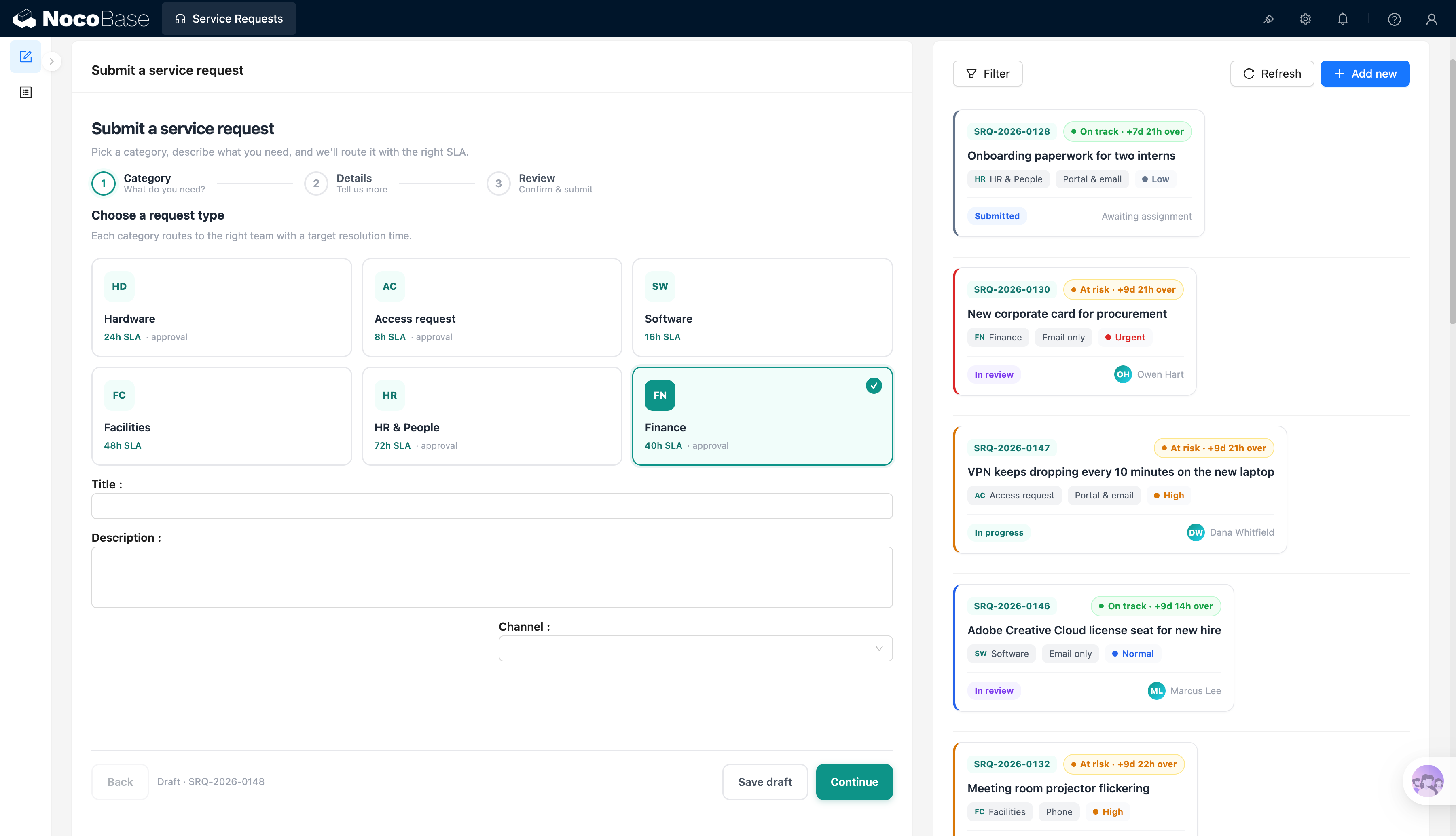
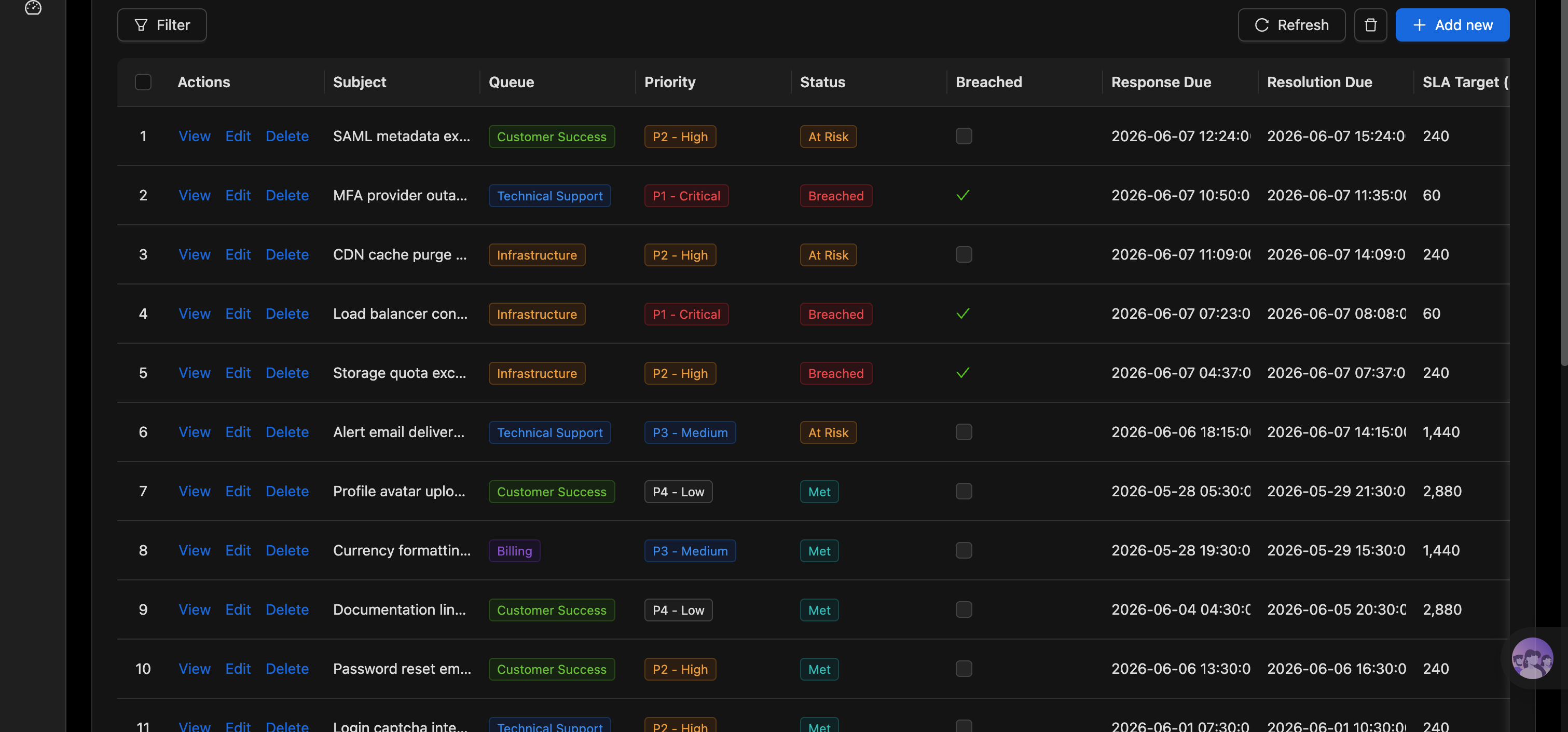
Lista detalhada de SLA dos tickets:
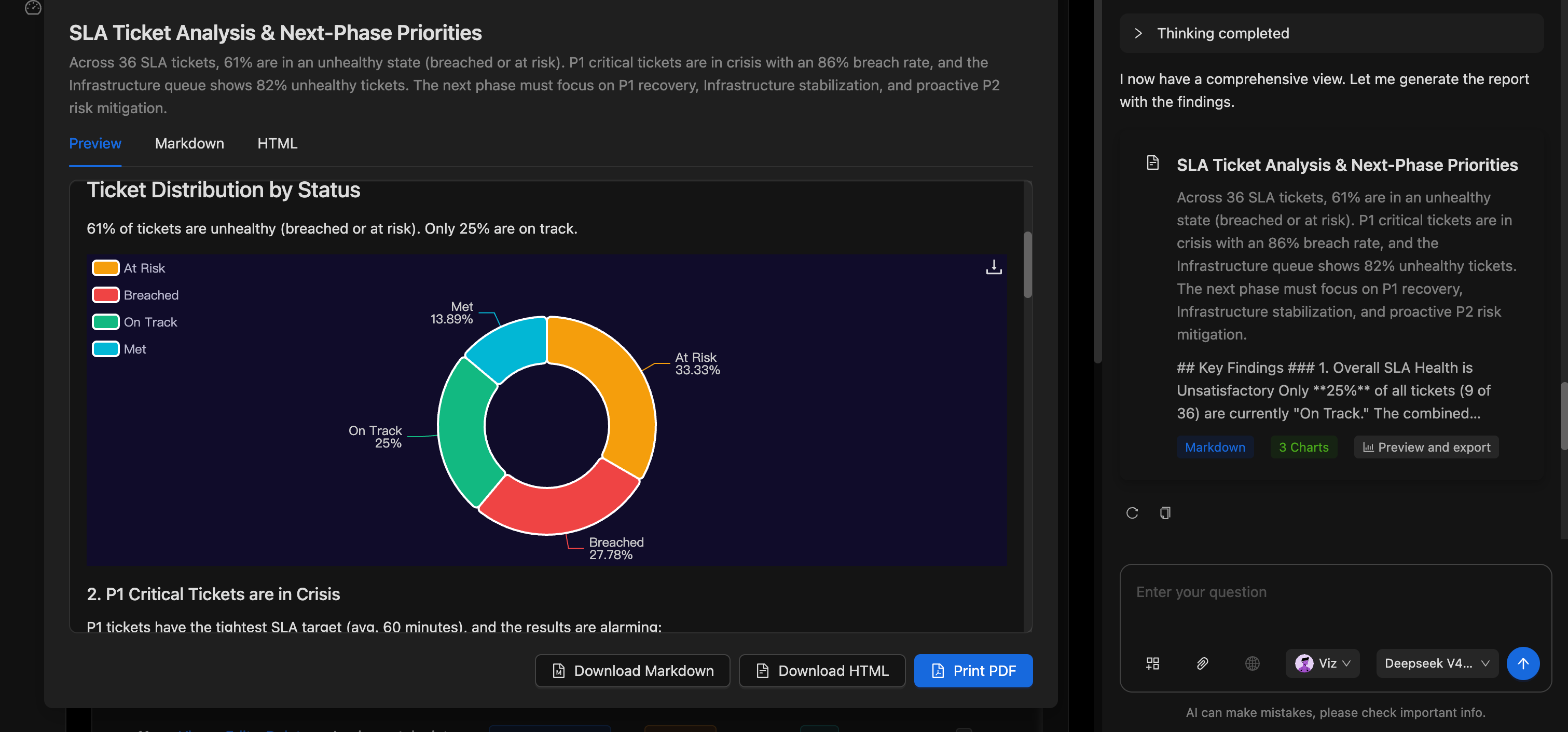
AI employee analisa dados e gera relatórios:
Quais problemas um sistema de gerenciamento de SLA resolve?
O núcleo do gerenciamento de SLA é determinar se cada ticket consegue receber sua primeira resposta e resolução final dentro do tempo acordado.
À medida que o volume de tickets cresce, fica difícil para as equipes depender de julgamento manual para identificar quais tickets estão prestes a expirar, quais já violaram o prazo e se o tratamento por nível de prioridade ainda atinge as metas. Sem uma página unificada de monitoramento de SLA, os problemas de alto risco muitas vezes só são descobertos depois que a violação já ocorreu.
Com este sistema, você pode definir limites de tempo de resposta e resolução para diferentes prioridades e calcular continuamente quanto tempo resta antes que cada ticket atinja seu prazo de SLA.
O sistema pode classificar os tickets em estados como Cumprido, Em Risco e Violado. Os gestores podem visualizar o número de tickets em risco, a contagem de violações do dia, a taxa geral de cumprimento do SLA e o tempo médio de primeira resposta em um dashboard em tempo real.
Para tickets que violaram ou estão prestes a violar, o sistema pode apresentá-los em um único lugar por prioridade, fila, tempo decorrido e tempo-alvo, ajudando a equipe a tratar os problemas mais urgentes primeiro.
A lista detalhada de tickets também pode exibir assunto, fila, prioridade, status, indicador de violação, prazo de resposta, prazo de resolução e duração-alvo do SLA, facilitando para os gestores auditar como cada ticket está sendo tratado.
Funcionalidades principais
Dashboard de monitoramento de SLA em tempo real
- Visão geral das métricas-chave: Exibe o número de tickets em risco, a contagem de violações do dia, a taxa de cumprimento do SLA e o tempo médio de primeira resposta em um só lugar.
- Indicadores de lacuna em relação à meta: Compara a taxa atual de cumprimento do SLA com a meta para avaliar rapidamente se o desempenho geral do serviço está no caminho certo.
- Monitoramento de status em tempo real: Atualiza continuamente o risco e o status de atendimento dos tickets atuais para que a equipe ajuste as prioridades a tempo.
Gerenciamento de tickets em risco e violados
- Tickets com violações críticas: Expõe os problemas principais que já ultrapassaram os limites de SLA, incluindo assunto, prioridade, fila e tempo decorrido.
- Alertas de violação iminente: Identifica antecipadamente tickets Em Risco próximos aos prazos para evitar escaladas adicionais.
- Visualização do progresso: Usa barras de progresso para mostrar a duração-alvo versus o tempo decorrido, tornando os níveis de risco dos tickets fáceis de identificar a primeira vista.
Gerenciamento de informações de SLA dos tickets
- Prazos de resposta e resolução: Registra separadamente o prazo de primeira resposta e o prazo de resolução final.
- Prioridades em múltiplos níveis: Suporta níveis de prioridade como P1 Critical, P2 High, P3 Medium e P4 Low, cada um com suas próprias metas de SLA.
- Classificação automática de status: Usa status como Em Risco, Violado e Cumprido para marcar o desempenho atual de SLA de cada ticket.
Filas de serviço e listas de tickets
- Gerenciamento de múltiplas filas: Organiza tickets por filas de serviço como Customer Success, Technical Support, Infrastructure e Billing.
- Lista detalhada de tickets: Exibe assunto, fila, prioridade, status, indicador de violação, prazo de resposta e prazo de resolução.
- Filtragem e manutenção: Suporta filtragem, criação, visualização, edição e exclusão de tickets para que a equipe mantenha os registros de serviço atualizados.
Análise de desempenho de SLA
- Pontuação geral de SLA: Agrega o cumprimento do serviço em todos os tickets em uma pontuação geral intuitiva.
- Análise por prioridade: Compara as taxas de cumprimento de SLA e as contagens não atendidas por prioridades como P1, P2 e P3.
- Análise de distribuição de status: Conta os tickets nos estados Em Risco, Violado, No Caminho Certo e Cumprido e exibe suas proporções.
Análise por inteligência artificial
- AI identifica riscos de serviço: Detecta automaticamente prioridades com altas taxas de violação, filas de serviço anômalas e clusters de tickets em risco.
- AI gera relatórios de SLA: Resume a saúde geral, distribuição do status dos tickets, desempenho por prioridade e riscos de filas.
- AI fornece recomendações de tratamento: Gera prioridades da próxima fase com base nos dados atuais, como restaurar primeiro os tickets P1, estabilizar filas de alto risco ou endereçar os riscos P2 com antecedência.
- Prévia e exportação de relatórios: Visualize relatórios em Preview, Markdown e HTML, e baixe ou imprima como PDF.
Por que criar um sistema de gerenciamento de SLA com AI e NocoBase?
A parte verdadeiramente difícil do gerenciamento de SLA não é definir um prazo, mas calcular continuamente o risco com base na prioridade, fila e status atual do ticket, e alertar a equipe antes que o ticket realmente viole o prazo.
Se você construir do zero com vibe coding comum, geralmente acaba com apenas uma lista de tickets no início. Você então precisa continuar adicionando cálculos de tempo, lógica de status, regras de violação, dashboards em tempo real, permissões e rastreamento histórico — e quanto mais regras você adiciona, mais difícil fica manter o sistema.
O NocoBase pode conectar tickets, prioridades, filas, prazos de resposta e prazos de resolução, e apresentar o status de SLA de cada ticket por meio de campos calculados, fluxos de trabalho, filtros e dashboards.
As equipes podem configurar diferentes metas de resposta e resolução para tickets P1, P2, P3 e P4 de acordo com seus próprios padrões de serviço, e definir regras independentes para diferentes filas de serviço.
A AI reduz ainda mais o custo de construção e análise. Você pode primeiro deixar um AI agent gerar as tabelas de tickets, regras de SLA, status de risco, dashboard de monitoramento e páginas de estatísticas, e então continuar ajustando limites de tempo, prioridades e lógica de exibição pela interface no-code do NocoBase.
Um sistema de gerenciamento de SLA construído dessa forma não é uma página de monitoramento pontual, mas um sistema de gestão de serviços que evolui continuamente com sua equipe de suporte, padrões de serviço e compromissos com o cliente.
FAQ
- O sistema consegue rastrear simultaneamente o SLA de primeira resposta e o SLA de resolução?
Sim. Cada ticket pode registrar separadamente seu prazo de resposta e prazo de resolução.
Com base no tempo de criação do ticket, no tempo de primeira resposta e no tempo de resolução final, o sistema pode avaliar se a equipe de suporte ou técnica respondeu e resolveu dentro do tempo acordado — em vez de apenas contar “fechado ou não” enquanto ignora se a primeira resposta foi oportuna.
- Como o sistema decide se um ticket está saudável, em risco ou violado?
O sistema pode marcar tickets como Cumprido, No Caminho Certo, Em Risco ou Violado com base no horário atual, metas de SLA e progresso real do ticket.
Por exemplo, um ticket não concluído com menos de duas horas até seu prazo pode entrar na zona Em Risco; uma vez que ultrapassa o prazo de resposta ou resolução, é automaticamente marcado como Violado.
- Consigo ver problemas de alto risco antes que um ticket realmente viole o prazo?
Sim. O dashboard de SLA expõe tickets Em Risco próximos aos seus prazos, mostrando prioridade, fila, tempo decorrido e tempo restante.
Isso permite que a equipe realoque recursos antes de uma violação real, em vez de descobrir o problema apenas depois que o cliente reclama.
- Diferentes prioridades podem ter diferentes metas de SLA?
Sim. P1 Critical, P2 High, P3 Medium e P4 Low podem cada um usar diferentes metas de resposta e resolução.
Por exemplo, tickets P1 podem ter um tempo de resposta menor, enquanto tickets P3 ou P4 permitem ciclos de atendimento mais longos. As regras também podem continuar evoluindo com seus próprios compromissos com clientes e níveis de serviço.
- A AI consegue analisar riscos de SLA e gerar recomendações para a próxima fase?
Sim. A AI pode ler o status dos tickets, prioridade, fila, tempo de resposta e tempo de resolução para identificar os riscos de SLA mais graves no momento.
Por exemplo, o relatório da captura de tela pode identificar que os tickets P1 têm uma taxa excessiva de violações e que a fila de Infrastructure contém muitos tickets com problemas, e então recomendar priorizar a recuperação de P1, a estabilização da infraestrutura e a mitigação de riscos P2 na próxima fase.
- Os relatórios de análise de SLA podem ser visualizados e exportados?
Sim. Após a AI gerar um relatório, você pode visualizá-lo em Preview, Markdown e HTML.
Os relatórios também podem ser baixados como Markdown ou HTML, ou impressos como PDF — úteis para retrospectivas de serviço, relatórios a clientes, reuniões semanais internas e comunicação com a gestão.
- As regras de SLA podem continuar evoluindo conforme as políticas de serviço mudam?
Sim. As equipes podem continuar modificando as durações-alvo por prioridade, limites de risco, critérios de status e regras de fila.
Quando os contratos com clientes, planos de serviço ou equipes de suporte mudam, você pode ajustar o sistema existente sem redessenvolver toda a lógica de SLA.
- Consigo rastrear quem alterou um status de SLA?
Você pode ativar o histórico de operações e logs de auditoria sob demanda para registrar alterações na prioridade, prazos, fila, status e indicadores de violação dos tickets.
Quando o prazo de um ticket é estendido, sua prioridade ajustada ou sua fila reatribuída, os gestores podem rastrear quem fez a mudança, quando e exatamente o que mudou — evitando que os dados de SLA sejam modificados sem registro.
- Posso restringir quais dados de SLA diferentes equipes podem visualizar e modificar?
Sim. O NocoBase suporta configuração de permissões por função, fila de serviço e escopo de dados.
Por exemplo, a equipe da linha de frente pode apenas tratar os tickets atribuídos a ela; os responsáveis pela fila podem visualizar os riscos de SLA dentro de sua própria fila; os supervisores de suporte podem visualizar todos os dados de serviço; e apenas administradores autorizados podem modificar as metas de SLA e as regras de avaliação.
- Claude Code, Codex, Cursor ou OpenCode conseguem ajudar a construir o sistema de gerenciamento de SLA?
Sim. AI coding agents como Claude Code, Codex, Cursor e OpenCode podem se conectar ao NocoBase e gerar tabelas de tickets, regras de prioridade, prazos de resposta e resolução, status de risco e dashboards de SLA a partir de prompts em linguagem natural.
Após a geração, a equipe ainda pode ajustar campos, regras, páginas e permissões pela interface no-code do NocoBase, sem pedir à AI que reescreva tudo do zero a cada mudança.
- Qual é a diferença deste sistema para um dashboard de SLA gerado por vibe coding comum?
O vibe coding comum pode rapidamente gerar um conjunto de cards de métricas ou uma página de monitoramento, mas uma vez que entra em gerenciamento real de serviços, você ainda precisa de cálculo contínuo de prazos, atualizações automáticas de status de risco, permissões de mudança, retenção de histórico e evolução de regras a longo prazo.
O NocoBase mantém dados de tickets, cálculos de tempo, fluxos de trabalho, permissões e relatórios de análise em um único sistema. A AI identifica riscos e gera recomendações, enquanto o NocoBase sustenta o processo de SLA em execução estável.
- Este sistema é adequado para gerenciamento de SLA empresarial em ambiente de produção?
Sim. Cenários de SLA exigem especialmente monitoramento em tempo real, avaliação automática, controle de acesso e rastreabilidade de mudanças — não apenas um relatório estático.
As empresas podem habilitar fluxos de trabalho, notificações, histórico de operações, logs de auditoria, single sign-on, APIs e extensões via plugins sob demanda. Comparado a um demo pontual de SLA, é muito mais adequado para o gerenciamento de longo prazo de suporte ao cliente, serviços técnicos e compromissos de serviços internos.