Construa com o seu agente de IA
Build a NocoBase app — Marketing Campaign Management System: a native gantt, KPI cards, donut charts, and data tables. Match the layout and signature visuals of this reference prototype: https://static-docs.nocobase.com/solution/templates/16-campaign-management.html
O link do protótipo (HTML) no prompt é um design que preparamos previamente, apenas para demonstrar a capacidade; o NocoBase não recomenda gerar um sistema inteiro a partir de um único prompt. Ao construir com ele, combine-o com a skill “prototype reproduction” (nocobase-prototype-repro) das NocoBase Skills para obter um bom resultado.
Antes de começar, siga o início rápido do agente de IA para instalar o NocoBase e conectar o seu agente. Os resultados de IA podem variar; dependendo do modelo e da complexidade do sistema, alguns ajustes ou rodadas adicionais podem ser necessários.
Introdução
Use seu AI Agent favorito e o NocoBase para criar rapidamente um sistema de gerenciamento de campanhas de marketing personalizável, confiável e continuamente evolutivo — para gerenciar planejamento de campanhas, ciclos de execução, canais, orçamentos, gastos, conversões, ROI e desempenho geral de marketing.
Você pode copiar o prompt abaixo e deixar seu AI Agent gerar a estrutura base do sistema de gerenciamento de campanhas no NocoBase, e depois ajustar campos, páginas, métricas e dimensões de análise pela interface sem código.
Este sistema é ideal para equipes de marketing, crescimento, marca, conteúdo e operações de eventos, para gerenciar anúncios pagos, marketing de conteúdo, redes sociais, e-mail marketing, SEO, eventos online e campanhas de marketing multicanal.
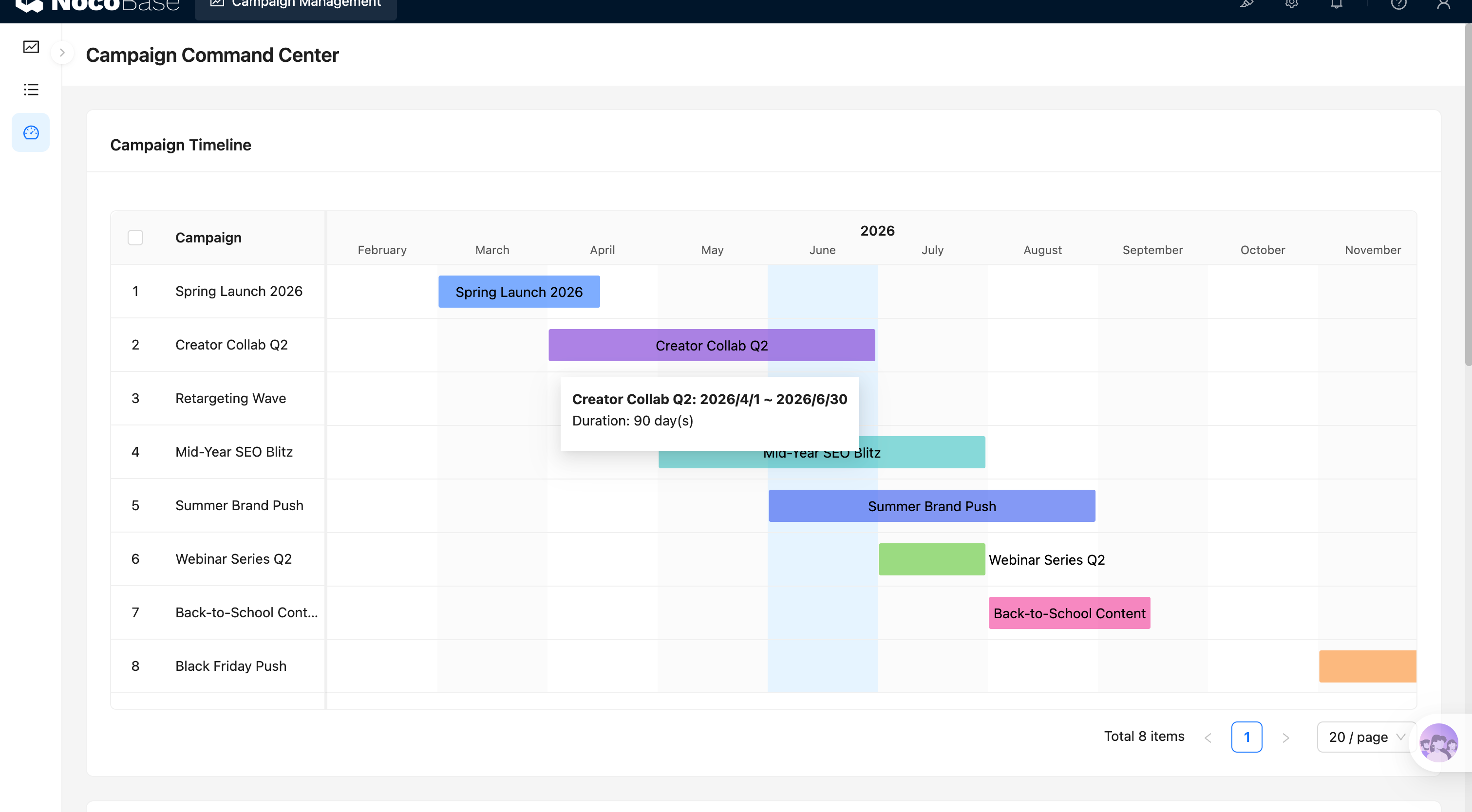
Linha do tempo das campanhas:
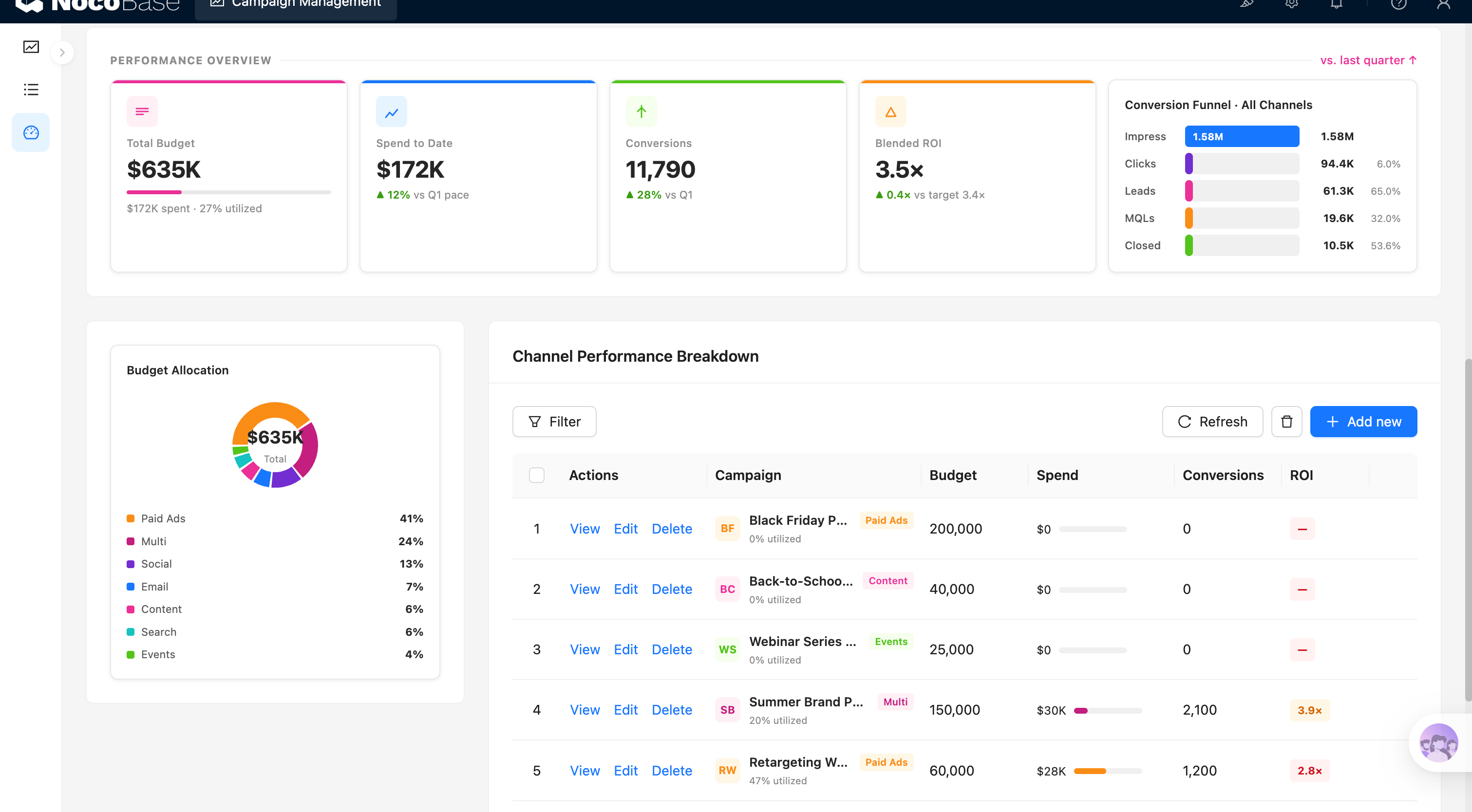
Visão geral do desempenho de marketing e análise de canais:
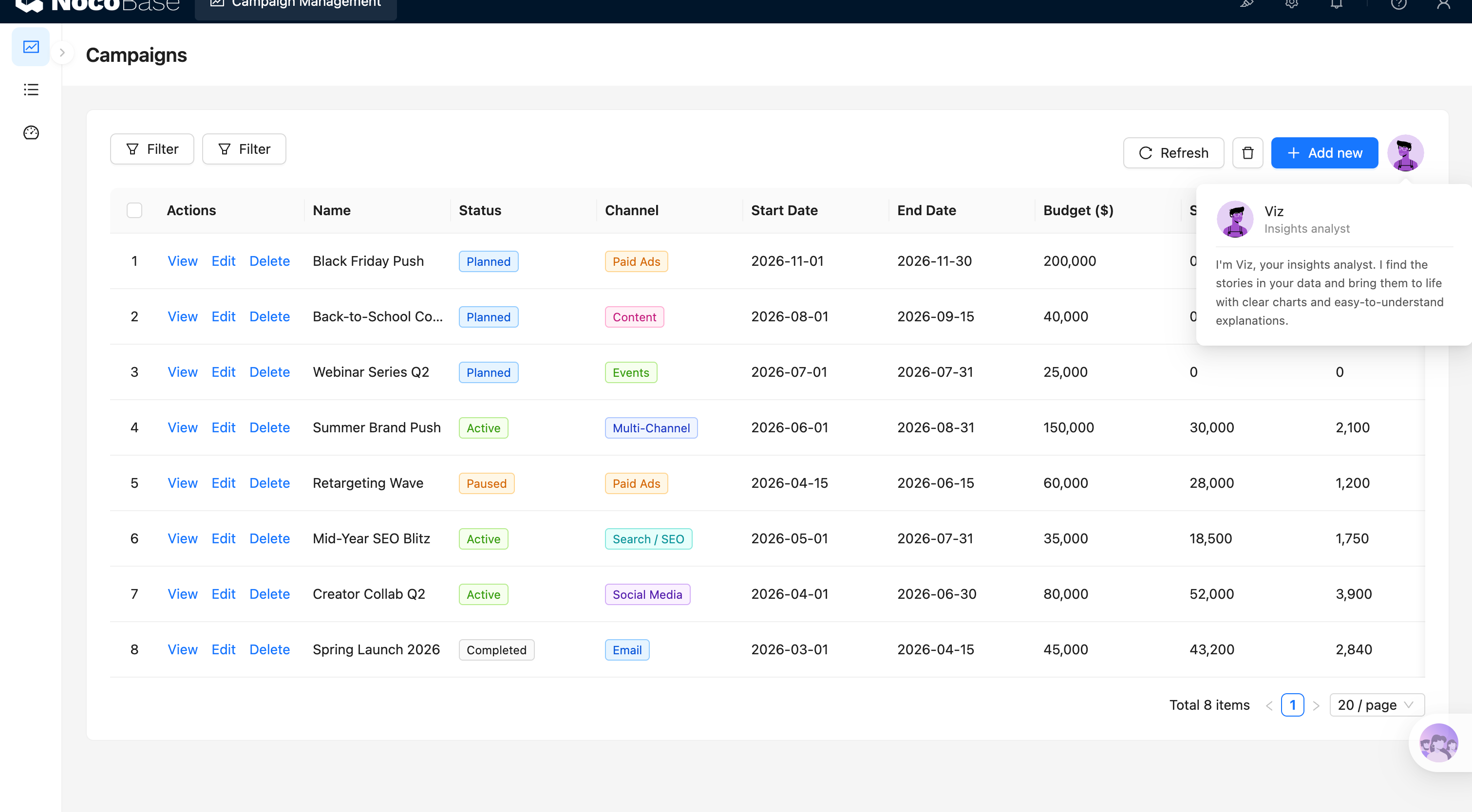
Lista de campanhas e AI employees:
Quais problemas um sistema de gerenciamento de campanhas resolve?
À medida que o número de campanhas cresce, as equipes rapidamente se deparam com agendamentos sobrepostos, uso de orçamento pouco claro, dados de canais dispersos, status de campanhas inconsistentes e dificuldade para comparar rapidamente o desempenho entre diferentes campanhas.
Com este sistema, você pode gerenciar centralmente nomes de campanhas, status, canais, datas de início, datas de encerramento, orçamentos, gastos reais, contagens de conversão e ROI.
A linha do tempo das campanhas organiza múltiplas campanhas por mês e ciclo de execução, ajudando a equipe a verificar se há sobreposição entre campanhas, quais estão em execução, quais estão prestes a começar e se o ritmo de marketing ao longo do ano está equilibrado.
O painel de desempenho de marketing reúne orçamento total, valor gasto, contagens de conversão e ROI geral, e usa um funil de conversão multicanal para mostrar a relação entre impressões, cliques, leads, MQLs e negócios fechados.
As equipes também podem revisar a alocação de orçamento e o desempenho das campanhas por canal — como anúncios pagos, redes sociais, e-mail, marketing de conteúdo, busca, eventos e campanhas multicanal — facilitando para os gestores decidir onde o orçamento deve continuar sendo investido.
Funcionalidades principais
Gerenciamento de campanhas
- Informações básicas das campanhas: Gerencie nomes, status, canais, datas de início, datas de encerramento, orçamentos e gastos reais em um único lugar.
- Acompanhamento de status: Suporte a status como Planned, Active, Paused e Completed para distinguir claramente os estágios de execução.
- Campanhas multicanal: Cubra canais como Paid Ads, Content, Events, Multi-Channel, Search / SEO, Social Media e Email.
Linha do tempo das campanhas
- Agendamento anual: Exiba o horário de início, término e duração de cada campanha por mês.
- Detecção de sobreposição: Verifique visualmente se várias campanhas estão sendo executadas em paralelo no mesmo período, ajudando a equipe a coordenar recursos.
- Destaque de datas importantes: Destaque o mês atual e exiba nomes de campanhas, datas exatas e duração em dias.
Visão geral do desempenho de marketing
- Painel de KPI: Exiba orçamento total, gastos acumulados, contagens de conversão e ROI geral.
- Comparação trimestral: Compare métricas atuais com o trimestre anterior ou metas para avaliar mudanças na eficiência de marketing.
- Utilização do orçamento: Acompanhe o valor do orçamento utilizado e a taxa geral de utilização para identificar desvios de execução precocemente.
Análise de funil de conversão
- Funil multicanal: Exiba etapas-chave como impressões, cliques, leads, MQLs e negócios fechados.
- Taxas de conversão por etapa: Calcule taxas de conversão entre etapas para identificar onde ocorrem as maiores perdas.
- Resultados unificados: Agregue dados de conversão de diferentes canais e campanhas em uma única visualização de funil.
Alocação de orçamento e análise de canais
- Participação do orçamento por canal: Use gráficos para mostrar a distribuição do orçamento entre anúncios pagos, multicanal, redes sociais, e-mail, conteúdo, busca e eventos.
- Verificações da estrutura de orçamento: Identifique rapidamente se o orçamento está excessivamente concentrado em um único canal.
- Comparação de investimento por canal: Combine dados de gastos e conversão para comparar a eficiência de diferentes canais.
Comparação de desempenho das campanhas
- Orçamento vs. gastos: Revise o orçamento, os gastos reais e a utilização do orçamento por campanha.
- Análise de conversão e ROI: Mostre a contagem de conversão e o ROI de cada campanha lado a lado para identificar os de alto e baixo desempenho.
- Manutenção de detalhes: Filtre, crie, visualize, edite e exclua registros de campanhas.
Análise com inteligência artificial
- Identificar os melhores desempenhos: O AI analisa orçamento, gastos, conversões e ROI para encontrar as campanhas de melhor desempenho.
- Detectar anomalias de orçamento: O AI identifica campanhas com orçamentos sendo gastos muito lentamente, com gastos excessivos ou com retorno sobre investimento fraco.
- Gerar revisões de marketing: O AI resume o desempenho dos canais, conversões do funil e ROI das campanhas em principais descobertas e recomendações de próximos passos.
Por que criar um sistema de gerenciamento de campanhas com AI e NocoBase?
Se você usar apenas vibe coding para gerar um painel de marketing do zero, geralmente consegue produzir rapidamente alguns cartões de KPI e gráficos, mas os relacionamentos entre dados de campanhas, dados de canais, dados de orçamento e dados de conversão ainda precisam ser conectados manualmente. À medida que as campanhas e os canais crescem, a lógica de página fica cada vez mais difícil de manter.
O NocoBase conecta campanhas, canais, orçamentos e dados de desempenho, e apresenta a execução de marketing por meio de linhas do tempo, listas, cartões de KPI, funis e gráficos.
As equipes de marketing podem ajustar status de campanhas, tipos de canais, campos de orçamento e métricas de conversão para atender ao próprio negócio, e revisar o desempenho por campanha, trimestre ou canal.
O AI pode ajudar ainda mais a equipe a analisar os dados. Você pode primeiro deixar um AI Agent gerar as tabelas de campanhas, linha do tempo, painel de orçamento e funil de conversão, e depois continuar refinando páginas e métricas pela interface sem código do NocoBase. Posteriormente, os AI employees podem ler os dados de marketing para sinalizar anomalias de orçamento, canais de baixo desempenho e campanhas com alto ROI.
O resultado não é um relatório de marketing único, mas um sistema de operações de marketing que continua evoluindo com o volume de campanhas, mix de canais, escala de orçamento e necessidades de análise.
FAQ
- Em que este sistema se diferencia de um painel de marketing gerado por vibe coding comum?
O vibe coding comum pode produzir rapidamente um conjunto de gráficos ou uma lista de campanhas, mas executar operações diárias de marketing também exige manter continuamente dados de campanhas, relacionamentos de canais, orçamentos, gastos, permissões e histórico.
O NocoBase mantém o gerenciamento de campanhas, controle de orçamento, análise de conversão e rastreamento de operações em um único sistema. O AI acelera a criação e a análise, enquanto o NocoBase sustenta os dados e processos de longo prazo.
- Este sistema é adequado para uso contínuo por uma equipe de marketing?
Sim. Ele foi criado não apenas para apresentar dados de campanhas, mas também para gerenciar continuamente agendamentos, orçamentos, canais, conversões e retrospectivas.
As empresas podem habilitar notificações, aprovações, single sign-on, histórico de operações, APIs e extensões de plugins conforme necessário. Comparado a um painel de marketing único, é muito mais adequado para construir um sistema de gerenciamento de campanhas sustentável, comparável e continuamente evolutivo.
- Posso analisar a alocação de orçamento entre canais?
Sim. O sistema pode detalhar a participação do orçamento por canal, incluindo Paid Ads, Social Media, Email, Content, Search / SEO, Events e Multi-Channel.
Isso ajuda a equipe a julgar se o orçamento está excessivamente concentrado em um único canal e se o mix de canais atual corresponde às metas gerais de crescimento.
- Posso visualizar o funil completo de conversão de marketing?
Sim. O sistema pode exibir dados de etapas como Impressions, Clicks, Leads, MQLs e Closed, e calcular taxas de conversão entre etapas.
A equipe pode ver não apenas o número final de negócios fechados, mas também se a maior queda ocorre entre impressões e cliques, leads e MQLs, ou MQLs e negócios fechados.
- Posso comparar o ROI entre campanhas?
Sim. A lista de desempenho por canal mostra o orçamento, os gastos, a contagem de conversão e o ROI de cada campanha lado a lado.
Isso permite que a equipe compare rapidamente quais campanhas entregam melhores retornos e quais convertem bem, mas com um custo notavelmente alto.
- Posso comparar o desempenho de marketing deste trimestre com o trimestre anterior?
Sim. O painel de desempenho pode mostrar como orçamento, gastos, conversões e ROI geral mudaram em relação ao trimestre anterior ou às metas.
Essa comparação é mais significativa do que olhar apenas para os números atuais, porque a equipe pode identificar se o crescimento vem do aumento do investimento ou de ganhos reais de eficiência.
- O AI pode analisar o desempenho das campanhas?
Sim. O AI pode ler dados de campanhas, canais, orçamento, gastos, conversão e ROI para identificar campanhas de alto desempenho, canais de baixo desempenho e uso anômalo de orçamento.
Por exemplo, o AI pode apontar que um canal ocupa uma grande parte do orçamento mas converte mal, ou que o gasto de uma campanha está claramente atrasado em relação ao seu cronograma.
- O AI pode gerar revisões de marketing e recomendações de próximos passos?
Sim. O AI pode combinar conversões do funil, distribuição de canais e ROI das campanhas para gerar um resumo de desempenho de marketing e recomendações para a próxima fase.
O relatório pode cobrir campanhas de alto ROI, canais de baixo desempenho, anomalias de orçamento, os principais pontos de queda no funil e onde aumentar, reduzir ou realocar investimento na próxima fase.
- O acesso aos dados pode ser restrito por campanha, canal ou responsável?
Sim. O NocoBase oferece suporte a permissões baseadas em funções, responsáveis, equipes e escopos de dados.
Por exemplo, os responsáveis por canais podem manter apenas suas próprias campanhas, o líder de marketing pode visualizar todos os orçamentos e dados de desempenho, e a área financeira ou a diretoria pode visualizar os resultados agregados sem modificar os registros de campanhas.
- Posso rastrear quem alterou um orçamento ou status de campanha?
O histórico de operações e os logs de auditoria podem ser habilitados conforme necessário para registrar alterações em campos-chave, como orçamento de campanha, gastos reais, status, datas e responsável.
Quando uma campanha é pausada, um orçamento é ajustado ou um ciclo de execução muda, a equipe pode rastrear quem fez a alteração e quando, o que facilita muito as revisões e a responsabilização.
- Claude Code, Codex, Cursor ou OpenCode podem ajudar a criar este sistema?
Sim. AI coding agents como Claude Code, Codex, Cursor e OpenCode podem se conectar ao NocoBase e gerar as estruturas de dados para campanhas, canais, orçamentos e desempenho, além da linha do tempo, funil de conversão e páginas de análise a partir de um prompt.
Após a geração, a equipe de marketing ainda pode ajustar campos, métricas, páginas e permissões pela interface sem código do NocoBase — sem necessidade de redesenvolvimento toda vez que a estrutura de campanhas mudar.