Construa com o seu agente de IA
Build a NocoBase app — Bug Tracking System: a bug board, an issue list, reproduction details, version fix tracking, a new-issue form, and an AI bug analysis report. Match the layout and signature visuals of this reference prototype: https://static-docs.nocobase.com/solution/templates/32-bug-tracking.html
O link do protótipo (HTML) no prompt é um design que preparamos previamente, apenas para demonstrar a capacidade; o NocoBase não recomenda gerar um sistema inteiro a partir de um único prompt. Ao construir com ele, combine-o com a skill “prototype reproduction” (nocobase-prototype-repro) das NocoBase Skills para obter um bom resultado.
Antes de começar, siga o início rápido do agente de IA para instalar o NocoBase e conectar o seu agente. Os resultados de IA podem variar; dependendo do modelo e da complexidade do sistema, alguns ajustes ou rodadas adicionais podem ser necessários.
Introduction
Build a Bug tracking system quickly with AI Agent and NocoBase to centrally manage product defects, issue statuses, severity levels, priorities, reproduction details, and release fix progress.
These records can also be managed as a NocoBase-based internal business system, with bug reports, severity, priorities, assignees, reproduction steps, status flow, and release fixes organized through configurable data models, role permissions, views, workflows where needed, and operation history.
The system can display the number of open issues, blocker and critical issues, average resolution time, reopen rate, and the fix and backlog status of different versions. This helps product, development, and QA teams quickly assess current defect risks.
You can copy the prompt directly and let AI Agents such as Claude Code, Codex, Cursor, and OpenCode generate a Bug tracking system in NocoBase. After that, you can continue adjusting fields, statuses, workflows, pages, and other details through no-code configuration.
This system is suitable for development teams, QA teams, product teams, and customer support teams. It helps teams record issues, add reproduction steps, track fix progress, and identify high-priority risks before a release.
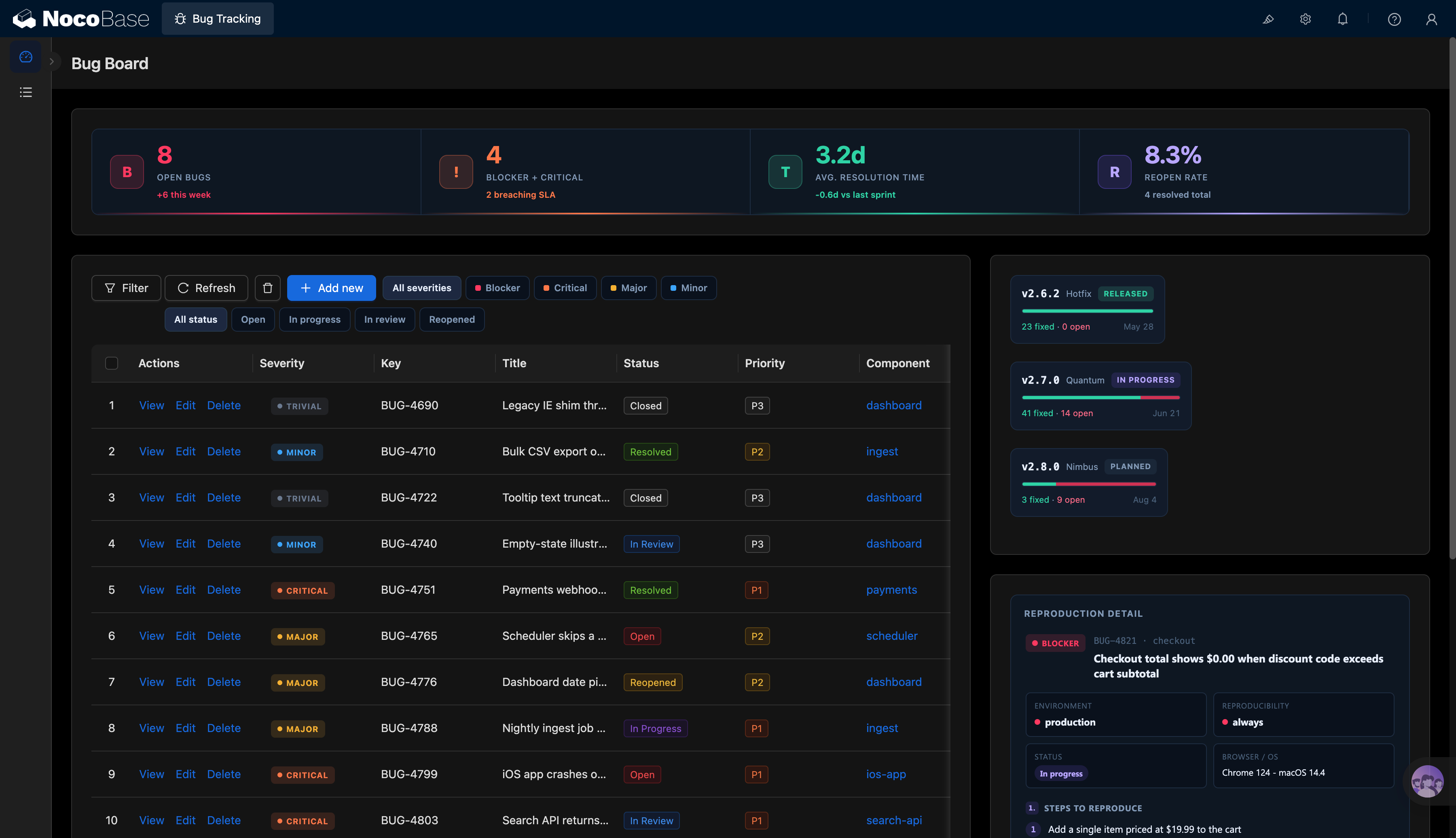
Bug dashboard, metric overview, and issue list:
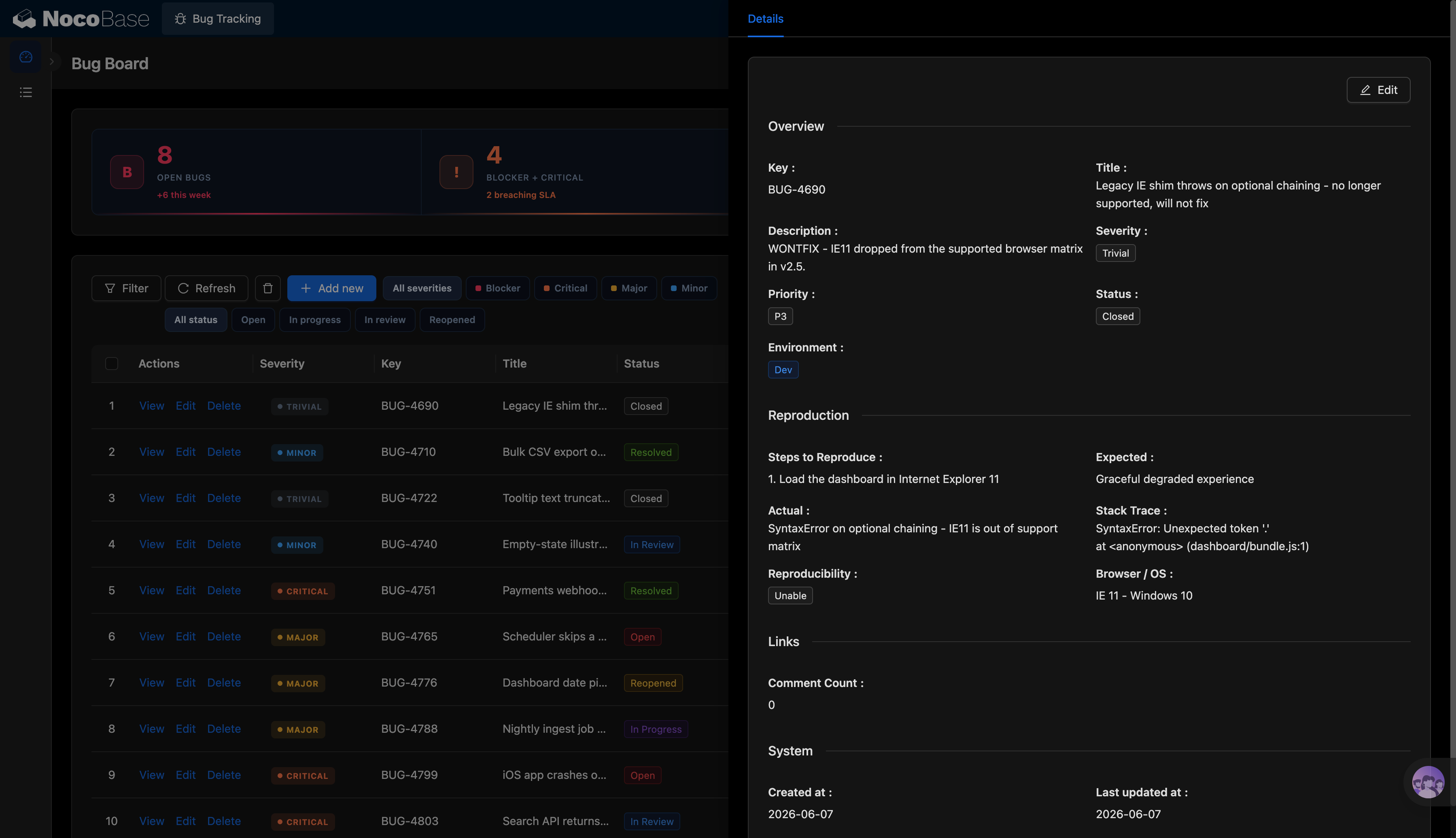
Issue details and reproduction information:
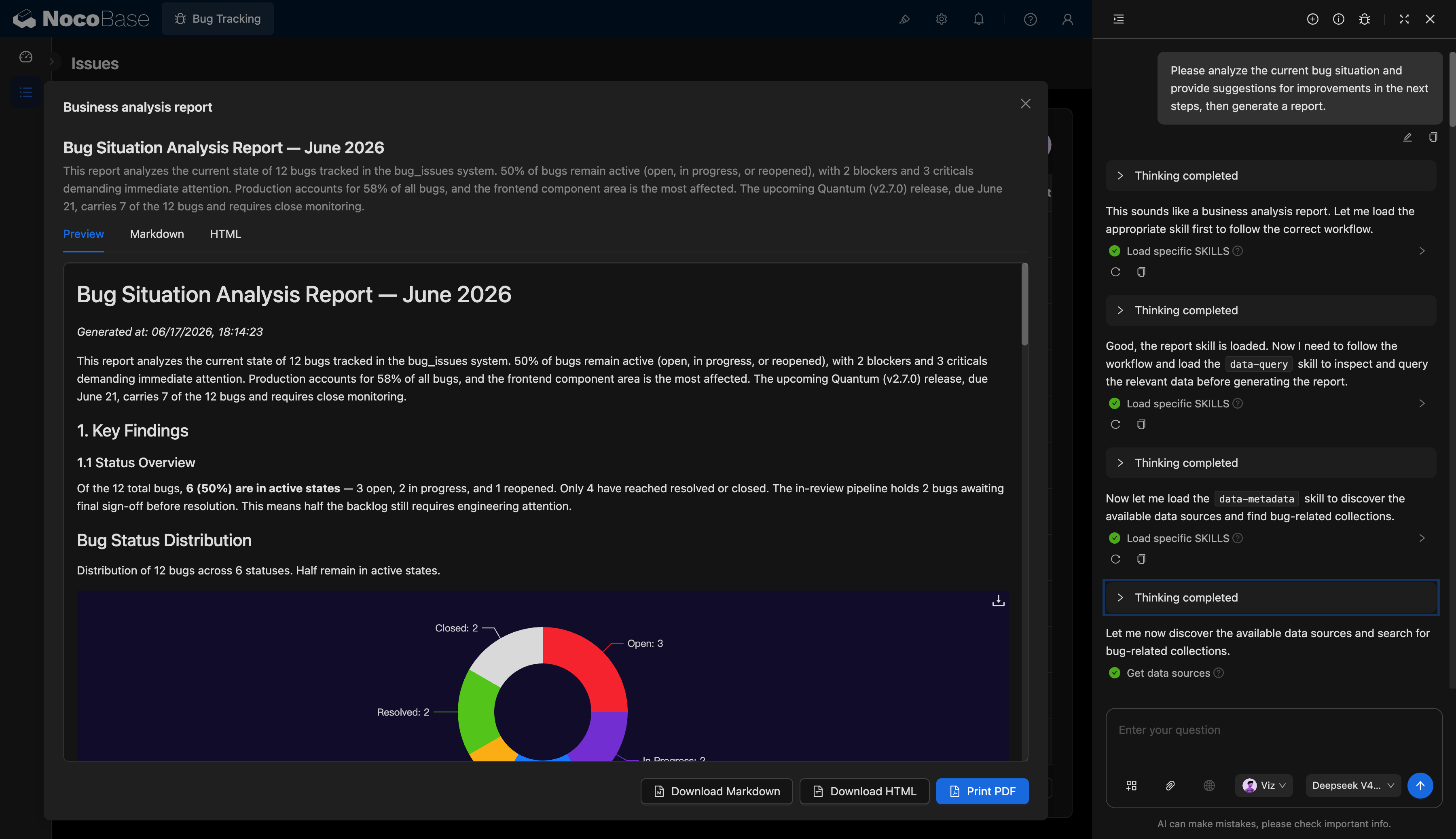
AI-generated Bug analysis report:
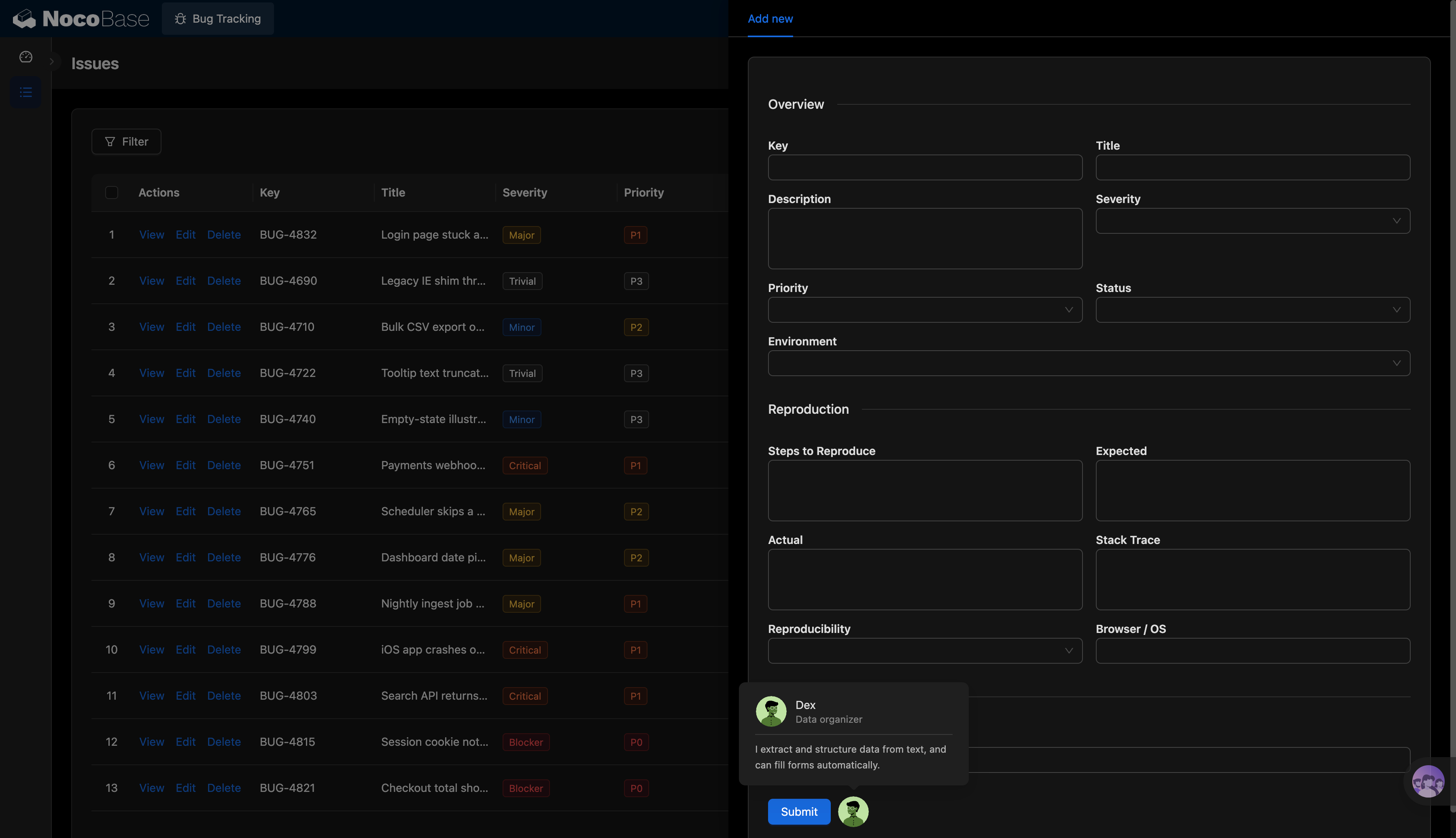
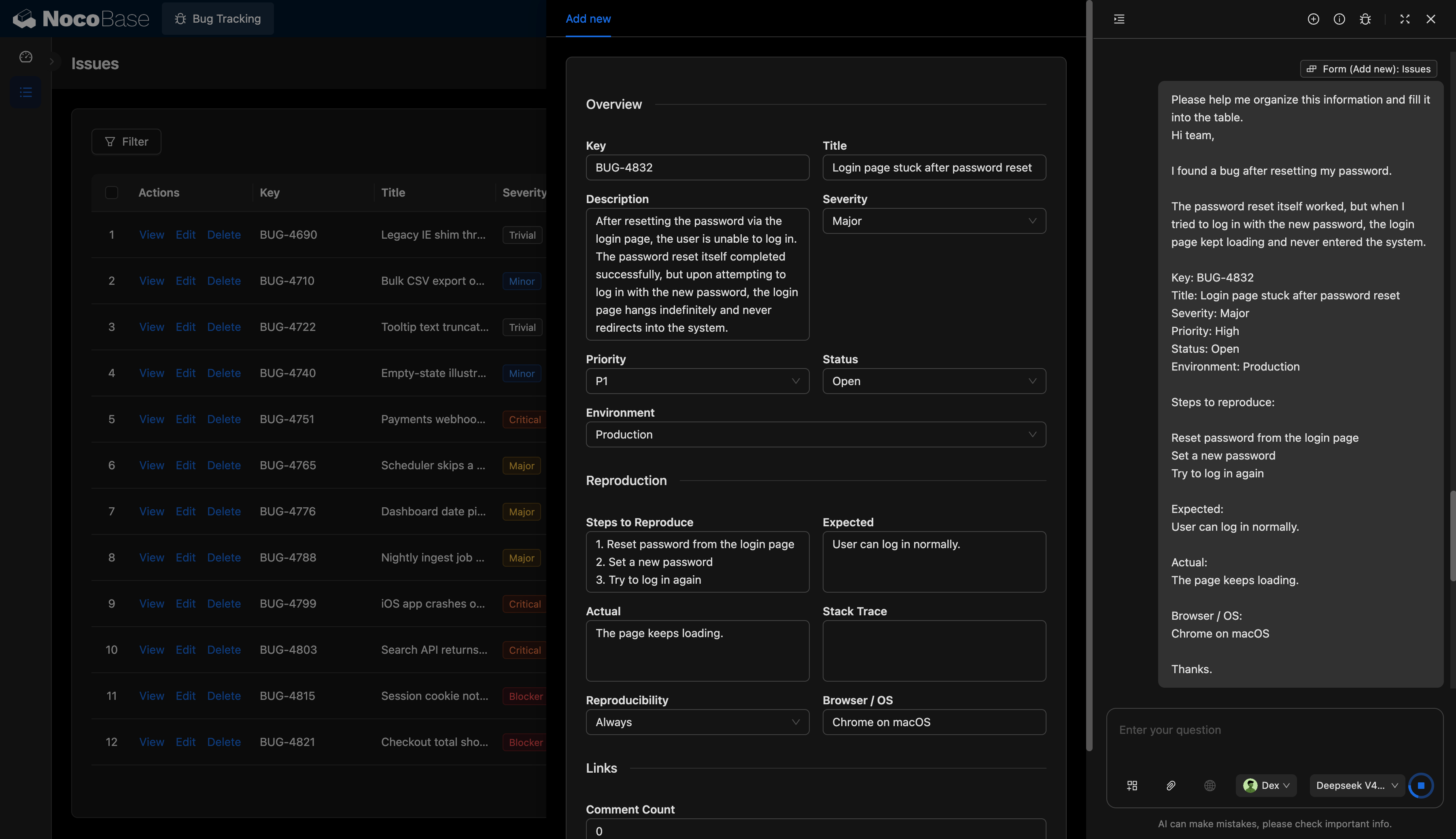
New issue form and AI auto-fill:
What Problems Can a Bug Tracking System Solve?
Bug tracking requires teams to manage issue sources, severity levels, priorities, reproduction steps, runtime environments, fix statuses, and release plans at the same time.
With this system, teams can view key metrics on the Bug dashboard.
The issue list can display issue IDs, titles, severity levels, statuses, priorities, and related components in one place.
The detail page can record full reproduction information, including reproduction steps, expected results, actual results, error stacks, reproducibility, browser, and operating system. This helps developers locate issues faster.
AI can also generate analysis reports based on current issue data. It can automatically summarize the proportion of active issues, blocker issues, critical issues, affected components, release risks, and recommended next steps.
Core Features
Bug Dashboard Overview
- Open issue statistics: Display the current number of open issues, such as the 8 open issues shown in the screenshot, along with the number of new issues added this week.
- High-risk issue statistics: Summarize blocker and critical issues, such as 4 blocker or critical issues, and indicate whether any issue has exceeded the service level agreement.
- Average resolution time: Show the average resolution cycle, such as 3.2 days, and compare it with the previous iteration.
- Reopen rate: Show the percentage of issues reopened after closure, such as 8.3%, to help evaluate fix quality.
- Release risk overview: Show the number of fixed issues, open issues, and release status for different versions, such as released, in progress, and planned.
Bug List Management
- Issue ID management: Assign a unique ID to each Bug, such as BUG-4690, BUG-4751, and BUG-4821.
- Severity classification: Support severity levels such as trivial, minor, major, critical, and blocker.
- Priority management: Support priorities such as P0, P1, P2, and P3 to help teams handle key issues first.
- Status tracking: Support statuses such as open, in progress, in review, resolved, closed, and reopened.
- Component classification: Categorize issues by components such as dashboard, data import, payment, scheduler, mobile app, and search API.
Bug Details and Reproduction Information
- Issue overview: Display the ID, title, description, severity, priority, status, and runtime environment.
- Reproduction steps: Record how users trigger the issue, such as opening a page, performing an action, or trying to log in again.
- Expected and actual results: Compare the user’s expected outcome with what actually happened, helping developers understand the issue boundary.
- Error information: Record error stacks, exception messages, or API response details.
- Environment information: Record the browser, operating system, and environment, such as production or development.
- Reproducibility: Mark whether the issue always occurs, occurs occasionally, or cannot be reproduced.
Release Fix Tracking
- Version cards: Display the fix status of different versions, such as 2.6.2 released, 2.7.0 in progress, and 2.8.0 planned.
- Fixed and remaining issue statistics: Show the number of fixed and still-open issues for each version.
- Release risk assessment: Check whether blocker, critical, or high-priority issues still exist before a release.
- Iteration progress management: Help teams track fix scope and remaining workload by version.
AI-Assisted Bug Information Structuring
- AI-filled issue form: Automatically extract the ID, title, description, severity, priority, status, and environment from user descriptions.
- AI extraction of reproduction steps: Convert natural language into reproduction steps, expected results, and actual results.
- AI completion of runtime environment: Automatically identify information such as browser, operating system, and production environment.
- AI-assisted classification: Determine issue severity, priority, and related module based on the description, reducing manual entry work.
AI Bug Analysis Report
- AI summary of current issues: Automatically count current issues, the proportion of active issues, resolved issues, and closed issues.
- AI identification of high-risk issues: Highlight blocker issues, critical issues, high-priority issues, and risks in upcoming releases.
- AI analysis of component distribution: Identify which modules have the most issues, such as frontend components, the production environment, or specific business modules.
- AI-generated recommendations: Provide next-step suggestions for fixes, regression testing, and release monitoring based on issue status and release plans.
- Report export: Support preview, Markdown, and HTML views, and allow users to download Markdown, download HTML, or print as PDF.
Why Build a Bug Tracking System with AI and NocoBase?
A Bug tracking system is not just an issue list. It also involves reproduction details, priorities, severity levels, release plans, fix statuses, assignee collaboration, and release risk assessment.
If a page is generated from scratch with ordinary Vibe Coding, the result is usually only a simple issue submission form. Status workflows, release tracking, access control, reproduction details, AI reports, and long-term maintenance still require continuous development.
NocoBase can manage issues, components, versions, statuses, priorities, and reproduction information within one system. QA engineers can submit defects, developers can review reproduction details, and product owners and team leads can assess release risks through dashboards.
Teams can also adjust fields, statuses, priorities, and version rules based on their own development workflows. For example, some teams need blocker, critical, major, minor, and trivial severity levels, while others focus more on P0 to P3 priorities. These can all be configured further.
AI can further reduce the cost of data entry and analysis. The AI assistant shown in the screenshot can turn a natural-language Bug report into a structured form, automatically filling in the title, description, severity, priority, status, environment, reproduction steps, expected results, and actual results.
The result is not just a Bug spreadsheet, but a long-term business system covering issue submission, reproduction management, status tracking, release fixes, and AI analysis reports.
FAQ
1.Can teams view current Bug risks in one dashboard?
Yes. The Bug dashboard can centrally display metrics such as open issues, blocker and critical issues, average resolution time, and reopen rate.
For example, the screenshot shows 8 open issues, 4 blocker or critical issues, an average resolution time of 3.2 days, and a reopen rate of 8.3%.
2.Can Bugs be managed by severity and priority?
Yes. The system supports severity levels such as trivial, minor, major, critical, and blocker, as well as priorities such as P0, P1, P2, and P3.
Teams can prioritize blocker, critical, P0, and P1 issues to prevent key defects from affecting releases.
3.Can teams track Bug handling status?
Yes. The system supports statuses such as open, in progress, in review, resolved, closed, and reopened.
QA engineers can check whether an issue has been fixed, developers can filter issues they are working on, and product owners can monitor the percentage of reopened issues.
4.Can full reproduction steps be recorded?
Yes. The detail page can record reproduction steps, expected results, actual results, error stacks, reproducibility, browser, and operating system.
For example, the screenshot records a syntax error that occurs after loading a dashboard in a browser, and notes that the browser is no longer supported.
5.Can Bug information from user feedback be recorded?
Yes. The new issue form can record the ID, title, description, severity, priority, status, environment, reproduction steps, expected results, and actual results.
For example, when a user reports that “the login page keeps loading after password reset,” AI can structure it as a login page freeze, major severity, P1 priority, open status, and production environment.
6.Can AI automatically fill in Bug forms?
Yes. AI can extract key information from emails, chats, or user feedback and automatically fill in form fields.
It can identify the issue title, description, reproduction steps, expected results, actual results, browser, operating system, and environment, reducing the time QA or support teams spend on manual organization.
7.Can fixes be tracked by version?
Yes. The system can use version cards to show each version’s status, number of fixed issues, and number of open issues.
For example, the screenshot shows version 2.6.2 as released, version 2.7.0 as in progress, and version 2.8.0 as planned, with fixed and unresolved issues displayed separately.
8.Can AI generate Bug analysis reports?
Yes. AI can read issue data and generate Bug analysis reports.
The report can summarize the total number of current issues, the proportion of active issues, blocker issues, critical issues, affected components, release risks, and next-step recommendations.
9.Can AI-generated reports be exported?
Yes. Reports support preview, Markdown, and HTML views, and can also be downloaded as Markdown, downloaded as HTML, or printed as PDF.
This is suitable for iteration reviews, release review meetings, test reports, and development weekly meetings.
10.Can Claude Code, Codex, Cursor, and OpenCode help build this system?
Yes. AI Coding Agents such as Claude Code, Codex, Cursor, and OpenCode can connect to NocoBase and generate the Bug list, detail page, new issue form, release dashboard, and AI analysis report based on the prompt.
After the system is generated, teams can still use the NocoBase no-code interface to adjust fields, statuses, priorities, permissions, and page layouts.
11.How is this system different from a Bug form generated by ordinary Vibe Coding?
Ordinary Vibe Coding can quickly generate an issue submission form, but real development workflows also require status transitions, priority management, release tracking, reproduction details, access control, and history records.
NocoBase can manage issues, versions, components, statuses, priorities, and AI analysis in one system. AI accelerates system generation and information structuring, while NocoBase handles data structure, workflows, and long-term maintenance.
12.Can different roles see different Bug information?
Yes. Enterprises can configure permissions by role.
For example, QA engineers can create and update issues, developers can handle issues assigned to them, product owners can view release risks, and customer support teams can only view issues related to customer feedback.
13.Can Bug changes and handling processes be tracked?
Yes. The system can record issue creation time, last update time, status changes, and handling information.
If stronger traceability is required, enterprises can enable operation history and audit logs in NocoBase to record status changes, field updates, and handling processes.
14.Can fields and statuses be adjusted based on a team’s own development workflow?
Yes. Teams can continue adjusting severity levels, priorities, statuses, components, versions, reproduction fields, and report content.
For example, teams can add statuses such as “Waiting for Customer Confirmation,” “Waiting for Release,” and “In Regression Testing,” or adjust priority rules based on their own habits.
15.Is this system suitable for formal use by development teams?
Yes. Bug tracking involves release management, defect fixes, responsibility collaboration, and quality risks. Compared with a one-time form, it requires more stable data structures and workflow capabilities.
NocoBase can enable access control, workflows, operation history, audit logs, single sign-on, notifications, APIs, and plugin extensions as needed. It is better suited for building a maintainable, traceable, and long-running Bug tracking system.