AI エージェントで同じシステムを構築する
Build a NocoBase app — IT Asset Tracker System: asset lifecycle, holder relationships, warranty risk, transfer records, and an activity report. Match the layout and signature visuals of this reference prototype: https://static-docs.nocobase.com/solution/templates/41-it-asset-tracker.html
prompt にあるプロトタイプのリンク(HTML)は、私たちが事前に用意したデザインで、機能のデモを目的としたものです。NocoBase は「一言でシステム全体を生成する」ことを推奨していません。これを使って構築する際は、NocoBase Skill の「プロトタイプ再現」(nocobase-prototype-repro)と組み合わせると、より良い結果が得られます。
始める前に、AI Agent クイックスタート に従って NocoBase をインストールし、エージェントを接続してください。AI の生成結果には個体差があります。モデルの性能とシステムの複雑さによっては、微調整や複数回のやり取りが必要になる場合があります。
Introduction
An IT Asset Tracker System is useful for managing internal computers, monitors, phones, tablets, peripherals, and network devices. Teams can view total assets, devices in use, assignable equipment, warranty risks, and devices under repair on one page, helping them quickly understand whether current IT assets are sufficient and which assets need attention.
These records can also be managed as a NocoBase-based internal business system, with IT assets, devices, assignees, serial numbers, warranty dates, lifecycle status, and return records organized through configurable data models, role permissions, views, workflows where needed, and operation history.
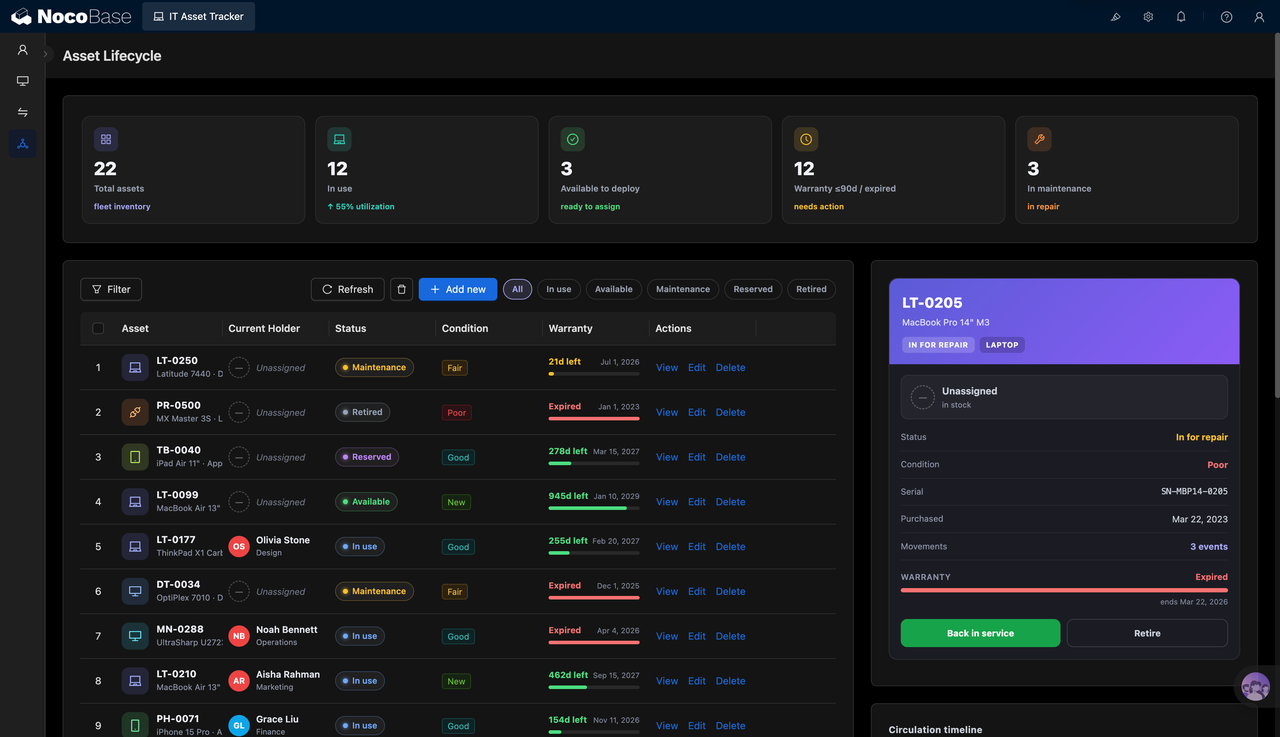
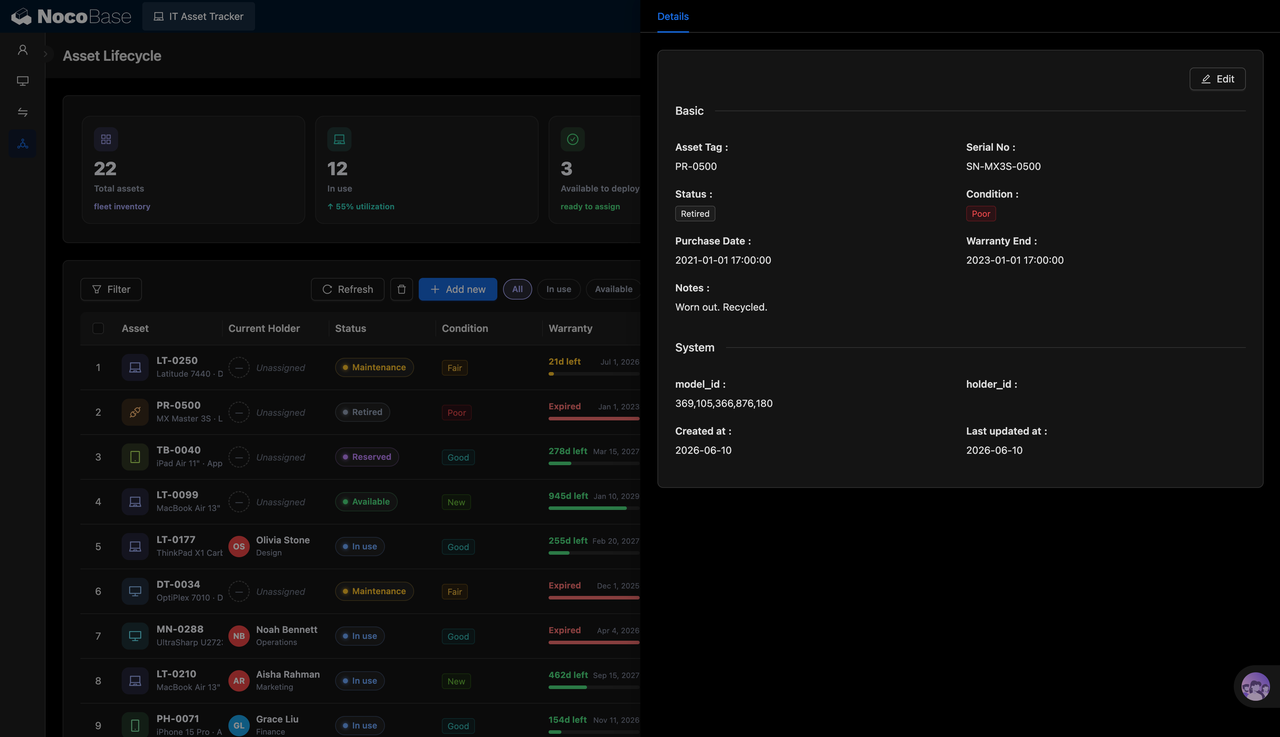
The page is built around the asset lifecycle. It brings assets, current holders, status, condition, warranty period, and operation records into the same view. IT teams can filter assets by all, in use, available, under maintenance, reserved, retired, and other statuses. They can also view each asset’s inventory status, repair status, warranty status, and transfer count.
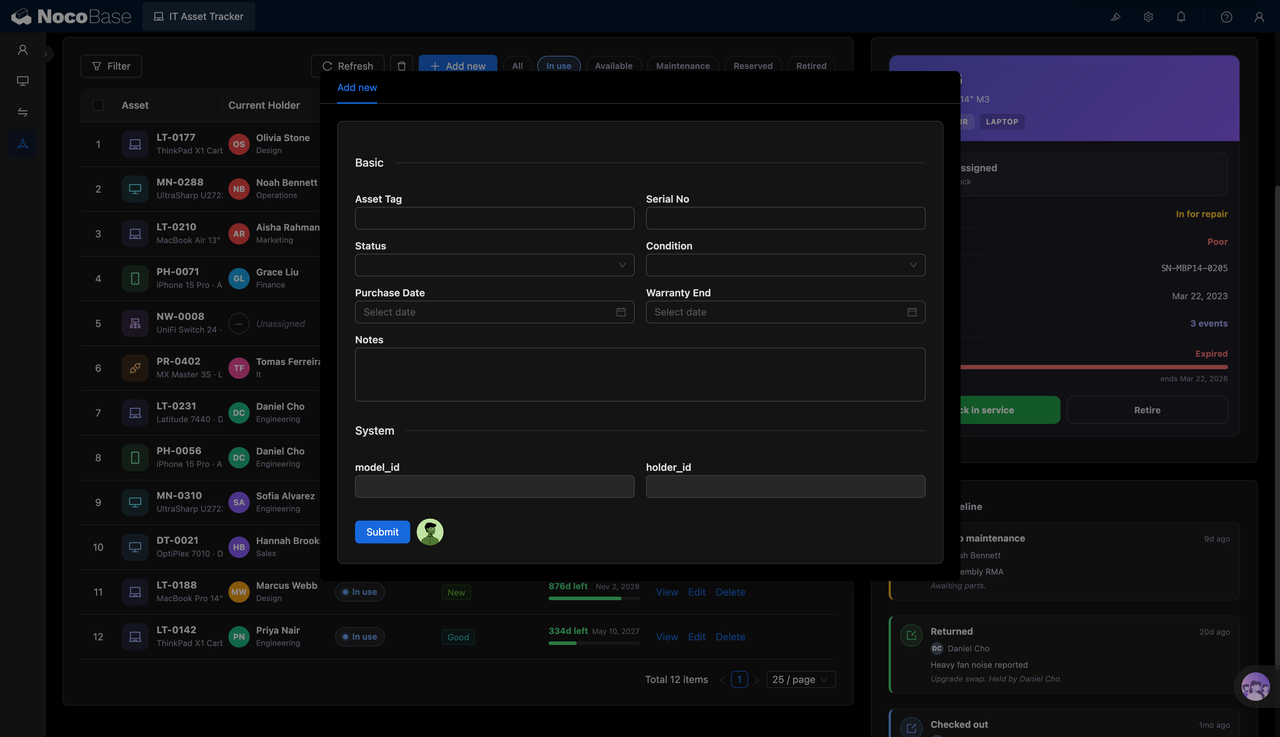
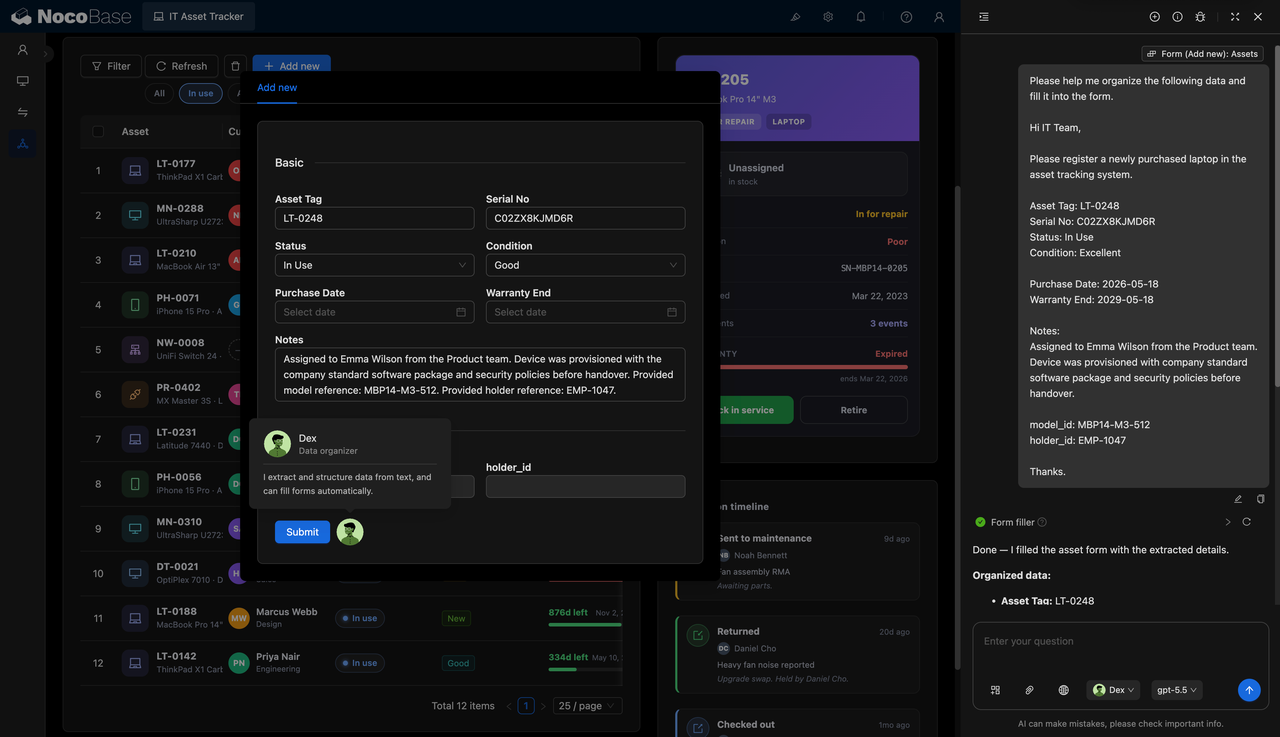
The system also provides asset detail pages and a creation form for maintaining asset tags, serial numbers, statuses, conditions, purchase dates, warranty expiration dates, notes, models, and holder information. For newly purchased devices, AI Agent can extract structured information from a purchase or assignment note and automatically fill it into the asset form.
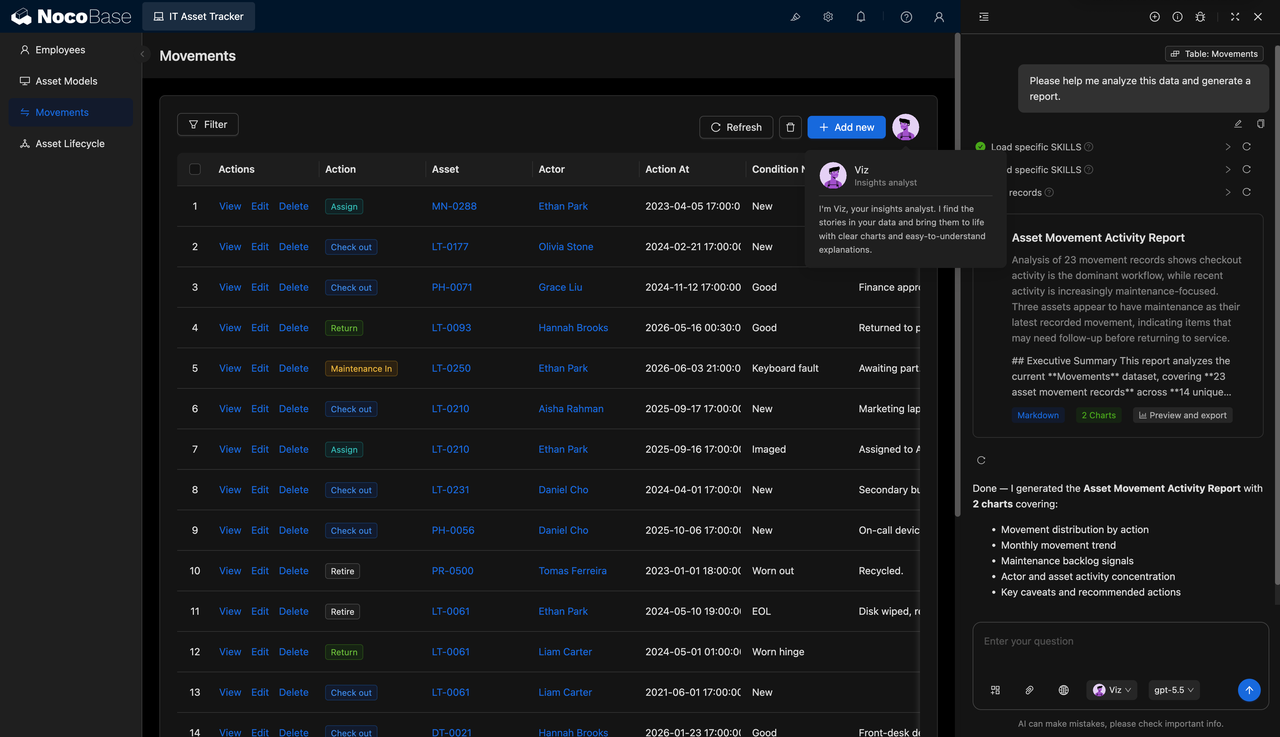
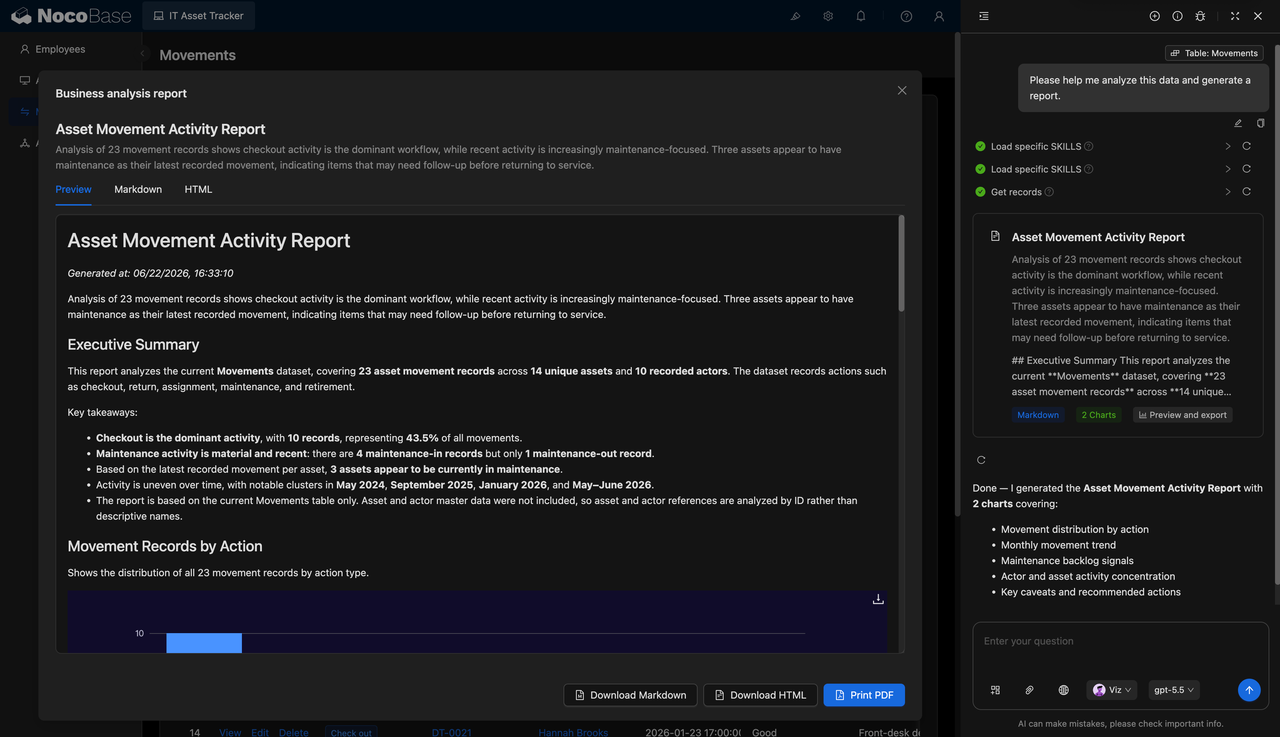
On the transfer records page, teams can track assignment, checkout, return, repair, and retirement actions. AI Agent can generate asset activity reports based on transfer data, analyzing checkout frequency, maintenance trends, asset concentration, and devices that need follow-up. This helps IT managers with inventory checks and operational reviews.
The asset lifecycle page shows inventory, in-use, assignable, and repair statuses:
The asset detail page presents basic information, warranty dates, and system fields:
The new asset form maintains tags, serial numbers, statuses, and notes:
AI extracts information from a purchase note and fills the form automatically:
Transfer records track assignment, checkout, return, and repair actions:
AI generates an asset transfer activity report:
What Problems Can an IT Asset Tracker System Solve?
The biggest challenge in IT asset management is that devices keep moving between purchase, assignment, checkout, return, repair, and retirement, while records often fail to keep up with the real status. A device may still appear as in use in a spreadsheet even though it is under repair. An employee may have returned a device, but the current holder has not been updated. A warranty may already have expired without being flagged in advance.
By managing device status and usage on the asset lifecycle page, IT teams can quickly see how many devices are in use, how many are ready to be assigned, how many need repair, and which devices are close to warranty expiration or already out of warranty.
Asset tags, serial numbers, statuses, conditions, purchase dates, warranty expiration dates, notes, models, and holder fields are kept on one page, making it easier to judge whether a device can continue to be used, needs repair, should be retired, or should be recovered.
For newly purchased devices, AI Agent can identify the asset tag, serial number, status, condition, purchase date, warranty date, notes, model ID, and holder ID from a purchase note, then automatically fill them into the form. For existing transfer data, AI can generate activity reports to help teams find checkout patterns, maintenance concentration, and assets that require follow-up.
Key Features
Asset Lifecycle Overview
- Total asset count: Shows the total number of current IT assets, helping teams quickly understand inventory scale.
- Assets in use: Shows the number of devices currently in use and highlights utilization changes.
- Assignable assets: Marks devices that can be deployed or assigned, supporting onboarding and device replacement.
- Warranty risk alerts: Summarizes assets whose warranties expire within 90 days or have already expired, helping teams prioritize action.
- Assets under repair: Shows the number of devices under maintenance, helping IT teams follow repair progress.
IT Asset Registry
- Asset tag: Each device has an individual asset tag, such as a laptop, monitor, phone, tablet, or peripheral ID.
- Current holder: Shows who the device is assigned to, along with the related team or department.
- Status management: Supports statuses such as in use, available, under maintenance, reserved, and retired.
- Condition records: Uses labels such as new, good, fair, and poor to record the current condition of each device.
- Warranty period: Shows remaining warranty days or expired status, helping teams plan repair and replacement.
AI Form Autofill
- Text information extraction: AI can extract asset information from purchase notes, assignment notes, or handover records.
- Automatic field matching: Fills asset tags, serial numbers, statuses, conditions, purchase dates, warranty dates, and other information into matching fields.
- Model and holder recognition: Identifies model IDs and holder IDs, reducing manual lookup.
- Assisted data entry: Useful for registering newly purchased devices in batches or organizing device handover information.
Asset Transfer Records
- Assignment records: Tracks the process of assigning devices to employees.
- Checkout records: Tracks when a device is checked out or delivered for use.
- Return records: Records device returns, including status and notes.
- Repair records: Marks devices entering the repair process and records issue descriptions.
- Retirement records: Records device retirement, recovery, or disposal actions.
AI Transfer Activity Report
- Action distribution: Analyzes counts across assignment, checkout, return, repair, and retirement actions.
- Monthly trend analysis: Shows which months have concentrated asset transfer activities.
- Maintenance risk alerts: Identifies devices with recent repair activity that may need follow-up.
Why Build an IT Asset Tracker System with AI and NocoBase?
An IT Asset Tracker System needs to manage more than device inventory. It also needs employee assignment relationships, asset status, condition changes, purchase dates, warranty periods, checkout and return records, repair progress, and asset activity analysis. For IT teams, the core value is continuously tracking the full lifecycle of each device from purchase and assignment to use, repair, and retirement.
It is easy to generate a first version of a device registration page or list with AI. But once IT assets enter daily operations, new management needs keep appearing: new employees need assigned devices, departing employees need to return assets, faulty devices need repair workflows, expiring warranties need attention, and idle devices need to be returned to inventory or reserved. A single page prototype is hard to maintain as these processes continue to change.
NocoBase is better suited as the business foundation for this type of system. It already provides core capabilities such as data models, permissions, workflows, operation history, audit logs, notifications, single sign-on, page building, and plugin extensions. These capabilities can connect devices, employees, models, transfer records, and repair statuses. AI helps teams generate the initial structure, pages, and analysis reports more quickly.
Teams can first use AI to build the asset lifecycle page, asset registry, detail page, creation form, transfer records, and activity report, then gradually refine asset fields, status rules, employee relationships, device models, and permission scopes in NocoBase. When IT asset management policies change later, the existing system can continue to evolve instead of being rebuilt from scratch.
FAQ
1.What types of devices can this IT Asset Tracker System manage?
It can manage laptops, desktops, monitors, phones, tablets, mice, keyboards, network devices, and other office IT assets. The screenshots already show asset types such as MacBook, ThinkPad, iPhone, iPad, monitors, switches, and peripherals.
2.Can the system show an asset overview?
Yes. The asset lifecycle page shows total assets, assets in use, assignable assets, warranty risks, and assets under repair, making it useful for daily IT inventory checks.
3.Can assets be filtered by status?
Yes. The page provides filters for all, in use, available, under maintenance, reserved, retired, and other statuses, helping teams quickly view devices in different stages.
4.Can the current holder be recorded?
Yes. The asset list shows the current holder and related team, and it also supports unassigned status, helping teams determine whether a device has been issued to an employee.
5.Can warranty periods be managed?
Yes. The system can record warranty expiration dates and show remaining days or expired status in the list, helping teams plan repair or replacement in advance.
6.Can new assets be added?
Yes. The new asset form supports asset tags, serial numbers, statuses, conditions, purchase dates, warranty expiration dates, notes, model IDs, and holder IDs.
7.Can each asset detail be viewed?
Yes. The detail page shows the asset tag, serial number, status, condition, purchase date, warranty expiration date, notes, model ID, holder ID, creation time, and last updated time.
8.Can AI help automatically fill forms?
Yes. In the screenshot, AI Agent extracts the asset tag, serial number, status, condition, purchase date, warranty date, notes, model ID, and holder ID from a new laptop purchase note and fills them into the form.
9.Are asset transfer records supported?
Yes. The transfer page records assignment, checkout, return, repair, and retirement actions, including the asset, operator, action time, condition, and notes.
10.Can AI generate asset analysis reports?
Yes. In the screenshot, AI Agent generates an asset transfer activity report based on transfer records, analyzing checkout share, maintenance activity, monthly trends, and assets that need follow-up.
11.Can AI reports be exported?
Yes. The report page shows Markdown, HTML, and PDF-related actions. Reports can be downloaded as Markdown, downloaded as HTML, or printed as PDF.
12.Are employees and assets connected?
Yes. The asset list and transfer records both show employee names, and the asset detail page and form include holder IDs, which can be used to manage relationships between employees and devices.
13.Can Claude Code, Codex, Cursor, and OpenCode help build this system?
Yes. These AI Agents can help generate the initial table structure, page layout, form fields, report prompts, and explanatory content. It is still recommended to maintain data relationships, permissions, and page configuration in NocoBase afterward.
14.How is this different from pure Vibe Coding?
Pure Vibe Coding is better for quickly creating prototypes. IT asset management involves device records, employee relationships, status transitions, warranty periods, repair records, permissions, and reports. NocoBase can support these long-term maintenance needs, while AI improves the speed of setup and data entry.
15.Does the system support permission management?
The screenshots do not directly show a permission configuration page, but NocoBase supports permission management. Companies can set different data viewing and editing scopes for IT administrators, employees, department heads, finance teams, or management.
16.Can fields and processes be adjusted later?
Yes. IT asset management often adds fields such as department, device location, purchase batch, supplier, warranty ticket number, device configuration, or inventory status. After building with NocoBase, teams can continue adjusting data tables, pages, and processes without rebuilding the whole system.
17.Is this system suitable for formal enterprise use?
Yes. IT asset management requires long-term maintenance of device inventory, assignment relationships, repair records, and warranty risks. Compared with temporary spreadsheets, it needs stable data structures and permission control. NocoBase is well suited for building it as a sustainable enterprise business system.