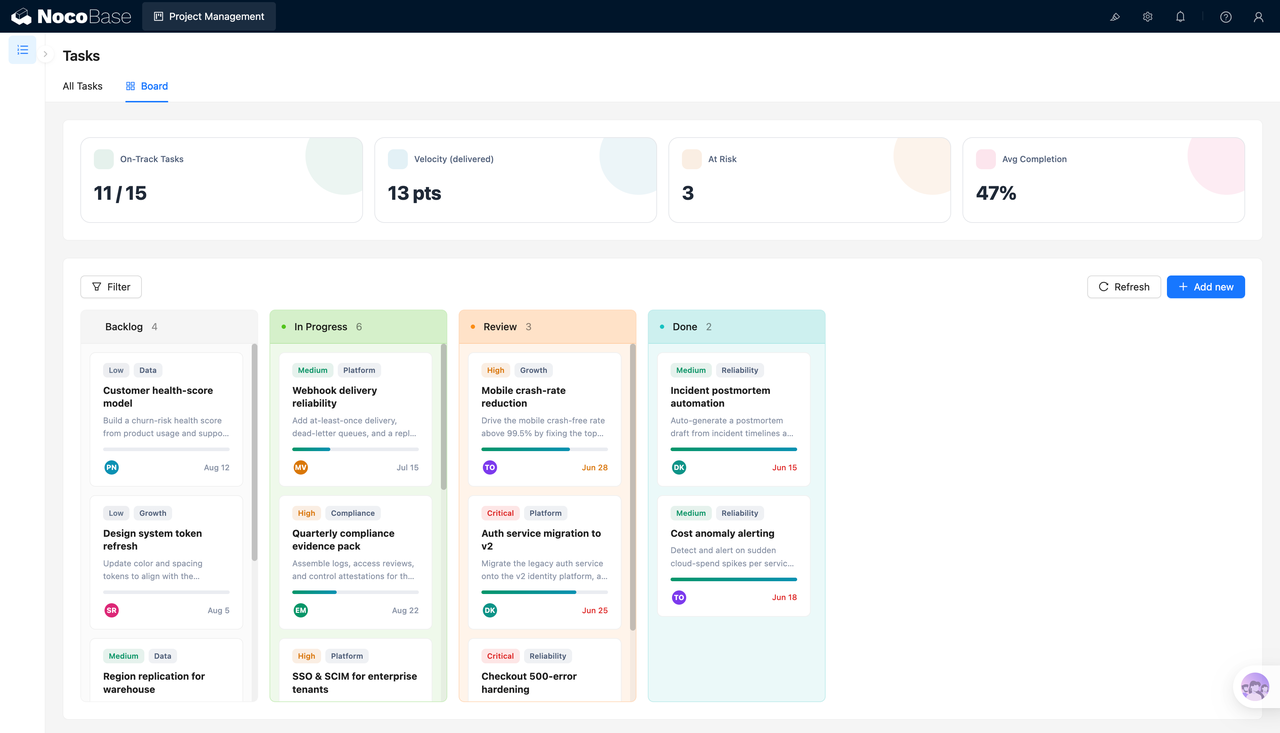
Construye esto con tu agente de IA
Build a NocoBase app — Employee Directory System: a search hero, multi-select facets, and avatar cards. Match the layout and signature visuals of this reference prototype: https://static-docs.nocobase.com/solution/templates/19-employee-directory.html
El enlace al prototipo (HTML) del prompt es un diseño que preparamos de antemano, solo para demostrar la capacidad; NocoBase no recomienda generar un sistema completo a partir de un único prompt. Al construir con él, combínalo con la skill «prototype reproduction» (nocobase-prototype-repro) de NocoBase Skills para obtener un buen resultado.
Antes de empezar, sigue la guía de inicio rápido del agente de IA para instalar NocoBase y conectar tu agente. Los resultados de la IA pueden variar; según el modelo y la complejidad del sistema, puede ser necesario ajustar o realizar varias iteraciones.
Introducción
Usa tu AI agent favorito y NocoBase para crear rápidamente un sistema de gestión de contactos de empleados personalizable, fiable y en continua evolución — con el que podrás gestionar de forma centralizada nombres, cargos, departamentos, ubicaciones de trabajo, tipos de contrato, habilidades, correos electrónicos y números de teléfono.
Puedes copiar el prompt a continuación y dejar que tu AI agent genere la estructura base de un directorio de empleados en NocoBase; después, ajusta campos, páginas, filtros y perfiles de empleado a través de la interfaz sin código.
Este sistema es ideal para directorios de empleados de empresas, directorios de personal de equipos multirregionales, consulta de contactos por departamento, gestión de empleados en remoto y cualquier escenario interno en el que necesites encontrar rápidamente el cargo, el departamento y los datos de contacto de un compañero.
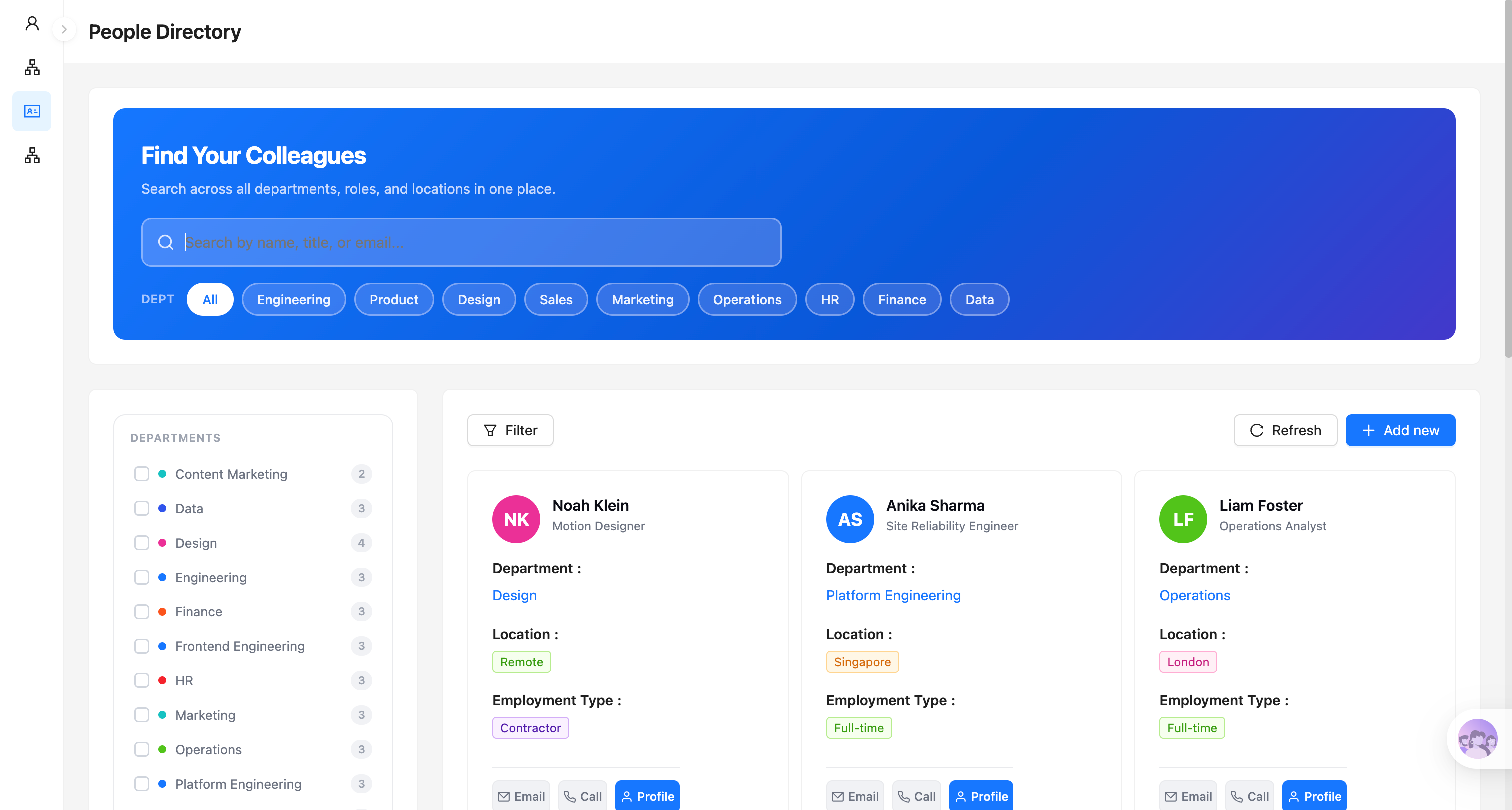
Directorio de contactos de empleados:
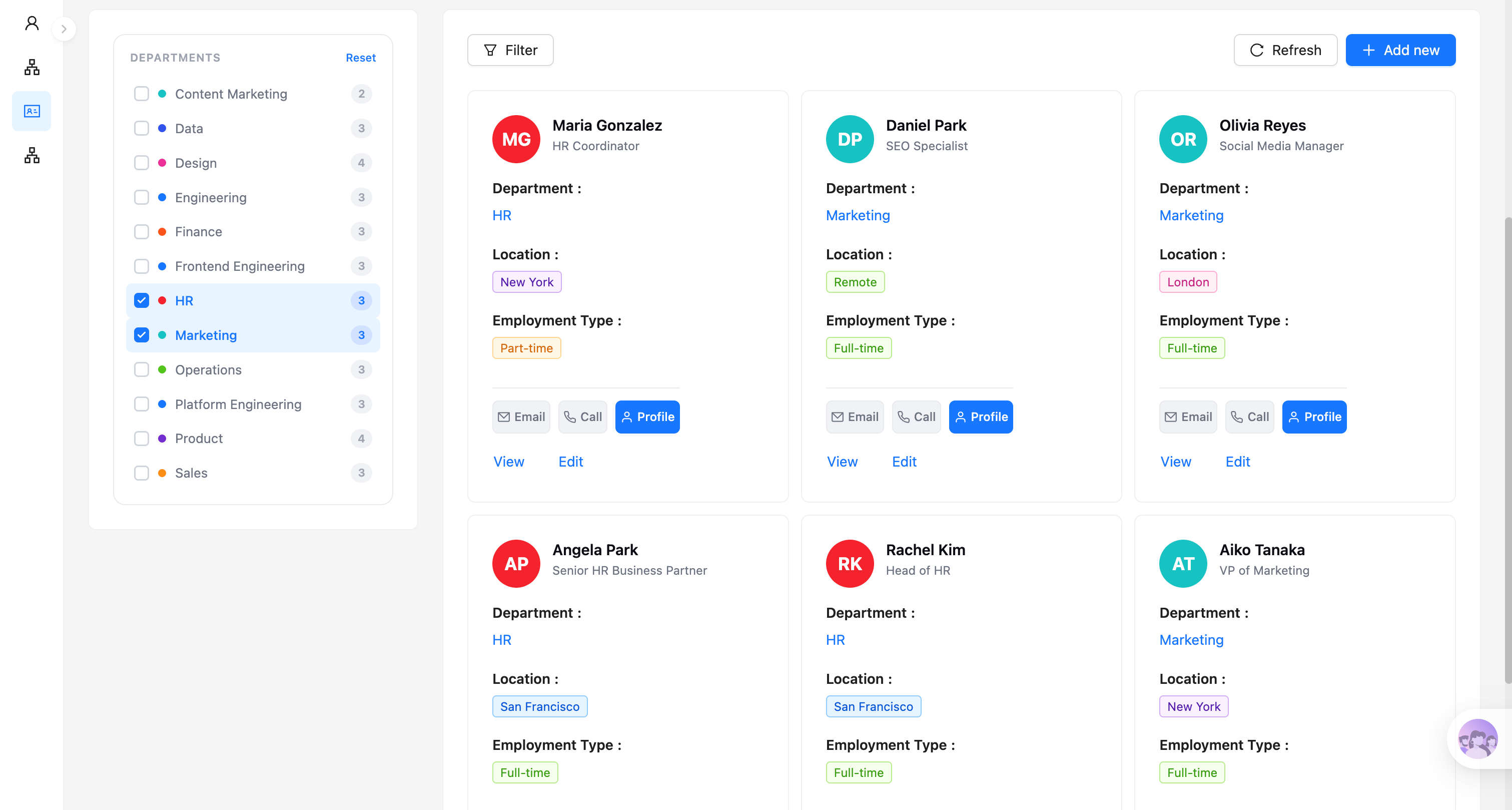
Filtrar empleados por departamento:
La IA extrae los datos del empleado del lenguaje natural:
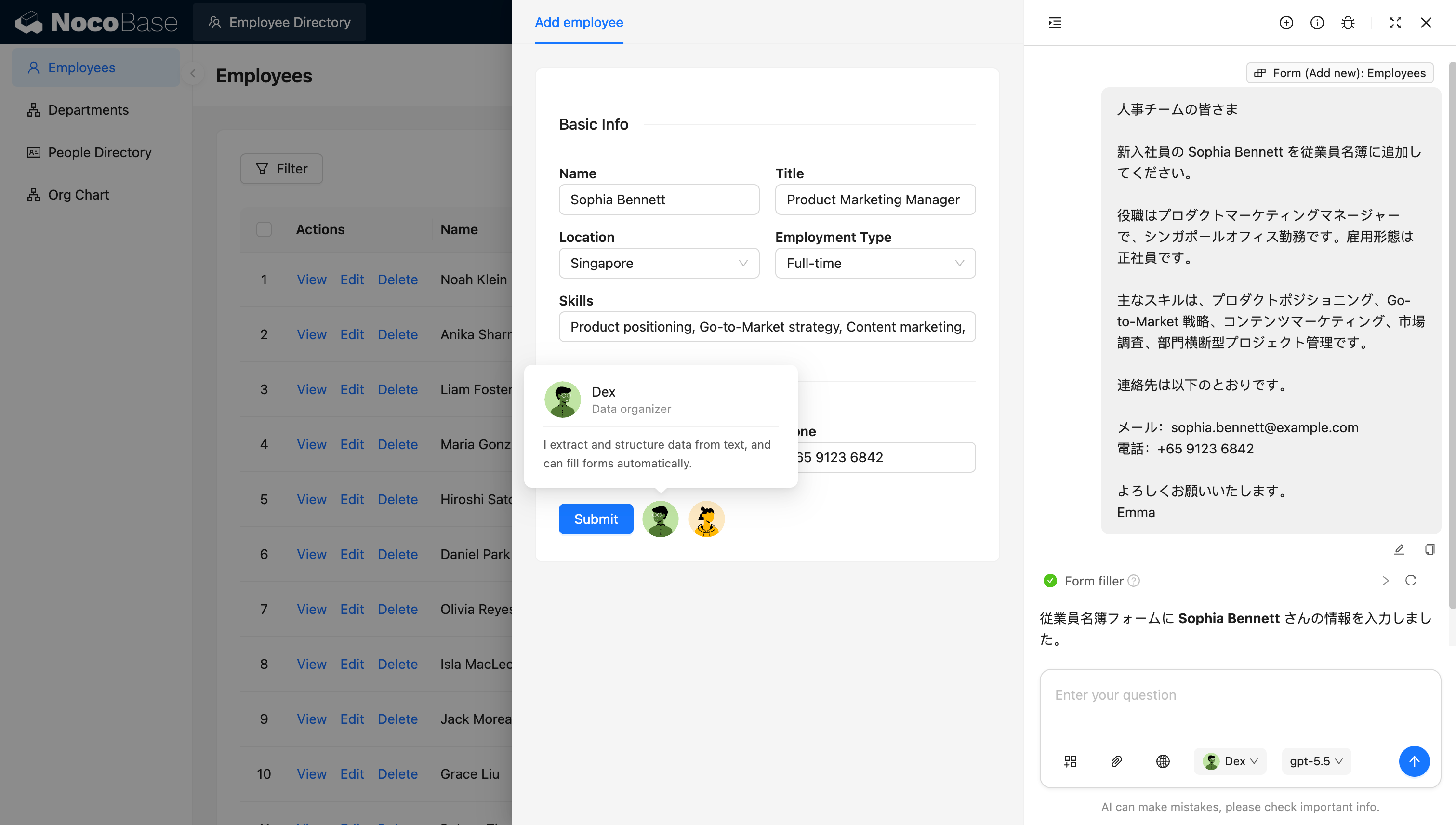
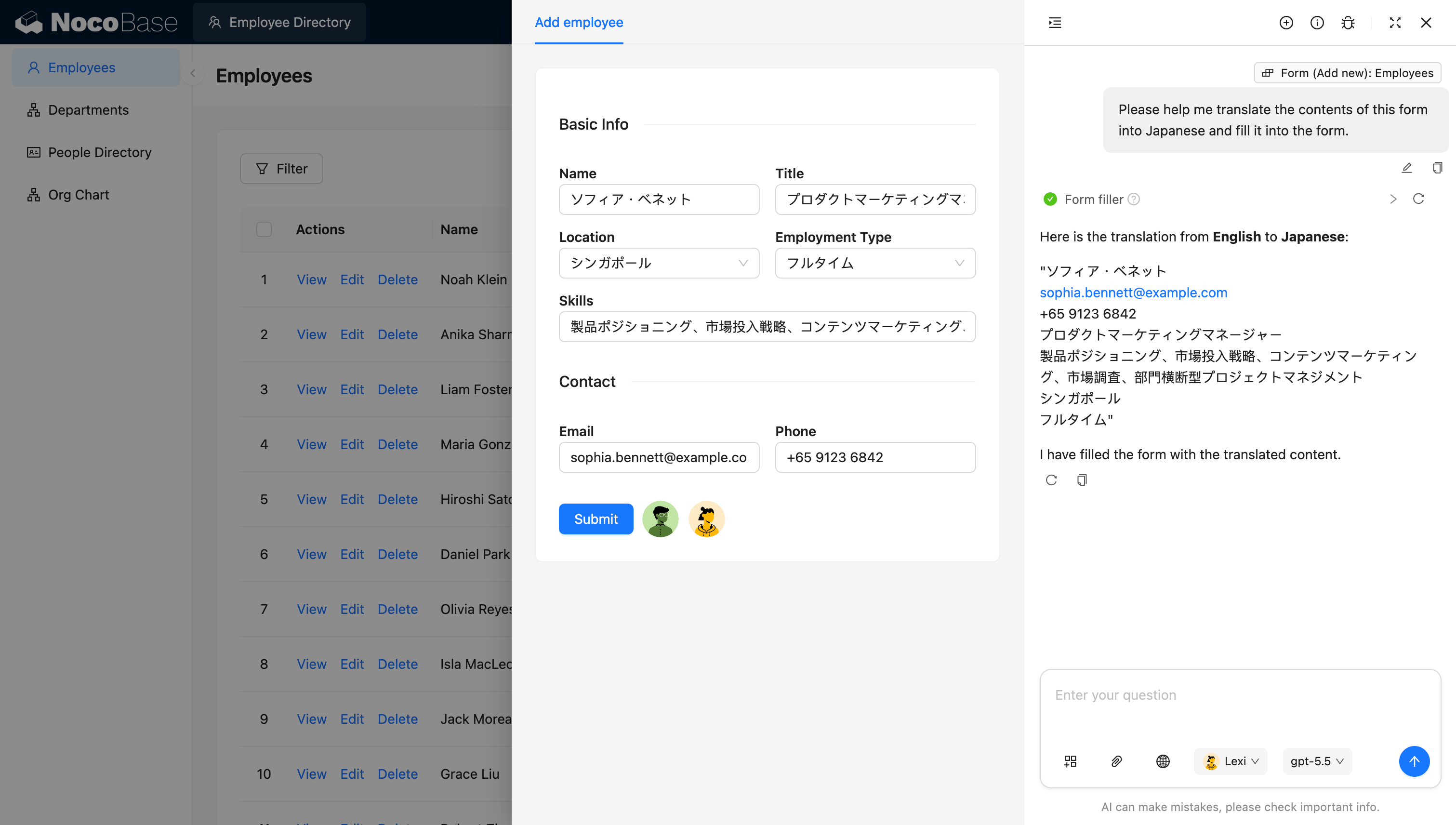
La IA traduce y rellena la información del empleado:
¿Qué problemas resuelve un sistema de gestión de contactos de empleados?
La gestión de contactos de empleados permite a los miembros del equipo encontrar rápidamente al compañero adecuado y comprender de qué se encarga, a qué departamento pertenece, dónde trabaja y cómo contactar con él.
A medida que una empresa crece, suma departamentos o adopta el trabajo en remoto, la información de los empleados acaba dispersa entre hojas de cálculo de RRHH, herramientas de chat, libretas de direcciones de correo electrónico y distintos sistemas internos. Los nuevos empleados pueden no saber a quién dirigirse para una tarea concreta, y en la colaboración entre departamentos puede ser difícil encontrar rápidamente a la persona con el rol adecuado.
Con este sistema, los empleados pueden buscar a compañeros directamente por nombre, cargo o correo electrónico, y filtrar personas por departamentos como Ingeniería, Producto, Diseño, Ventas, Marketing, Operaciones, RRHH, Finanzas y Datos.
Cada tarjeta de empleado puede mostrar el nombre, el cargo, el departamento, la ubicación de trabajo y el tipo de contrato, con accesos directos para enviar un correo electrónico, realizar una llamada y ver el perfil completo. Los empleados en remoto, a tiempo completo, a tiempo parcial y de contrata pueden distinguirse claramente con diferentes etiquetas.
RRHH o los administradores pueden agregar, consultar, editar y eliminar registros de empleados en un solo lugar. Un AI employee también puede extraer datos de empleados de correos electrónicos, mensajes de chat u otro texto en lenguaje natural, y rellenar automáticamente el formulario del nuevo empleado, reduciendo la introducción manual de datos.
Funcionalidades principales
Directorio de empleados y búsqueda rápida
- Directorio unificado de empleados: Muestra de forma centralizada nombres de empleados, cargos, departamentos, ubicaciones de trabajo y tipos de contrato.
- Búsqueda multicritério: Encuentra rápidamente a compañeros por nombre, cargo o correo electrónico.
- Filtros rápidos por departamento: Filtra empleados mediante las etiquetas de departamento superiores o la lista de departamentos de la izquierda, con el número de empleados mostrado en cada departamento.
Tarjetas de empleado y datos de contacto
- Tarjetas de información de empleado: Muestra en forma de tarjeta el avatar, el nombre, el cargo, el departamento, la ubicación y el tipo de contrato de cada empleado.
- Contacta con compañeros rápidamente: Los accesos directos de Email, Llamada y Perfil facilitan ponerse en contacto o consultar el perfil completo.
- Equipos multisede y en remoto: Compatible con ubicaciones de trabajo como Nueva York, Londres, Singapur y Remoto — ideal para equipos distribuidos.
Gestión de departamentos y tipos de contrato
- Categorización por departamento: Compatible con departamentos como RRHH, Marketing, Ingeniería, Diseño, Finanzas y Operaciones.
- Filtrado por múltiples departamentos: Selecciona varios departamentos a la vez para consultar rápidamente el personal de varios equipos.
- Distinción de tipos de contrato: Compatible con los tipos Full-time, Part-time y Contractor, mostrados claramente con etiquetas.
Gestión de perfiles de empleado
- Mantenimiento de información básica: Registra nombres de empleados, cargos, ubicaciones, tipos de contrato, habilidades, correos electrónicos y teléfonos.
- Operaciones con registros de empleado: Agrega, consulta, edita y elimina registros de empleados.
- Gestión de información de habilidades: Almacena habilidades de los empleados como posicionamiento de producto, estrategia de marketing, marketing de contenidos y gestión de proyectos, lo que facilita la colaboración interna y la búsqueda de talento.
Entrada de datos impulsada por IA
- La IA extrae información de los empleados: Identifica nombres, cargos, ubicaciones de trabajo, tipos de contrato, habilidades y datos de contacto de correos de incorporación o mensajes de chat.
- La IA rellena formularios automáticamente: Escribe la información extraída directamente en el formulario de nuevo empleado, reduciendo el copiar y pegar manual.
- Creación de perfiles de empleado desde lenguaje natural: Solo tienes que proporcionar una breve introducción y la IA genera un registro de empleado estructurado.
Procesamiento multilingüe con IA
- Traducción automática de perfiles: Traduce nombres, cargos, ubicaciones, habilidades y tipos de contrato al japonés u otros idiomas.
- Conservación de datos de contacto clave: Mantiene intacta durante la traducción la información que no necesita conversión, como correos electrónicos y números de teléfono.
- Relleno de formularios multilingüe: La IA puede escribir los resultados traducidos directamente en el formulario de empleado — ideal para equipos internacionales que mantienen perfiles en el idioma local.
¿Por qué crear un sistema de gestión de contactos de empleados con IA y NocoBase?
Un directorio de empleados puede parecer una simple lista de personas, pero una vez que se usa de verdad en una empresa, necesita gestionar departamentos, cargos, ubicaciones, tipos de contrato, habilidades y datos de contacto, y debe admitir búsqueda, filtrado y control de acceso.
Si usas vibe coding puro para generar una página de directorio de empleados desde cero, normalmente puedes mostrar tarjetas de personas rápidamente, pero las relaciones entre los datos de los empleados, los datos del departamento, los criterios de búsqueda, los formularios de empleado y los perfiles personales aún deben completarse después.
NocoBase organiza la información de empleados, departamentos y contactos en un sistema y la presenta a través de tarjetas, listas, cuadros de búsqueda y filtros. Los equipos pueden añadir campos para departamentos, ubicaciones de trabajo, habilidades y tipos de contrato en función de su propia estructura organizativa.
La IA reduce aún más el coste de la entrada de datos y el mantenimiento multilingüe. RRHH simplemente entrega al AI un correo de presentación del nuevo empleado o un mensaje de chat, y la IA extrae el nombre, el cargo, la ubicación, las habilidades, el correo electrónico y el teléfono, y rellena automáticamente el formulario de empleado.
Para los equipos internacionales, la IA también puede traducir la información de los empleados al japonés u otros idiomas y escribir los resultados directamente de vuelta en el formulario. Esto reduce el copiado, la traducción y la escritura repetitivos, y facilita el mantenimiento de un directorio de empleados multilingüe.
El sistema de gestión de contactos de empleados resultante no es una agenda estática, sino un directorio interno de personas que evoluciona continuamente con el tamaño del equipo, la estructura organizativa y las ubicaciones de las oficinas.
FAQ
- ¿Qué información puede mostrar una tarjeta de empleado?
Cada tarjeta de empleado puede mostrar el nombre, el cargo, el departamento, la ubicación de trabajo y el tipo de contrato, con accesos directos al correo electrónico, el teléfono y el perfil personal.
Los equipos también pueden añadir campos como habilidades, áreas de cobertura, responsable directo, zona horaria o idiomas según sea necesario, para que el directorio se adapte mejor a las necesidades reales de colaboración.
- ¿Puede gestionar empleados en remoto y equipos multirregionales?
Sí. Los perfiles de empleado pueden registrar la ciudad de oficina, el país, la región o el estado Remoto, y distinguir tipos de contrato como Full-time, Part-time y Contractor.
Para los equipos internacionales, también puedes añadir zona horaria, idioma de trabajo y filtros de ubicación para reducir el coste de encontrar información entre regiones.
- ¿Puede extraer automáticamente datos de correos de presentación de empleados?
Sí. La IA puede leer correos de presentación de nuevos empleados, anuncios de RRHH o mensajes de chat, extraer el nombre, el cargo, la ubicación, el tipo de contrato, las habilidades, el correo electrónico y el número de teléfono, y rellenar automáticamente el formulario de empleado.
Esto es especialmente útil cuando RRHH necesita incorporar empleados en lotes, reduciendo el trabajo de copiar información entre correos y sistemas.
- ¿Puede la IA traducir perfiles de empleados y rellenar información multilingüe?
Sí. La IA puede traducir cargos, ubicaciones, tipos de contrato y habilidades al japonés u otros idiomas, conservando a la vez la información que no necesita traducción, como correos electrónicos y números de teléfono.
Para las empresas multinacionales, puedes mantener el contenido de visualización en diferentes idiomas sobre los mismos datos de empleado, sin necesidad de traducir e introducir cada registro manualmente.
- ¿Pueden Claude Code, Codex, Cursor u OpenCode ayudar a crear el directorio de empleados?
Sí. Agentes de codificación IA como Claude Code, Codex, Cursor y OpenCode pueden conectarse a NocoBase y generar estructuras de datos para empleados, departamentos y relaciones organizativas, junto con páginas de búsqueda, filtrado, directorio de tarjetas y entrada de datos a partir de un prompt.
Tras generar el sistema base, RRHH puede seguir ajustando campos, páginas y permisos a través de la interfaz sin código de NocoBase, en lugar de regenerar la aplicación cada vez que cambie la estructura organizativa.
- ¿Puedo controlar qué datos de empleados puede ver cada persona?
Sí. NocoBase admite la configuración de permisos por rol, departamento y ámbito de datos.
Por ejemplo, los empleados ordinarios pueden ver los nombres públicos, los cargos y los datos de contacto profesionales; los responsables de departamento pueden ver más información sobre su propio departamento; RRHH puede mantener perfiles completos de empleados; y los campos sensibles como números de teléfono o correos personales pueden abrirse solo a los roles autorizados.
- ¿Pueden los empleados actualizar sus propios perfiles?
Ciertos campos pueden abrirse en función de los permisos. Los empleados pueden mantener su propio avatar, número de teléfono, habilidades o ubicación de trabajo, mientras que RRHH gestiona la información formal de RRHH como el cargo, el departamento y el tipo de contrato.
Este enfoque mejora la velocidad de actualización de los perfiles y, al mismo tiempo, evita que la información organizativa clave se modifique arbitrariamente.
- ¿Es fácil ajustar el directorio cuando cambia la estructura organizativa?
Sí. Puedes seguir añadiendo o ajustando departamentos, cargos, ubicaciones, habilidades y tipos de contrato, y actualizar los filtros, las tarjetas de empleado y las páginas de perfil.
Cuando los departamentos se dividen, los equipos se fusionan o los empleados cambian de puesto, puedes modificar los datos y las relaciones existentes directamente, sin necesidad de reconstruir el directorio.
- ¿Puedo rastrear quién modificó los registros de empleados?
Puedes habilitar el historial de operaciones y los registros de auditoría según sea necesario para registrar los cambios en los departamentos, los cargos, las ubicaciones de trabajo y los datos de contacto de los empleados.
Cuando alguien cambia de rol, se traslada de departamento o actualiza sus datos de contacto, RRHH puede rastrear quién realizó el cambio, cuándo y exactamente qué cambió, reduciendo el riesgo de ediciones accidentales no verificables.
- ¿En qué se diferencia esto de un directorio de empleados generado con vibe coding puro?
El vibe coding puro puede generar rápidamente tarjetas de empleados y una página de búsqueda, pero el uso empresarial real también requiere gestionar relaciones de departamento, permisos de datos, campos sensibles, actualizaciones de perfiles, registros de operaciones y mantenimiento a largo plazo.
NocoBase almacena la información de empleados, departamentos y organización en un modelo de datos unificado y proporciona permisos, auditoría, inicio de sesión empresarial, APIs y extensibilidad mediante plugins. La IA acelera la construcción, la extracción de datos y la traducción, mientras que NocoBase se encarga de la operación a largo plazo y la gobernanza de datos.
- ¿Es este sistema adecuado para mantener un directorio de empresa a largo plazo?
Sí. Más allá de servir como lista de datos de contacto de empleados, puede llevar continuamente información organizativa como cargos, departamentos, ubicaciones, habilidades y tipos de contrato.
Las empresas pueden integrar inicio de sesión único, sincronización de usuarios, gestión de permisos, historial de operaciones, APIs y extensiones de plugins según sea necesario. En comparación con una página de directorio puntual, es mucho más adecuado para construir un directorio interno de personas mantenible que soporte la colaboración multirregional y evolucione con la organización.