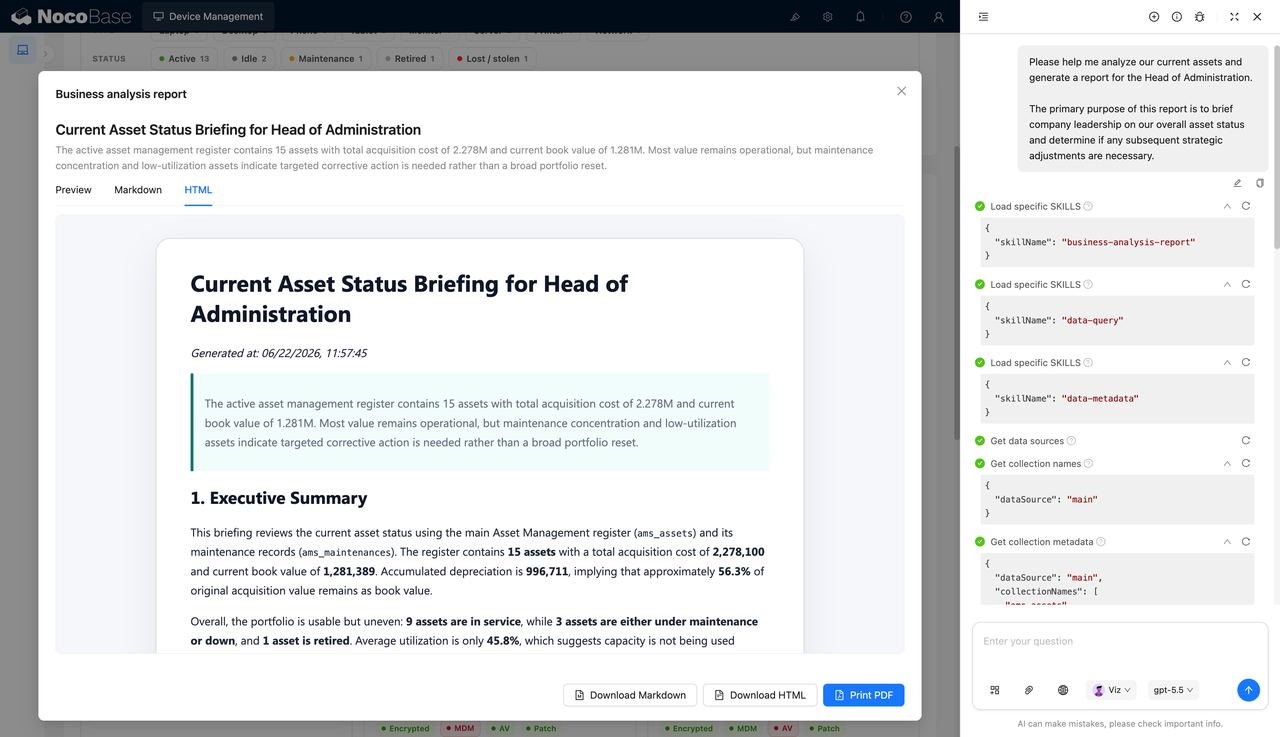
Construye esto con tu agente de IA
Build a NocoBase app — Asset Management System: three-section asset cards, depreciation progress bars, and maintenance tracking. Match the layout and signature visuals of this reference prototype: https://static-docs.nocobase.com/solution/templates/02-asset-management.html
El enlace al prototipo (HTML) del prompt es un diseño que preparamos de antemano, solo para demostrar la capacidad; NocoBase no recomienda generar un sistema completo a partir de un único prompt. Al construir con él, combínalo con la skill «prototype reproduction» (nocobase-prototype-repro) de NocoBase Skills para obtener un buen resultado.
Antes de empezar, sigue la guía de inicio rápido del agente de IA para instalar NocoBase y conectar tu agente. Los resultados de la IA pueden variar; según el modelo y la complejidad del sistema, puede ser necesario ajustar o realizar varias iteraciones.
Introducción
Utiliza tu AI Agent favorito y NocoBase para construir rápidamente un sistema de gestión de activos personalizable, confiable y en constante evolución. Con él podrás gestionar activos fijos, números de activo, categorías, estado de uso, ubicaciones de almacenamiento, propietarios, valores de activos y registros de mantenimiento.
Puedes copiar el siguiente prompt y dejar que tu AI Agent genere la estructura básica de un sistema de gestión de activos en NocoBase; luego ajusta campos, páginas y flujos de trabajo desde la interfaz sin código.
Este sistema es ideal para escenarios como gestión de equipos de TI, gestión de mobiliario de oficina, gestión de vehículos, gestión de equipos de producción, libros mayores de activos fijos, gestión de registros de mantenimiento y seguimiento de activos en múltiples ubicaciones.
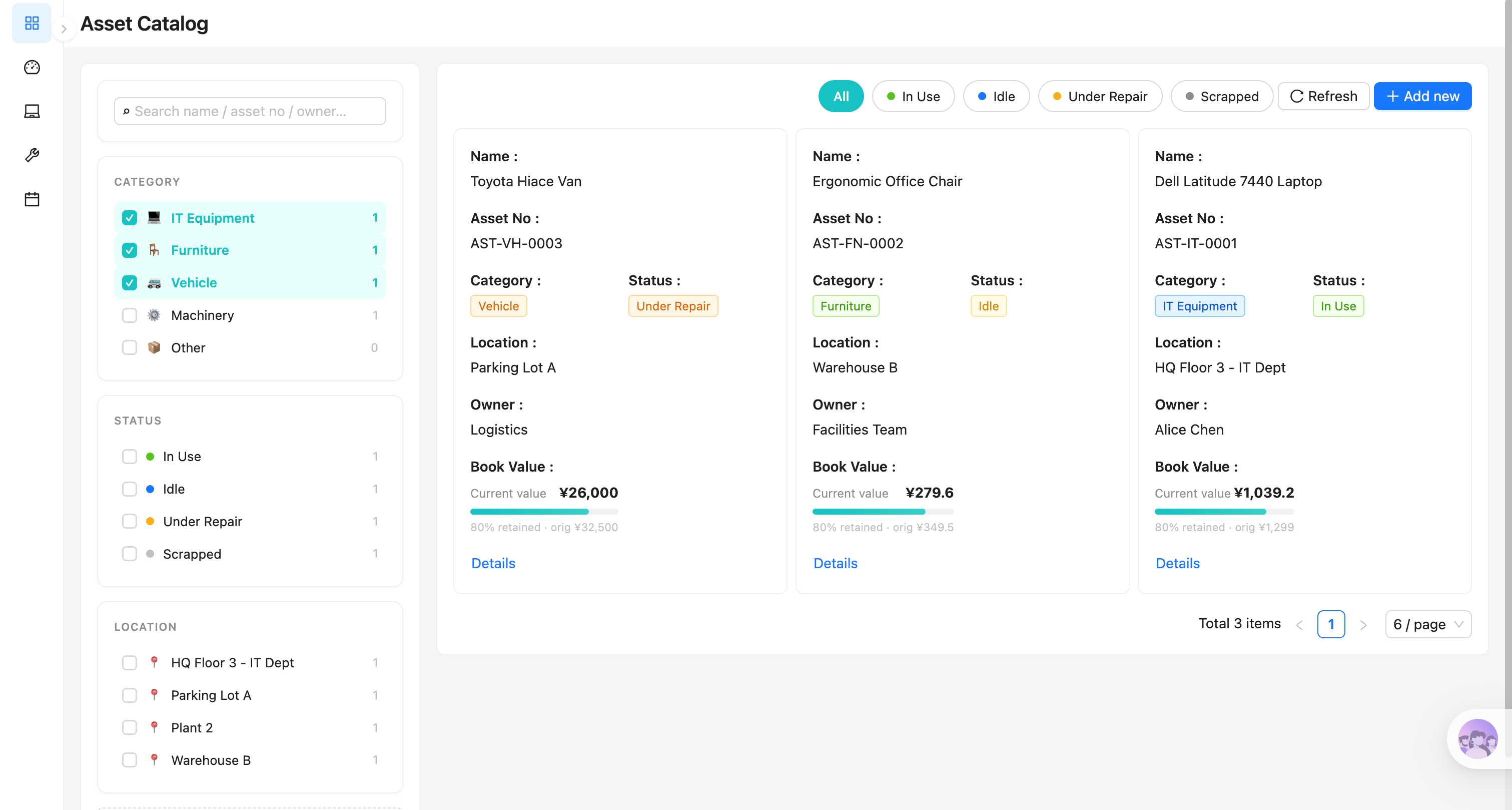
Catálogo de activos:
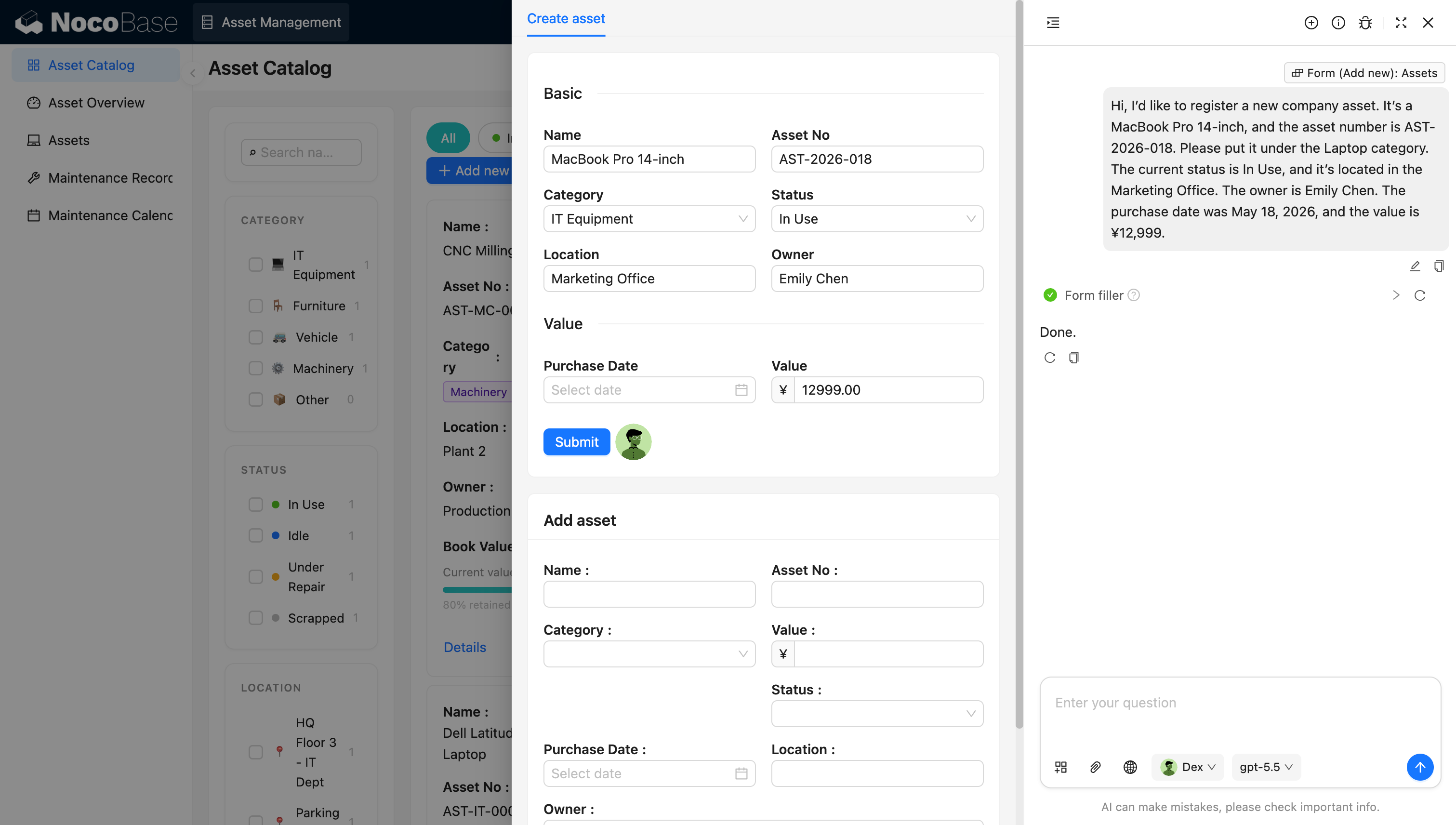
AI employee asistiendo con el registro de datos de activos:
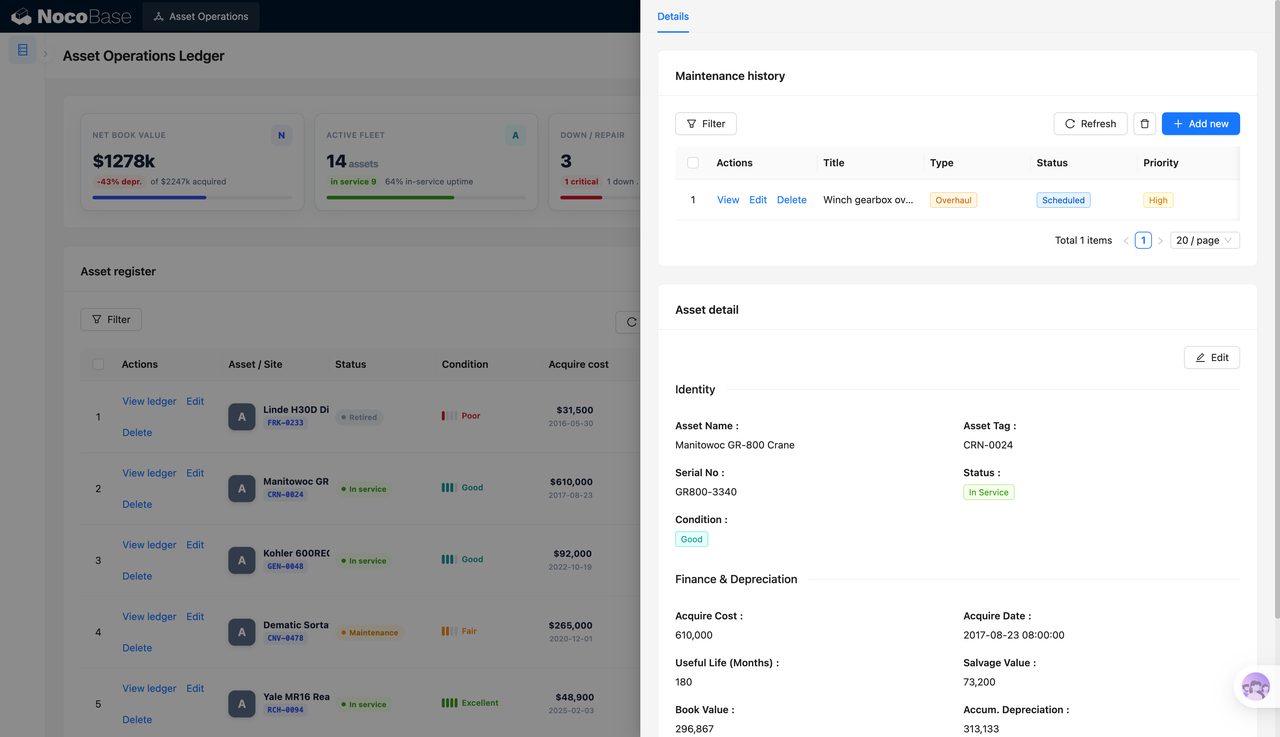
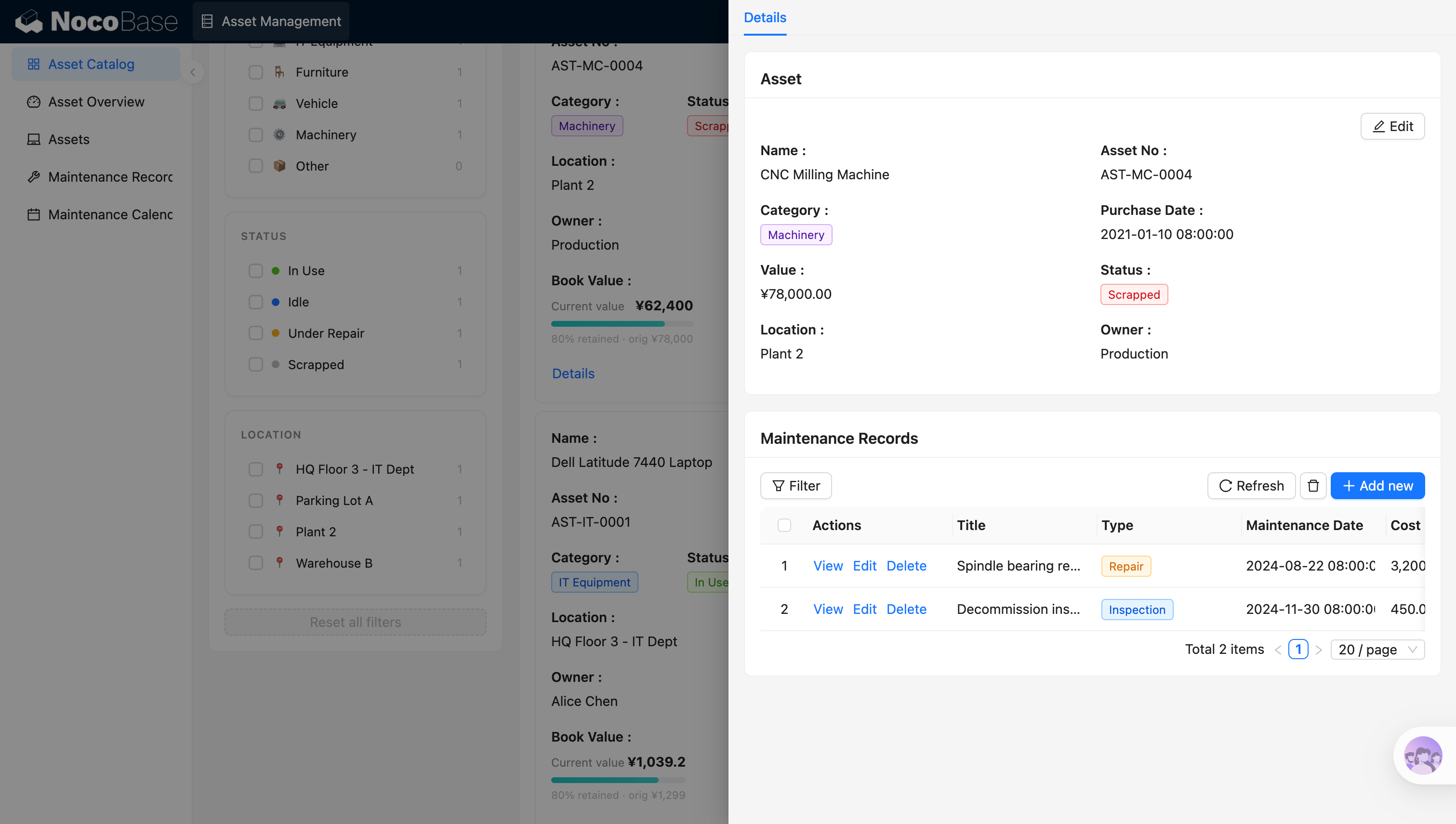
Detalles del activo y registros de mantenimiento:
¿Qué problemas puede resolver un sistema de gestión de activos?
Un sistema de gestión de activos ayuda a los equipos a resolver problemas como información de activos dispersa, estados de activos poco claros, dificultad para rastrear cambios de propietario, registros de mantenimiento incompletos e inventarios de activos ineficientes.
Con este sistema, puedes registrar de forma centralizada el nombre, número de activo, categoría, estado, ubicación, propietario, fecha de compra y valor de cada activo. Los equipos pueden filtrar activos rápidamente por categoría, estado de uso o ubicación de almacenamiento; por ejemplo, ver activos en uso, inactivos, en reparación o dados de baja.
Los responsables también pueden usar la página de detalle del activo para ver su información básica, estado actual, propietario y registros de mantenimiento relacionados, obteniendo rápidamente una visión del uso del activo, los costos de mantenimiento y el estado del ciclo de vida.
Funciones principales
Gestión del libro mayor de activos
- Información básica del activo: Gestiona de forma centralizada los nombres, números, categorías, estados, ubicaciones y propietarios de los activos.
- Categorías y estados de activos: Clasifica los activos por tipo de equipo y diferencia estados como en uso, inactivo, en reparación y dado de baja.
- Titularidad de activos: Registra el propietario actual y la ubicación de almacenamiento de cada activo para facilitar la búsqueda y el inventario.
Valor del activo y ciclo de vida
- Información de compra: Almacena la fecha de compra, el valor original y el valor actual de cada activo.
- Seguimiento del ciclo de vida: Registra continuamente los cambios de estado a medida que los activos pasan de en uso a inactivo, en reparación y dado de baja.
- Página de detalle del activo: Presenta la información básica, el valor, el estado y los registros relacionados de un activo en un solo lugar.
Registros de reparación y mantenimiento
- Gestión de registros de mantenimiento: Registra el contenido, el tipo y el resultado de cada evento de reparación o mantenimiento.
- Fechas y costos de mantenimiento: Almacena las fechas de mantenimiento y los costos de reparación para facilitar el análisis del costo de mantenimiento de activos.
- Historial vinculado al activo: Asocia los registros de mantenimiento con los activos correspondientes para crear un historial de mantenimiento completo.
Filtrado y búsqueda
- Filtrado por múltiples condiciones: Filtra activos por categoría, estado y ubicación de almacenamiento.
- Búsqueda rápida: Encuentra registros rápidamente por nombre de activo, número de activo o propietario.
- Consulta de estado de activos: Ayuda a los responsables a localizar rápidamente activos inactivos, activos en reparación o activos pendientes de disposición.
Asistencia con IA
- Registro de datos asistido por IA: Extrae nombres de activos, números, categorías, estados, propietarios y más desde lenguaje natural u otros textos, y rellena formularios automáticamente.
- Consulta de activos con IA: Consulta en lenguaje natural la ubicación actual, el propietario y el estado de uso de un activo.
- Resúmenes de mantenimiento con IA: Resume automáticamente el número de reparaciones, los costos de mantenimiento y los problemas clave por activo.
- Resúmenes de inventario con IA: Compila los resultados del inventario, los activos con anomalías y los elementos pendientes a partir de los datos de activos.
¿Por qué construir un sistema de gestión de activos con IA y NocoBase?
La gestión de activos puede parecer simplemente registrar información sobre equipos, pero una vez que entra en uso real en la empresa, suele implicar préstamos y devoluciones, transferencias entre departamentos, reparaciones y mantenimiento, inventarios, aprobaciones de bajas y trazabilidad histórica. Si solo usas IA para generar una página desde cero, es fácil quedarse atascado en la etapa de “puedo ingresar datos”, y los permisos, flujos de trabajo, auditoría y mantenibilidad a largo plazo aún requieren remiendos repetidos.
NocoBase se adapta mejor para construir este tipo de sistemas de gestión de activos internos en constante evolución. Es una plataforma de IA sin código de código abierto y autoalojable, por lo que los equipos pueden gestionar los datos de activos en su propio entorno mientras configuran campos de activos, páginas de detalle, registros de mantenimiento, flujos de inventario, flujos de disposición y reglas de permisos según sus políticas reales.
Un sistema de gestión de activos construido de esta manera no es un prototipo de demostración de un solo uso, sino un sistema empresarial que puede seguir evolucionando a medida que cambian la estructura organizativa, los tipos de activos y las políticas de gestión. Para los equipos que valoran el código abierto, el autoalojamiento, el control de datos, la gestión de permisos y el mantenimiento a largo plazo, IA + NocoBase es la mejor opción.
FAQ
- ¿En qué se diferencia esto de un sistema de gestión de activos generado con vibe coding ordinario?
El vibe coding ordinario es más adecuado para generar prototipos rápidamente, pero los sistemas empresariales internos también suelen necesitar permisos, flujos de trabajo, auditoría, historial de operaciones, inicio de sesión único, extensiones de plugins y mantenibilidad a largo plazo. NocoBase ya proporciona estos fundamentos de sistemas empresariales, por lo que un AI Agent puede construir directamente sobre NocoBase en lugar de iterar desde cero por ensayo y error.
- ¿Se puede evolucionar a largo plazo un sistema de gestión de activos construido con IA?
Sí. NocoBase no es un generador de prototipos de un solo uso, sino una plataforma de sistemas empresariales continuamente mantenible. Una vez generado el sistema, puedes seguir ajustando colecciones, campos, páginas, condiciones de filtro, flujos de trabajo, permisos y capacidades de plugins, lo que lo hace ideal para la iteración a largo plazo.
- ¿Puedo controlar el acceso de diferentes usuarios a la gestión de activos?
Sí. NocoBase tiene configuración de permisos integrada que te permite controlar, por rol, qué datos de activos pueden ver los usuarios, qué páginas pueden operar y qué acciones pueden realizar. Por ejemplo, los empleados solo pueden ver los activos de los que son responsables, el personal administrativo o de TI puede gestionar los registros de activos y los administradores pueden configurar la estructura del sistema y las reglas de permisos.
- ¿Puedo configurar flujos de préstamo, devolución y disposición de activos?
Sí. Puedes usar los flujos de trabajo de NocoBase para configurar flujos de préstamo, devolución, reparación, inventario y disposición de activos. Por ejemplo, cuando un empleado envía una solicitud de préstamo de activo, el sistema puede notificar automáticamente al propietario para su aprobación; una vez completada la reparación de un activo, el estado del activo puede actualizarse automáticamente.
En comparación con los prototipos de un solo uso generados por vibe coding ordinario, NocoBase es más adecuado para construir sistemas de gestión de activos mantenibles y extensibles que puedan evolucionar a largo plazo.
- ¿Puedo gestionar los registros de mantenimiento de activos?
Sí. Puedes vincular registros de mantenimiento a cada activo, registrando el tipo de reparación, la fecha, el costo, el responsable y las notas de mantenimiento, ayudando a tu equipo a rastrear el historial de mantenimiento y el estado de uso de cada activo.
- ¿Puedo realizar inventarios de activos fijos?
Sí. Puedes crear registros de inventario de activos que capturen el momento del inventario, el personal involucrado, los resultados y las anomalías, y generar listas de inventario por departamento, ubicación, propietario o estado del activo.
- ¿Este sistema admite la gestión de activos en múltiples departamentos y ubicaciones?
Sí. Puedes asignar a cada activo un departamento, una ubicación de almacenamiento, un propietario y un estado de uso, y ver la distribución de activos en diferentes oficinas, almacenes, tiendas o sitios de producción.