
Before we start
What are companies actually using for self-hosted AI, and how do they choose?
Someone asked exactly this on Reddit, in r/OpenSourceeAI. The replies brought up cost, data privacy, model performance and long-term maintenance. A few people also pointed out that a company does not have to host its own models: calling models through an API and then wiring AI into existing business systems is a perfectly workable route too.
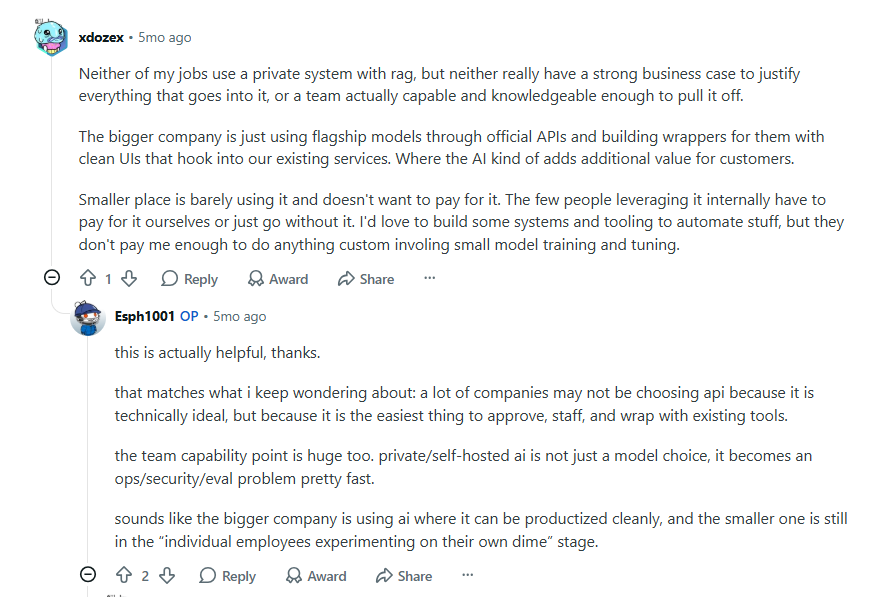
In practice, different companies want different things from AI. Some teams only need a single chat entry point. Some want AI to search internal documents and connect to the tools they already use. Others want AI to help build business systems such as CRM, procurement and ticketing.
So in this article we have collected 10 enterprise AI platforms and related open-source projects that you can deploy on your own infrastructure. They are grouped by main purpose, with notes on core capabilities, typical use cases and licenses, to help you find the tool that fits your needs.
💬 Hi there! You are reading the NocoBase blog. NocoBase is an open-source platform for enterprise application development that lets AI take part in building and continuously improving business systems. Come and find us on GitHub.
How we selected
There is no shortage of enterprise AI projects on GitHub. This time we focused on tools that target a specific use case and can actually be run in a corporate environment. We filtered on three conditions:
- Public code, private deployment: the code is on GitHub and the maintainers offer an official self-hosting option.
- A clear enterprise use case: business system development, process automation, agent development, knowledge management or model operations.
- Active maintenance: recent commits or releases, plus documentation.
Quick comparison
| Project | What it does | GitHub Stars | License (type / main restrictions) | Best for |
|---|---|---|---|---|
| NocoBase | Build business systems with coding agents; NocoBase supplies permissions, workflows and other foundations | 24.8k | NocoBase's own license with additional terms; commercial features such as Studio need a license | Building and maintaining CRM, procurement, ticketing and similar systems over the long run |
| Activepieces | Connect apps visually and run tasks automatically with workflows and AI | 23.7k | MIT (open-source core); enterprise features licensed separately | Teams that want cross-tool automation with little code |
| Windmill | APIs, workflows and internal operation UIs | 17.5k | AGPLv3 / Apache-2.0; the official distribution includes proprietary features and usage limits | Technical teams that write code and build internal automation tools |
| Sim | Build, deploy and orchestrate AI agents visually | 29.4k | Apache-2.0 | Quickly building and testing AI agent workflows |
| Mastra | Build agents, tool calling and workflows in TypeScript | 28.0k | Apache-2.0 (core); enterprise features under a separate license | Teams building AI apps in JavaScript / TypeScript |
| MaxKB | Build AI Q&A assistants and agents on top of an enterprise knowledge base | 23.2k | GPL-3.0; modification and distribution must follow its terms | Quickly deploying an internal knowledge assistant |
| RAGFlow | Parse complex documents and answer questions with cited RAG retrieval | 94.0k | Apache-2.0 | Contracts, manuals, scanned files and other complex documents |
| LiteLLM | Unified model API with keys, budgets, routing and call logs | 60k | MIT core; enterprise features licensed separately | Multiple teams sharing different models while managing spend |
| MLflow | Trace and evaluate AI apps, manage prompts and model versions | 28.8k | Apache-2.0 | AI engineering teams that need evaluation, experiment tracking and versioning |
| Langfuse | Trace LLM and agent runs; analyze quality, latency and usage | 32.8k | MIT (core); theee directory is licensed separately |
Monitoring AI apps in production and improving them over time |
1. NocoBase: an AI-driven development platform for enterprise business systems
Project info
- GitHub: https://github.com/nocobase/nocobase
- GitHub Stars: 24.8k
- License: NocoBase's own license, based on Apache-2.0 with additional terms; commercial features such as Studio require a separate license
- Deployment: self-hosted, with application code and data managed by the company itself
- Website: https://www.nocobase.com
Overview
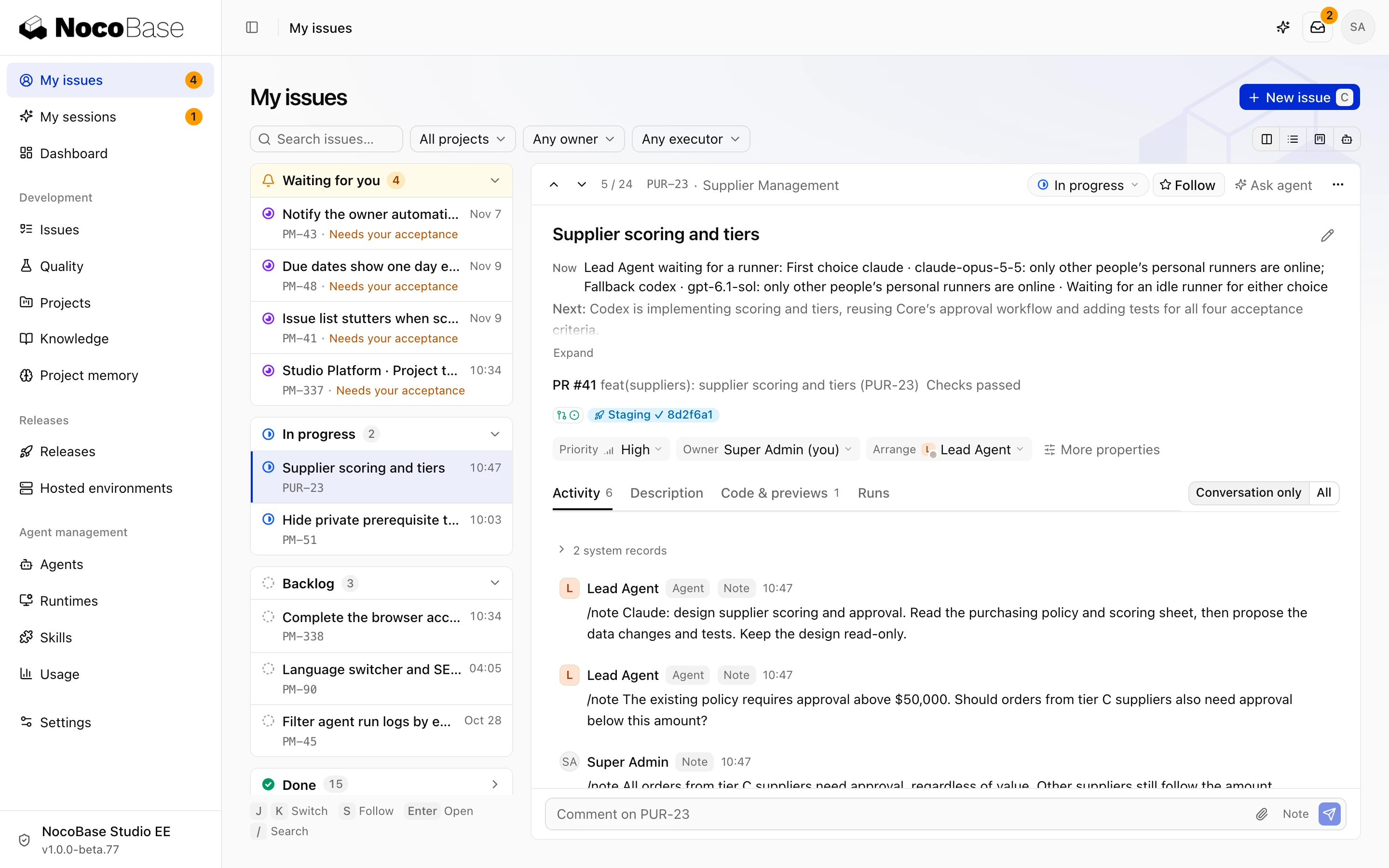
NocoBase is an open-source development platform for enterprise business systems. With AI, you can build and keep improving applications such as CRM, procurement, ticketing and IT asset management. It uses NocoBase Core as the application foundation, which provides the common capabilities enterprise development needs, so coding agents can focus on implementing the actual business features.
NocoBase also offers Studio for development with multiple agents working together, and ready-made Solutions such as NocoCRM and NocoITAM. Together they cover the whole journey from building an application to maintaining and iterating on it.
Highlights
1. Lets AI concentrate on business features
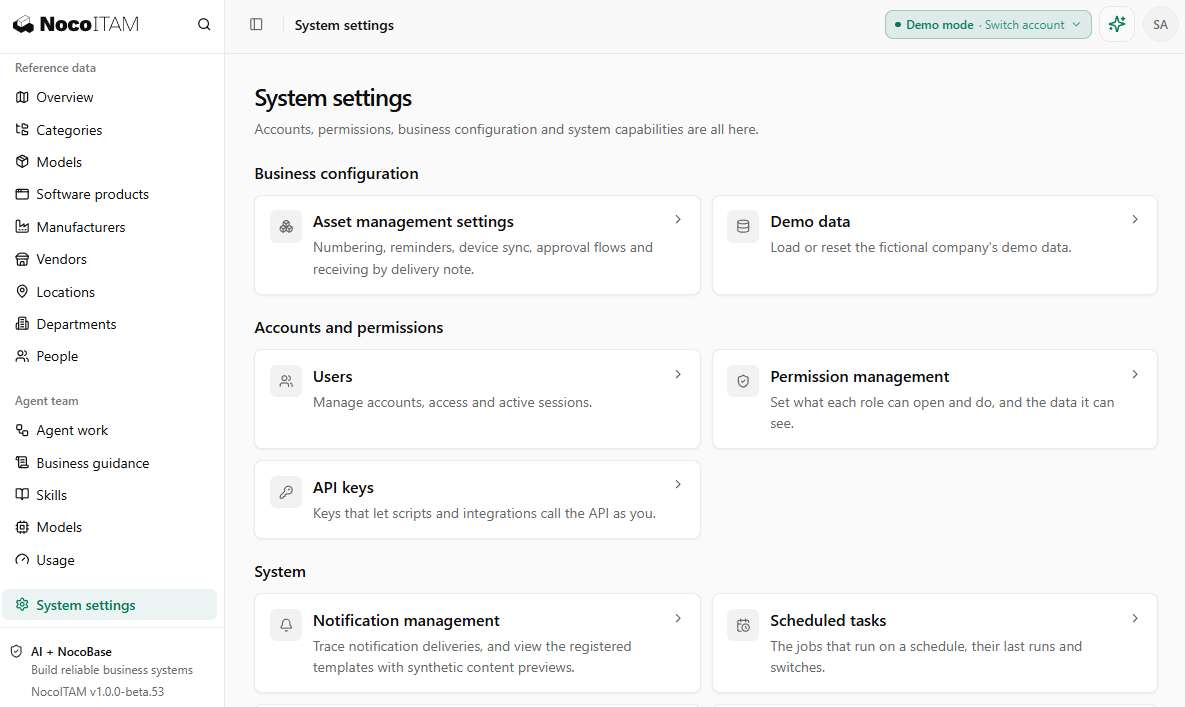
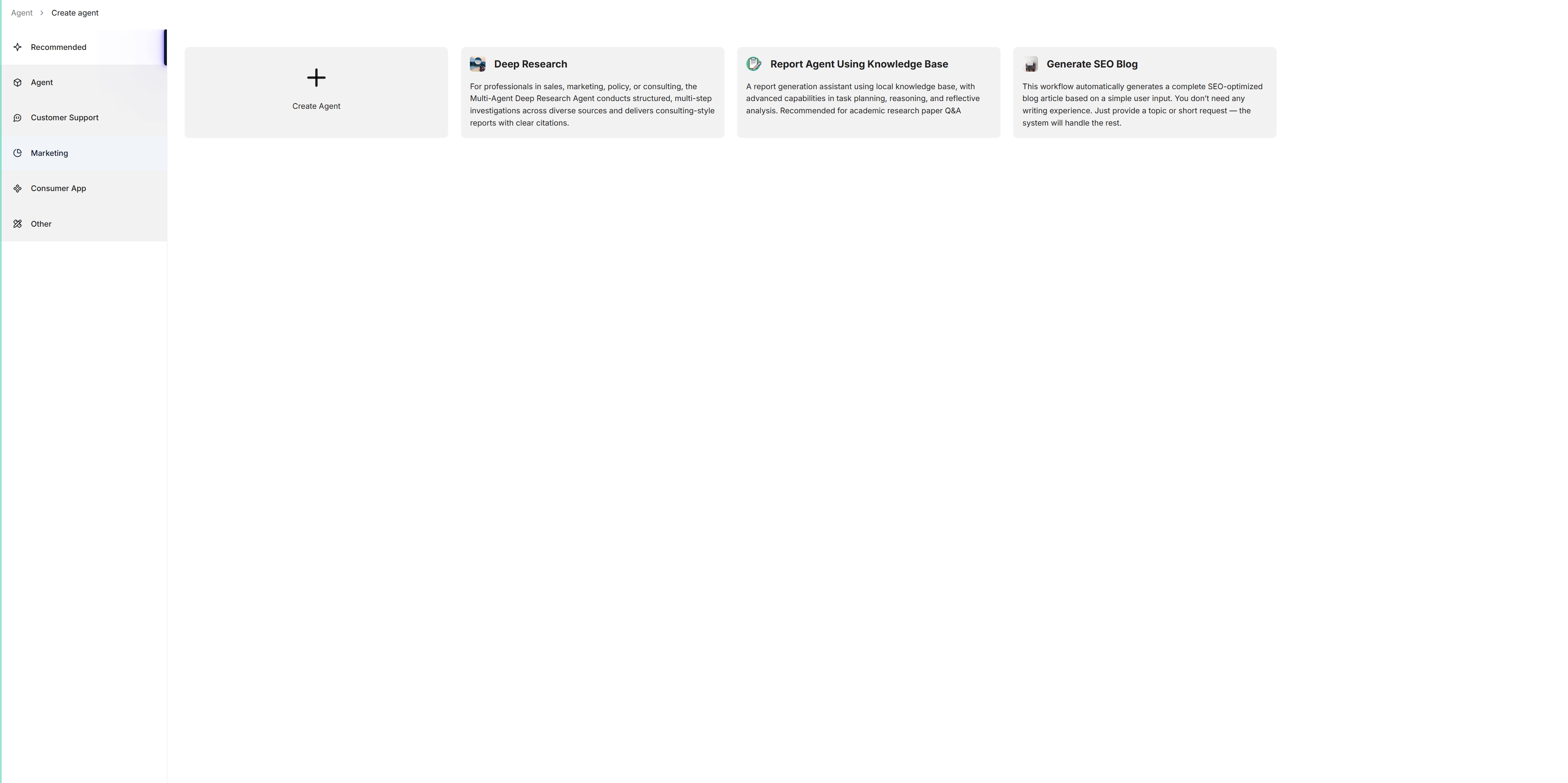
NocoBase Core provides the foundations enterprise applications usually need: data models, roles and permissions, workflows, approvals and file management. Coding agents build specific business features directly on top of them. Business code is maintained separately from Core, which cuts down on repeated work and makes it easier to add features, adjust business logic and upgrade the foundation later. NocoITAM, shown below, is built on NocoBase Core and uses Core directly for its underlying capabilities.
2. Supports AI development and business collaboration
You can use coding agents such as Claude Code and Codex to build and modify applications according to business requirements. The commercial Studio can also organize multiple agents to handle development, testing and code review, while a human owner accepts the work and controls the release. Once an application is live, business agents can be connected to it. They query data and handle business tasks under the existing roles, permissions and approval rules, which takes repetitive daily work off people's plates.
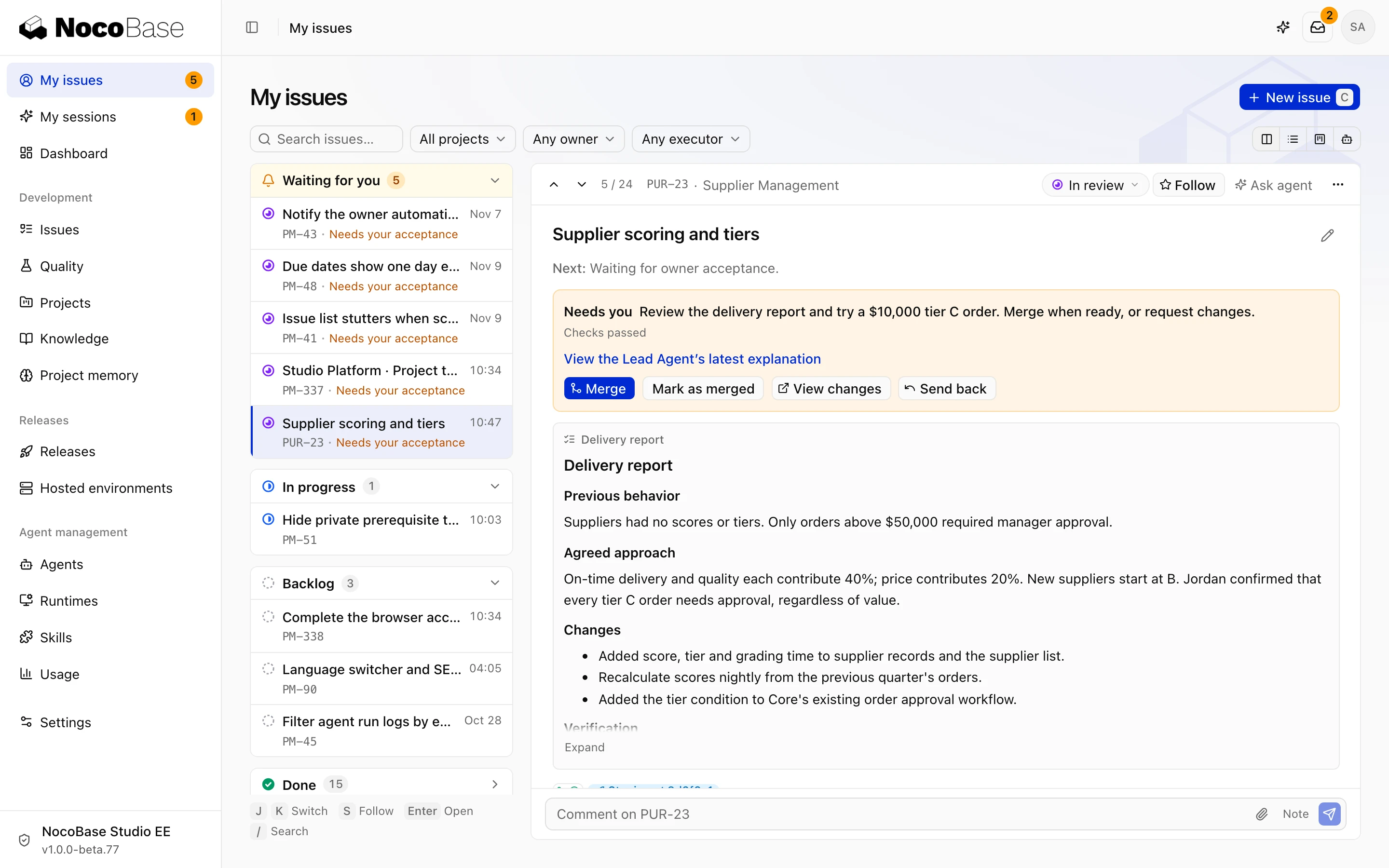
3. Ready-made applications that stay customizable
NocoBase Solutions offers ready-to-use business applications built on Core, such as NocoCRM and NocoITAM. A company can deploy them as they are or keep modifying them to fit its own needs. Coding agents can add modules and adjust screens and business processes on top of an existing application, so there is no need to rebuild the system from scratch each time.
Use cases and teams
NocoBase suits enterprise teams that want to use AI to build and maintain business systems such as CRM, procurement, ticketing and IT asset management over the long term, as well as software service providers that build and deliver applications for clients. Where a project has to handle business data, roles and permissions, approval flows and cross-department collaboration all at once, NocoBase provides a single application foundation and lets the system keep growing as the business changes.
2. Activepieces: visual AI workflow automation
Project info
- GitHub: https://github.com/activepieces/activepieces
- GitHub Stars: 23.7k
- License: MIT (community edition); enterprise features require a separate license
- Deployment: self-hosted with Docker or Kubernetes, or the official cloud service
- Website: https://www.activepieces.com
Overview
Activepieces is an open-source AI automation platform. Through a visual interface it connects different applications and turns repetitive operations such as data syncing, information processing and notifications into automated workflows. It ships with a large library of prebuilt integrations and also supports AI agents, model calls and MCP, so teams can add AI to the business processes they already run.
Its main appeal is the low barrier to entry. Business users can complete most of the setup by dragging and dropping nodes, while developers extend special functionality with code.
Highlights
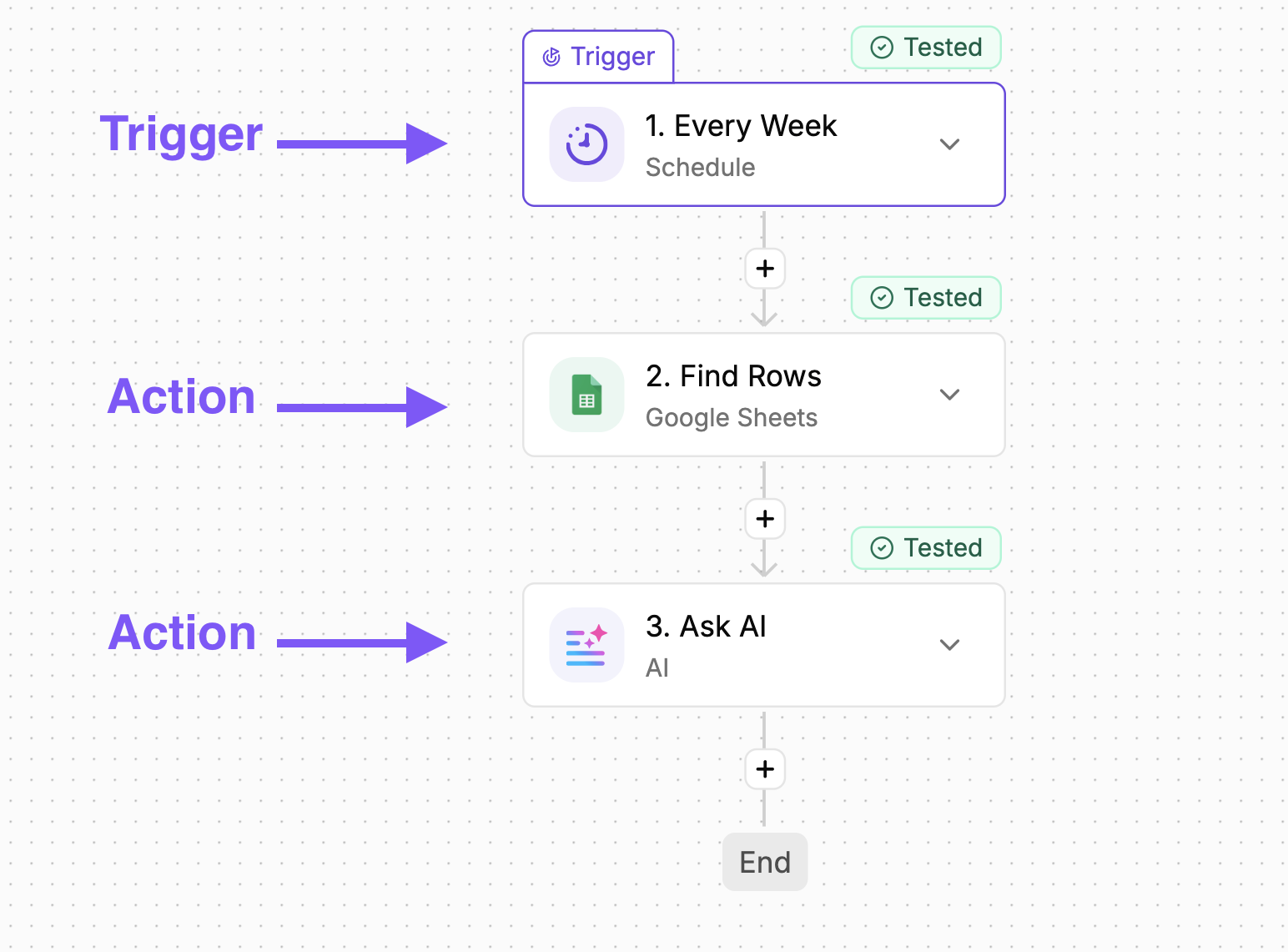
1. Connects business tools visually
Drag and drop nodes to connect CRM, email, spreadsheets, databases and collaboration tools, then set triggers, branches and execution steps. Teams can chain together operations that used to be scattered across systems, with less manual re-entry and hand processing.
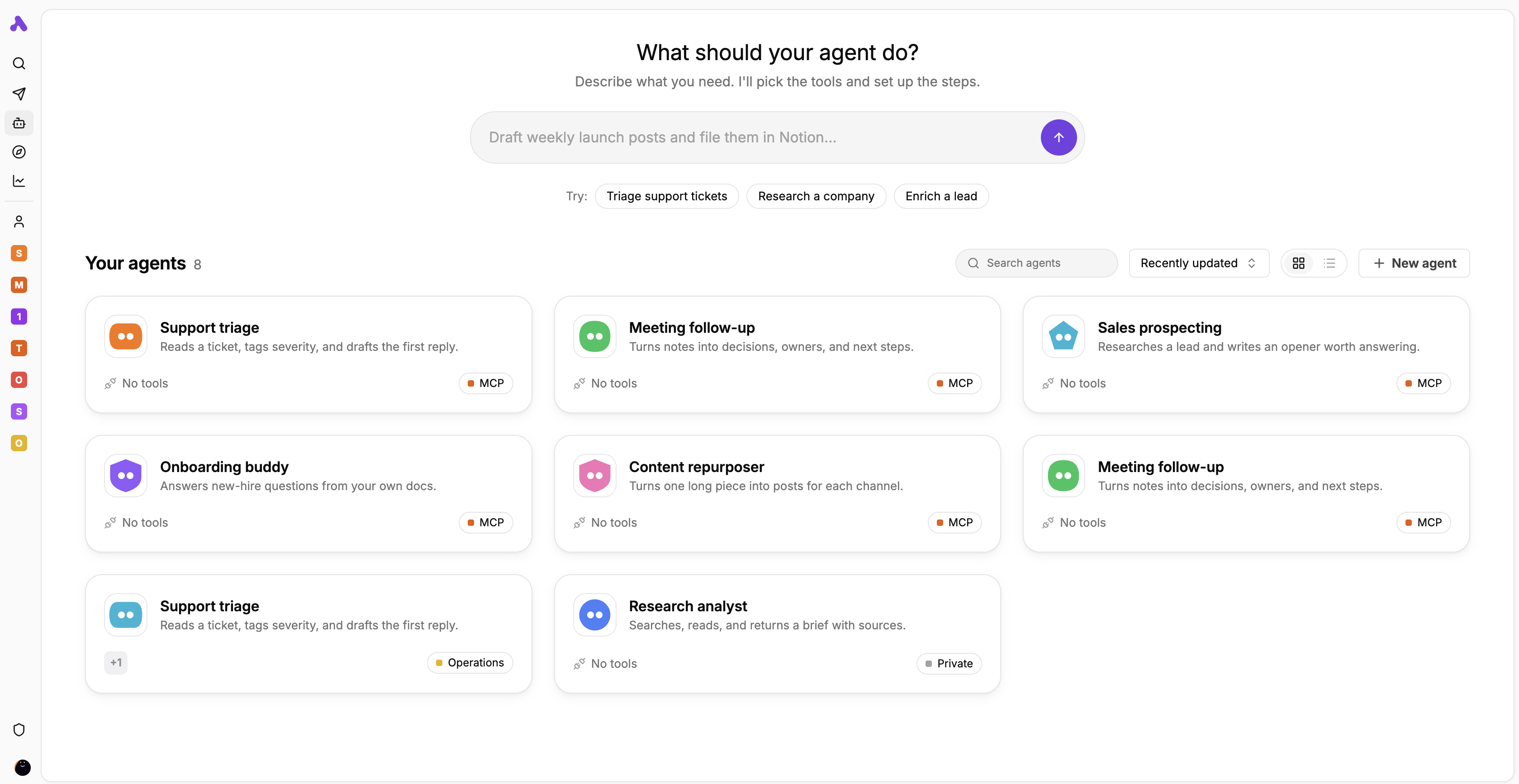
2. Puts AI agents inside automated processes
Workflows can call large language models or AI agents to classify content, extract information, generate text and call tools. For steps that need human judgment, you can add an approval or confirmation stage so the workflow only continues once someone has signed off.
3. Custom integrations and MCP support
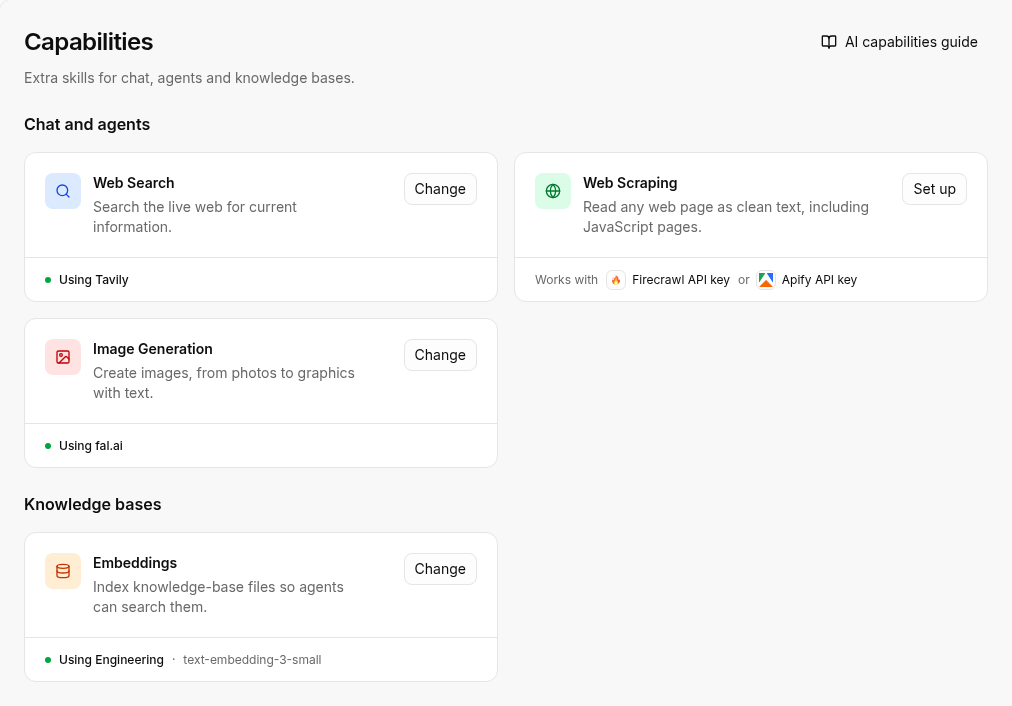
Activepieces comes with many prebuilt integration components (Pieces) and also lets developers write custom ones in TypeScript to connect internal systems or unusual APIs. It supports MCP as well, so some of its tool capabilities can be exposed to other AI clients, extending how far the automations reach.
Use cases and teams
Activepieces suits operations, marketing, sales and IT teams that want cross-tool automation quickly, especially companies that already run several business systems and do not want to invest heavily in custom code. Its focus is connecting existing tools and executing workflows. Core business data such as customers and orders still lives in the respective systems.
3. Windmill: automation and internal tools for developer teams
Project info
- GitHub: https://github.com/windmill-labs/windmill
- GitHub Stars: 17.5k
- License: the core services are mainly AGPLv3, some SDKs are Apache-2.0; some features are under a commercial license
- Deployment: self-hosted with Docker Compose or Kubernetes, or the official cloud service
- Website: https://www.windmill.dev
Overview
Windmill is a code-first platform for workflows and internal tools. It turns Python, TypeScript, SQL and other scripts into APIs, automated jobs or internal apps. Developers can reuse code they already have, compose workflows in a visual editor and build operation screens for business users. It also offers AI-assisted development and model integrations, which makes it a fit for technical teams that want to manage internal scripts, automation and AI features in one place. Compared with automation tools that rely mainly on drag-and-drop nodes, Windmill puts more emphasis on the flexibility of code.
Highlights
1. Turns code straight into runnable jobs
It supports Python, TypeScript, SQL, Bash and more, and publishes scripts as APIs, scheduled jobs or workflow steps. Windmill generates an input form from a script's parameters and keeps run history in one place, so existing code becomes easier for other systems and teammates to use.

2. Visual workflows with AI integration
Several scripts, database queries and external APIs can be combined into one workflow, with branching, parallel execution, scheduled triggers and error-handling rules. Workflows can also include AI steps such as model calls, handling text analysis or information extraction while the code stays in control.

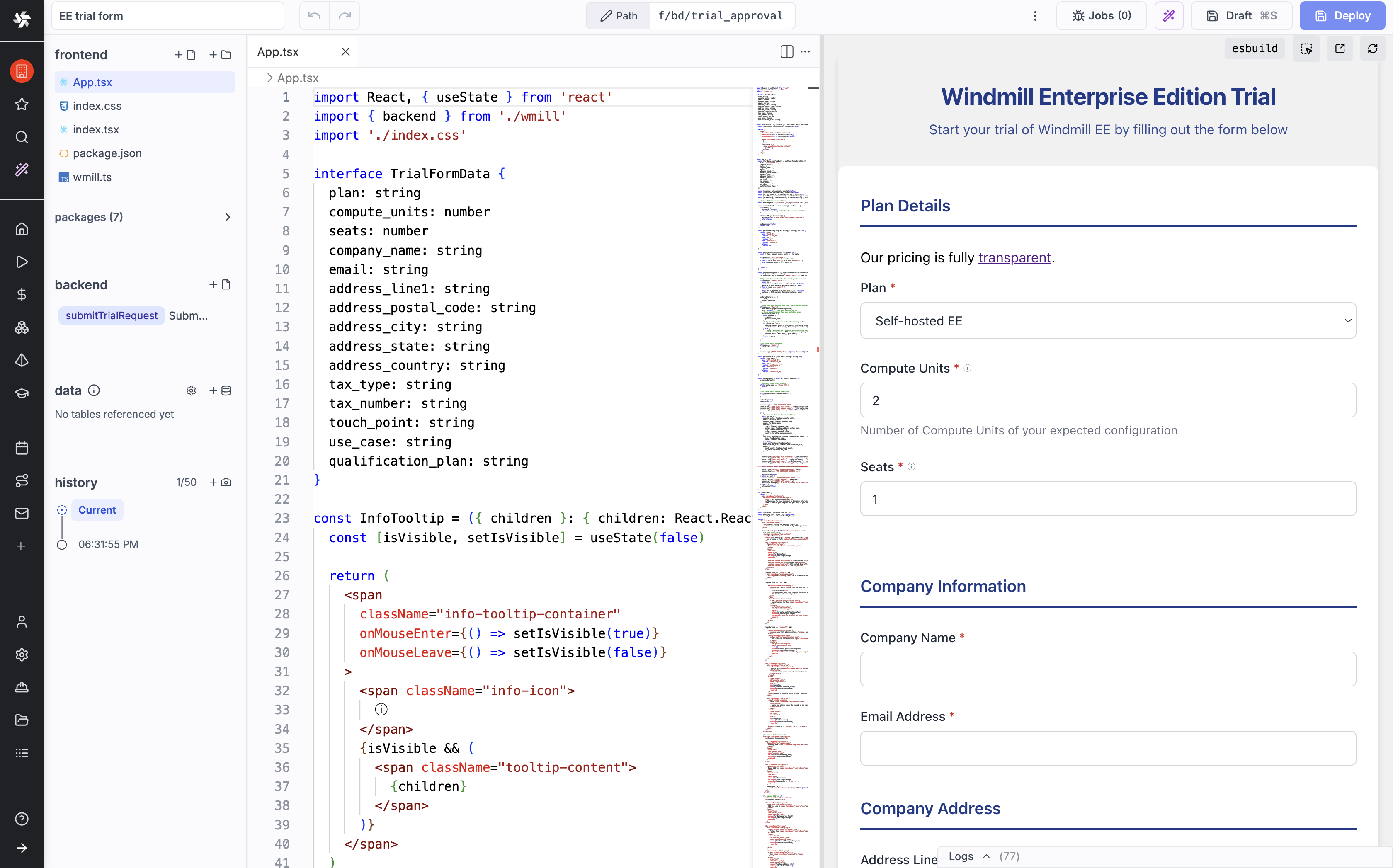
3. Builds internal operation screens
Windmill's app editor builds forms, data tables, dashboards and action buttons on top of scripts and data sources. Business users query data or run backend jobs through the UI without touching the scripts, while developers keep maintaining the code underneath.
Use cases and teams
Windmill is a better fit for companies with Python, TypeScript or SQL skills in-house that want to centralize internal scripts, data processing and automated jobs. It also suits technical teams that need to build internal operation tools quickly, especially where existing code logic should be reused.
4. Sim: a visual AI agent development platform
Project info
- GitHub: https://github.com/simstudioai/sim
- GitHub Stars: 29.4k
- License: Apache-2.0
- Deployment: self-hosted, the official cloud service, or a desktop client
- Website: https://www.sim.ai
Overview
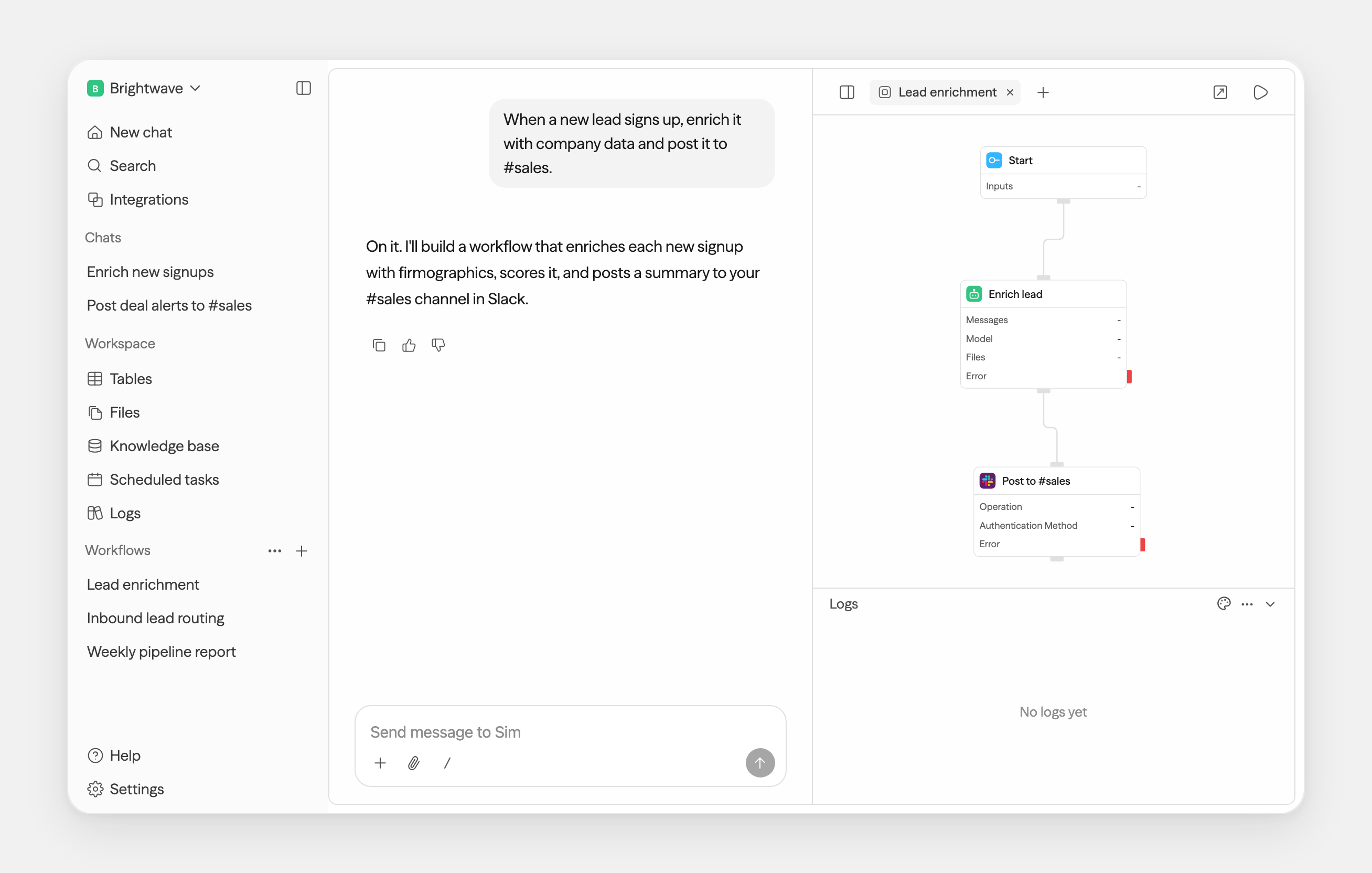
Sim is an open-source platform for building AI agents and workflows through a visual interface, natural language and code. It brings models, tool calls, knowledge bases and data connections together in one workspace, and can be used for anything from simple Q&A to multi-step agent workflows.
Sim also provides testing, execution logs and deployment management, so a team can build and adjust agents on a single platform. For teams that want to validate an AI application idea quickly, it removes much of the work of building agent scaffolding from scratch.
Highlights
1. Builds agent workflows visually
By connecting nodes for models, prompts, tools and conditions, you define the agent's processing steps and execution logic. Sim can also create and adjust workflows with natural-language assistance, so teams change agent behavior without writing code by hand every time.
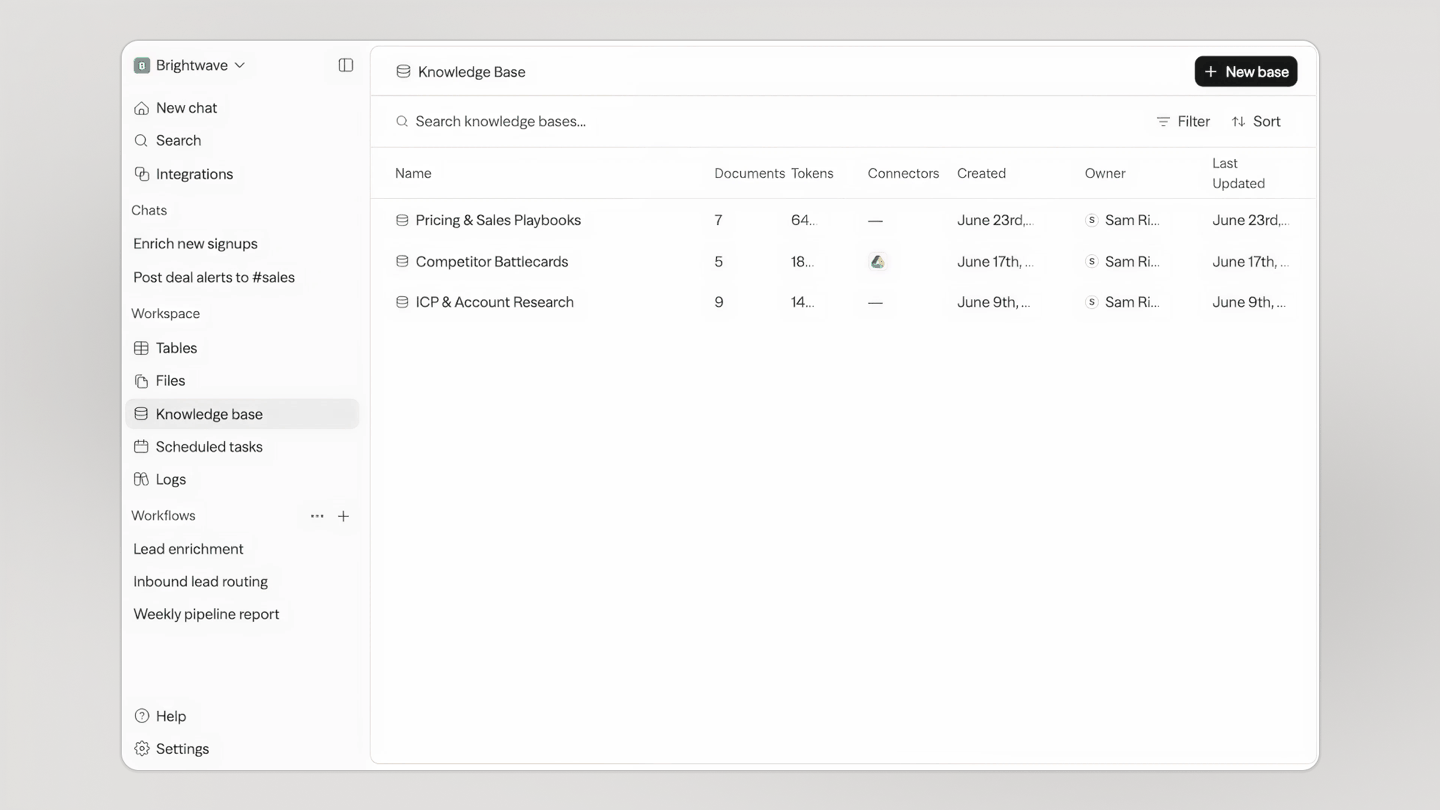
2. Connects models, knowledge bases and external tools
It plugs into different large language models, databases, knowledge bases and third-party services, letting agents read data, retrieve material and call external tools. Teams combine these capabilities as the task requires, so agents handle multi-step work rather than plain chat.
3. Workflow testing and run management
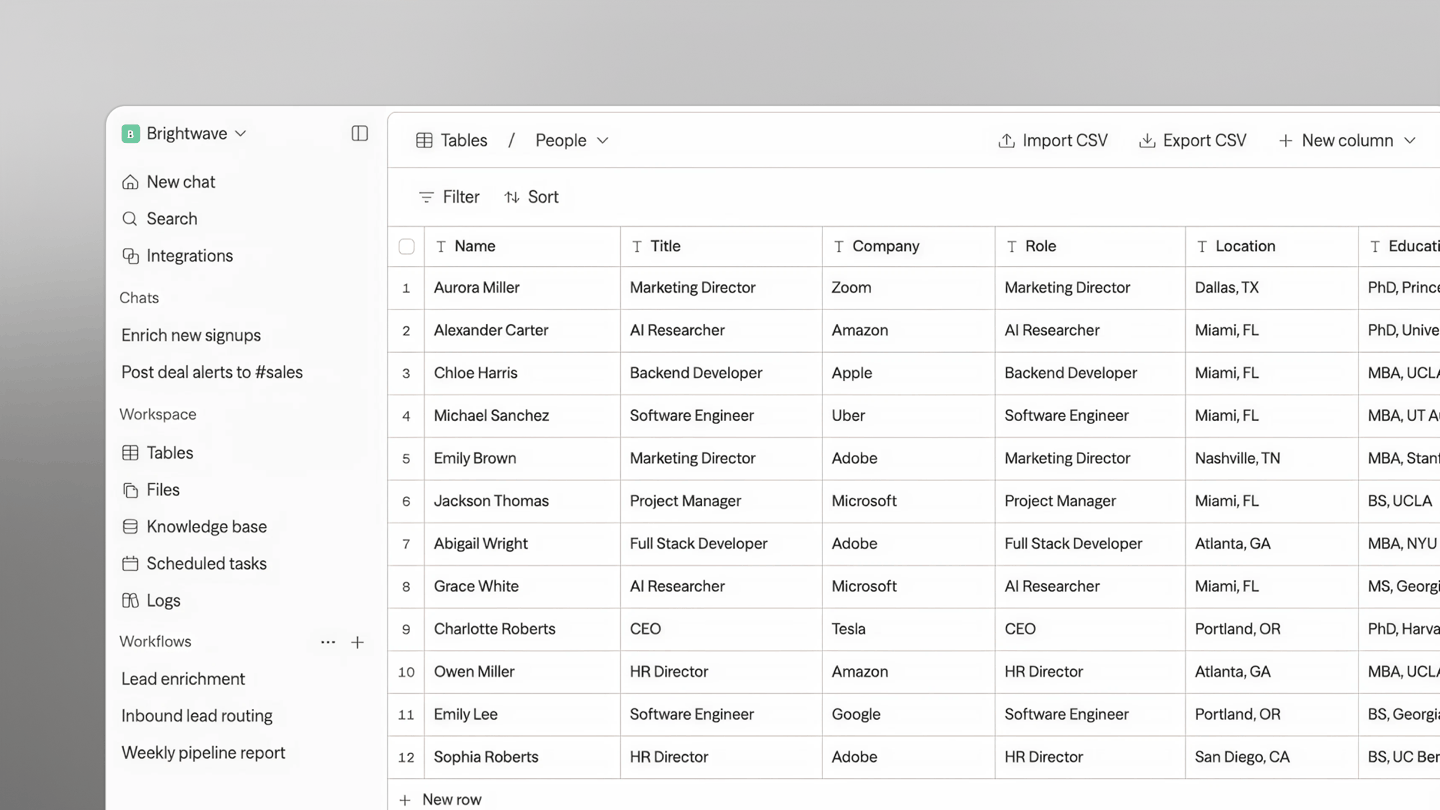
Sim includes workflow testing, execution logs and run monitoring, with the input, output and status of each step. Developers can tell whether a problem lies in the model response, a tool call or the workflow configuration, and keep refining the existing flow.
Use cases and teams
Sim suits product teams, startups and developers who want to build, test and deploy AI agents quickly, especially for projects that orchestrate several AI tasks visually. Its focus is agent development and execution. Complex business data and enterprise application management usually need to be handled alongside other systems.
5. Mastra: a TypeScript framework for AI agents
Project info
- GitHub: https://github.com/mastra-ai/mastra
- GitHub Stars: 28.0k
- License: Apache-2.0 (core framework); enterprise features under a separate license
- Deployment: built on Node.js and TypeScript, deployable to your own servers or cloud environment
- Website: https://mastra.ai
Overview
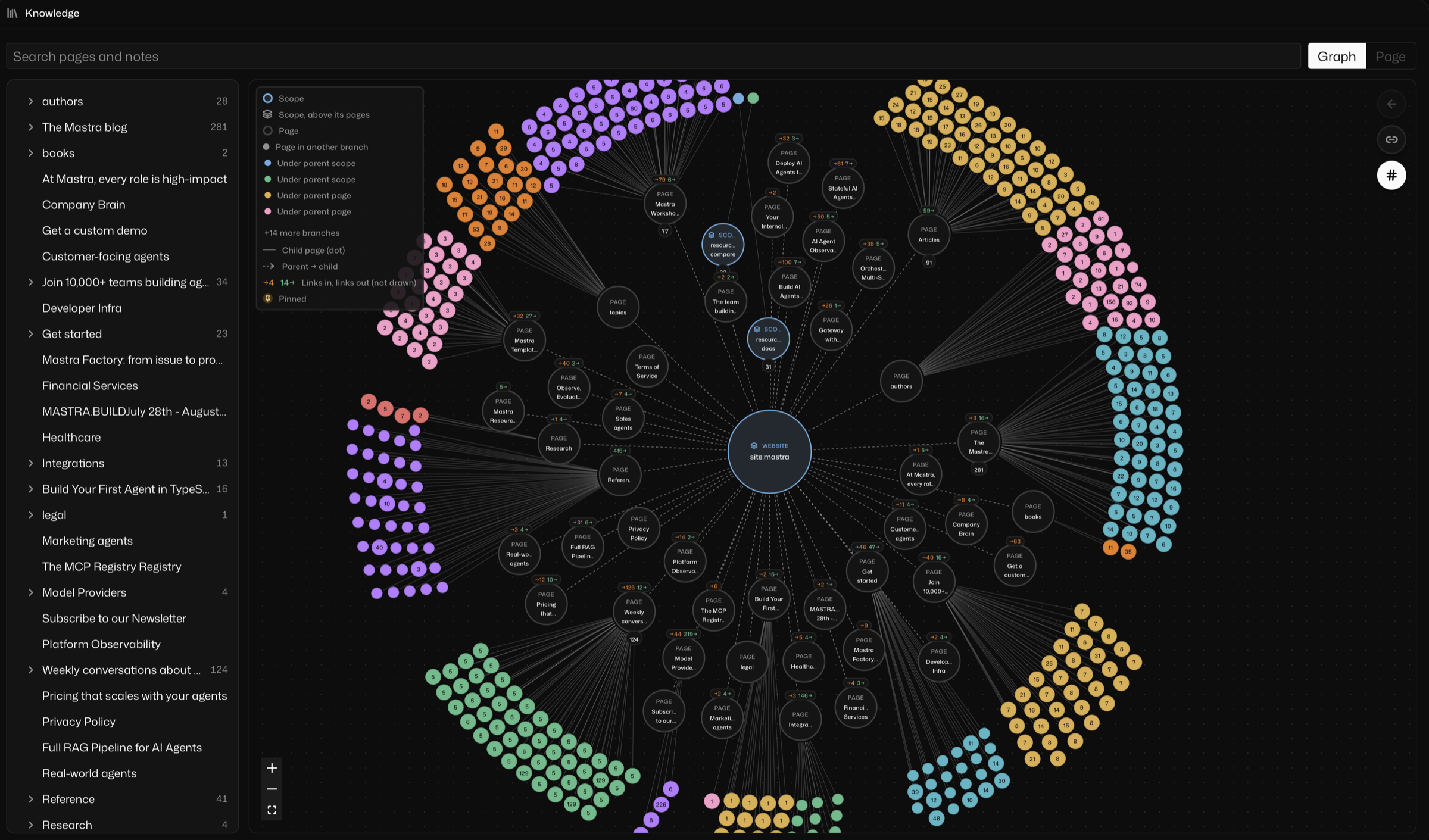
Mastra is an open-source TypeScript framework for building agents, tool calling and complex workflows inside existing applications. It provides memory, evaluation and run tracing, and developers define agent behavior in code and integrate it into their existing products or services. AI features become part of the application codebase. Teams already on a JavaScript or TypeScript stack keep the development, testing and deployment practices they know.
Highlights
1. Develops AI agents in TypeScript
Developers define an agent's model, instructions and callable tools in TypeScript and connect them directly to the existing application's APIs and business logic. Agent code goes through the same type checking, tests and version control as the rest of the project, which helps with long-term maintenance.
2. Workflow orchestration and MCP integration
Mastra organizes several processing steps into workflows, covering sequential execution, branching and task flows that need explicit control. It also supports MCP, so agents can connect to external tools and services to read information or perform actions in existing systems.
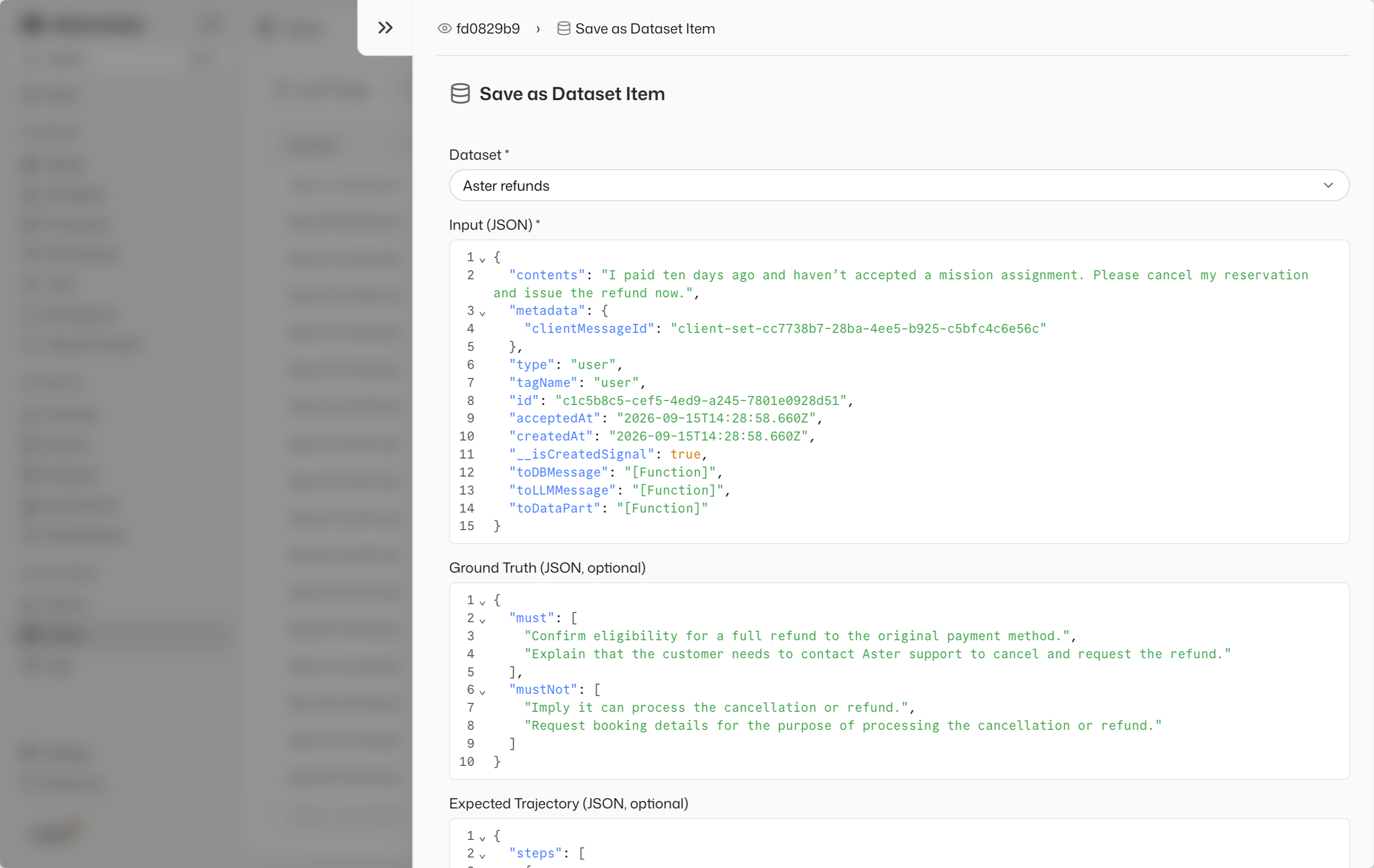
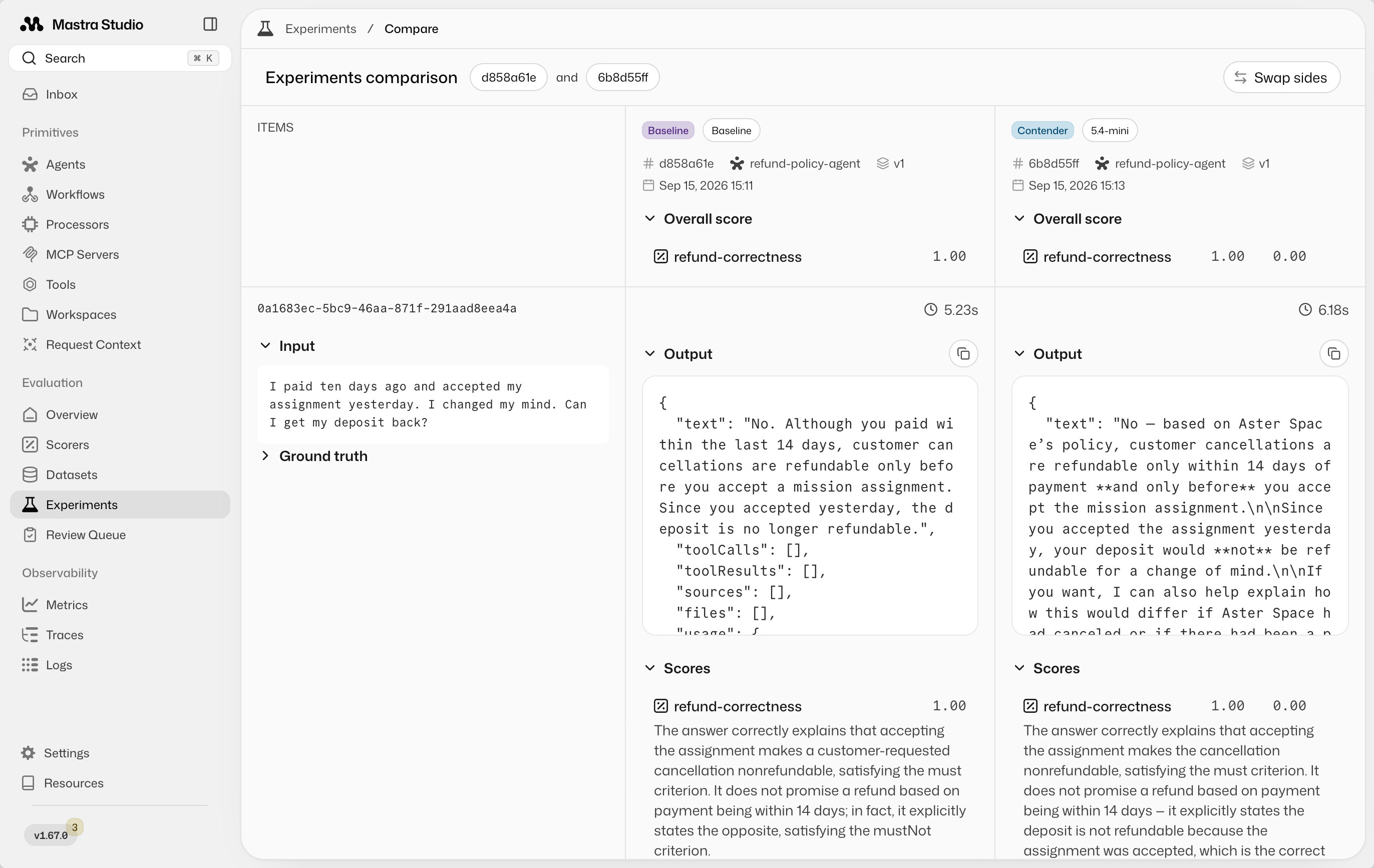
3. Agent memory, tracing and evaluation
Agent memory manages the context a conversation or task needs, and tracing records model calls and tool executions. Developers can also use the evaluation tools to compare different prompts, models and agent configurations, giving them evidence for the next round of adjustments.
Use cases and teams
Mastra suits technical teams that build products in JavaScript or TypeScript and want to add AI agents to an existing application. Compared with visual platforms such as Sim, it is a better fit for developers who need deep control over agent logic, want to reuse existing code and manage their own deployment pipeline.
6. MaxKB: enterprise knowledge base and AI agent platform
Project info
- GitHub: https://github.com/1Panel-dev/MaxKB
- GitHub Stars: 23.2k
- License: GPL-3.0
- Deployment: self-hosted with Docker, offline installation supported
- Website: https://maxkb.cn
Overview
MaxKB is an open-source enterprise AI agent platform. It organizes company documents into a knowledge base and combines it with large language models to build Q&A assistants and agents. With document management, knowledge retrieval, workflows and application integration built in, teams can create AI applications grounded in internal material without developing a RAG system from scratch.
MaxKB connects to different model services and supports private deployment, which suits teams that want to manage their own knowledge and AI applications.
Highlights
1. Manages documents and knowledge bases
Import company documents of various types, then handle chunking, vectorization and retrieval settings so the AI answers from what is in the knowledge base. Teams manage document content and retrieval settings and keep the knowledge base up to date, so employees spend less time hunting through files.

2. Builds AI agents and workflows
Beyond knowledge Q&A, MaxKB connects knowledge retrieval, model calls and external tools in a visual workflow to build agents that carry out multi-step tasks. Teams adjust the flow to their needs so the AI goes on to organize, analyze or act on the information after retrieving it.

3. Multi-model access and application integration
It connects to both public cloud models and privately deployed ones, so a company can choose based on data requirements, cost and model quality. Finished AI applications can be embedded or exposed through an API to websites and internal systems, giving existing business tools access to knowledge Q&A.

Use cases and teams
MaxKB suits teams that need an internal knowledge base, product Q&A, customer service assistant or technical support assistant, especially companies that want to deploy AI knowledge applications quickly through visual configuration. Its emphasis is the complete path from knowledge base to Q&A application, rather than a standalone document-parsing component.
7. RAGFlow: a RAG engine for complex documents
Project info
- GitHub: https://github.com/infiniflow/ragflow
- GitHub Stars: 94.0k
- License: Apache-2.0
- Deployment: self-hosted with Docker Compose
- Website: https://ragflow.io
Overview
RAGFlow is an open-source RAG engine focused on parsing, retrieving and answering questions over complex enterprise documents. It handles PDFs, scanned files, tables and technical manuals, and uses document understanding and retrieval techniques so that AI answers can be traced back to a specific source.
RAGFlow also supports agents and visual workflows that combine knowledge retrieval with model calls and external tools. Compared with ordinary document Q&A tools, it puts more weight on parsing quality, retrieval accuracy and traceable answers.
Highlights
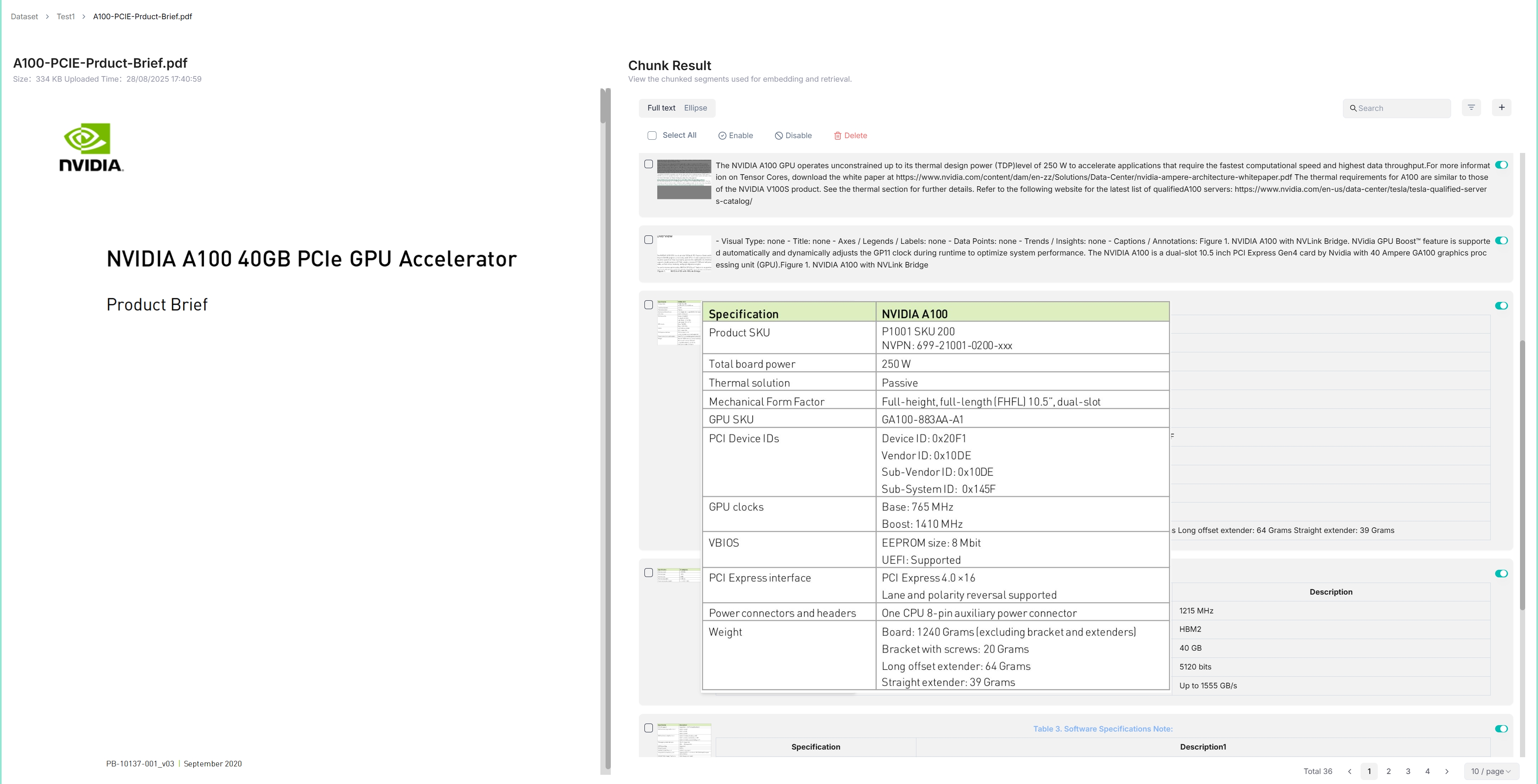
1. Parses and processes complex documents
It supports PDF, Word, Excel, images, scanned files and more, extracting text, tables and layout structure. Teams can inspect and adjust the resulting chunks, reducing lost information or broken structure when extracting from complex documents.
2. Hybrid retrieval with traceable citations
Vector search, keyword search and re-ranking work together to find the document content most relevant to a question. Answers can carry their citations, so users go back to the original material to verify, which matters where accuracy is critical.
3. Agent and workflow integration
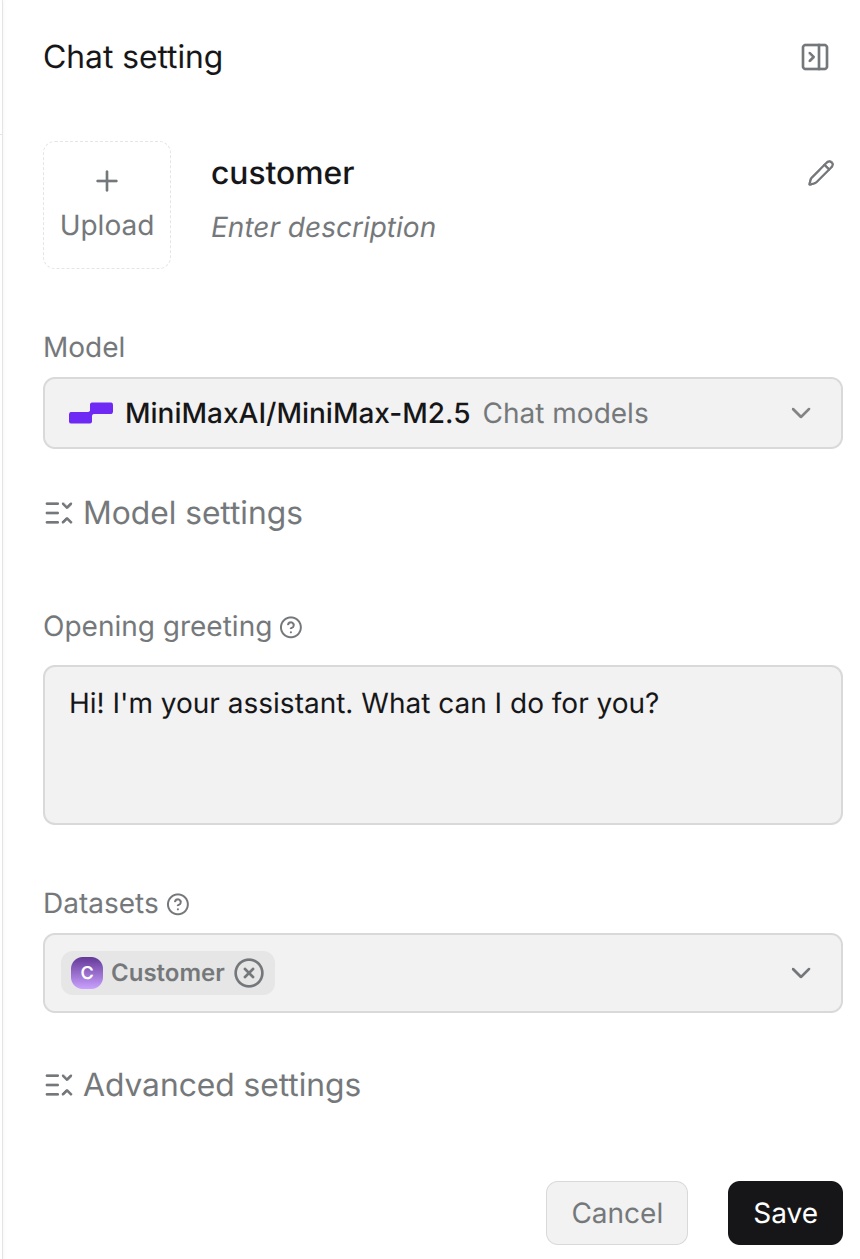
RAGFlow combines knowledge bases, models and tool calls in a visual workflow so agents can run multi-step retrieval and analysis tasks. It also exposes an API, so document retrieval and Q&A can be plugged into existing business systems instead of doing everything inside RAGFlow.
Use cases and teams
RAGFlow suits legal, quality management, manufacturing and technical support teams that deal with large volumes of complex documents, especially retrieval and Q&A over contracts, repair manuals, scanned files and technical references. Compared with MaxKB, its document parsing and retrieval capabilities are the part to watch. When evaluating it, start by testing it on your own real documents.
8. LiteLLM: an AI gateway for managing model calls
Project info
- GitHub: https://github.com/BerriAI/litellm
- GitHub Stars: 60k
- License: MIT (core); enterprise features under a separate license
- Deployment: a Python SDK and a self-hostable Proxy Server
- Website: https://www.litellm.ai
Overview
LiteLLM is an open-source LLM gateway. It connects to different model providers through one unified API so that multiple AI applications share the same way of calling models. It supports model routing, virtual keys, budget management and usage statistics, helping companies manage different model services centrally. It can be used as a Python SDK inside an application or deployed as a standalone proxy service. For teams that use several model providers at once, it cuts the repeated work of API adaptation and key management.
Highlights
1. Unified model API and routing
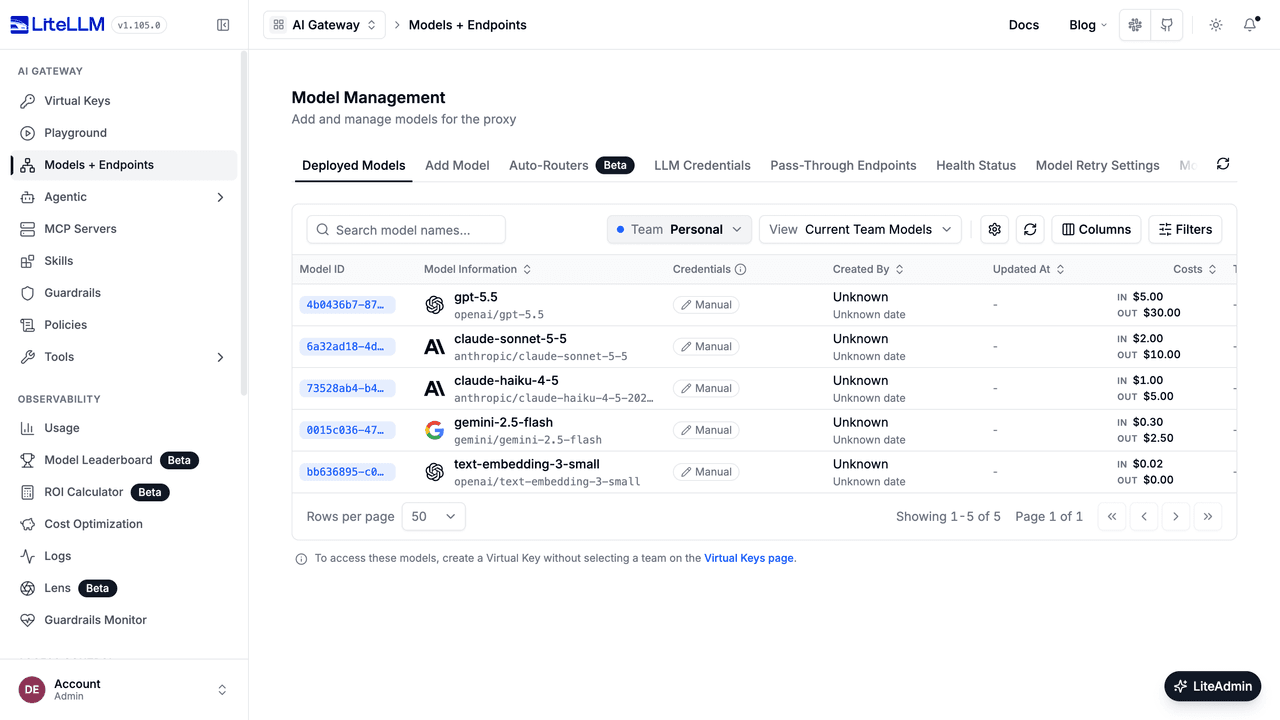
LiteLLM standardizes different providers' calling conventions into an OpenAI-compatible interface, so developers reach many models through one API. Switching or adding models is handled mainly through provider and routing configuration in the gateway, with fewer changes to the applications above it.
2. Keys, budgets and cost management
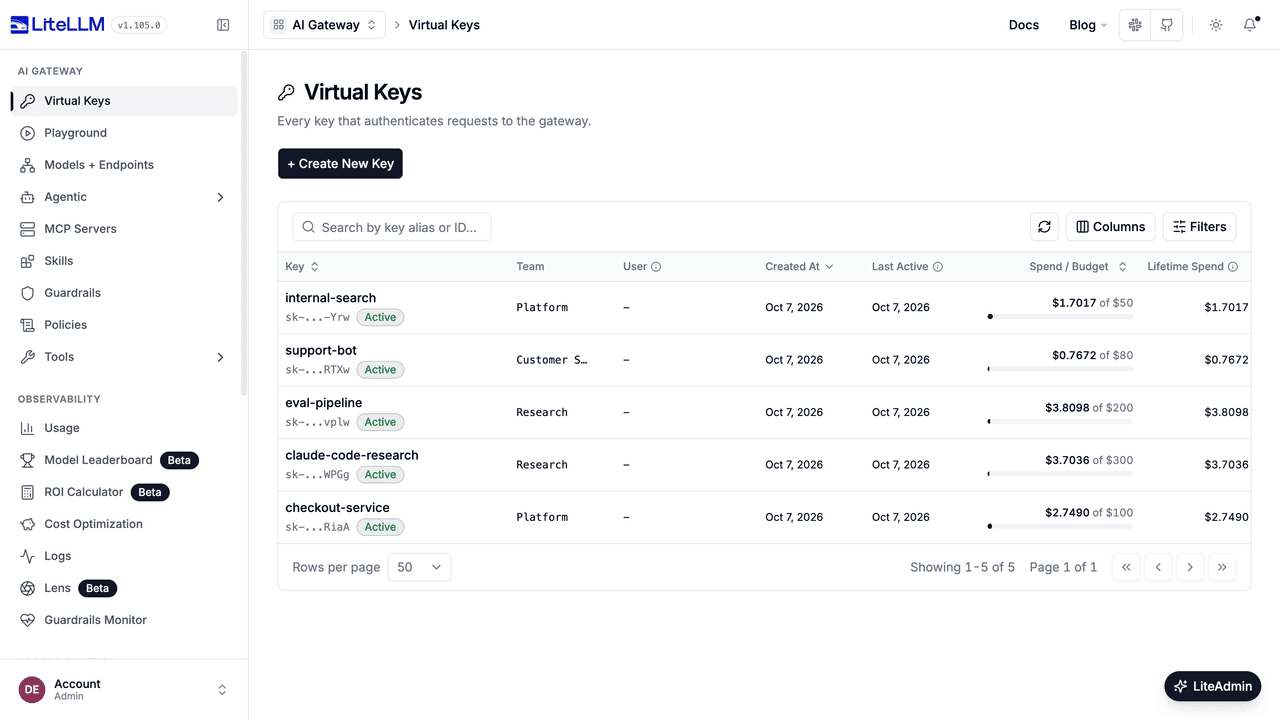
Teams, users or applications get their own virtual keys, so the real API keys from model providers are never shared directly. Administrators set budget limits and review call volume and cost statistics to control model spend per project. Budget enforcement requires dependencies such as the database to be configured correctly.
3. Call reliability and monitoring
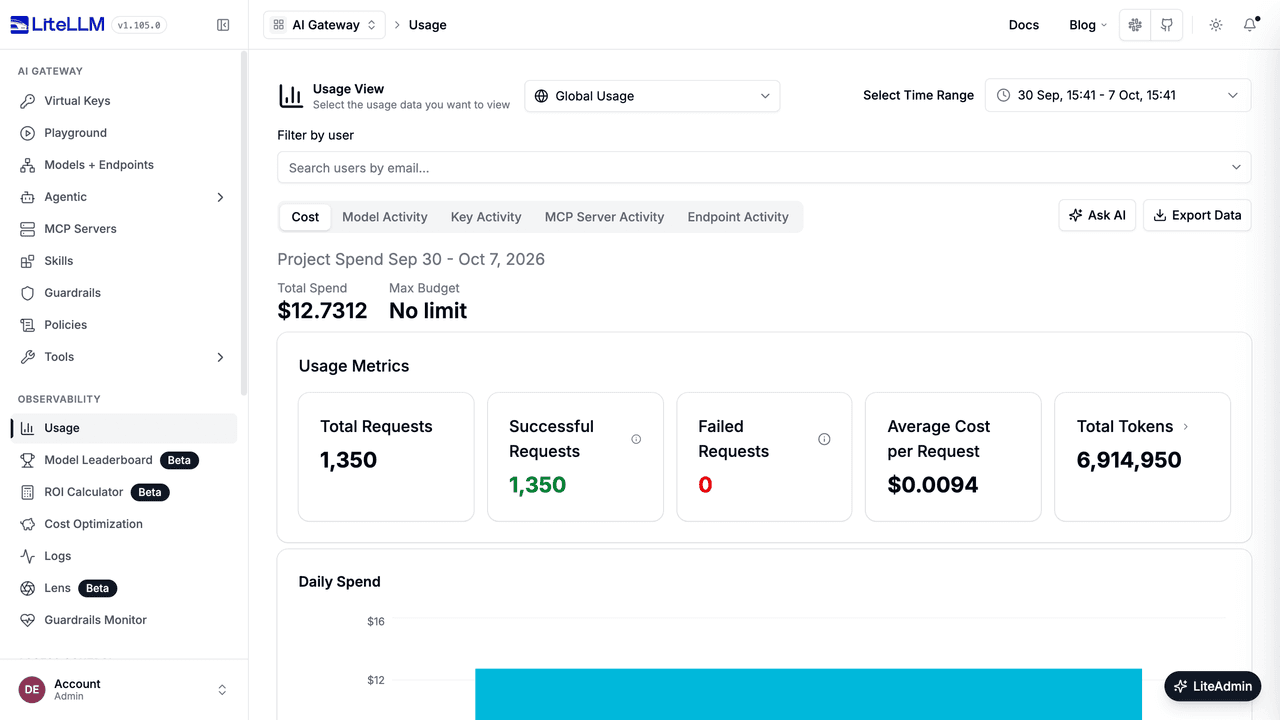
Retries, fallback models, load balancing and caching let requests be handled according to your configuration when a model service fails. LiteLLM also connects to external monitoring and logging tools, so teams review model calls, failures and performance in one place.
Use cases and teams
LiteLLM suits enterprise technical teams that use several model providers, or that run multiple AI applications and need to manage model access, keys and budgets centrally. It is responsible for model calls and their management, and works alongside existing agent platforms, business systems and AI application development tools.
9. MLflow: AI application evaluation and model lifecycle management
Project info
- GitHub: https://github.com/mlflow/mlflow
- GitHub Stars: 28.8k
- License: Apache-2.0
- Deployment: self-hosted MLflow Tracking Server
- Website: https://mlflow.org
Overview
MLflow is an open-source AI engineering platform that helps development teams record experiments, trace AI applications, evaluate models and manage model versions. It covers the development and evaluation of large language models and agents, and also supports experiment tracking, model registry and deployment management for traditional machine learning and deep learning projects.
The point of MLflow is to make the development of models and AI applications recorded and comparable, with ongoing checks on how updates perform. It suits teams that maintain several AI projects over a long period.
Highlights
1. Traces AI agent execution
MLflow records model requests, tool calls, results and related run information, so developers see exactly how an agent completed a task. Tracing is built on OpenTelemetry and supports many AI frameworks, which makes it easier to analyze execution issues across different applications in one place.

2. Evaluates models, prompts and agents
With built-in and custom metrics, you compare how different models, prompts and agent configurations perform on test data. Teams keep prompt versions, test records and evaluation results, and check for quality changes before a model or application update ships.

3. Manages model versions and deployment
Model registry, experiment tracking and version management link each model version to its training and evaluation records. MLflow also provides an AI Gateway and an Agent Server for model access management and agent deployment, helping teams manage the path from development to production.

Use cases and teams
MLflow suits companies with data science, machine learning or AI engineering teams that need ongoing model evaluation, experiment management and version control. For teams that build both traditional machine learning models and LLM applications, it brings the different kinds of AI engineering work under one roof.
10. Langfuse: monitoring for LLM and agent applications
Project info
- GitHub: https://github.com/langfuse/langfuse
- GitHub Stars: 32.8k
- License: MIT (core); some enterprise features require a separate license
- Deployment: self-hosted with Docker Compose or Kubernetes, or Langfuse Cloud
- Website: https://langfuse.com
Overview
Langfuse is an open-source observability and evaluation platform for LLM applications. It traces how large language models and agents run, and analyzes answer quality, response time and call cost. Connected to an existing AI application, it shows development teams what the model actually did and at which step something went wrong.
Langfuse also offers evaluation, prompt version management and usage analytics, which suits teams whose AI applications are already live and need continuous observation and tuning.
Highlights
1. Traces LLM and agent execution
Langfuse records prompts, model responses, tool calls, execution time and token usage, and links the steps into one complete trace. Developers use it to pinpoint the cause of wrong answers, failed calls or slow responses instead of looking only at the final output.

2. Evaluates and experiments on AI applications
Datasets, experiments and evaluation features combine user feedback, human scoring and automated evaluation to compare models and prompts. Teams test before updating an AI application and keep finding quality issues from real usage records.
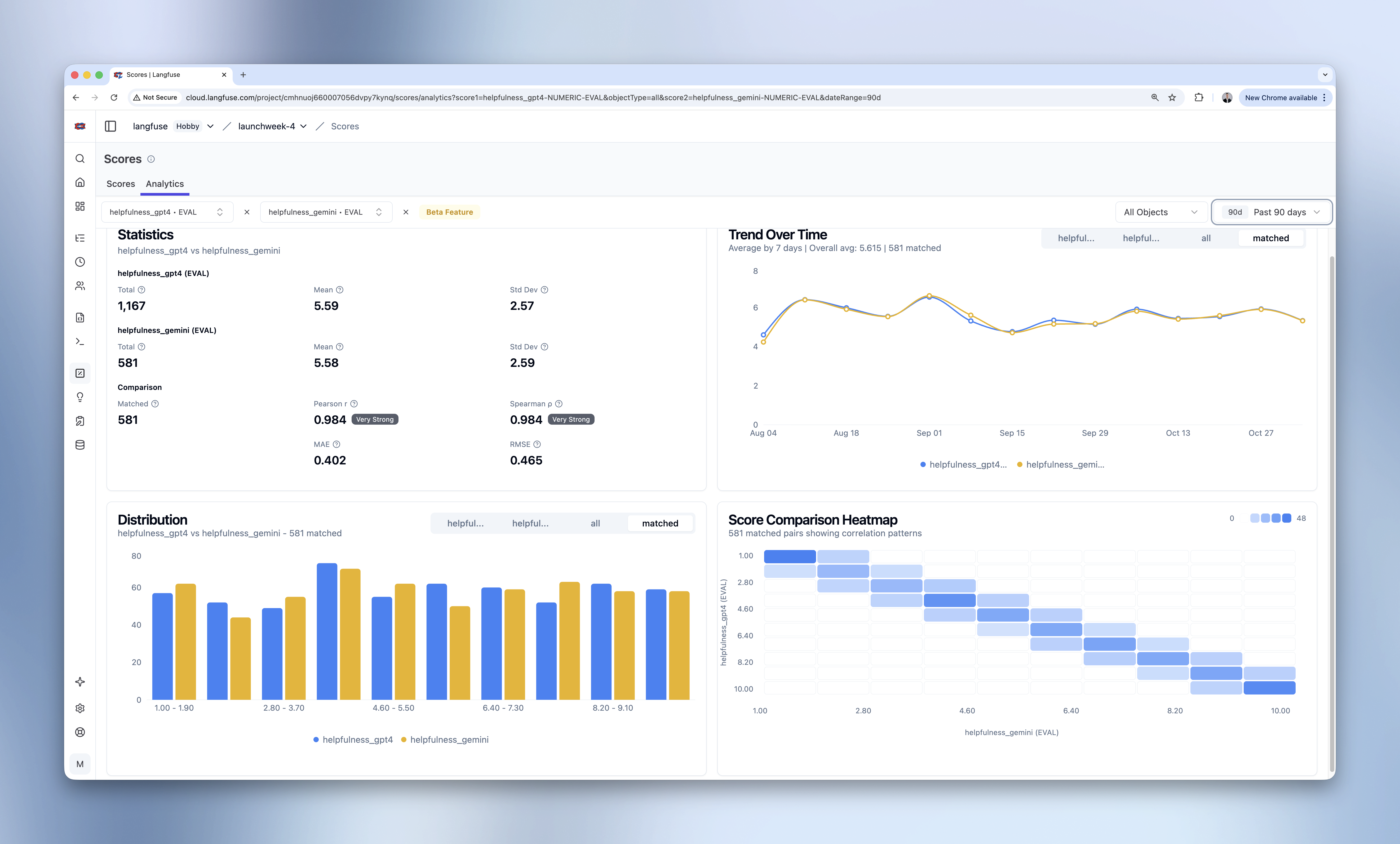
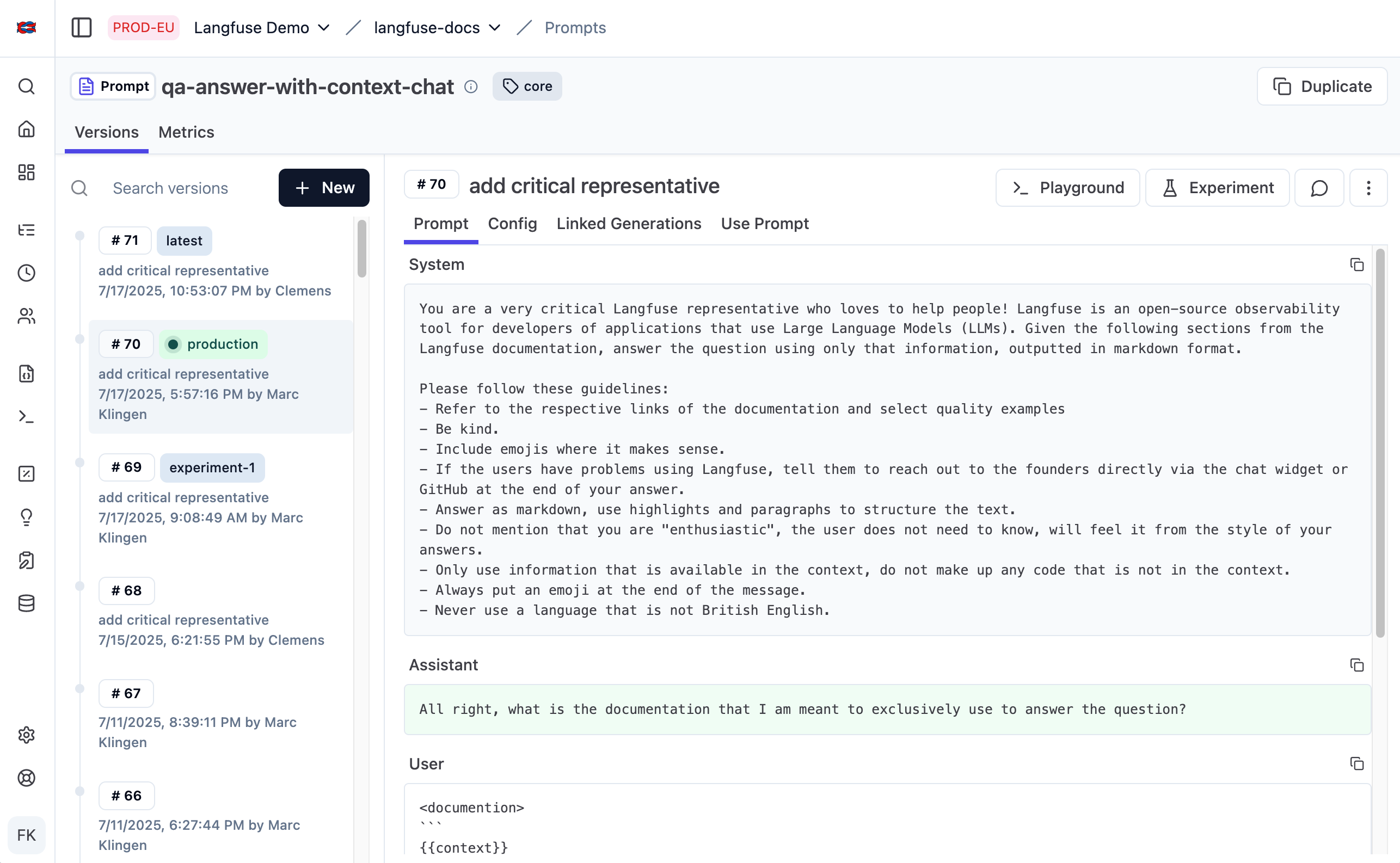
3. Prompt versions and cost management
Centralized prompt management stores versions and links prompts to actual runs, making it easy to compare results before and after a change. The platform also analyzes call volume, latency and cost, so teams see what different models or tasks consume.
Use cases and teams
Langfuse suits development teams that have already deployed AI agents, customer service assistants or other LLM applications and need to keep an eye on answer quality, runtime behavior and call cost. Compared with MLflow, which also covers traditional machine learning and model lifecycle management, Langfuse concentrates on observability, evaluation and prompt tuning for LLM applications.
Closing thoughts
We have covered many popular open-source AI platforms before. Some of them now have well over a hundred thousand GitHub Stars and keep adding features. The 10 projects here show a different kind of choice. Some are less well known and do not try to cover everything, yet each has its own strengths in a specific area: enterprise business system development, process automation, knowledge retrieval or AI application monitoring.
GitHub Stars are a useful reference, but the real decision comes back to what your company needs. If a project does the job you need well, and is easy to use and maintain afterwards, it is worth your time to look into.
⭐ If you found this article helpful, share it with friends who are exploring enterprise AI.
💡 Related reading:
- 10 Open-Source AI Agent Platforms for Business: From Automation to Internal Apps
- 8 Open-Source AI Agent Platforms for Building Internal Tools
- Top 10 Open-Source AI And No-Code Tools for Enterprise Software Development
- 20+ Best Self Hosted Tools for Enterprises with Full Data Control
- How to Start Using AI Without Replacing Existing Business Systems
- How to Design an RBAC (Role-Based Access Control) System
- Top 12 Open-source AI Workflows Projects with the Most GitHub Stars
- Top 8 Open Source AI Assistant Tools by GitHub Stars
- NocoBase 3 docs: How a request gets done
- NocoBase Core documentation