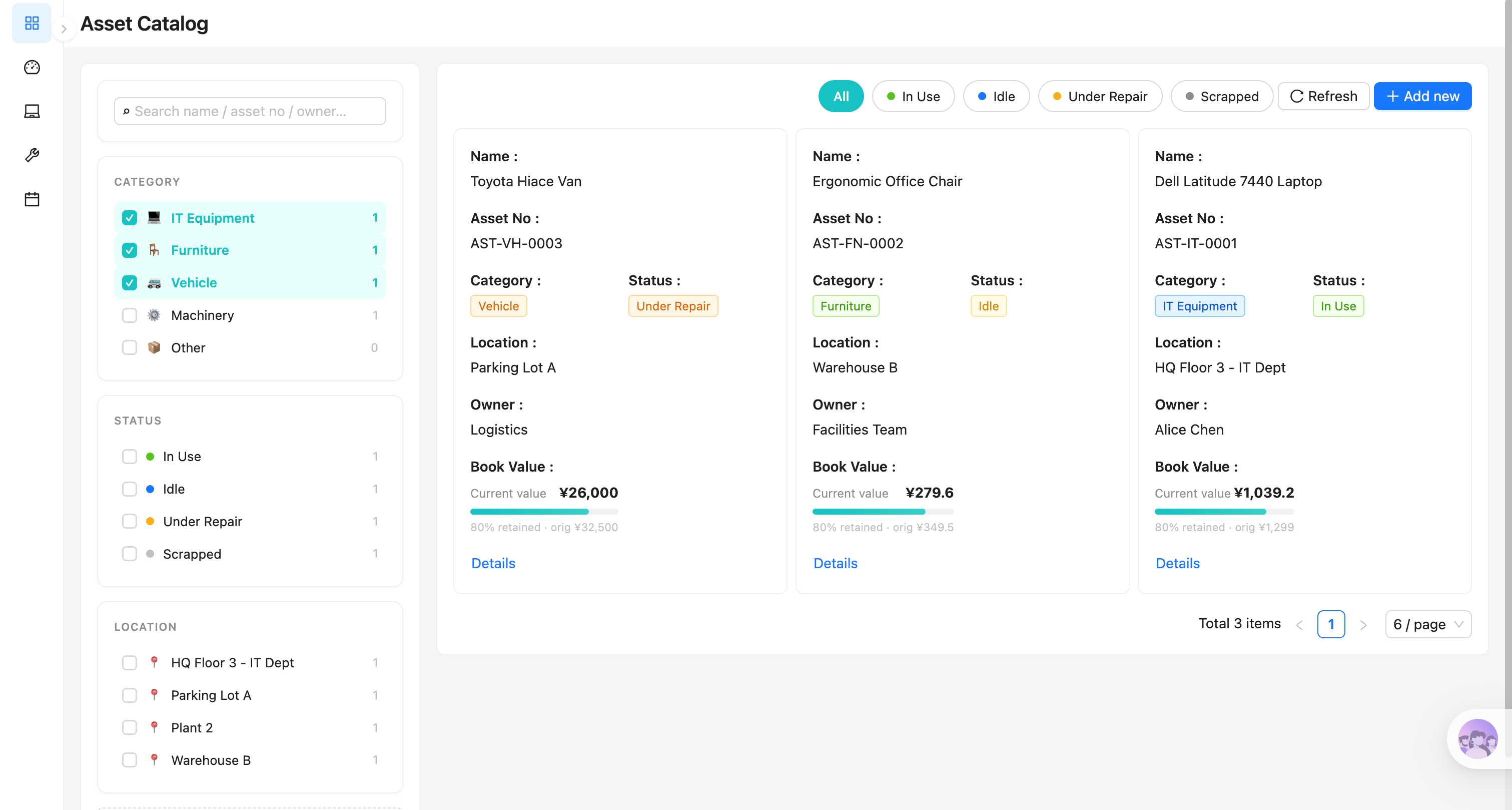
用 AI Agent 搭建同款系統
Build a NocoBase app — Device Management System: a device health dashboard, security & compliance tags, warranty risk, and AI asset-label recognition. Match the layout and signature visuals of this reference prototype: https://static-docs.nocobase.com/solution/templates/25-device-management.html
prompt 裡附的原型連結(HTML)是我們預先做好的設計,僅作能力展示,NocoBase 並不建議「一句話生成整套系統」。使用它進行搭建時,需要搭配 NocoBase Skill 中的「原型解析」(nocobase-prototype-repro),才能得到比較好的效果。
開始前,請先按 AI Agent 快速開始 安裝 NocoBase 並接入你的 AI Agent。AI 生成的結果可能有波動,視模型能力與系統複雜度,可能需要微調或多輪互動。
Introduction
A device management system helps teams centrally manage company-owned computers, mobile phones, tablets, monitors, servers, printers, and network devices. Teams can view device status, health scores, compliance, warranty expiration, and high-risk devices in one place, instead of maintaining asset information across scattered spreadsheets.
These records can also be managed as a NocoBase-based internal business system, with device records, assignments, maintenance status, warranty dates, owners, usage history, and device lifecycle organized through configurable data models, role permissions, views, workflows where needed, and operation history.
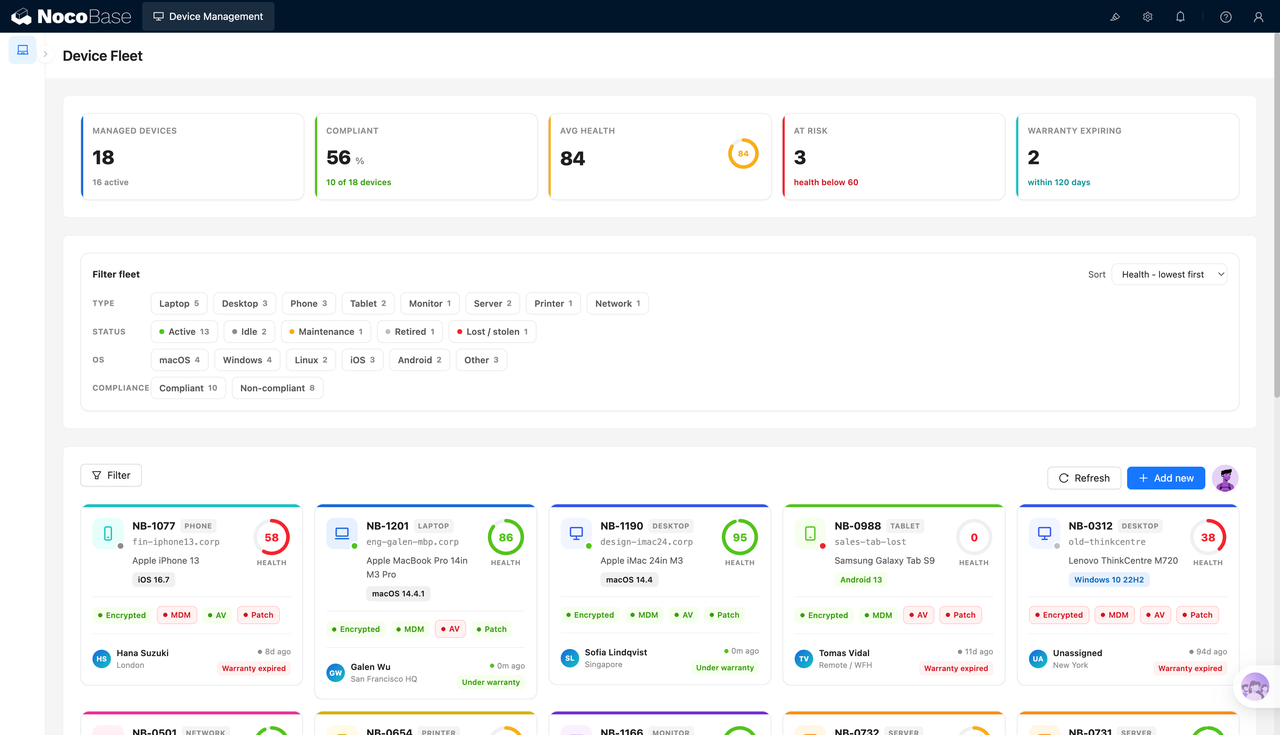
The page is built around a device asset dashboard. It shows managed devices, compliance rate, average health score, risky devices, and devices with warranties expiring soon. Each device card can display the asset number, hostname, device model, operating system version, security status, owner, location, and warranty status.
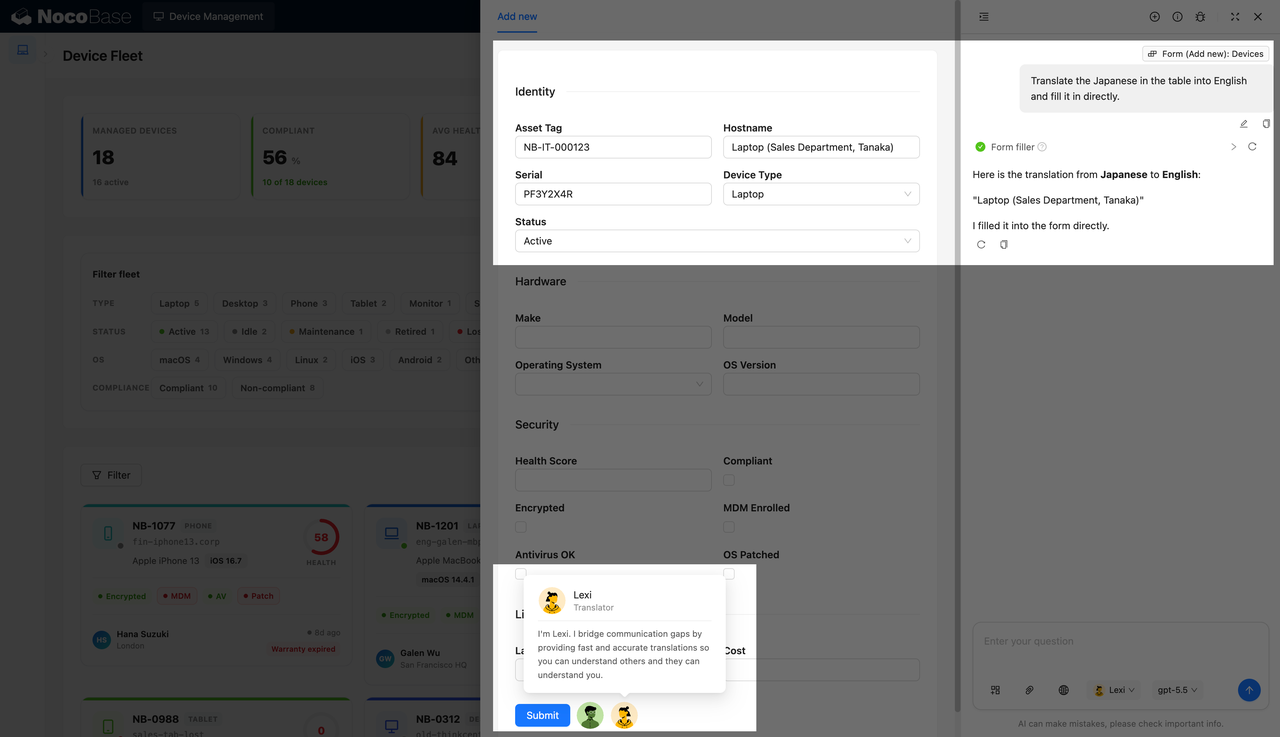
With the help of AI Agent, teams can generate asset status analysis reports from device data. They can also recognize asset numbers, device names, device types, serial numbers, and usage status from asset label images, then automatically fill the extracted data into NocoBase forms. When labels contain Japanese or other languages, AI can translate the content before writing it into fields.
This system is suitable for IT operations, administrative asset management, information security, office management, and device procurement teams. It is especially useful for companies that need to maintain device ledgers, check security compliance, and track warranty risks over time.
Device overview showing health, compliance, and warranty risks:
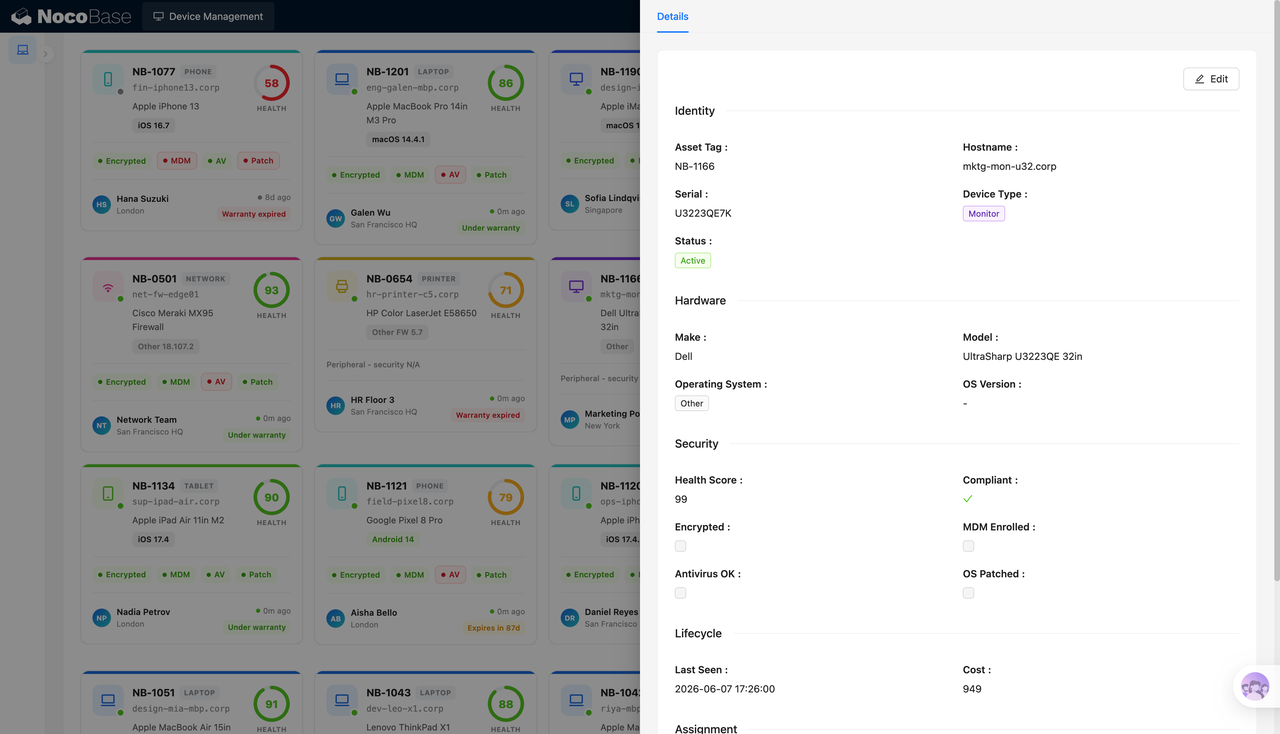
Device details recording identity, hardware, and security information:
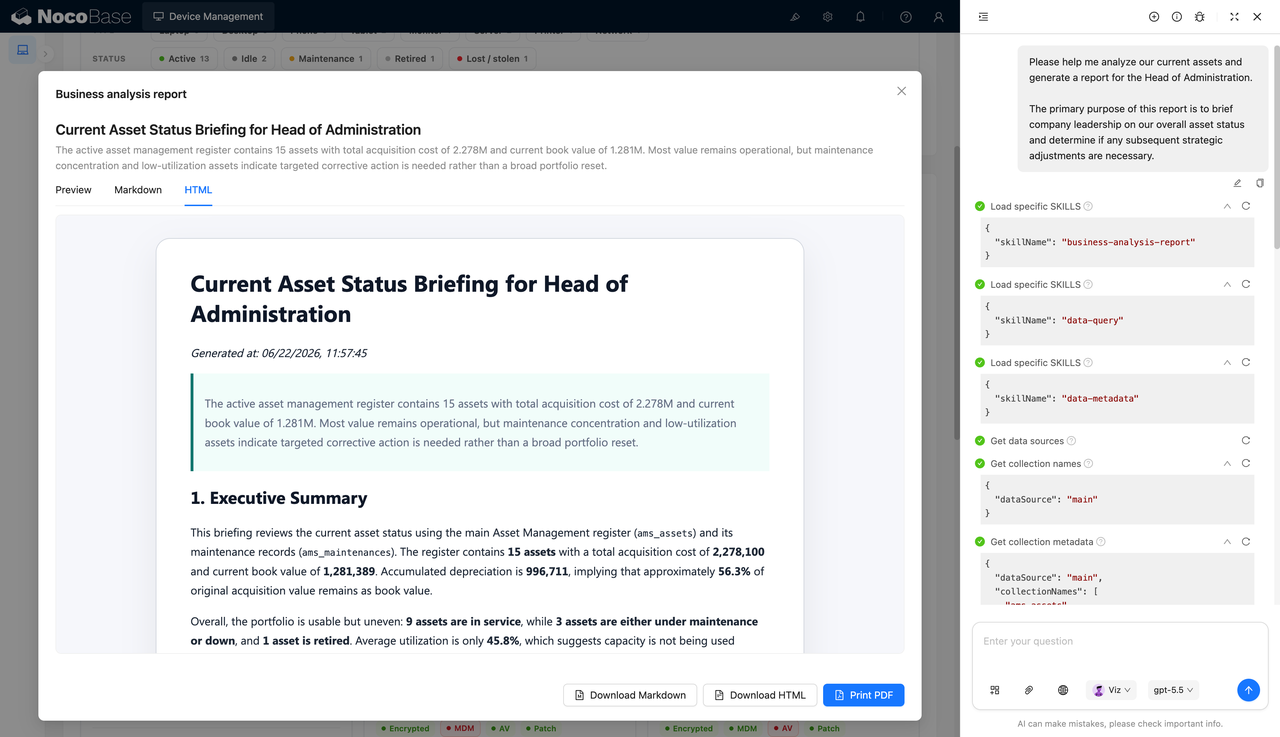
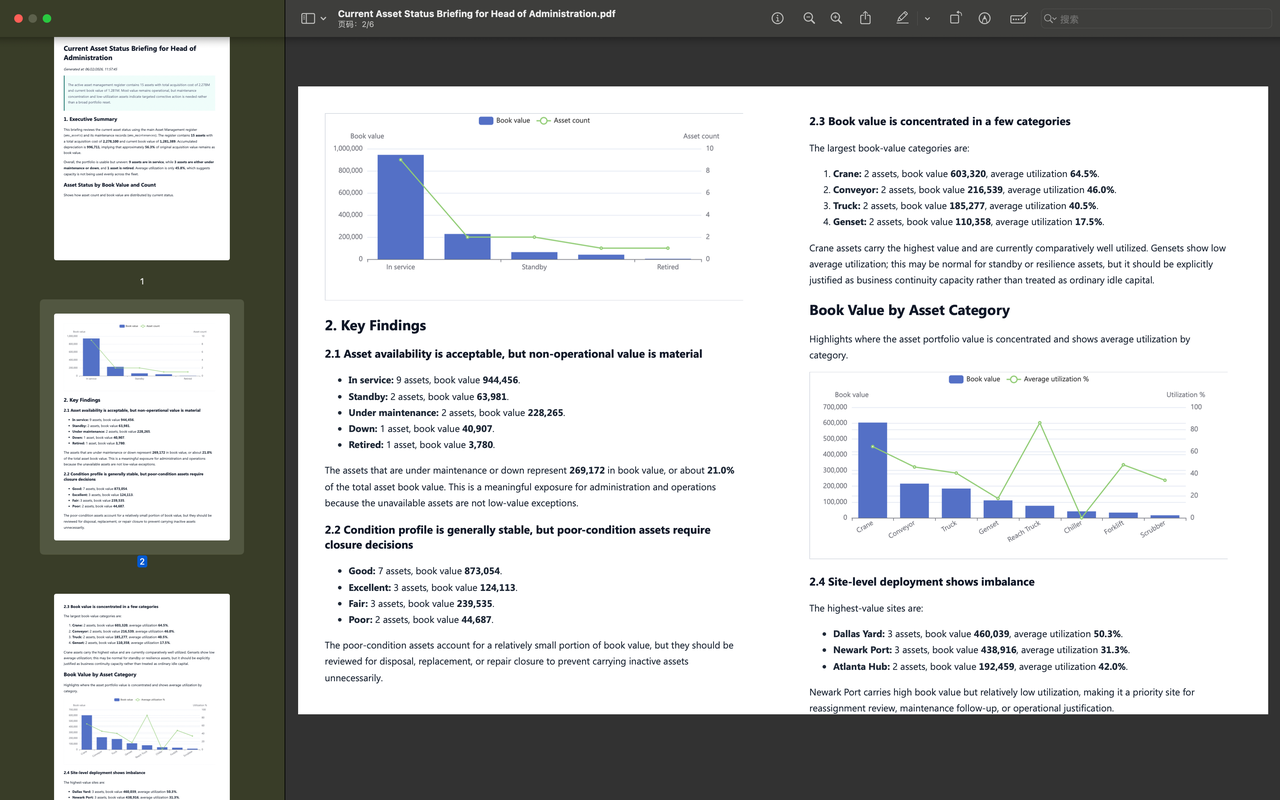
AI-generated asset status analysis report:
PDF report showing asset value and utilization:
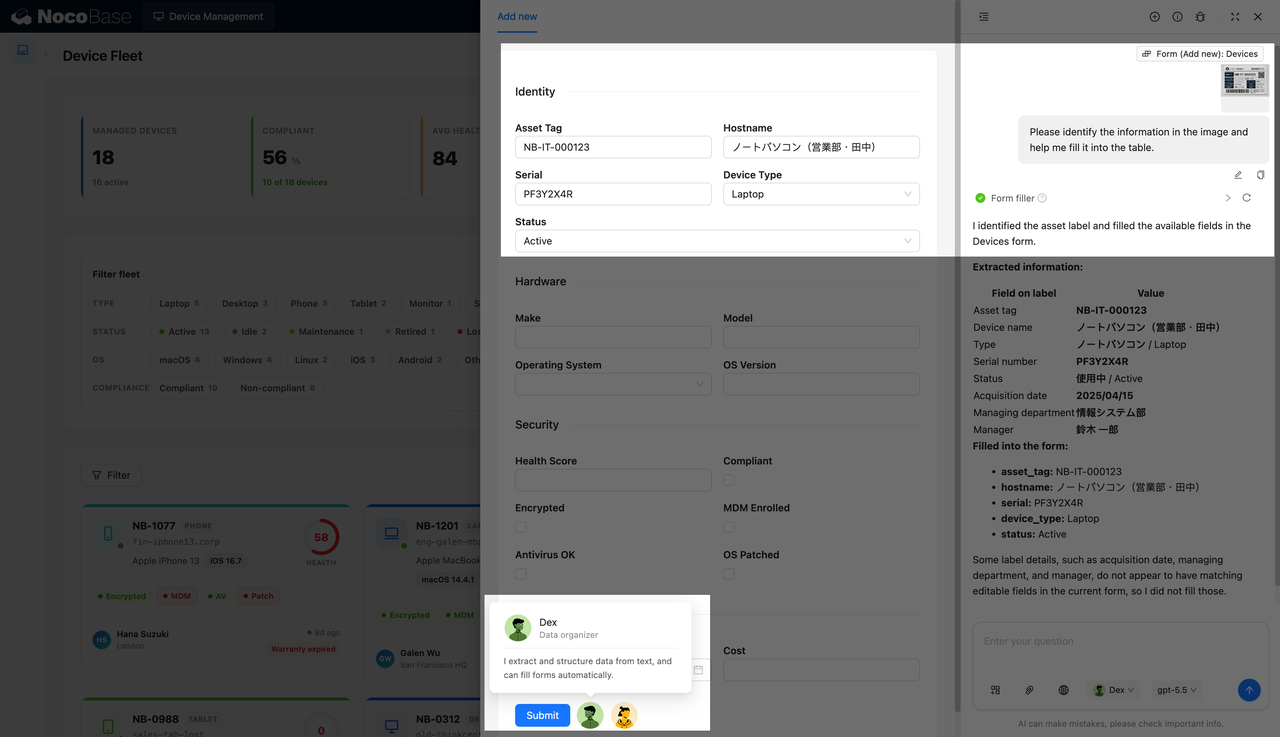
AI recognizing a Japanese asset label and filling a form:
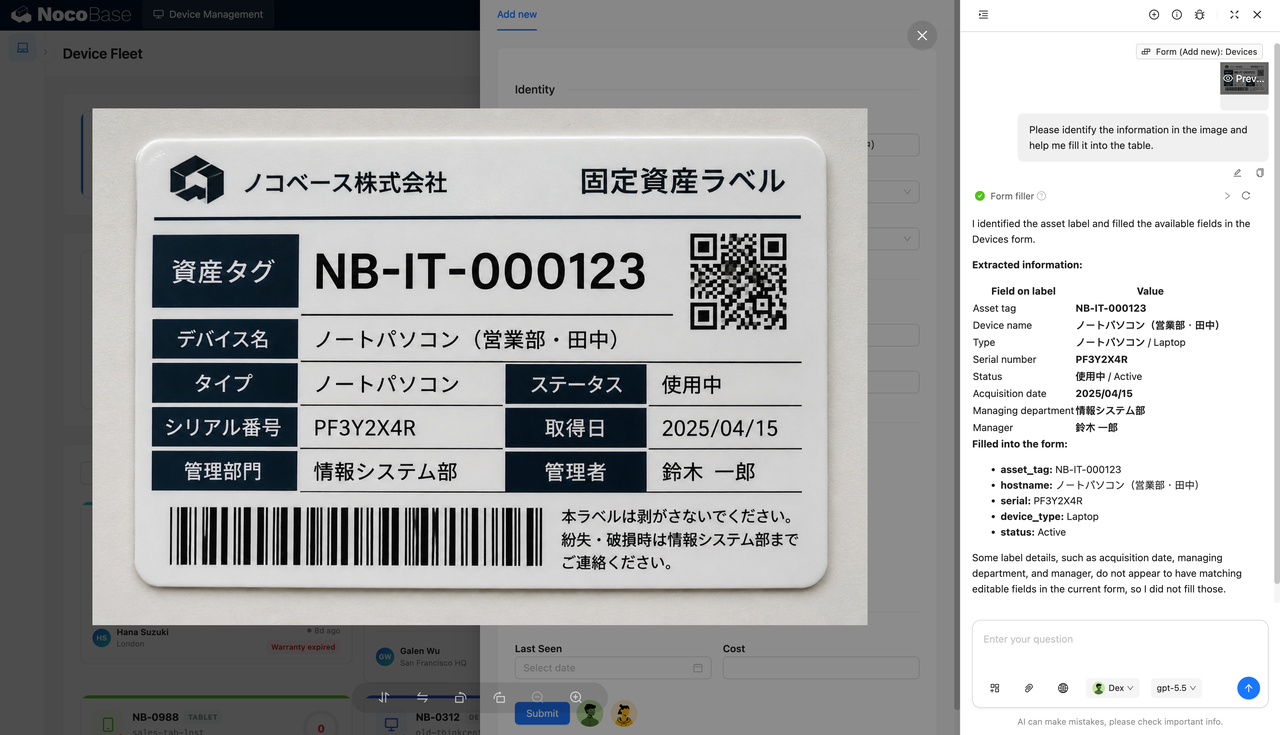
Asset label image containing the asset number and management information:
AI translating the Japanese device name into English:
What Problems Can a Device Management System Solve?
As the number of company devices grows, teams often face scattered asset information, delayed status updates, unclear ownership, and difficulty assessing security compliance quickly.
IT teams need to know which devices are active and which are idle, under maintenance, retired, lost, or stolen. They also need to track whether devices are encrypted, enrolled in MDM, protected by antivirus software, and updated with system patches, so that security risks are not overlooked.
AI can reduce manual organization and data entry work. After an asset label is photographed, AI can extract the asset number, device name, type, serial number, and status. If the label contains Japanese, AI can translate the content before filling the form, reducing manual transcription and translation errors.
AI asset reports are also useful for management review. Based on the current asset ledger, the system can generate summaries covering asset counts, book value, maintenance risks, utilization, and recommended actions, helping teams make device adjustment and procurement decisions.
Key Features
Device Asset Overview Dashboard
- Managed device statistics: Shows the number of devices currently under management, such as 18 devices and 16 active devices.
- Compliance rate: Displays device compliance, such as 56% compliant and 10 compliant devices.
- Average health score: Shows the overall device health level, such as an average health score of 84.
- Risky devices: Marks devices with health scores below 60, helping teams prioritize inspections.
- Warranty alerts: Shows devices with warranties expiring soon, such as devices expiring within 120 days.
Device Card Management
- Asset number: Each card displays the device asset number, such as NB-1077, NB-1201, and NB-1190.
- Device type: Shows types such as mobile phones, laptops, desktops, tablets, and network devices.
- Hostname and model: Displays the hostname, brand model, and operating system version.
- Security tags: Marks encryption, MDM, antivirus, and patch status.
- Owner and location: Shows the responsible person and location, such as London, San Francisco HQ, and Singapore.
Compliance and Security Status Management
- Health score: Each device has a health score, and low-score devices can be handled first.
- Compliance status: Distinguishes compliant and non-compliant devices for security checks.
- Encryption status: Indicates whether a device is encrypted.
- MDM status: Indicates whether a device is enrolled in mobile device management.
- Antivirus and patches: Records antivirus and system patch status to help IT teams identify security gaps.
AI Asset Tag Recognition and Form Filling
- Label image recognition: AI can read device information from asset label images.
- Key field extraction: Supports extracting asset number, device name, type, serial number, status, acquisition date, managing department, and administrator.
- Automatic form writing: AI can fill the recognized results into the new device form.
- Field matching reminders: If label information has no corresponding field, AI can indicate which content was not filled in.
- Manual review before submission: After recognition, staff can review the fields and add brand, model, cost, and other details as needed.
Why Build a Device Management System with AI and NocoBase?
A device management system needs to cover asset ledgers, device status, health scores, security compliance, warranty risks, owners, locations, cost information, and asset reports. It supports IT, administration, and information security teams in managing the full device lifecycle.
Pure Vibe Coding may quickly generate a device list or asset card at the beginning, but many details appear later. Different device types need different fields. Security checks need encryption, MDM, antivirus, and system patch status. Low-health devices need to be marked in time. Devices nearing warranty expiration need early reminders. Transfers, maintenance records, and owner changes also need continuous tracking.
NocoBase acts more like infrastructure and scaffolding for enterprise applications. It already provides data models, permissions, workflows, operation history, audit logs, notifications, single sign-on, page building, and plugin extensions. AI helps speed up system building and page generation, while NocoBase keeps the system maintainable, extensible, and suitable for long-term operation.
Teams can first use AI to generate device dashboards, asset cards, detail pages, filters, and asset analysis reports. Then they can continue adjusting device types, field structures, compliance rules, health score logic, permission scopes, and report content in NocoBase. When device management policies change later, the system does not need to be rebuilt from scratch.
A device management system built this way is better suited for long-term use by IT, administration, information security, and management teams. It helps them continuously understand device status, identify security risks, track warranty conditions, and support asset stocktaking and management reporting.
FAQ
1.Can a device management system show the overall device status?
Yes. The system can centrally display managed device count, compliance rate, average health score, risky devices, and devices with warranties expiring soon.
2.Does the system support filtering by device type?
Yes. The screenshots show filters for laptops, desktops, mobile phones, tablets, monitors, servers, printers, and network devices.
3.Does the system support filtering by device status?
Yes. The system supports statuses such as active, idle, maintenance, retired, lost, and stolen.
4.Can the system show details for each device?
Yes. The detail page can show asset number, serial number, hostname, device type, brand model, operating system, health score, compliance status, and cost information.
5.What is the purpose of the device health score?
The health score helps teams quickly assess device risk. Devices with scores below 60 can be prioritized for inspection, such as the 3 risky devices shown in the screenshot.
6.Can the system manage security compliance status?
Yes. Device cards and detail pages can record encryption, MDM, antivirus, and system patch status.
7.Does the system support warranty expiration reminders?
Yes. The dashboard can show devices with warranties expiring soon, and device cards can mark whether a device is under warranty, expiring soon, or already expired.
8.Can AI generate device asset analysis reports?
Yes. AI can generate asset status reports from the device ledger, analyzing asset count, book value, utilization, maintenance risks, and recommended actions.
9.Can AI reports be exported?
Yes. The screenshots show support for Markdown, HTML, and PDF output, making it easier to report, archive, or share with management.
10.Can AI recognize device asset labels?
Yes. AI can recognize asset number, device name, type, serial number, status, acquisition date, managing department, administrator, and other information from asset label images.
11.Can AI fill the recognized results into forms?
Yes. In the screenshot, AI fills the asset number, hostname, serial number, device type, and status into the new device form.
12.Does the system support multilingual label processing?
Yes. The screenshots show that AI can recognize a Japanese asset label and translate the Japanese device name into English before filling the form.
13.Can Claude Code, Codex, Cursor, and OpenCode help build this system?
Yes. These AI Agents can connect to NocoBase and help generate device dashboards, asset cards, detail pages, forms, reports, and field structures. Teams can then continue adjusting the system in NocoBase.
14.How is this different from building with pure Vibe Coding?
Pure Vibe Coding is better suited for quickly generating page prototypes. NocoBase is better for managing device data, permissions, status rules, security compliance, report output, and later iterations.
15.Does the system support permission control?
Yes. Permissions can be configured in NocoBase. For example, IT teams can edit device information, administrative teams can view asset status, and management can view statistics and analysis reports.
16.Can device fields and rules be adjusted later?
Yes. Device types, fields, filter conditions, compliance rules, health score logic, page layouts, and report content can all be adjusted later.
17.Is this system suitable for formal enterprise use?
Yes. NocoBase can support device ledgers, permissions, pages, and process configuration, while AI can reduce system building, data entry, and report preparation work. This makes it suitable for long-term maintenance and continuous iteration.