用 AI Agent 搭建同款系統
Build an App with NocoBase — Candidate Management System: Candidate profiles, AI resume parsing, recruitment stages, interview rooms, and multi-dimensional scorecards. The layout and signature visual style can reference this prototype: https://static-docs.nocobase.com/solution/templates/43-candidate-management.html
prompt 裡附的原型連結(HTML)是我們預先做好的設計,僅作能力展示,NocoBase 並不建議「一句話生成整套系統」。使用它進行搭建時,需要搭配 NocoBase Skill 中的「原型解析」(nocobase-prototype-repro),才能得到比較好的效果。
開始前,請先按 AI Agent 快速開始 安裝 NocoBase 並接入你的 AI Agent。AI 生成的結果可能有波動,視模型能力與系統複雜度,可能需要微調或多輪互動。
What is a candidate management system?
A candidate management system is an AI-powered business system for recruiting, HR, and interview collaboration. It helps teams manage candidate information, job matching, resume parsing, interview scheduling, and scoring results. Teams can describe the recruiting workflow and page structure they need in natural language, and an AI Agent can call NocoBase tables, forms, detail pages, calendars, boards, and scoring components to build the system.
After the basic structure is in place, NocoBase AI employees can continue extracting information from resumes, such as names, job titles, years of experience, companies, email addresses, and candidate sources. In this example, the system can manage 9 candidates, 5 recruiting stages, multiple job openings, and several interview scoring dimensions, making the process from resume collection to interview evaluation clearer and easier to maintain.
Key value
- ⏱️ Build candidate lists, resume forms, and interview scoring pages in about 1 hour
- 📄 Use AI to extract key resume information, such as names, roles, experience, companies, and email addresses
- 📊 Manage candidate progress across stages such as screening, onsite interviews, review, hired, and rejected
- ⭐ Support multi-dimensional interview scoring, including technical skills, problem solving, communication, and culture fit
System preview
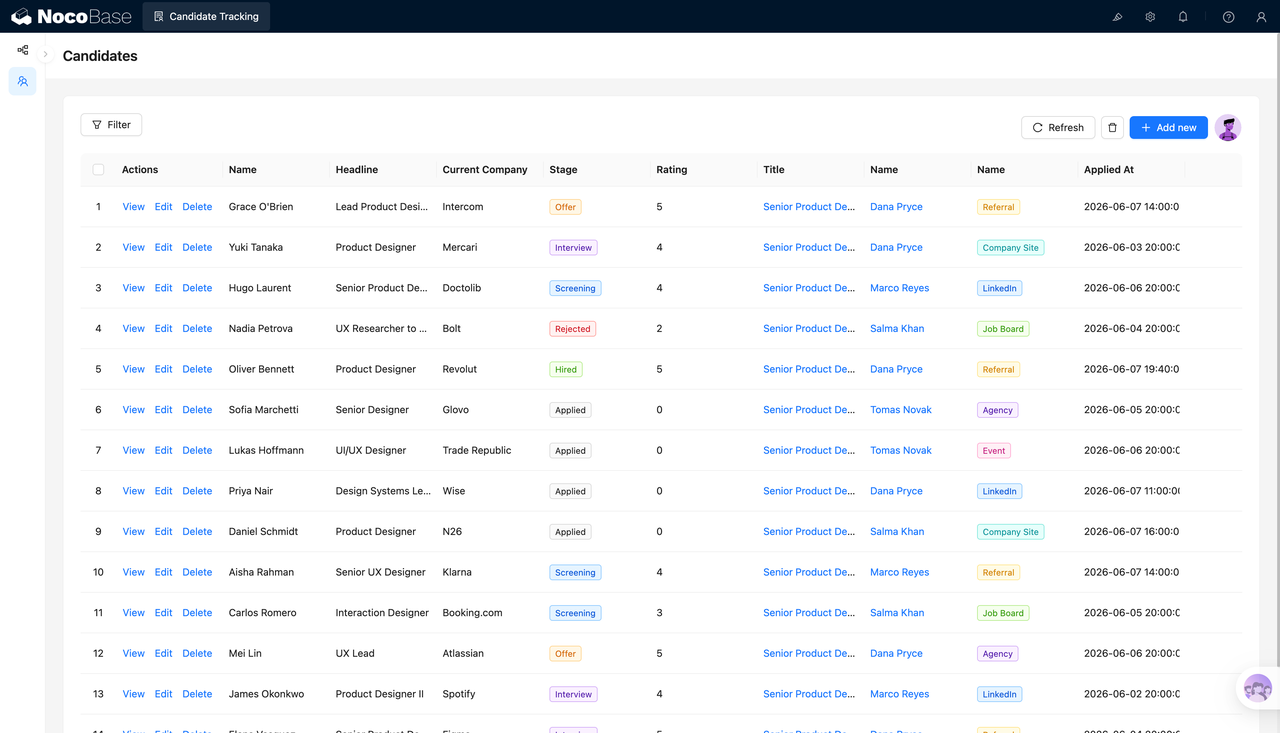
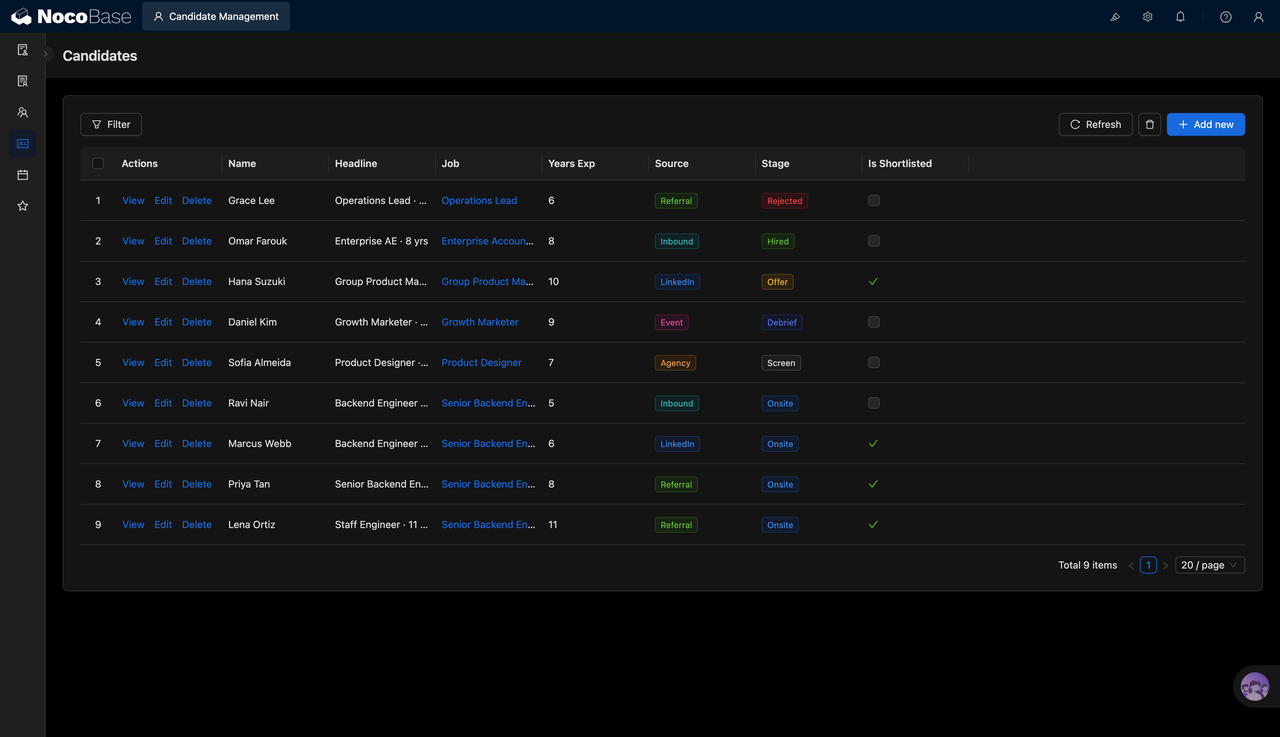
1.Manage all candidates in one list
The candidate list brings names, job titles, applied positions, years of experience, candidate sources, hiring stages, and shortlist status into one view. HR teams can quickly understand each candidate’s current status and distinguish between hired, rejected, offered, review-stage, and onsite interview candidates.
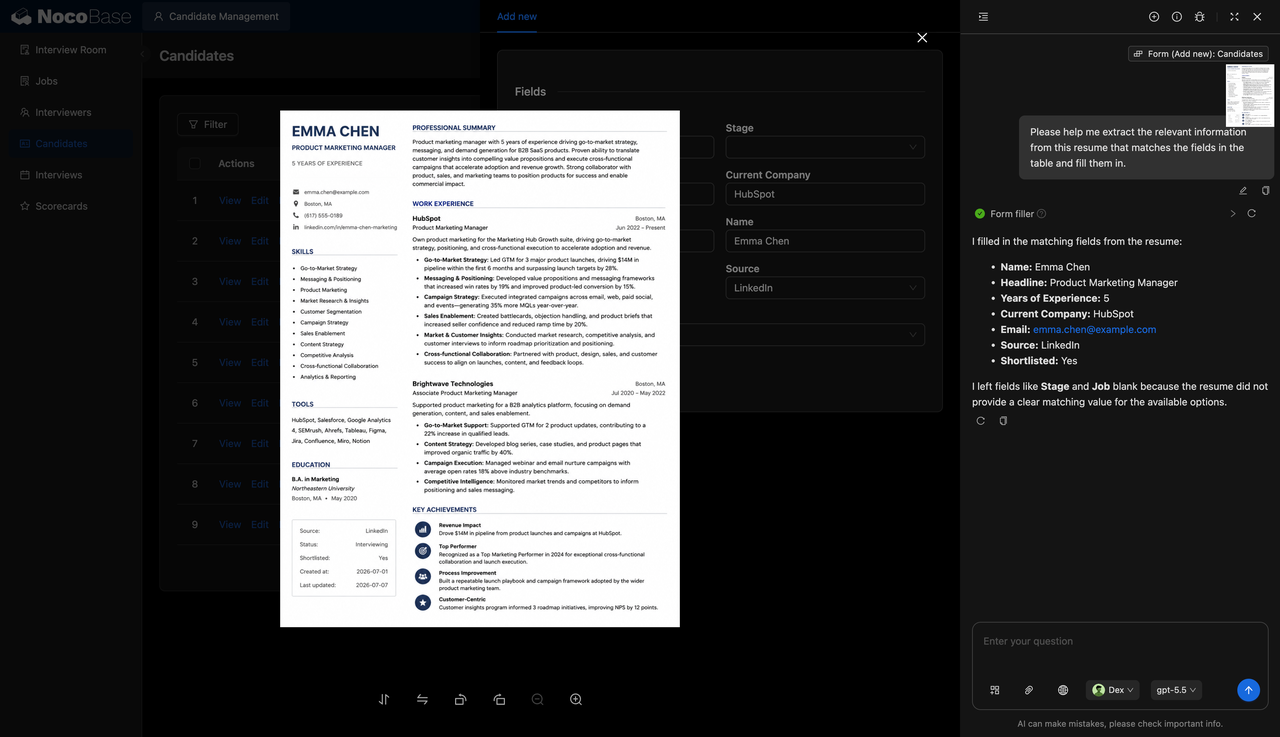
2.Extract resume information with AI
NocoBase AI employees can read candidate resumes and automatically extract fields such as name, job title, years of experience, current company, email address, source, and shortlist status. Recruiters only need to confirm the extracted results and fill in business-specific fields such as hiring stage and applied position, reducing repetitive manual entry.
3.Review resumes and validate fields together
The system lets HR review the original resume while entering candidate information. Experience, skills, education, and key achievements can be checked against structured form fields in the same workflow, reducing the risk of missing or incorrect information.
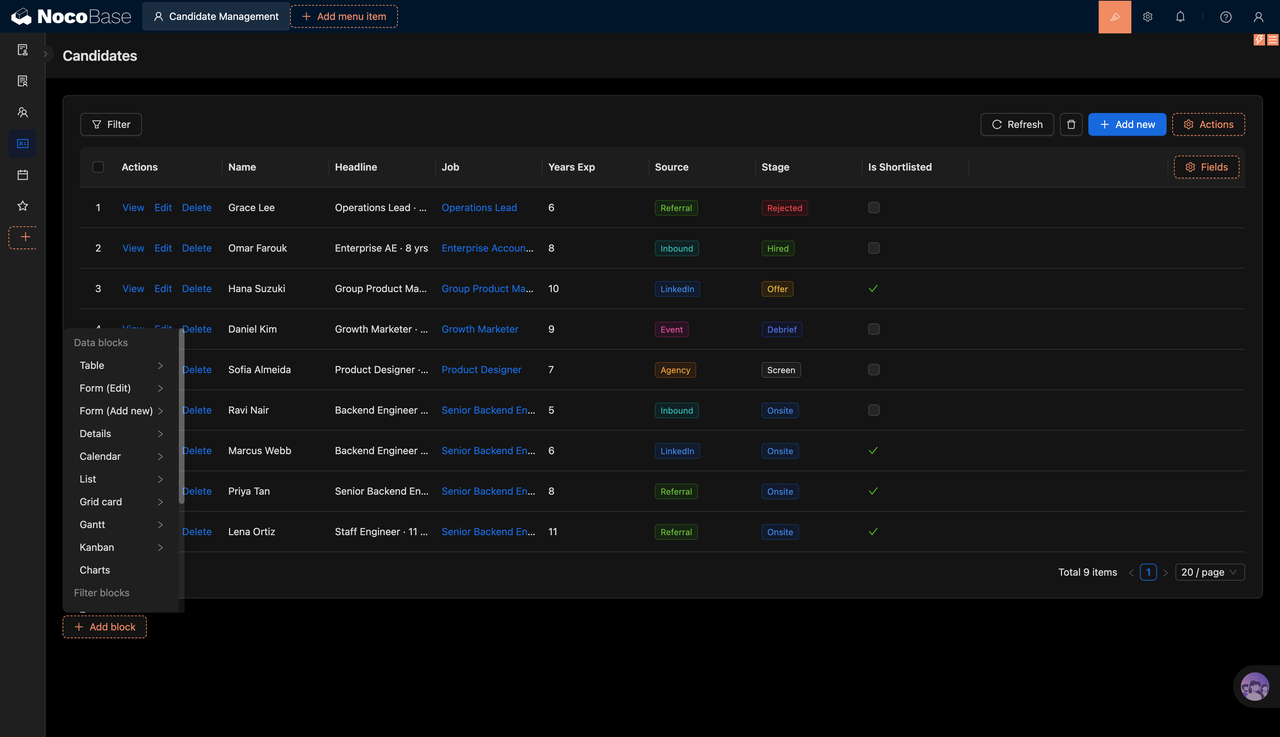
4.Configure recruiting pages with data blocks
NocoBase supports recruiting pages built with tables, forms, detail pages, calendars, lists, boards, charts, and other data blocks. Teams can extend candidate views, interview scheduling, scoring records, and recruiting analysis based on their own workflow, without building an admin system from scratch.
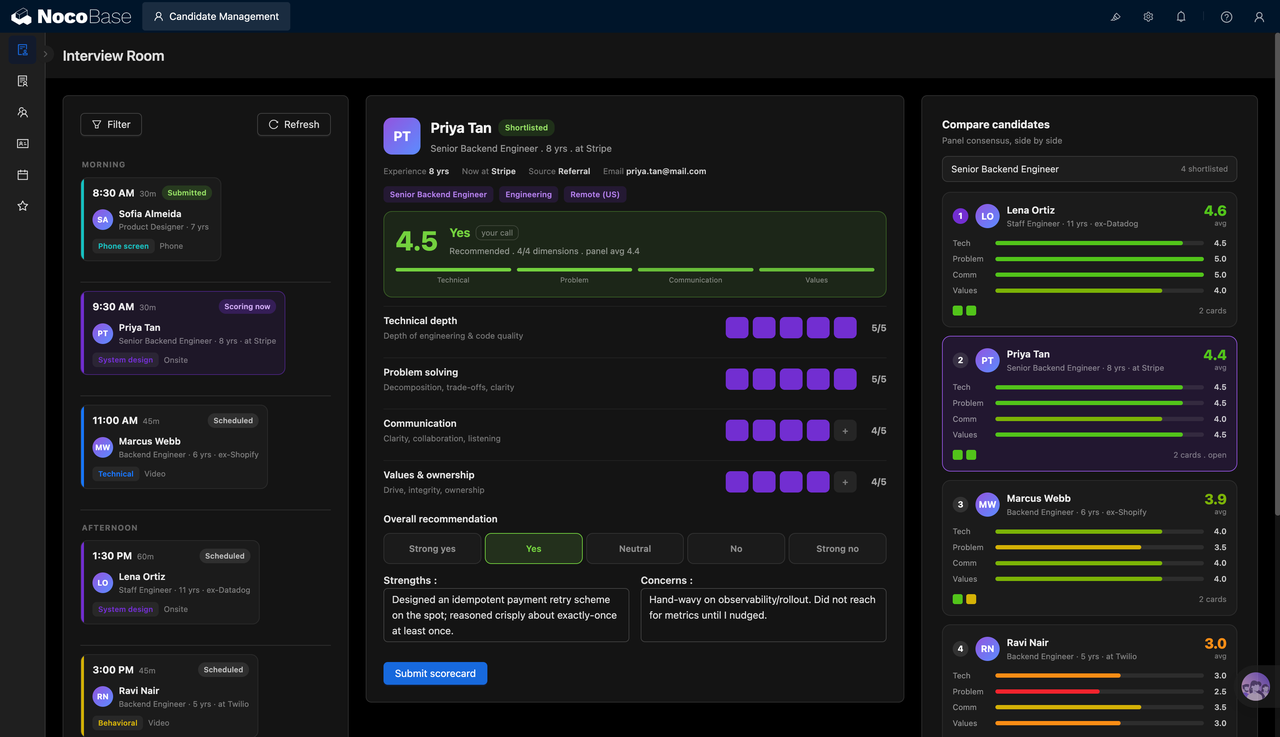
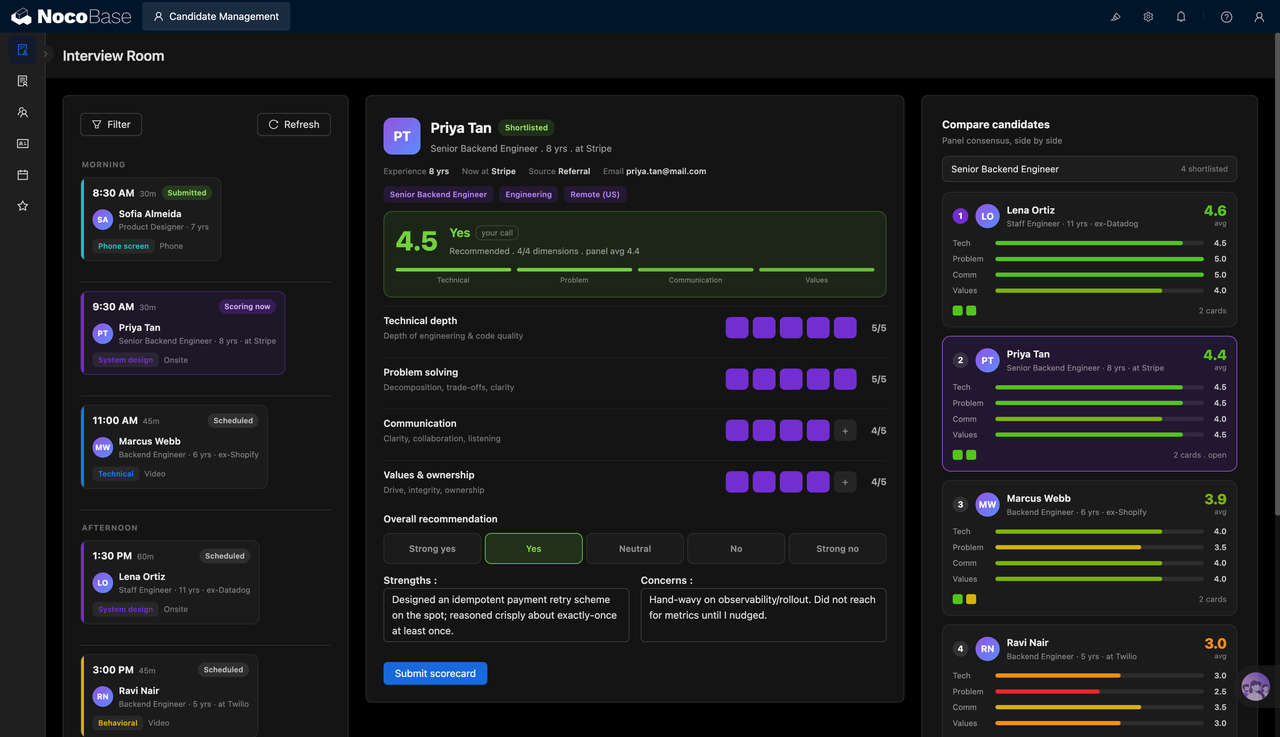
5.Use interview rooms and scorecards
The interview room brings daily interview schedules, candidate information, interview conclusions, and scorecards into one page. Interviewers can score candidates by technical depth, problem solving, communication, and culture fit, then compare multiple shortlisted candidates side by side.
Use cases
- Candidate management for recruiting: Manage resumes, sources, stages, positions, and shortlist status in one system.
- AI resume parsing system: Extract names, email addresses, years of experience, current companies, and job titles from resumes.
- Interview workflow management: Coordinate phone screens, onsite interviews, technical interviews, and review stages.
- Candidate scoring system: Record interview scores by competency and compare multiple candidates for the same role.
Why choose a candidate management system?
| Comparison | Excel / Resume folders | Candidate management system |
|---|---|---|
| Candidate information | ❌ Resumes, notes, and statuses are stored separately | ✅ Candidate information is managed in one place |
| Resume entry | ❌ Recruiters manually copy names, emails, companies, and experience | ✅ AI extracts resume fields, and humans only need to confirm |
| Recruiting stages | ❌ Status updates are inconsistent and easy to miss | ✅ Candidates move through stages such as screening, interview, review, and offer |
| Interview scheduling | ❌ Scheduling depends on calendars and chat tools | ✅ The interview room shows the day’s schedule in one place |
| Interview scoring | ❌ Scores are scattered across documents or spreadsheets | ✅ Scorecards record evaluations across multiple dimensions |
| Candidate comparison | ❌ Comparison tables must be prepared manually | ✅ Candidates can be compared by role and performance |
| System extension | ❌ New workflows require reorganizing files | ✅ Forms, boards, calendars, and reports can be extended over time |
Core features
1.Candidate information management
Maintain candidate names, job titles, applied positions, years of experience, sources, recruiting stages, and shortlist status in one place, helping HR teams track hiring progress consistently.
2.AI resume parsing and form filling
NocoBase AI employees can extract key information from resumes and fill it into candidate forms, reducing repetitive entry while keeping the results easy to review manually.
3.Recruiting workflow configuration
Using NocoBase tables, forms, detail pages, calendars, boards, and charts, teams can build a candidate management system that matches their own recruiting process.
4.Interview scoring and candidate comparison
Score candidates by technical skills, problem solving, communication, culture fit, and other dimensions, then compare candidates for the same position to support interview decisions.
FAQ
1.What teams is a candidate management system suitable for?
It is suitable for HR teams, recruiting teams, startups, technical teams, and recruiting agencies, especially when they need to manage multiple positions, candidates, and interview rounds at the same time.
2.Can the system parse resumes automatically?
Yes. NocoBase AI employees can extract information such as names, job titles, years of experience, current companies, email addresses, and candidate sources from resumes, then fill the results into the corresponding fields.
3.Does it support interview scoring?
Yes. The system can record interview scores across dimensions such as technical depth, problem solving, communication, and culture fit. It can also store interviewer notes on strengths, risks, and final recommendations.
4.Can it manage recruiting workflows for different roles?
Yes. Candidates can be linked to different roles and moved through stages such as screening, onsite interview, review, offer, hired, and rejected, making it suitable for parallel hiring across multiple positions.
5.Why build a candidate management system with AI + NocoBase?
AI Agents can use natural language instructions to call NocoBase components and build candidate tables, resume forms, interview rooms, and scoring pages. NocoBase provides the data structure, permissions, views, and extension capabilities needed for long-term use. Combined with NocoBase AI employees for resume extraction and information organization, it is easier to maintain than a recruiting process spread across Excel, email, and folders.