用 AI Agent 搭建同款系統
Build a NocoBase app — Document Approval Workflow System: an approval board, a document registration form, SLA risk, and an AI approval analysis report. Match the layout and signature visuals of this reference prototype: https://static-docs.nocobase.com/solution/templates/35-document-approval.html
prompt 裡附的原型連結(HTML)是我們預先做好的設計,僅作能力展示,NocoBase 並不建議「一句話生成整套系統」。使用它進行搭建時,需要搭配 NocoBase Skill 中的「原型解析」(nocobase-prototype-repro),才能得到比較好的效果。
開始前,請先按 AI Agent 快速開始 安裝 NocoBase 並接入你的 AI Agent。AI 生成的結果可能有波動,視模型能力與系統複雜度,可能需要微調或多輪互動。
Introduction
A document approval workflow is useful for managing approval materials such as contracts, purchase orders, invoices, offers, policy documents, statements of work, and NDAs. Teams can view documents awaiting signature, items under legal review, overdue signatures, and documents signed in the current cycle in one place, making it easier to understand approval pressure and delay risks.
These records can also be managed as a NocoBase-based internal business system, with document approvals, approval nodes, SLA deadlines, legal review, signing timelines, risk levels, and audit records organized through configurable data models, role permissions, views, workflows where needed, and operation history.
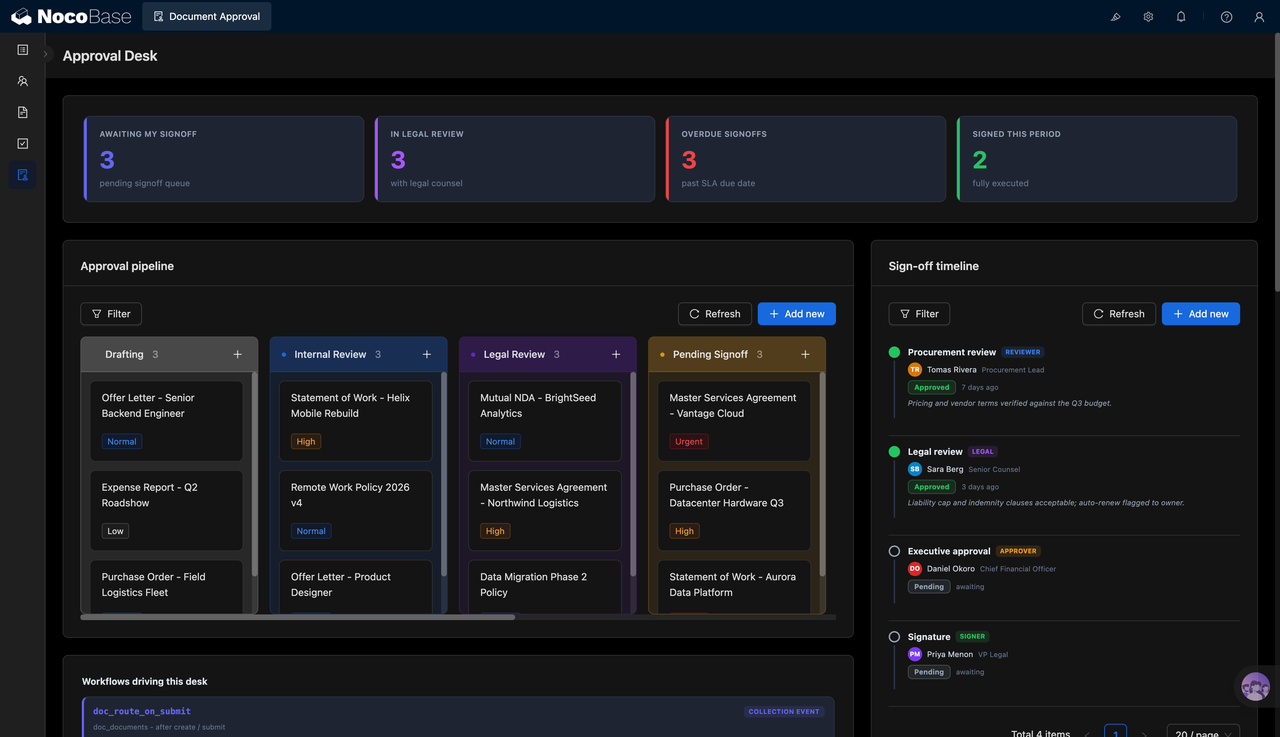
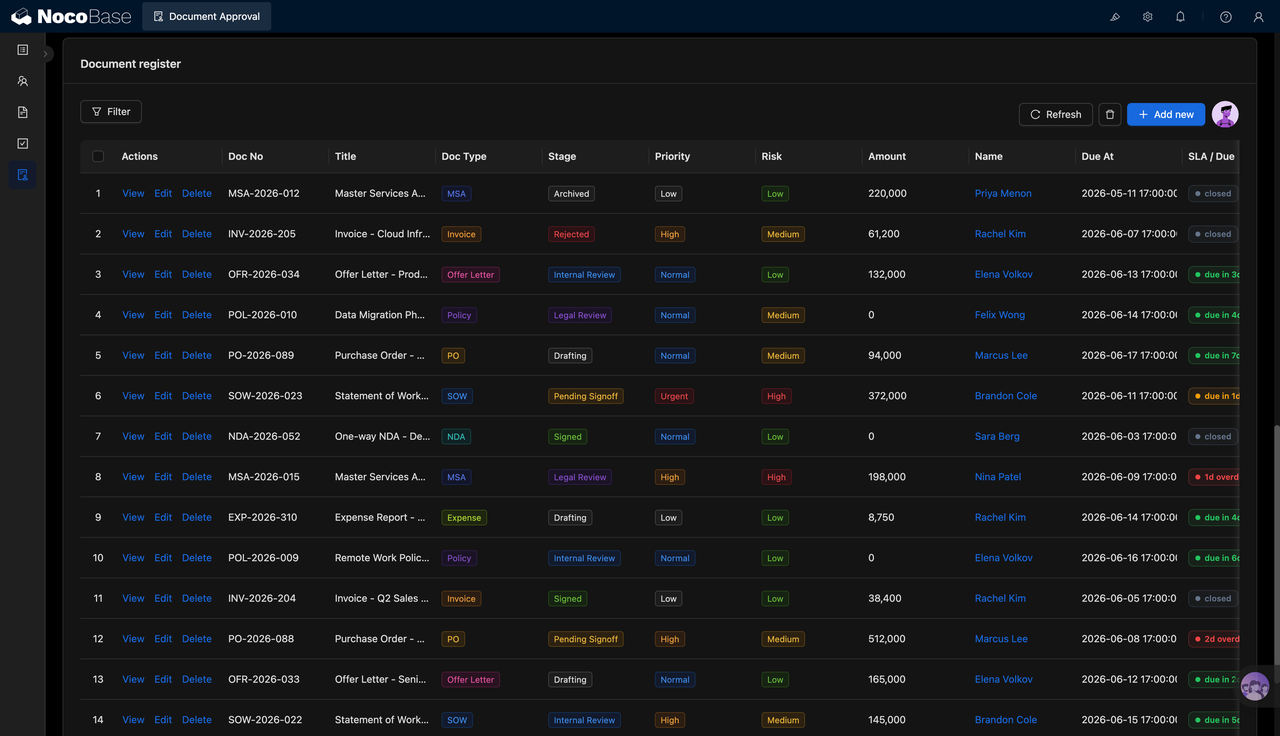
The page is built around an approval workspace and a document registry. The approval board groups documents by drafting, internal review, legal review, and awaiting signature. The document registry records document number, title, type, stage, priority, risk level, amount, owner, deadline, and SLA status.
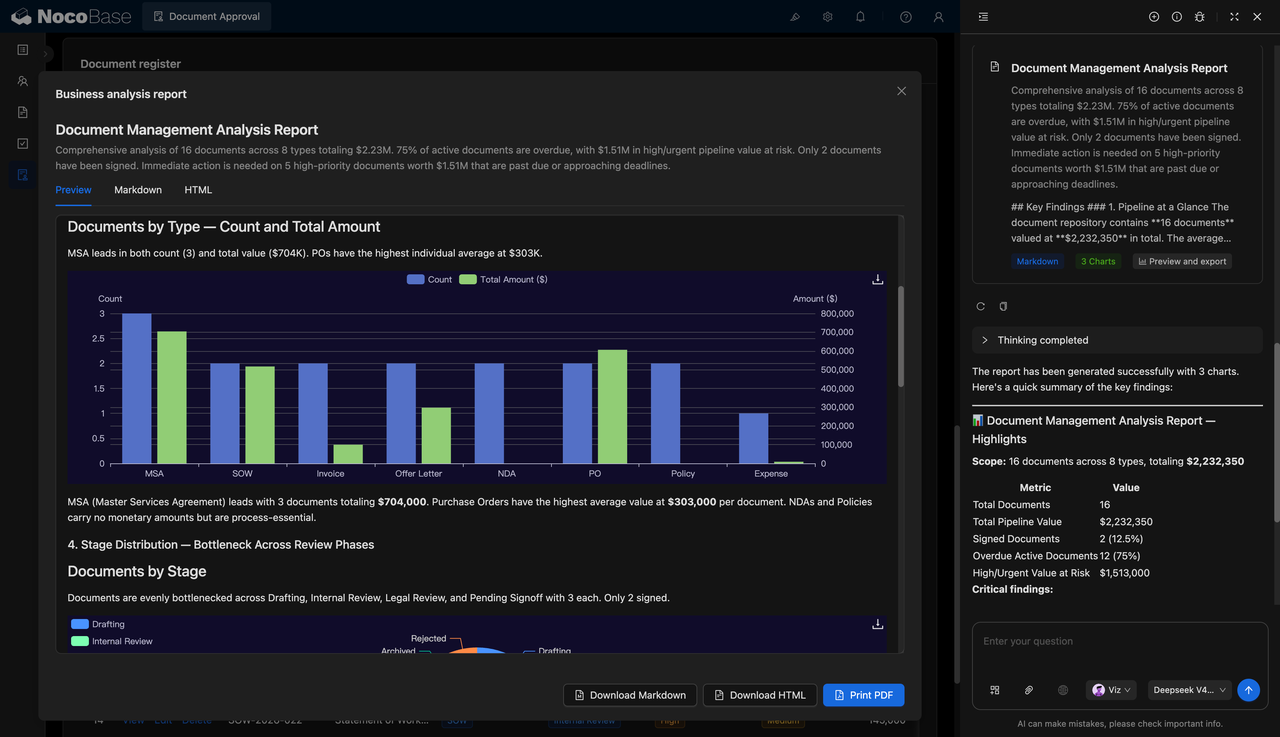
With the help of AI Agent, teams can generate analysis reports based on all approval documents, identifying high-priority items, overdue documents, signing bottlenecks, and high-value risks. Reports can be exported as Markdown, HTML, and PDF, making them useful for approval reviews, risk reporting, and management decisions.
This system is suitable for legal, procurement, finance, HR, operations, and management teams, especially when they need to continuously track multi-type document approvals, control signing timelines, and reduce workflow risks.
Documents awaiting signature, legal review items, and overdue risks are shown together in the approval workspace:
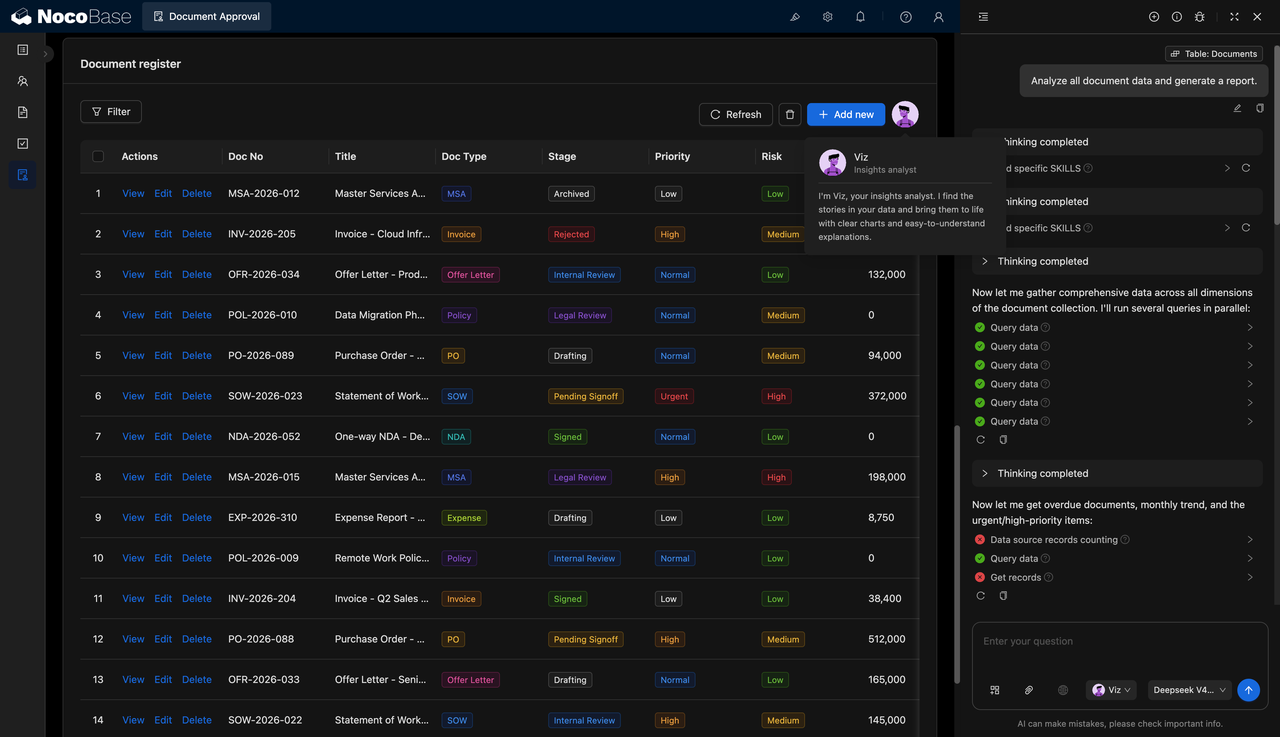
The document registry manages stages, amounts, and SLA status in one table:
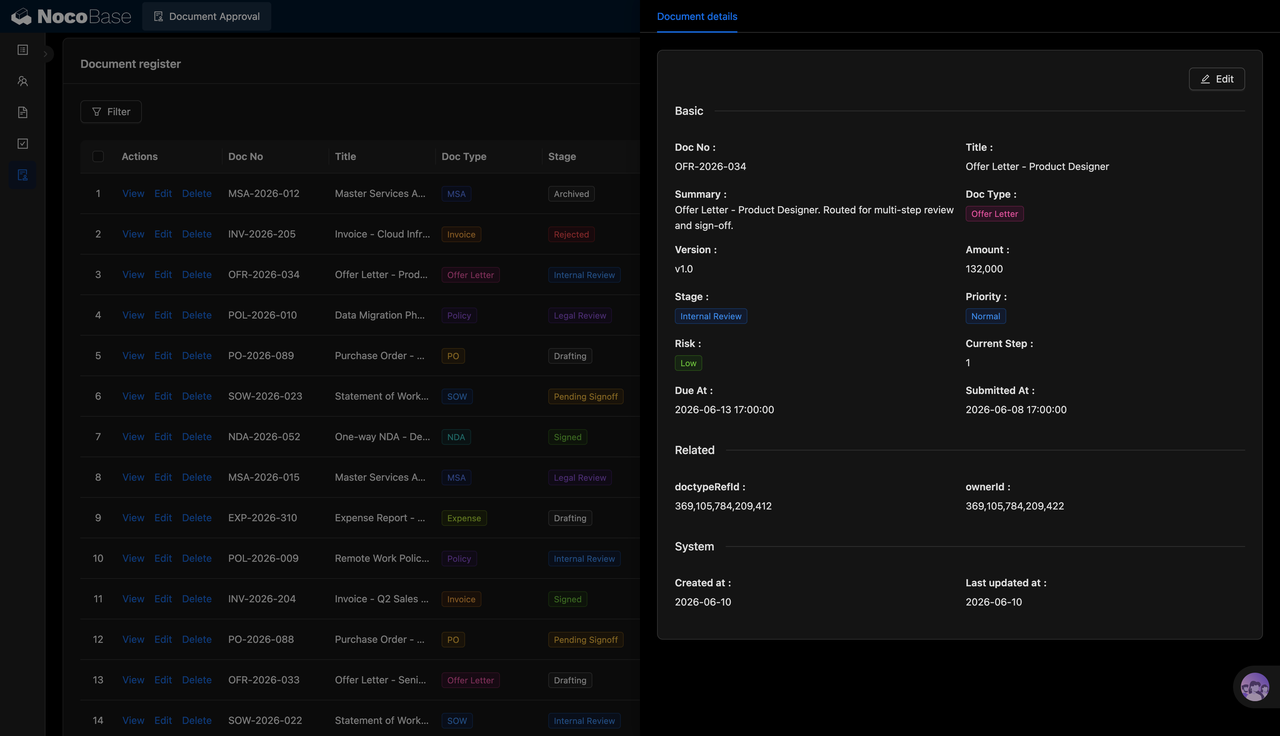
Document details record versions, risks, and the current step:
AI generates approval analysis based on document data:
AI analysis report:
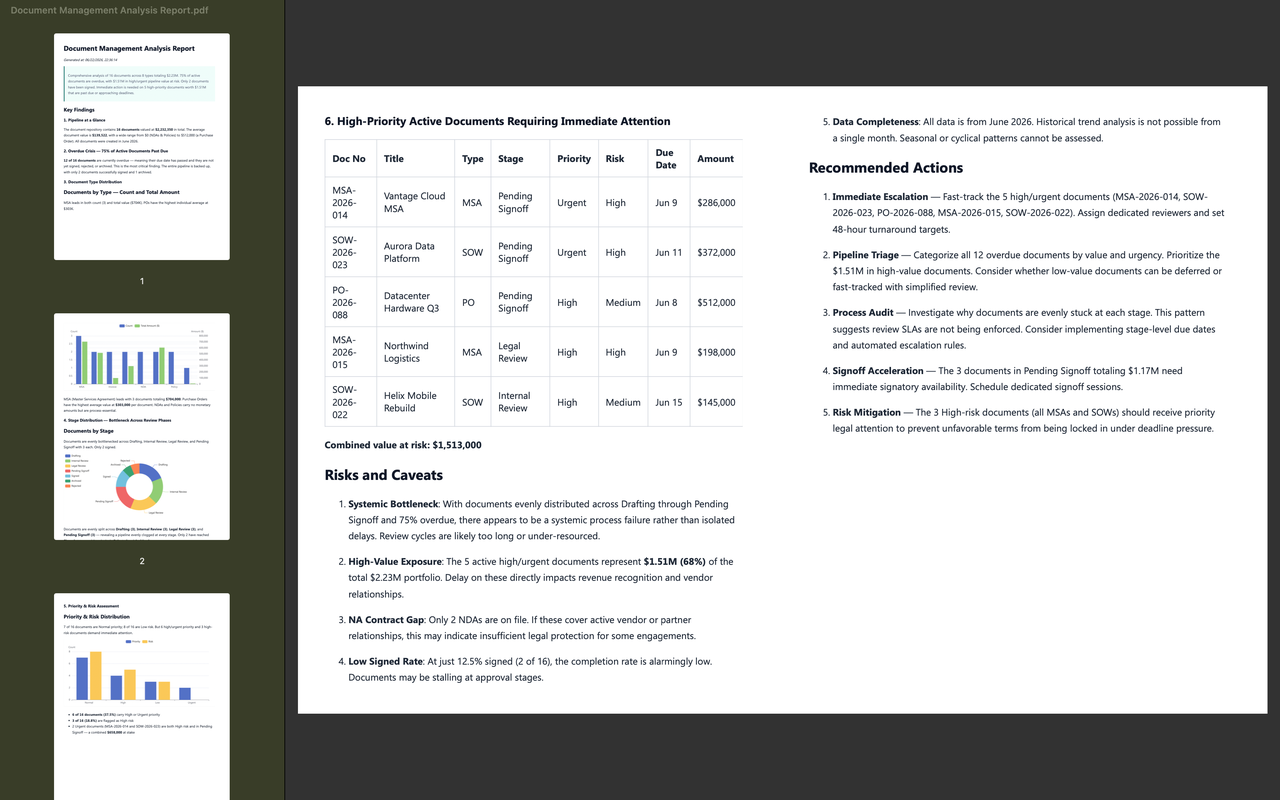
PDF reports can be generated from AI conclusions:
What Problems Can a Document Approval Workflow Solve?
After a contract is sent out, teams often ask the same questions: who is handling it now, has legal reviewed it, is there any amount-related risk, and can it still be signed today? When this information is scattered across emails, chat messages, and spreadsheets, approval tracking easily turns into repeated follow-ups.
After contracts, purchase orders, invoices, offers, and policy documents enter the process, the system can group them by stages such as drafting, internal review, legal review, and awaiting signature. Teams no longer need to search through separate records to see which documents are still being prepared, which need legal involvement, and which have reached final signing.
AI analysis reports can turn approval data into conclusions that are easier for management to read. For example, the report can summarize that there are 16 documents across 8 types, with a total value of USD 2.23 million, 75% of active documents already overdue, and USD 1.51 million in high-risk value.
For documents that require urgent action, AI can also list specific items, such as the Vantage Cloud Master Service Agreement, Aurora Data Platform Statement of Work, and Datacenter Hardware Q3 Purchase Order, helping teams prioritize high-value, high-risk, and high-impact approvals.
Key Features
Approval Process Board
- Drafting: Manage documents that are still being prepared or need more information.
- Internal review: Manage documents requiring confirmation from business, finance, or internal owners.
- Legal review: Manage documents that require legal review for terms and risks.
- Awaiting signature: Manage documents that have completed previous reviews and are waiting for final signature.
- Priority tags: Each card can be marked with a low, normal, high, or urgent priority.
Workflow-Driven Approval
- Routing after submission: Documents can enter the corresponding approval process after submission.
- Workflow trigger records: The workspace can show the workflow that drives approval routing, such as a post-submission routing workflow.
- Stage updates: Documents can move into internal review, legal review, or awaiting signature based on approval actions.
- Role collaboration: Procurement, legal, finance, signers, and other roles can collaborate in the same process.
- Process transparency: Teams can see which stage each document is in, reducing repeated follow-up questions.
AI Document Approval Analysis Report
- Document overview: AI can summarize document count, number of document types, and total amount.
- Type analysis: Reports can analyze count and value by document type, such as MSA, SOW, PO, and invoice.
- Stage bottlenecks: Reports can identify backlogs in drafting, internal review, legal review, and awaiting signature.
- High-risk list: AI can list high-priority, high-risk, and high-value documents.
- Recommended actions: Reports can suggest signing acceleration, workflow routing, risk mitigation, and audit checks.
Why Build a Document Approval Workflow with AI and NocoBase?
Once contracts, purchase orders, invoices, offers, and policy documents enter approval, the real challenge is managing the full routing chain: who is handling the current stage, whether the SLA has been exceeded, whether amount and risk levels require escalation, which step is still missing before signature, and whether approval history can be retained completely. A document approval workflow needs to cover document records, approval stages, priority, risk level, amount, owner, deadline, signing timeline, and analysis reports.
AI can help teams design the approval process from the beginning. For different document types, it can generate approval stages, field structures, risk labels, SLA rules, and report frameworks. It can also analyze existing approval data to identify overdue documents, high-risk contracts, and approval items that need priority handling. Instead of starting from a blank page, teams can quickly get an initial workflow that is close to the actual business scenario.
NocoBase turns this workflow into a business system that can run over the long term. Documents, approval nodes, owners, amounts, risk levels, and signing records can be connected. Legal, procurement, finance, HR, and management users can also see different data scopes based on their roles. When approval policies change, teams can continue to adjust document types, stage rules, permission scopes, workflow nodes, and report content.
FAQ
1.Can a document approval workflow show the overall approval status?
Yes. The system can show key metrics such as documents awaiting my signature, documents under legal review, overdue signatures, and documents signed in the current cycle.
2.Does the system support an approval process board?
Yes. In the screenshots, documents are grouped by drafting, internal review, legal review, and awaiting signature, making approval progress easier to track.
3.What types of documents can the system manage?
It can manage master service agreements, invoices, offers, policies, purchase orders, statements of work, NDAs, and expense reports.
4.Can each document have a detail page?
Yes. The detail page can show document number, title, summary, version, type, amount, stage, priority, risk level, current step, and deadline.
5.Does the system support priority management?
Yes. Documents can be marked with low, normal, high, or urgent priority, helping teams decide the order of handling.
6.Does the system support risk level management?
Yes. The document registry and detail page can record low, medium, and high risk levels, helping legal and management teams focus on key items.
7.Can the system track SLA or deadlines?
Yes. The document registry can display due time and SLA status, such as closed, due soon, or overdue.
8.Does the system support a signing timeline?
Yes. The signing timeline can show steps such as procurement review, legal review, executive approval, and final signature.
9.Can the system record approvers and roles?
Yes. The timeline can show reviewer names, roles, and status, such as procurement owner, legal counsel, finance owner, and signer.
10.Does the system support workflow-driven approval?
Yes. The screenshots show a post-submission routing workflow, indicating that documents can enter the corresponding approval process after submission.
11.Can AI generate document approval analysis reports?
Yes. AI can generate reports based on document data, summarizing document count, amount, type distribution, stage bottlenecks, and high-risk lists.
12.Can AI reports be exported?
Yes. The screenshots show support for Markdown, HTML, and PDF output, which is useful for approval reviews, risk reporting, and internal archiving.
13.What risks can the report identify?
The report can identify overdue documents, high-priority files, high-value risks, awaiting-signature backlogs, legal review bottlenecks, and low signing rates.
14.Can Claude Code, Codex, Cursor, or OpenCode help build this system?
Yes. These AI Agents can connect to NocoBase and help generate approval boards, document tables, detail pages, timelines, and analysis reports, which can then be adjusted in NocoBase.
15.How is this different from building with pure Vibe Coding?
Pure Vibe Coding is better for quickly creating page prototypes. NocoBase is better for managing document data, approval stages, permissions, workflows, SLA rules, report output, and later iteration.
16.Does the system support access control?
Yes. Permissions can be configured in NocoBase. For example, legal can handle contract review, procurement can view purchase orders, finance can focus on high-value documents, and signers can handle only their own signature tasks.
17.Can approval stages and workflows be adjusted later?
Yes. Document types, approval stages, priority rules, risk rules, SLA deadlines, workflow nodes, and report content can all be adjusted later.
18.Is this system suitable for formal enterprise use?
Yes. NocoBase can support document records, permissions, pages, and approval workflow configuration, while AI reduces the effort required for system setup and report preparation, making it suitable for long-term maintenance and continuous iteration.