Meeting room booking

Build a customizable meeting room booking system with AI and NocoBase. Connect coding agents like Claude Code, Codex, Cursor, or OpenCode to NocoBase and use natural language to generate room management, capacity and equipment info, a booking timeline, meeting statuses, today's agenda, and a room calendar — not just a prototype, but a customizable, reliable, continuously evolvable meeting room booking system.

NocoBase Team |
Operations
AI エージェントで同じシステムを構築する
Build a NocoBase app — Meeting Room Booking: a gantt-style room-availability board and a calendar scoped to the current user. Match the layout and signature visuals of this reference prototype: https://static-docs.nocobase.com/solution/templates/10-meeting-room-booking.html

始める前に、AI Agent クイックスタート に従って NocoBase をインストールし、エージェントを接続してください。AI の生成結果には個体差があります。モデルの性能とシステムの複雑さによっては、微調整や複数回のやり取りが必要になる場合があります。

Introduction

Use your favorite AI agent (such as Claude Code, Codex, Cursor, or OpenCode) together with NocoBase to quickly build a customizable, reliable, and continuously evolvable meeting room booking system for managing rooms, capacity, location, equipment, availability status, meeting schedules, and a booking calendar.

You can copy the prompt below and let your AI agent generate the basic structure of the meeting room booking system in NocoBase, then adjust fields, pages, and booking rules through the no-code UI.

This system is a good fit for office meeting rooms, shared meeting spaces, training rooms, video conference rooms, and any team that needs a centralized view of room occupancy and meeting schedules.

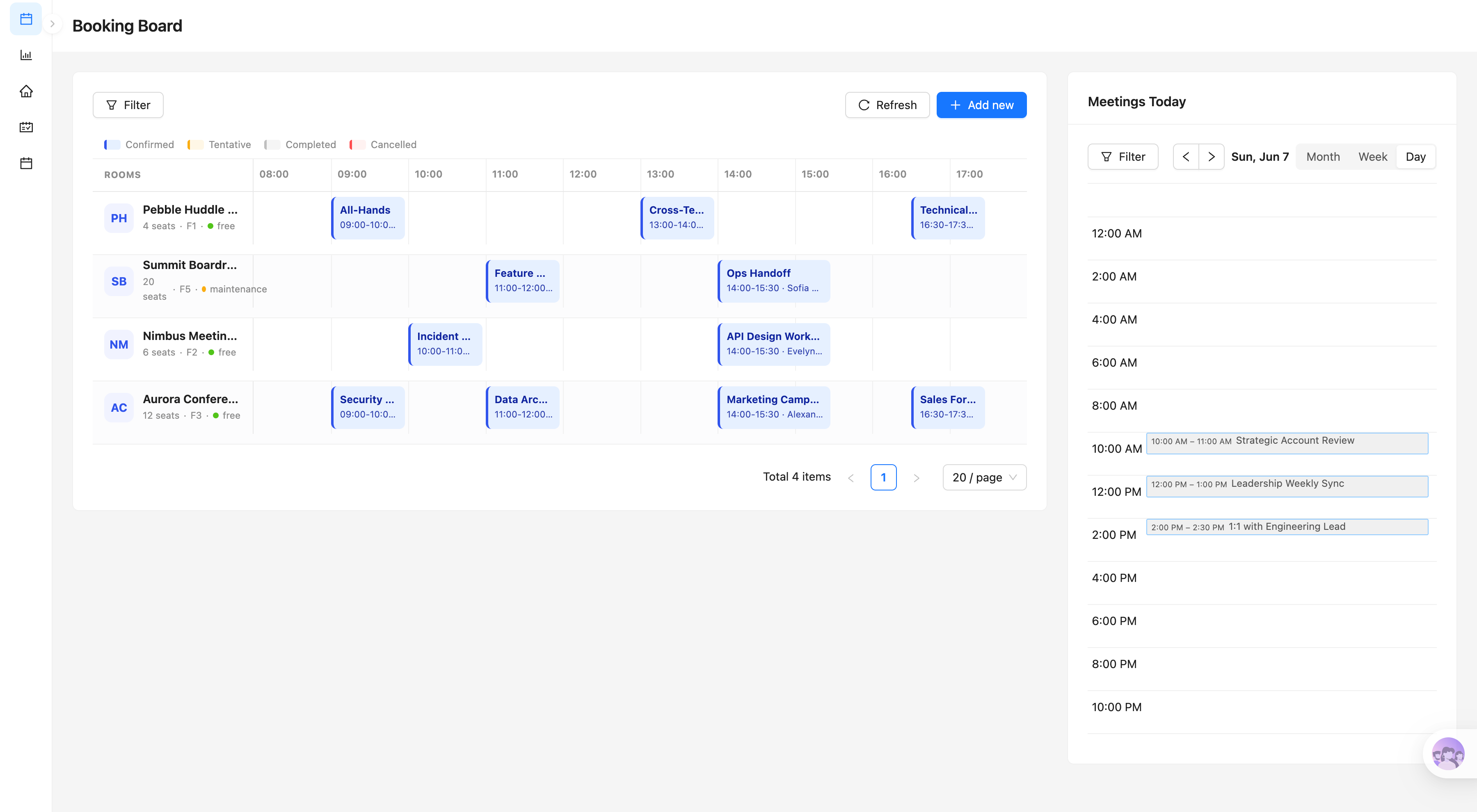
Meeting room booking board:

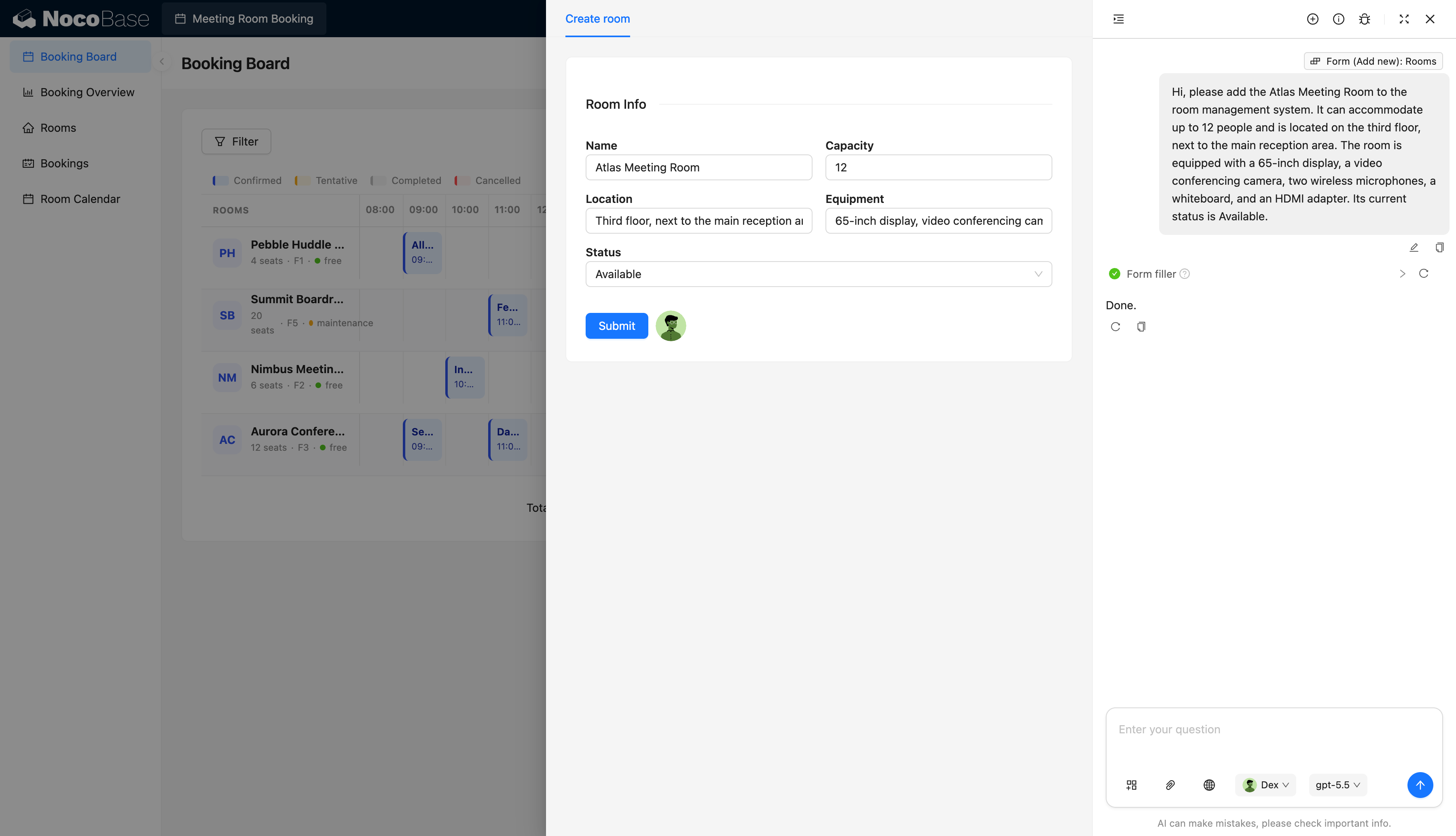
AI-assisted room data entry:

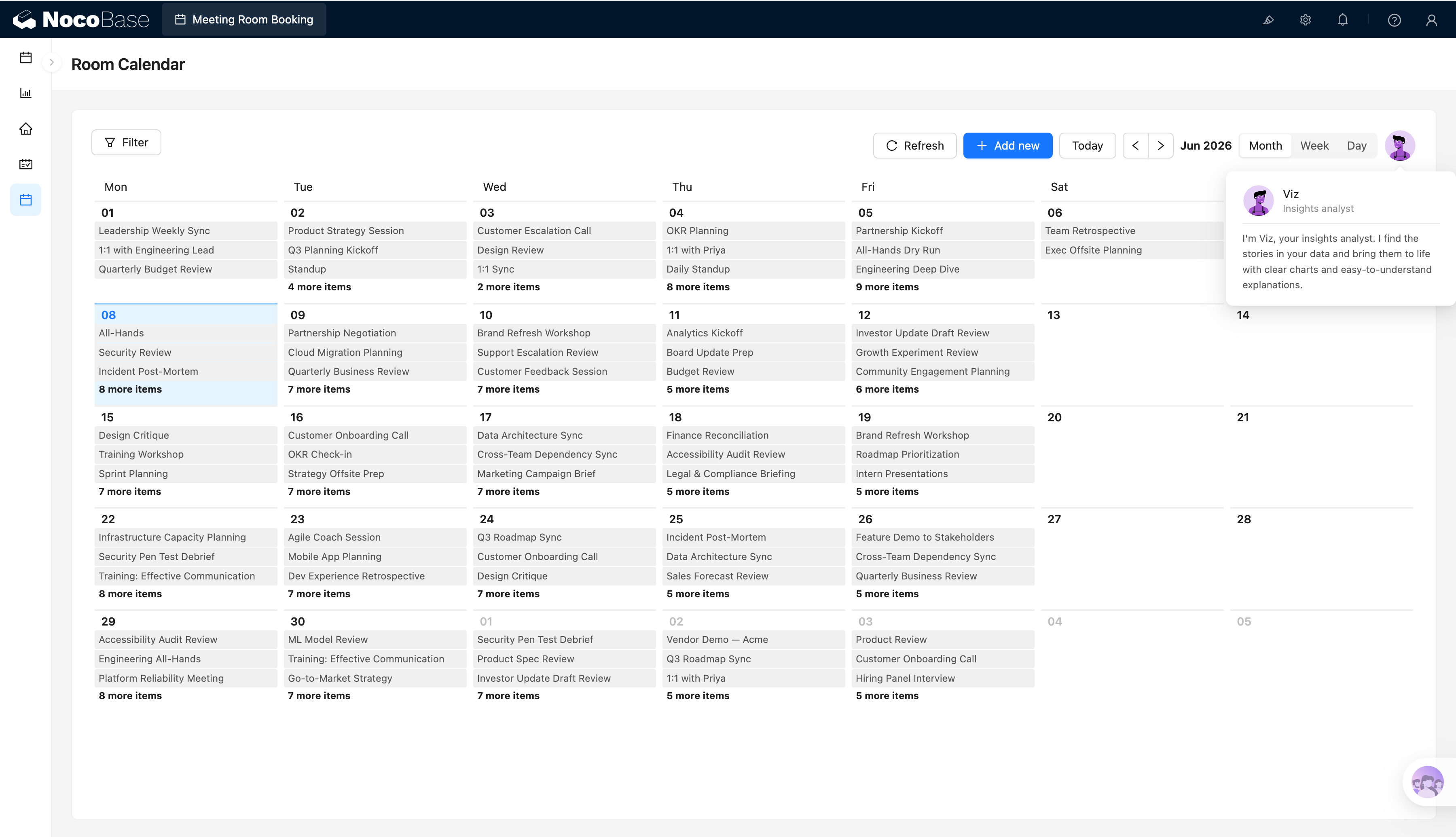
Meeting room calendar:

What problems does a meeting room booking system solve?

Meeting room booking lets employees quickly see which rooms are available in a given time slot, and whether each room meets their requirements for capacity, location, and equipment.

As the number of meeting rooms grows, teams easily run into double bookings, last-minute scrambles for a free room, rooms with the wrong capacity, and unclear equipment information. When meeting schedules are scattered across chat threads, personal calendars, and spreadsheets, employees have no unified view of room occupancy.

With this system, you can centrally manage room names, capacity, floor location, equipment, and current status, and use a timeline to see how each room is booked throughout the day.

The system can also show the day’s meeting agenda and let you view all meetings by month, week, or day. Employees can find a suitable room faster, and managers get a clear picture of room utilization and maintenance status.

Core features

Meeting room resource management

  • Room basics: Centrally manage room names, capacity, floor location, and current availability status.
  • Equipment records: Record displays, video conferencing cameras, microphones, whiteboards, and other equipment, so employees can pick a space that fits the meeting format.
  • Maintenance status: Mark rooms as available or under maintenance, so employees never book a room that is temporarily out of service.

Booking and status management

  • Meeting scheduling: Record the meeting title, room, start time, and end time to form a complete booking record.
  • Multiple booking statuses: Support confirmed, tentative, completed, and cancelled statuses, making meeting progress easy to read.
  • Today’s meetings: Show the day’s meeting titles and times in one place, so employees can quickly grasp the day’s schedule.

Room occupancy board

  • Room timeline: Display each room’s time slots and bookings across the day, letting you check the occupancy of multiple rooms at once.
  • Linked resource info: Show room capacity, floor, and current status alongside the board for quick selection.
  • Conflict spotting: See at a glance whether a target room is already taken at a given time, reducing double bookings.

Multi-view meeting calendar

  • Month, week, and day views: Browse all meetings across different time ranges.
  • Browse by date: Quickly locate the meeting titles, rooms, and times for any given day.
  • Flexible switching: Move quickly between long-range meeting plans and the day’s concrete schedule.

AI assistance

  • AI room recognition: Extract room name, capacity, location, equipment, and status from a natural-language description.
  • AI form filling: Fill the extracted structured information directly into the new-room form, cutting manual entry.
  • AI-assisted resource creation: Turn a short room description into a complete record and add it to the room resource list.

Why build a meeting room booking system with AI and NocoBase?

Meeting room booking may look like just a calendar, but once a team really uses it, you also need to manage room capacity, location, equipment, availability status, and the schedules of many different meetings.

If you only use plain vibe coding to generate a booking page from scratch, it is easy to get just the “create a meeting” layer done. Room information, status display, calendar views, and the data links between pages still need endless tweaking and debugging.

NocoBase organizes rooms, bookings, and calendar views in one system. Teams can configure room fields, equipment information, the timeline page, and the calendar page to match how their office actually works, and keep adjusting layouts and entry points over time.

AI lowers the cost of building the system and entering data. You can let an AI agent generate the room table, booking table, booking board, and calendar pages, and let an AI employee extract room name, capacity, location, equipment, and status from a natural-language description and fill in the form automatically.

A system built this way not only launches quickly, but also keeps evolving as the number of rooms, office locations, and the way the team works change.

FAQ

  1. How is this different from a booking page generated by plain vibe coding?

Plain vibe coding is great for quickly producing a calendar, form, or booking page, but real enterprise use also requires room statuses, time-conflict handling, user permissions, operation history, single sign-on, and long-term maintenance.

NocoBase already provides data modeling, access control, workflows, calendar views, audit records, APIs, and plugin extensions as core business-system capabilities. An AI agent can build the booking flow directly on top of them, with no need to rebuild enterprise features from scratch.

  1. Can I view the occupancy of multiple rooms at the same time?

Yes. The booking board shows a per-room timeline for the day, so employees can compare the occupancy of different rooms across time slots and find a free room that fits their schedule faster.

  1. Can I see a room’s capacity, location, and equipment?

Yes. Each room can record its capacity, floor or specific location, and equipment such as displays, video conferencing cameras, microphones, and whiteboards.

Employees can check whether a room fits the headcount and meeting format before booking.

  1. Can I distinguish different meeting and room statuses?

Yes. Bookings can be set to confirmed, tentative, completed, or cancelled, and are styled differently on the booking board.

Rooms themselves can be marked as available or under maintenance. When a room is under maintenance, employees can see directly on the board that it cannot be used.

  1. Can AI enter room information automatically?

Yes. Users simply describe the room’s name, capacity, location, equipment, and status in natural language, and AI extracts the structured information and fills in the new-room form automatically.

AI coding agents such as Claude Code, Codex, Cursor, and OpenCode can also connect to NocoBase and generate the room table, booking table, timeline board, and calendar pages from a prompt.

  1. Can I control which users can book or manage rooms?

Yes. NocoBase supports permission configuration by role and action type.

For example, regular employees can view rooms and create bookings; department assistants can manage their department’s meeting schedules; room administrators can add and maintain room information; and system administrators can configure fields, pages, statuses, and permissions.

Which rooms and booking records each user can view and modify can be further restricted according to your company’s rules.

  1. Can double bookings be prevented?

Yes, through workflows and validation rules. When an employee submits a booking, the system can check whether the same room already has another meeting in the target time slot.

When a conflict is found, the submission can be blocked or the user prompted to pick another room or time, reducing double bookings.

  1. Can I integrate enterprise single sign-on and keep booking history?

Yes, both can be enabled as needed. NocoBase can connect to your enterprise identity and single sign-on system through the corresponding plugins, so employees access the booking system with their existing company accounts.

The system can also keep an operation history of meeting creation, time changes, room changes, cancellations, and status updates, helping administrators trace who changed which booking and when.

  1. Can a system built with AI keep evolving over time?

Yes. The AI agent generates the system’s foundation, not a one-off static booking page.

After launch, you can keep adjusting room fields, equipment categories, booking statuses, conflict rules, board layouts, calendar views, workflows, and permissions. As the office expands or room management rules change, there is no need to rebuild from scratch.

  1. Is this system ready for real internal use?

Yes. NocoBase lets you enable access control, workflows, operation history, audit logs, single sign-on, notifications, APIs, and plugin extensions — the capabilities internal enterprise systems typically need — as required.

Teams can start with core features such as room lookup and booking, then gradually add conflict validation, approvals, reminders, equipment management, and external calendar integration. Compared with a one-off page generated by plain vibe coding, it is far better suited to building a maintainable, extensible, long-lived meeting room booking system.

× View Image