AI エージェントで同じシステムを構築する
Build a NocoBase app — Employee Exit Checklist System: staged offboarding tasks, access revocation, and asset-return tracking. Match the layout and signature visuals of this reference prototype: https://static-docs.nocobase.com/solution/templates/38-exit-checklist.html
prompt にあるプロトタイプのリンク(HTML)は、私たちが事前に用意したデザインで、機能のデモを目的としたものです。NocoBase は「一言でシステム全体を生成する」ことを推奨していません。これを使って構築する際は、NocoBase Skill の「プロトタイプ再現」(nocobase-prototype-repro)と組み合わせると、より良い結果が得られます。
始める前に、AI Agent クイックスタート に従って NocoBase をインストールし、エージェントを接続してください。AI の生成結果には個体差があります。モデルの性能とシステムの複雑さによっては、微調整や複数回のやり取りが必要になる場合があります。
Introduction
An employee offboarding workflow system is designed for HR, IT, administration, finance, and direct managers to manage the full process from resignation notice to final settlement. Teams can view offboarding progress, task completion, asset return status, days until the last working day, and outstanding items on one page.
These records can also be managed as a NocoBase-based internal business system, with exit tasks, handover items, access removal, asset return, final clearance, responsible teams, and completion status organized through configurable data models, role permissions, views, workflows where needed, and operation history.
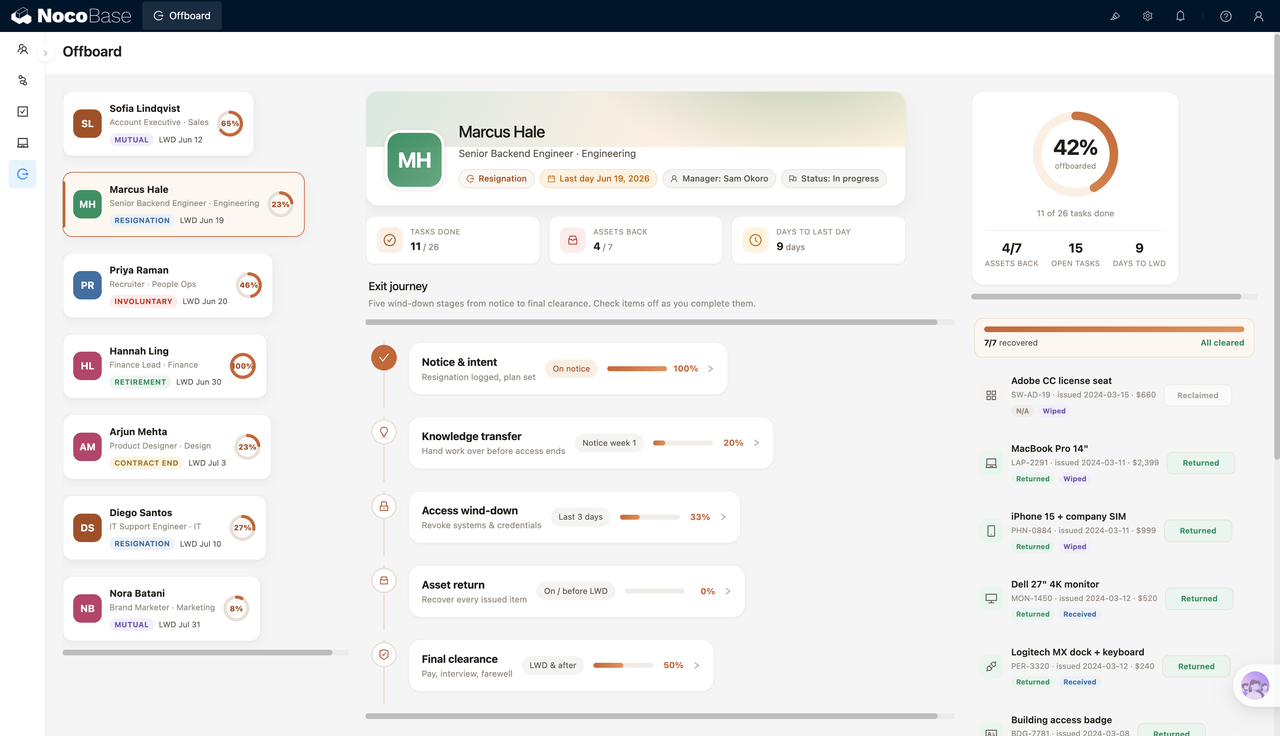
The page is organized around departing employees. The left-side list shows each employee’s exit type, last working day, overall completion rate, and current status. The central area presents the offboarding journey by stage, including resignation notice, knowledge handover, access revocation, asset return, and final settlement, so each department can move tasks forward by timeline.
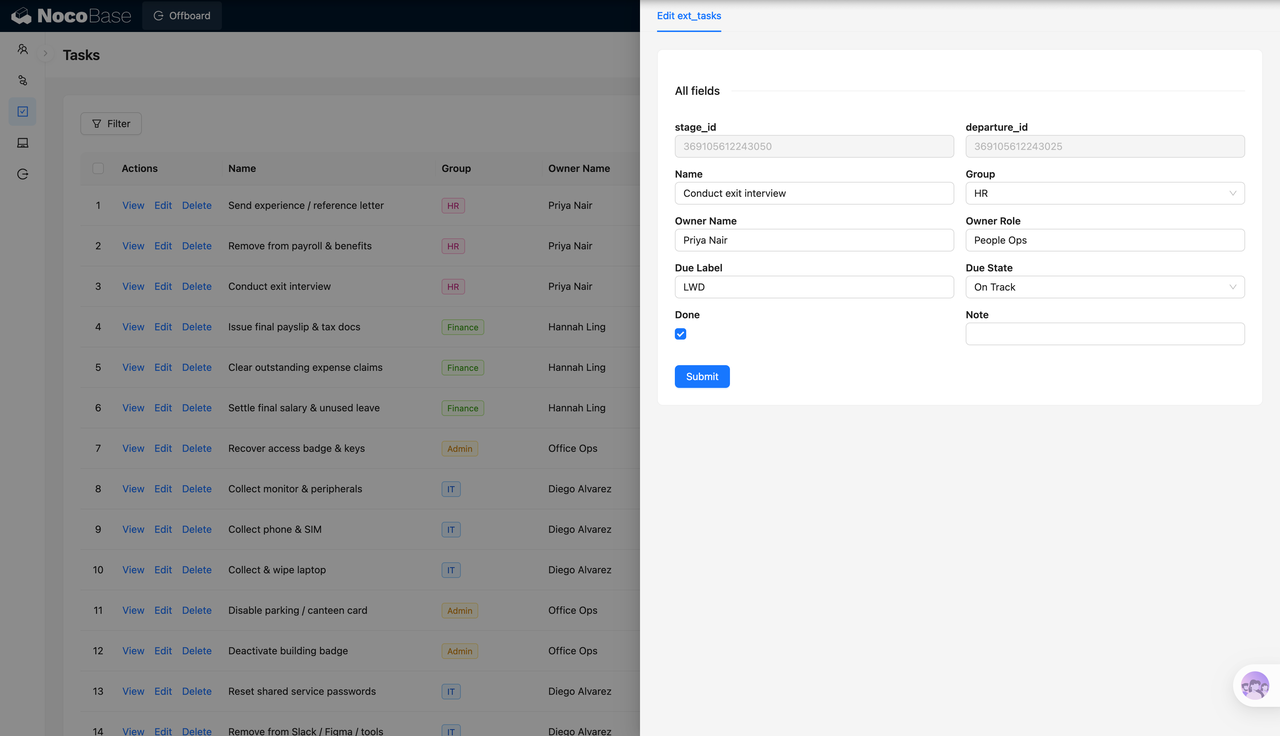
The system also provides a task list and task editing form to maintain task names, departments, owners, owner roles, due labels, due status, and completion status. For IT and administration workflows, it can also manage the return and wipe status of laptops, phones, monitors, access cards, keys, parking passes, and other assets.
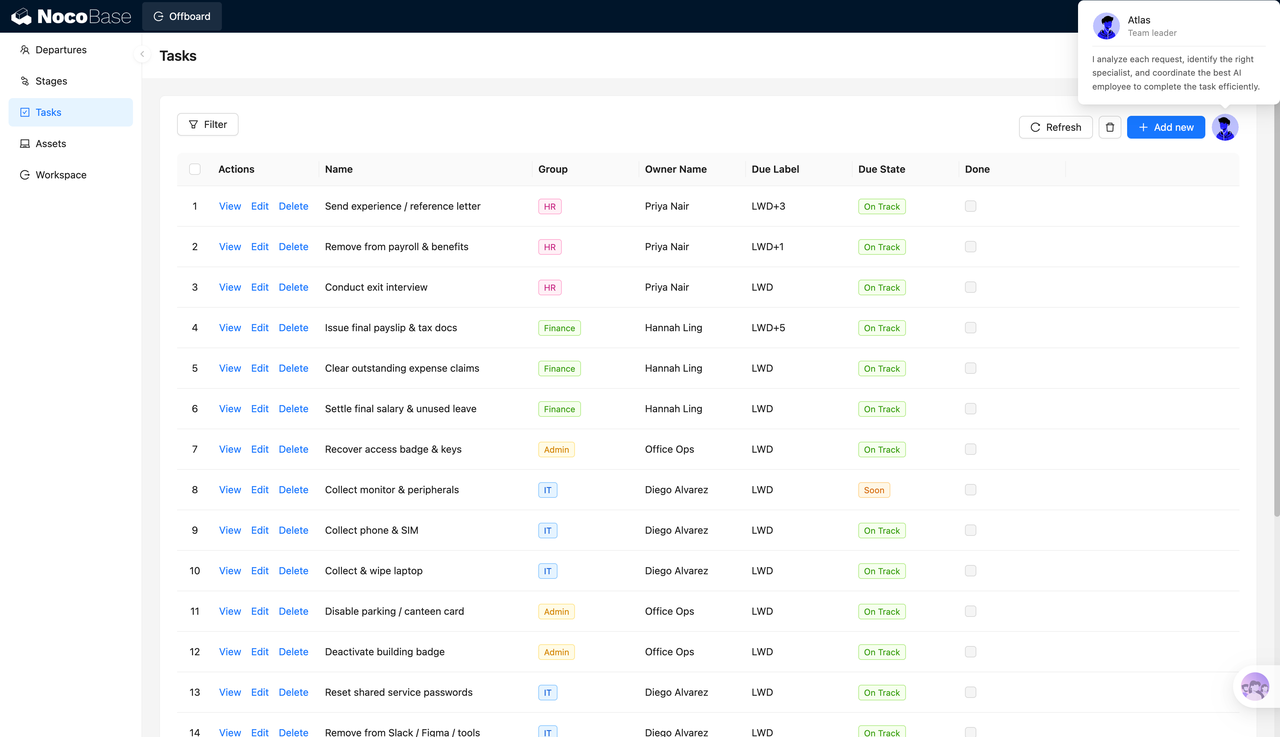
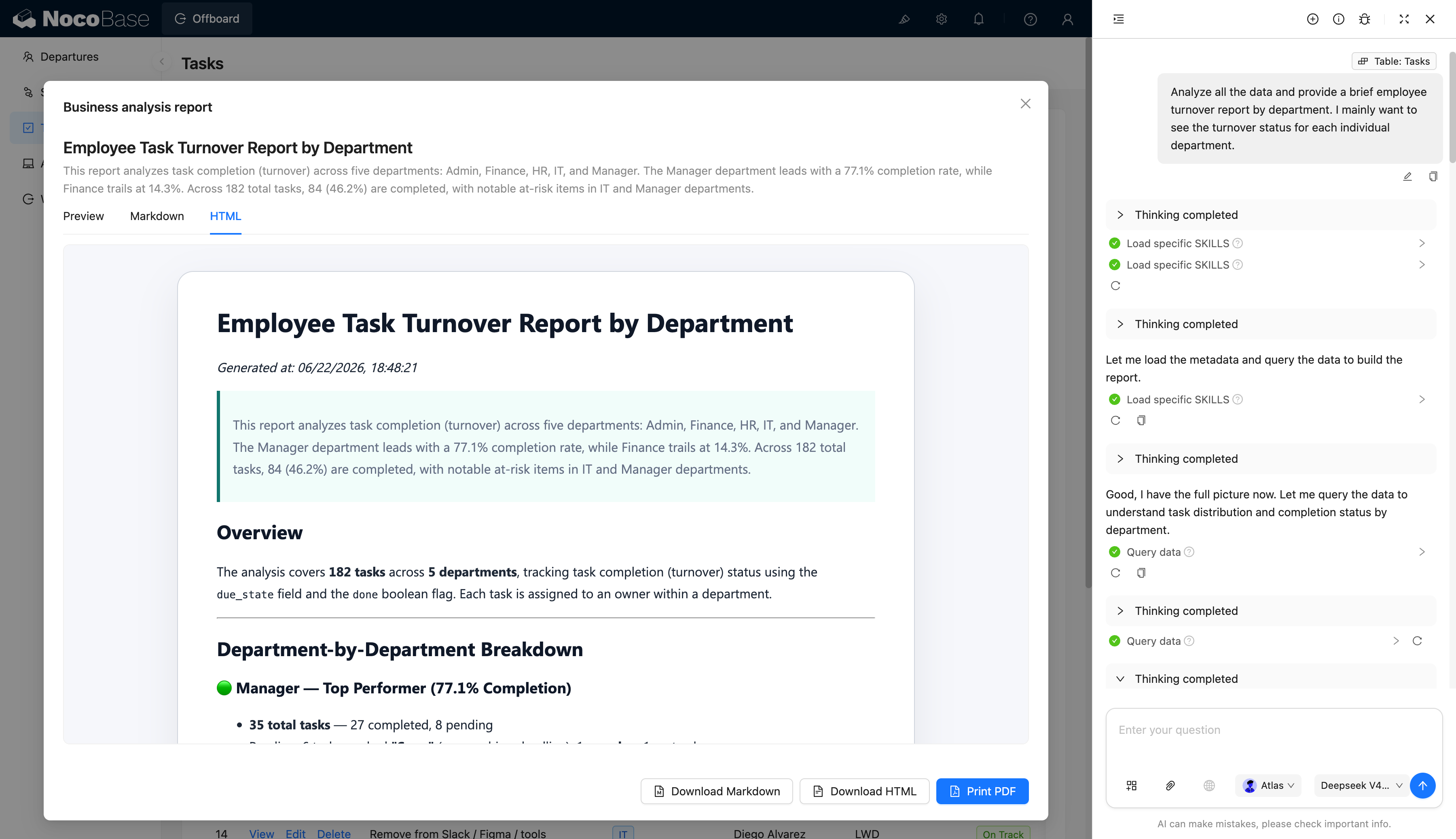
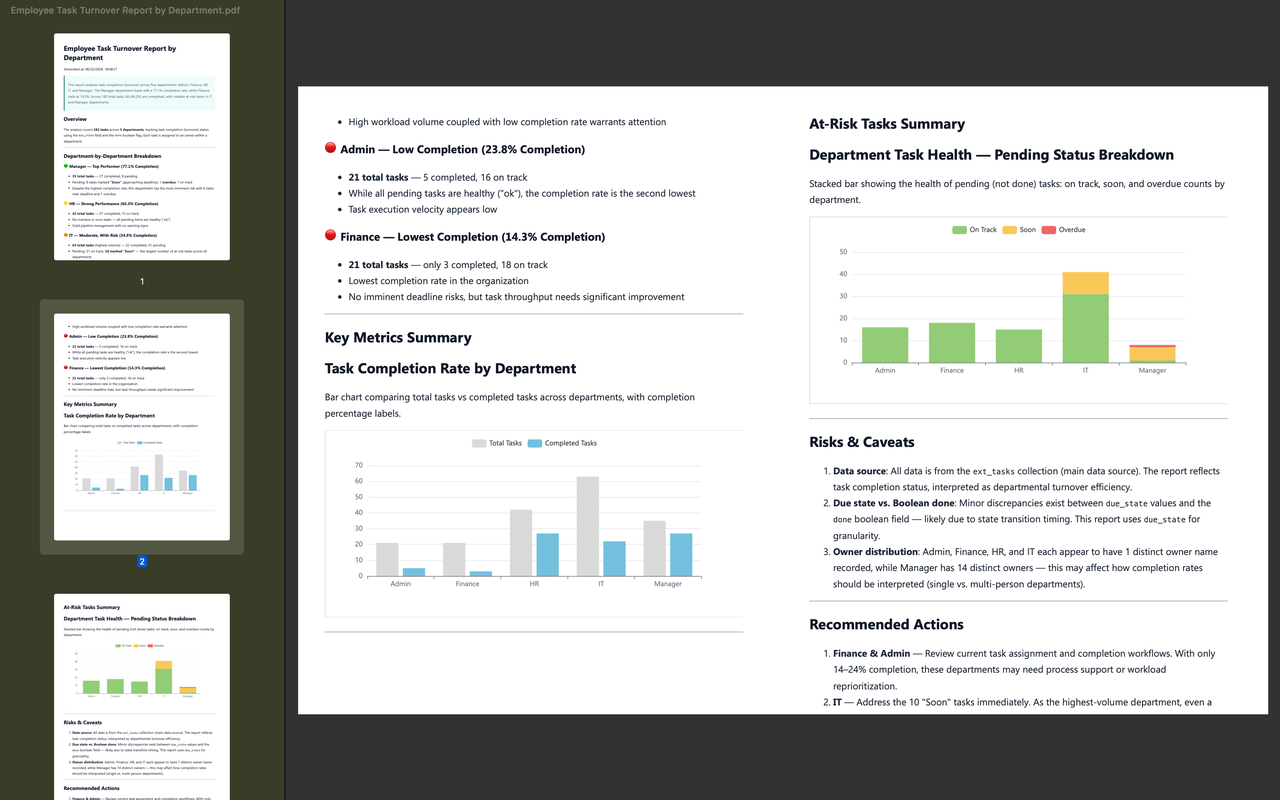
AI Agent can read task data and generate employee offboarding task reports by department. The report can analyze completion rates, pending risks, and follow-up items across HR, Finance, IT, Admin, and Manager teams. It supports preview, Markdown, HTML, and PDF output, making it easier for HR teams to review the workflow.
Employee progress, stage tasks, and asset return status:
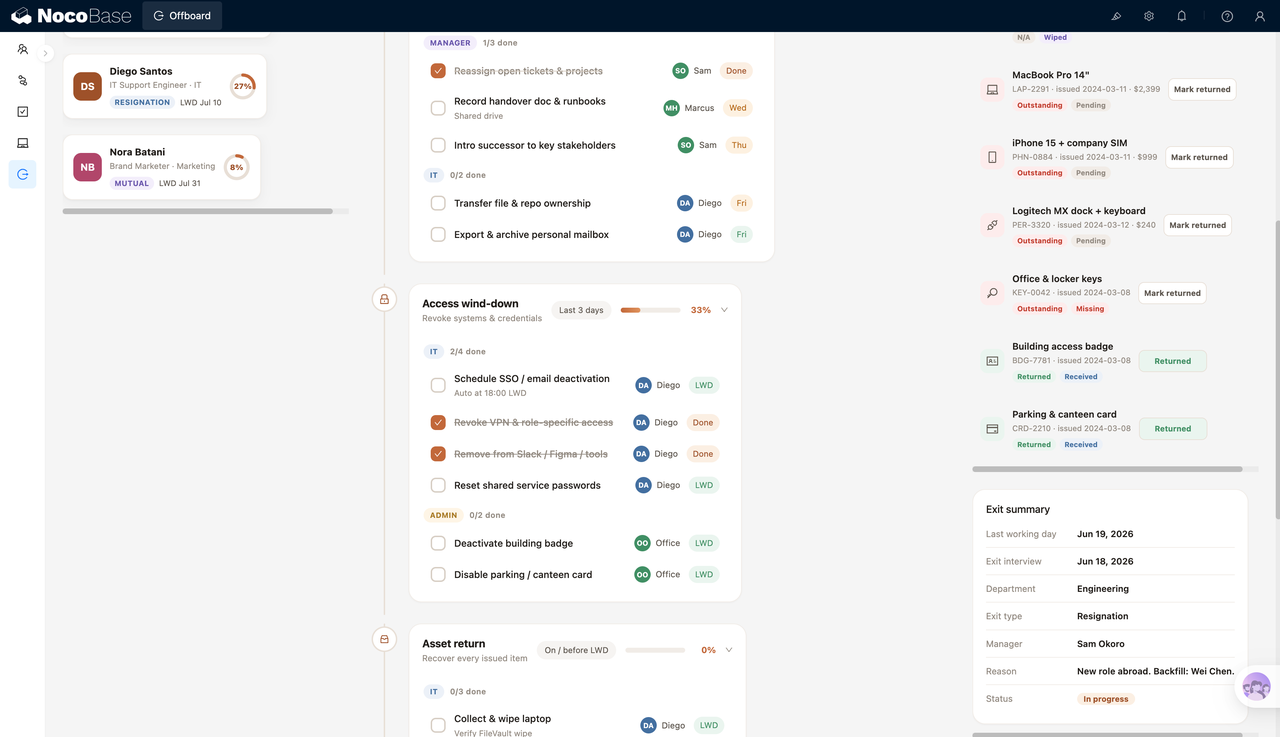
Expanded offboarding stages show access revocation and asset return tasks:
Task editing form for owners, due status, and completion:
Task list grouped by department with offboarding items and due status:
AI generates an offboarding task completion report by department:
Exported PDF report showing completion rates and risk summary:
What Problems Can an Employee Offboarding Workflow System Solve?
Employee offboarding is rarely something HR can complete alone. Before an employee’s last working day, the direct manager needs to arrange handover, IT needs to close system access, administration needs to collect devices and access cards, finance needs to handle settlement, and HR needs to confirm documents, exit interviews, and final procedures. If any step is missed, the handover may be affected, and access or asset risks may remain.
In daily operations, problems often come from the assumption that someone else will handle the task. A laptop may not be returned, system permissions may still be active, customer or project handover may remain verbal, and exit interviews or proof documents may not be completed on time. If everything is checked only on the last day, HR can easily become stuck chasing people, collecting missing materials, and checking task status manually.
This system breaks the offboarding process into stages such as resignation notice, knowledge handover, access revocation, asset return, and final settlement. Each stage shows the owner, due time, completion status, and current progress. HR no longer has to switch between spreadsheets, chat history, and emails to confirm every item. They can directly see which employee’s offboarding process still has risks and which department needs follow-up.
High-risk items such as assets and system access can also be managed separately. Laptops, phones, monitors, access cards, keys, and parking passes can be marked as returned, wiped, received, pending return, or missing. Access revocation tasks for SSO, email, VPN, Slack, Figma, and shared service passwords can also be tracked by owner and due date, reducing the chance that access remains after an employee leaves.
Key Features
Departing Employee Overview
- Employee list: Show departing employees, job roles, departments, exit types, last working days, and completion rates on the left.
- Exit type: Support voluntary exit, involuntary exit, retirement, contract end, mutual separation, and other types.
- Current status: Show whether the offboarding process is in progress, helping HR understand the current stage.
- Progress metrics: Display completed task count, returned asset count, and days until the last working day.
- Overall completion rate: Summarize completion percentage, open task count, and asset return progress on the right.
Offboarding Stage Management
- Resignation notice: Track exit registration, offboarding plan creation, and notice confirmation.
- Knowledge handover: Manage work handover, document handover, project transfer, and key relationship introduction.
- Access revocation: Track closure of SSO, email, VPN, Slack, Figma, and shared service passwords.
- Exit interview: Record exit interview date and related information.
- Department information: Show the employee’s department.
- Direct manager: Record the manager to clarify handover responsibility.
- Exit reason: Record exit reason, succession plan, and current status.
Asset Return Management
- Asset list: Show software licenses, laptops, phones, monitors, peripherals, access cards, and keys assigned to the employee.
- Return status: Mark assets as returned, pending return, recovered, missing, or similar statuses.
- Data wiping: Record whether a device has been wiped, which is useful for IT security checks.
- Receipt status: Mark whether an asset has been received or confirmed.
Task Management and Editing
- Task name: Record the specific item for each offboarding task.
- Task group: Manage tasks by HR, Finance, IT, Admin, Manager, and other groups.
- Owner information: Maintain owner name and owner role to reduce unclear responsibility.
- Due label: Support labels such as LWD, LWD+1, LWD+3, and LWD+5.
- Due status: Mark whether a task is on time, approaching due date, or needs attention.
- Completion status: Record whether a task is completed and keep related notes.
AI Offboarding Task Report
- Department completion rate: AI can summarize task completion across HR, Finance, IT, Admin, and Manager teams.
- Risk identification: Reports can identify unfinished tasks, upcoming due items, and follow-up risks.
- Workflow review: HR can use reports to review how different departments respond during offboarding.
- Multi-format export: Support preview, Markdown, HTML, and PDF output for review, archiving, and management reporting.
Why Build an Employee Offboarding Workflow System with AI and NocoBase?
An employee offboarding workflow system needs to manage departing employees, exit types, last working days, staged tasks, owners, due status, asset returns, access revocation, final settlement, and task analysis reports at the same time.
AI can assist from the process design stage. Teams can ask AI Agent to generate offboarding stages, task checklists, owner roles, due timelines, and asset return fields based on the company’s offboarding rules. These can then become editable, filterable, and trackable business pages in NocoBase. Compared with manually building the process from scratch, AI is better suited for quickly drafting an initial structure and covering easily missed items such as access revocation, device wiping, handover confirmation, and final settlement.
NocoBase then turns the AI-generated plan into a long-running enterprise system. Employees, tasks, assets, access permissions, departments, and owners can be connected. Different roles can see different scopes of data. Task status, due rules, and asset fields can also be adjusted continuously.
When the offboarding process changes later, teams can still use AI to generate new task templates, check for missing items, summarize department completion rates, and output offboarding task reports.
FAQ
1.What exit scenarios does this system support?
It supports voluntary exits, involuntary exits, retirement, contract end, mutual separation, and other offboarding scenarios. The screenshots show multiple exit types and support viewing the last working day and completion rate by employee.
2.Can the system show each employee’s offboarding progress?
Yes. The employee cards on the left show each departing employee’s completion rate, exit type, and last working day, while the central area shows the stage progress for the selected employee.
3.Does it support staged offboarding management?
Yes. The screenshots show stages such as resignation notice, knowledge handover, access revocation, asset return, and final settlement. Each stage includes progress and task details.
4.Does it support cross-department task ownership?
Yes. Tasks can be grouped by HR, Finance, IT, Admin, Manager, and other departments, with owners and owner roles recorded.
5.Can task deadlines be managed?
Yes. Tasks can use due labels such as LWD, LWD+1, LWD+3, and LWD+5, and the system can also record due status such as on time or approaching due date.
6.Can tasks be marked as complete?
Yes. The task list includes a completion status field, and stage details can show how many tasks in each group have been completed.
7.Can access revocation be managed?
Yes. The screenshots show access revocation tasks such as SSO / email deactivation, VPN access removal, Slack / Figma / tool removal, and shared service password reset.
8.Does it support asset return management?
Yes. The system can manage laptops, phones, monitors, software licenses, access cards, keys, parking passes, and other assets, and mark their return, wipe, receipt, pending return, or missing status.
9.Can users view an offboarding summary?
Yes. The right-side summary shows the last working day, exit interview date, department, exit type, manager, reason, and current status.
10.Can task fields be edited?
Yes. The task editing form supports task name, group, owner name, owner role, due label, due status, completion status, and notes.
11.Can AI generate offboarding workflow reports?
Yes. In the screenshots, AI Agent generates a department-level offboarding task report based on task data, analyzing completion rates and risk items across departments.
12.Can AI reports be exported?
Yes. The report page shows Markdown, HTML, and PDF actions, including downloading Markdown, downloading HTML, and printing to PDF.
13.Can Claude Code, Codex, Cursor, or OpenCode help build it?
Yes. These AI Agents can help generate the initial table structure, task templates, page layouts, stage descriptions, and report prompts. The workflow, permissions, and data relationships should then be maintained in NocoBase.
14.How is this different from pure Vibe Coding?
Pure Vibe Coding is better for quickly creating a page prototype. Offboarding management involves employees, tasks, assets, access rights, departments, owners, due status, and reports. NocoBase can support long-term workflow maintenance, while AI improves setup, data entry, and analysis efficiency.
15.Does it support access control?
The screenshots do not directly show a permission configuration page, but NocoBase supports access control. Companies can configure different data viewing and operation scopes for HR, IT, administration, finance, managers, and leadership.
16.Can task templates be adjusted later?
Yes. Offboarding workflows often change, such as adding data backup, compliance confirmation, customer handover, system access checklists, or confidentiality agreement confirmation. With NocoBase, teams can continue adjusting task tables, stage configuration, and page content.
17.Is this system suitable for formal enterprise use?
Yes. Employee offboarding involves access security, asset return, financial settlement, and knowledge handover, so it should not rely only on temporary spreadsheets. NocoBase is better suited for building it into a long-term enterprise business system.