Bangun dengan AI agent Anda
Build a NocoBase app — Warehouse Management System: a warehouse / location / stock three-tier model with a location tree and an inventory dashboard. Match the layout and signature visuals of this reference prototype: https://static-docs.nocobase.com/solution/templates/06-warehouse-management.html
Tautan prototipe (HTML) di prompt adalah desain yang sudah kami siapkan, hanya untuk mendemonstrasikan kemampuannya; NocoBase tidak menyarankan membuat satu sistem utuh hanya dari satu prompt. Saat membangun dengannya, padukan dengan skill “prototype reproduction” (nocobase-prototype-repro) di NocoBase Skills agar mendapat hasil yang baik.
Sebelum memulai, ikuti panduan cepat AI agent untuk menginstal NocoBase dan menghubungkan agent Anda. Hasil AI dapat bervariasi; bergantung pada model dan kompleksitas sistem, mungkin diperlukan penyesuaian atau beberapa putaran tambahan.
Pendahuluan
Gunakan AI agent favorit Anda dan NocoBase untuk membangun sistem manajemen gudang yang dapat dikustomisasi, andal, dan terus berkembang — mencakup manajemen zona gudang, rak, lokasi penyimpanan, tingkat pemanfaatan kapasitas, catatan masuk barang, catatan keluar barang, catatan perpindahan, dan dasbor operasional gudang.
Anda dapat menyalin prompt di bawah dan membiarkan AI agent menghasilkan struktur dasar sistem manajemen gudang di NocoBase, lalu menyesuaikan kolom, halaman, dan alur melalui antarmuka tanpa kode.
Sistem ini cocok untuk operasi pergudangan, pusat distribusi, gudang manufaktur, gudang e-commerce, gudang suku cadang, gudang rantai dingin, manajemen multi-zona, serta tim mana pun yang perlu melacak hunian lokasi dan alur masuk/keluar barang.
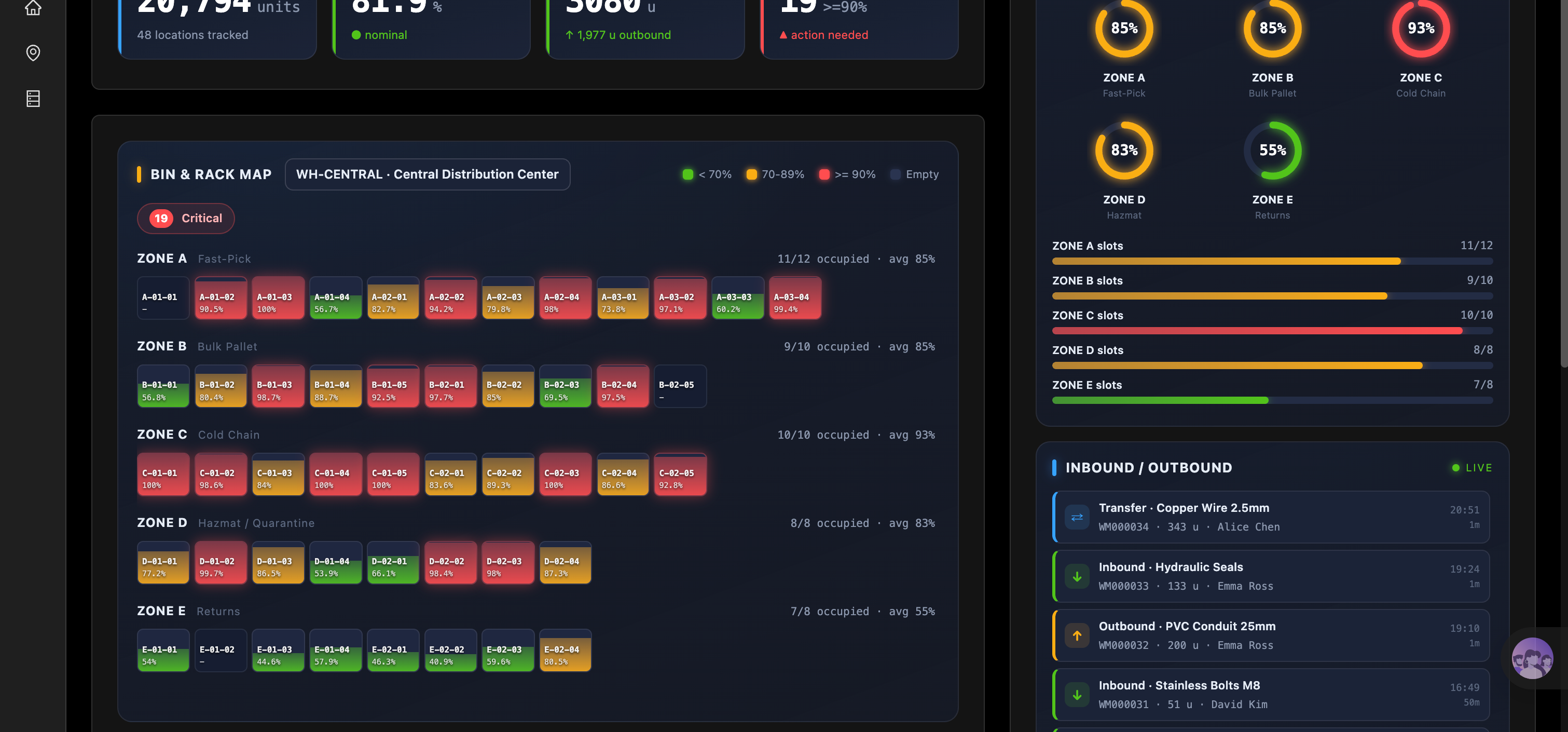
Dasbor operasional gudang:
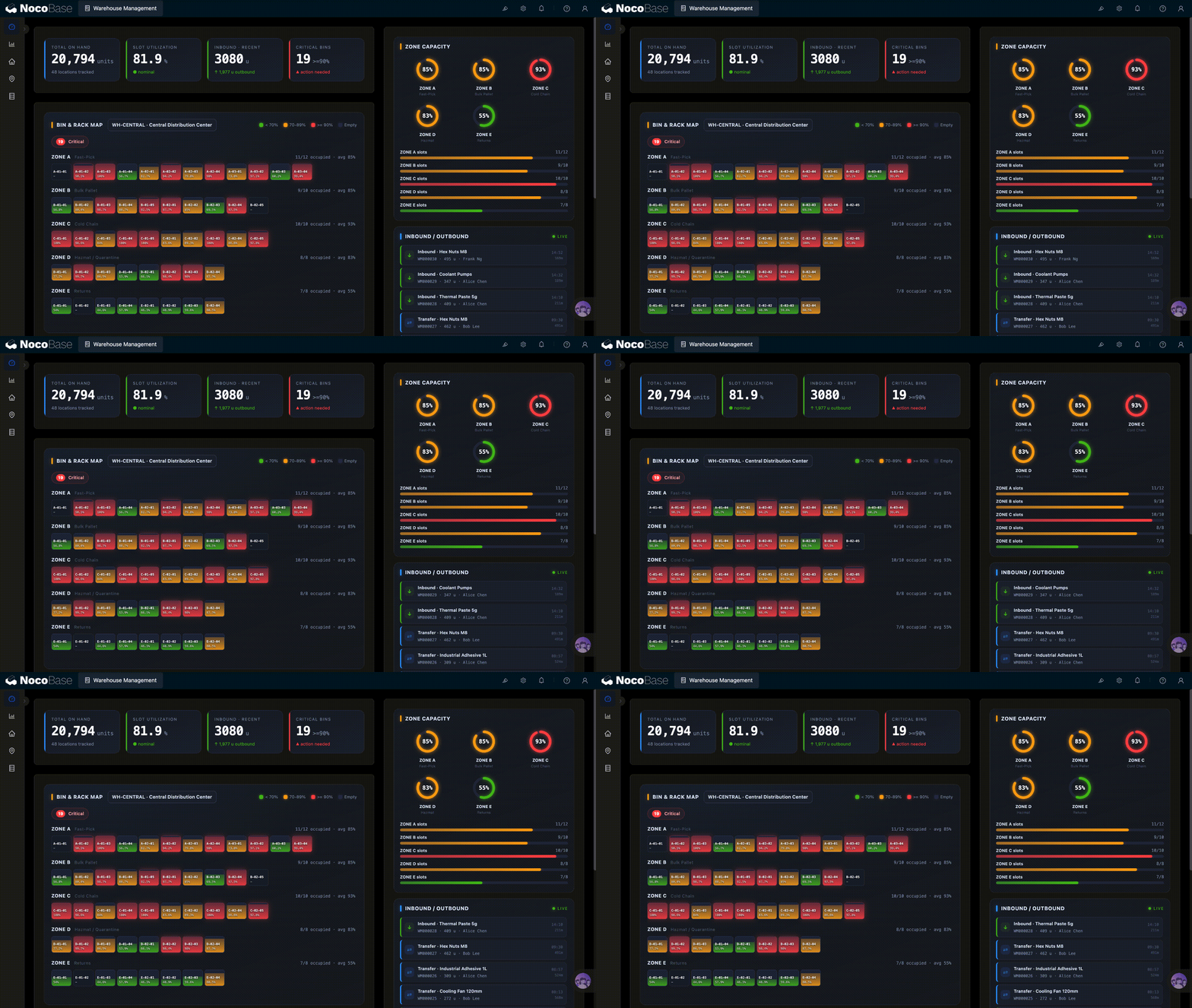
Kapasitas zona dan aktivitas masuk/keluar barang:
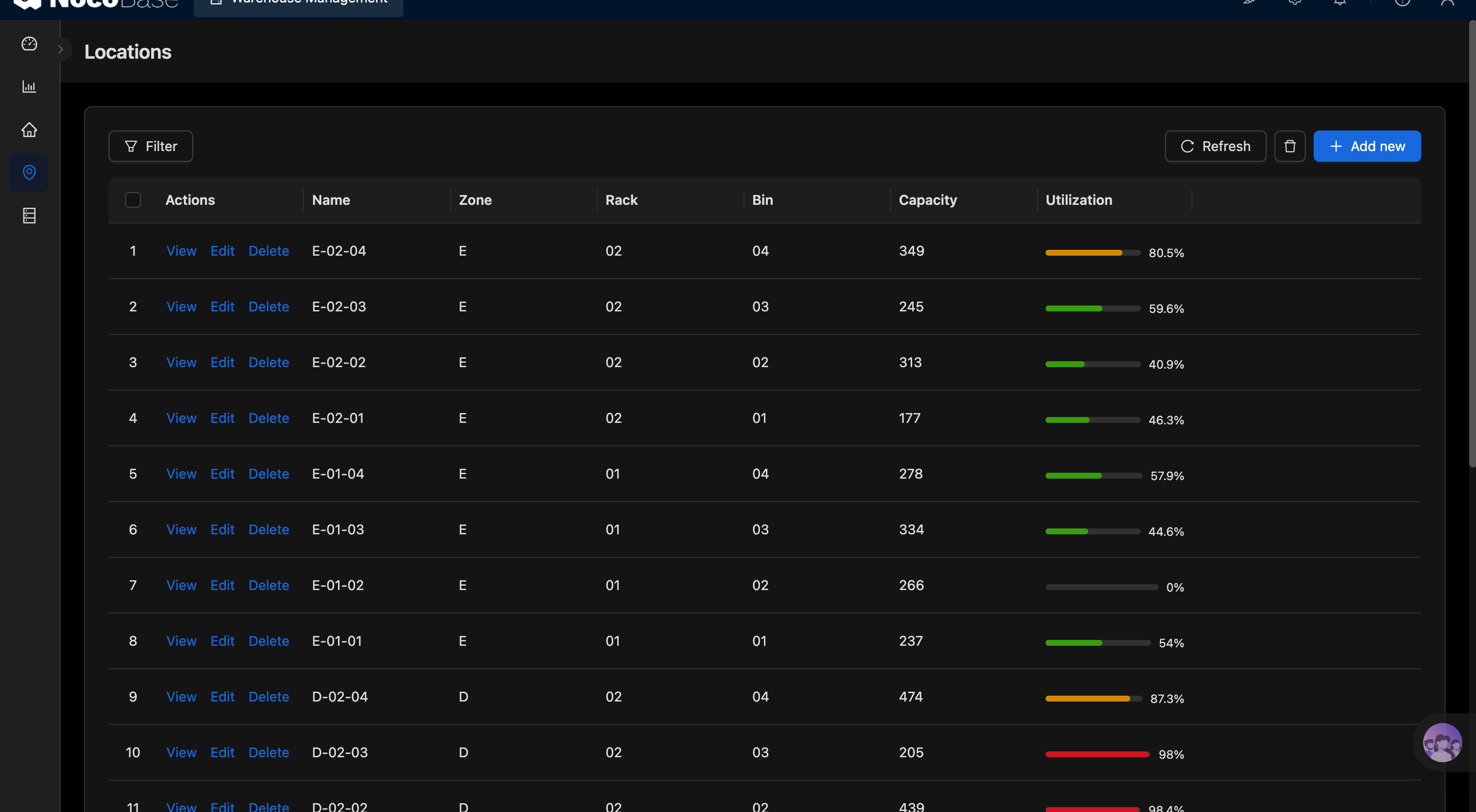
Daftar lokasi penyimpanan:
Masalah apa yang diselesaikan oleh sistem manajemen gudang?
Pertanyaan inti dalam manajemen gudang bukan “berapa banyak stok yang kita miliki”, melainkan di mana barang disimpan, apakah lokasi digunakan secara masuk akal, area mana yang mendekati kapasitas penuh, dan apakah pergerakan masuk, keluar, dan perpindahan dapat dilacak tepat waktu.
Banyak tim yang awalnya melacak posisi gudang di spreadsheet, tetapi begitu gudang dibagi menjadi beberapa zona, rak, dan lokasi penyimpanan, pemeliharaan manual dengan cepat menjadi kacau. Beberapa zona tetap kelebihan beban dalam jangka panjang sementara lokasi tertentu kosong, dan area rantai dingin, area pengambilan cepat, area pengembalian, serta area barang berbahaya masing-masing mengikuti aturan manajemen yang berbeda. Tanpa manajemen lokasi yang jelas dan dasbor visual, operator gudang kesulitan untuk menilai kapasitas saat ini dan menemukan anomali dengan cepat.
Dengan sistem ini, Anda dapat mengelola gudang, zona, rak, lokasi penyimpanan, kapasitas, pemanfaatan, serta catatan masuk/keluar secara terpusat. Manajer dapat melihat seberapa terisi setiap zona, mengidentifikasi lokasi yang kelebihan beban, kosong, dan kritis, serta melacak aktivitas masuk, keluar, dan perpindahan terkini.
Bagi tim yang ingin meningkatkan pemanfaatan ruang gudang, mengurangi waktu pencarian barang, mengurangi kekacauan lokasi, dan mempercepat penanganan masuk/keluar barang, sistem manajemen gudang membuat operasi pergudangan menjadi lebih jelas dan terkontrol.
Fitur utama
Manajemen gudang, zona, dan lokasi
- Manajemen struktur gudang: Pertahankan hierarki gudang, zona, rak, dan lokasi penyimpanan di satu tempat.
- Manajemen kode lokasi: Tetapkan kode unik untuk setiap lokasi penyimpanan sehingga barang dapat ditemukan dan diidentifikasi dengan cepat.
- Konfigurasi tipe zona: Kelola berbagai jenis area penyimpanan berdasarkan tujuan, seperti pengambilan, penyimpanan, rantai dingin, dan pengembalian.
Manajemen kapasitas dan pemanfaatan
- Catatan kapasitas lokasi: Catat total kapasitas, hunian saat ini, dan sisa ruang setiap lokasi.
- Statistik pemanfaatan otomatis: Hitung pemanfaatan lokasi dan zona dari data kapasitas dan hunian.
- Deteksi lokasi abnormal: Temukan dengan cepat lokasi yang kosong, hampir penuh, atau penuh, dan beri peringatan pada lokasi yang kelebihan beban.
Penerimaan, pengiriman, dan perpindahan internal
- Manajemen catatan masuk/keluar: Catat barang, kuantitas, lokasi asal atau tujuan, serta waktu dan operator setiap pergerakan.
- Pelacakan perpindahan internal: Kelola bagaimana barang berpindah antara zona atau lokasi penyimpanan yang berbeda.
- Log aktivitas gudang: Lihat operasi masuk, keluar, dan perpindahan terkini di satu tempat untuk melacak alur barang.
Dasbor operasional gudang
- Ikhtisar metrik utama: Tampilkan total stok, pemanfaatan lokasi, volume masuk dan keluar terkini, serta jumlah lokasi kritis.
- Analisis kapasitas zona: Bandingkan penggunaan kapasitas di seluruh zona untuk mengidentifikasi area yang kelebihan beban dengan cepat.
- Pemantauan anomali: Tampilkan lokasi kosong, padat, dan berisiko tinggi dalam satu tampilan sehingga manajer dapat menata ulang penyimpanan tepat waktu.
Peta lokasi dan analisis ruang
- Tata letak lokasi visual: Tampilkan rak, lokasi penyimpanan, dan status penggunaan saat ini berdasarkan gudang dan zona.
- Status berkode warna: Bedakan lokasi kosong, normal, hampir penuh, dan penuh berdasarkan pemanfaatan.
- Analisis pemanfaatan ruang: Identifikasi area yang terus-menerus kosong atau terlalu padat, untuk mendukung penyesuaian lokasi dan perencanaan gudang.
Bantuan bertenaga AI
- Pembuatan lokasi berbantuan AI: Ekstrak informasi gudang, zona, rak, kapasitas, dan kode lokasi dari bahasa alami dan isi formulir secara otomatis.
- Kueri status lokasi oleh AI: Tanyakan dalam bahasa alami tentang kapasitas dan hunian gudang, zona, atau lokasi tertentu.
- Deteksi risiko oleh AI: Temukan secara otomatis lokasi yang kelebihan beban, penuh, atau menunjukkan pemanfaatan abnormal.
- Ringkasan operasional oleh AI: Rangkum pemanfaatan kapasitas, lokasi kritis, dan aktivitas masuk/keluar terkini untuk menghasilkan laporan operasional gudang dengan cepat.
Mengapa membangun sistem manajemen gudang dengan AI dan NocoBase?
Manajemen gudang mungkin terlihat seperti sekadar mencatat lokasi, tetapi begitu digunakan dalam operasi gudang nyata, biasanya melibatkan perencanaan zona, pengkodean lokasi, pemanfaatan kapasitas, alur masuk/keluar, perpindahan internal, peringatan lokasi abnormal, dan dasbor operasional. Jika Anda hanya menggunakan AI untuk menghasilkan tabel sederhana dari awal, Anda dengan mudah terjebak di tahap “dapat mencatat lokasi”, dan masih harus terus-menerus menambahkan alur kerja, izin, visualisasi, dan kemampuan pemeliharaan jangka panjang setelahnya.
NocoBase lebih cocok untuk membangun sistem manajemen gudang semacam ini yang memerlukan penyesuaian berkelanjutan. Ini adalah platform no-code AI sumber terbuka yang dapat di-hosting sendiri. Tim dapat mengelola data gudang di lingkungan mereka sendiri sambil mengonfigurasi gudang, zona, rak, lokasi penyimpanan, catatan masuk/keluar, alur perpindahan, halaman dasbor, dan aturan izin sesuai struktur gudang nyata mereka.
Anda dapat memulai dengan prompt yang meminta AI agent menghasilkan manajemen lokasi, manajemen zona, catatan masuk/keluar, catatan perpindahan, dan dasbor operasional gudang, lalu terus menyesuaikan kolom, halaman, dan alur melalui antarmuka tanpa kode NocoBase.
Sistem manajemen gudang yang dibangun dengan cara ini bukan prototipe demo sekali pakai, melainkan sistem bisnis yang terus berkembang seiring perubahan skala gudang, aturan zona, alur barang, dan metrik operasional. Bagi tim yang mengutamakan sumber terbuka, self-hosting, kontrol data, proses fleksibel, dan pemeliharaan jangka panjang, AI + NocoBase adalah pilihan yang lebih baik.
FAQ
- Apa bedanya dengan sistem manajemen gudang yang dihasilkan oleh vibe coding biasa?
Vibe coding biasa sangat baik untuk menghasilkan prototipe tabel atau dasbor dengan cepat, tetapi begitu sistem manajemen gudang mulai beroperasi nyata, biasanya juga membutuhkan aturan zona, status lokasi, alur kerja masuk/keluar, catatan perpindahan, izin, audit, riwayat operasi, notifikasi, dan kemampuan pemeliharaan jangka panjang. NocoBase sudah menyediakan fondasi sistem bisnis ini, sehingga AI agent dapat membangun langsung di atas NocoBase daripada trial and error dari nol.
- Bisakah sistem manajemen gudang yang dibangun dengan AI terus berkembang dari waktu ke waktu?
Ya. NocoBase bukan alat pembuat prototipe sekali pakai, melainkan platform untuk sistem bisnis yang dipelihara secara berkelanjutan. Setelah sistem dibuat, Anda dapat terus menyesuaikan struktur gudang, aturan zona, kolom lokasi, alur masuk/keluar, alur perpindahan, halaman dasbor, izin, dan kemampuan plugin, sehingga sangat cocok untuk iterasi jangka panjang.
- Bisakah sistem ini mengelola zona, rak, dan lokasi penyimpanan?
Ya. Anda dapat mengelola gudang, zona, rak, dan lokasi penyimpanan di NocoBase, serta menetapkan kapasitas, hunian saat ini, pemanfaatan, dan status untuk setiap lokasi — cocok untuk manajemen lokasi yang terperinci.
- Bisakah saya melihat kapasitas gudang dan pemanfaatan lokasi?
Ya. Anda dapat membuat dasbor operasional gudang dan dasbor kapasitas zona untuk melihat total stok, pemanfaatan lokasi, lokasi kritis, lokasi kosong, dan penggunaan kapasitas di seluruh zona.
- Bisakah sistem ini mengelola penerimaan, pengiriman, dan perpindahan internal?
Ya. Anda dapat mencatat operasi masuk, keluar, dan perpindahan internal, termasuk barang, kuantitas, lokasi asal, lokasi tujuan, operator, waktu, dan catatan, membantu tim melacak pergerakan barang.
- Apakah sistem ini cocok untuk operasi gudang nyata?
Ya. NocoBase menyediakan kemampuan yang umum dibutuhkan oleh sistem internal perusahaan — manajemen izin, alur kerja, log audit, riwayat operasi, single sign-on, notifikasi, visualisasi data, manajemen file, API, dan ekstensi plugin — yang dapat diaktifkan sesuai kebutuhan.
Dibandingkan dengan prototipe sekali pakai yang dihasilkan oleh vibe coding biasa, NocoBase lebih cocok untuk membangun sistem manajemen gudang yang dapat dipelihara, diperluas, dan terus berkembang.
- Bisakah AI membantu menganalisis operasi gudang?
Ya. Anda dapat menambahkan AI employee khusus ke dalam sistem untuk mengkueri hunian lokasi, merangkum lokasi yang kelebihan beban, menghasilkan ringkasan operasional gudang, dan mengidentifikasi zona atau lokasi abnormal yang mungkin perlu disesuaikan.
- Bisakah saya menyesuaikan kolom dan halaman sesuai struktur gudang saya sendiri?
Ya. NocoBase mendukung koleksi, kolom, halaman, filter, peta lokasi, dasbor gudang, alur kerja, dan izin yang dapat dikustomisasi, sehingga cocok untuk membangun sistem manajemen gudang yang sesuai dengan struktur gudang nyata Anda.