Mit Ihrem KI-Agenten nachbauen
Build a NocoBase app — Training Tracker System: a course catalog, a month/week/day training calendar, a completion-rate dashboard, and AI training-session analysis. Match the layout and signature visuals of this reference prototype: https://static-docs.nocobase.com/solution/templates/28-training-tracker.html
Der Prototyp-Link (HTML) im Prompt ist ein von uns vorbereitetes Design und dient nur als Funktionsdemo; NocoBase empfiehlt nicht, ein ganzes System aus einem einzigen Prompt zu generieren. Kombinieren Sie es beim Aufbau mit dem Skill „prototype reproduction“ (nocobase-prototype-repro) aus den NocoBase Skills, um ein gutes Ergebnis zu erzielen.
Folgen Sie zunächst dem AI-Agent-Schnellstart, um NocoBase zu installieren und Ihren Agenten anzubinden. KI-Ergebnisse können variieren; je nach Modell und Systemkomplexität sind möglicherweise Feinabstimmungen oder mehrere Runden erforderlich.
Introduction
Use your preferred AI Agent and NocoBase to quickly build a customizable, reliable, and continuously evolvable training tracker for managing internal courses, training schedules, learner enrollments, completion status, course owners, and training data analysis.
These records can also be managed as a NocoBase-based internal business system, with training courses, participants, completion status, learning progress, certificates, departments, and training reports organized through configurable data models, role permissions, views, workflows where needed, and operation history.
You can copy the prompt below and let your AI Agent generate the basic structure of the training tracker in NocoBase, then continue adjusting course fields, calendar views, enrollment rules, completion statuses, and report content through the no-code interface.
This system is suitable for human resources, training operations, learning and development, compliance training, and enterprise management teams. It helps teams continuously track active courses, average completion rate, monthly completions, overdue learners, and training resource utilization. The course catalog can manage course names, course codes, categories, delivery formats, duration, credits, difficulty, enrollment counts, and owners. The training calendar supports monthly, weekly, and daily views for different course schedules.
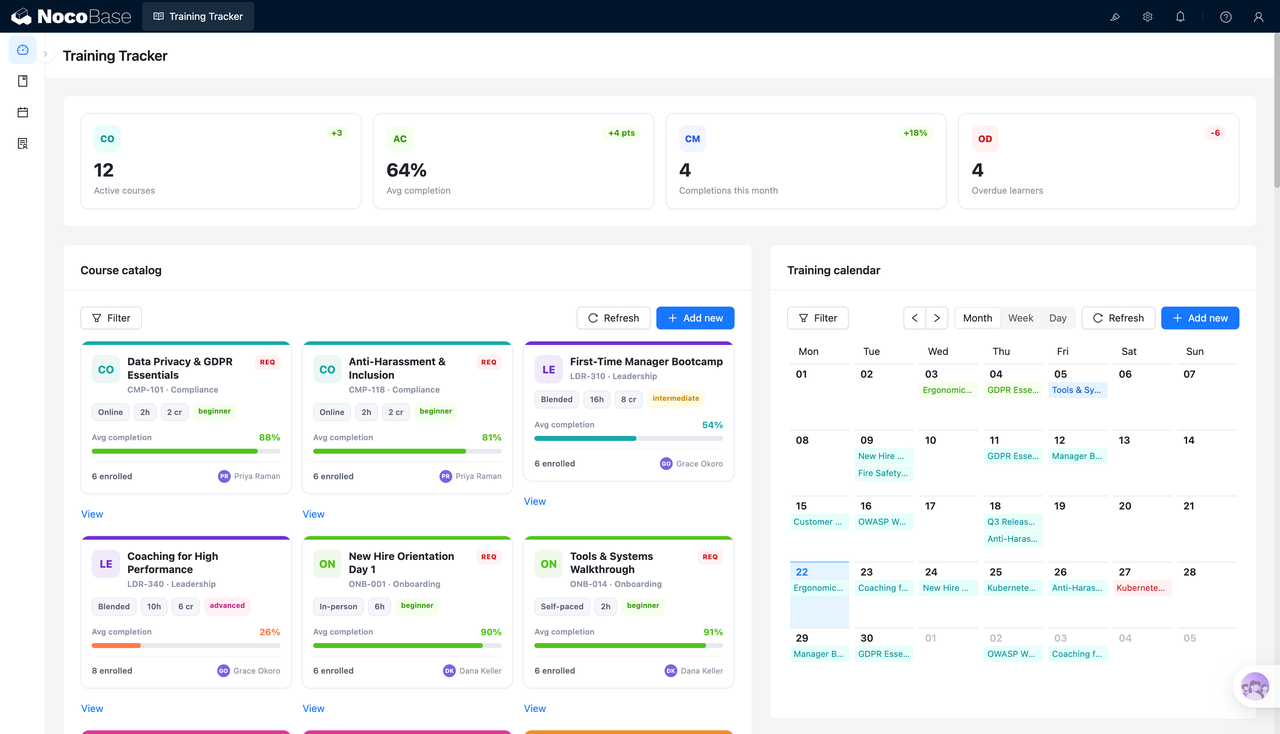
Course catalog and training calendar in one workspace:
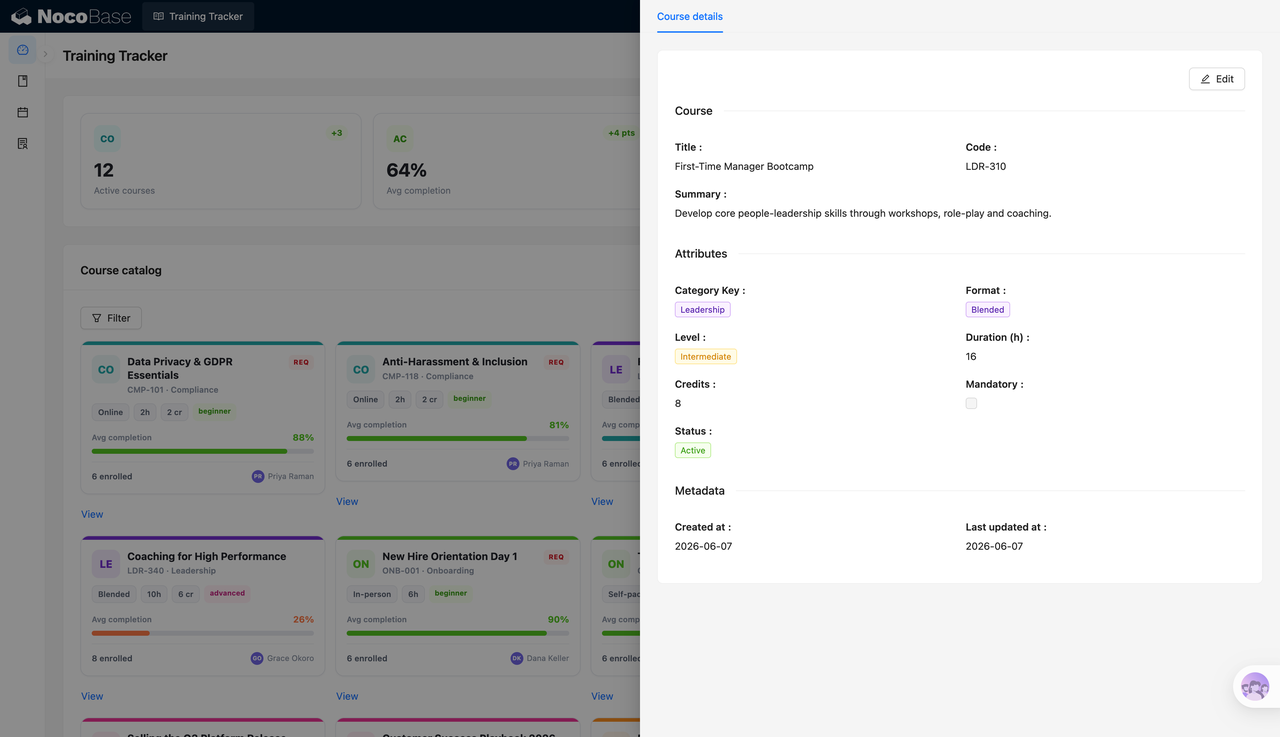
Course details record category, format, duration, and status:
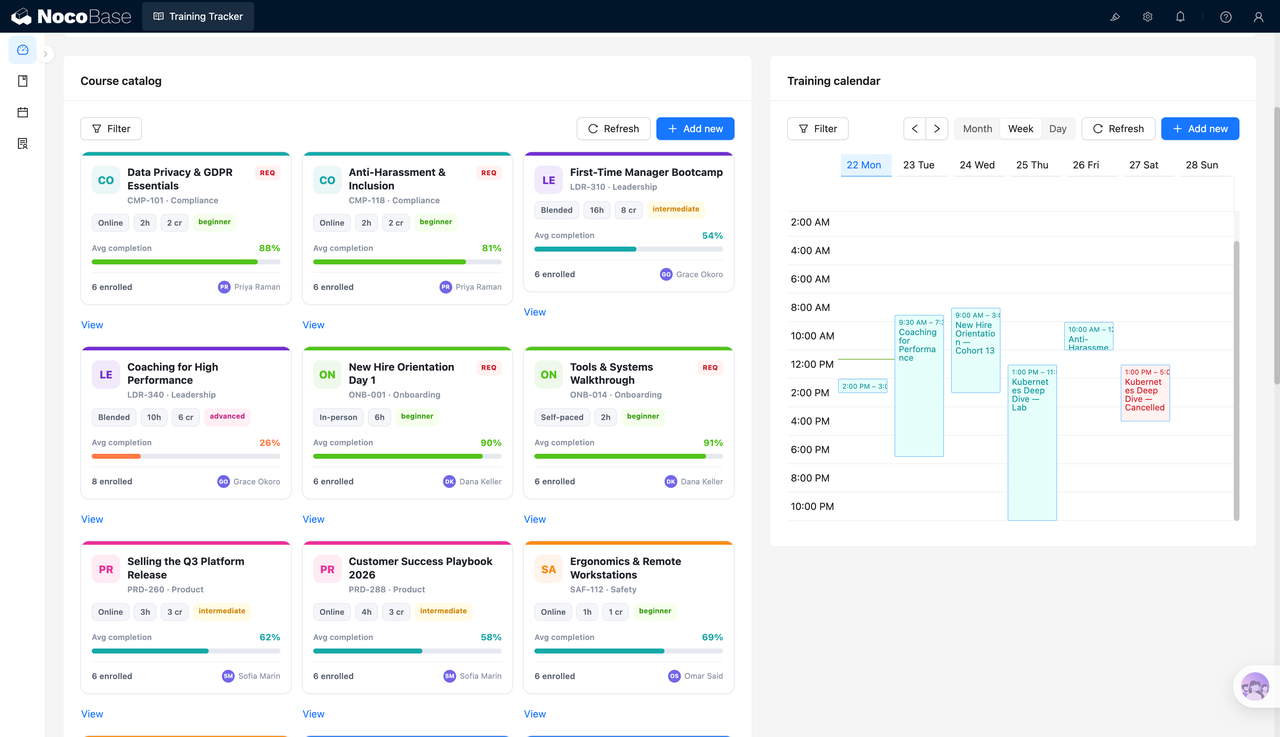
Weekly view shows scheduled training sessions:
Course list supports viewing, editing, and analysis:
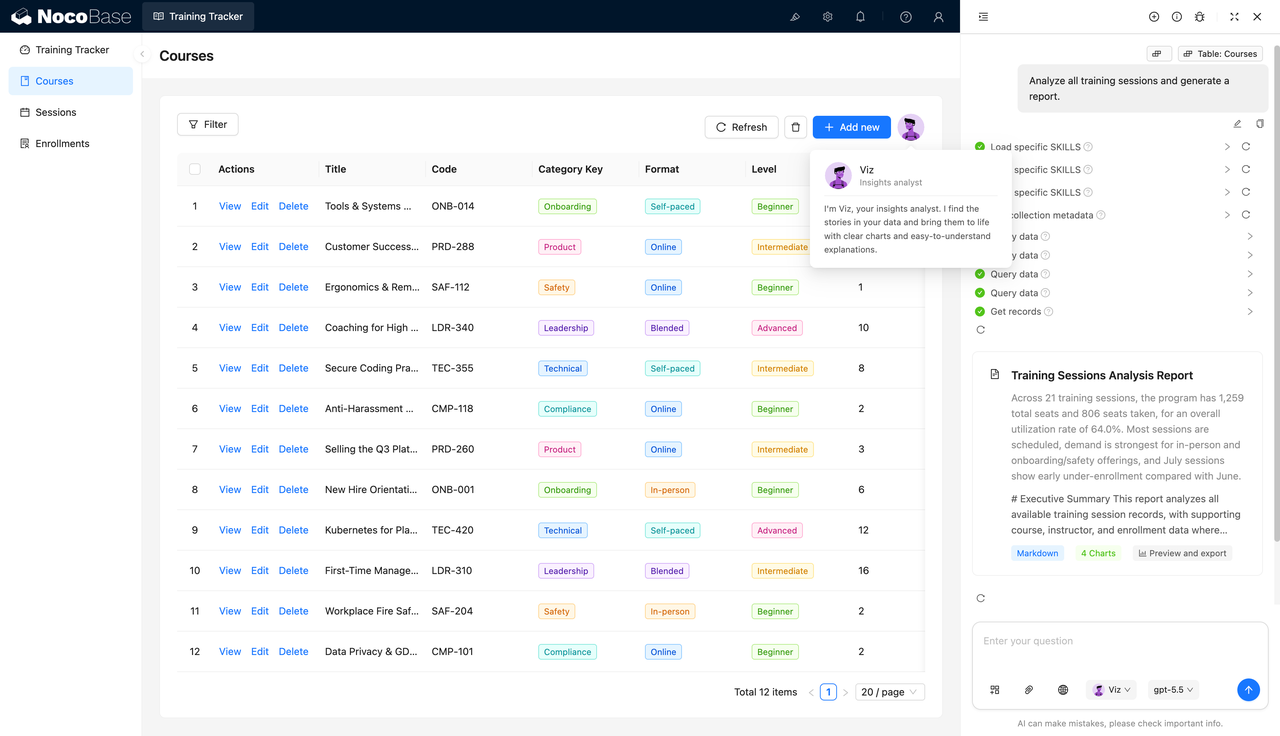
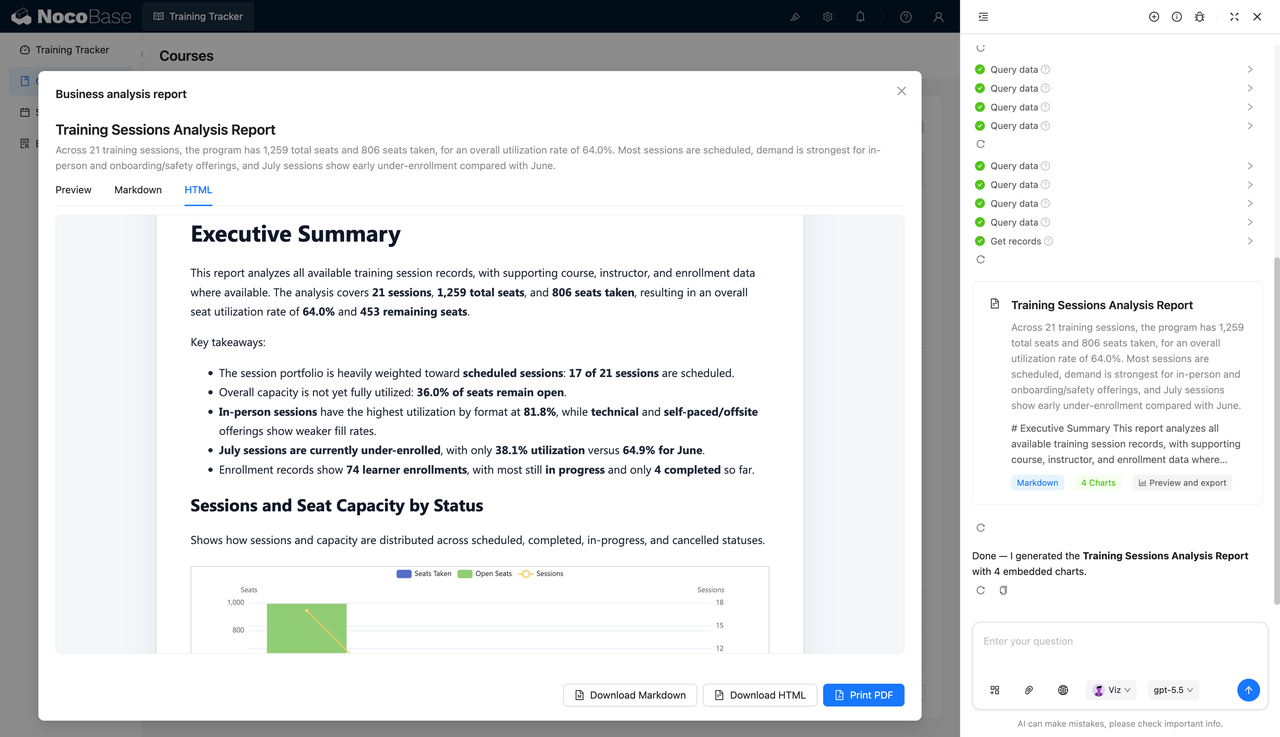
AI-generated training session analysis report:
What Problems Can a Training Tracker Solve?
As the number of training courses grows, course catalogs, calendar schedules, learner enrollments, and completion records can easily become scattered across spreadsheets or multiple tools. HR and training teams then struggle to see which courses are progressing well, which courses have low completion rates, and which learners are already overdue.
The course catalog helps centralize compliance, leadership, onboarding, product, safety, and technical courses. Each course can record its course code, delivery format, duration, credits, difficulty, average completion rate, enrollment count, and owner, making it easier for teams to compare execution across different courses.
The training calendar is useful for managing course sessions. Teams can view schedules by month, week, or day, such as new employee onboarding, anti-harassment training, Kubernetes deep-dive sessions, office safety, and remote workstation training, reducing scheduling conflicts and missed sessions.
AI training analysis reports can turn course, session, and enrollment data into management-friendly insights. Total sessions, total seats, occupied seats, utilization rate, remaining seats, monthly enrollment patterns, and performance by delivery format can all be summarized in a report.
Key Features
Training Overview Dashboard
- Active course count: Shows the number of currently running courses, such as 12 active courses.
- Average completion rate: Shows overall course completion, such as a 64% average completion rate.
- Monthly completions: Shows how many trainings were completed this month, such as 4 completed items.
- Overdue learner count: Shows the number of overdue learners, helping teams follow up on time.
- Trend indicators: Metric cards can show changes such as more courses, improved completion rates, or fewer overdue learners.
Course Catalog Management
- Course cards: Display course name, course code, category, delivery format, duration, and credits.
- Category management: Supports categories such as compliance, leadership, onboarding, product, safety, and technical training.
- Completion rate display: Shows the average completion rate for each course so teams can evaluate progress.
- Enrollment count: Shows the current number of enrollments for each course, such as 6 or 8 learners.
- Owner information: Displays the course owner on each card for easier communication and follow-up.
Training Calendar Scheduling
- Monthly view: Shows course schedules by month for overall planning and resource allocation.
- Weekly view: Shows training sessions by time slot, making it easier to detect conflicts.
- Daily view: Provides a closer look at the training plan for a specific day.
- Session display: The calendar can show course names and time ranges.
- Schedule maintenance: Supports filtering, refreshing, and adding new training sessions.
Course Detail Management
- Basic information: Shows the course title, course code, and course summary.
- Attributes: Shows category, delivery format, level, duration, and credits.
- Status information: Records whether the course is active.
- Metadata: Displays creation time and update time to help track course maintenance.
- Edit entry: Users can open editing from the detail page to keep course information updated.
AI Training Analysis Reports
- Session summary: AI can summarize the number of training sessions, such as 21 sessions.
- Seat analysis: Reports can analyze total seats, occupied seats, remaining seats, and utilization rate.
- Completion status: Summarizes learner statuses such as completed, in progress, and pending.
- Schedule analysis: Compares enrollment performance across months, delivery formats, and course types.
- Report export: Supports Markdown, HTML, and PDF output for reporting and archiving.
Why Build a Training Tracker with AI and NocoBase?
A training tracker needs to cover course catalogs, training calendars, enrollment counts, completion progress, overdue learners, delivery formats, credits, mandatory status, and training analysis reports. It is not just a place to store course names; it also helps teams continuously manage training plans and learning outcomes.
With pure Vibe Coding, a team may quickly generate a course list or calendar page at the beginning, but many details become harder to maintain later. Different courses require different categories and difficulty levels. Online, offline, self-paced, and blended training need separate statistics. Mandatory courses require special follow-up. Overdue learners need reminders, and seat utilization needs continuous analysis.
NocoBase works more like the infrastructure and scaffolding for enterprise applications. It already provides data models, access control, workflows, operation history, audit logs, notifications, single sign-on, page building, and plugin extensions. AI helps accelerate system generation, while NocoBase keeps the system maintainable, extensible, and suitable for long-term use.
Teams can first use AI to generate the course catalog, course detail pages, training calendar, enrollment data tables, and training analysis reports. They can then continue adjusting course categories, fields, scheduling methods, enrollment rules, permission scopes, and report content in NocoBase. When training policies or course structures change later, the system does not need to be rebuilt from scratch.
FAQ
1.Can the training tracker show the overall training status?
Yes. The system can show active courses, average completion rate, monthly completions, and overdue learners in one place, helping teams quickly understand training progress.
2.Does the system support course catalog management?
Yes. The course catalog can display course name, course code, category, delivery format, duration, credits, difficulty, completion rate, and enrollment count.
3.Does the system support a training calendar?
Yes. The screenshots show monthly, weekly, and daily views, which are useful for viewing course schedules and specific training sessions.
4.Can each course have a detail page?
Yes. The course detail page can show title, code, summary, category, delivery format, level, duration, credits, mandatory status, and course status.
5.Can the system manage different course categories?
Yes. The screenshots include categories such as compliance, leadership, onboarding, product, safety, and technical training.
6.Does the system support different delivery formats?
Yes. Courses can be marked as online, offline, self-paced, or blended, making filtering and analysis easier.
7.Can the system track course completion rates?
Yes. Course cards show average completion rates such as 88%, 81%, 54%, 26%, and 90%, helping teams evaluate course progress.
8.Can the system show overdue learners?
Yes. The top dashboard shows the number of overdue learners, helping training teams follow up with people who have not completed required learning tasks.
9.Can AI generate training analysis reports?
Yes. AI can generate training session analysis reports based on course, session, and enrollment data, summarizing seats, utilization, completion status, and scheduling performance.
10.Can AI reports be exported?
Yes. The screenshots show support for Markdown, HTML, and PDF output, making reports easier to share, archive, or send to management.
11.Can Claude Code, Codex, Cursor, or OpenCode help build this system?
Yes. These AI Agents can connect to NocoBase to help generate the course catalog, detail pages, training calendar, enrollment data tables, and analysis reports. Teams can then continue adjusting them in NocoBase.
12.How is this different from building with pure Vibe Coding?
Pure Vibe Coding is better suited for quickly generating page prototypes. NocoBase is better suited for managing course data, enrollment records, training schedules, permission configuration, report output, and long-term iteration.
13.Does the system support access control?
Yes. Access control can be configured in NocoBase. For example, HR can maintain courses and enrollment data, department managers can view team training progress, and management can view statistics and reports.
14.Can course fields and training rules be adjusted later?
Yes. Course categories, delivery formats, difficulty levels, credits, completion rates, calendar views, enrollment rules, and report content can all continue to be adjusted.
15.Is this system suitable for formal enterprise use?
Yes. NocoBase can support course data, pages, permissions, and process configuration, while AI can reduce system setup and report preparation work. This makes it suitable for long-term maintenance and continuous iteration.