Xây dựng hệ thống bằng AI agent của bạn
Build a NocoBase app — Employee Information System: an employee directory, department filtering, employee profile details, and a CEO-view workforce-structure analysis report. Match the layout and signature visuals of this reference prototype: https://static-docs.nocobase.com/solution/templates/42-employee-information.html
Liên kết nguyên mẫu (HTML) trong prompt là thiết kế chúng tôi chuẩn bị sẵn, chỉ nhằm minh họa khả năng; NocoBase không khuyến nghị tạo cả một hệ thống chỉ từ một câu prompt. Khi xây dựng với nó, hãy kết hợp với skill “prototype reproduction” (nocobase-prototype-repro) trong NocoBase Skills để có kết quả tốt.
Trước khi bắt đầu, hãy làm theo hướng dẫn nhanh AI agent để cài đặt NocoBase và kết nối agent của bạn. Kết quả AI có thể khác nhau; tùy vào mô hình và độ phức tạp của hệ thống, có thể cần tinh chỉnh thêm hoặc tương tác nhiều vòng.
Introduction
An employee information system helps HR, people operations, finance, and management teams maintain employee profiles, department ownership, job information, employment types, employment status, office locations, and compensation data in one place. Teams can use the employee directory to quickly understand the current organization structure and filter employees by department, status, and employment type.
These records can also be managed as a NocoBase-based internal business system, with employee records, departments, positions, employment status, personal profiles, HR data, and permissions organized through configurable data models, role permissions, views, workflows where needed, and operation history.
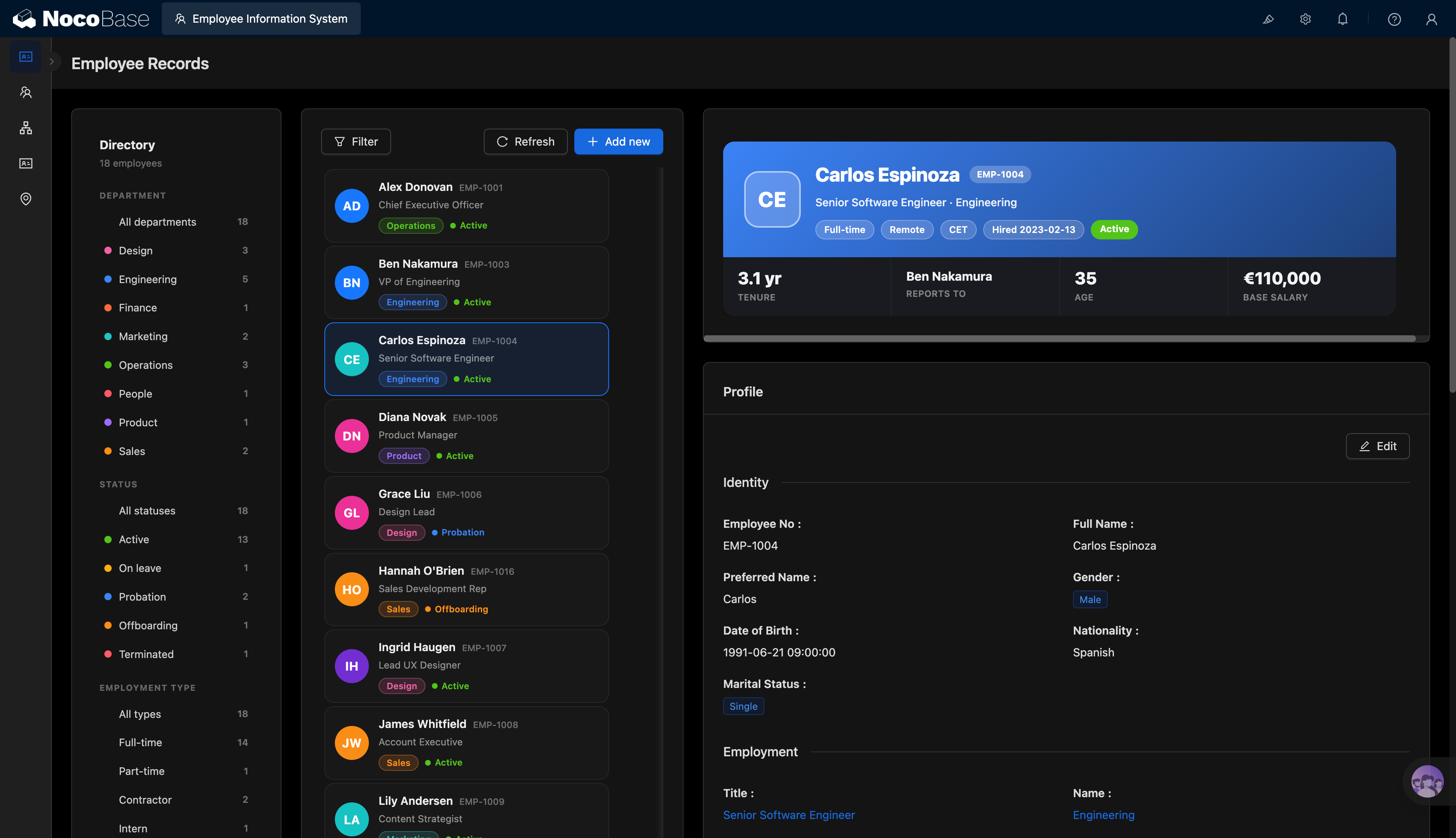
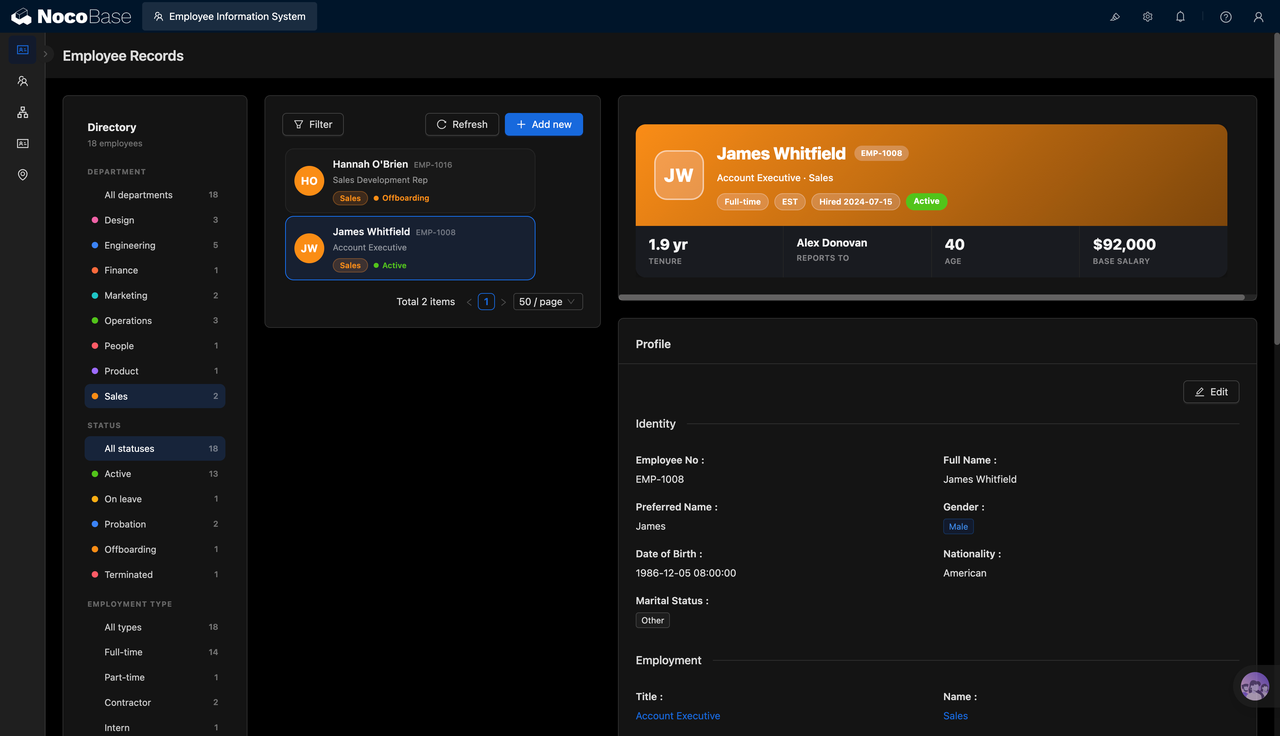
The page is centered on employee records. The left side provides filters for departments, employee status, and employment type. The middle area displays employee cards, while the right side shows the full profile of the selected employee. Managers can quickly view the employee ID, name, job title, department, status, hire date, reporting relationship, age, tenure, and base salary.
The employee detail page further separates personal identity information and employment information, including employee ID, full name, preferred name, gender, date of birth, nationality, marital status, job title, department, and work email. For distributed teams, the system can also record the employee’s city, remote work status, and time zone.
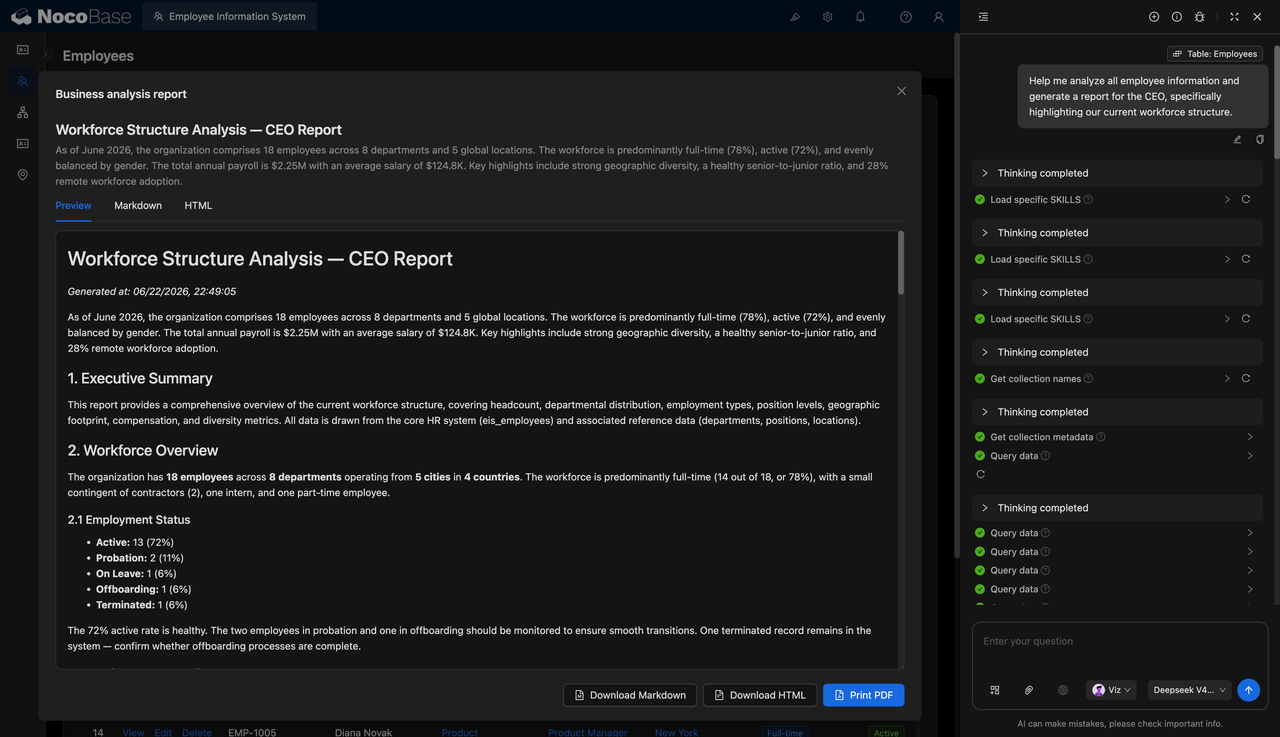
AI Agent can generate workforce structure reports for CEOs and management teams based on employee data, summarizing headcount, department distribution, employment type, employment status, compensation structure, job levels, and the share of remote employees.
Employee directory with filters by department, status, and employment type:
Employee cards and profile details after filtering by the sales department:
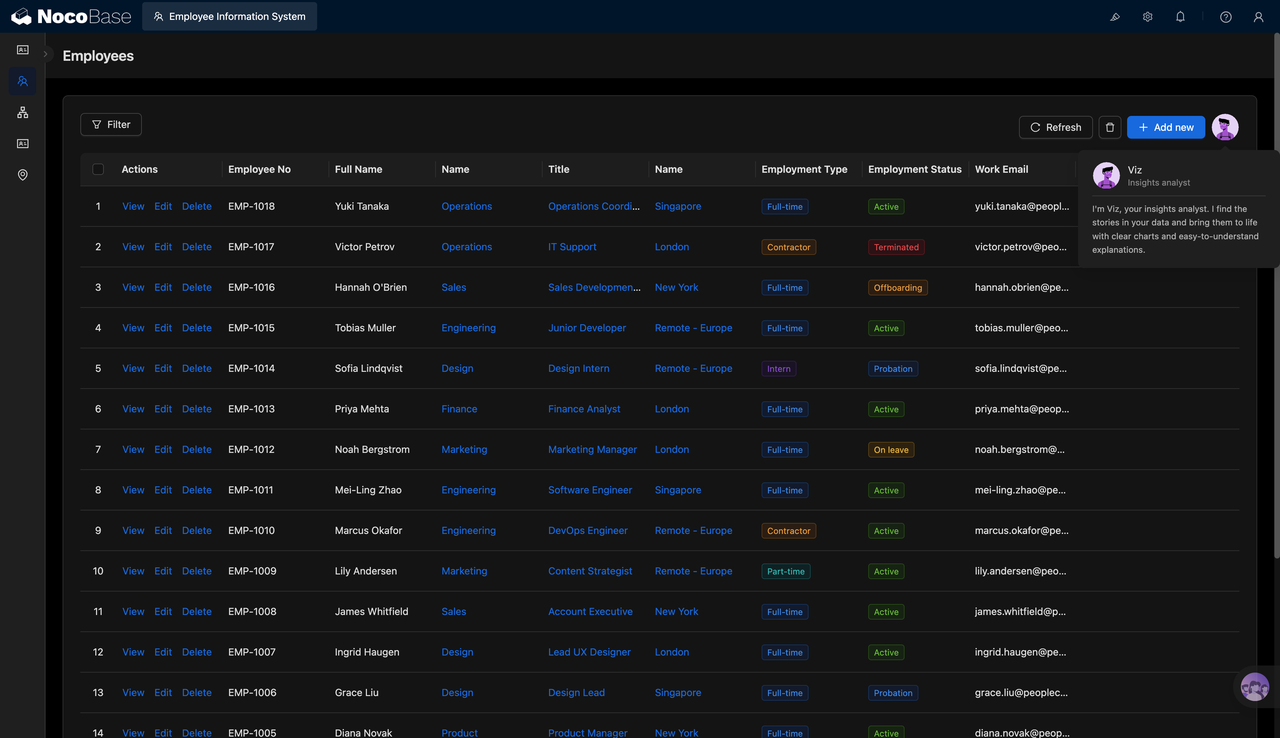
Employee list showing ID, department, role, status, and email:
AI-generated workforce structure analysis report from a CEO perspective:
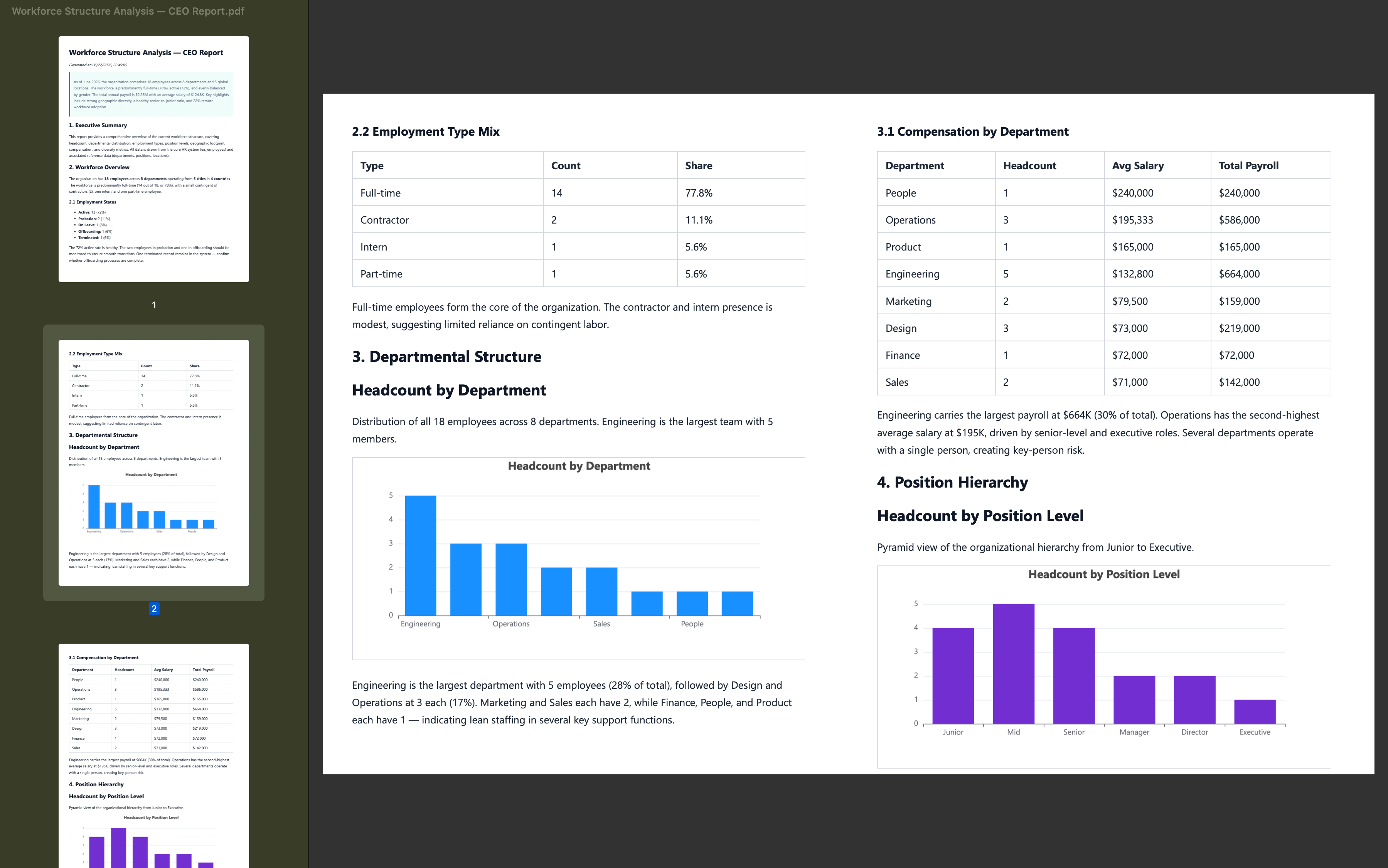
PDF report with employment type, department headcount, and compensation distribution:
What Problems Can an Employee Information System Solve?
When employee information is scattered, HR teams struggle to answer basic questions quickly: How many employees does the company currently have? Is headcount balanced across departments? Who is on probation, on leave, in offboarding, or already inactive? Which employees are full-time, part-time, contractors, or interns?
The employee directory places organization structure and employee profiles on the same page. Teams can filter by departments such as Design, Engineering, Finance, Marketing, Operations, HR, Product, and Sales, or view employees by status, including active, on leave, probation, offboarding, and inactive.
The employee detail page solves the problem of having information only in tables and not easy to review as a complete profile. Employee ID, name, role, department, hire date, manager, base salary, tenure, age, nationality, and marital status are shown together, helping HR and management teams understand employee information more efficiently.
The employee list is suitable for daily maintenance and batch review. HR can view employee ID, full name, department, role, office location, employment type, employment status, and work email for all employees, and then open detail pages for further editing.
AI workforce structure reports turn employee records into management-level insights. The system can analyze 18 employees across 8 departments and multiple locations, summarizing the share of full-time employees, active employees, total compensation, average salary, department headcount, and job levels, so management can understand the organization structure faster.
Key Features
Employee Directory Filters
- Department filters: View employees by departments such as Design, Engineering, Finance, Marketing, Operations, HR, Product, and Sales.
- Status filters: Filter employees by active, on leave, probation, offboarding, and inactive status.
- Employment type filters: Support full-time, part-time, contractor, and intern categories.
- Headcount indicators: Show the number of employees under each filter option to clarify organization distribution.
- Employee cards: Display employee name, ID, job title, department, and status.
Organization Structure Data
- Department distribution: Count employees across departments such as Engineering, Design, Operations, and Sales.
- Employment type structure: Analyze the share of full-time employees, contractors, interns, and part-time employees.
- Employee status structure: Track active, probation, on-leave, offboarding, and inactive employees.
- Location distribution: View employees by city, country, or remote location.
- Job levels: Analyze junior, mid-level, senior, manager, director, and executive roles.
Employee Profile Details
- Identity information: Record employee ID, full name, preferred name, gender, date of birth, nationality, and marital status.
- Employment information: Record role, department, status, hire date, tenure, and work email.
- Reporting relationships: Show who the employee reports to, supporting a basic view of organization structure.
- Compensation information: Record base salary and support later compensation structure analysis.
- Work location: Manage city, country, remote work status, and time zone information.
AI Workforce Structure Reports
- Employee data analysis: AI can read employee records and generate workforce structure reports.
- Executive summary: Reports can summarize total employees, number of departments, number of locations, and key structure metrics for CEOs.
- Structure analysis: Summarize department distribution, employment types, employee status, job levels, and remote employee share.
- Compensation analysis: Analyze total compensation, average salary, and department-level compensation distribution.
- Report export: Support Markdown, HTML, and PDF output for management reporting and archiving.
Why Build an Employee Information System with AI and NocoBase?
Many HR management questions depend on accurate employee data: How many people are in the company now? Is headcount balanced across departments? Who is on probation, on leave, or in offboarding? What share of the workforce belongs to each employment type? If this information is scattered across spreadsheets, emails, and different systems, each analysis requires repeated checking.
An employee information system is more than a contact list or employee directory. It needs to manage employee profiles, departments, roles, status, employment types, work locations, reporting relationships, and compensation data in a unified data structure, while controlling who can view and edit different types of information.
AI Agent can help teams quickly generate the initial table structure, page layout, filters, employee detail pages, and report prompts. It can also generate workforce structure reports based on employee records. Data such as total headcount, department distribution, employment type, employee status, job levels, remote employee share, total compensation, and average salary can be organized into more readable analysis.
NocoBase supports the system’s long-term maintenance. Teams can continue adjusting fields, departments, statuses, permissions, and reporting logic inside NocoBase. When the organization changes, AI Agent can generate updated reports based on the latest data. The result is not just an employee directory, but an enterprise business system that continuously supports organization analysis and management decisions.
FAQ
1.Which teams is this employee information system suitable for?
It is suitable for HR, people operations, finance, department leads, and management teams. It can be used to maintain employee profiles, view organization structure, count department headcount, and generate management reports.
2.Can the system show the total number of employees?
Yes. The employee directory shows the current employee count, such as the 18 employees shown in the screenshot.
3.Can employees be filtered by department?
Yes. The screenshots show department filters such as Design, Engineering, Finance, Marketing, Operations, HR, Product, and Sales, with headcount shown for each department.
4.Can the system manage employee status?
Yes. The system can record statuses such as active, on leave, probation, offboarding, and inactive, and filter employees by status.
5.Can the system manage employment types?
Yes. The screenshots show full-time, part-time, contractor, and intern employment types, helping HR understand workforce structure.
6.Can a single employee profile be viewed?
Yes. The employee detail page shows employee ID, name, preferred name, gender, date of birth, nationality, marital status, job title, and department.
7.Can the system show reporting relationships?
Yes. The employee profile card shows the reporting manager, which helps teams understand basic organization relationships.
8.Can the system manage employee salary information?
Yes. The employee profile card shows a base salary field, and the AI report also includes average salary and total compensation by department.
9.Can the system manage office locations?
Yes. The employee list shows locations such as Singapore, London, New York, and Remote Europe, making it suitable for multi-location and remote teams.
10.Can new employees be added?
Yes. The page includes an add button so HR can create new employee profiles and maintain related fields.
11.Can employee information be edited?
Yes. The employee profile area provides an edit entry point for updating identity, employment, and organization information.
12.Can AI generate employee analysis reports?
Yes. The screenshot shows an AI-generated workforce structure analysis report from a CEO perspective, covering headcount, department distribution, employment types, status structure, compensation, and job levels.
13.Can AI reports be exported?
Yes. The report page shows Markdown, HTML, and PDF actions, so teams can download Markdown, download HTML, or print to PDF.
14.Can Claude Code, Codex, Cursor, or OpenCode help build this system?
Yes. These AI Agents can help generate the initial employee table structure, page layout, filters, employee detail pages, and report prompts. The data model, permissions, and page configuration should then be maintained in NocoBase.
15.How is this different from pure Vibe Coding?
Pure Vibe Coding is better for quickly creating a page prototype. An employee information system involves employees, departments, roles, locations, compensation, status, reporting relationships, and permissions. NocoBase can support long-term maintenance, while AI improves setup and analysis efficiency.
16.Does the system support access control?
The screenshots do not directly show a permissions page, but NocoBase supports access control. Companies can configure different data viewing and editing scopes for HR, finance, department leads, employees themselves, and management teams.
17.Can fields and organization structures be adjusted later?
Yes. Employee information systems often add fields such as probation end date, contract information, cost center, job level, direct manager, office area, or offboarding status. With NocoBase, teams can continue adjusting data tables, pages, and report content without rebuilding the system.