
A Sungrow project team built a custom sales management system in about two months by using AI and NocoBase. The application connects opportunities, technical solutions, quotations, and orders across several countries — without manually writing code.
The results went beyond faster development. Information previously scattered across spreadsheets, messaging apps, and other tools now lives in one application. Once a technical solution is confirmed, employees generate a quotation in minutes. The same process used to take hours or even days.
The team achieved this by combining AI-driven development with NocoBase's existing data management, permissions, and workflow capabilities. This gave them more time to focus on their business requirements rather than building everything from scratch.
About Sungrow
Founded in 1997, Sungrow is a global renewable energy company. Its businesses cover solar and wind power, energy storage, electric vehicles and charging, hydrogen, and related technologies.
By June 2026, Sungrow had installed over 1,100 GW of power electronic conversion equipment worldwide. It operates in more than 100 countries and regions, with four manufacturing bases and seven R&D centers.
 *
Operating across these markets brings complex requirements. Grid standards, product certifications, tariffs, and tax policies vary by country. Customers also have different requirements for currencies, trade terms, and payment methods.
For teams managing projects across multiple countries, coordinating these details is a daily challenge.
The Challenge: Complex Sales Processes Across Multiple Markets
Sungrow has a dedicated AI department that promotes AI adoption across the company. One project team wanted to explore how AI could improve its daily operations.
The team started with a clear goal: manage sales opportunities in one place and connect the technical solutions, quotations, and orders that follow.
Existing tools could not fully support these processes.
A single project might involve multiple technical revisions, quotation versions, and approval steps. Salespeople, solution engineers, product teams, and pricing managers all needed to coordinate. The same information often appeared in different spreadsheets and message threads, making it difficult to identify the latest version.
The team needed a system that could handle these workflows while remaining flexible as business requirements changed.
It also needed reliable data management, access controls, and version tracking. AI could help build the application, but generating features alone would not solve these challenges.
Why NocoBase: Giving AI a Foundation to Build On
The team's IT lead evaluated several options, including off-the-shelf business software, online collaborative spreadsheets, and application platforms such as NocoBase.
Ready-made systems offered standard features but lacked the flexibility to support the team's specific workflows. Spreadsheets were flexible, but managing complex processes, permissions, and revisions became increasingly difficult.
NocoBase offered a different approach.
It already provided essential capabilities for data management, permissions, and workflows. AI could build the business-specific features on top of that foundation. The team could then review and refine the results without developing every component from scratch.
Access permissions were one practical example.
Whether an employee could view a quotation amount depended on their role and membership in the relevant project team.
The built-in AI agent followed the same permissions. It could only retrieve information the employee was authorized to access. These rules were managed through NocoBase's existing permission system, rather than being rebuilt for AI.
This allowed the team to focus on its business logic while reusing established application capabilities.
Business Teams Define the Requirements. AI Builds the Application.
Once the initial scope was clear, the project team worked with colleagues across different regions to document their workflows.
They mapped each stage of an opportunity, identified responsibilities, and defined what information the system needed to collect. They also clarified how exceptions should be handled.
These requirements became the instructions AI used to build the application on NocoBase.
AI generated data structures, pages, business rules, and dashboards. The project team did not need to write code manually.
Business users defined requirements and validated the results. The technical team reviewed the implementation and helped ensure reliable operation. As new needs emerged, the team updated the requirements and continued refining the application.
This allowed business users to take a more active role in building applications.
" 'Tell us exactly what you need, and we can build it. ' This platform gives us the confidence to say that."
— Project team
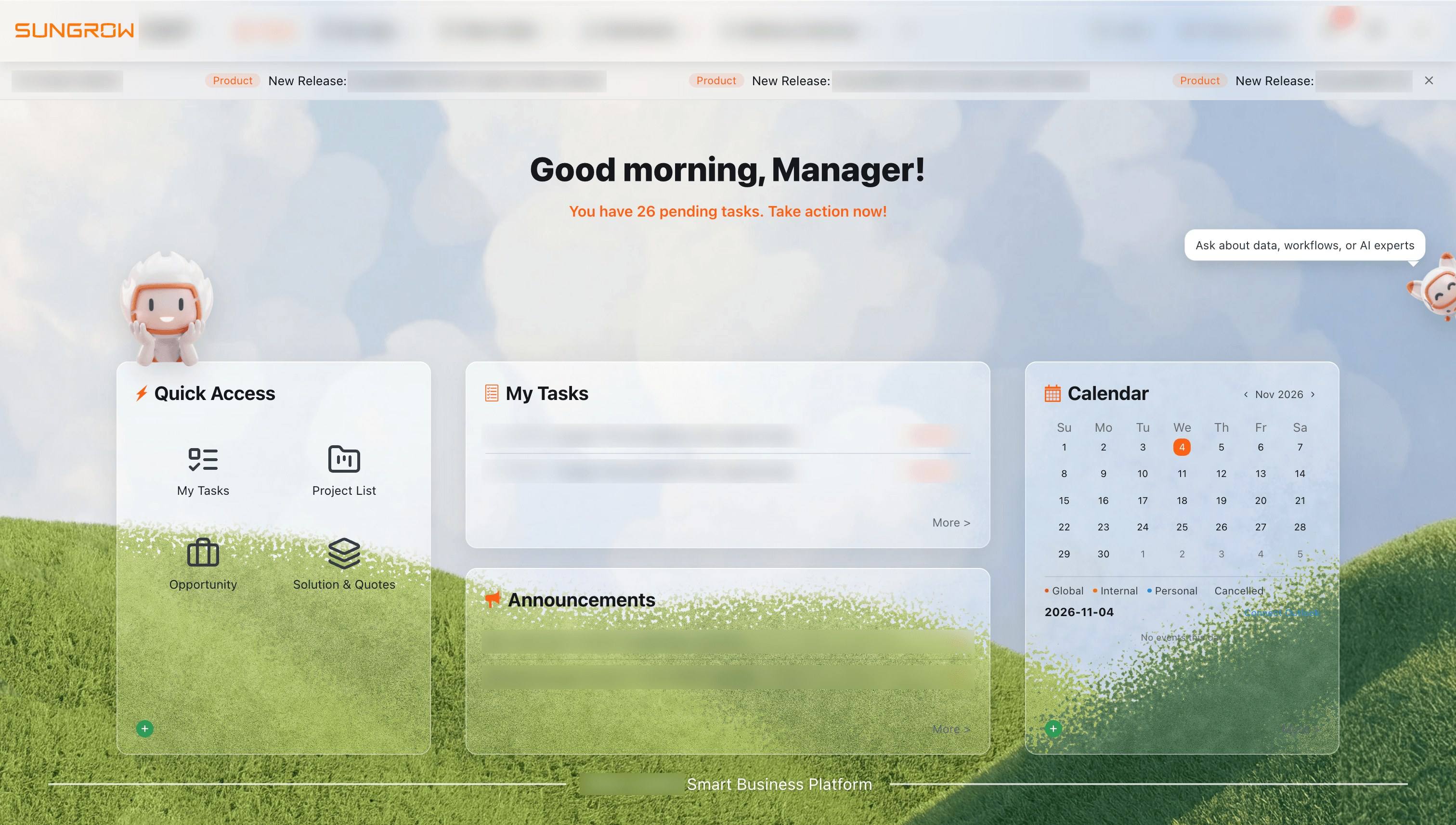
Note: All application screenshots are from a test environment. The data shown is test data, and some information has been blurred.
Bringing Opportunity Management into One Place
The new application gives employees a single place to manage opportunities. They review records by country, customer, or project stage, and track responsibilities and progress.
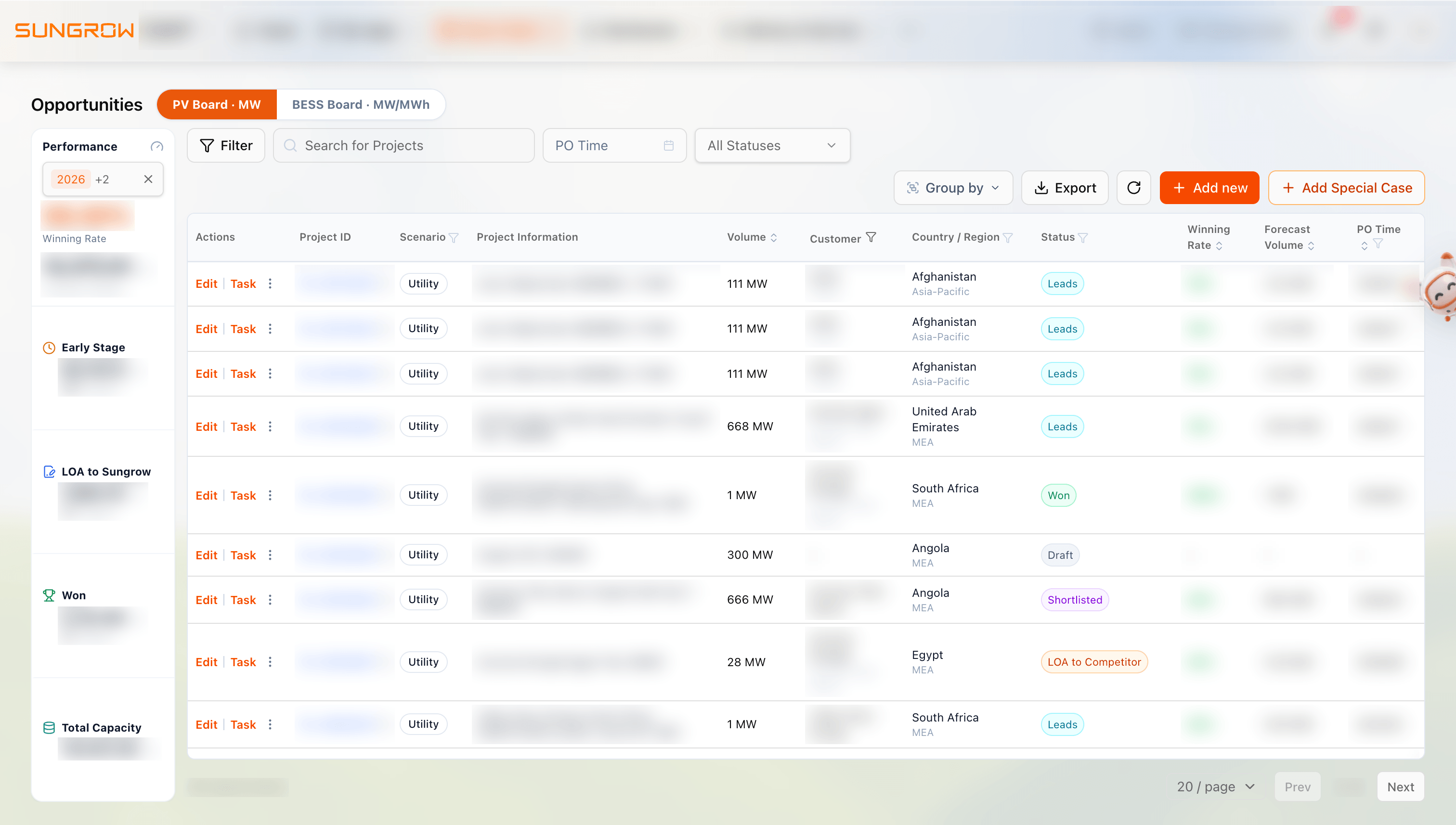
Some tasks are now automated.
When an employee selects a country, the system fills in the corresponding region. It also determines the project classification. If an EPC contractor is selected, the system checks its location to identify cross-regional projects.
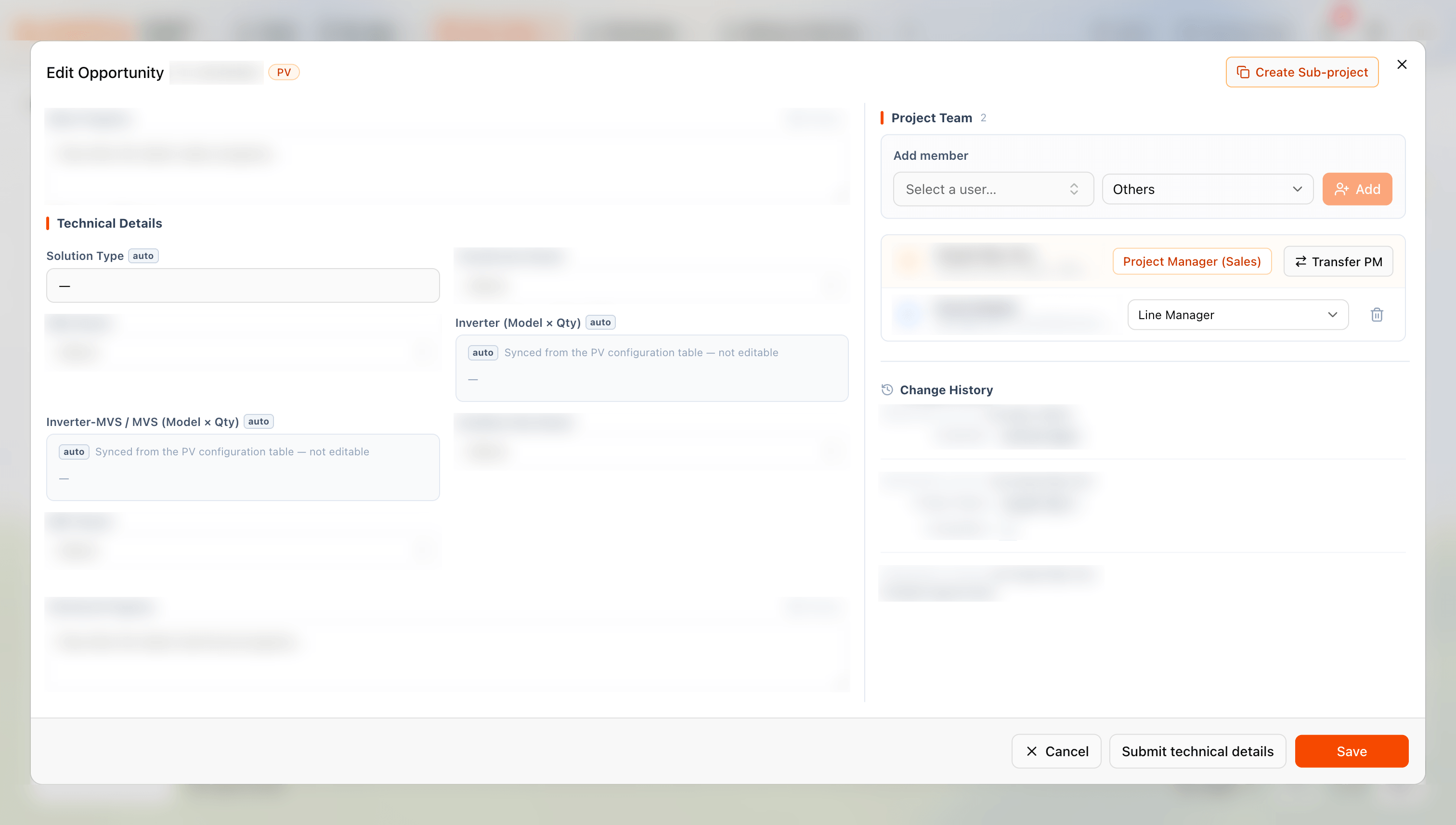
Employees utilize the built-in AI agent to search business records, filter opportunities, and check project progress through natural language.
From Complex Configurations to Quotations in Minutes
Quotation management is one of the most demanding parts of Sungrow's sales process.
For large power plant projects, a quotation involves much more than selecting equipment and calculating prices.
Hundreds of Configuration Items and Regional Requirements
Every quotation starts with a technical configuration sheet.
A mature project may contain hundreds of configuration items, each with several possible values. These items are often connected. Changing one specification might affect others, while custom requirements add further complexity.
Regional conditions make the process harder.
Temperature and altitude affect equipment selection. Coastal projects may need greater corrosion resistance. Wind loads, snow loads, and fire-resistance requirements must also be considered.
A configuration that works in one country may need adjustments in another.
Each change requires evaluation. Can the technical requirements be met? Will the change increase costs or delay delivery?
The team records these findings in a deviation sheet, which then informs the quotation.
Commercial terms introduce more variables. These include currency, exchange rates, trade terms, VAT, and withholding tax. Prices also need adjustments when exchange rates or local policies change.
Connecting Technical Solutions and Quotations
Previously, much of this work happened in Excel files and messaging apps.
Salespeople, solution engineers, product teams, and pricing managers repeatedly checked and confirmed details.
A project could have several technical configurations and quotation versions. Some differed by only one or two items. Employees had to make sure each quotation matched the correct equipment capacity, configuration, and pricing.
The team initially expected to move its existing Excel sheets directly into the new application.
But the process was more complex than it appeared. The spreadsheets contained many interconnected formulas. The team spent several days clarifying the configuration options and their relationships before asking AI to implement the logic in NocoBase.
Today, these processes are connected in one application.
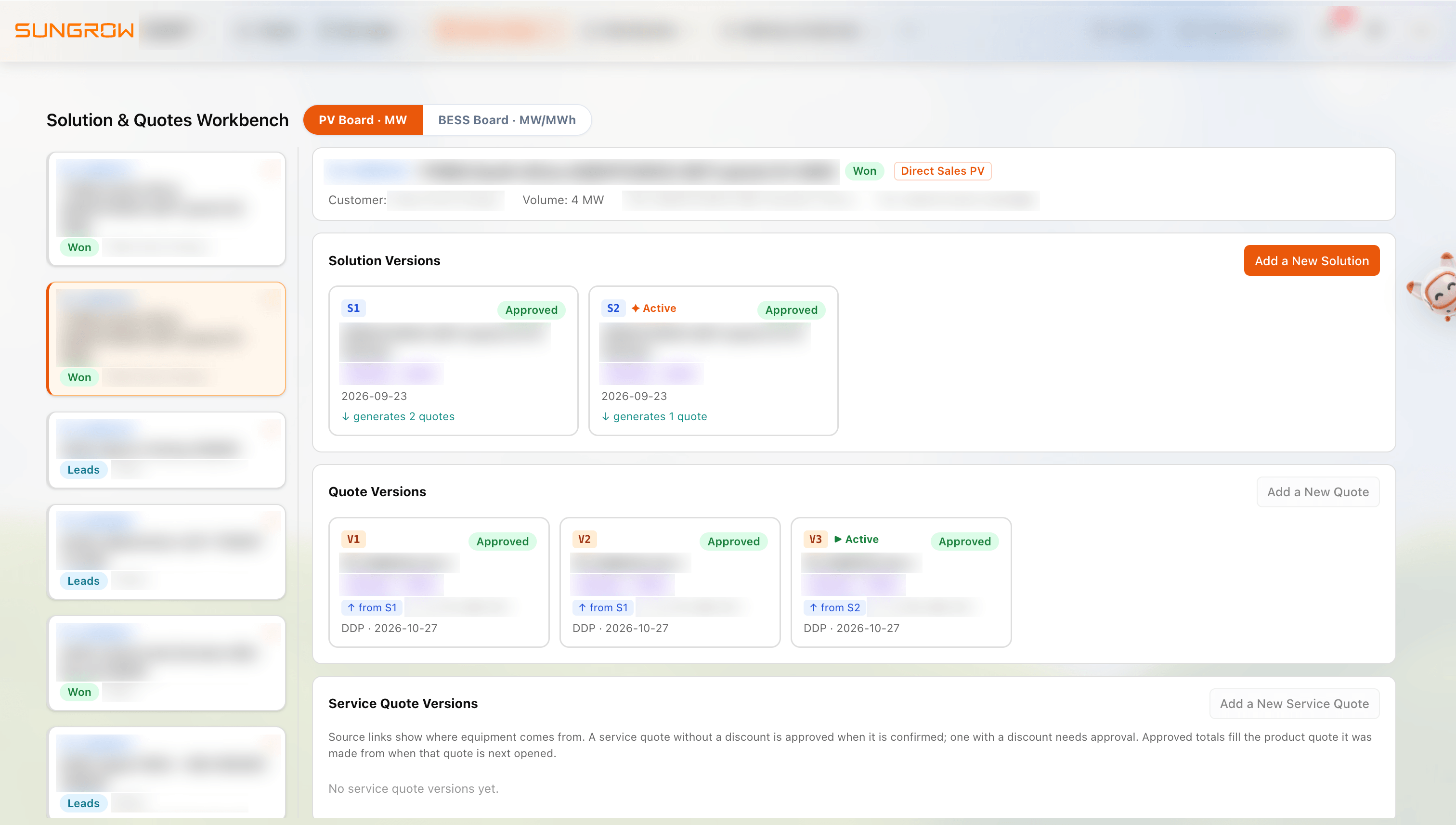
When a configuration sheet is uploaded, the application parses it. Quotations use equipment information from the corresponding technical solution. Prices and commercial terms are calculated and prefilled automatically.
The workbench shows which solution version each quotation belongs to and which version is currently active.
Once a technical solution is confirmed, a quotation can be generated in just a few minutes.
Supporting Different Quotation Workflows
Standard product quotations follow a simpler process.
Salespeople select a model from the product catalog, and the application fills in its specifications. They enter the quantity and unit price to calculate the total, then generate a customer-facing quotation and draft order.
Each business type keeps its own quotation workflow, while sharing the same underlying platform.
AI helps employees find and verify information. For projects with multiple solution versions, users can ask the AI agent to compare them and identify the differences.
Opportunities, solutions, quotations, and orders now share connected data. Information confirmed at one stage carries over to the next.
Once a deal is won, the order amount comes directly from the active quotation.
A New Way of Working
After completing the first phase, the project team introduced the application during an internal training session.
Many employees expected another conventional business system. Instead, they saw an application built around their workflows, with an interface tailored to their team's preferences.
Sungrow pays close attention to visual details. Some design ideas had been difficult to implement with previous tools. This time, the project team worked with marketing colleagues to refine the homepage layout, brand mascot, and even the colors of individual charts.
The application includes specialized AI agents.
Different agents handle information organization, translation, document-related questions, and strategic analysis. A routing agent directs requests to the appropriate agent.
Employees began to see how AI could support their daily work, rather than remain a separate tool.
The training also sparked new ideas. Employees started bringing more requests to the project team and reconsidering how they wanted their workflows to operate.
The team is reviewing these requests as part of the next development phase.
Plans include expanding the document repository into a knowledge base and bringing AI into more daily tasks.
Built Around the Business, Ready to Evolve
For the Sungrow project team, flexibility has been one of the biggest benefits.
Off-the-shelf software can meet standard needs, but adapting it to specialized workflows often requires workarounds or custom development.
With AI and NocoBase, the team can keep improving its application while reusing the same foundation for data, permissions, and workflows.
The team started working with NocoBase in July and completed its first major development phase in September.
In about two months, it built more than ten modules covering opportunities, projects, technical solutions, quotations, orders, management dashboards, a document repository, and AI agents.
The team is exploring how to connect more internal systems, bring in additional business data, and expand the use of AI.
The biggest change is not just how quickly the application was built. The team can continue adapting the system to fit in its business needs, rather than adapting to the limitations of a fixed system.
More Customer Stories:
- How a Volunteer Fire Department Manages 200 Callouts a Year with NocoBase
- From Paperwork to Digital Public Services in France
- How to Deliver a Complex OA System in 3 Months with NocoBase
- Case Study: Digitizing Medical Manufacturing Workflows with NocoBase
- Software Vendor Boosts Delivery Efficiency by 70% with NocoBase
- Community Spotlight: Building a Real-World ERP with NocoBase
- Inside: How an 8-Person Team Delivers at Enterprise Speed
- Built an AI Multimodal R&D Platform in Days — with NocoBase
- NocoBase in Russia: Multi-Scenario Digital Solutions in Action